trailer CHRYSLER 300 2020 Owners Manual
[x] Cancel search | Manufacturer: CHRYSLER, Model Year: 2020, Model line: 300, Model: CHRYSLER 300 2020Pages: 328, PDF Size: 14.28 MB
Page 7 of 328

5
Service The ParkSense Park Assist
System ........................................................ 182 Cleaning The ParkSense System ..............182
ParkSense System Usage Precautions ....182
LANESENSE — IF EQUIPPED ........................... 183
LaneSense Operation ................................183Turning LaneSense On Or Off ...................184LaneSense Warning Message ..................184
Changing LaneSense Status .....................186
PARKVIEW REAR BACK UP CAMERA ............. 186
REFUELING THE VEHICLE ................................. 188
Emergency Fuel Filler Door Release.........189
VEHICLE LOADING ............................................ 190
Vehicle Certification Label ........................ 190Gross Vehicle Weight Rating (GVWR) .......190
Gross Axle Weight Rating (GAWR) ........... 190Overloading ................................................190
Loading ......................................................190
TRAILER TOWING .............................................. 191
Common Towing Definitions .....................191Trailer Hitch Classification ........................ 193Trailer Towing Weights (Maximum Trailer
Weight Ratings) .........................................194 Trailer And Tongue Weight .......................194
Towing Requirements ................................195Towing Tips ................................................197 RECREATIONAL TOWING
(BEHIND MOTORHOME, ETC.) .......................... 198
DRIVING TIPS ...................................................... 198
Driving On Slippery Surfaces .................... 198
Driving Through Water .............................. 199
IN CASE OF EMERGENCY
HAZARD WARNING FLASHERS .......................201
ASSIST AND SOS MIRROR —
IF EQUIPPED ....................................................... 201General Information .................................. 205
BULB REPLACEMENT ........................................ 206
Replacement Bulbs ................................... 206
Replacing Exterior Bulbs ........................... 207
FUSES ..................................................................209
General Information .................................. 210Underhood Fuses ...................................... 210
Rear Interior Fuses .................................... 213
JACKING AND TIRE CHANGING ........................217
Jack Location/Spare Tire Stowage ........... 218
Preparations For Jacking .......................... 218Jacking And Changing A Tire .................... 219
Road Tire Installation ................................ 222
JUMP STARTING ................................................ 222
Preparations For Jump Start ..................... 222Jump Starting Procedure .......................... 223 REFUELING IN EMERGENCY –
IF EQUIPPED ...................................................... 224
IF YOUR ENGINE OVERHEATS ......................... 225
MANUAL PARK RELEASE ................................ 225
FREEING A STUCK VEHICLE ............................. 227
TOWING A DISABLED VEHICLE ........................ 228 All Wheel Drive (AWD) Models .................. 229Rear-Wheel Drive (RWD) Models ............. 229
ENHANCED ACCIDENT RESPONSE
SYSTEM (EARS) ................................................. 230
EVENT DATA RECORDER (EDR) ....................... 230
SERVICING AND MAINTENANCE
SCHEDULED SERVICING .................................. 231
Maintenance Plan ..................................... 232
ENGINE COMPARTMENT .................................. 236
3.6L Engine ............................................... 236
5.7L Engine ............................................... 237
Checking Oil Level .................................... 238Adding Washer Fluid ................................. 238Maintenance-Free Battery ....................... 238Pressure Washing...................................... 239
20_LX_OM_EN_USC_t.book Page 5
Page 80 of 328
78GETTING TO KNOW YOUR INSTRUMENT PANEL
engine cooling system is operating satis-
factorily.
The gauge pointer will likely indicate a
higher temperature when driving in hot
weather, up mountain grades, or when
towing a trailer. It should not be allowed
to exceed the upper limits of the normal
operating range. 5. Fuel Gauge
The pointer shows the level of fuel in the
fuel tank when the Keyless Push Button
Ignition is in the ON/RUN position.
The fuel pump symbol points
to the side of the vehicle where
the fuel door is located.
For further information refer to “Refueling
The Vehicle” in “Starting And Operating.”
NOTE:
The warning / indicator Lights will briefly illumi -
nate for a bulb check when the ignition is first
cycled.
INSTRUMENT CLUSTER DISPLAY
Your vehicle is equipped with an instrument
cluster display, which offers useful information
to the driver. With the ignition in the OFF mode,
opening/closing of a door will activate the
display for viewing, and display the total miles,
or kilometers, in the odometer. Your instrument
cluster display is designed to display important
information about your vehicle’s systems and
features. Using a driver interactive display
located on the instrument panel, your
instrument cluster display can show you how systems are working and give you warnings
when they are not. The steering wheel mounted
controls allow you to scroll through the main
menus and submenus. You can access the
specific information you want and make
selections and adjustments.
LOCATION AND CONTROLS
The instrument cluster display features an
interactive display which is located in the
instrument cluster.
This system conveniently allows the driver to
select a variety of useful information by pushing
the arrow buttons located on the left side of the
steering wheel. The instrument cluster display
menu items consist of the following:
Speedometer
Vehicle Info
Driver Assist — If Equipped
Fuel Economy
Trip
Audio
Messages
Screen Setup
WARNING!
A hot engine cooling system is dangerous.
You or others could be badly burned by steam
or boiling coolant. You may want to call an
authorized dealer for service if your vehicle
overheats.
CAUTION!
Driving with a hot engine cooling system
could damage your vehicle. If the
temperature gauge reads “H,” pull over and
stop the vehicle. Idle the vehicle with the air
conditioner turned off until the pointer drops
back into the normal range. If the pointer
remains on the “H,” turn the engine off
immediately and call an authorized dealer for
service.
20_LX_OM_EN_USC_t.book Page 78
Page 89 of 328
GETTING TO KNOW YOUR INSTRUMENT PANEL87
Refer to “If Your Engine Overheats” in “In Case
Of Emergency” for further information.
Oil Pressure Warning Light
This warning light will illuminate to
indicate low engine oil pressure. If the
light turns on while driving, stop the
vehicle, shut off the engine as soon as
possible, and contact an authorized dealer. A
chime will sound when this light turns on.
Do not operate the vehicle until the cause is
corrected. This light does not indicate how
much oil is in the engine. The engine oil level
must be checked under the hood.
Oil Temperature Warning Light
This warning light will illuminate to
indicate the engine oil temperature is
high. If the light turns on while driving,
stop the vehicle and shut off the
engine as soon as possible. Wait for oil
temperature to return to normal levels.
Seat Belt Reminder Warning Light
This warning light indicates when the
driver or passenger seat belt is
unbuckled. When the ignition is first
placed in the ON/RUN or ACC/ON/ RUN position and if the driver’s seat belt is
unbuckled, a chime will sound and the light will
turn on. When driving, if the driver or front
passenger seat belt remains unbuckled, the
Seat Belt Reminder Light will flash or remain on
continuously and a chime will sound.
Refer to “Occupant Restraint Systems” in
“Safety” for further information.
Transmission Temperature Warning Light
— If Equipped
This warning light will illuminate to
warn of a high transmission fluid
temperature. This may occur with
strenuous usage such as trailer
towing. If this light turns on, stop the vehicle and
run the engine at idle or slightly faster, with the
transmission in PARK or NEUTRAL, until the
light turns off. Once the light turns off, you may
continue to drive normally.
Trunk Open Warning Light
This indicator will illuminate when the
trunk is open and not fully closed.
NOTE:
If the vehicle is moving, there will also be a
single chime.
Vehicle Security Warning Light — If
Equipped
This light will flash at a fast rate for
approximately 15 seconds when the
vehicle security alarm is arming, and
then will flash slowly until the vehicle
is disarmed.
WARNING!
If you continue operating the vehicle when
the Transmission Temperature Warning Light
is illuminated you could cause the fluid to boil
over, come in contact with hot engine or
exhaust components and cause a fire.
CAUTION!
Continuous driving with the Transmission
Temperature Warning Light illuminated will
eventually cause severe transmission
damage or transmission failure.
3
20_LX_OM_EN_USC_t.book Page 87
Page 101 of 328
SAFETY99
NOTE:
For vehicles with multiple partial ESC modes
a momentary button push will toggle the ESC
mode. Multiple momentary button pushes
may be required to return to “"ESC On"”.
Trailer Sway Control (TSC) is disabled when
the ESC system is in the “Partial Off” mode.
If Equipped — "ESC Sport" and "ESC Track"
are ESC “Partial Off” mode(s).
Full Off – If Equipped
This mode is intended for off-highway or
off-road use only and should not be used on any
public roadways. In this mode, TCS and ESC
features are turned off. To enter the “Full Off”
mode, push and hold the “ESC OFF” switch for
five seconds while the vehicle is stopped with
the engine running. After five seconds, a chime
will sound, the “ESC OFF Indicator Light” will
illuminate, and the “ESC OFF” message will
display in the instrument cluster. To turn ESC on
again, momentarily push the “ESC OFF” switch.
ESC Activation/Malfunction Indicator Light
And ESC OFF Indicator Light
The “ESC Activation/Malfunction
Indicator Light” in the instrument
cluster will come on when the ignition
is placed in the ON position. It should
go out with the engine running. If the “ESC
Activation/Malfunction Indicator Light” comes
on continuously with the engine running, a
malfunction has been detected in the ESC
system. If this light remains on after several
ignition cycles, and the vehicle has been driven
several miles (kilometers) at speeds greater
than 30 mph (48 km/h), see an authorized
dealer as soon as possible to have the problem
diagnosed and corrected.
The “ESC Activation/Malfunction Indicator
Light” (located in the instrument cluster) starts
to flash as soon as the tires lose traction and
the ESC system becomes active. The “ESC
Activation/Malfunction Indicator Light” also
flashes when TCS is active. If the “ESC
Activation/Malfunction Indicator Light” begins
to flash during acceleration, ease up on the
accelerator and apply as little throttle as
possible. Be sure to adapt your speed and
driving to the prevailing road conditions.
WARNING!
In the ESC “Full Off” mode, the engine
torque reduction and stability features are
disabled. Therefore, enhanced vehicle
stability offered by the ESC system is
unavailable. In an emergency evasive
maneuver, the ESC system will not engage
to assist in maintaining stability. ESC “Full
Off” mode is intended for off-highway or
off-road use only.
With the ESC switched off, the enhanced
vehicle stability offered by ESC is unavail -
able. In an emergency evasive maneuver,
the ESC system will not engage to assist in
maintaining stability. ESC “Full Off” mode is
only intended for off-highway or off-road
use.
The Electronic Stability Control (ESC)
cannot prevent the natural laws of physics
from acting on the vehicle, nor can it
increase the traction afforded by prevailing
road conditions. ESC cannot prevent all
accidents, including those resulting from
excessive speed in turns, driving on very
slippery surfaces, or hydroplaning. ESC also
cannot prevent collisions.
4
20_LX_OM_EN_USC_t.book Page 99
Page 102 of 328
100SAFETY
NOTE:
The “ESC Activation/Malfunction Indicator
Light” and the “ESC OFF Indicator Light”
come on momentarily each time the ignition
is turned on.
Each time the ignition is turned on, the ESC
system will be on even if it was turned off
previously.
The ESC system will make buzzing or clicking
sounds when it is active. This is normal; the
sounds will stop when ESC becomes inactive
following the maneuver that caused the ESC
activation.
The “ESC OFF Indicator Light”
indicates the customer has elected to
have the Electronic Stability Control
(ESC) in a reduced mode.
Hill Start Assist (HSA)
The Hill Start Assist (HSA) system is designed to
mitigate roll back from a complete stop while on
an incline. If the driver releases the brake while
stopped on an incline, HSA will continue to hold
the brake pressure for a short period. If the
driver does not apply the throttle before this time expires, the system will release brake
pressure and the vehicle will roll down the hill as
normal.
The following conditions must be met in order
for HSA to activate:
The feature must be enabled.
The vehicle must be stopped.
The park brake must be off.
Driver door must be closed.
The vehicle must be on a sufficient grade.
The gear selection must match vehicle uphill
direction (i.e., vehicle facing uphill is in
forward gear; vehicle backing uphill is in
REVERSE gear).
HSA will work in REVERSE gear and all
forward gears. The system will not activate if
the transmission is in PARK or NEUTRAL. For
vehicles equipped with a manual transmis
-
sion, if the clutch is pressed, HSA will remain
active.Towing With HSA
HSA will also provide assistance to mitigate roll
back while towing a trailer.
WARNING!
There may be situations where the Hill Start
Assist (HSA) will not activate and slight rolling
may occur, such as on minor hills or with a
loaded vehicle, or while pulling a trailer. HSA
is not a substitute for active driving
involvement. It is always the driver’s
responsibility to be attentive to distance to
other vehicles, people, and objects, and most
importantly brake operation to ensure safe
operation of the vehicle under all road
conditions. Your complete attention is always
required while driving to maintain safe control
of your vehicle. Failure to follow these
warnings can result in a collision or serious
personal injury.
20_LX_OM_EN_USC_t.book Page 100
Page 103 of 328

SAFETY101
Disabling And Enabling HSA
This feature can be turned on or turned off. To
change the current setting, proceed as follows:
If disabling HSA using your instrument cluster
display, refer to “Instrument Cluster Display”
in “Getting To Know Your Instrument Panel”
for further information.
If disabling HSA using Uconnect Settings,
refer to “Uconnect Settings” in “Multimedia”
for further information.
For vehicles not equipped with an instrument
cluster display, perform the following steps:
1. Center the steering wheel (front wheels pointing straight forward).
2. Shift the transmission into PARK.
3. Apply the parking brake.
4. Start the engine.
5. Rotate the steering wheel slightly more than one-half turn to the left.
6. Push the “ESC OFF” button located in the lower switch bank below the climate control
four times within 20 seconds. The “ESC OFF
Indicator Light” should turn on and turn off
two times.
7. Rotate the steering wheel back to center and then an additional slightly more than
one-half turn to the right. 8. Turn the ignition to the OFF mode and then
back to ON. If the sequence was completed
properly, the “ESC OFF Indicator Light” will
blink several times to confirm HSA is
disabled.
9. Repeat these steps if you want to return this feature to its previous setting.
Rain Brake Support (RBS)
Rain Brake Support (RBS) may improve braking
performance in wet conditions. It will
periodically apply a small amount of brake
pressure to remove any water buildup on the
front brake rotors. It functions when the
windshield wipers are in LO or HI speed. When
RBS is active, there is no notification to the
driver and no driver interaction is required.
Ready Alert Braking (RAB)
Ready Alert Braking (RAB) may reduce the time
required to reach full braking during emergency
braking situations. It anticipates when an
emergency braking situation may occur by
monitoring how fast the throttle is released by
the driver. The Electronic Brake Controller (EBC)
will prepare the brake system for a panic stop.
WARNING!
If you use a trailer brake controller with your
trailer, the trailer brakes may be activated
and deactivated with the brake switch. If
so, there may not be enough brake pres -
sure to hold both the vehicle and the trailer
on a hill when the brake pedal is released.
In order to avoid rolling down an incline
while resuming acceleration, manually acti -
vate the trailer brake or apply more vehicle
brake pressure prior to releasing the brake
pedal.
HSA is not a parking brake. Always apply
the parking brake fully when exiting your
vehicle. Also, be certain to place the trans -
mission in PARK.
Failure to follow these warnings can result
in a collision or serious personal injury.
4
20_LX_OM_EN_USC_t.book Page 101
Page 105 of 328
SAFETY103
The BSM system detection zone DOES NOT
change if your vehicle is towing a trailer.
Therefore, visually verify the adjacent lane is
clear for both your vehicle and trailer before
making a lane change. If the trailer or other
object (i.e., bicycle, sports equipment)
extends beyond the side of your vehicle, this
may result in the BSM warning light randomly
alerting on the trailer or even remaining illu -
minated the entire time the vehicle is in a
forward gear.
The Blind Spot Monitoring (BSM) system may
experience drop outs (blinking on and off) of
the side mirror Warning Indicator lamps
when a motorcycle or any small object
remains at the side of the vehicle for
extended periods of time (more than a couple
of seconds).
The area on the rear fascia where the radar
sensors are located must remain free of snow,
ice, and dirt/road contamination so that the
BSM system can function properly. Do not block
the area of the rear fascia where the radar
sensors are located with foreign objects
(bumper stickers, bicycle racks, etc.).
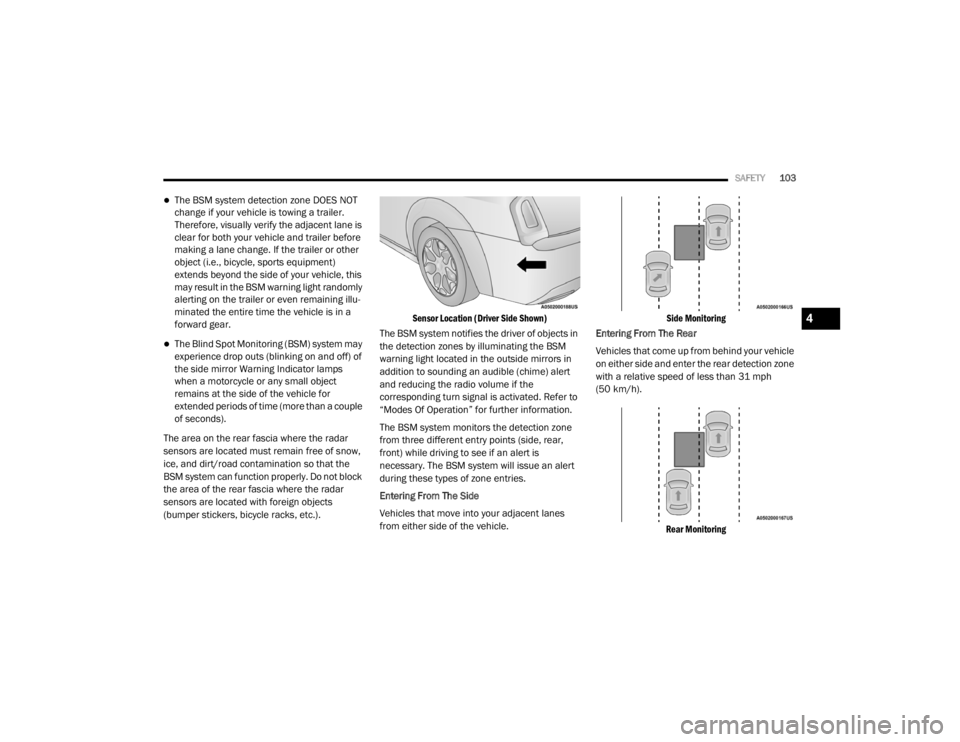
Sensor Location (Driver Side Shown)
The BSM system notifies the driver of objects in
the detection zones by illuminating the BSM
warning light located in the outside mirrors in
addition to sounding an audible (chime) alert
and reducing the radio volume if the
corresponding turn signal is activated. Refer to
“Modes Of Operation” for further information.
The BSM system monitors the detection zone
from three different entry points (side, rear,
front) while driving to see if an alert is
necessary. The BSM system will issue an alert
during these types of zone entries.
Entering From The Side
Vehicles that move into your adjacent lanes
from either side of the vehicle.
Side Monitoring
Entering From The Rear
Vehicles that come up from behind your vehicle
on either side and enter the rear detection zone
with a relative speed of less than 31 mph
(50 km/h).
Rear Monitoring
4
20_LX_OM_EN_USC_t.book Page 103
Page 159 of 328
STARTING AND OPERATING157
DRIVE (D)
This range should be used for most city and
highway driving. It provides the smoothest
upshifts and downshifts, and the best fuel
economy. The transmission automatically
upshifts through all forward gears. The DRIVE
position provides optimum driving characteristics
under all normal operating conditions.
When frequent transmission shifting occurs
(such as when operating the vehicle under
heavy loading conditions, in hilly terrain,
traveling into strong head winds, or while towing
a heavy trailer), use the AutoStick shift control
(if equipped, refer to “AutoStick” in this section
for further information) to select a lower gear.
Under these conditions, using a lower gear will improve performance and extend transmission
life by reducing excessive shifting and heat
buildup.
During extremely cold temperatures (-22°F
[-30°C] or below), transmission operation may
be modified depending on engine and
transmission temperature as well as vehicle
speed. Normal operation will resume once the
transmission temperature has risen to a
suitable level.
SPORT (S) — If Equipped
This mode alters the transmission's automatic
shift schedule for sportier driving. Upshift
speeds are increased to make full use of
available engine power.
To access SPORT mode, push down on the gear
selector and rotate it fully clockwise, or push the
SPORT button in the center stack.
LOW (L) — If Equipped
Use this range for engine braking when
descending very steep grades. In this range, the
transmission will downshift for increased
engine braking. To access the LOW position,
push down on the gear selector and rotate it
fully clockwise.
Transmission Limp Home Mode
Transmission function is monitored
electronically for abnormal conditions. If a
condition is detected that could result in
transmission damage, Transmission Limp
Home Mode is activated. In this mode, the
transmission may operate only in certain gears,
or may not shift at all. Vehicle performance may
be severely degraded and the engine may stall.
In some situations, the transmission may not
re-engage if the engine is turned off and
restarted. The Malfunction Indicator Light (MIL)
may be illuminated. A message in the
instrument cluster will inform the driver of the
more serious conditions, and indicate what
actions may be necessary.
In the event of a momentary problem, the
transmission can be reset to regain all forward
gears by performing the following steps:
NOTE:
In cases where the instrument cluster message
indicates the transmission may not re-engage
after engine shutdown, perform this procedure
only in a desired location (preferably, at an
authorized dealer).CAUTION!
Towing the vehicle, coasting, or driving for any
other reason with the transmission in NEUTRAL
can cause severe transmission damage.
Refer to “Recreational Towing” in “Starting
And Operating” and “Towing A Disabled
Vehicle” in “In Case Of Emergency” for further
information.
5
20_LX_OM_EN_USC_t.book Page 157
Page 160 of 328
158STARTING AND OPERATING
1. Stop the vehicle.
2. Shift the transmission into PARK, if
possible. If not, shift the transmission to
NEUTRAL.
3. Push and hold the ignition switch until the engine turns off.
4. Wait approximately 30 seconds.
5. Restart the engine.
6. Shift into the desired gear range. If the problem is no longer detected, the
transmission will return to normal operation.
NOTE:
Even if the transmission can be reset, we
recommend that you visit an authorized dealer
at your earliest possible convenience. An autho -
rized dealer has diagnostic equipment to
assess the condition of your transmission.
If the transmission cannot be reset, authorized
dealer service is required.
AutoStick — If Equipped
AutoStick is a driver-interactive transmission
feature providing manual shift control, giving
you more control of the vehicle. AutoStick allows you to maximize engine braking,
eliminate undesirable upshifts and downshifts,
and improve overall vehicle performance.
This system can also provide you with more
control during passing, city driving, cold slippery
conditions, mountain driving, trailer towing, and
many other situations.
Operation
When the transmission is in DRIVE or SPORT
mode, it will operate automatically, shifting
between the eight available gears. To engage
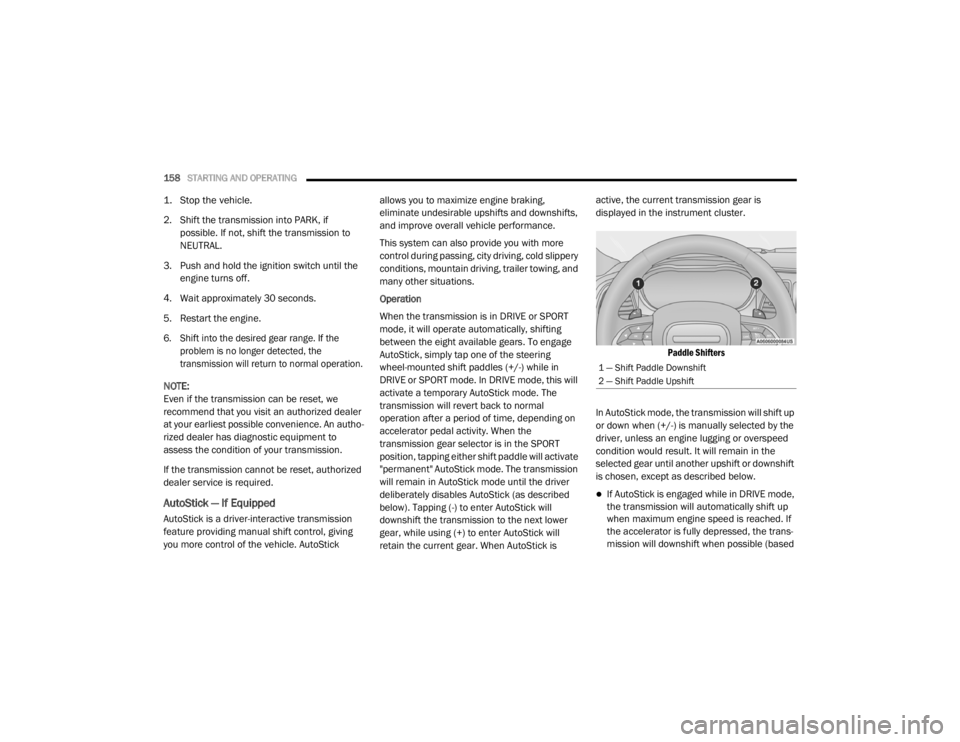
AutoStick, simply tap one of the steering
wheel-mounted shift paddles (+/-) while in
DRIVE or SPORT mode. In DRIVE mode, this will
activate a temporary AutoStick mode. The
transmission will revert back to normal
operation after a period of time, depending on
accelerator pedal activity. When the
transmission gear selector is in the SPORT
position, tapping either shift paddle will activate
"permanent" AutoStick mode. The transmission
will remain in AutoStick mode until the driver
deliberately disables AutoStick (as described
below). Tapping (-) to enter AutoStick will
downshift the transmission to the next lower
gear, while using (+) to enter AutoStick will
retain the current gear. When AutoStick is active, the current transmission gear is
displayed in the instrument cluster.
Paddle Shifters
In AutoStick mode, the transmission will shift up
or down when (+/-) is manually selected by the
driver, unless an engine lugging or overspeed
condition would result. It will remain in the
selected gear until another upshift or downshift
is chosen, except as described below.
If AutoStick is engaged while in DRIVE mode,
the transmission will automatically shift up
when maximum engine speed is reached. If
the accelerator is fully depressed, the trans -
mission will downshift when possible (based
1 — Shift Paddle Downshift
2 — Shift Paddle Upshift
20_LX_OM_EN_USC_t.book Page 158
Page 166 of 328
164STARTING AND OPERATING
(Continued)
ADAPTIVE CRUISE CONTROL (ACC)
O
PERATION
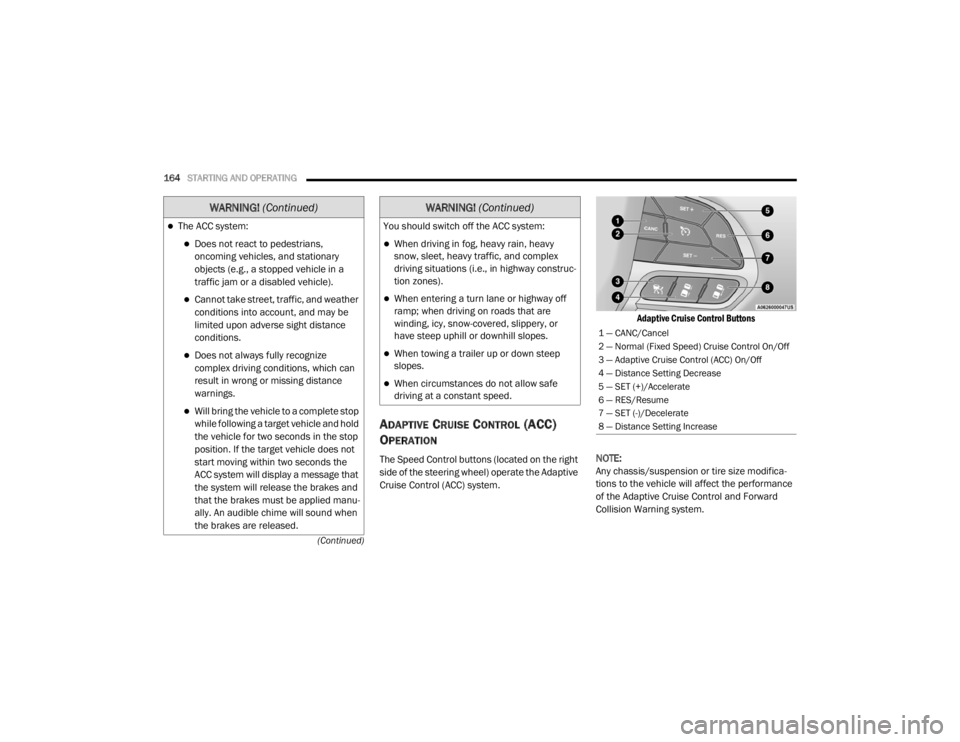
The Speed Control buttons (located on the right
side of the steering wheel) operate the Adaptive
Cruise Control (ACC) system.
Adaptive Cruise Control Buttons
NOTE:
Any chassis/suspension or tire size modifica -
tions to the vehicle will affect the performance
of the Adaptive Cruise Control and Forward
Collision Warning system.
The ACC system:
Does not react to pedestrians,
oncoming vehicles, and stationary
objects (e.g., a stopped vehicle in a
traffic jam or a disabled vehicle).
Cannot take street, traffic, and weather
conditions into account, and may be
limited upon adverse sight distance
conditions.
Does not always fully recognize
complex driving conditions, which can
result in wrong or missing distance
warnings.
Will bring the vehicle to a complete stop
while following a target vehicle and hold
the vehicle for two seconds in the stop
position. If the target vehicle does not
start moving within two seconds the
ACC system will display a message that
the system will release the brakes and
that the brakes must be applied manu -
ally. An audible chime will sound when
the brakes are released.
WARNING! (Continued)
You should switch off the ACC system:
When driving in fog, heavy rain, heavy
snow, sleet, heavy traffic, and complex
driving situations (i.e., in highway construc -
tion zones).
When entering a turn lane or highway off
ramp; when driving on roads that are
winding, icy, snow-covered, slippery, or
have steep uphill or downhill slopes.
When towing a trailer up or down steep
slopes.
When circumstances do not allow safe
driving at a constant speed.
WARNING! (Continued)
1 — CANC/Cancel
2 — Normal (Fixed Speed) Cruise Control On/Off
3 — Adaptive Cruise Control (ACC) On/Off
4 — Distance Setting Decrease
5 — SET (+)/Accelerate
6 — RES/Resume
7 — SET (-)/Decelerate
8 — Distance Setting Increase
20_LX_OM_EN_USC_t.book Page 164