door lock CHRYSLER 300 2021 User Guide
[x] Cancel search | Manufacturer: CHRYSLER, Model Year: 2021, Model line: 300, Model: CHRYSLER 300 2021Pages: 268, PDF Size: 15.24 MB
Page 23 of 268
GETTING TO KNOW YOUR VEHICLE 21
between 0, 30, 60 or 90 seconds. Passive Entry
Unlock also initiates two flashes of the turn
signal lamps.
If wearing gloves, or if it has been raining/
snowing on the Passive Entry door handle, the
unlock sensitivity can be affected, resulting in a
slower response time.
If the vehicle is unlocked by Passive Entry and
no door is opened within 60 seconds, the
vehicle will relock and (if equipped) will arm the
Vehicle Security system.
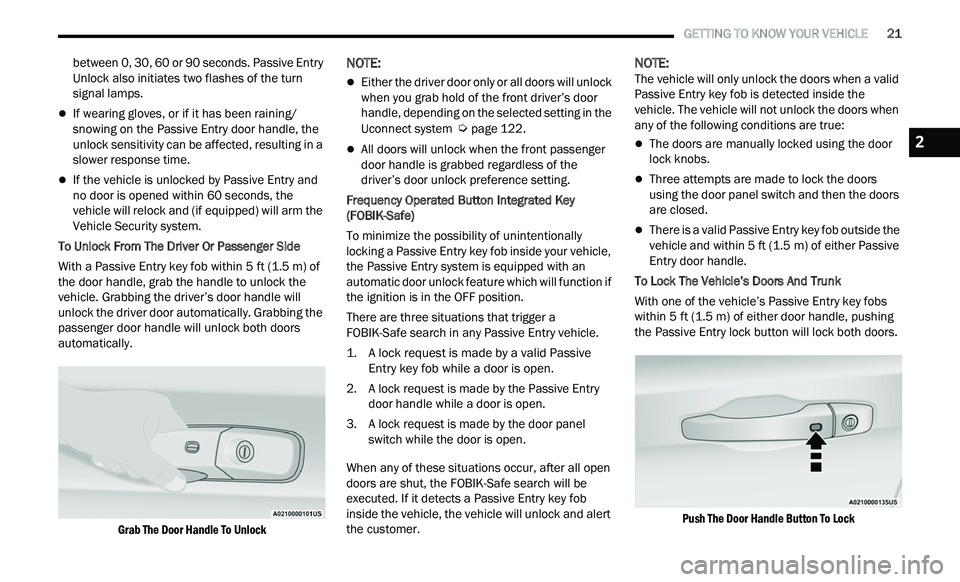
To Unlock From The Driver Or Passenger Side
With a Passive Entry key fob within 5 ft (1.5 m) of
t h
e door handle, grab the handle to unlock the
vehicle. Grabbing the driver’s door handle will
unlock the driver door automatically. Grabbing the
passenger door handle will unlock both doors
automatically.
Grab The Door Handle To Unlock
NOTE:
Either the driver door only or all doors will unlock
when you grab hold of the front driver’s door
handle, depending on the selected setting in the
Uconnect system
Ú page 122.
All doors will unlock when the front passenger
door handle is grabbed regardless of the
driver’s door unlock preference setting.
Frequency Operated Button Integrated Key
( F
OBIK-Safe)
To minimize the possibility of unintentionally
loc
king a Passive Entry key fob inside your vehicle,
the Passive Entry system is equipped with an
automatic door unlock feature which will function if
the ignition is in the OFF position.
There are three situations that trigger a
F O
BIK-Safe search in any Passive Entry vehicle.
1. A lock request is made by a valid Passive E
ntry key fob while a door is open.
2. A lock request is made by the Passive Entry d
oor handle while a door is open.
3. A lock request is made by the door panel s
witch while the door is open.
When any of these situations occur, after all open
door
s are shut, the FOBIK-Safe search will be
executed. If it detects a Passive Entry key fob
inside the vehicle, the vehicle will unlock and alert
the customer.
NOTE:
The vehicle will only unlock the doors when a valid
P a
ssive Entry key fob is detected inside the
vehicle. The vehicle will not unlock the doors when
any of the following conditions are true:
The doors are manually locked using the door
lock knobs.
Three attempts are made to lock the doors
using the door panel switch and then the doors
are closed.
There is a valid Passive Entry key fob outside the
vehicle and within 5 ft (1.5 m) of either Passive
E n
try door handle.
To Lock The Vehicle’s Doors And Trunk
With one of the vehicle’s Passive Entry key fobs
w i
thin 5 ft (1.5 m) of either door handle, pushing
t h
e Passive Entry lock button will lock both doors.
Push The Door Handle Button To Lock
2
Page 24 of 268
22 GETTING TO KNOW YOUR VEHICLE
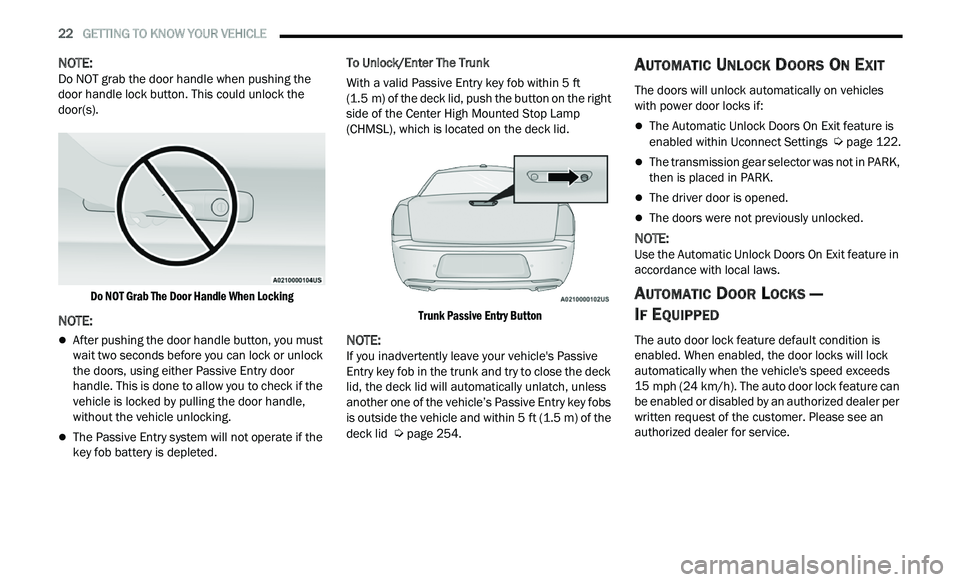
NOTE:
Do NOT grab the door handle when pushing the
d oor
handle lock button. This could unlock the
door(s).
Do NOT Grab The Door Handle When Locking
NOTE:
After pushing the door handle button, you must
wait two seconds before you can lock or unlock
the doors, using either Passive Entry door
handle. This is done to allow you to check if the
vehicle is locked by pulling the door handle,
without the vehicle unlocking.
The Passive Entry system will not operate if the
key fob battery is depleted. To Unlock/Enter The Trunk
With a valid Passive Entry key fob within 5
ft
( 1
.5 m) of the deck lid, push the button on the right
s i
de of the Center High Mounted Stop Lamp
(CHMSL), which is located on the deck lid.
Trunk Passive Entry Button
NOTE:
If you inadvertently leave your vehicle's Passive
E n
try key fob in the trunk and try to close the deck
lid, the deck lid will automatically unlatch, unless
another one of the vehicle’s Passive Entry key fobs
is outside the vehicle and within 5 ft (1.5 m) of the
de
ck lid Ú page 254.
AUTOMATIC UNLOCK DOORS ON EXIT
The doors will unlock automatically on vehicles
with power door locks if:
The Automatic Unlock Doors On Exit feature is
enabled within Uconnect Settings Ú page 122.
The transmission gear selector was not in PARK,
then is placed in PARK.
The driver door is opened.
The doors were not previously unlocked.
NOTE:
Use the Automatic Unlock Doors On Exit feature in
a c
cordance with local laws.
AUTOMATIC DOOR LOCKS —
I
F EQUIPPED
The auto door lock feature default condition is
enabled. When enabled, the door locks will lock
automatically when the vehicle's speed exceeds
15 mph (24 km/h). The auto door lock feature can
b e
enabled or disabled by an authorized dealer per
written request of the customer. Please see an
authorized dealer for service.
Page 25 of 268
GETTING TO KNOW YOUR VEHICLE 23
CHILD-PROTECTION DOOR LOCK
S
YSTEM — REAR DOORS
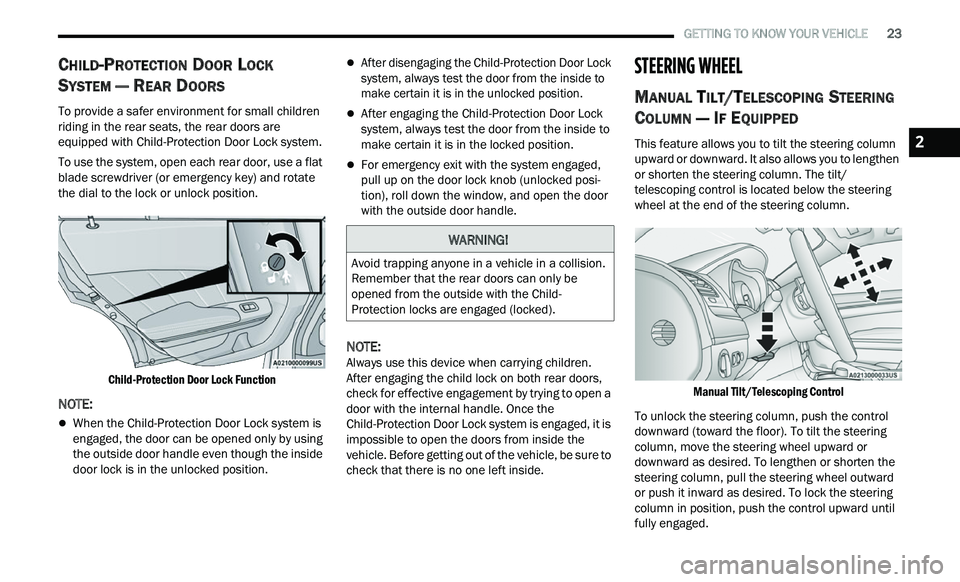
To provide a safer environment for small children
riding in the rear seats, the rear doors are
equipped with Child-Protection Door Lock system.
To use the system, open each rear door, use a flat
b l
ade screwdriver (or emergency key) and rotate
the dial to the lock or unlock position.
Child-Protection Door Lock Function
NOTE:
When the Child-Protection Door Lock system is
engaged, the door can be opened only by using
the outside door handle even though the inside
door lock is in the unlocked position.
After disengaging the Child-Protection Door Lock
system, always test the door from the inside to
make certain it is in the unlocked position.
After engaging the Child-Protection Door Lock
system, always test the door from the inside to
make certain it is in the locked position.
For emergency exit with the system engaged,
pull up on the door lock knob (unlocked posi -
tion), roll down the window, and open the door
w i
th the outside door handle.
NOTE:
Always use this device when carrying children.
A f
ter engaging the child lock on both rear doors,
check for effective engagement by trying to open a
door with the internal handle. Once the
Child-Protection Door Lock system is engaged, it is
impossible to open the doors from inside the
vehicle. Before getting out of the vehicle, be sure to
check that there is no one left inside.
STEERING WHEEL
MANUAL TILT/TELESCOPING STEERING
C
OLUMN — IF EQUIPPED
This feature allows you to tilt the steering column
upward or downward. It also allows you to lengthen
or shorten the steering column. The tilt/
telescoping control is located below the steering
wheel at the end of the steering column.
Manual Tilt/Telescoping Control
To unlock the steering column, push the control
dow
nward (toward the floor). To tilt the steering
column, move the steering wheel upward or
downward as desired. To lengthen or shorten the
steering column, pull the steering wheel outward
or push it inward as desired. To lock the steering
column in position, push the control upward until
fully engaged.
WARNING!
Avoid trapping anyone in a vehicle in a collision.
Remember that the rear doors can only be
opened from the outside with the Child-
Protection locks are engaged (locked).
2
Page 26 of 268
24 GETTING TO KNOW YOUR VEHICLE
POWER TILT/TELESCOPING STEERING
C
OLUMN — IF EQUIPPED
This feature allows you to tilt the steering column
upward or downward. It also allows you to lengthen
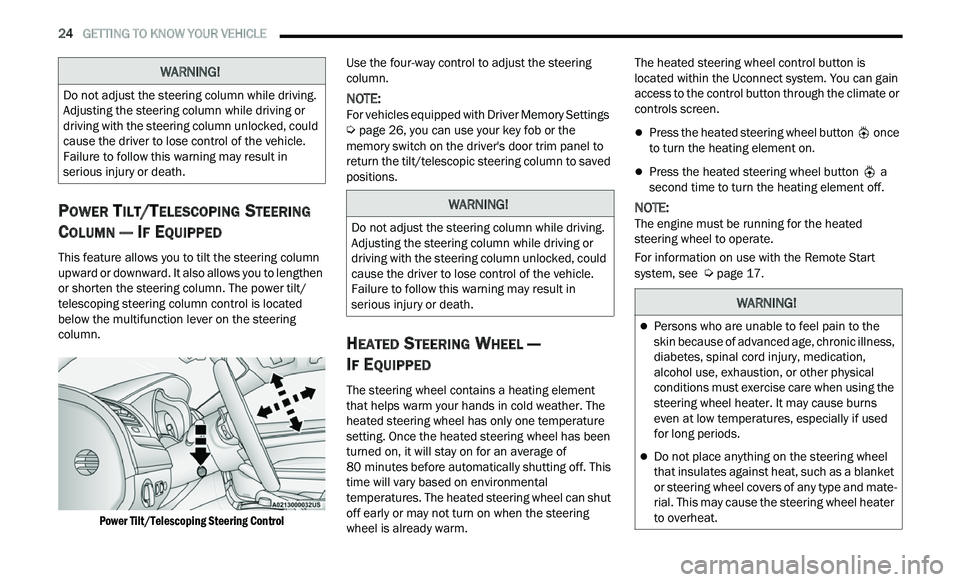
or shorten the steering column. The power tilt/
telescoping steering column control is located
below the multifunction lever on the steering
column.
Power Tilt/Telescoping Steering Control
Use the four-way control to adjust the steering
c
ol
umn.
NOTE:
For vehicles equipped with Driver Memory Settings
Ú page 26, you can use your key fob or the
memory switch on the driver's door trim panel to
r e
turn the tilt/telescopic steering column to saved
positions.
HEATED STEERING WHEEL —
I
F EQUIPPED
The steering wheel contains a heating element
that helps warm your hands in cold weather. The
heated steering wheel has only one temperature
setting. Once the heated steering wheel has been
turned on, it will stay on for an average of
80 minutes before automatically shutting off. This
t i
me will vary based on environmental
temperatures. The heated steering wheel can shut
off early or may not turn on when the steering
wheel is already warm. The heated steering wheel control button is
l
oc
ated within the Uconnect system. You can gain
access to the control button through the climate or
controls screen.
Press the heated steering wheel button once
to turn the heating element on.
Press the heated steering wheel button a
second time to turn the heating element off.
NOTE:
The engine must be running for the heated
s t
eering wheel to operate.
For information on use with the Remote Start
sy
stem, see Ú page 17.
WARNING!
Do not adjust the steering column while driving.
Adjusting the steering column while driving or
driving with the steering column unlocked, could
cause the driver to lose control of the vehicle.
Failure to follow this warning may result in
serious injury or death.
WARNING!
Do not adjust the steering column while driving.
Adjusting the steering column while driving or
driving with the steering column unlocked, could
cause the driver to lose control of the vehicle.
Failure to follow this warning may result in
serious injury or death.
WARNING!
Persons who are unable to feel pain to the
skin because of advanced age, chronic illness,
diabetes, spinal cord injury, medication,
alcohol use, exhaustion, or other physical
conditions must exercise care when using the
steering wheel heater. It may cause burns
even at low temperatures, especially if used
for long periods.
Do not place anything on the steering wheel
that insulates against heat, such as a blanket
or steering wheel covers of any type and mate
-
rial. This may cause the steering wheel heater
t o
overheat.
Page 38 of 268
36 GETTING TO KNOW YOUR VEHICLE
POWER FOLDING OUTSIDE MIRRORS —
I
F EQUIPPED
If equipped with power folding mirrors, they can be
electrically folded rearward and unfolded into the
drive position.
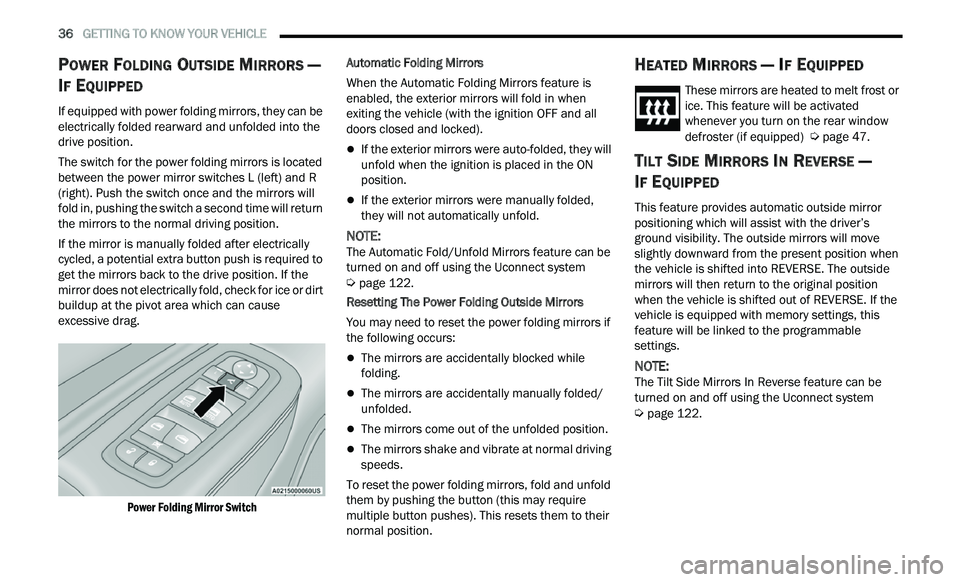
The switch for the power folding mirrors is located
b e
tween the power mirror switches L (left) and R
(right). Push the switch once and the mirrors will
fold in, pushing the switch a second time will return
the mirrors to the normal driving position.
If the mirror is manually folded after electrically
c y
cled, a potential extra button push is required to
get the mirrors back to the drive position. If the
mirror does not electrically fold, check for ice or dirt
buildup at the pivot area which can cause
excessive drag.
Power Folding Mirror Switch
Automatic Folding Mirrors
When the Automatic Folding Mirrors feature is
e
n
abled, the exterior mirrors will fold in when
exiting the vehicle (with the ignition OFF and all
doors closed and locked).
If the exterior mirrors were auto-folded, they will
unfold when the ignition is placed in the ON
position.
If the exterior mirrors were manually folded,
they will not automatically unfold.
NOTE:
The Automatic Fold/Unfold Mirrors feature can be
t u
rned on and off using the Uconnect system
Ú page 122.
Resetting The Power Folding Outside Mirrors
You may need to reset the power folding mirrors if
t h
e following occurs:
The mirrors are accidentally blocked while
folding.
The mirrors are accidentally manually folded/
unfolded.
The mirrors come out of the unfolded position.
The mirrors shake and vibrate at normal driving
speeds.
To reset the power folding mirrors, fold and unfold
th
em by pushing the button (this may require
multiple button pushes). This resets them to their
normal position.
HEATED MIRRORS — IF EQUIPPED
These mirrors are heated to melt frost or
ice. This feature will be activated
w h
enever you turn on the rear window
defroster (if equipped)
Ú page 47.
TILT SIDE MIRRORS IN REVERSE —
I
F EQUIPPED
This feature provides automatic outside mirror
positioning which will assist with the driver’s
ground visibility. The outside mirrors will move
slightly downward from the present position when
the vehicle is shifted into REVERSE. The outside
mirrors will then return to the original position
when the vehicle is shifted out of REVERSE. If the
vehicle is equipped with memory settings, this
feature will be linked to the programmable
settings.
NOTE:
The Tilt Side Mirrors In Reverse feature can be
t u
rned on and off using the Uconnect system
Ú page 122.
Page 46 of 268
44 GETTING TO KNOW YOUR VEHICLE
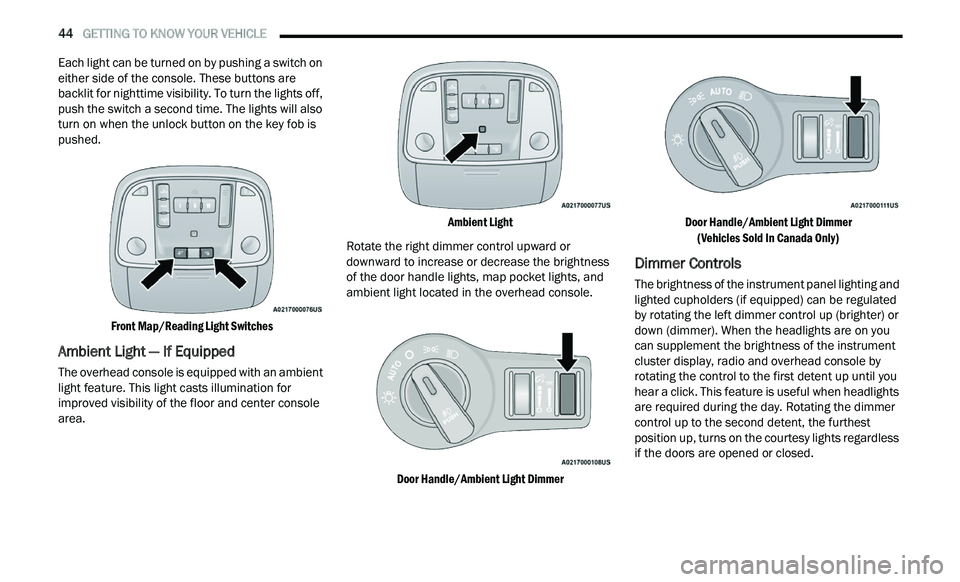
Each light can be turned on by pushing a switch on
either side of the console. These buttons are
backlit for nighttime visibility. To turn the lights off,
push the switch a second time. The lights will also
turn on when the unlock button on the key fob is
pushed.
Front Map/Reading Light Switches
Ambient Light — If Equipped
The overhead console is equipped with an ambient
light feature. This light casts illumination for
improved visibility of the floor and center console
area.
Ambient Light
Rotate the right dimmer control upward or
d ow
nward to increase or decrease the brightness
of the door handle lights, map pocket lights, and
ambient light located in the overhead console.
Door Handle/Ambient Light Dimmer Door Handle/Ambient Light Dimmer
(V
ehicles Sold In Canada Only)
Dimmer Controls
The brightness of the instrument panel lighting and
lighted cupholders (if equipped) can be regulated
by rotating the left dimmer control up (brighter) or
down (dimmer). When the headlights are on you
can supplement the brightness of the instrument
cluster display, radio and overhead console by
rotating the control to the first detent up until you
hear a click. This feature is useful when headlights
are required during the day. Rotating the dimmer
control up to the second detent, the furthest
position up, turns on the courtesy lights regardless
if the doors are opened or closed.
Page 59 of 268
GETTING TO KNOW YOUR VEHICLE 57
Auto-Up Feature With Anti-Pinch Protection
Pull the window switch up to the second detent and
th
e window will go up automatically.
To stop the window from going all the way up
du
ring the Auto-Up operation, push down on the
switch briefly.
To close the window part way, lift the window
s w
itch briefly and release it when you want the
window to stop.
If the window runs into any obstacle during
a u
to-closure, it will reverse direction and then go
back down. Remove the obstacle and use the
window switch again to close the window.
NOTE:
Any impact due to rough road conditions may
t r
igger the auto-reverse function unexpectedly
during auto-closure. If this happens, pull the switch
lightly and hold to close the window manually.
RESET AUTO-UP
Should the Auto-Up feature stop working, the
window may need to be reset. To reset Auto-Up:
1. Make sure the door is fully closed.
2
. P ull the window switch up to close the window
c
ompletely and continue to hold the switch up
for an additional two seconds after the window
is closed.
3. Push the window switch down firmly to the s
econd detent to open the window completely
and continue to hold the switch down for an
additional two seconds after the window is
fully open.
WINDOW LOCKOUT SWITCH
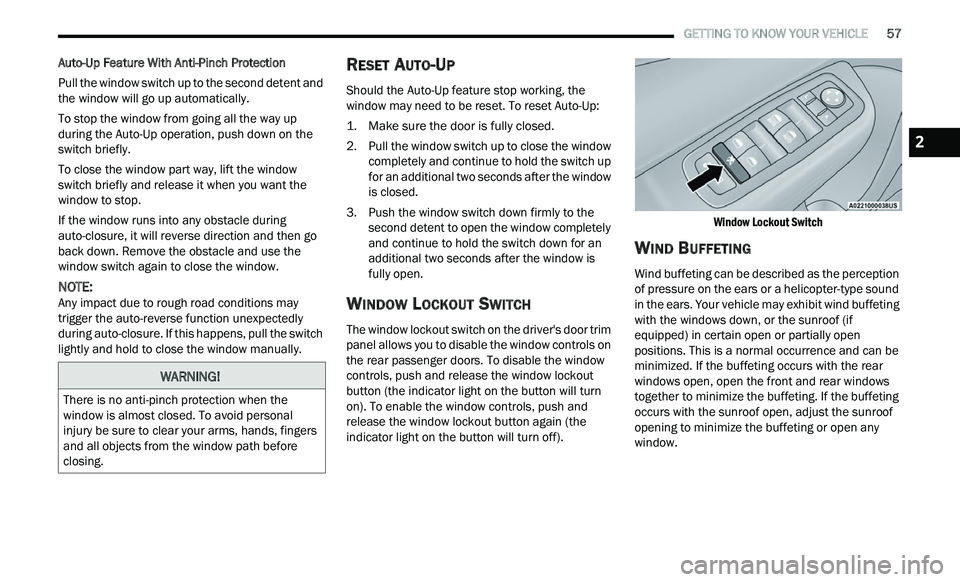
The window lockout switch on the driver's door trim
panel allows you to disable the window controls on
the rear passenger doors. To disable the window
controls, push and release the window lockout
button (the indicator light on the button will turn
on). To enable the window controls, push and
release the window lockout button again (the
indicator light on the button will turn off).
Window Lockout Switch
WIND BUFFETING
Wind buffeting can be described as the perception
of pressure on the ears or a helicopter-type sound
in the ears. Your vehicle may exhibit wind buffeting
with the windows down, or the sunroof (if
equipped) in certain open or partially open
positions. This is a normal occurrence and can be
minimized. If the buffeting occurs with the rear
windows open, open the front and rear windows
together to minimize the buffeting. If the buffeting
occurs with the sunroof open, adjust the sunroof
opening to minimize the buffeting or open any
window.
WARNING!
There is no anti-pinch protection when the
window is almost closed. To avoid personal
injury be sure to clear your arms, hands, fingers
and all objects from the window path before
closing.
2
Page 85 of 268
STARTING AND OPERATING 83
NOTE:
For Keyless Enter ‘n Go™ equipped vehicles, the
e n
gine will turn off and the ignition switch will
change to ACC Mode.
If the vehicle is not in PARK and the driver exits the
v e
hicle with the engine running, the vehicle may
AutoPark.
AutoPark will engage when all of these conditions
a r
e met:
Vehicle is equipped with a rotary selector and an
eight speed transmission
Vehicle is not in PARK
Vehicle speed is 1.2 mph (1.9 km/h) or less
Driver’s seat belt is unbuckled
Driver’s door is ajar
Brake pedal is not pressed
The message “ Au
toPark Engaged Shift to P then
Shift to Gear ” will display in the instrument cluster.
NOTE:
In some cases the ParkSense graphic will be
d i
splayed in the instrument cluster. In these cases,
the gear selector must be returned to “P” to select
desired gear.
If the driver shifts into PARK while moving, the
ve
hicle may AutoPark.
AutoPark will engage ON
LY when vehicle speed is
1.2 mph (1.9 km/h) or less. The message “
Ve
hicle Speed is Too High to Shift to
P” will be displayed in the instrument cluster if
vehicle speed is above 1.2 mph (1.9 km/h).
ALWAYS DO A VISUAL CHECK
that your vehicle is in
PARK by looking for the “P” in the instrument
cluster display and near the gear selector. As an
added precaution, always apply the parking brake
when exiting the vehicle.
COLD WEATHER OPERATION
(B
ELOW –22°F OR −30°C)
To ensure reliable starting at these temperatures,
use of an externally powered electric engine block
heater (available from an authorized dealer) is
recommended.
IF ENGINE FAILS TO START
If the engine fails to start after you have followed
the “Normal Starting” or “Cold Weather Operation”
procedure, it may be flooded. Push the accelerator pedal all the way to the floor and hold it there.
Crank the engine for no more than 15 seconds.
This should clear any excess fuel in case the
engine is flooded. Leave the ignition key in the RUN
position, release the accelerator pedal and repeat
the “Normal Starting” procedure.
WARNING!
If vehicle speed is above 1.2
mph (1.9 km/h), the
tr
ansmission will default to NEUTRAL until the
vehicle speed drops below 1.2 mph (1.9 km/h). A
ve
hicle left in the NEUTRAL position can roll. As an
added precaution, always apply the parking brake
when exiting the vehicle.
WARNING!
Never pour fuel or other flammable liquid into
the throttle body air inlet opening in an
attempt to start the vehicle. This could result
in flash fire causing serious personal injury.
Do not attempt to push or tow your vehicle to
get it started. Vehicles equipped with an auto -
matic transmission cannot be started this
w a
y. Unburned fuel could enter the catalytic
converter and once the engine has started,
ignite and damage the converter and vehicle.
If the vehicle has a discharged battery,
booster cables may be used to obtain a start
from a booster battery or the battery in
another vehicle. This type of start can be
dangerous if done improperly
Ú page 186.
4
Page 99 of 268
STARTING AND OPERATING 97
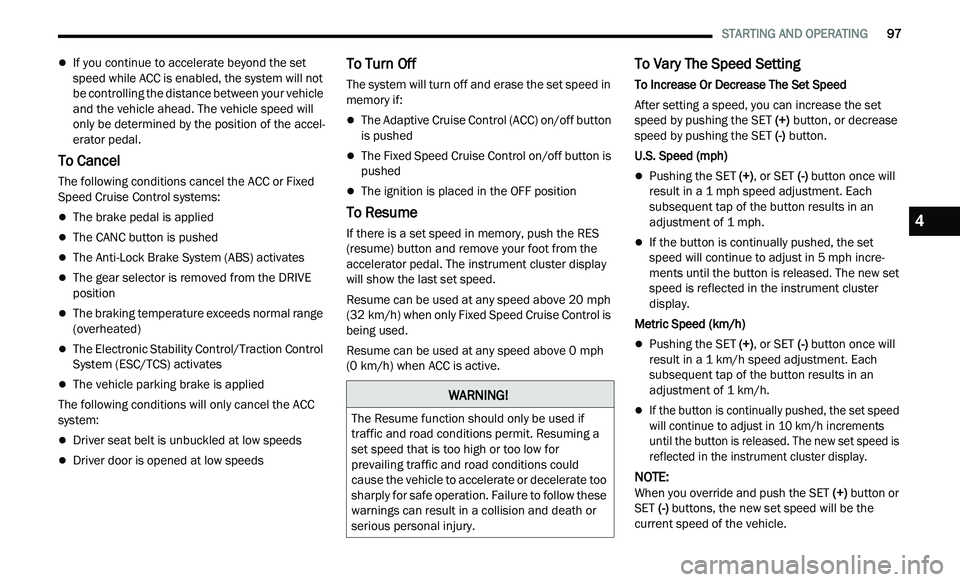
If you continue to accelerate beyond the set
speed while ACC is enabled, the system will not
be controlling the distance between your vehicle
and the vehicle ahead. The vehicle speed will
only be determined by the position of the accel
-
erator pedal.
To Cancel
The following conditions cancel the ACC or Fixed
Speed Cruise Control systems:
The brake pedal is applied
The CANC button is pushed
The Anti-Lock Brake System (ABS) activates
The gear selector is removed from the DRIVE
position
The braking temperature exceeds normal range
(overheated)
The Electronic Stability Control/Traction Control
System (ESC/TCS) activates
The vehicle parking brake is applied
The following conditions will only cancel the ACC
s y
stem:
Driver seat belt is unbuckled at low speeds
Driver door is opened at low speeds
To Turn Off
The system will turn off and erase the set speed in
memory if:
The Adaptive Cruise Control (ACC) on/off button
is pushed
The Fixed Speed Cruise Control on/off button is
pushed
The ignition is placed in the OFF position
To Resume
If there is a set speed in memory, push the RES
(resume) button and remove your foot from the
accelerator pedal. The instrument cluster display
will show the last set speed.
Resume can be used at any speed above 20 mph
(3
2 km/h) when only Fixed Speed Cruise Control is
b e
ing used.
Resume can be used at any speed above 0 mph
(0
km/h) when ACC is active.
To Vary The Speed Setting
To Increase Or Decrease The Set Speed
After setting a speed, you can increase the set
s p
eed by pushing the SET (+) button, or decrease
speed by pushing the SET (-) button.
U.S. Speed (mph)
Pushing the SET (+) , or SET (-) button once will
result in a 1 mph speed adjustment. Each
s u
bsequent tap of the button results in an
adjustment of 1 mph.
If the button is continually pushed, the set
speed will continue to adjust in 5 mph incre-
ments until the button is released. The new set
sp
eed is reflected in the instrument cluster
display.
Metric Speed (km/h)
Pushing the SET (+) , or SET (-) button once will
result in a 1 km/h speed adjustment. Each
s u
bsequent tap of the button results in an
adjustment of 1 km/h.
If the button is continually pushed, the set speed
will continue to adjust in 10 km/h increments
u n
til the button is released. The new set speed is
reflected in the instrument cluster display.
NOTE:
When you override and push the SET (+ ) button or
SET (-) buttons, the new set speed will be the
current speed of the vehicle.
WARNING!
The Resume function should only be used if
traffic and road conditions permit. Resuming a
set speed that is too high or too low for
prevailing traffic and road conditions could
cause the vehicle to accelerate or decelerate too
sharply for safe operation. Failure to follow these
warnings can result in a collision and death or
serious personal injury.
4
Page 132 of 268
130 MULTIMEDIA
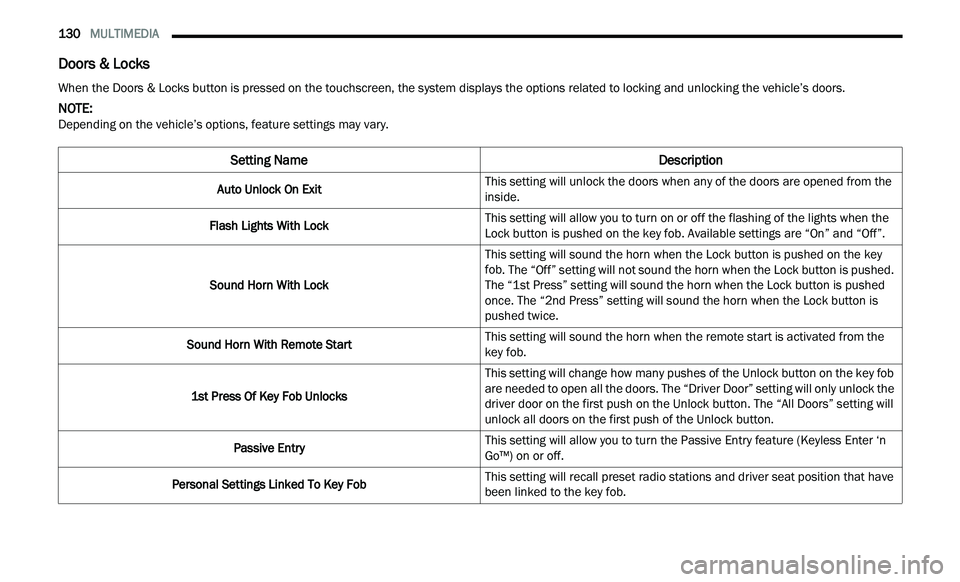
Doors & Locks
When the Doors & Locks button is pressed on the touchscreen, the system displays the options related to locking and unlocking the vehicle’s doors.
NOTE:
Depending on the vehicle’s options, feature settings may vary.
Setting Name Description
Auto Unlock On ExitThis setting will unlock the doors when any of the doors are opened from the
i
n
side.
Flash Lights With Lock This setting will allow you to turn on or off the flashing of the lights when the
Loc
k
button is pushed on the key fob. Available settings are “On” and “Off”.
Sound Horn With Lock This setting will sound the horn when the Lock button is pushed on the key
f
ob
. The “Off” setting will not sound the horn when the Lock button is pushed.
The “1st Press” setting will sound the horn when the Lock button is pushed
once. The “2nd Press” setting will sound the horn when the Lock button is
pushed twice.
Sound Horn With Remote Start This setting will sound the horn when the remote start is activated from the
ke
y fob.
1st Press Of Key Fob Unlocks This setting will change how many pushes of the Unlock button on the key fob
a
r
e needed to open all the doors. The “Driver Door” setting will only unlock the
driver door on the first push on the Unlock button. The “All Doors” setting will
unlock all doors on the first push of the Unlock button.
Passive Entry This setting will allow you to turn the Passive Entry feature (Keyless Enter ‘n
G
o™
) on or off.
Personal Settings Linked To Key Fob This setting will recall preset radio stations and driver seat position that have
b
e
en linked to the key fob.