keyless CHRYSLER 300 2021 User Guide
[x] Cancel search | Manufacturer: CHRYSLER, Model Year: 2021, Model line: 300, Model: CHRYSLER 300 2021Pages: 268, PDF Size: 15.24 MB
Page 60 of 268
58 GETTING TO KNOW YOUR VEHICLE
PANORAMIC SUNROOF — IF EQUIPPED
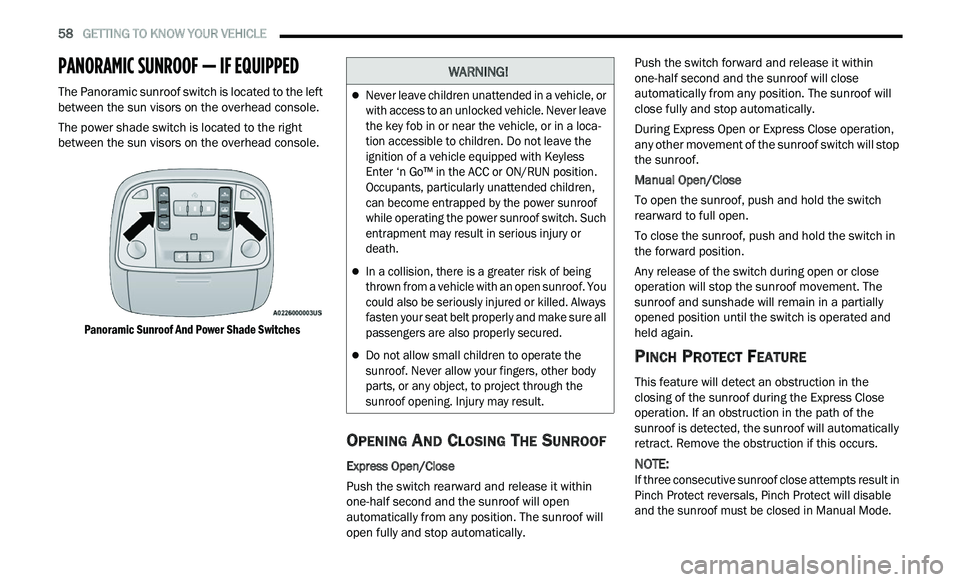
The Panoramic sunroof switch is located to the left
between the sun visors on the overhead console.
The power shade switch is located to the right
be
tween the sun visors on the overhead console.
Panoramic Sunroof And Power Shade Switches
OPENING AND CLOSING THE SUNROOF
Express Open/Close
Push the switch rearward and release it within
on e
-half second and the sunroof will open
automatically from any position. The sunroof will
open fully and stop automatically. Push the switch forward and release it within
on
e
-half second and the sunroof will close
automatically from any position. The sunroof will
close fully and stop automatically.
During Express Open or Express Close operation,
an
y other movement of the sunroof switch will stop
the sunroof.
Manual Open/Close
To open the sunroof, push and hold the switch
r e
arward to full open.
To close the sunroof, push and hold the switch in
th
e forward position.
Any release of the switch during open or close
ope
ration will stop the sunroof movement. The
sunroof and sunshade will remain in a partially
opened position until the switch is operated and
held again.
PINCH PROTECT FEATURE
This feature will detect an obstruction in the
closing of the sunroof during the Express Close
operation. If an obstruction in the path of the
sunroof is detected, the sunroof will automatically
retract. Remove the obstruction if this occurs.
NOTE:
If three consecutive sunroof close attempts result in
P i
nch Protect reversals, Pinch Protect will disable
and the sunroof must be closed in Manual Mode.
WARNING!
Never leave children unattended in a vehicle, or
with access to an unlocked vehicle. Never leave
the key fob in or near the vehicle, or in a loca -
tion accessible to children. Do not leave the
i g
nition of a vehicle equipped with Keyless
Enter ‘n Go™ in the ACC or ON/RUN position.
Occupants, particularly unattended children,
can become entrapped by the power sunroof
while operating the power sunroof switch. Such
entrapment may result in serious injury or
death.
In a collision, there is a greater risk of being
thrown from a vehicle with an open sunroof. You
could also be seriously injured or killed. Always
fasten your seat belt properly and make sure all
passengers are also properly secured.
Do not allow small children to operate the
sunroof. Never allow your fingers, other body
parts, or any object, to project through the
sunroof opening. Injury may result.
Page 68 of 268
66 GETTING TO KNOW YOUR INSTRUMENT PANEL
INSTRUMENT CLUSTER DESCRIPTIONS
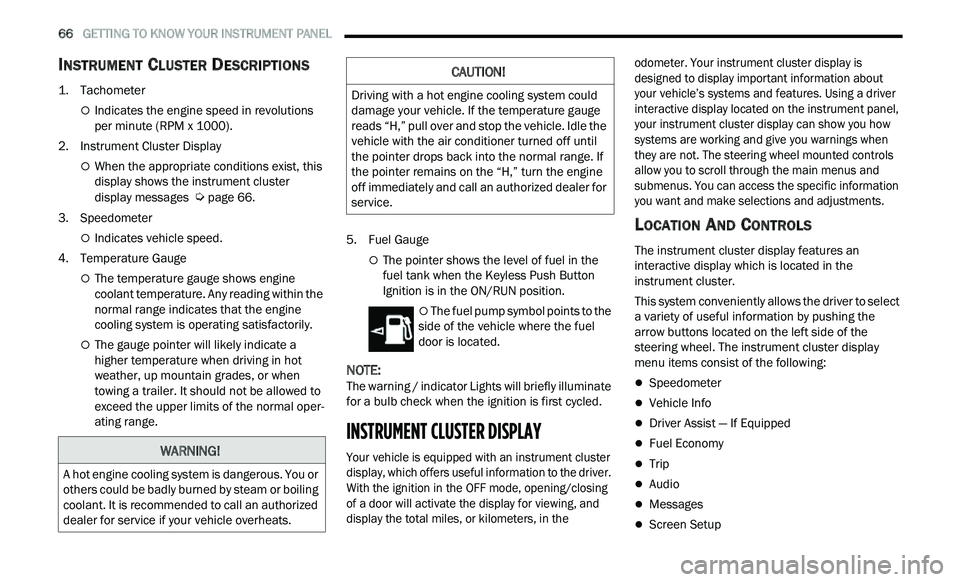
1. Tachometer
Indicates the engine speed in revolutions
per minute (RPM x 1000).
2. Instrument Cluster Display
When the appropriate conditions exist, this
display shows the instrument cluster
display messages
Ú page 66.
3. S peedometer
Indicates vehicle speed.
4. T emperature Gauge
The temperature gauge shows engine
coolant temperature. Any reading within the
normal range indicates that the engine
cooling system is operating satisfactorily.
The gauge pointer will likely indicate a
higher temperature when driving in hot
weather, up mountain grades, or when
towing a trailer. It should not be allowed to
exceed the upper limits of the normal oper
-
ating range. 5. Fuel Gauge
The pointer shows the level of fuel in the
fuel tank when the Keyless Push Button
Ignition is in the ON/RUN position.
The fuel pump symbol points to the
side of the vehicle where the fuel
d oor
is located.
NOTE:
The warning / indicator Lights will briefly illuminate
f or
a bulb check when the ignition is first cycled.
INSTRUMENT CLUSTER DISPLAY
Your vehicle is equipped with an instrument cluster
display, which offers useful information to the driver.
With the ignition in the OFF mode, opening/closing
of a door will activate the display for viewing, and
display the total miles, or kilometers, in the odometer. Your instrument cluster display is
designed to display important information about
your vehicle’s systems and features. Using a driver
interactive display located on the instrument panel,
your instrument cluster display can show you how
systems are working and give you warnings when
they are not. The steering wheel mounted controls
allow you to scroll through the main menus and
submenus. You can access the specific information
you want and make selections and adjustments.
LOCATION AND CONTROLS
The instrument cluster display features an
interactive display which is located in the
instrument cluster.
This system conveniently allows the driver to select
a
variety of useful information by pushing the
arrow buttons located on the left side of the
steering wheel. The instrument cluster display
menu items consist of the following:
Speedometer
Vehicle Info
Driver Assist — If Equipped
Fuel Economy
Trip
Audio
Messages
Screen Setup
WARNING!
A hot engine cooling system is dangerous. You or
others could be badly burned by steam or boiling
coolant. It is recommended to call an authorized
dealer for service if your vehicle overheats.
CAUTION!
Driving with a hot engine cooling system could
damage your vehicle. If the temperature gauge
reads “H,” pull over and stop the vehicle. Idle the
vehicle with the air conditioner turned off until
the pointer drops back into the normal range. If
the pointer remains on the “H,” turn the engine
off immediately and call an authorized dealer for
service.
Page 69 of 268
GETTING TO KNOW YOUR INSTRUMENT PANEL 67
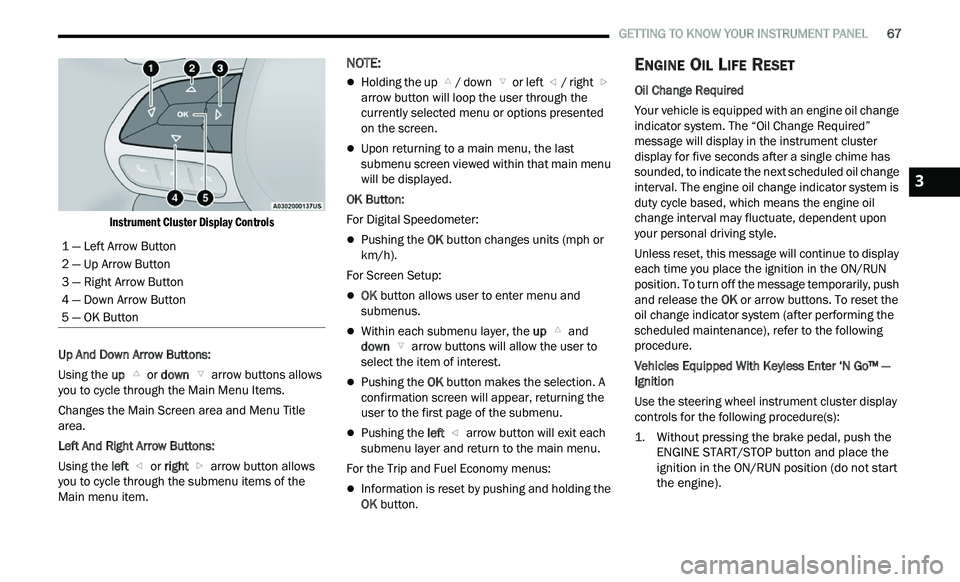
Instrument Cluster Display Controls
Up And Down Arrow Buttons:
Using the up
or down arrow buttons allows
you to cycle through the Main Menu Items.
Changes the Main Screen area and Menu Title
a r
ea.
Left And Right Arrow Buttons:
Using the left
or right arrow button allows
you to cycle through the submenu items of the
M a
in menu item.
NOTE:
Holding the up / down or left / right
a
rrow button will loop the user through the
c u
rrently selected menu or options presented
on the screen.
Upon returning to a main menu, the last
submenu screen viewed within that main menu
will be displayed.
OK Button:
For Digital Speedometer:
Pushing the OK button changes units (mph or
km/h).
For Screen Setup:
OK button allows user to enter menu and
submenus.
Within each submenu layer, the up and
down arrow buttons will allow the user to
select the item of interest.
Pushing the OK button makes the selection. A
confirmation screen will appear, returning the
user to the first page of the submenu.
Pushing the left arrow button will exit each
submenu layer and return to the main menu.
For the Trip and Fuel Economy menus:
Information is reset by pushing and holding the
OK button.
ENGINE OIL LIFE RESET
Oil Change Required
Your vehicle is equipped with an engine oil change
in
dicator system. The “Oil Change Required”
message will display in the instrument cluster
display for five seconds after a single chime has
sounded, to indicate the next scheduled oil change
interval. The engine oil change indicator system is
duty cycle based, which means the engine oil
change interval may fluctuate, dependent upon
your personal driving style.
Unless reset, this message will continue to display
e a
ch time you place the ignition in the ON/RUN
position. To turn off the message temporarily, push
and release the OK or arrow buttons. To reset the
oil change indicator system (after performing the
scheduled maintenance), refer to the following
procedure.
Vehicles Equipped With Keyless Enter ‘N Go™ —
I g
nition
Use the steering wheel instrument cluster display
con
trols for the following procedure(s):
1. Without pressing the brake pedal, push the E
NGINE START/STOP button and place the
ignition in the ON/RUN position (do not start
the engine).
1 — Left Arrow Button
2 — Up Arrow Button
3 — Right Arrow Button
4 — Down Arrow Button
5 — OK Button
3
Page 83 of 268
81
(Continued)
STARTING AND OPERATING
STARTING THE ENGINE
Before starting your vehicle, adjust your seat,
adjust the inside and outside mirrors, fasten your
seat belt, and if present, instruct all other
occupants to buckle their seat belts.
AUTOMATIC TRANSMISSION
The gear selector must be in the PARK position
before you can start the engine. Apply the brakes
before shifting into any driving gear.
KEYLESS ENTER ‘N GO™ — IGNITION
This feature allows the driver to operate the
ignition switch with the push of a button, as long as
the Remote Start/Keyless Enter ‘n Go™ key fob is
in the passenger compartment.
NORMAL STARTING
To Turn On The Engine Using The ENGINE START/
STOP Button
1. The transmission must be in PARK.
2
. P ress and hold the brake pedal while pushing
t
he ENGINE START/STOP button once.
3. The system takes over and attempts to start t
he vehicle. If the vehicle fails to start, the
starter will disengage automatically after
10 seconds.
4. I f you wish to stop the cranking of the engine
p
rior to the engine starting, push the ENGINE
START/STOP button again.
NOTE:
Normal starting of either a cold or a warm engine is
ob t
ained without pumping or pressing the accel -
erator pedal.
WARNING!
When exiting the vehicle, always make sure
the ignition is in OFF mode, remove the key
fob from the vehicle and lock the vehicle.
Never leave children alone in a vehicle, or with
access to an unlocked vehicle. Leaving chil -
dren in a vehicle unattended is dangerous for
a
number of reasons. A child or others could
be seriously or fatally injured. Children should
be warned not to touch the parking brake,
brake pedal or the transmission gear selector.
Do not leave the key fob in or near the vehicle
(or in a location accessible to children), and do
not leave the ignition (of a vehicle equipped
with Keyless Enter ‘n Go™) in the ACC or ON/
RUN mode. A child could operate power
windows, other controls, or move the vehicle.
Do not leave children or animals inside parked
vehicles in hot weather. Interior heat build-up
may cause serious injury or death.
CAUTION!
Shift into or out of PARK or REVERSE only after
the vehicle has come to a complete stop.
Do not shift between PARK, REVERSE,
NEUTRAL, or DRIVE when the engine is above
idle speed.
Before shifting into any gear, make sure your
foot is firmly pressing the brake pedal.
WARNING!
4
Page 85 of 268
STARTING AND OPERATING 83
NOTE:
For Keyless Enter ‘n Go™ equipped vehicles, the
e n
gine will turn off and the ignition switch will
change to ACC Mode.
If the vehicle is not in PARK and the driver exits the
v e
hicle with the engine running, the vehicle may
AutoPark.
AutoPark will engage when all of these conditions
a r
e met:
Vehicle is equipped with a rotary selector and an
eight speed transmission
Vehicle is not in PARK
Vehicle speed is 1.2 mph (1.9 km/h) or less
Driver’s seat belt is unbuckled
Driver’s door is ajar
Brake pedal is not pressed
The message “ Au
toPark Engaged Shift to P then
Shift to Gear ” will display in the instrument cluster.
NOTE:
In some cases the ParkSense graphic will be
d i
splayed in the instrument cluster. In these cases,
the gear selector must be returned to “P” to select
desired gear.
If the driver shifts into PARK while moving, the
ve
hicle may AutoPark.
AutoPark will engage ON
LY when vehicle speed is
1.2 mph (1.9 km/h) or less. The message “
Ve
hicle Speed is Too High to Shift to
P” will be displayed in the instrument cluster if
vehicle speed is above 1.2 mph (1.9 km/h).
ALWAYS DO A VISUAL CHECK
that your vehicle is in
PARK by looking for the “P” in the instrument
cluster display and near the gear selector. As an
added precaution, always apply the parking brake
when exiting the vehicle.
COLD WEATHER OPERATION
(B
ELOW –22°F OR −30°C)
To ensure reliable starting at these temperatures,
use of an externally powered electric engine block
heater (available from an authorized dealer) is
recommended.
IF ENGINE FAILS TO START
If the engine fails to start after you have followed
the “Normal Starting” or “Cold Weather Operation”
procedure, it may be flooded. Push the accelerator pedal all the way to the floor and hold it there.
Crank the engine for no more than 15 seconds.
This should clear any excess fuel in case the
engine is flooded. Leave the ignition key in the RUN
position, release the accelerator pedal and repeat
the “Normal Starting” procedure.
WARNING!
If vehicle speed is above 1.2
mph (1.9 km/h), the
tr
ansmission will default to NEUTRAL until the
vehicle speed drops below 1.2 mph (1.9 km/h). A
ve
hicle left in the NEUTRAL position can roll. As an
added precaution, always apply the parking brake
when exiting the vehicle.
WARNING!
Never pour fuel or other flammable liquid into
the throttle body air inlet opening in an
attempt to start the vehicle. This could result
in flash fire causing serious personal injury.
Do not attempt to push or tow your vehicle to
get it started. Vehicles equipped with an auto -
matic transmission cannot be started this
w a
y. Unburned fuel could enter the catalytic
converter and once the engine has started,
ignite and damage the converter and vehicle.
If the vehicle has a discharged battery,
booster cables may be used to obtain a start
from a booster battery or the battery in
another vehicle. This type of start can be
dangerous if done improperly
Ú page 186.
4
Page 87 of 268
STARTING AND OPERATING 85
(Continued)
(Continued)
(Continued)
When the parking brake is applied with the ignition
switch in the ON/RUN position, the Brake Warning
Light in the instrument cluster will illuminate.
NOTE:
When the parking brake is applied and the trans -
mission is placed in gear, the Brake Warning Light
w i
ll flash. If vehicle speed is detected, a chime will
sound to alert the driver. Fully release the parking
brake before attempting to move the vehicle.
This light only shows that the parking brake is
applied. It does not show the degree of brake
application.
When parking on a hill, it is important to turn the
f r
ont wheels toward the curb on a downhill grade
and away from the curb on an uphill grade. Apply
the parking brake before placing the gear selector
in PARK, otherwise the load on the transmission
locking mechanism may make it difficult to move
the gear selector out of PARK. The parking brake
should always be applied whenever the driver is
not in the vehicle.
AUTOMATIC TRANSMISSION
NOTE:
You must press and hold the brake pedal while
s h
ifting out of PARK.
WARNING!
Never use the PARK position as a substitute
for the parking brake. Always apply the
parking brake fully when parked to guard
against vehicle movement and possible injury
or damage.
When exiting the vehicle, always remove the
key fob from the ignition and lock your vehicle.
Never leave children alone in a vehicle, or with
access to an unlocked vehicle. Allowing chil -
dren to be in a vehicle unattended is
d a
ngerous for a number of reasons. A child or
others could be seriously or fatally injured.
Children should be warned not to touch the
parking brake, brake pedal or the gear
selector.
When exiting the vehicle, always make sure
the keyless ignition node is in the OFF mode,
remove the key fob from the vehicle and lock
the vehicle.
Do not leave the key fob in or near the vehicle
or in a location accessible to children, and do
not leave the ignition of a vehicle equipped
with Keyless Enter ‘n Go™ in the ACC or ON/
RUN mode. A child could operate power
windows, other controls, or move the vehicle.
Be sure the parking brake is fully disengaged
before driving; failure to do so can lead to
brake failure and a collision.
WARNING!
Always fully apply the parking brake when
leaving your vehicle, or it may roll and cause
damage or injury. Also be certain to leave the
transmission in PARK. Failure to do so may
allow the vehicle to roll and cause damage or
injury.
CAUTION!
If the Brake Warning Light remains on with the
parking brake released, a brake system
malfunction is indicated. Have the brake system
serviced by an authorized dealer immediately.
WARNING!
Never use the PARK position as a substitute
for the parking brake. Always apply the
parking brake fully when exiting the vehicle to
guard against vehicle movement and possible
injury or damage.
WARNING!
4
Page 132 of 268
130 MULTIMEDIA
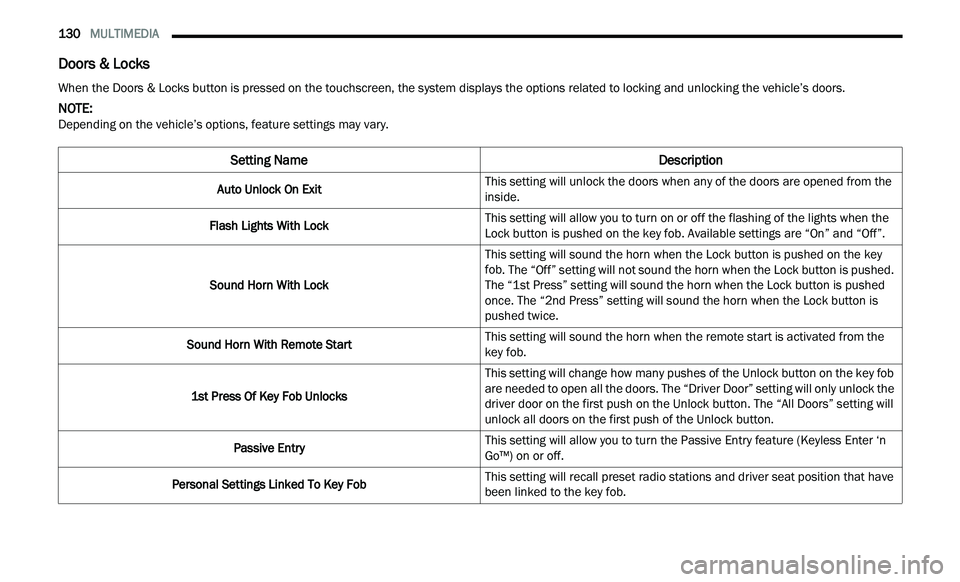
Doors & Locks
When the Doors & Locks button is pressed on the touchscreen, the system displays the options related to locking and unlocking the vehicle’s doors.
NOTE:
Depending on the vehicle’s options, feature settings may vary.
Setting Name Description
Auto Unlock On ExitThis setting will unlock the doors when any of the doors are opened from the
i
n
side.
Flash Lights With Lock This setting will allow you to turn on or off the flashing of the lights when the
Loc
k
button is pushed on the key fob. Available settings are “On” and “Off”.
Sound Horn With Lock This setting will sound the horn when the Lock button is pushed on the key
f
ob
. The “Off” setting will not sound the horn when the Lock button is pushed.
The “1st Press” setting will sound the horn when the Lock button is pushed
once. The “2nd Press” setting will sound the horn when the Lock button is
pushed twice.
Sound Horn With Remote Start This setting will sound the horn when the remote start is activated from the
ke
y fob.
1st Press Of Key Fob Unlocks This setting will change how many pushes of the Unlock button on the key fob
a
r
e needed to open all the doors. The “Driver Door” setting will only unlock the
driver door on the first push on the Unlock button. The “All Doors” setting will
unlock all doors on the first push of the Unlock button.
Passive Entry This setting will allow you to turn the Passive Entry feature (Keyless Enter ‘n
G
o™
) on or off.
Personal Settings Linked To Key Fob This setting will recall preset radio stations and driver seat position that have
b
e
en linked to the key fob.
Page 258 of 268
256
B
Back-Up.........................................................110Battery....................................................73, 201Charging System Light.................................73Keyless Key Fob Replacement....................13Location....................................................201Belts, Seat.....................................................176Beverage Holder Cooled (Cupholder)..............53Beverage Holder Heated (Cupholder)..............53Body Mechanism Lubrication........................206B-Pillar Location.............................................229Brake Assist System......................................138Brake Control System....................................138Brake Fluid..........................................212, 250Brake System......................................212, 245Fluid Check.....................................212, 250Master Cylinder.........................................212Parking........................................................84Warning Light.....................................72, 245Brake/Transmission Interlock.........................87Break-In Recommendations, New Vehicle.......84Brightness, Interior Lights................................44Bulb Replacement.........................................221Bulbs, Light..........................................178, 221
C
Camera, Rear................................................110Capacities, Fluid............................................248
Caps, Filler
Oil (Engine)...............................................199Radiator (Coolant Pressure).....................210Car Washes...................................................242Carbon Monoxide Warning............................178CargoVehicle Loading........................................113Cargo Area Cover.............................................61Cargo Compartment........................................61Cellular Phone..............................................136Certification Label.........................................113Chains, Tire...................................................239Chart, Tire Sizing...........................................226Check Engine Light (Malfunction Indicator
Light)................................................................79Checking Your Vehicle For Safety.................176Checks, Safety..............................................176Child Restraint..............................................166Child Restraints Booster Seats...........................................168Child Seat Installation..............................174How To Stow An unused ALR Seat Belt....172Infant And Child Restraints.......................167Lower Anchors And Tethers For Children..169Older Children And Child Restraints.........167Seating Positions......................................169Child Safety Locks...........................................23Clean Air Gasoline.........................................246
CleaningWheels......................................................238Climate Control................................................47Automatic....................................................47Coin Holder......................................................52Cold Weather Operation...................................83Compact Spare Tire......................................236ConsoleFloor............................................................52Contract, Service...........................................252Cooling Pressure Cap (Radiator Cap)............210Cooling System.............................................209Adding Coolant (Antifreeze)......................210Coolant Capacity.......................................248Coolant Level...................................209, 211Disposal Of Used Coolant.........................211Drain, Flush, And Refill.............................209Inspection.................................................211Points To Remember................................211Pressure Cap............................................210Radiator Cap.............................................210Selection Of Coolant
(Antifreeze).........................210, 248, 249Corrosion Protection.....................................242Cruise Control (Speed Control)..................92, 94Cruise Light...............................................77, 78Customer Assistance....................................251Cybersecurity................................................121
Page 260 of 268
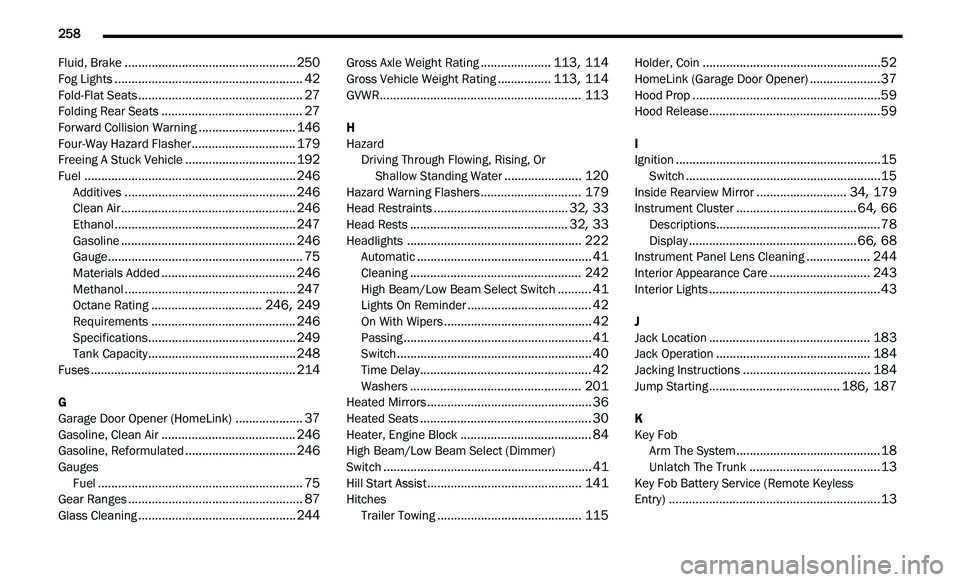
258
Fluid, Brake...................................................250Fog Lights........................................................42Fold-Flat Seats.................................................27Folding Rear Seats..........................................27Forward Collision Warning.............................146Four-Way Hazard Flasher...............................179Freeing A Stuck Vehicle.................................192Fuel...............................................................246Additives...................................................246Clean Air....................................................246Ethanol......................................................247Gasoline....................................................246Gauge..........................................................75Materials Added........................................246Methanol...................................................247Octane Rating.................................246, 249Requirements...........................................246Specifications............................................249Tank Capacity............................................248Fuses.............................................................214
G
Garage Door Opener (HomeLink)....................37Gasoline, Clean Air........................................246Gasoline, Reformulated.................................246Gauges
Fuel.............................................................75Gear Ranges....................................................87Glass Cleaning...............................................244
Gross Axle Weight Rating.....................113, 114Gross Vehicle Weight Rating................113, 114GVWR............................................................113
H
HazardDriving Through Flowing, Rising, Or
Shallow Standing Water
.......................120Hazard Warning Flashers..............................179Head Restraints........................................32, 33Head Rests...............................................32, 33Headlights....................................................222Automatic....................................................41Cleaning...................................................242High Beam/Low Beam Select Switch..........41Lights On Reminder.....................................42On With Wipers............................................42Passing........................................................41Switch..........................................................40Time Delay...................................................42Washers...................................................201Heated Mirrors.................................................36Heated Seats...................................................30Heater, Engine Block.......................................84High Beam/Low Beam Select (Dimmer)
Switch..............................................................41Hill Start Assist..............................................141Hitches Trailer Towing...........................................115
Holder, Coin.....................................................52HomeLink (Garage Door Opener).....................37Hood Prop........................................................59Hood Release...................................................59
I
Ignition.............................................................15Switch..........................................................15Inside Rearview Mirror...........................34, 179Instrument Cluster....................................64, 66Descriptions.................................................78Display..................................................66, 68Instrument Panel Lens Cleaning...................244Interior Appearance Care..............................243Interior Lights...................................................43
J
Jack Location................................................183Jack Operation..............................................184Jacking Instructions......................................184Jump Starting.......................................186, 187
K
Key FobArm The System
...........................................18Unlatch The Trunk.......................................13Key Fob Battery Service (Remote Keyless
Entry)...............................................................13
Page 261 of 268
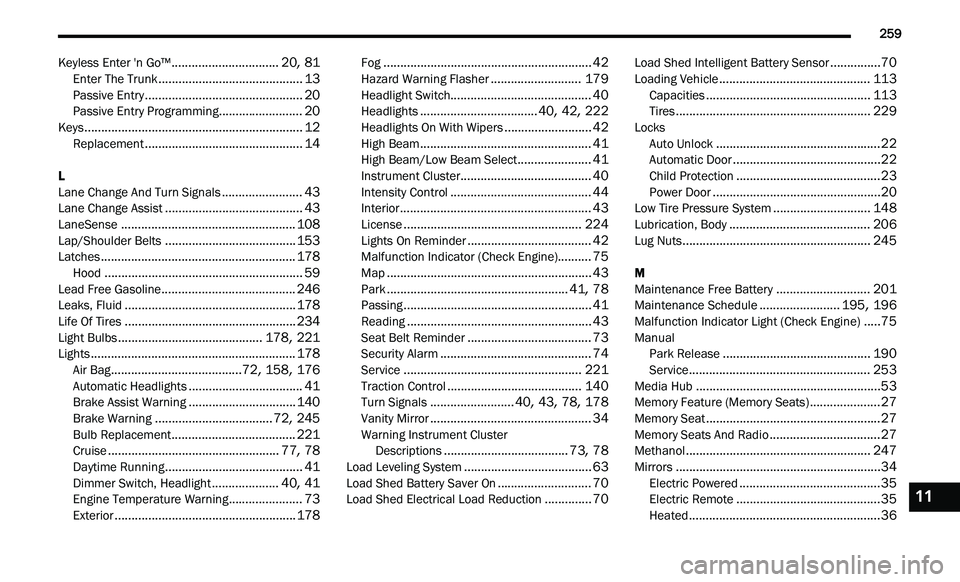
259
Keyless Enter 'n Go™................................20, 81Enter The Trunk...........................................13Passive Entry...............................................20Passive Entry Programming.........................20Keys.................................................................12Replacement...............................................14
L
Lane Change And Turn Signals........................43Lane Change Assist.........................................43LaneSense....................................................108Lap/Shoulder Belts.......................................153Latches..........................................................178Hood...........................................................59Lead Free Gasoline........................................246Leaks, Fluid...................................................178Life Of Tires...................................................234Light Bulbs...........................................178, 221Lights.............................................................178Air Bag.......................................72, 158, 176Automatic Headlights..................................41Brake Assist Warning................................140Brake Warning...................................72, 245Bulb Replacement.....................................221Cruise...................................................77, 78Daytime Running.........................................41Dimmer Switch, Headlight....................40, 41Engine Temperature Warning......................73Exterior......................................................178
Fog..............................................................42Hazard Warning Flasher...........................179Headlight Switch..........................................40Headlights...................................40, 42, 222Headlights On With Wipers..........................42High Beam...................................................41High Beam/Low Beam Select......................41Instrument Cluster.......................................40Intensity Control..........................................44Interior.........................................................43License.....................................................224Lights On Reminder.....................................42Malfunction Indicator (Check Engine)..........75Map.............................................................43Park......................................................41, 78Passing........................................................41Reading.......................................................43Seat Belt Reminder.....................................73Security Alarm.............................................74Service.....................................................221Traction Control........................................140Turn Signals.........................40, 43, 78, 178Vanity Mirror................................................34Warning Instrument Cluster
Descriptions.....................................73, 78Load Leveling System......................................63Load Shed Battery Saver On............................70Load Shed Electrical Load Reduction..............70
Load Shed Intelligent Battery Sensor...............70Loading Vehicle.............................................113Capacities.................................................113Tires..........................................................229Locks Auto Unlock.................................................22Automatic Door............................................22Child Protection...........................................23Power Door..................................................20Low Tire Pressure System.............................148Lubrication, Body..........................................206Lug Nuts........................................................245
M
Maintenance Free Battery............................201Maintenance Schedule........................195, 196Malfunction Indicator Light (Check Engine).....75ManualPark Release............................................190Service......................................................253Media Hub.......................................................53Memory Feature (Memory Seats).....................27Memory Seat....................................................27Memory Seats And Radio.................................27Methanol.......................................................247Mirrors.............................................................34Electric Powered..........................................35Electric Remote...........................................35Heated.........................................................36
11