ECO mode CHRYSLER 300 2022 User Guide
[x] Cancel search | Manufacturer: CHRYSLER, Model Year: 2022, Model line: 300, Model: CHRYSLER 300 2022Pages: 288, PDF Size: 13.34 MB
Page 54 of 288
52GETTING TO KNOW YOUR VEHICLE
CLIMATE CONTROLS
The Climate Control system allows you to regulate
the temperature, air flow, and direction of air
circulating throughout the vehicle. The controls are
located on the touchscreen and on the instrument
panel below the radio.
AUTOMATIC CLIMATE CONTROL
D
ESCRIPTIONS AND FUNCTIONS
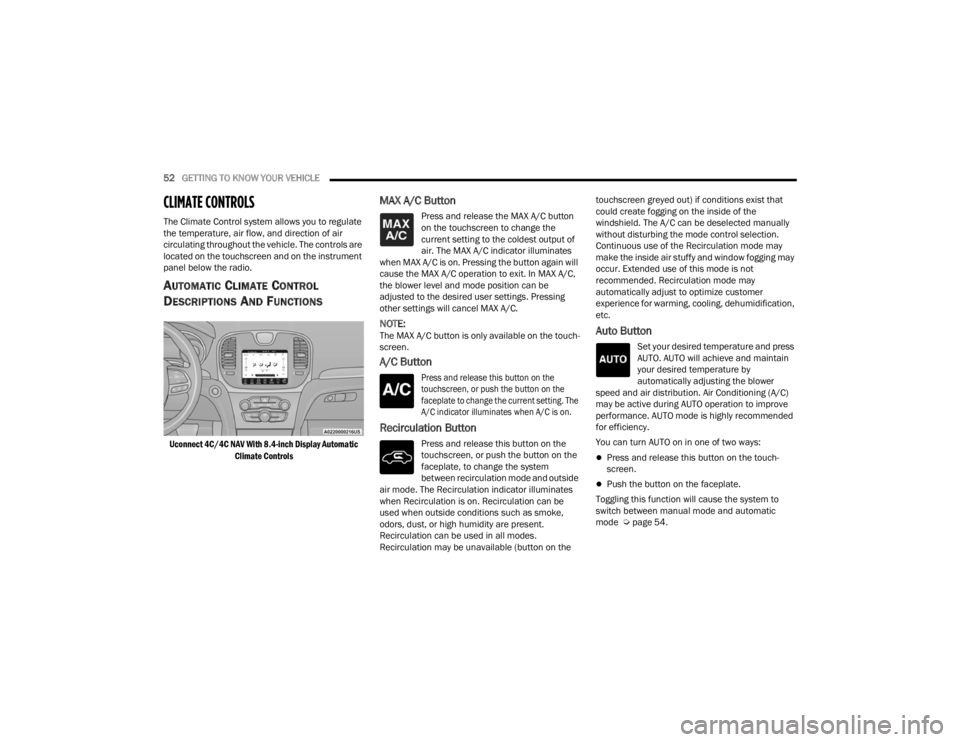
Uconnect 4C/4C NAV With 8.4-inch Display Automatic
Climate Controls
MAX A/C Button
Press and release the MAX A/C button
on the touchscreen to change the
current setting to the coldest output of
air. The MAX A/C indicator illuminates
when MAX A/C is on. Pressing the button again will
cause the MAX A/C operation to exit. In MAX A/C,
the blower level and mode position can be
adjusted to the desired user settings. Pressing
other settings will cancel MAX A/C.
NOTE:The MAX A/C button is only available on the touch -
screen.
A/C Button
Press and release this button on the
touchscreen, or push the button on the
faceplate to change the current setting. The
A/C indicator illuminates when A/C is on.
Recirculation Button
Press and release this button on the
touchscreen, or push the button on the
faceplate, to change the system
between recirculation mode and outside
air mode. The Recirculation indicator illuminates
when Recirculation is on. Recirculation can be
used when outside conditions such as smoke,
odors, dust, or high humidity are present.
Recirculation can be used in all modes.
Recirculation may be unavailable (button on the touchscreen greyed out) if conditions exist that
could create fogging on the inside of the
windshield. The A/C can be deselected manually
without disturbing the mode control selection.
Continuous use of the Recirculation mode may
make the inside air stuffy and window fogging may
occur. Extended use of this mode is not
recommended. Recirculation mode may
automatically adjust to optimize customer
experience for warming, cooling, dehumidification,
etc.
Auto Button
Set your desired temperature and press
AUTO. AUTO will achieve and maintain
your desired temperature by
automatically adjusting the blower
speed and air distribution. Air Conditioning (A/C)
may be active during AUTO operation to improve
performance. AUTO mode is highly recommended
for efficiency.
You can turn AUTO on in one of two ways:
Press and release this button on the touch -
screen.
Push the button on the faceplate.
Toggling this function will cause the system to
switch between manual mode and automatic
mode Ú page 54.
22_LX_OM_EN_USC_t.book Page 52
Page 57 of 288

GETTING TO KNOW YOUR VEHICLE55
To provide you with maximum comfort in the
Automatic mode during cold start-ups, the blower
fan will remain on low until the engine warms up.
The blower will increase in speed and transition
into Auto mode.
Manual Operation Override
This system offers a full complement of manual
override features. The AUTO symbol in the front
ATC display will be turned off when the system is
being used in the manual mode.
CLIMATE VOICE COMMANDS
Adjust vehicle temperatures hands-free and keep
everyone comfortable while you keep moving
ahead.
Push the VR button. After the beep, say one of the
following commands:
“ Set the driver temperature to 70 degrees ”
“Set the passenger temperature to 70 degrees ”
TIP:Voice Command for Climate may only be used to
adjust the interior temperature of your vehicle.
Voice Command will not work to adjust the heated
seats or steering wheel if equipped.
OPERATING TIPS
Refer to the chart at the end of this section for
suggested control settings for various weather
conditions.
Summer Operation
The engine cooling system must be protected with
a high-quality antifreeze coolant to provide proper
corrosion protection and to protect against engine
overheating. OAT coolant (conforming to
MS.90032) is recommended.
Winter Operation
To ensure the best possible heater and defroster
performance, make sure the engine cooling
system is functioning properly and the proper
amount, type, and concentration of coolant is
used. Use of the Air Recirculation mode during
Winter months is not recommended, because it
may cause window fogging.
Vacation/Storage
For information on maintaining the Climate Control
system when the vehicle is being stored for an
extended period of time, see Ú page 260.
Window Fogging
Vehicle windows tend to fog on the inside in mild,
rainy, and/or humid weather. To clear the
windows, select Defrost or Mix mode and increase
the front blower speed. Do not use the
Recirculation mode without A/C for long periods,
as fogging may occur.
Outside Air Intake
Make sure the air intake, located directly in front of
the windshield, is free of obstructions, such as
leaves. Leaves collected in the air intake may
reduce airflow, and if they enter the air distribution
box, they could plug the water drains. In Winter
months, make sure the air intake is clear of ice,
slush, and snow.
Cabin Air Filter
The Climate Control system filters out dust and
pollen from the air. Contact an authorized dealer to
service your cabin air filter, and to have it replaced
when needed.
2
22_LX_OM_EN_USC_t.book Page 55
Page 66 of 288

64GETTING TO KNOW YOUR VEHICLE
OPENING AND CLOSING THE SUNROOF
Express Open/Close
Push the switch rearward and release it within
one-half second and the sunroof will open
automatically from any position. The sunroof will
open fully and stop automatically.
Push the switch forward and release it within
one-half second and the sunroof will close
automatically from any position. The sunroof will
close fully and stop automatically.
During Express Open or Express Close operation,
any other movement of the sunroof switch will stop
the sunroof.
Manual Open/Close
To open the sunroof, push and hold the switch
rearward to full open.
To close the sunroof, push and hold the switch in
the forward position.
Any release of the switch during open or close
operation will stop the sunroof movement. The
sunroof and sunshade will remain in a partially
opened position until the switch is operated and
held again. Venting The Sunroof
Push and release the Vent switch within one half
second and the sunroof will open to the vent
position. During vent operation, any other
movement of the sunroof switch will stop the
sunroof.
NOTE:If the sunshade is in the closed position when the
vent switch is pushed, the sunshade will automati
-
cally cycle to the halfway open position prior to the
sunroof opening to the Vent position.
PINCH PROTECT FEATURE
This feature will detect an obstruction in the
closing of the sunroof during the Express Close
operation. If an obstruction in the path of the
sunroof is detected, the sunroof will automatically
retract. Remove the obstruction if this occurs.
NOTE:If three consecutive sunroof close attempts result
in Pinch Protect reversals, Pinch Protect will
disable and the sunroof must be closed in Manual
Mode.
OPENING AND CLOSING THE POWER
S
HADE
Express Open/Close
Push the shade switch rearward and release it
within one-half second and the shade will
automatically open to the halfway position and
stop automatically. Push the switch again to fully
open the shade.
Push the switch forward and release it within
one-half second and the shade will close
automatically from any position.
During Express Open or Express Close operation,
any other movement of the shade switch will stop
the shade.
Manual Open/Close
To open the shade, push and hold the switch
rearward. The shade will open and stop
automatically at the half-open position. Push and
hold the switch again and the shade will fully open.
To close the shade, push and hold the switch in the
forward position.
Any release of the switch will stop the movement
and the shade will remain in a partially closed
condition until the switch is pushed again.
22_LX_OM_EN_USC_t.book Page 64
Page 72 of 288
70GETTING TO KNOW YOUR INSTRUMENT PANEL
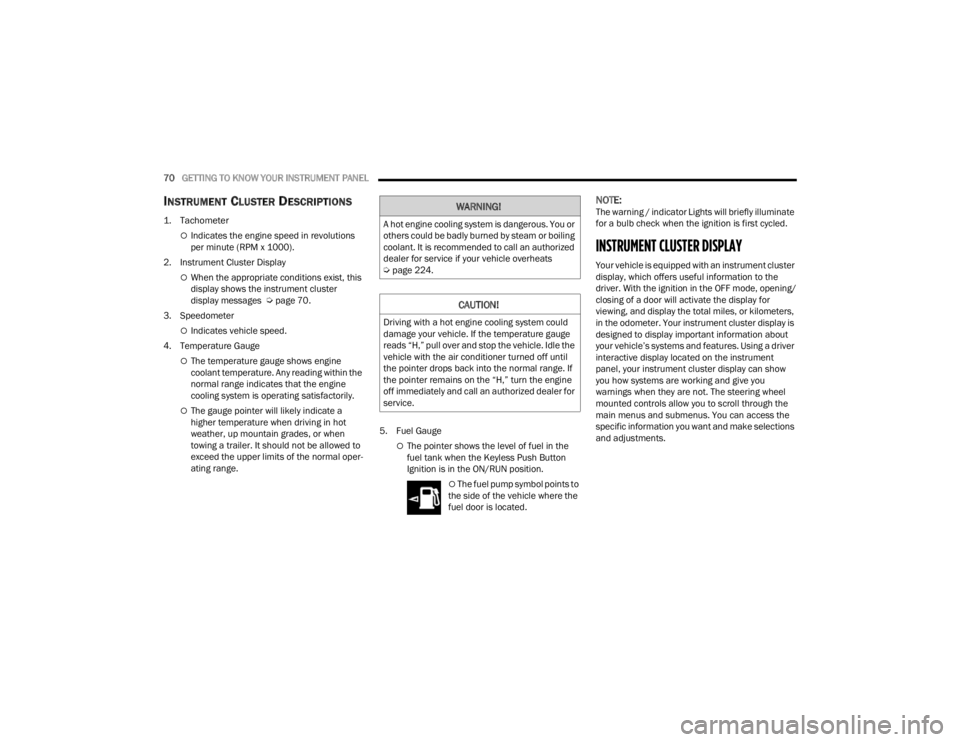
INSTRUMENT CLUSTER DESCRIPTIONS
1. Tachometer
Indicates the engine speed in revolutions
per minute (RPM x 1000).
2. Instrument Cluster Display
When the appropriate conditions exist, this
display shows the instrument cluster
display messages Ú page 70.
3. Speedometer
Indicates vehicle speed.
4. Temperature Gauge
The temperature gauge shows engine
coolant temperature. Any reading within the
normal range indicates that the engine
cooling system is operating satisfactorily.
The gauge pointer will likely indicate a
higher temperature when driving in hot
weather, up mountain grades, or when
towing a trailer. It should not be allowed to
exceed the upper limits of the normal oper -
ating range. 5. Fuel Gauge
The pointer shows the level of fuel in the
fuel tank when the Keyless Push Button
Ignition is in the ON/RUN position.
The fuel pump symbol points to
the side of the vehicle where the
fuel door is located.
NOTE:The warning / indicator Lights will briefly illuminate
for a bulb check when the ignition is first cycled.
INSTRUMENT CLUSTER DISPLAY
Your vehicle is equipped with an instrument cluster
display, which offers useful information to the
driver. With the ignition in the OFF mode, opening/
closing of a door will activate the display for
viewing, and display the total miles, or kilometers,
in the odometer. Your instrument cluster display is
designed to display important information about
your vehicle’s systems and features. Using a driver
interactive display located on the instrument
panel, your instrument cluster display can show
you how systems are working and give you
warnings when they are not. The steering wheel
mounted controls allow you to scroll through the
main menus and submenus. You can access the
specific information you want and make selections
and adjustments.
WARNING!
A hot engine cooling system is dangerous. You or
others could be badly burned by steam or boiling
coolant. It is recommended to call an authorized
dealer for service if your vehicle overheats
Ú page 224.
CAUTION!
Driving with a hot engine cooling system could
damage your vehicle. If the temperature gauge
reads “H,” pull over and stop the vehicle. Idle the
vehicle with the air conditioner turned off until
the pointer drops back into the normal range. If
the pointer remains on the “H,” turn the engine
off immediately and call an authorized dealer for
service.
22_LX_OM_EN_USC_t.book Page 70
Page 85 of 288
GETTING TO KNOW YOUR INSTRUMENT PANEL83
LaneSense Indicator Light — If Equipped
The LaneSense indicator light
illuminates solid green when both lane
markings have been detected and the
system is “armed” and ready to provide
visual and torque warnings if an unintentional lane
departure occurs Ú page 114.
Parking/Headlights On Indicator Light
This indicator light will illuminate when
the parking lights or headlights are
turned on Úpage 44.
Sport Mode Indicator Light
This light will turn on when Sport Mode is
active.
Turn Signal Indicator Lights
When the left or right turn signal is
activated, the turn signal indicator will
flash independently and the
corresponding exterior turn signal lamps
will flash. Turn signals can be activated when the
multifunction lever is moved down (left) or up
(right).
NOTE:
A continuous chime will sound if the vehicle is
driven more than 1 mile (1.6 km) with either
turn signal on.
Check for an inoperative outside light bulb if
either indicator flashes at a rapid rate.
ECO Mode Indicator Light — If Equipped
This light will turn on when ECO mode is
active.
WHITE INDICATOR LIGHTS
Adaptive Cruise Control (ACC) Ready Light —
If Equipped
This light will turn on when ACC has
been turned on, but is not set
Ú page 100.
Cruise Control Ready Indicator Light
This indicator light will illuminate when
the cruise control is ready, but not set
Úpage 98.
LaneSense Indicator Light — If Equipped
When the LaneSense system is ON, but
not armed, the LaneSense indicator
light illuminates solid white. This occurs
when only left, right, or neither lane line
has been detected. If a single lane line is detected,
the system is ready to provide only visual warnings
if an unintentional lane departure occurs on the
detected lane line Ú page 114.
BLUE INDICATOR LIGHTS
High Beam Indicator Light
This indicator light will illuminate to
indicate that the high beam headlights
are on. With the low beams activated,
push the multifunction lever forward
(toward the front of the vehicle) to turn on the high
beams. Pull the multifunction lever rearward
(toward the rear of the vehicle) to turn off the high
beams. If the high beams are off, pull the lever
toward you for a temporary high beam on, "flash to
pass" scenario.
3
22_LX_OM_EN_USC_t.book Page 83
Page 89 of 288

STARTING AND OPERATING87
To Turn Off The Engine Using The ENGINE START/
STOP Button
1. Place the gear selector in PARK, then push and release the ENGINE START/STOP button.
2. The ignition will return to the OFF position.
3. If the gear selector is not in PARK, the ENGINE START/STOP button must be held for two
seconds or three short pushes in a row with
the vehicle speed above 5 mph (8 km/h) before the engine will shut off. The ignition will
remain in the ACC position until the gear
selector is in PARK and the button is pushed
twice to the OFF position.
4. If the gear selector is not in PARK and the ENGINE START/STOP button is pushed once
with the vehicle speed above 5 mph (8 km/h), the instrument cluster will display a “ Vehicle
Not In Park ” message and the engine will
remain running. Never leave a vehicle out of
the PARK position, or it could roll.
NOTE:If the gear selector is not in PARK, and the ENGINE
START/STOP button is pushed once with the
vehicle speed below 5 mph (8 km/h), the engine
will shut off and the ignition will remain in the ACC
position. If vehicle speed drops below 1.2 mph
(1.9 km/h), the vehicle will AutoPark Ú page 87.ENGINE START/STOP Button Functions — With
Driver’s Foot OFF The Brake Pedal (In PARK Or
NEUTRAL Position)
The ENGINE START/STOP button operates similar
to an ignition switch. It has three positions: OFF,
ACC, and ON/RUN. To change the ignition modes
without starting the vehicle and use the
accessories, follow these directions:
1. Start with the ignition in the OFF position.
2. Push the ENGINE START/STOP button once to
place the ignition to the ACC position.
3. Push the ENGINE START/STOP button a second time to place the ignition to the ON/
RUN position.
4. Push the ENGINE START/STOP button a third time to return the ignition to the OFF position.
AUTOPARK
AutoPark is a supplemental feature to assist in
placing the vehicle in PARK should the situations
on the following pages occur. It is a back up system
and should not be relied upon as the primary
method by which the driver shifts the vehicle into
PARK.
The conditions under which AutoPark will engage
are outlined on the following pages. If the vehicle is not in PARK and the driver turns off
the engine, the vehicle may AutoPark.
AutoPark will engage when all of these conditions
are met:
Vehicle is equipped with a rotary selector and an
8-speed transmission
Vehicle is not in PARK
Vehicle speed is 1.2 mph (1.9 km/h) or less
Ignition switched from RUN to ACC
WARNING!
Driver inattention could lead to failure to place
the vehicle in PARK. ALWAYS DO A VISUAL
CHECK that your vehicle is in PARK by verifying
that a solid (not blinking) “P” is indicated in
the instrument cluster display and near the
gear selector. If the “P” indicator is blinking,
your vehicle is not in PARK. As an added
precaution, always apply the parking brake
when exiting the vehicle.
AutoPark is a supplemental feature. It is not
designed to replace the need to shift your
vehicle into PARK. It is a back up system and
should not be relied upon as the primary
method by which the driver shifts the vehicle
into PARK.
4
22_LX_OM_EN_USC_t.book Page 87
Page 91 of 288

STARTING AND OPERATING89
COLD WEATHER OPERATION
(BELOW –22°F OR −30°C)
To ensure reliable starting at these temperatures,
use of an externally powered electric engine block
heater (available from an authorized dealer) is
recommended.
AFTER STARTING
The idle speed is controlled automatically, and it
will decrease as the engine warms up.
ENGINE BLOCK HEATER — IF EQUIPPED
The engine block heater warms the engine, and
permits quicker starts in cold weather. Connect the
cord to a standard 110-115 Volt AC electrical
outlet with a grounded, three-wire extension cord.
The engine block heater must be plugged in at
least one hour to have an adequate warming effect
on the engine.
The engine block heater cord is routed under the
hood on the driver side of the vehicle. It has a
removable cap that is located near the air box.
ENGINE BREAK-IN RECOMMENDATIONS
A long break-in period is not required for the
drivetrain (engine, transmission, and rear axle) in
your new vehicle.
Drive moderately during the first 300 miles
(500 km). After the initial 60 miles (100 km),
speeds up to 50 or 55 mph (80 or 90 km/h) are
desirable.
While cruising, brief full-throttle acceleration within
the limits of local traffic laws contributes to a good
break-in. However, wide-open throttle acceleration
in low gear can be detrimental and should be
avoided.
The engine oil, transmission fluid, and axle
lubricant installed at the factory are high-quality
and energy-conserving. Oil, fluid, and lubricant
changes should be consistent with anticipated
climate and conditions under which vehicle
operations will occur. For the recommended
viscosity and quality grades Ú page 268.
WARNING!
Never pour fuel or other flammable liquid into
the throttle body air inlet opening in an
attempt to start the vehicle. This could result
in flash fire causing serious personal injury.
Do not attempt to push or tow your vehicle to
get it started. Vehicles equipped with an auto -
matic transmission cannot be started this
way. Unburned fuel could enter the catalytic
converter and once the engine has started,
ignite and damage the converter and vehicle.
If the vehicle has a discharged battery,
booster cables may be used to obtain a start
from a booster battery or the battery in
another vehicle. This type of start can be
dangerous if done improperly Ú page 201.
CAUTION!
To prevent damage to the starter, do not
continuously crank the engine for more than 10
seconds at a time. Wait 10 to 15 seconds before
trying again.
WARNING!
Remember to disconnect the engine block
heater cord before driving. Damage to the
110-115 Volt electrical cord could cause
electrocution.
CAUTION!
Never use Non-Detergent Oil or Straight Mineral
Oil in the engine or damage may result.
4
22_LX_OM_EN_USC_t.book Page 89
Page 97 of 288

STARTING AND OPERATING95
DRIVE (D)
This range should be used for most city and
highway driving. It provides the smoothest upshifts
and downshifts, and the best fuel economy. The
transmission automatically upshifts through all
forward gears. The DRIVE position provides
optimum driving characteristics under all normal
operating conditions.
When frequent transmission shifting occurs (such
as when operating the vehicle under heavy loading
conditions, in hilly terrain, traveling into strong
head winds, or while towing a heavy trailer), use
the AutoStick shift control (if equipped) to select a
lower gear Úpage 96. Under these conditions,
using a lower gear will improve performance and
extend transmission life by reducing excessive
shifting and heat buildup. During extremely cold temperatures (-22°F
[-30°C] or below), transmission operation may be
modified depending on engine and transmission
temperature as well as vehicle speed. Normal
operation will resume once the transmission
temperature has risen to a suitable level.
SPORT (S) — IF EQUIPPED
This mode alters the transmission's automatic
shift schedule for sportier driving. Upshift speeds
are increased to make full use of available engine
power.
To access SPORT mode, push down on the gear
selector and rotate it fully clockwise, or push the
SPORT button in the center stack.
LOW (L) — IF EQUIPPED
Use this range for engine braking when
descending very steep grades. In this range, the
transmission will downshift for increased engine
braking. To access the LOW position, push down
on the gear selector and rotate it fully clockwise.
Transmission Limp Home Mode
Transmission function is monitored electronically
for abnormal conditions. If a condition is detected
that could result in transmission damage,
Transmission Limp Home Mode is activated. In this
mode, the transmission may operate only in
certain gears, or may not shift at all. Vehicle
performance may be severely degraded and the engine may stall. In some situations, the
transmission may not re-engage if the engine is
turned off and restarted. The Malfunction Indicator
Light (MIL) may be illuminated. A message in the
instrument cluster will inform the driver of the
more serious conditions, and indicate what actions
may be necessary.
In the event of a momentary problem, the
transmission can be reset to regain all forward
gears by performing the following steps:
NOTE:In cases where the instrument cluster message
indicates the transmission may not re-engage after
engine shutdown, perform this procedure only in a
desired location (preferably, at an authorized
dealer).
1. Stop the vehicle.
2. Shift the transmission into PARK, if possible. If
not, shift the transmission to NEUTRAL.
3. Push and hold the ignition switch until the engine turns off.
4. Wait approximately 30 seconds.
5. Restart the engine.
6. Shift into the desired gear range. If the problem is no longer detected, the
transmission will return to normal operation.
CAUTION!
Towing the vehicle, coasting, or driving for any
other reason with the transmission in NEUTRAL
can cause severe transmission damage.
For “Recreational Towing” Ú page 126
For “Towing A Disabled Vehicle” Ú page 208
4
22_LX_OM_EN_USC_t.book Page 95
Page 98 of 288
96STARTING AND OPERATING
NOTE:Even if the transmission can be reset, we
recommend that you visit an authorized dealer at
your earliest possible convenience. An authorized
dealer has diagnostic equipment to assess the
condition of your transmission.
If the transmission cannot be reset, authorized
dealer service is required.
AutoStick — If Equipped
AutoStick is a driver-interactive transmission
feature providing manual shift control, giving you
more control of the vehicle. AutoStick allows you to
maximize engine braking, eliminate undesirable
upshifts and downshifts, and improve overall
vehicle performance.
This system can also provide you with more control
during passing, city driving, cold slippery
conditions, mountain driving, trailer towing, and
many other situations.
Operation
When the transmission is in DRIVE or SPORT
mode, it will operate automatically, shifting
between the eight available gears. To engage
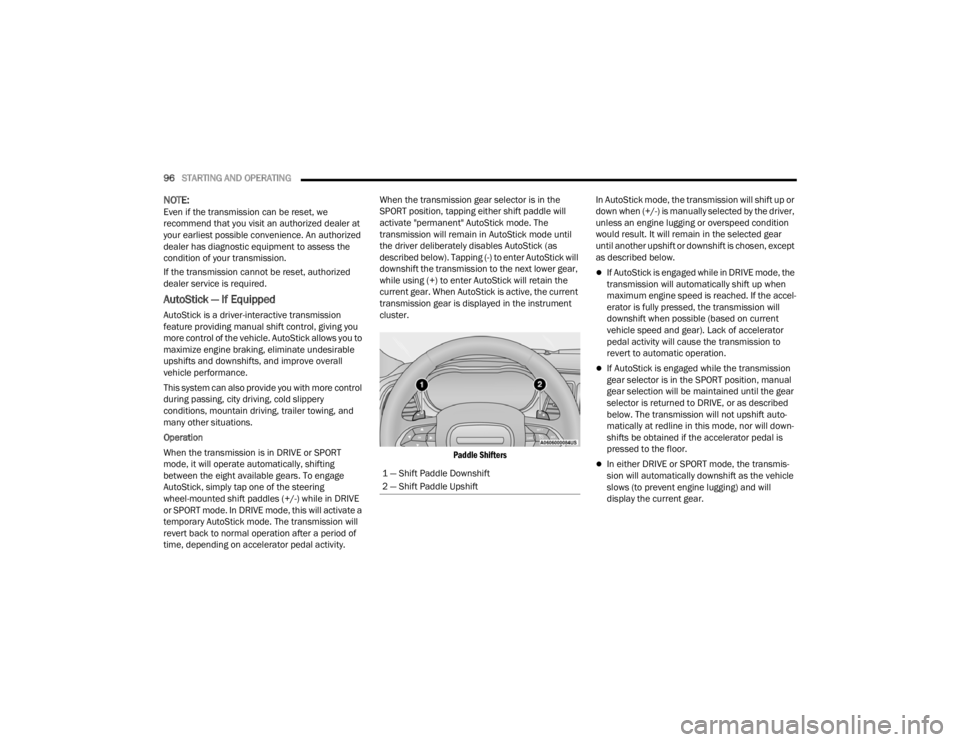
AutoStick, simply tap one of the steering
wheel-mounted shift paddles (+/-) while in DRIVE
or SPORT mode. In DRIVE mode, this will activate a
temporary AutoStick mode. The transmission will
revert back to normal operation after a period of
time, depending on accelerator pedal activity. When the transmission gear selector is in the
SPORT position, tapping either shift paddle will
activate "permanent" AutoStick mode. The
transmission will remain in AutoStick mode until
the driver deliberately disables AutoStick (as
described below). Tapping (-) to enter AutoStick will
downshift the transmission to the next lower gear,
while using (+) to enter AutoStick will retain the
current gear. When AutoStick is active, the current
transmission gear is displayed in the instrument
cluster.
Paddle Shifters
In AutoStick mode, the transmission will shift up or
down when (+/-) is manually selected by the driver,
unless an engine lugging or overspeed condition
would result. It will remain in the selected gear
until another upshift or downshift is chosen, except
as described below.
If AutoStick is engaged while in DRIVE mode, the
transmission will automatically shift up when
maximum engine speed is reached. If the accel
-
erator is fully pressed, the transmission will
downshift when possible (based on current
vehicle speed and gear). Lack of accelerator
pedal activity will cause the transmission to
revert to automatic operation.
If AutoStick is engaged while the transmission
gear selector is in the SPORT position, manual
gear selection will be maintained until the gear
selector is returned to DRIVE, or as described
below. The transmission will not upshift auto -
matically at redline in this mode, nor will down -
shifts be obtained if the accelerator pedal is
pressed to the floor.
In either DRIVE or SPORT mode, the transmis -
sion will automatically downshift as the vehicle
slows (to prevent engine lugging) and will
display the current gear.
1 — Shift Paddle Downshift
2 — Shift Paddle Upshift
22_LX_OM_EN_USC_t.book Page 96
Page 99 of 288
STARTING AND OPERATING97
The transmission will automatically downshift to
FIRST gear when coming to a stop. After a stop,
the driver should manually upshift (+) the trans -
mission as the vehicle is accelerated.
You can start out, from a stop, in FIRST or
SECOND gear. Tapping (+) at a stop will allow
starting in SECOND gear. Starting out in
SECOND gear can be helpful in snowy or icy
conditions.
If a requested downshift would cause the
engine to over-speed, that shift will not occur.
The system will ignore attempts to upshift at too
low of a vehicle speed.
Holding the (-) paddle pressed will downshift the
transmission to the lowest gear possible at the
current speed.
Transmission shifting will be more noticeable
when AutoStick is enabled.
The system may revert to automatic shift mode
if a fault or overheat condition is detected.
To disengage AutoStick mode, press and hold the
(+) shift paddle until "D" or "S" is once again
indicated in the instrument cluster. Shifting out of
SPORT mode will also disable AutoStick. You can
shift in or out of AutoStick mode at any time
without taking your foot off the accelerator pedal.
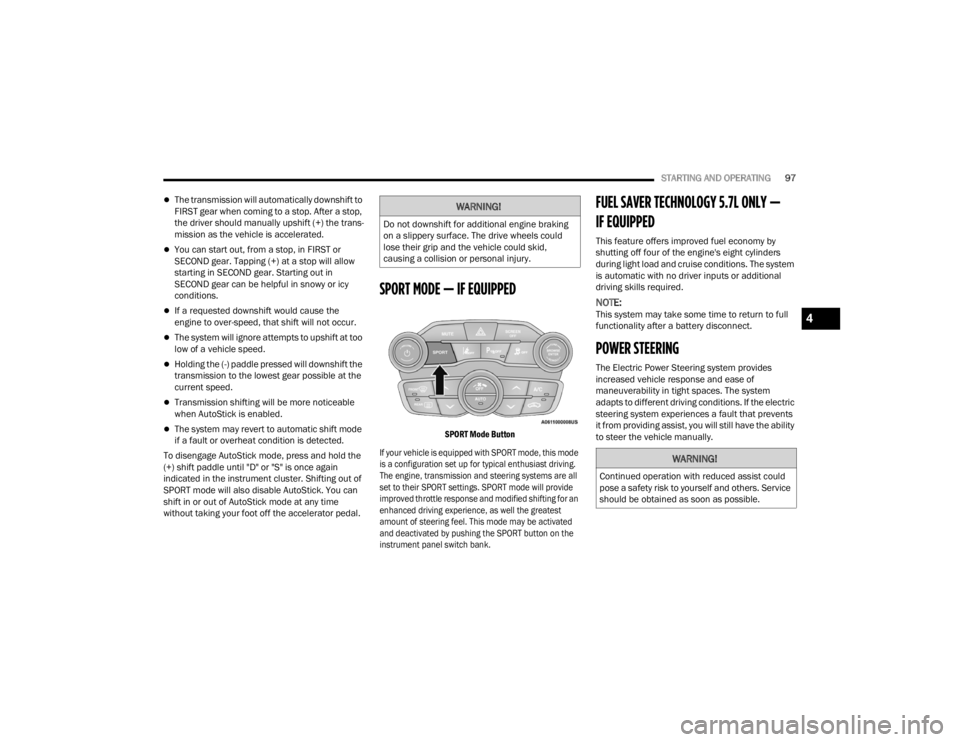
SPORT MODE — IF EQUIPPED
SPORT Mode Button
If your vehicle is equipped with SPORT mode, this mode
is a configuration set up for typical enthusiast driving.
The engine, transmission and steering systems are all
set to their SPORT settings. SPORT mode will provide
improved throttle response and modified shifting for an
enhanced driving experience, as well the greatest
amount of steering feel. This mode may be activated
and deactivated by pushing the SPORT button on the
instrument panel switch bank.
FUEL SAVER TECHNOLOGY 5.7L ONLY —
IF EQUIPPED
This feature offers improved fuel economy by
shutting off four of the engine's eight cylinders
during light load and cruise conditions. The system
is automatic with no driver inputs or additional
driving skills required.
NOTE:This system may take some time to return to full
functionality after a battery disconnect.
POWER STEERING
The Electric Power Steering system provides
increased vehicle response and ease of
maneuverability in tight spaces. The system
adapts to different driving conditions. If the electric
steering system experiences a fault that prevents
it from providing assist, you will still have the ability
to steer the vehicle manually.
WARNING!
Do not downshift for additional engine braking
on a slippery surface. The drive wheels could
lose their grip and the vehicle could skid,
causing a collision or personal injury.
WARNING!
Continued operation with reduced assist could
pose a safety risk to yourself and others. Service
should be obtained as soon as possible.
4
22_LX_OM_EN_USC_t.book Page 97