Side view CHRYSLER 300 2022 User Guide
[x] Cancel search | Manufacturer: CHRYSLER, Model Year: 2022, Model line: 300, Model: CHRYSLER 300 2022Pages: 288, PDF Size: 13.34 MB
Page 118 of 288
116STARTING AND OPERATING
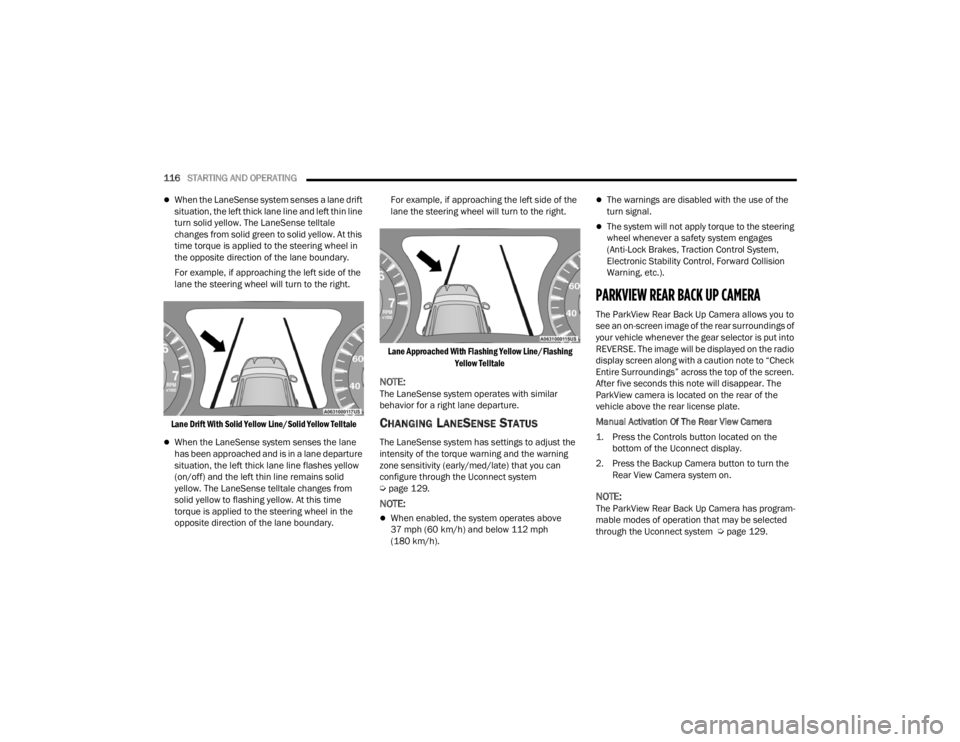
When the LaneSense system senses a lane drift
situation, the left thick lane line and left thin line
turn solid yellow. The LaneSense telltale
changes from solid green to solid yellow. At this
time torque is applied to the steering wheel in
the opposite direction of the lane boundary.
For example, if approaching the left side of the
lane the steering wheel will turn to the right.
Lane Drift With Solid Yellow Line/Solid Yellow Telltale
When the LaneSense system senses the lane
has been approached and is in a lane departure
situation, the left thick lane line flashes yellow
(on/off) and the left thin line remains solid
yellow. The LaneSense telltale changes from
solid yellow to flashing yellow. At this time
torque is applied to the steering wheel in the
opposite direction of the lane boundary. For example, if approaching the left side of the
lane the steering wheel will turn to the right.
Lane Approached With Flashing Yellow Line/Flashing Yellow Telltale
NOTE:The LaneSense system operates with similar
behavior for a right lane departure.
CHANGING LANESENSE STATUS
The LaneSense system has settings to adjust the
intensity of the torque warning and the warning
zone sensitivity (early/med/late) that you can
configure through the Uconnect system
Úpage 129.
NOTE:
When enabled, the system operates above
37 mph (60 km/h) and below 112 mph
(180 km/h).
The warnings are disabled with the use of the
turn signal.
The system will not apply torque to the steering
wheel whenever a safety system engages
(Anti-Lock Brakes, Traction Control System,
Electronic Stability Control, Forward Collision
Warning, etc.).
PARKVIEW REAR BACK UP CAMERA
The ParkView Rear Back Up Camera allows you to
see an on-screen image of the rear surroundings of
your vehicle whenever the gear selector is put into
REVERSE. The image will be displayed on the radio
display screen along with a caution note to “Check
Entire Surroundings” across the top of the screen.
After five seconds this note will disappear. The
ParkView camera is located on the rear of the
vehicle above the rear license plate.
Manual Activation Of The Rear View Camera
1. Press the Controls button located on the
bottom of the Uconnect display.
2. Press the Backup Camera button to turn the Rear View Camera system on.
NOTE:The ParkView Rear Back Up Camera has program -
mable modes of operation that may be selected
through the Uconnect system Ú page 129.
22_LX_OM_EN_USC_t.book Page 116
Page 122 of 288

120STARTING AND OPERATING
The best way to figure out the total weight of your
vehicle is to weigh it when it is fully loaded and
ready for operation. Weigh it on a commercial scale
to ensure that it is not over the GVWR.
Figure out the weight on the front and rear of the
vehicle separately. It is important that you
distribute the load evenly over the front and rear
axles.
Overloading can cause potential safety hazards
and shorten useful service life. Heavier axles or
suspension components do not necessarily
increase the vehicle's GVWR.
LOADING
To load your vehicle properly, first figure out its
empty weight, axle-by-axle and side-by-side. Store
heavier items down low and be sure you distribute
their weight as evenly as possible. Stow all loose
items securely before driving. If weighing the
loaded vehicle shows that you have exceeded
either GAWR, but the total load is within the
specified GVWR, you must redistribute the weight.
Improper weight distribution can have an adverse
effect on the way your vehicle steers and handles
and the way the brakes operate.
NOTE:
Refer to the “Vehicle Certification Label” affixed
to the rear of the driver's door for your vehicle's
GVWR and GAWRs Ú page 119.
Refer to the “Tire Placard” for your vehicle's
proper tire pressure.
TRAILER TOWING
In this section you will find safety tips and
information on limits to the type of towing you can
reasonably do with your vehicle. Before towing a
trailer, carefully review this information to tow your
load as efficiently and safely as possible.
To maintain the New Vehicle Limited Warranty
coverage, follow the requirements and
recommendations in this manual concerning
vehicles used for trailer towing.
COMMON TOWING DEFINITIONS
The following trailer towing related definitions will
assist you in understanding the following
information:
Gross Vehicle Weight Rating (GVWR)
The GVWR is the total allowable weight of your
vehicle. This includes driver, passengers, cargo
and tongue weight. The total load must be limited
so that you do not exceed the GVWR Ú page 120.
Gross Trailer Weight (GTW)
The GTW is the weight of the trailer plus the weight
of all cargo, consumables, and equipment
(permanent or temporary) loaded in or on the
trailer in its "loaded and ready for operation"
condition.
The recommended way to measure GTW is to put
your fully loaded trailer on a vehicle scale. The
entire weight of the trailer must be supported by
the scale.
22_LX_OM_EN_USC_t.book Page 120
Page 153 of 288
SAFETY151
Ready Alert Braking (RAB)
RAB may reduce the time required to reach full
braking during emergency braking situations. It
anticipates when an emergency braking situation
may occur by monitoring how fast the throttle is
released by the driver. The Electronic Brake
Controller (EBC) will prepare the brake system for
a panic stop.
Traction Control System (TCS)
TCS monitors the amount of wheel spin of each of
the driven wheels. If wheel spin is detected, the
TCS may apply brake pressure to the spinning
wheel(s) and/or reduce engine power to provide
enhanced acceleration and stability. A feature of
the TCS, Brake Limited Differential (BLD) functions
similarly to a limited slip differential and controls
the wheel spin across a driven axle. If one wheel on
a driven axle is spinning faster than the other, the
system will apply the brake of the spinning wheel.
This will allow more engine torque to be applied to
the wheel that is not spinning. BLD may remain
enabled even if TCS and Electronic Stability Control
(ESC) are in reduced modes.
AUXILIARY DRIVING SYSTEMS
BLIND SPOT MONITORING (BS M) —
I
F EQUIPPED
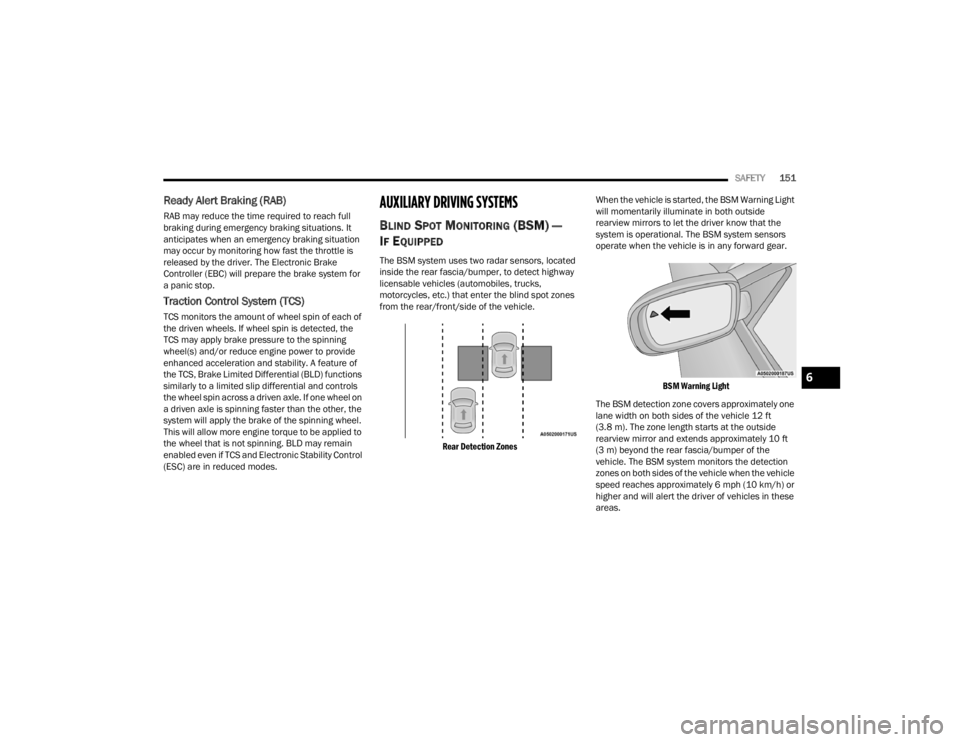
The BSM system uses two radar sensors, located
inside the rear fascia/bumper, to detect highway
licensable vehicles (automobiles, trucks,
motorcycles, etc.) that enter the blind spot zones
from the rear/front/side of the vehicle.
Rear Detection Zones
When the vehicle is started, the BSM Warning Light
will momentarily illuminate in both outside
rearview mirrors to let the driver know that the
system is operational. The BSM system sensors
operate when the vehicle is in any forward gear.
BSM Warning Light
The BSM detection zone covers approximately one
lane width on both sides of the vehicle 12 ft
(3.8 m). The zone length starts at the outside
rearview mirror and extends approximately 10 ft
(3 m) beyond the rear fascia/bumper of the
vehicle. The BSM system monitors the detection
zones on both sides of the vehicle when the vehicle
speed reaches approximately 6 mph (10 km/h) or
higher and will alert the driver of vehicles in these
areas.
6
22_LX_OM_EN_USC_t.book Page 151
Page 156 of 288
154SAFETY
Rear Cross Path (RCP) Detection —
If Equipped
RCP is intended to aid the driver when backing out
of parking spaces where their vision of oncoming
vehicles may be blocked. Proceed slowly and
cautiously out of the parking space until the rear
end of the vehicle is exposed. The RCP system will
then have a clear view of the cross traffic and if an
oncoming vehicle is detected, alert the driver.
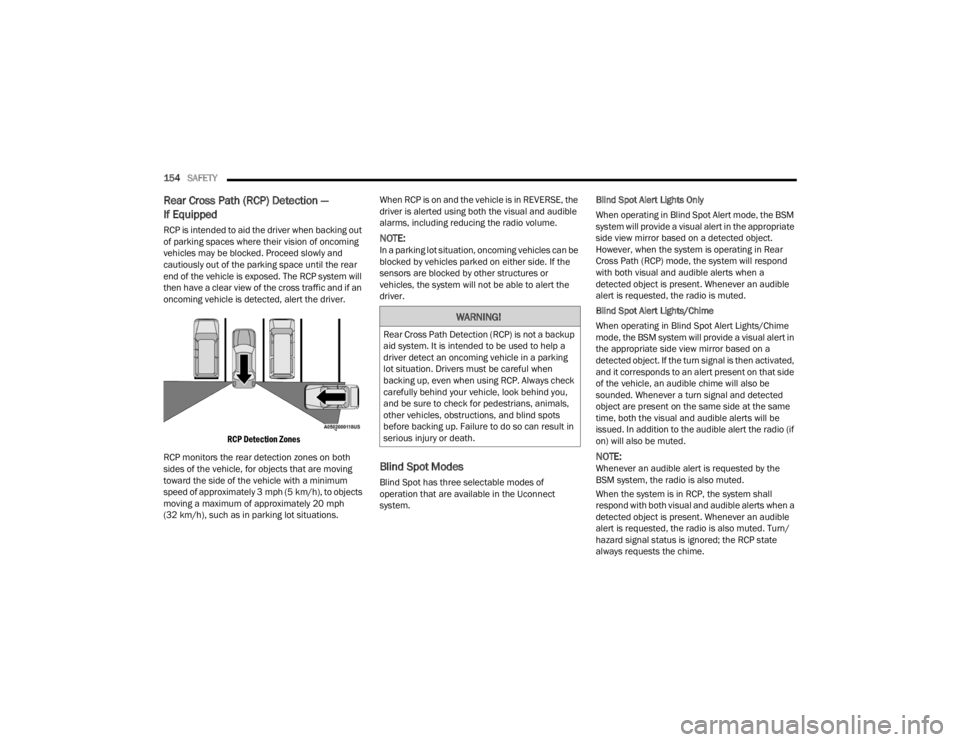
RCP Detection Zones
RCP monitors the rear detection zones on both
sides of the vehicle, for objects that are moving
toward the side of the vehicle with a minimum
speed of approximately 3 mph (5 km/h), to objects
moving a maximum of approximately 20 mph
(32 km/h), such as in parking lot situations. When RCP is on and the vehicle is in REVERSE, the
driver is alerted using both the visual and audible
alarms, including reducing the radio volume.NOTE:In a parking lot situation, oncoming vehicles can be
blocked by vehicles parked on either side. If the
sensors are blocked by other structures or
vehicles, the system will not be able to alert the
driver.
Blind Spot Modes
Blind Spot has three selectable modes of
operation that are available in the Uconnect
system.
Blind Spot Alert Lights Only
When operating in Blind Spot Alert mode, the BSM
system will provide a visual alert in the appropriate
side view mirror based on a detected object.
However, when the system is operating in Rear
Cross Path (RCP) mode, the system will respond
with both visual and audible alerts when a
detected object is present. Whenever an audible
alert is requested, the radio is muted.
Blind Spot Alert Lights/Chime
When operating in Blind Spot Alert Lights/Chime
mode, the BSM system will provide a visual alert in
the appropriate side view mirror based on a
detected object. If the turn signal is then activated,
and it corresponds to an alert present on that side
of the vehicle, an audible chime will also be
sounded. Whenever a turn signal and detected
object are present on the same side at the same
time, both the visual and audible alerts will be
issued. In addition to the audible alert the radio (if
on) will also be muted.
NOTE:Whenever an audible alert is requested by the
BSM system, the radio is also muted.
When the system is in RCP, the system shall
respond with both visual and audible alerts when a
detected object is present. Whenever an audible
alert is requested, the radio is also muted. Turn/
hazard signal status is ignored; the RCP state
always requests the chime.
WARNING!
Rear Cross Path Detection (RCP) is not a backup
aid system. It is intended to be used to help a
driver detect an oncoming vehicle in a parking
lot situation. Drivers must be careful when
backing up, even when using RCP. Always check
carefully behind your vehicle, look behind you,
and be sure to check for pedestrians, animals,
other vehicles, obstructions, and blind spots
before backing up. Failure to do so can result in
serious injury or death.
22_LX_OM_EN_USC_t.book Page 154
Page 196 of 288
194IN CASE OF EMERGENCY
ASSIST Call
The ASSIST Button is used to automatically
connect you to any one of the following support
centers:
Roadside Assistance – If you get a flat tire, or
need a tow, just push the ASSIST button and you
will be connected to a representative for assis-
tance. Roadside Assistance will know what
vehicle you’re driving and its location. Additional
fees may apply for roadside Assistance.
SiriusXM Guardian™ Customer Care – In-vehicle
support for SiriusXM Guardian™.
Vehicle Customer Care – Total support for all
other vehicle issues.
Uconnect Customer Care - Total support for
Radio, Phone and NAV issues.
SOS Call
1. Push the SOS Call button on the Rearview Mirror.
NOTE:In case the SOS Call button is pushed in error,
there will be a 10 second delay before the SOS Call
system initiates a call to a SOS operator. To cancel
the SOS Call connection, push the SOS call button
on the Rearview Mirror or press the cancellation
button on the Device Screen. Termination of the
SOS Call will turn off the green LED light on the
Rearview Mirror. 2. The LED light located between the ASSIST and
SOS buttons on the Rearview Mirror will turn
green once a connection to a SOS operator has
been made.
3. Once a connection between the vehicle and a SOS operator is made, the SOS Call system
may transmit the following important vehicle
information to a SOS operator:
Indication that the occupant placed a SOS
Call.
The vehicle brand.
The last known GPS coordinates of the
vehicle.
4. You should be able to speak with the SOS operator through the vehicle audio system to
determine if additional help is needed.
NOTE:
Your vehicle may be transmitting data as
authorized by the subscriber.
Once a connection is made between the
vehicle’s SOS Call system and the SOS oper -
ator, the SOS operator may be able to open
a voice connection with the vehicle to deter -
mine if additional help is needed. Once the
SOS operator opens a voice connection with
the vehicle’s SOS Call system, the operator
should be able to speak with you or other
vehicle occupants and hear sounds occur -
ring in the vehicle. The vehicle’s SOS Call
system will attempt to remain connected
with the SOS operator until the SOS oper -
ator terminates the connection.
5. The SOS operator may attempt to contact appropriate emergency responders and
provide them with important vehicle
information and GPS coordinates.
WARNING!
ALWAYS obey traffic laws and pay attention to
the road. ALWAYS drive safely with your hands on
the steering wheel. You have full responsibility
and assume all risks related to the use of the
Uconnect and SiriusXM Guardian™ features and
applications in this vehicle. Only use Uconnect
features and SiriusXM Guardian™ services when
it is safe to do so. Failure to do so may result in
an accident involving serious injury or death.
22_LX_OM_EN_USC_t.book Page 194
Page 204 of 288
202IN CASE OF EMERGENCY
NOTE:The remote battery posts are viewed by standing
on the right side of the vehicle looking over the
fender. The positive battery post may be covered
with a protective cap. Lift up on the cap to gain
access to the positive battery post. Do not jump off
fuses. Only jump directly off positive post which
has a positive (+) symbol on or around the post.
See below steps to prepare for jump starting:
1. Apply the parking brake, shift the automatic transmission into PARK and cycle the ignition
to OFF.
2. Turn off the heater, radio, and all electrical accessories.
3. Pull upward and remove the protective cover over the remote positive (+) battery post.
4. If using another vehicle to jump start the battery, park the vehicle within the jumper
cables reach, set the parking brake, and make
sure the ignition is OFF.
JUMP STARTING PROCEDURE
NOTE:Make sure at all times that unused ends of jumper
cables are not contacting each other or either
vehicle while making connections.
Connecting The Jumper Cables
1. Connect the positive
(+) end of the jumper
cable to the remote positive (+)
post of the
discharged vehicle.
2. Connect the opposite end of the positive (+)
jumper cable to the positive (+) post of the
booster battery.
3. Connect the negative (-) end of the jumper
cable to the negative (-) post of the booster
battery.
4. Connect the opposite end of the negative (-)
jumper cable to the remote negative (-) post
(exposed metallic/unpainted post of the
discharge vehicle) located directly behind the
under-hood fuse box.
WARNING!
Do not allow vehicles to touch each other as this
could establish a ground connection and
personal injury could result.
WARNING!
Take care to avoid the radiator cooling fan
whenever the hood is raised. It can start
anytime the ignition switch is ON. You can be
injured by moving fan blades.
Remove any metal jewelry such as rings,
watch bands and bracelets that could make
an inadvertent electrical contact. You could be
seriously injured.
Batteries contain sulfuric acid that can burn
your skin or eyes and generate hydrogen gas
which is flammable and explosive. Keep open
flames or sparks away from the battery.
WARNING!
Failure to follow this jump starting procedure
could result in personal injury or property
damage due to battery explosion.
CAUTION!
Failure to follow these procedures could result in
damage to the charging system of the booster
vehicle or the discharged vehicle.
WARNING!
Do not connect the jumper cable to the negative
(-) post of the discharged battery. The resulting
electrical spark could cause the battery to
explode and could result in personal injury.
22_LX_OM_EN_USC_t.book Page 202
Page 239 of 288

SERVICING AND MAINTENANCE237
F55 ––Spare
F56 ––Spare
F57 ––Spare
F58 –10 Amp RedAirbag Module
F59 –20 Amp YellowAdjustable Pedals – Police
F60 ––Spare
F61 ––Spare
F62 ––Spare
F63 ––Spare
F64 –25 Amp BreakerRear Windows (Charger/300)
F65 –10 Amp RedAirbag Module
F66 ––Spare
F67 –10 Amp Red
Rain & Light Sensor */ Sunroof */
Inside RearView Mirror / Police Run Acc
F68 –10 Amp RedRear USB Timer / Rear Sunshade *
F69 ––Spare
F70 ––Spare
Cavity Cartridge Fuse Mini-FuseDescription
* If Equipped
8
22_LX_OM_EN_USC_t.book Page 237
Page 264 of 288

262SERVICING AND MAINTENANCE
PLASTIC AND COATED PARTS
Use Mopar® Total Clean to clean vinyl upholstery.
Cleaning Plastic Instrument Cluster
Lenses
The lenses in front of the instruments in this
vehicle are molded in clear plastic. When cleaning
the lenses, care must be taken to avoid scratching
the plastic.
Clean with a wet soft cloth. A mild soap solution
may be used, but do not use high alcohol content
or abrasive cleaners. If soap is used, wipe clean
with a clean damp cloth. Dry with a soft cloth.
LEATHER SURFACES
Mopar® Total Clean is specifically recommended
for leather upholstery.
Your leather upholstery can be best preserved by
regular cleaning with a damp soft cloth. Small
particles of dirt can act as an abrasive and damage
the leather upholstery and should be removed
promptly with a damp cloth. Stubborn soils can be
removed easily with a soft cloth and Mopar® Total
Clean. Care should be taken to avoid soaking your
leather upholstery with any liquid. Please do not
use polishes, oils, cleaning fluids, solvents,
detergents, or ammonia-based cleaners to clean
your leather upholstery.
NOTE:If equipped with light colored leather, it tends to
show any foreign material, dirt, and fabric dye
transfer more so than darker colors. The leather is
designed for easy cleaning, and FCA recommends
Mopar® total care leather cleaner applied on a
cloth to clean the leather seats as needed.
GLASS SURFACES
All glass surfaces should be cleaned on a regular
basis with Mopar® Glass Cleaner, or any
commercial household-type glass cleaner. Never
use an abrasive type cleaner. Use caution when
cleaning the inside rear window equipped with
electric defrosters or windows equipped with radio
antennas. Do not use scrapers or other sharp
instruments that may scratch the elements.
When cleaning the rear view mirror, spray cleaner
on the towel or cloth that you are using. Do not
spray cleaner directly on the mirror.
CAUTION!
Direct contact of air fresheners, insect repel -
lents, suntan lotions, or hand sanitizers to the
plastic, painted, or decorated surfaces of the
interior may cause permanent damage. Wipe
away immediately.
Damage caused by these type of products
may not be covered by your New Vehicle
Limited Warranty.
CAUTION!
Do not use Alcohol and Alcohol-based and/or
Ketone based cleaning products to clean leather
seats, as damage to the seat may result.
22_LX_OM_EN_USC_t.book Page 262
Page 279 of 288

277
Folding Rear Seats
.......................................... 30Forward Collision Warning............................. 155Four-Way Hazard Flasher............................... 193Freeing A Stuck Vehicle................................. 206Fuel............................................................... 264Additives................................................... 265Clean Air.................................................... 265Ethanol...................................................... 265Gasoline.................................................... 264Gauge.......................................................... 80Materials Added........................................ 265Methanol................................................... 265Octane Rating................................. 264, 268Requirements........................................... 264Specifications............................................ 268Tank Capacity............................................ 267Fuses............................................................. 228
G
Garage Door Opener (HomeLink).................... 40Gasoline, Clean Air........................................ 265Gasoline, Reformulated................................. 265Gauges Fuel............................................................. 80Gear Ranges.................................................... 93Glass Cleaning............................................... 262Gross Axle Weight Rating..................... 119, 121Gross Vehicle Weight Rating................ 119, 120GVWR............................................................ 119
H
HazardDriving Through Flowing, Rising, Or Shallow Standing Water
.................................... 127Hazard Warning Flashers.............................. 193Head Restraints........................................ 35, 36Head Rests............................................... 35, 36Headlights.................................................... 240Automatic.................................................... 46Cleaning................................................... 260High Beam/Low Beam Select Switch.......... 45Lights On Reminder..................................... 47On With Wipers............................................ 46Passing........................................................ 46Switch.......................................................... 44Time Delay................................................... 46Washers................................................... 216Heated Mirrors................................................. 39Heated Seats................................................... 33Heater, Engine Block....................................... 89
High Beam/Low Beam Select (Dimmer) Switch... 45
Hill Start Assist.............................................. 150HitchesTrailer Towing........................................... 122Holder, Coin..................................................... 57HomeLink (Garage Door Opener)..................... 40Hood Prop........................................................ 65Hood Release.................................................. 65
I
Ignition.............................................................15Switch..........................................................15Inside Rearview Mirror........................... 37, 193Instrument Cluster....................................68, 70Descriptions.................................................83Display.................................................. 70, 73Instrument Panel Lens Cleaning................... 262Interior Appearance Care.............................. 261Interior Lights...................................................48
J
Jack Location................................................ 198Jack Operation.............................................. 198Jacking Instructions...................................... 198Jump Starting................................................ 201
K
Key FobArm The System
...........................................19Unlatch The Trunk.......................................13Key Fob Battery Service
(Remote Keyless Entry)....................................13Keyless Enter 'n Go™................................ 23, 86Enter The Trunk...........................................13Passive Entry...............................................23Passive Entry Programming.........................23Keys.................................................................12Replacement...............................................14
11
22_LX_OM_EN_USC_t.book Page 277
Page 280 of 288

278
L
Lane Change And Turn Signals
........................ 47Lane Change Assist......................................... 47LaneSense.................................................... 114Lap/Shoulder Belts....................................... 162Latches.......................................................... 191Hood........................................................... 65Lead Free Gasoline........................................ 264Leaks, Fluid................................................... 191Life Of Tires................................................... 252Light Bulbs........................................... 191, 238Lights............................................................. 191Air Bag.......................................77, 168, 190Automatic Headlights.................................. 46Brake Assist Warning................................ 149Brake Warning................................... 77, 263Bulb Replacement..................................... 238Cruise................................................... 82, 83Daytime Running......................................... 45Dimmer Switch, Headlight........................... 45Engine Temperature Warning...................... 78Exterior...................................................... 191Fog.............................................................. 47Hazard Warning Flasher............................ 193Headlight Switch......................................... 44Headlights................................... 44, 47, 240Headlights On With Wipers.......................... 46
High Beam................................................... 45High Beam/Low Beam Select...................... 45Instrument Cluster....................................... 44Intensity Control.......................................... 49Interior......................................................... 48License..................................................... 242Lights On Reminder..................................... 47Malfunction Indicator (Check Engine).......... 80Map............................................................. 48Park...................................................... 46, 83Passing........................................................ 46Reading....................................................... 48Seat Belt Reminder..................................... 78Security Alarm............................................. 79Service..................................................... 238Traction Control........................................ 149Turn Signals.........................45, 47, 83, 191Vanity Mirror................................................ 37Warning Instrument Cluster Descriptions..................................... 78, 83Load Shed Battery Saver On............................ 75Load Shed Electrical Load Reduction.............. 75Load Shed Intelligent Battery Sensor............... 75Loading Vehicle................................... 119, 120Capacities................................................. 120Tires......................................................... 247
LocksAuto Unlock.................................................25Automatic Door............................................25Child Protection...........................................25Power Door..................................................22Low Tire Pressure System............................. 157Lubrication, Body.......................................... 221Lug Nuts........................................................ 263
M
Maintenance Free Battery............................ 216Maintenance Schedule........................ 210, 211Malfunction Indicator Light (Check Engine).....80ManualPark Release............................................ 205Service...................................................... 273Media Hub.......................................................58Memory Feature (Memory Seats).....................30Memory Seat....................................................30Memory Seats And Radio.................................30Methanol....................................................... 265Mirrors.............................................................37Electric Powered..........................................38Electric Remote...........................................38Heated.........................................................39Outside........................................................38Rearview............................................ 37, 193Vanity...........................................................37
22_LX_OM_EN_USC_t.book Page 278