mirror CHRYSLER 300 2022 Owners Manual
[x] Cancel search | Manufacturer: CHRYSLER, Model Year: 2022, Model line: 300, Model: CHRYSLER 300 2022Pages: 288, PDF Size: 13.34 MB
Page 4 of 288

2
INTRODUCTION
SYMBOLS KEY ...........................................................8
VEHICLE MODIFICATIONS/ALTERATIONS .............8
SYMBOL GLOSSARY.................................................8
GETTING TO KNOW YOUR VEHICLE
KEYS ....................................................................... 12 Key Fob .............................................................12
SENTRY KEY ........................................................... 15
IGNITION SWITCH .................................................. 15
Keyless Enter ‘n Go™ Ignition .........................15
REMOTE START — IF EQUIPPED .......................... 17
How To Use Remote Start ................................17
To Exit Remote Start Mode .............................18
Remote Start Front Defrost Activation —
If Equipped........................................................18
Remote Start Comfort Systems —
If Equipped........................................................18
Remote Start Windshield Wiper De–Icer
Activation — If Equipped ..................................19
Remote Start Cancel Message ........................19
VEHICLE SECURITY SYSTEM — IF EQUIPPED .... 19
To Arm The System ..........................................19
To Disarm The System .....................................19
Rearming Of The System .................................20
Security System Manual Override ...................20
Tamper Alert .....................................................20 DELUXE VEHICLE SECURITY SYSTEM —
IF EQUIPPED .......................................................... 20
To Arm The System ..........................................20
To Disarm The System .....................................21
Security System Manual Override ...................21
DOORS ....................................................................22
Manual Door Locks ..........................................22
Power Door Locks ...........................................22
Keyless Enter ‘n Go™ — Passive Entry ...........23
Automatic Unlock Doors On Exit......................25
Automatic Door Locks —If Equipped ...............25
Child-Protection Door Lock System —
Rear Doors ........................................................25
STEERING WHEEL ..................................................26
Manual Tilt/Telescoping Steering Column —
If Equipped........................................................26
Power Tilt/Telescoping Steering Column —
If Equipped .......................................................26
Heated Steering Wheel — If Equipped ............26
UCONNECT VOICE RECOGNITION QUICK TIPS ...27
Introducing Uconnect .......................................27
Basic Voice Commands ...................................27
Get Started .......................................................27
Additional Information .....................................28 DRIVER MEMORY SETTINGS — IF EQUIPPED .... 28
Programming The Memory Feature ................29
Linking And Unlinking The Key
Fob To Memory.................................................29
Memory Position Recall ................................... 29
SEATS ..................................................................... 30
Manual Adjustment (Rear Seats).................... 30
Power Adjustment (Front Seats) .................... 31
Heated Seats — If Equipped ........................... 33
Front Ventilated Seats — If Equipped ............ 35
Head Restraints ............................................... 35
MIRRORS ............................................................... 37
Inside Rearview Mirror..................................... 37
Illuminated Vanity Mirrors ............................... 37
Outside Mirrors.................................................38
Driver's Outside Automatic Dimming Mirror —
If Equipped .......................................................38
Outside Mirrors With Turn Signal And
Approach Lighting —If Equipped ..................... 38
Power Mirrors ................................................... 38
Power Folding Outside Mirrors — If Equipped... 39
Heated Mirrors — If Equipped ......................... 39
Tilt Side Mirrors In Reverse — If Equipped ..... 39
22_LX_OM_EN_USC_t.book Page 2
Page 7 of 288

5
RECREATIONAL TOWING
(BEHIND MOTORHOME) ..................................... 126
DRIVING TIPS ....................................................... 126 Driving On Slippery Surfaces ........................ 126
Driving Through Water ................................. 127
MULTIMEDIA
UCONNECT SYSTEMS ......................................... 128
CYBERSECURITY ................................................. 128
UCONNECT SETTINGS ........................................ 129Customer Programmable Features —
Uconnect 4C/4C NAV Settings .................... 129
RADIO OPERATION AND MOBILE PHONES...... 144
Regulatory And Safety Information .............. 144
SAFETY
SAFETY FEATURES .............................................. 145 Anti-Lock Brake System (ABS) ..................... 145
Electronic Brake Control (EBC) System ....... 146
AUXILIARY DRIVING SYSTEMS .......................... 151
Blind Spot Monitoring (BSM) —
If Equipped..................................................... 151
Forward Collision Warning (FCW) With Mitigation
Operation —
If Equipped..................................................... 155
Tire Pressure Monitoring System (TPMS) .... 157 OCCUPANT RESTRAINT SYSTEMS ................... 160
Occupant Restraint Systems Features ....... 160
Important Safety Precautions ...................... 160Seat Belt Systems ........................................ 161Supplemental Restraint Systems (SRS) ...... 167Child Restraints ............................................. 176
SAFETY TIPS ....................................................... 189
Transporting Passengers .............................. 189Transporting Pets ......................................... 189
Safety Checks You Should Make Inside
The Vehicle ................................................... 189
Periodic Safety Checks You Should Make
Outside The Vehicle ...................................... 191
Exhaust Gas................................................... 191
Carbon Monoxide Warnings ......................... 192IN CASE OF EMERGENCY
HAZARD WARNING FLASHERS ........................ 193
ASSIST AND SOS MIRROR — IF EQUIPPED ..... 193
JACKING AND TIRE CHANGING ......................... 197 Preparations For Jacking ............................. 197
Jack Location/Spare Tire Stowage .............. 198Jacking And Changing A Tire ....................... 198
JUMP STARTING ................................................. 201
Preparations For Jump Start ........................ 201
Jump Starting Procedure .............................. 202 REFUELING IN AN EMERGENCY –
IF EQUIPPED ........................................................ 203
IF YOUR ENGINE OVERHEATS ........................... 204
MANUAL PARK RELEASE .................................. 205
FREEING A STUCK VEHICLE ............................... 206
TOWING A DISABLED VEHICLE .......................... 208 All Wheel Drive (AWD) Models...................... 209
Rear Wheel Drive (RWD) Models ................. 209
ENHANCED ACCIDENT RESPONSE SYSTEM
(EARS) .................................................................. 209
EVENT DATA RECORDER (EDR) ......................... 209
SERVICING AND MAINTENANCE
SCHEDULED SERVICING .................................... 210
Maintenance Plan ......................................... 211
ENGINE COMPARTMENT .................................... 214
3.6L Engine .................................................. 2145.7L Engine ................................................... 215
Checking Oil Level ........................................ 216
Adding Washer Fluid ..................................... 216Maintenance-Free Battery ........................... 216
Pressure Washing ......................................... 217
22_LX_OM_EN_USC_t.book Page 5
Page 15 of 288
GETTING TO KNOW YOUR VEHICLE13
All doors can be programmed to unlock on the first
push of the unlock button through Uconnect
Settings Ú page 129.
NOTE:When you use the key fob to open any door, the
courtesy lights, overhead lights, and approach
lighting in the outside mirrors (if equipped) will turn
on.
Key Left Vehicle Feature
If a valid key fob is no longer detected inside the
vehicle while the vehicle’s ignition system is in the
ON/RUN or START position, the message “Key Left
Vehicle” will be shown in the instrument cluster
display along with an interior chime. An exterior
audible and visual alert will also be activated to
warn the driver.
The vehicle’s horn will rapidly chirp three times
along with a single flash of the vehicle’s exterior
lights.
NOTE:
The doors have to be open and then closed in
order for the vehicle to check for the presence of
a key fob; the Key Left Vehicle feature will not
activate until all of the doors are closed.
These alerts will not be activated in situations
where the vehicle’s engine is left running with
the key fob inside.
To Unlatch The Trunk
Push the trunk button on the key fob two times
within five seconds to unlatch the trunk.
Replacing The Battery In The Key Fob
The recommended replacement battery is one
CR2032 battery.
NOTE:
Customers are recommended to use a battery
obtained from Mopar®. Aftermarket coin
battery dimensions may not meet the original
OEM coin battery dimensions.
Perchlorate Material — special handling may
apply. See www.dtsc.ca.gov/hazard -
ouswaste/perchlorate for further information.
Do not touch the battery terminals that are on
the back housing or the printed circuit board.
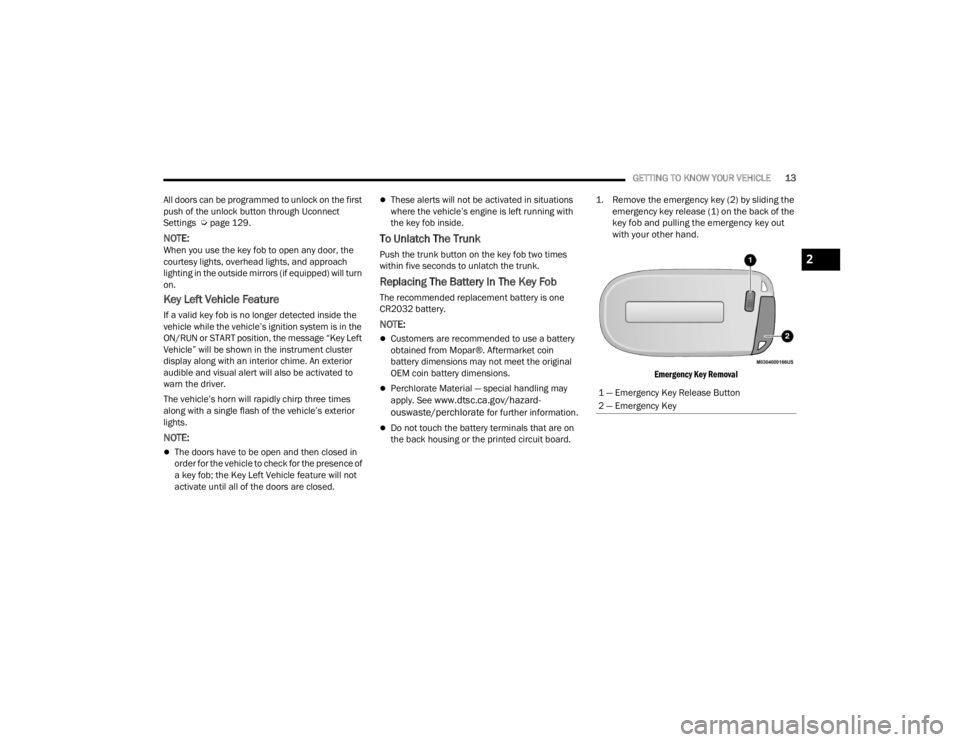
1. Remove the emergency key (2) by sliding the
emergency key release (1) on the back of the
key fob and pulling the emergency key out
with your other hand.
Emergency Key Removal
1 — Emergency Key Release Button
2 — Emergency Key
2
22_LX_OM_EN_USC_t.book Page 13
Page 30 of 288
28GETTING TO KNOW YOUR VEHICLE
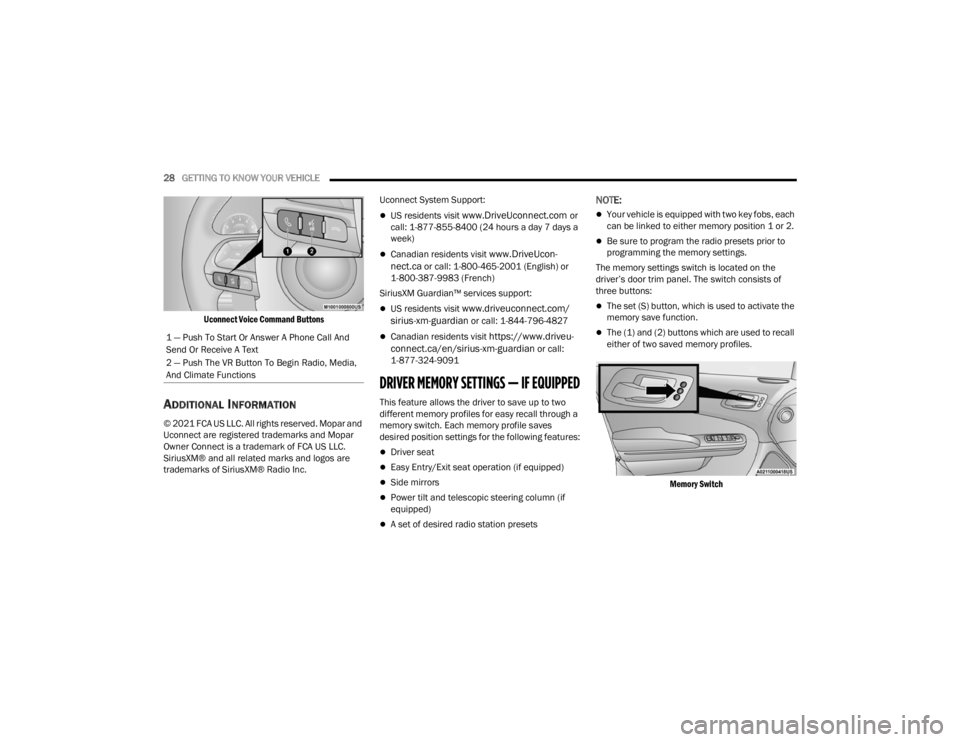
Uconnect Voice Command Buttons
ADDITIONAL INFORMATION
© 2021 FCA US LLC. All rights reserved. Mopar and
Uconnect are registered trademarks and Mopar
Owner Connect is a trademark of FCA US LLC.
SiriusXM® and all related marks and logos are
trademarks of SiriusXM® Radio Inc. Uconnect System Support:
US residents visit www.DriveUconnect.com or
call: 1-877-855-8400 (24 hours a day 7 days a
week)
Canadian residents visit www.DriveUcon -
nect.ca or call: 1-800-465-2001 (English) or
1-800-387-9983 (French)
SiriusXM Guardian™ services support:
US residents visit www.driveuconnect.com/
sirius-xm-guardian or call: 1-844-796-4827
Canadian residents visit https://www.driveu -
connect.ca/en/sirius-xm-guardian or call:
1-877-324-9091
DRIVER MEMORY SETTINGS — IF EQUIPPED
This feature allows the driver to save up to two
different memory profiles for easy recall through a
memory switch. Each memory profile saves
desired position settings for the following features:
Driver seat
Easy Entry/Exit seat operation (if equipped)
Side mirrors
Power tilt and telescopic steering column (if
equipped)
A set of desired radio station presets
NOTE:
Your vehicle is equipped with two key fobs, each
can be linked to either memory position 1 or 2.
Be sure to program the radio presets prior to
programming the memory settings.
The memory settings switch is located on the
driver’s door trim panel. The switch consists of
three buttons:
The set (S) button, which is used to activate the
memory save function.
The (1) and (2) buttons which are used to recall
either of two saved memory profiles.
Memory Switch
1 — Push To Start Or Answer A Phone Call And
Send Or Receive A Text
2 — Push The VR Button To Begin Radio, Media,
And Climate Functions
22_LX_OM_EN_USC_t.book Page 28
Page 31 of 288

GETTING TO KNOW YOUR VEHICLE29
PROGRAMMING THE MEMORY FEATURE
To create a new memory profile, perform the
following:
NOTE:Saving a new memory profile will erase the
selected profile from memory.
1. Place the vehicle’s ignition in the ON/RUN
position (do not start the engine).
2. Adjust all memory profile settings to desired preferences (i.e., seat, side mirror, power tilt
and telescopic steering column [if equipped],
and radio station presets).
3. Push and release the set (S) button on the memory switch, and then push the desired
memory button (1 or 2) within five seconds.
The instrument cluster display will display
which memory position has been set.
NOTE:Memory profiles can be set without the vehicle in
PARK, but the vehicle must be in PARK to recall a
memory profile.
LINKING AND UNLINKING THE KEY FOB
T
O MEMORY
Your key fobs can be programmed to recall one of
two saved memory profiles.
NOTE:
Before programming your key fobs you must select
the “Memory Linked To Fob” feature through the
Uconnect system Ú page 129.
To program your key fobs, perform the following:
1. Place the vehicle’s ignition in the OFF position.
2. Select a desired memory profile, 1 or 2.
3. Once the profile has been recalled, push and release the set (S) button on the memory
switch.
4. Within five seconds, push and release button (1) or (2) accordingly. “Memory Profile Set” (1
or 2) will display in the instrument cluster.
5. Push and release the lock button on the key fob within 10 seconds.
NOTE:Your key fob can be unlinked from your memory
settings by pushing the set (S) button, followed by
pushing the unlock button on the key fob within 10
seconds.
MEMORY POSITION RECALL
NOTE:If a recall is attempted when the vehicle is not in
PARK, a message will be displayed in the
instrument cluster display.
To recall the memory settings for driver one or two,
push the desired memory button number (1 or 2)
or the unlock button on the key fob linked to the
desired memory position.
A recall can be canceled by pushing any of the
memory buttons (S, 1, or 2) during a recall. When
a recall is canceled, the driver seat will stop
moving. A delay of one second will occur before
another recall can be selected.
2
22_LX_OM_EN_USC_t.book Page 29
Page 39 of 288
GETTING TO KNOW YOUR VEHICLE37
MIRRORS
INSIDE REARVIEW MIRROR
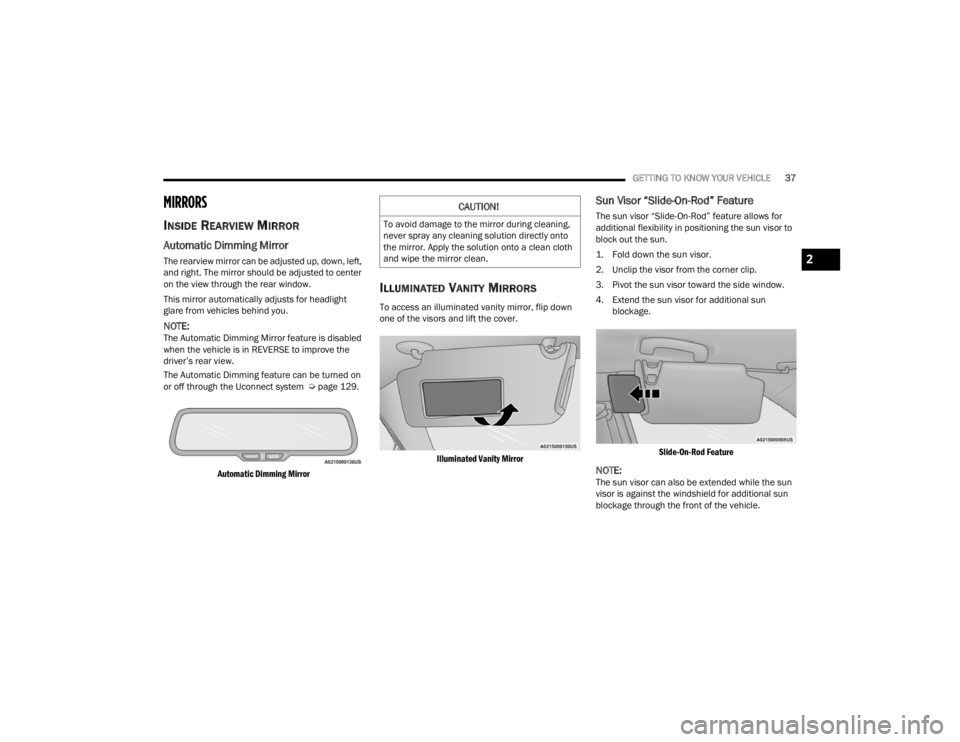
Automatic Dimming Mirror
The rearview mirror can be adjusted up, down, left,
and right. The mirror should be adjusted to center
on the view through the rear window.
This mirror automatically adjusts for headlight
glare from vehicles behind you.
NOTE:The Automatic Dimming Mirror feature is disabled
when the vehicle is in REVERSE to improve the
driver’s rear view.
The Automatic Dimming feature can be turned on
or off through the Uconnect system Ú page 129.
Automatic Dimming Mirror
ILLUMINATED VANITY MIRRORS
To access an illuminated vanity mirror, flip down
one of the visors and lift the cover.
Illuminated Vanity Mirror
Sun Visor “Slide-On-Rod” Feature
The sun visor “Slide-On-Rod” feature allows for
additional flexibility in positioning the sun visor to
block out the sun.
1. Fold down the sun visor.
2. Unclip the visor from the corner clip.
3. Pivot the sun visor toward the side window.
4. Extend the sun visor for additional sun blockage.
Slide-On-Rod Feature
NOTE:The sun visor can also be extended while the sun
visor is against the windshield for additional sun
blockage through the front of the vehicle.
CAUTION!
To avoid damage to the mirror during cleaning,
never spray any cleaning solution directly onto
the mirror. Apply the solution onto a clean cloth
and wipe the mirror clean.
2
22_LX_OM_EN_USC_t.book Page 37
Page 40 of 288
38GETTING TO KNOW YOUR VEHICLE
OUTSIDE MIRRORS
The outside mirror(s) can be adjusted to the center
of the adjacent lane of traffic to achieve the
optimal view.
DRIVER'S OUTSIDE AUTOMATIC
D
IMMING MIRROR — IF EQUIPPED
The driver’s outside mirror will automatically adjust
for glare from vehicles behind you. This feature is
controlled by the inside automatic dimming mirror
and will automatically adjust for headlight glare
when the inside mirror adjusts.
OUTSIDE MIRRORS WITH TURN SIGNAL
A
ND APPROACH LIGHTING —
I
F EQUIPPED
Driver and passenger outside mirrors with turn
signal and approach lighting contain four LEDs,
which are located in the upper outer corner of each
mirror.
Three of the LEDs are turn signal indicators, which
flash with the corresponding turn signal lights in
the front and rear of the vehicle. Turning on the
Hazard Warning flashers will also activate these
LEDs.
The fourth LED supplies illuminated entry lighting,
which turns on in both mirrors when you use the
key fob or open any door. This LED shines outward
to illuminate the front and rear door handles. It
also shines downward to illuminate the area in
front of the doors.
The illuminated entry lighting fades to off after
about 30 seconds or it will fade to off immediately
once the ignition is placed into the ON/RUN
position.
NOTE:The approach lighting will not function when the
gear selector is moved out of the PARK position.
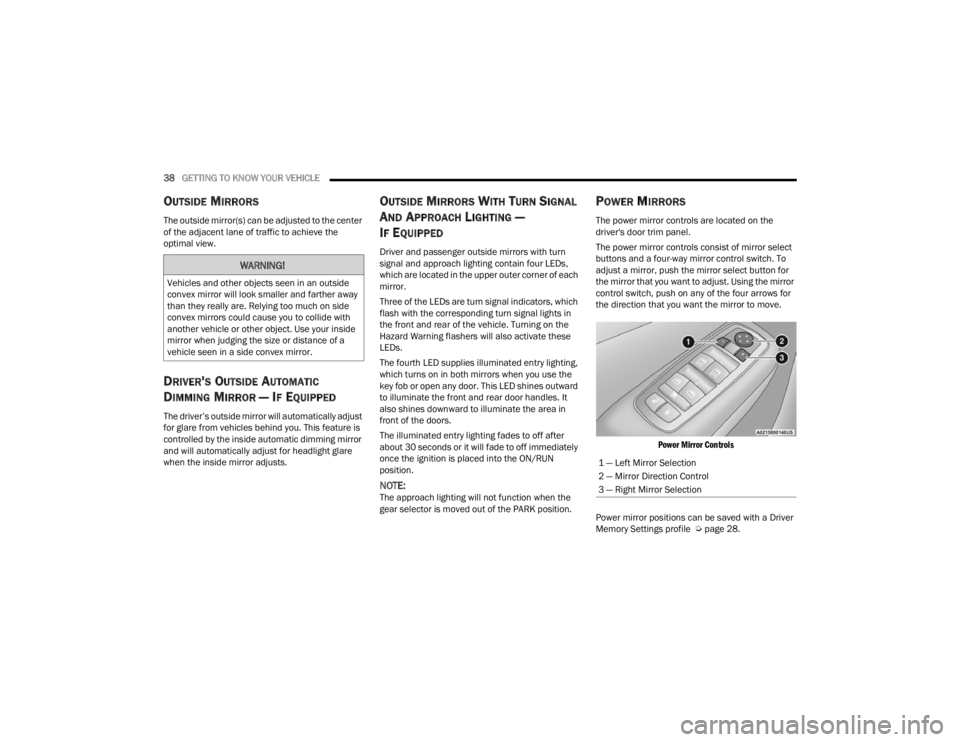
POWER MIRRORS
The power mirror controls are located on the
driver's door trim panel.
The power mirror controls consist of mirror select
buttons and a four-way mirror control switch. To
adjust a mirror, push the mirror select button for
the mirror that you want to adjust. Using the mirror
control switch, push on any of the four arrows for
the direction that you want the mirror to move.
Power Mirror Controls
Power mirror positions can be saved with a Driver
Memory Settings profile Ú page 28.
WARNING!
Vehicles and other objects seen in an outside
convex mirror will look smaller and farther away
than they really are. Relying too much on side
convex mirrors could cause you to collide with
another vehicle or other object. Use your inside
mirror when judging the size or distance of a
vehicle seen in a side convex mirror.
1 — Left Mirror Selection
2 — Mirror Direction Control
3 — Right Mirror Selection
22_LX_OM_EN_USC_t.book Page 38
Page 41 of 288
GETTING TO KNOW YOUR VEHICLE39
POWER FOLDING OUTSIDE MIRRORS —
I
F EQUIPPED
If equipped with power folding mirrors, they can be
electrically folded rearward and unfolded into the
drive position.
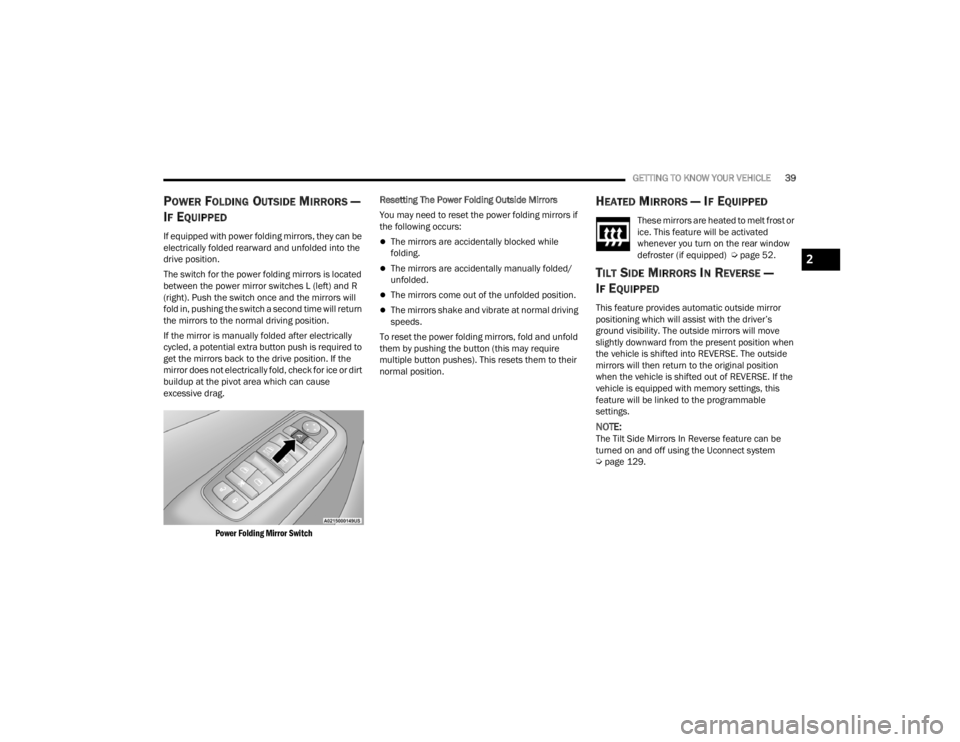
The switch for the power folding mirrors is located
between the power mirror switches L (left) and R
(right). Push the switch once and the mirrors will
fold in, pushing the switch a second time will return
the mirrors to the normal driving position.
If the mirror is manually folded after electrically
cycled, a potential extra button push is required to
get the mirrors back to the drive position. If the
mirror does not electrically fold, check for ice or dirt
buildup at the pivot area which can cause
excessive drag.
Power Folding Mirror Switch
Resetting The Power Folding Outside Mirrors
You may need to reset the power folding mirrors if
the following occurs:The mirrors are accidentally blocked while
folding.
The mirrors are accidentally manually folded/
unfolded.
The mirrors come out of the unfolded position.
The mirrors shake and vibrate at normal driving
speeds.
To reset the power folding mirrors, fold and unfold
them by pushing the button (this may require
multiple button pushes). This resets them to their
normal position.
HEATED MIRRORS — IF EQUIPPED
These mirrors are heated to melt frost or
ice. This feature will be activated
whenever you turn on the rear window
defroster (if equipped) Ú page 52.
TILT SIDE MIRRORS IN REVERSE —
I
F EQUIPPED
This feature provides automatic outside mirror
positioning which will assist with the driver’s
ground visibility. The outside mirrors will move
slightly downward from the present position when
the vehicle is shifted into REVERSE. The outside
mirrors will then return to the original position
when the vehicle is shifted out of REVERSE. If the
vehicle is equipped with memory settings, this
feature will be linked to the programmable
settings.
NOTE:The Tilt Side Mirrors In Reverse feature can be
turned on and off using the Uconnect system
Ú page 129.
2
22_LX_OM_EN_USC_t.book Page 39
Page 47 of 288
GETTING TO KNOW YOUR VEHICLE45
To turn on the headlights, rotate the headlight
switch clockwise. When the headlight switch is on,
the parking lights, taillights, license plate light and
instrument panel lights are also turned on. To turn
off the headlights, rotate the headlight switch back
to the O (off) position.
For vehicles sold in Canada, rotate the headlight
switch clockwise from the parking lights and
instrument panel lights position to the AUTO
position for automatic headlights. Rotate to the
second detent to turn on headlights, parking lights,
and instrument panel lights operation.
MULTIFUNCTION LEVER
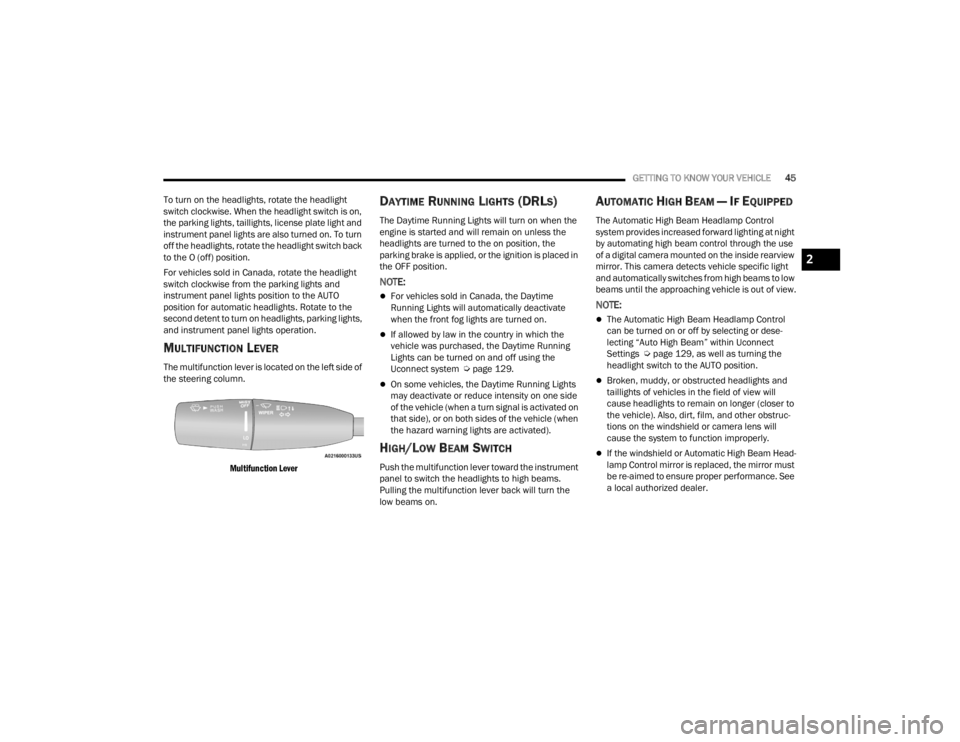
The multifunction lever is located on the left side of
the steering column.
Multifunction Lever
DAYTIME RUNNING LIGHTS (DRLS)
The Daytime Running Lights will turn on when the
engine is started and will remain on unless the
headlights are turned to the on position, the
parking brake is applied, or the ignition is placed in
the OFF position.
NOTE:
For vehicles sold in Canada, the Daytime
Running Lights will automatically deactivate
when the front fog lights are turned on.
If allowed by law in the country in which the
vehicle was purchased, the Daytime Running
Lights can be turned on and off using the
Uconnect system Ú page 129.
On some vehicles, the Daytime Running Lights
may deactivate or reduce intensity on one side
of the vehicle (when a turn signal is activated on
that side), or on both sides of the vehicle (when
the hazard warning lights are activated).
HIGH/LOW BEAM SWITCH
Push the multifunction lever toward the instrument
panel to switch the headlights to high beams.
Pulling the multifunction lever back will turn the
low beams on.
AUTOMATIC HIGH BEAM — IF EQUIPPED
The Automatic High Beam Headlamp Control
system provides increased forward lighting at night
by automating high beam control through the use
of a digital camera mounted on the inside rearview
mirror. This camera detects vehicle specific light
and automatically switches from high beams to low
beams until the approaching vehicle is out of view.
NOTE:
The Automatic High Beam Headlamp Control
can be turned on or off by selecting or dese -
lecting “Auto High Beam” within Uconnect
Settings Ú page 129, as well as turning the
headlight switch to the AUTO position.
Broken, muddy, or obstructed headlights and
taillights of vehicles in the field of view will
cause headlights to remain on longer (closer to
the vehicle). Also, dirt, film, and other obstruc -
tions on the windshield or camera lens will
cause the system to function improperly.
If the windshield or Automatic High Beam Head -
lamp Control mirror is replaced, the mirror must
be re-aimed to ensure proper performance. See
a local authorized dealer.
2
22_LX_OM_EN_USC_t.book Page 45
Page 55 of 288
GETTING TO KNOW YOUR VEHICLE53
Front Defrost Button
Press and release the Front Defrost
button on the touchscreen, or push and
release the button on the faceplate, to
change the current airflow setting to
Defrost mode. The Front Defrost indicator
illuminates when Front Defrost is on. Air comes
from the windshield and side window demist
outlets. When the defrost button is selected, the
blower level may increase. Use Defrost mode with
maximum temperature settings for best
windshield and side window defrosting and
defogging. When toggling the front defrost mode
button, the Climate Control system will return to
the previous setting.
Rear Defrost Button
Press and release the Rear Defrost
button on the touchscreen, or push and
release the button on the faceplate, to
turn on the rear window defroster and
the heated outside mirrors (if equipped). The Rear
Defrost indicator illuminates when the rear window
defroster is on. The rear window defroster
automatically turns off after 10 minutes.
NOTE:Failure to follow these cautions can cause damage
to the heating elements:
Use care when washing the inside of the rear
window. Do not use abrasive window cleaners
on the interior surface of the window. Use a soft
cloth and a mild washing solution, wiping
parallel to the heating elements. Labels can be
peeled off after soaking with warm water.
Do not use scrapers, sharp instruments, or
abrasive window cleaners on the interior
surface of the window.
Keep all objects a safe distance from the
window.
Driver And Passenger Temperature Up And
Down Buttons
These buttons provide the driver and passenger
with independent temperature control.
Push the red button on the faceplate or
touchscreen or press and slide the
temperature bar towards the red arrow
button on the touchscreen for warmer
temperature settings.
Push the blue button on the faceplate or
touchscreen or press and slide the
temperature bar towards the blue arrow
button on the touchscreen for cooler
temperature settings.
SYNC Button
Press the SYNC button on the
touchscreen to toggle the SYNC feature
on/off. The SYNC indicator illuminates
when SYNC is on. SYNC synchronizes
the passenger temperature setting with the driver
temperature setting. Changing the passenger’s
temperature setting while in SYNC will
automatically exit this feature.
NOTE:The SYNC button is only available on the touch-
screen.
Blower Control
Blower Control regulates the amount of
air forced through the climate control
system. There are seven blower speeds
available. Adjusting the blower will
cause automatic mode to switch to manual
operation. The speeds can be selected using either
the blower control knob on the faceplate or the
buttons on the touchscreen.
Faceplate
The blower speed increases as you turn the blower
control knob clockwise from the lowest blower
setting. The blower speed decreases as you turn
the blower control knob counterclockwise.
2
22_LX_OM_EN_USC_t.book Page 53