radio CHRYSLER 300 2022 Owners Manual
[x] Cancel search | Manufacturer: CHRYSLER, Model Year: 2022, Model line: 300, Model: CHRYSLER 300 2022Pages: 288, PDF Size: 13.34 MB
Page 1 of 288

SCAN FOR THE MOST UP-TO-DATE OWNER’S MANUAL,
RADIO AND WARRANTY BOOKS
owners.mopar.ca
Canada
U. S.
mopar.com/om
First Edition
22_LX_OM_EN_USC
Whether it’s providing information about specific product features, taking a tour through your vehicle’s heritage, knowing what steps to take following an accident or
scheduling your next appointment, we know you’ll find the app an important extension of your Chrysler brand vehicle. Simply download the app, select your make
and model and enjoy the ride. To get this app, go directly to the App Store® or Google Play® Store and enter the search keyword “Chrysler” (U.S. residents only).
©2021 FCA US LLC. All Rights Reserved. Tous droits réservés. Chrysler is a registered tra demark of FCA US LLC or FCA Canada Inc., used under license. Chrysler est une marque
déposée de FCA US LLC ou FCA Canada Inc., utilisée sous le permis. App Store is a registered trademark of Apple Inc. Google Play Store is a registered trademark of Google.
2022 CHRYSLER 300
2022 Chrysler 300
OWNER’S MANUAL
Page 2 of 288
The driver’s primary responsibility is the safe operation of the vehicle. Driving while distracted can result in loss of vehicle control, resulting in
an accident and personal injury. FCA US LLC strongly recommends that the driver use extreme caution when using any device or feature that
may
take their attention off the road. Use of any electrical devices, such as cellular telephones, computers, portable radios, vehicle navigation
or other devices, by the driver while the vehicle is moving is dangerous and could lead to a serious accident. Texting while driving is also
dangerous and should never be done while the vehicle is moving. If you find yourself unable to devote your full attention to vehicle operation,
pull off the road to a safe location and stop your vehicle. Some states or provinces prohibit the use of cellular telephones or texting while
driving. It is always the driver’s responsibility to comply with all local laws.
This Owner’s Manual has been prepared to help you get acquainted with your new Chrysler
brand vehicle and to provide a convenient
reference source for common questions.
Not all features shown in this manual may apply to your vehicle. For additional information, visit mopar.com/om (U.S.), owners.mopar.ca
(Canada) or your local Chrysler brand dealer.
DRIVING AND ALCOHOL
Drunk driving is one of the most frequent causes of accidents. Your driving ability can be seriously impaired with blood alcohol levels far
below the legal minimum. If you are drinking, don’t drive. Ride with a designated non-drinking driver, call a cab, a rideshare, a friend, or use
public transportation.
WARNING
Driving after drinking can lead to an accident. Your perceptions are less sharp, your reflexes are slower and your judgment is impaired
when you have been drinking. Never drink and then drive.
WARNING: Operating, servicing and maintaining a passenger vehicle or off-highway motor vehicle can
expose you to chemicals including engine exhaust, carbon monoxide, phthalates, and lead, which are known to
the State of California to cause cancer and birth defects or other reproductive harm. To minimize exposure,
avoid breathing exhaust, do not idle the engine except as necessary, service your vehicle in a well-ventilated area
and wear gloves or wash your hands frequently when servicing your vehicle. For more information go to
www.P65Warnings.ca.gov/passenger-vehicle.
This Owner’s Manual illustrates and describes the operation of features and equipment that are either standard or optional on this vehicle.
This manual may also include a description of features and equipment that are no longer available or were not ordered on this vehicle. Please
disregard any features and equipment described in this manual that are not on this vehicle. FCA US LLC reserves the right to make changes in
design and specifications, and/or make additions to or improvements to its products without imposing any obligation upon itself to install them
on products previously manufactured.
With respect to any vehicles sold in Canada, the name FCA US LLC shall be deemed to be deleted and the name FCA Canada Inc. used in
substitution therefore.
This Owner’s Manual is intended to familiarize you with the important features of your vehicle. Your most up-to-date Owner’s Manual, Navigation/
Uconnect manuals and Warranty Booklet can be found by visiting the website on the back cover.
U.S. Residents: If you are the first registered retail owner of your vehicle, you may obtain a complimentary printed copy of the Warranty
Booklet by calling 1-800-247-9753 or by contacting your dealer. Replacement kits can be purchased by visiting www.techauthority.com.
Canadian Residents: If you are the first registered retail owner of your vehicle, you may obtain a complimentary printed copy of the Warranty
Booklet or purchase a replacement kit by calling 1-800-387-1143 or by contacting your dealer.
Page 7 of 288

5
RECREATIONAL TOWING
(BEHIND MOTORHOME) ..................................... 126
DRIVING TIPS ....................................................... 126 Driving On Slippery Surfaces ........................ 126
Driving Through Water ................................. 127
MULTIMEDIA
UCONNECT SYSTEMS ......................................... 128
CYBERSECURITY ................................................. 128
UCONNECT SETTINGS ........................................ 129Customer Programmable Features —
Uconnect 4C/4C NAV Settings .................... 129
RADIO OPERATION AND MOBILE PHONES...... 144
Regulatory And Safety Information .............. 144
SAFETY
SAFETY FEATURES .............................................. 145 Anti-Lock Brake System (ABS) ..................... 145
Electronic Brake Control (EBC) System ....... 146
AUXILIARY DRIVING SYSTEMS .......................... 151
Blind Spot Monitoring (BSM) —
If Equipped..................................................... 151
Forward Collision Warning (FCW) With Mitigation
Operation —
If Equipped..................................................... 155
Tire Pressure Monitoring System (TPMS) .... 157 OCCUPANT RESTRAINT SYSTEMS ................... 160
Occupant Restraint Systems Features ....... 160
Important Safety Precautions ...................... 160Seat Belt Systems ........................................ 161Supplemental Restraint Systems (SRS) ...... 167Child Restraints ............................................. 176
SAFETY TIPS ....................................................... 189
Transporting Passengers .............................. 189Transporting Pets ......................................... 189
Safety Checks You Should Make Inside
The Vehicle ................................................... 189
Periodic Safety Checks You Should Make
Outside The Vehicle ...................................... 191
Exhaust Gas................................................... 191
Carbon Monoxide Warnings ......................... 192IN CASE OF EMERGENCY
HAZARD WARNING FLASHERS ........................ 193
ASSIST AND SOS MIRROR — IF EQUIPPED ..... 193
JACKING AND TIRE CHANGING ......................... 197 Preparations For Jacking ............................. 197
Jack Location/Spare Tire Stowage .............. 198Jacking And Changing A Tire ....................... 198
JUMP STARTING ................................................. 201
Preparations For Jump Start ........................ 201
Jump Starting Procedure .............................. 202 REFUELING IN AN EMERGENCY –
IF EQUIPPED ........................................................ 203
IF YOUR ENGINE OVERHEATS ........................... 204
MANUAL PARK RELEASE .................................. 205
FREEING A STUCK VEHICLE ............................... 206
TOWING A DISABLED VEHICLE .......................... 208 All Wheel Drive (AWD) Models...................... 209
Rear Wheel Drive (RWD) Models ................. 209
ENHANCED ACCIDENT RESPONSE SYSTEM
(EARS) .................................................................. 209
EVENT DATA RECORDER (EDR) ......................... 209
SERVICING AND MAINTENANCE
SCHEDULED SERVICING .................................... 210
Maintenance Plan ......................................... 211
ENGINE COMPARTMENT .................................... 214
3.6L Engine .................................................. 2145.7L Engine ................................................... 215
Checking Oil Level ........................................ 216
Adding Washer Fluid ..................................... 216Maintenance-Free Battery ........................... 216
Pressure Washing ......................................... 217
22_LX_OM_EN_USC_t.book Page 5
Page 17 of 288
GETTING TO KNOW YOUR VEHICLE15
Duplication of key fobs may be performed at an
authorized dealer. This procedure consists of
programming a blank key fob to the vehicle
electronics. A blank key fob is one that has never
been programmed.
NOTE:
When having the Sentry Key Immobilizer system
serviced, bring all vehicle keys with you to an
authorized dealer.
Keys must be ordered to the correct key cut to
match the vehicle locks.
SENTRY KEY
The Sentry Key Immobilizer system prevents
unauthorized vehicle operation by disabling the
engine. The system does not need to be armed or
activated. Operation is automatic, regardless of
whether the vehicle is locked or unlocked.
The system uses a key fob, keyless push button
ignition and a Radio Frequency (RF) receiver to
prevent unauthorized vehicle operation. Therefore,
only key fobs that are programmed to the vehicle
can be used to start and operate the vehicle. The
system cannot reprogram a key fob obtained from
another vehicle. After placing the ignition in the ON/RUN position,
the Vehicle Security Light will turn on for three
seconds for a bulb check. If the light remains on
after the bulb check, it indicates that there is a
problem with the electronics. In addition, if the light
begins to flash after the bulb check, it indicates
that someone attempted to start the engine with
an invalid key fob. In the event that a valid key fob
is used to start the engine but there is an issue
with the vehicle electronics, the engine will start
and shut off after two seconds.
If the Vehicle Security Light turns on during normal
vehicle operation (vehicle running for longer than
10 seconds), it indicates that there is a fault in the
electronics. Should this occur, have the vehicle
serviced as soon as possible by an authorized
dealer.
All of the key fobs provided with your new vehicle
have been programmed to the vehicle electronics
Ú
page 273.
NOTE:A key fob that has not been programmed is also
considered an invalid key.
IGNITION SWITCH
KEYLESS ENTER ‘N GO™ IGNITION
This feature allows the driver to operate the
ignition switch with the push of a button as long as
the key fob is in the passenger compartment.
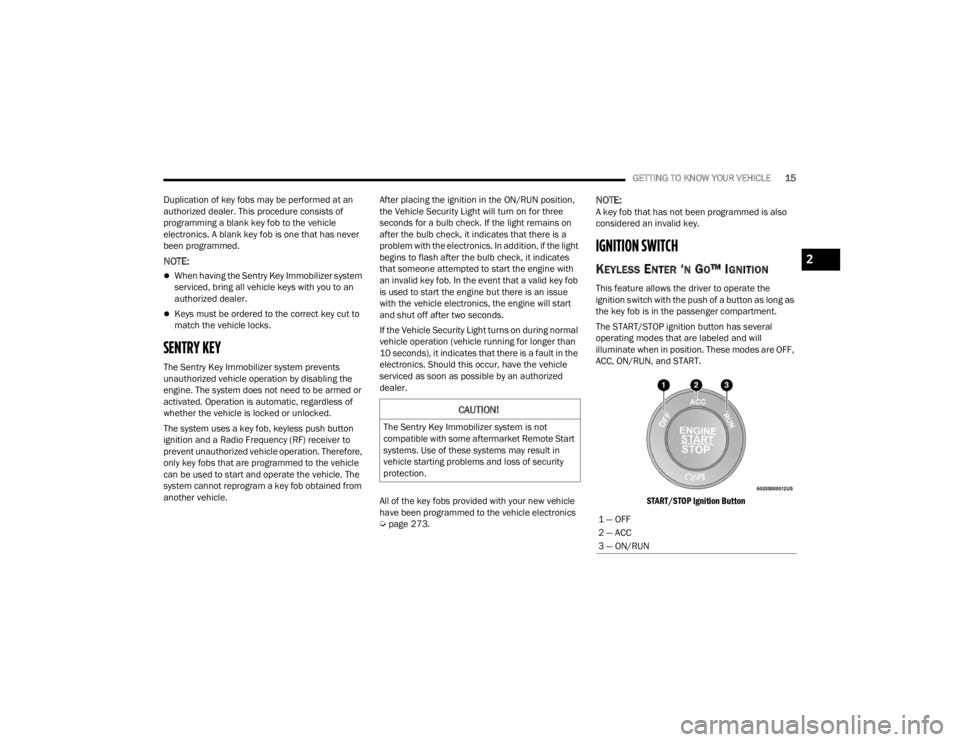
The START/STOP ignition button has several
operating modes that are labeled and will
illuminate when in position. These modes are OFF,
ACC, ON/RUN, and START.
START/STOP Ignition Button
CAUTION!
The Sentry Key Immobilizer system is not
compatible with some aftermarket Remote Start
systems. Use of these systems may result in
vehicle starting problems and loss of security
protection.
1 — OFF
2 — ACC
3 — ON/RUN
2
22_LX_OM_EN_USC_t.book Page 15
Page 30 of 288
28GETTING TO KNOW YOUR VEHICLE
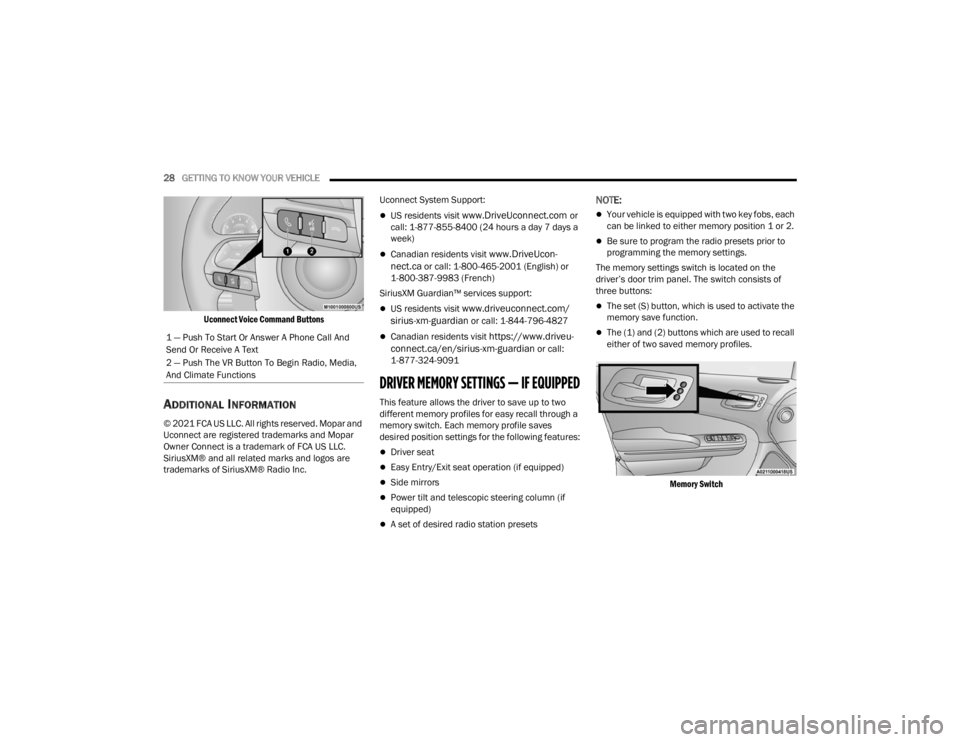
Uconnect Voice Command Buttons
ADDITIONAL INFORMATION
© 2021 FCA US LLC. All rights reserved. Mopar and
Uconnect are registered trademarks and Mopar
Owner Connect is a trademark of FCA US LLC.
SiriusXM® and all related marks and logos are
trademarks of SiriusXM® Radio Inc. Uconnect System Support:
US residents visit www.DriveUconnect.com or
call: 1-877-855-8400 (24 hours a day 7 days a
week)
Canadian residents visit www.DriveUcon -
nect.ca or call: 1-800-465-2001 (English) or
1-800-387-9983 (French)
SiriusXM Guardian™ services support:
US residents visit www.driveuconnect.com/
sirius-xm-guardian or call: 1-844-796-4827
Canadian residents visit https://www.driveu -
connect.ca/en/sirius-xm-guardian or call:
1-877-324-9091
DRIVER MEMORY SETTINGS — IF EQUIPPED
This feature allows the driver to save up to two
different memory profiles for easy recall through a
memory switch. Each memory profile saves
desired position settings for the following features:
Driver seat
Easy Entry/Exit seat operation (if equipped)
Side mirrors
Power tilt and telescopic steering column (if
equipped)
A set of desired radio station presets
NOTE:
Your vehicle is equipped with two key fobs, each
can be linked to either memory position 1 or 2.
Be sure to program the radio presets prior to
programming the memory settings.
The memory settings switch is located on the
driver’s door trim panel. The switch consists of
three buttons:
The set (S) button, which is used to activate the
memory save function.
The (1) and (2) buttons which are used to recall
either of two saved memory profiles.
Memory Switch
1 — Push To Start Or Answer A Phone Call And
Send Or Receive A Text
2 — Push The VR Button To Begin Radio, Media,
And Climate Functions
22_LX_OM_EN_USC_t.book Page 28
Page 31 of 288

GETTING TO KNOW YOUR VEHICLE29
PROGRAMMING THE MEMORY FEATURE
To create a new memory profile, perform the
following:
NOTE:Saving a new memory profile will erase the
selected profile from memory.
1. Place the vehicle’s ignition in the ON/RUN
position (do not start the engine).
2. Adjust all memory profile settings to desired preferences (i.e., seat, side mirror, power tilt
and telescopic steering column [if equipped],
and radio station presets).
3. Push and release the set (S) button on the memory switch, and then push the desired
memory button (1 or 2) within five seconds.
The instrument cluster display will display
which memory position has been set.
NOTE:Memory profiles can be set without the vehicle in
PARK, but the vehicle must be in PARK to recall a
memory profile.
LINKING AND UNLINKING THE KEY FOB
T
O MEMORY
Your key fobs can be programmed to recall one of
two saved memory profiles.
NOTE:
Before programming your key fobs you must select
the “Memory Linked To Fob” feature through the
Uconnect system Ú page 129.
To program your key fobs, perform the following:
1. Place the vehicle’s ignition in the OFF position.
2. Select a desired memory profile, 1 or 2.
3. Once the profile has been recalled, push and release the set (S) button on the memory
switch.
4. Within five seconds, push and release button (1) or (2) accordingly. “Memory Profile Set” (1
or 2) will display in the instrument cluster.
5. Push and release the lock button on the key fob within 10 seconds.
NOTE:Your key fob can be unlinked from your memory
settings by pushing the set (S) button, followed by
pushing the unlock button on the key fob within 10
seconds.
MEMORY POSITION RECALL
NOTE:If a recall is attempted when the vehicle is not in
PARK, a message will be displayed in the
instrument cluster display.
To recall the memory settings for driver one or two,
push the desired memory button number (1 or 2)
or the unlock button on the key fob linked to the
desired memory position.
A recall can be canceled by pushing any of the
memory buttons (S, 1, or 2) during a recall. When
a recall is canceled, the driver seat will stop
moving. A delay of one second will occur before
another recall can be selected.
2
22_LX_OM_EN_USC_t.book Page 29
Page 35 of 288
GETTING TO KNOW YOUR VEHICLE33
Easy Entry/Exit Seat — If Equipped
This feature provides automatic driver seat
positioning to enhance driver mobility when
entering and exiting the vehicle.
The distance the driver seat moves depends on
where you have the driver seat positioned when
you place the vehicle’s ignition in the OFF position.
When you place the vehicle’s ignition in the OFF
position, the driver seat will move about
2.4 inches (60 mm) rearward if the driver seat
position is greater than or equal to 2.7 inches
(67.7 mm) forward of the rear stop. The seat will
return to its previously set position when you
place the vehicle’s ignition in the ACC or RUN
position.
The Easy Entry/Easy Exit feature is disabled
when the driver seat position is less than 0.9 of
an inch (22.7 mm) forward of the rear stop. At
this position, there is no benefit to the driver by
moving the seat for Easy Exit or Easy Entry.
When enabled in Uconnect Settings, Easy Entry
and Easy Exit positions are stored in each memory
setting profile Ú page 28.
NOTE:The Easy Entry/Exit feature is enabled or disabled
through the programmable features in the
Uconnect system Ú page 129.
HEATED SEATS — IF EQUIPPED
On some models, the front and rear seats may be
equipped with heaters located in the seat cushions
and seatbacks.
Front Heated Seats
The front heated seat control buttons
are located within the climate or
controls screen of the touchscreen.
You can choose from HI, LO, or OFF heat
settings. The indicator arrows in touchscreen
buttons indicate the level of heat in use. Two
indicator arrows will illuminate for HI, and one for
LO. Turning the heating elements off will return the
user to the radio screen.
Press the heated seat button once to turn the HI
setting on.
Press the heated seat button a second time to
turn the LO setting on.
Press the heated seat button a third time to turn
the heating elements off.
If the HI-level setting is selected, the system will
automatically switch to LO-level after
approximately 60 minutes of continuous
operation. At that time, the display will change
from HI to LO, indicating the change. The LO-level
setting will turn off automatically after
approximately 45 minutes.
WARNING!
Persons who are unable to feel pain to the
skin because of advanced age, chronic illness,
diabetes, spinal cord injury, medication,
alcohol use, exhaustion or other physical
condition must exercise care when using the
seat heater. It may cause burns even at low
temperatures, especially if used for long
periods of time.
Do not place anything on the seat or seatback
that insulates against heat, such as a blanket
or cushion. This may cause the seat heater to
overheat. Sitting in a seat that has been over -
heated could cause serious burns due to the
increased surface temperature of the seat.
2
22_LX_OM_EN_USC_t.book Page 33
Page 42 of 288
40GETTING TO KNOW YOUR VEHICLE
UNIVERSAL GARAGE DOOR OPENER
(HOMELINK®)
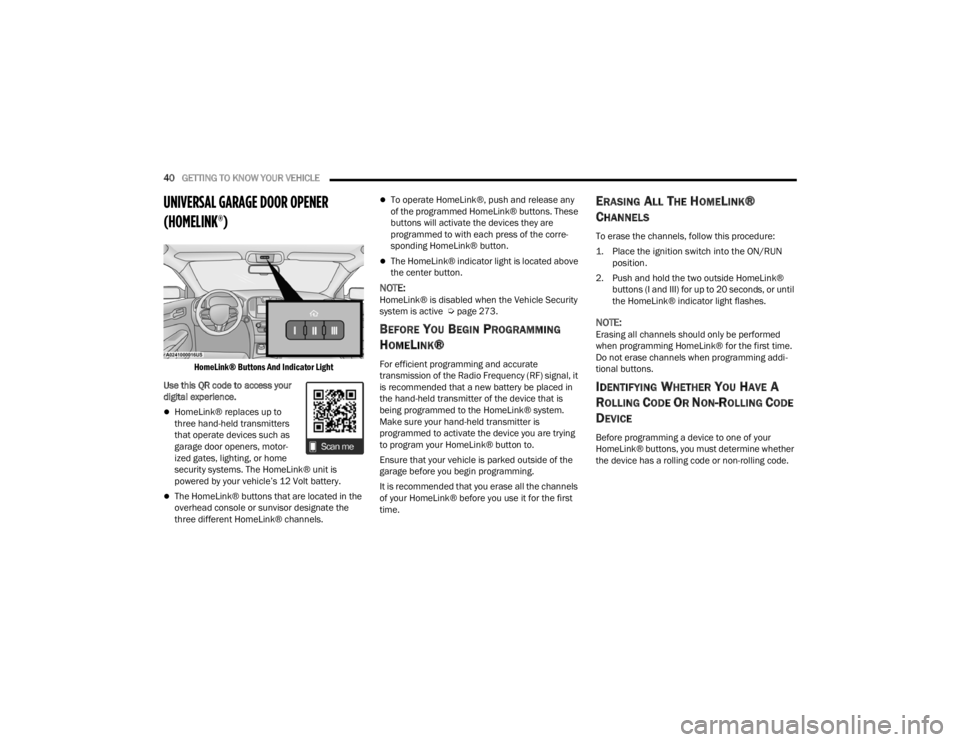
HomeLink® Buttons And Indicator Light
Use this QR code to access your
digital experience.
HomeLink® replaces up to
three hand-held transmitters
that operate devices such as
garage door openers, motor -
ized gates, lighting, or home
security systems. The HomeLink® unit is
powered by your vehicle’s 12 Volt battery.
The HomeLink® buttons that are located in the
overhead console or sunvisor designate the
three different HomeLink® channels.
To operate HomeLink®, push and release any
of the programmed HomeLink® buttons. These
buttons will activate the devices they are
programmed to with each press of the corre -
sponding HomeLink® button.
The HomeLink® indicator light is located above
the center button.
NOTE:HomeLink® is disabled when the Vehicle Security
system is active Ú page 273.
BEFORE YOU BEGIN PROGRAMMING
H
OMELINK®
For efficient programming and accurate
transmission of the Radio Frequency (RF) signal, it
is recommended that a new battery be placed in
the hand-held transmitter of the device that is
being programmed to the HomeLink® system.
Make sure your hand-held transmitter is
programmed to activate the device you are trying
to program your HomeLink® button to.
Ensure that your vehicle is parked outside of the
garage before you begin programming.
It is recommended that you erase all the channels
of your HomeLink® before you use it for the first
time.
ERASING ALL THE HOMELINK®
C
HANNELS
To erase the channels, follow this procedure:
1. Place the ignition switch into the ON/RUN
position.
2. Push and hold the two outside HomeLink® buttons (I and III) for up to 20 seconds, or until
the HomeLink® indicator light flashes.
NOTE:Erasing all channels should only be performed
when programming HomeLink® for the first time.
Do not erase channels when programming addi -
tional buttons.
IDENTIFYING WHETHER YOU HAVE A
R
OLLING CODE OR NON-ROLLING CODE
D
EVICE
Before programming a device to one of your
HomeLink® buttons, you must determine whether
the device has a rolling code or non-rolling code.
22_LX_OM_EN_USC_t.book Page 40
Page 44 of 288

42GETTING TO KNOW YOUR VEHICLE
PROGRAMMING HOMELINK® TO A
M
ISCELLANEOUS DEVICE
The procedure on how to program HomeLink® to a
miscellaneous device follows the same procedure
as programming to a garage door opener
Ú page 41. Be sure to determine if the device has
a rolling code, or non-rolling code before beginning
the programming process.
NOTE:Canadian Radio Frequency (RF) laws require trans -
mitter signals to time-out (or quit) after several
seconds of transmission, which may not be long
enough for HomeLink® to pick up the signal during
programming. Similar to this Canadian law, some
U.S. gate operators are designed to time-out in the
same manner. The procedure may need to be
performed multiple times to successfully pair the
device to your HomeLink® buttons.
REPROGRAMMING A SINGLE
H
OMELINK® BUTTON
To reprogram a single HomeLink® button that has
been previously trained, without erasing all the
channels, follow the procedure below. Be sure to
determine whether the new device you want to
program the HomeLink® button to has a rolling
code, or non-rolling code.
1. Place the ignition in the ON/RUN position,
without starting the engine.
2. Push and hold the desired HomeLink® button until the HomeLink® indicator light begins to
flash after 20 seconds. Do not release the
button. 3.
Without releasing the button , proceed with
Step 2 in “Programming HomeLink® To A
Garage Door Opener” and follow all remaining
steps.
CANADIAN/GATE OPERATOR
P
ROGRAMMING
For programming transmitters in Canada/United
States that require the transmitter signals to
“time-out” after several seconds of transmission:
Canadian Radio Frequency (RF) laws require
transmitter signals to time-out (or quit) after
several seconds of transmission, which may not be
long enough for HomeLink® to pick up the signal
during programming. Similar to this Canadian law,
some U.S. gate operators are designed to time-out
in the same manner.
It may be helpful to unplug the device during the
cycling process to prevent possible overheating of
the garage door or gate motor.
1. Place the ignition in the ON/RUN position.
NOTE:For vehicles equipped with Keyless Enter ‘n Go™,
place the ignition in the RUN position. Make sure
while programming HomeLink® with the engine on
that your vehicle is outside of your garage, or that
the garage door remains open at all times.
WARNING!
Your motorized door or gate will open and close
while you are programming the universal trans -
mitter. Do not program the transmitter if people
or pets are in the path of the door or gate.
Do not run your vehicle in a closed garage or
confined area while programming the trans -
mitter. Exhaust gas from your vehicle contains
Carbon Monoxide (CO) which is odorless and
colorless. Carbon Monoxide is poisonous
when inhaled and can cause you and others to
be severely injured or killed.
22_LX_OM_EN_USC_t.book Page 42
Page 51 of 288
GETTING TO KNOW YOUR VEHICLE49
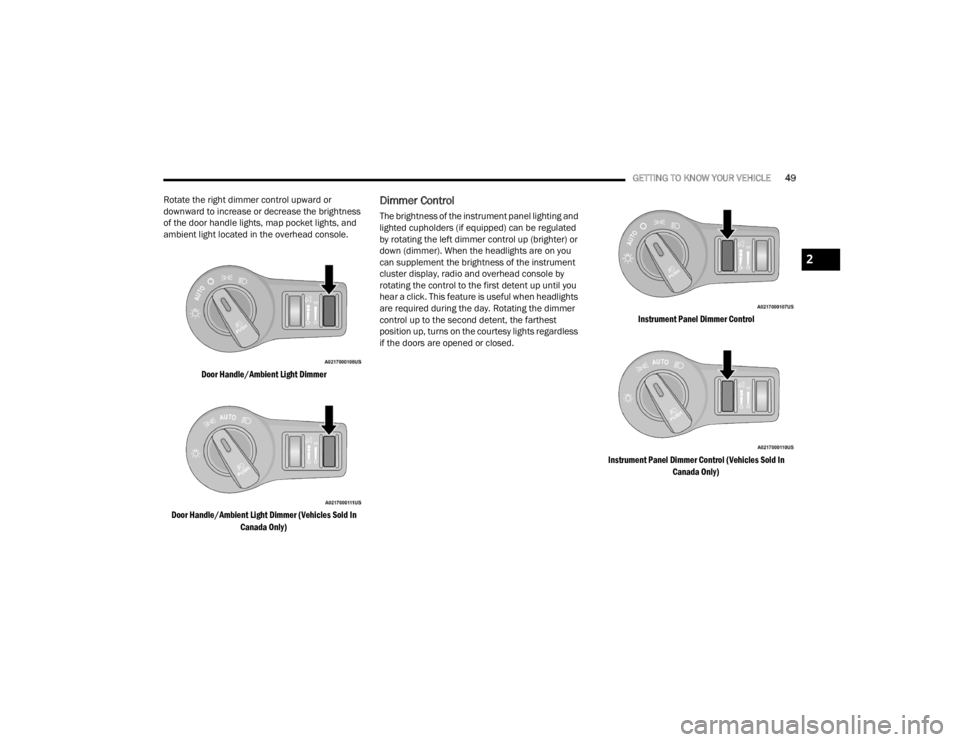
Rotate the right dimmer control upward or
downward to increase or decrease the brightness
of the door handle lights, map pocket lights, and
ambient light located in the overhead console.
Door Handle/Ambient Light Dimmer
Door Handle/Ambient Light Dimmer (Vehicles Sold In Canada Only)
Dimmer Control
The brightness of the instrument panel lighting and
lighted cupholders (if equipped) can be regulated
by rotating the left dimmer control up (brighter) or
down (dimmer). When the headlights are on you
can supplement the brightness of the instrument
cluster display, radio and overhead console by
rotating the control to the first detent up until you
hear a click. This feature is useful when headlights
are required during the day. Rotating the dimmer
control up to the second detent, the farthest
position up, turns on the courtesy lights regardless
if the doors are opened or closed.
Instrument Panel Dimmer Control
Instrument Panel Dimmer Control (Vehicles Sold In Canada Only)
2
22_LX_OM_EN_USC_t.book Page 49