change time CHRYSLER 300 C 2008 1.G User Guide
[x] Cancel search | Manufacturer: CHRYSLER, Model Year: 2008, Model line: 300 C, Model: CHRYSLER 300 C 2008 1.GPages: 520, PDF Size: 5.43 MB
Page 204 of 520
sure to keep a record of the reading before and after the
service so that the correct mileage can be determined.
On vehicles equipped with a Premium Instrument Clus-
ter, this display shows the Electronic Vehicle Information
Center (EVIC) messages when the appropriate conditions
exist. (See page 213 for more information.)
Loose Fuel Filler Cap Message
If the vehicle diagnostic system determines that the fuel
filler cap is loose, improperly installed, or damaged, a
“Check Gascap” message will display in the Electronic
Vehicle Information Center (EVIC) — if equipped.
Tighten the fuel filler cap properly and press the odom-
eter reset button to turn off the message. If the problem
continues, the message will appear the next time the
vehicle is started.A loose, improperly installed, or damaged fuel filler cap
may also turn on the Malfunction Indicator Light (MIL).
(See page 417 for more information.)
Change Oil Message (Base Cluster)
Your vehicle is equipped with an engine oil change
indicator system. The “Change Oil” message will flash in
the instrument cluster odometer for approximately 12
seconds after a single chime has sounded to indicate the
next scheduled oil change interval. The engine oil change
indicator system is duty cycle based, which means the
engine oil change interval may fluctuate dependent upon
your personal driving style.
Unless reset, this message will continue to display each
time you turn the ignition switch to the ON position. To
turn off the message temporarily, press and release the
Trip Odometer button on the instrument cluster. To reset
UNDERSTANDING YOUR INSTRUMENT PANEL 203
4
Page 205 of 520

the oil change indicator system (after performing the
scheduled maintenance) perform the following proce-
dure:
1. Turn the ignition switch to the ON position (Do not
start the engine).
2. Fully depress the accelerator pedal slowly three
times within 10 seconds.
3. Turn the ignition switch to the LOCK position.
NOTE:If the indicator message illuminates when you
start the vehicle, the oil change indicator system did not
reset. If necessary, repeat this procedure.
7. Tachometer
The red segments indicate the maximum permissible
engine revolutions-per-minute (r.p.m. x 1000) for each
gear range. Ease up on the accelerator before reaching the
red area.8. Engine Temperature Warning Light
This light will turn on and a single chime will
sound to warn of an overheated engine condition.
When this light turns on, the engine temperature
is critically hot. The vehicle should be turned off imme-
diately and serviced as soon as possible. (See page 393 for
more information.)
9. Anti-Lock Brake Light — If Equipped
This light monitors the Anti-Lock Brake System.
The light will turn on when the ignition switch is
turned to the ON position and may stay on for as long as
four seconds.
If the ABS light remains on or turns on while driving,
then the Anti-Lock portion of the brake system is not
functioning and service is required. However, the con-
ventional brake system will continue to operate normally
if the BRAKE warning light is not on.
204 UNDERSTANDING YOUR INSTRUMENT PANEL
Page 219 of 520
•Left Rear Low Pressure (with a single chime). Refer to
information on “Tire Pressure” and “Tire Pressure
Monitor” in the “Starting And Operating” section of
this manual.
•Right Front Low Pressure (with a single chime). Refer
to information on “Tire Pressure” and “Tire Pressure
Monitor” in the “Starting And Operating” section of
this manual.
•Right Rear Low Pressure (with a single chime). Refer
to information on “Tire Pressure” and “Tire Pressure
Monitor” in the “Starting And Operating” section of
this manual.
•Check TPM System (with a single chime). Refer to
information on “Tire Pressure Monitor” in the “Start-
ing And Operating” section of this manual.
•Check Gascap (refer to “Adding Fuel” in Section 5 of
this manual for more details)
•Service Park Assist System (with a single chime)
•Oil Change Required (with a single chime)
Oil Change Required
Your vehicle is equipped with an engine oil change
indicator system. The “Oil Change Required” message
will flash in the EVIC display for approximately 10
seconds after a single chime has sounded to indicate the
next scheduled oil change interval. The engine oil change
indicator system is duty cycle based, which means the
engine oil change interval may fluctuate dependent upon
your personal driving style.
Unless reset, this message will continue to display each
time you turn the ignition switch to the ON position. To
turn off the message temporarily, press and release the
Menu button. To reset the oil change indicator system
(after performing the scheduled maintenance) perform
the following procedure:
218 UNDERSTANDING YOUR INSTRUMENT PANEL
Page 220 of 520
1. Turn the ignition switch to the ON position (Do not
start the engine).
2. Fully depress the accelerator pedal slowly three times
within 10 seconds.
3. Turn the ignition switch to the LOCK position.
NOTE:If the indicator message illuminates when you
start the vehicle, the oil change indicator system did not
reset. If necessary, repeat this procedure.
Trip Functions
Press and release the MENU button until one of the
following Trip Functions displays in the EVIC:
•Average Fuel Economy / Fuel Saver Mode
•Distance To Empty
•Trip A
•Trip B
•Elapsed Time
•Display Units of Measure in
Press the SCROLL button to cycle through all the Trip
Computer functions.
The Trip Functions mode displays the following informa-
tion:
•Average Fuel Economy / Fuel Saver Mode
Shows the average fuel economy since the last reset.
When the fuel economy is reset, the display will read
“RESET” or show dashes for two seconds. Then, the
history information will be erased, and the averaging will
continue from the last fuel average reading before the
reset.
Vehicles with the 5.7L Multi-Displacement System (MDS)
may be equipped with the FUEL SAVER MODE in the
Trip Functions of the EVIC. The FUEL SAVER MODE
message will display above the average fuel economy in
UNDERSTANDING YOUR INSTRUMENT PANEL 219
4
Page 222 of 520
and average fuel economy, according to the current fuel
tank level. DTE cannot be reset through the FUNCTION
SELECT button.
NOTE:Significant changes in driving style or vehicle
loading will greatly affect the actual drivable distance of
the vehicle, regardless of the DTE displayed value.
•When the DTE value is less than 30 miles (48 km)
estimated driving distance, the DTE display will
change to a text display of\4LOW FUEL.\4This display
will continue until the vehicle runs out of fuel. Adding
a significant amount of fuel to the vehicle will turn off
the\4LOW FUEL\4text and a new DTE value will
display.
•Trip A
Shows the total distance traveled for trip A since the last
reset.
•Trip B
Shows the total distance traveled for trip B since the last
reset.
•Elapsed Time
Shows the total elapsed time of travel since the last reset
when the ignition switch is in the ACC position. Elapsed
time will increment when the ignition switch is in the ON
or START position.
•Display Units of Measure in:
To make your selection, press and release the FUNC-
TION SELECT button until “US” or “METRIC” appears.
To Reset The Display
Reset will only occur while a resettable function is being
displayed. Press and release the FUNCTION SELECT
button once to clear the resettable function being dis-
played. To reset all resettable functions, press and release
the FUNCTION SELECT button a second time within 3
UNDERSTANDING YOUR INSTRUMENT PANEL 221
4
Page 234 of 520
Electrical Disturbances
Radio waves may pick up electrical disturbances during
transmission. They mainly affect the wave amplitude,
and thus remain a part of the AM reception. They
interfere very little with the frequency variations that
carry the FM signal.
AM Reception
AM sound is based on wave amplitude, so AM reception
can be disrupted by such things as lightning, power lines
and neon signs.
FM Reception
Because FM transmission is based on frequency varia-
tions, interference that consists of amplitude variations
can be filtered out, leaving the reception relatively clear,
which is the major feature of FM radio.NOTE:For vehicles not equipped with the Electronic
Vehicle Information Center (EVIC), the radio, steering
wheel radio controls (if equipped), and 6 disc CD/DVD
changer (if equipped) will remain active for 10 minutes
after the ignition switch is turned off. Opening either
front door will cancel this feature.
NOTE:For vehicles equipped with the Electronic Ve-
hicle Information Center (EVIC), the radio, steering
wheel radio controls (if equipped), and 6 disc CD/DVD
changer (if equipped) will remain active for up to 60
minutes after the ignition switch is turned off. Opening
either front door will cancel this feature. The time is
programmable. For details, refer to “Delay Power Off to
Accessories Until Exit,” under “Personal Settings (Cus-
tomer Programmable Features),” under “Electronic Ve-
hicle Information Center (EVIC)” in Section 4 of this
manual.
UNDERSTANDING YOUR INSTRUMENT PANEL 233
4
Page 235 of 520
SALES CODE REN — MULTIMEDIA SYSTEM — IF
EQUIPPED
NOTE:The sales code is located on the lower right side
of the unit’s faceplate.
The REN multimedia system contains a radio, CD/DVD
player, USB port, a 20 gigabyte Hard Drive (HDD), and a
“JukeBox” (virtual CD changer). Sirius Satellite Radio is
optional. The 6.5-inch touch screen allows for easy menu
selection.
A 20 gigabyte Hard Drive (HDD) allows uploads of
music and photos from CDs or through the USB port.
While the Gracenote database finds the artist, track, and
title for the music.
An auxiliary input jack permits passengers to listen to a
portable MP3 player through the vehicle’s speakers. For
vehicles equipped with the Vehicle Entertainment System
(VES), separate audio outputs allow passengers to listento the car speakers while different audio tracks play
through the system’s wireless headphones. This means
rear seat passengers can watch a DVD on the optional
rear-seat entertainment system while the driver and front
seat passenger listen to the radio.
Other special features include direct tune, music type
selections, easy store presets, backup camera display for
vehicles equipped with a backup camera, and on some
models a dual display screen operation. Refer to your
Radio Specific User’s Manual for detailed operating
instructions.
Operating Instructions — Satellite Radio (If
Equipped)
Refer to your Radio Specific User’s Manual for detailed
operating instructions.
234 UNDERSTANDING YOUR INSTRUMENT PANEL
Page 236 of 520
Operating Instructions — Hands-Free
Communication (UConnect™) (If Equipped)
Refer to “Hands-Free Communication (UConnect™)” in
Section 3 of this manual for detailed operating instruc-
tions.
Clock Setting Procedure
Setting the Clock
1. Turn on the system.
2. Touch the screen where the time is displayed. The
clock setting menu will appear on the screen.
3. To move the hour forward, touch the screen where the
word “Hour” with the arrow pointing upward is dis-
played. To move the hour backward, touch the screen
where the word “Hour” with the arrow pointing down-
ward is displayed.4. To move the minute forward, touch the screen where
the word “Min” with the arrow pointing upward is
displayed. To move the minute backward, touch the
screen where the word “Min” with the arrow pointing
downward is displayed.
5. To save the new time setting, touch the screen where
the word “Save” is displayed.Changing Daylight Savings Time
When selected, this feature will display the time of day in
daylight savings time. Proceed as follows to change the
current setting:
1. Turn on the system.
2. Touch the screen where the time is displayed. The
clock setting menu will appear on the screen.
UNDERSTANDING YOUR INSTRUMENT PANEL 235
4
Page 237 of 520
3. When this feature is on, a check mark will appear in
the box next to the words “Daylight Savings.” Touch the
screen where the words “Daylight Savings” are dis-
played to change the current setting.
Show Time if Radio is Off
When selected, this feature will display the time of day
on the touch screen when the system is turned off.
Proceed as follows to change the current setting:
1. Turn on the system.
2. Touch the screen where the time is displayed. The
clock setting menu will appear on the screen.
3. When this feature is on, a check mark will appear in
the box next to the words “Show Time if Radio is Off.”
Touch the screen where the words “Show Time if Radio is
Off” are displayed to change the current setting.
Changing the Time Zone
1. Turn on the system.
2. Touch the screen where the time is displayed. The
clock setting menu will appear on the screen.
3. Touch the screen where the words “Set Time Zone” are
displayed. The time zone selection menu will appear on
the screen.
4. Select a time zone by touching the screen where your
selection appears. If you do not see a time zone that you
want to select, touch the screen where the word “Page” is
displayed to view additional time zones in the menu.
5. Touch the screen where the word “Save” is displayed.
236 UNDERSTANDING YOUR INSTRUMENT PANEL
Page 238 of 520
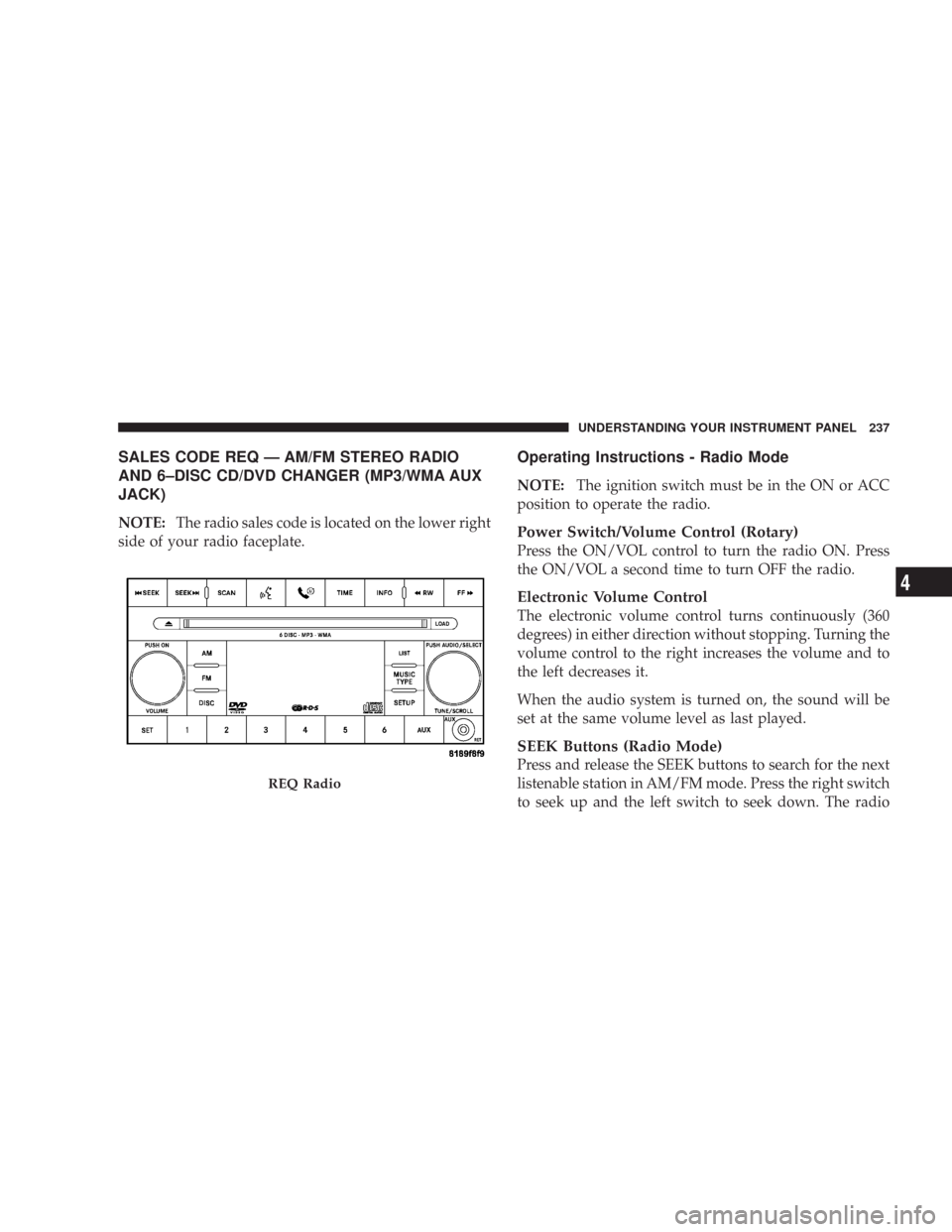
SALES CODE REQ — AM/FM STEREO RADIO
AND 6–DISC CD/DVD CHANGER (MP3/WMA AUX
JACK)
NOTE:The radio sales code is located on the lower right
side of your radio faceplate.
Operating Instructions - Radio Mode
NOTE:The ignition switch must be in the ON or ACC
position to operate the radio.
Power Switch/Volume Control (Rotary)
Press the ON/VOL control to turn the radio ON. Press
the ON/VOL a second time to turn OFF the radio.
Electronic Volume Control
The electronic volume control turns continuously (360
degrees) in either direction without stopping. Turning the
volume control to the right increases the volume and to
the left decreases it.
When the audio system is turned on, the sound will be
set at the same volume level as last played.
SEEK Buttons (Radio Mode)
Press and release the SEEK buttons to search for the next
listenable station in AM/FM mode. Press the right switch
to seek up and the left switch to seek down. The radio
REQ Radio
UNDERSTANDING YOUR INSTRUMENT PANEL 237
4