service CHRYSLER 300 C 2008 1.G User Guide
[x] Cancel search | Manufacturer: CHRYSLER, Model Year: 2008, Model line: 300 C, Model: CHRYSLER 300 C 2008 1.GPages: 520, PDF Size: 5.43 MB
Page 101 of 520
•The UConnect™ system will play the names of all the
phone book entries.
•To call one of the names in the list, press the\4Voice
Recognition’ button during the playing of the desired
name, and say\4Call.\4
NOTE:The user can also exercise\4Edit\4or\4Delete\4
operations at this point.
•The UConnect™ system will then prompt you as to the
number designation you wish to call.
•The selected number will be dialed.
Phone Call Features
The following features can be accessed through the
UConnect™ system if the feature(s) are available on your
cellular service plan. For example, if your cellular service
plan provides three-way calling, this feature can beaccessed through the UConnect™ system. Check with
your cellular service provider for the features that you
have.
Answer or Reject an Incoming Call - No Call
Currently in Progress
When you receive a call on your cellular phone, the
UConnect™ system will interrupt the vehicle audio
system, if on, and will ask if you would like to answer the
call. Press ’Phone’ button to accept the call. To reject the
call, press and hold the ’Phone’ button until you hear a
single beep indicating that the incoming call was rejected.
Answer or Reject an Incoming Call - Call
Currently in Progress
If a call is currently in progress and you have another
incoming call, you will hear the same network tones for
call waiting that you normally hear when using your cell
phone. Press the ’Phone’ button to place the current call
on hold and answer the incoming call.
100 UNDERSTANDING THE FEATURES OF YOUR VEHICLE
Page 105 of 520
NOTE:The emergency number dialed is based on the
Country where the vehicle is purchased (911 for USA and
Canada and 060 for Mexico). The number dialed may not
be applicable with the available cellular service and area.
The UConnect™ system does slightly lower your chances
of successfully making a phone call as to that for the cell
phone directly.
Your phone must be turned on and paired to the UCon-
nect™ system to allow use of this vehicle feature in
emergency situations when the cell phone has network
coverage and stays paired to the UConnect™ system.
Towing Assistance
If you need towing assistance,
•Press the “Phone” button to begin.
•After the\4Ready\4prompt and the following beep, say
\4Towing Assistance.\4NOTE:The Towing Assistance number dialed is based
on the Country where the vehicle is purchased (1-800-
528-2069 for USA, 1-877-213-4525 for Canada, 55-14-3454
for Mexico City and 1-800-712-3040 for outside Mexico
City in Mexico).
Please refer to the 24-Hour “Towing Assistance” cover-
age details in the Warranty information booklet and on
the 24–Hour Towing Assistance Card.
Paging
To learn how to page refer to\4Working with Automated
Systems.\4Paging works properly except for pagers of
certain companies which time-out a little too soon to
work properly with the UConnect™ system.
Voice Mail Calling
To learn how to access your voice mail, refer to\4Working
with Automated Systems.\4
104 UNDERSTANDING THE FEATURES OF YOUR VEHICLE
Page 106 of 520
Working with Automated Systems
This method is designed to be used in instances where
one generally has to press numbers on the cellular phone
keypad while navigating through an automated tele-
phone system.
You can use your UConnect™ system to access a voice-
mail system or an automated service, such as, paging
service or automated customer service. Some services
require immediate response selection, in some instances,
that may be too quick for use of UConnect™ system.
When calling a number with your UConnect™ system
that normally requires you to enter in a touch-tone
sequence on your cellular phone keypad, you can push
the “Voice Recognition” button and say the sequence you
wish to enter followed by the word\4Send.\4For example,
if required to enter your pin number followed with a
pound3746#,youcanpressthe“Voice Recognition”
button and say\43746#Send.\4Saying a number, orsequence of numbers, followed by\4Send\4is also to be
used to navigate through an automated customer service
center menu structure and to leave a number on a pager.
You can also send stored UConnect™ phonebook entries
as tones for fast and easy access to voicemail and pager
entries. To use this feature, dial the number you wish to
call and then press the “Voice Recognition” button and
say “Send.” The system will prompt you to enter the
name or number, say the name of the phonebook entry
you wish to send. The UConnect™ will then send the
corresponding phone number associated with the phone-
book entry as tones over the phone.
NOTE:
•You may not hear all of the tones due to cellular phone
network configurations, this is normal.
•Some paging and voicemail systems have system
timeout settings too short that may not allow the use
of this feature.
UNDERSTANDING THE FEATURES OF YOUR VEHICLE 105
3
Page 136 of 520
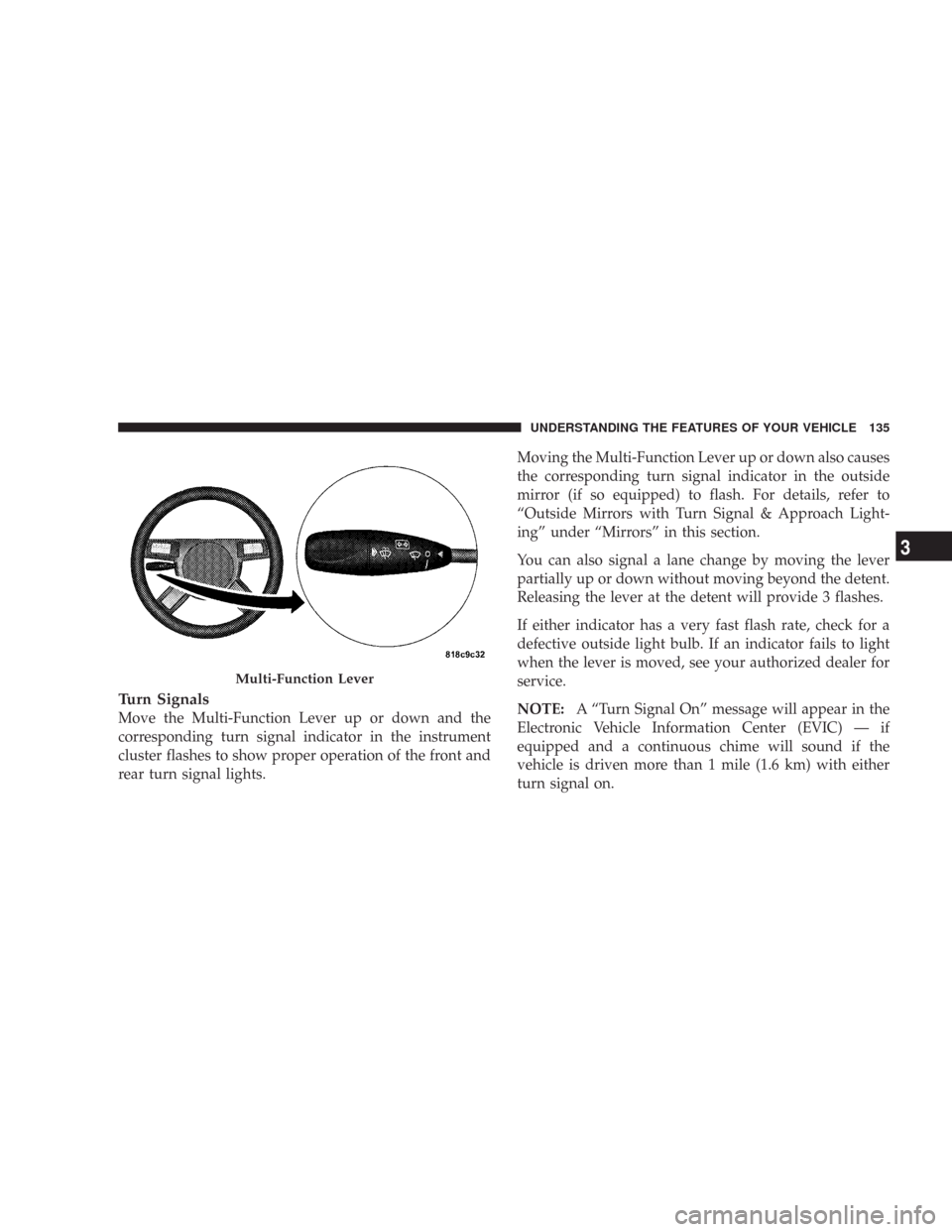
Turn Signals
Move the Multi-Function Lever up or down and the
corresponding turn signal indicator in the instrument
cluster flashes to show proper operation of the front and
rear turn signal lights.Moving the Multi-Function Lever up or down also causes
the corresponding turn signal indicator in the outside
mirror (if so equipped) to flash. For details, refer to
“Outside Mirrors with Turn Signal & Approach Light-
ing” under “Mirrors” in this section.
You can also signal a lane change by moving the lever
partially up or down without moving beyond the detent.
Releasing the lever at the detent will provide 3 flashes.
If either indicator has a very fast flash rate, check for a
defective outside light bulb. If an indicator fails to light
when the lever is moved, see your authorized dealer for
service.
NOTE:A “Turn Signal On” message will appear in the
Electronic Vehicle Information Center (EVIC) — if
equipped and a continuous chime will sound if the
vehicle is driven more than 1 mile (1.6 km) with either
turn signal on.
Multi-Function Lever
UNDERSTANDING THE FEATURES OF YOUR VEHICLE 135
3
Page 167 of 520

If weather conditions are not a factor, the driver should
examine the sensor. It may require cleaning or removal of
an obstruction. The sensor is located behind the grille,
slightly offset from the center of the grille.
To keep the ACC System operating properly, it is impor-
tant to note the following maintenance items:•Always keep the sensor clean. Carefully wipe the
sensor lens with a soft cloth. Be cautious not to
damage the sensor lens.
•Do not remove any screws from the sensor or the
sensor mount. Doing so could cause an ACC system
malfunction or failure and require a sensor re-
alignment.
•If the sensor is damaged due to an accident, see your
authorized dealer for service.
•Do not attach or install any accessories near the sensor,
including transparent material or aftermarket grilles.
Doing so could cause an ACC system failure or
malfunction.
When the condition that deactivated the system is no
longer present, the system will return to the “ACC Off”
state and will resume function by simply reactivating it.
ACC Sensor Location
166 UNDERSTANDING THE FEATURES OF YOUR VEHICLE
Page 168 of 520

NOTE:Installing a vehicle front-end protector or an
aftermarket grille or modifying the grille is not recom-
mended. Doing so may block the sensor and inhibit ACC
operation.
ACC Unavailable Warning
If the system turns off, and the EVIC displays\4ACC
UNAVAILABLE,\4there may be a temporary malfunction
that limits ACC functionality. In this case, ACC will be
temporarily unavailable. If this occurs, try activating
ACC again later, following a key cycle. If the problem
persists, see your authorized dealer.
Service ACC Warning
If the system turns off, and the EVIC displays “SERVICE
ACC,” it indicates there is an internal system fault that
requires service from an authorized dealer.
UNDERSTANDING THE FEATURES OF YOUR VEHICLE 167
3
Page 170 of 520

ACC may occasionally provide braking and/or a driver
alert that you consider unnecessary. This may be the
system’s response to signs, guardrails, and other station-
ary objects in a curve. This may also occur at the base of
dramatic hills. This is normal operation and your vehicle
does not require service.
Using ACC on Hills
When driving on hills, ACC may not detect a vehicle in
your lane. Depending on the speed, vehicle load, traffic
conditions, and the steepness of the hills, ACC perfor-
mance may be limited.
UNDERSTANDING THE FEATURES OF YOUR VEHICLE 169
3
Page 177 of 520

NOTE:
•Ensure that the rear bumper is free of dirt and debris
to keep the system operating properly.
•Jackhammers, large trucks, and other vibrations could
affect the performance of the system.
If “Service Park Assist System” appears in the Electronic
Vehicle Information Center (EVIC) after making sure the
rear bumper is clean please see your authorized dealer.
OVERHEAD CONSOLE
The overhead console contains courtesy/reading lights,
an optional universal garage door opener (HomeLink\2),
storage for sunglasses, and an optional power sunroof
switch.
Courtesy/Reading Lights
At the forward end of the console are two courtesy/
reading lights.
Press the lens to turn on the light. Press it a second time
to turn off the light.
Overhead Console
176 UNDERSTANDING THE FEATURES OF YOUR VEHICLE
Page 204 of 520
sure to keep a record of the reading before and after the
service so that the correct mileage can be determined.
On vehicles equipped with a Premium Instrument Clus-
ter, this display shows the Electronic Vehicle Information
Center (EVIC) messages when the appropriate conditions
exist. (See page 213 for more information.)
Loose Fuel Filler Cap Message
If the vehicle diagnostic system determines that the fuel
filler cap is loose, improperly installed, or damaged, a
“Check Gascap” message will display in the Electronic
Vehicle Information Center (EVIC) — if equipped.
Tighten the fuel filler cap properly and press the odom-
eter reset button to turn off the message. If the problem
continues, the message will appear the next time the
vehicle is started.A loose, improperly installed, or damaged fuel filler cap
may also turn on the Malfunction Indicator Light (MIL).
(See page 417 for more information.)
Change Oil Message (Base Cluster)
Your vehicle is equipped with an engine oil change
indicator system. The “Change Oil” message will flash in
the instrument cluster odometer for approximately 12
seconds after a single chime has sounded to indicate the
next scheduled oil change interval. The engine oil change
indicator system is duty cycle based, which means the
engine oil change interval may fluctuate dependent upon
your personal driving style.
Unless reset, this message will continue to display each
time you turn the ignition switch to the ON position. To
turn off the message temporarily, press and release the
Trip Odometer button on the instrument cluster. To reset
UNDERSTANDING YOUR INSTRUMENT PANEL 203
4
Page 205 of 520

the oil change indicator system (after performing the
scheduled maintenance) perform the following proce-
dure:
1. Turn the ignition switch to the ON position (Do not
start the engine).
2. Fully depress the accelerator pedal slowly three
times within 10 seconds.
3. Turn the ignition switch to the LOCK position.
NOTE:If the indicator message illuminates when you
start the vehicle, the oil change indicator system did not
reset. If necessary, repeat this procedure.
7. Tachometer
The red segments indicate the maximum permissible
engine revolutions-per-minute (r.p.m. x 1000) for each
gear range. Ease up on the accelerator before reaching the
red area.8. Engine Temperature Warning Light
This light will turn on and a single chime will
sound to warn of an overheated engine condition.
When this light turns on, the engine temperature
is critically hot. The vehicle should be turned off imme-
diately and serviced as soon as possible. (See page 393 for
more information.)
9. Anti-Lock Brake Light — If Equipped
This light monitors the Anti-Lock Brake System.
The light will turn on when the ignition switch is
turned to the ON position and may stay on for as long as
four seconds.
If the ABS light remains on or turns on while driving,
then the Anti-Lock portion of the brake system is not
functioning and service is required. However, the con-
ventional brake system will continue to operate normally
if the BRAKE warning light is not on.
204 UNDERSTANDING YOUR INSTRUMENT PANEL