reset CHRYSLER 300 C 2008 1.G Owner's Manual
[x] Cancel search | Manufacturer: CHRYSLER, Model Year: 2008, Model line: 300 C, Model: CHRYSLER 300 C 2008 1.GPages: 520, PDF Size: 5.43 MB
Page 279 of 520

List or Browse Mode
DuringPlaymode, pressing any of the following buttons
will take you toListmode.Listmode enables you to
scroll through the list of menus and tracks on the iPod\2.
TUNE/SCROLL Knob
In theListmode, the “TUNE/SCROLL” knob functions
in a similar manner as the scroll wheel on the iPod\2.
Turning the “TUNE/SCROLL” knob clockwise (forward)
and counter-clockwise (backward) scrolls through lists,
displaying the track detail on the radio display. Once you
have the track to be played highlighted on the radio
display, press the “TUNE/SCROLL” knob to select and
start playing the track. By turning the “TUNE/SCROLL”
knob fast, you can jump through the list faster. During
fast scroll, you may notice a slight delay in updating the
information on the radio display.
During all List modes, the iPod\2will display all lists in
“wrap-around” mode. So if the track you wish to select isat the bottom of the list, you just turn the “TUNE/
SCROLL” knob backwards (counter-clockwise) to get to
the track faster.
Radio Preset Buttons
In theListmode, the radio preset buttons are used as
shortcuts to the following lists on the iPod\2.
•1 – Playlists
•2 – Artists
•3 – Albums
•4 – Genres
•5 - Audiobooks
•6 – Podcasts
After pressing a preset button, you will see the list you
are in on the top line and the first item in that list on the
second line.
278 UNDERSTANDING YOUR INSTRUMENT PANEL
Page 280 of 520

To exit theListmode without selecting a track, press the
same preset button again to go back toPlaymode.
LIST Button
Pressing the “LIST” button will take to the top level
menu of the iPod\2. This takes you to the same top level
menu as on your iPod\2. Turn the “TUNE/SCROLL”
knob to list the top menu item you wish to select and
then press the “TUNE/SCROLL” knob. This will take
you to the next sub menu list item of the iPod\2and you
can follow the same the same steps to go to the desired
track in that list. Not all iPod\2sub menu levels are
available on this system.
MUSIC TYPE Button
The “MUSIC TYPE” button is another shortcut button to
the genre listing on your iPod\2.REMOTE SOUND SYSTEM CONTROLS — IF
EQUIPPED
The remote sound system controls are located on the
surface of the steering wheel at the 3 and 9 o’clock
positions.
Electronic Vehicle Information Center
UNDERSTANDING YOUR INSTRUMENT PANEL 279
4
Page 281 of 520
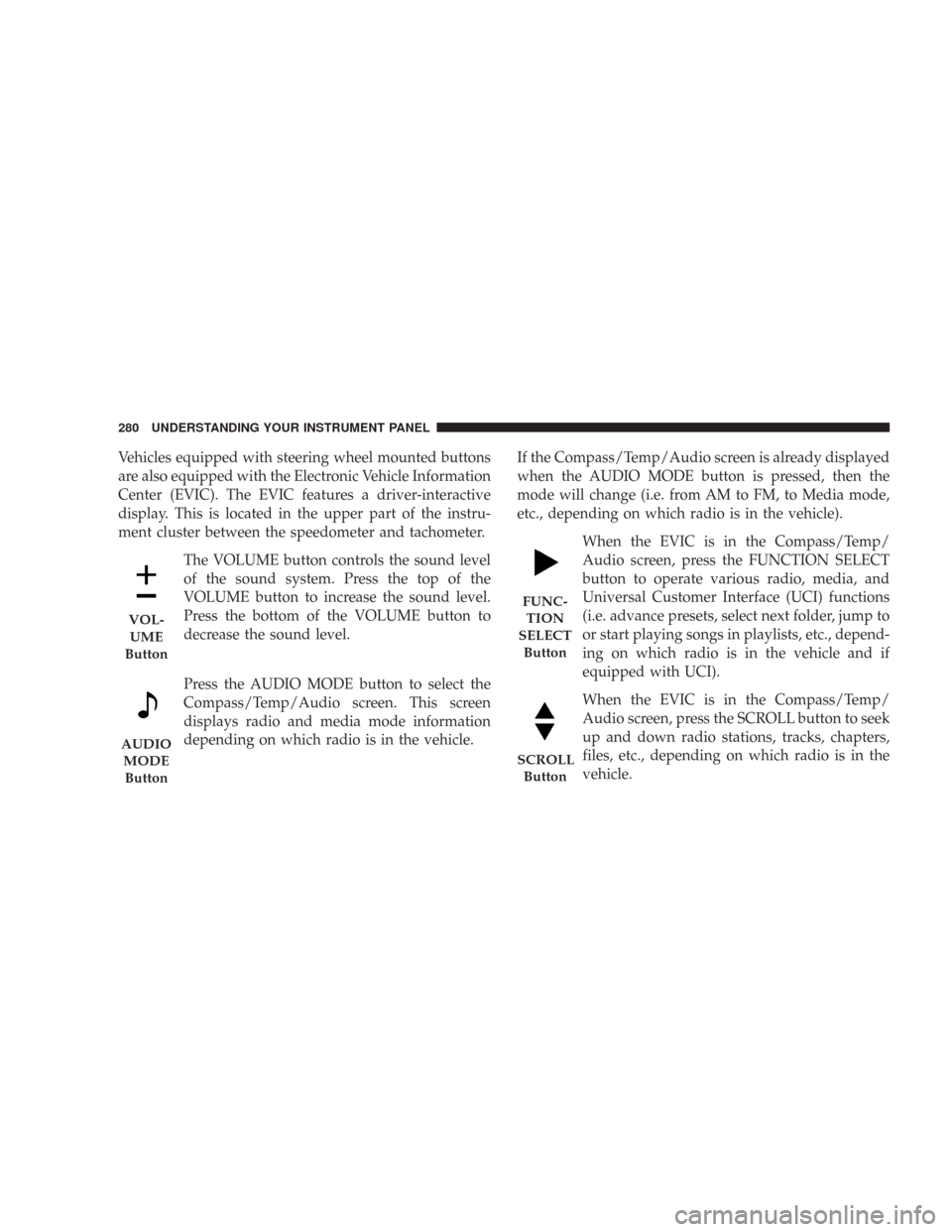
Vehicles equipped with steering wheel mounted buttons
are also equipped with the Electronic Vehicle Information
Center (EVIC). The EVIC features a driver-interactive
display. This is located in the upper part of the instru-
ment cluster between the speedometer and tachometer.
The VOLUME button controls the sound level
of the sound system. Press the top of the
VOLUME button to increase the sound level.
Press the bottom of the VOLUME button to
decrease the sound level.
Press the AUDIO MODE button to select the
Compass/Temp/Audio screen. This screen
displays radio and media mode information
depending on which radio is in the vehicle.If the Compass/Temp/Audio screen is already displayed
when the AUDIO MODE button is pressed, then the
mode will change (i.e. from AM to FM, to Media mode,
etc., depending on which radio is in the vehicle).
When the EVIC is in the Compass/Temp/
Audio screen, press the FUNCTION SELECT
button to operate various radio, media, and
Universal Customer Interface (UCI) functions
(i.e. advance presets, select next folder, jump to
or start playing songs in playlists, etc., depend-
ing on which radio is in the vehicle and if
equipped with UCI).
When the EVIC is in the Compass/Temp/
Audio screen, press the SCROLL button to seek
up and down radio stations, tracks, chapters,
files, etc., depending on which radio is in the
vehicle.
VOL-
UME
Button
AUDIO
MODE
Button
FUNC-
TION
SELECT
Button
SCROLL
Button
280 UNDERSTANDING YOUR INSTRUMENT PANEL
Page 313 of 520

Transmission Limp Home Mode
The transmission is monitored for abnormal conditions.
If a condition is detected that could cause damage, the
transmission automatically shifts into second gear. The
transmission remains in second gear despite the forward
gear selected. “P” (Park), “R” (Reverse), and “N” (Neu-
tral) will continue to operate. This Reset feature allows
the vehicle to be driven to a dealer for service without
damaging the transmission.
If the problem has been momentary, the transmission can
be reset to regain all forward gears.
•Stop the vehicle and shift into “P” (Park).
•Turn the key to LOCK then start the engine.
•Shift into “D” (Drive) and resume driving.NOTE:Even if the transmission can be reset, we recom-
mend that you visit a dealer at your earliest possible
convenience. Your dealer has diagnostic equipment to
determine if the problem could recur.
If the transmission cannot be reset, dealer service is
required.
5 Speed Automatic Transmission
Shifting from “D” (Drive) to “P” (Park) or “R” (Reverse)
(or from “P” or “R” to “D”) should be done only after the
accelerator pedal is released and the vehicle is stopped.
Be sure to keep your foot on the brake when moving the
selector lever between these gears.
312 STARTING AND OPERATING
Page 318 of 520

damage, the transmission will engage Limp Home Mode.
If vehicle acceleration worsens, or the transmission no
longer shifts, the transmission is most likely operating in
the Limp Home Mode. In this mode, the transmission
will remain in the current gear until the vehicle is
brought to a stop. After the vehicle has stopped, “P”
(Park), “R” (Reverse), and “N” (Neutral) will continue to
operate. Second gear will operate in the “D” (Drive)
shifter position. The Malfunction Indicator Light may be
illuminated.
A reset feature is available to allow the vehicle to be
driven to a dealer for service. To reset the transmission,
use the following procedure:
1. Stop the vehicle.
2. Move the selector lever to the “P” (Park) position.
3. Turn off the engine.
4. Wait approximately 10 seconds.5. Restart the engine.
6. Move the selector lever to the desired range. If the
problem is no longer detected, the transmission will
return to normal operation.
NOTE:Even if the transmission can be reset, we recom-
mend that you visit a dealer at your earliest possible
convenience. Your dealer has diagnostic equipment to
determine if the problem could recur.
Have the transmission checked at your authorized dealer
as soon as possible.
If the problem has been momentary, the transmission can
be reset to regain all forward gears.
Permanent Transmission Limp Home Mode
Permanent Limp Home Mode will be activated if the
transmission enters temporary Limp Home Mode three
times. Follow the reset procedure described under “Tem-
porary Transmission Limp Home Mode” in this section.
STARTING AND OPERATING 317
5
Page 372 of 520

WARNING!
•Never have any smoking materials lit in or near
the vehicle when the gas cap is removed or the
tank filled.
•Never add fuel to the vehicle when the engine is
running.
•A fire may result if gasoline is pumped into a
portable container that is inside of a vehicle. You
could be burned. Always place gas containers on
the ground while filling.NOTE:
•Tighten the gas cap until you hear a “clicking” sound.
This is an indication that the gas cap is tightened
properly. The Malfunction Indicator Light in the in-
strument cluster may turn on if the gas cap is not
secured properly. Make sure that the gas cap is tight-
ened each time the vehicle is refueled.
•When the fuel nozzle “clicks” or shuts off, the fuel
tank is full.
Loose Fuel Filler Cap Message
If the vehicle diagnostic system determines that the fuel
filler cap is loose, improperly installed, or damaged, a
“Check Gascap” message will display in the Electronic
Vehicle Information Center (EVIC) — if equipped. If this
occurs, tighten the fuel filler cap properly and press the
odometer reset button to turn off the message. If the
problem continues, the message will appear the next time
the vehicle is started.
STARTING AND OPERATING 371
5
Page 419 of 520

odometer reset button to turn off the message. If the
problem continues, the message will appear the next time
the vehicle is started.
A loose, improperly installed, or damaged fuel filler cap
may also turn on the Malfunction Indicator Light (MIL).
EMISSIONS INSPECTION AND MAINTENANCE
PROGRAMS
In some localities, it may be a legal requirement to pass
an inspection of your vehicle’s emissions control system.
Failure to pass could prevent vehicle registration.
For states, which have an I/M (Inspection and
Maintenance) requirement, this check verifies the
following: the MIL (Malfunction Indicator Light)
is functioning and is not on when the engine is running,
and that the OBD (On Board Diagnostic) system is ready
for testing.Normally, the OBD system will be ready. The OBD
system maynotbe ready if your vehicle was recently
serviced, if you recently had a dead battery, or a battery
replacement. If the OBD system should be determined
not ready for the I/M test, your vehicle may fail the test.
Your vehicle has a simple ignition key actuated test,
which you can use prior to going to the test station. To
check if your vehicle’s OBD system is ready, you must do
the following:
1. Insert your ignition key into the ignition switch.
2. Turn the ignition to the ON position, but do not crank
or start the engine.
3. If you crank or start the engine, you will have to start
this test over.
4. As soon as you turn your key to the ON position, you
will see your MIL symbol come on as part of a normal
bulb check.
418 MAINTAINING YOUR VEHICLE
Page 445 of 520

CAUTION!
Do not allow petroleum-base fluid to contaminate
the brake fluid. Seal damage may result.
Automatic Transmission
Fluid Level Check
Regular automatic transmission fluid level checks are not
required. For this reason, the dipstick is omitted.
If you notice fluid loss or gear shift malfunction, have
your authorized dealer check the transmission fluid level.
CAUTION!
•Using a transmission fluid other than the manu-
facturer’s recommended fluid may cause deterio-
ration in transmission shift quality and/or torque
converter shudder. Using a transmission fluid
other than that recommended by the manufacturer
will result in more frequent fluid and filter
changes. Refer to “Fluids, Lubricants, and Genu-
ine Parts” for the correct fluid type.
•The fluid level is preset at the factory and it does
not require adjustment under normal operating
conditions. If a transmission fluid leak occurs,
visit your authorized dealer immediately. Severe
damage to the transmission may occur. Your au-
thorized dealer has the proper tools to adjust the
fluid level accurately.
444 MAINTAINING YOUR VEHICLE
Page 458 of 520
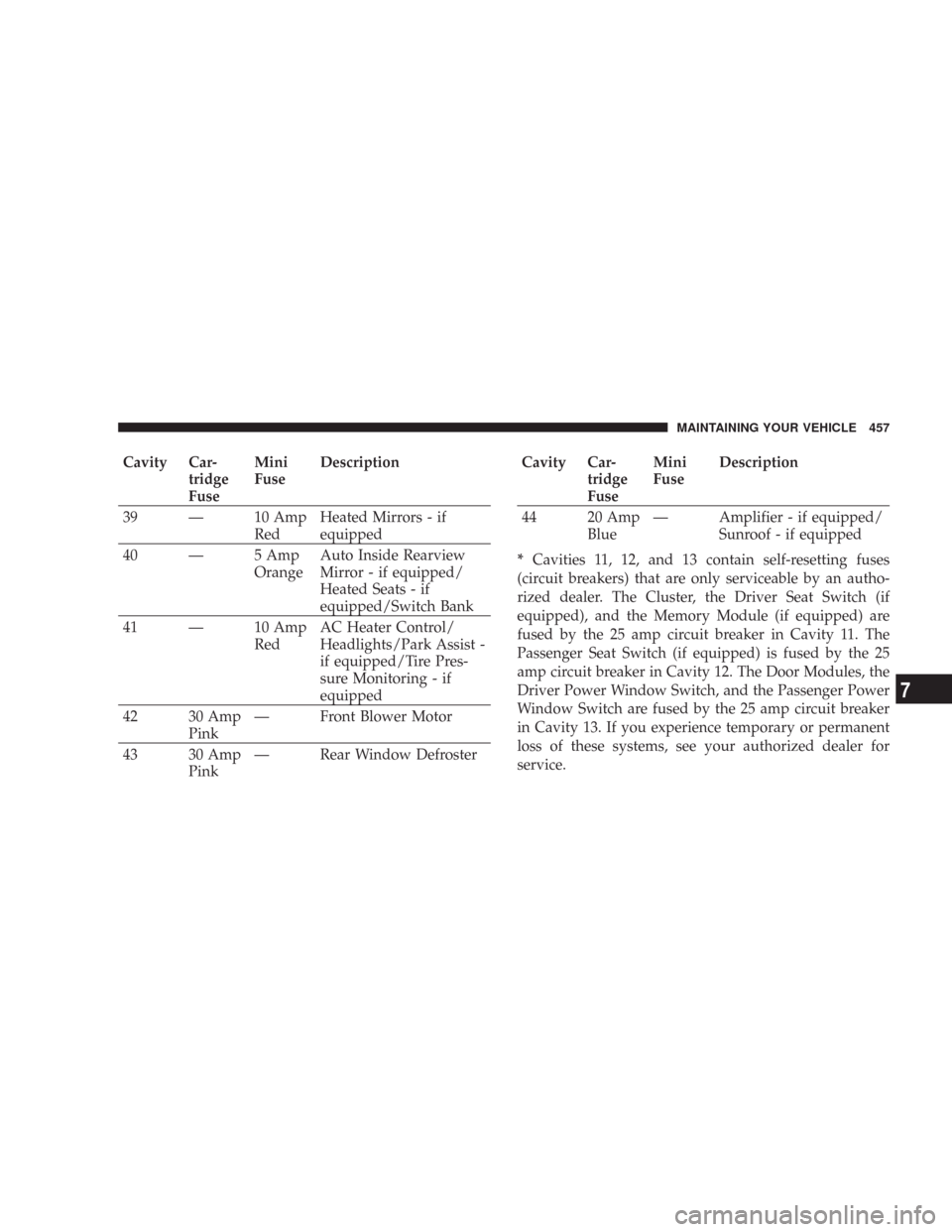
Cavity Car-
tridge
FuseMini
FuseDescription
39 — 10 Amp
RedHeated Mirrors - if
equipped
40 — 5 Amp
OrangeAuto Inside Rearview
Mirror - if equipped/
Heated Seats - if
equipped/Switch Bank
41 — 10 Amp
RedAC Heater Control/
Headlights/Park Assist -
if equipped/Tire Pres-
sure Monitoring - if
equipped
42 30 Amp
Pink— Front Blower Motor
43 30 Amp
Pink— Rear Window DefrosterCavity Car-
tridge
FuseMini
FuseDescription
44 20 Amp
Blue— Amplifier - if equipped/
Sunroof - if equipped
*Cavities 11, 12, and 13 contain self-resetting fuses
(circuit breakers) that are only serviceable by an autho-
rized dealer. The Cluster, the Driver Seat Switch (if
equipped), and the Memory Module (if equipped) are
fused by the 25 amp circuit breaker in Cavity 11. The
Passenger Seat Switch (if equipped) is fused by the 25
amp circuit breaker in Cavity 12. The Door Modules, the
Driver Power Window Switch, and the Passenger Power
Window Switch are fused by the 25 amp circuit breaker
in Cavity 13. If you experience temporary or permanent
loss of these systems, see your authorized dealer for
service.
MAINTAINING YOUR VEHICLE 457
7
Page 480 of 520
if it has been 6 months since your last oil change even
if the oil change indicator message is NOT illumi-
nated.
•Change your engine oil more often if you drive your
vehicle off-road for an extended period of time.
•Under no circumstances should oil change intervals
exceed 6,000 miles (10,000 km) or 6 months, whichever
comes first.
Your dealer will reset the oil change indicator message
after completing the scheduled oil change. If a scheduled
oil change is performed by someone other than your
dealer, the message can be reset by referring to the steps
described under “Oil Change Required” under “Elec-
tronic Vehicle Information Center (EVIC)” in Section 3 of
this manual or under “Odometer/Trip Odometer” under
“Instrument Cluster Descriptions” in Section 3 of this
manual.At Each Stop for Fuel
•Check the engine oil level about 5 minutes after a fully
warmed engine is shut off. Checking the oil level while
the vehicle is on level ground will improve the accu-
racy of the oil level reading. Add oil only when the
level is at or below the ADD or MIN mark.
•Check the windshield washer solvent and add if
required.
Once a Month
•Check tire pressure and look for unusual wear or
damage.
•Inspect the battery, and clean and tighten the terminals
as required.
•Check the fluid levels of coolant reservoir, brake
master cylinder, power steering, and transmission,
and add as needed.
MAINTENANCE SCHEDULES 479
8
M
A
I
N
T
E
N
A
N
C
E
S
C
H
E
D
U
L
E
S