mirror CHRYSLER 300 C 2009 1.G User Guide
[x] Cancel search | Manufacturer: CHRYSLER, Model Year: 2009, Model line: 300 C, Model: CHRYSLER 300 C 2009 1.GPages: 537, PDF Size: 8.46 MB
Page 136 of 537
WARNING!
•Be certain that the seatback is securely locked into
position. If the seatback is not securely locked into
position, the seat will not provide the proper
stability for child seats and/or passengers. An
improperly latched seat could cause serious injury.
•The cargo area in the rear of the vehicle (with the
rear seatbacks in the locked-up or folded down
position) should not be used as a play area by
children when the vehicle is in motion. They could
be seriously injured in an accident. Children
should be seated and using the proper restraint
system.
DRIVER MEMORY SEAT — IF EQUIPPED
This feature allows the driver to store up to two different
memory profiles for easy recall through a memory
switch. Each memory profile contains desired position
settings for the driver seat, side mirror, adjustable pedals
(if equipped), and power tilt and telescopic steering
column (if equipped) and a set of desired radio station
presets.
NOTE:Only one Remote Keyless Entry (RKE) transmit-
ter can be linked to each of the memory positions.
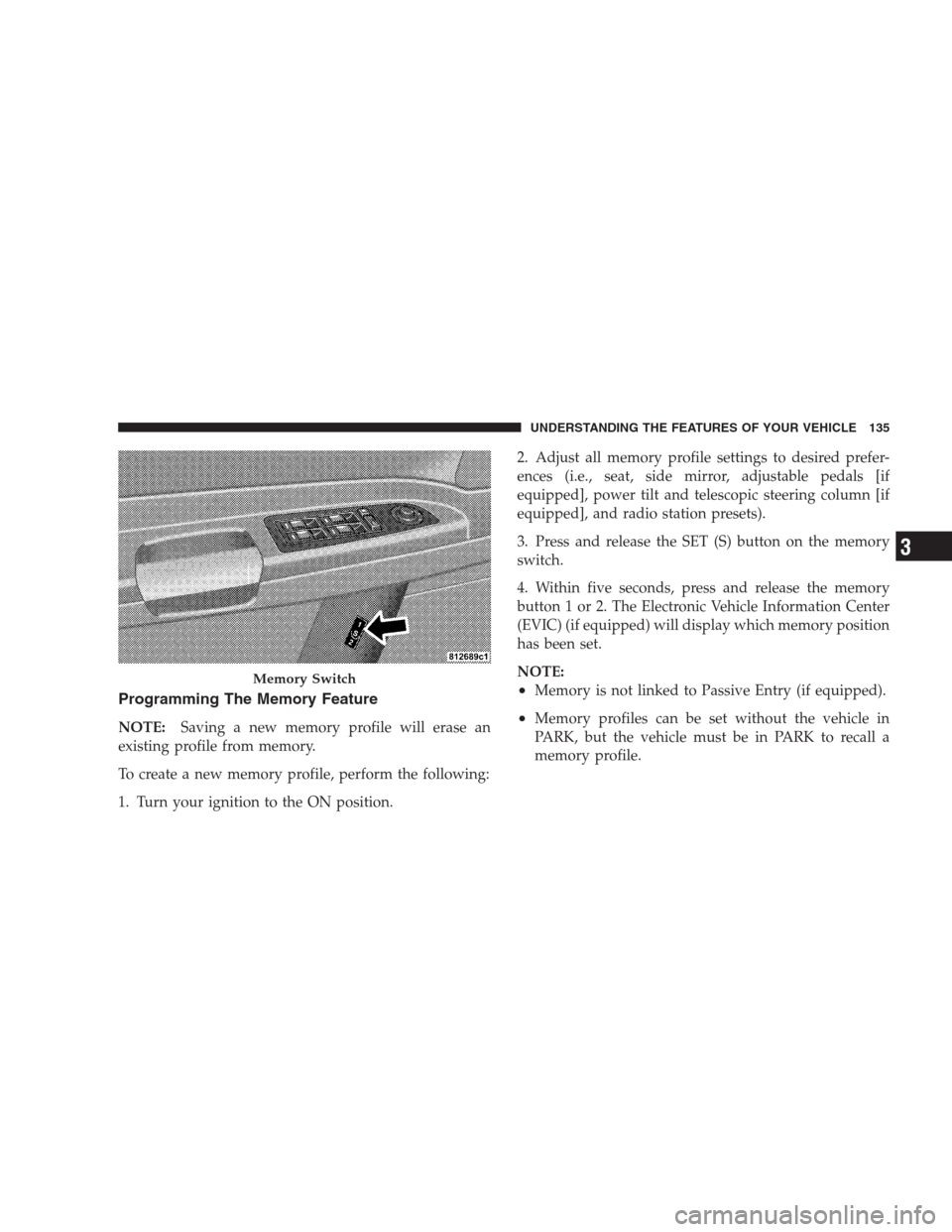
The memory switch is located on the driver’s door trim
panel. The switch contains an (S) button to activate the
memory save function. It also contains a rocker switch
labeled with the number (1) and the number (2). The
rocker switch allows the driver to recall either of two
pre-programmed memory profiles by pressing the appro-
priate side of the switch.
134 UNDERSTANDING THE FEATURES OF YOUR VEHICLE
Page 137 of 537
Programming The Memory Feature
NOTE:Saving a new memory profile will erase an
existing profile from memory.
To create a new memory profile, perform the following:
1. Turn your ignition to the ON position.2. Adjust all memory profile settings to desired prefer-
ences (i.e., seat, side mirror, adjustable pedals [if
equipped], power tilt and telescopic steering column [if
equipped], and radio station presets).
3. Press and release the SET (S) button on the memory
switch.
4. Within five seconds, press and release the memory
button 1 or 2. The Electronic Vehicle Information Center
(EVIC) (if equipped) will display which memory position
has been set.
NOTE:
•Memory is not linked to Passive Entry (if equipped).
•Memory profiles can be set without the vehicle in
PARK, but the vehicle must be in PARK to recall a
memory profile.
Memory Switch
UNDERSTANDING THE FEATURES OF YOUR VEHICLE 135
3
Page 139 of 537
To recall the memory settings for driver one, press
MEMORY button number 1 on the driver’s door or the
UNLOCK button on the RKE transmitter linked to
memory position 1.
To recall the memory setting for driver two, press
MEMORY button number 2 on the driver’s door or the
UNLOCK button on the RKE transmitter linked to
memory position 2.
A recall can be cancelled by pressing any of the
MEMORY buttons (S, 1, or 2) on the driver’s door during
a recall. When a recall is cancelled, the driver seat, side
mirror, adjustable pedals (if equipped), and power tilt
and telescopic steering column (if equipped) stop mov-
ing. A delay of one second will occur before another recall
can be selected.Easy Entry/Exit Seat (Available with Memory Seat
Only)
This feature provides automatic driver seat positioning to
enhance driver mobility when entering and exiting the
vehicle.
The distance the driver seat moves depends on where
you have the driver seat positioned when you remove the
key from the ignition switch.
•When you remove the key from the ignition switch,
the driver seat will move about 2.4 in (60 mm)
rearward if the driver seat position is greater than or
equal to 2.7 in (67.7 mm) forward of the rear stop. The
seat will return to its previously set position when you
insert the key into the ignition switch and turn it out of
the LOCK position.
•When you remove the key from the ignition switch,
the driver seat will move to a position 0.3 in (7.7 mm)
forward of the rear stop if the driver seat position is
UNDERSTANDING THE FEATURES OF YOUR VEHICLE 137
3
Page 143 of 537
Headlights On with Wipers (Available with Auto
Headlights Only)
When this feature is active, the headlights will turn on
approximately 10 seconds after the wipers are turned on
if the headlight switch is placed in the AUTO position. In
addition, the headlights will turn off when the wipers are
turned off if they were turned on by this feature.
The Headlights On with Wipers feature can be turned on
or off through the Electronic Vehicle Information Center
(EVIC) (if equipped). Refer to ”Headlights On with
Wipers,” under “Personal Settings (Customer-
Programmable Features)” under “Electronic Vehicle In-
formation Center (EVIC)” in Section 4.
SmartBeams — If Equipped
The SmartBeam system provides increased forward light-
ing at night by automating high beam control through
the use of a digital camera mounted on the inside
rearview mirror. This camera detects vehicle specific lightand automatically switches from high beams to low
beams until the approaching vehicle is out of view.
To Activate
1. Select “Automatic High Beams — ON” through the
EVIC. Refer to “Automatic High Beams,” under “Per-
sonal Settings (Customer-Programmable Features)” un-
der “Electronic Vehicle Information Center (EVIC)” in
Section 4.
2. Rotate the headlight switch counterclockwise to the
AUTO (A) position.
3. Push the multifunction lever away from you to switch
the headlights to the high beam position. Refer to “Mul-
tifunction Lever” in this section.
NOTE:This system will not activate until the vehicle is
at or above 25 mph (40 km/h).
UNDERSTANDING THE FEATURES OF YOUR VEHICLE 141
3
Page 146 of 537
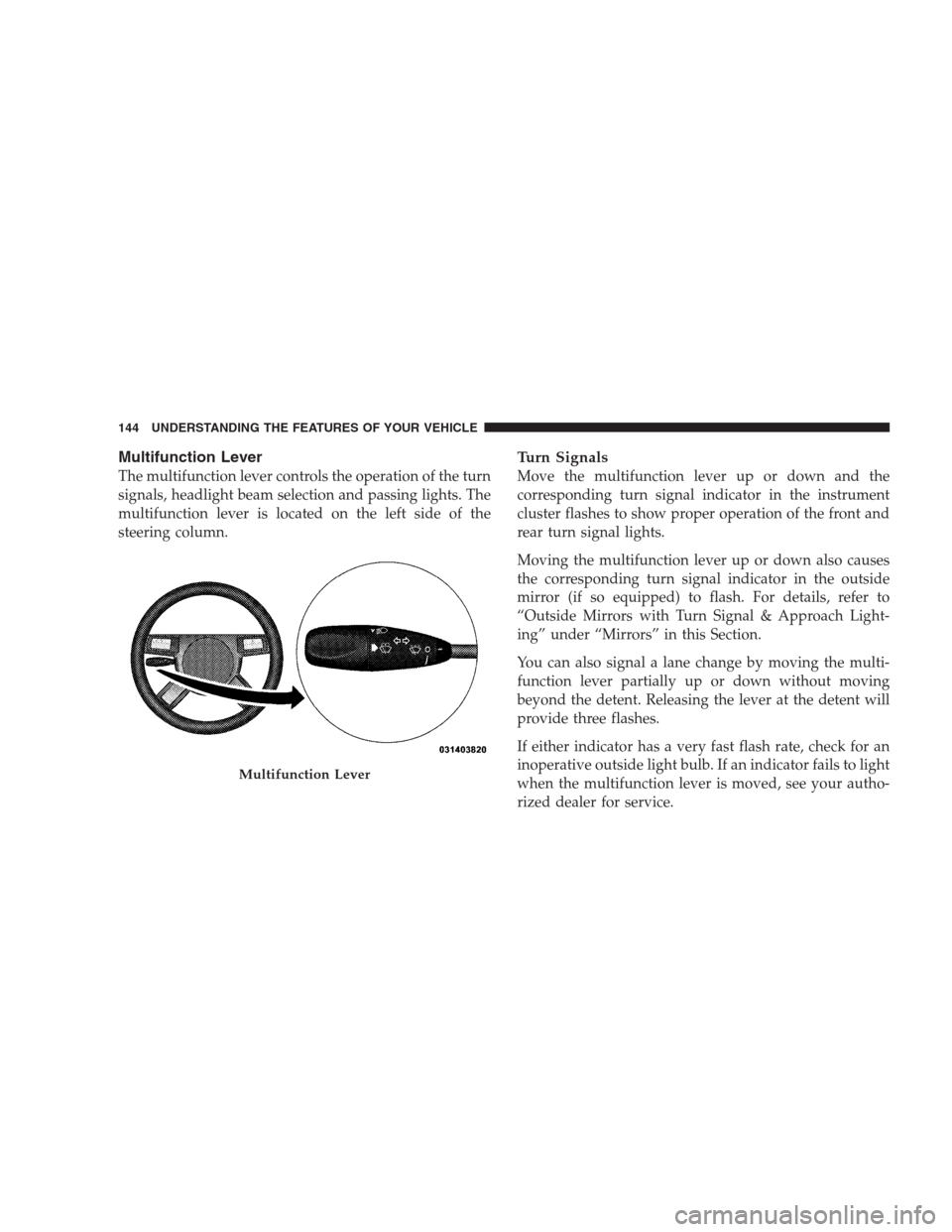
Multifunction Lever
The multifunction lever controls the operation of the turn
signals, headlight beam selection and passing lights. The
multifunction lever is located on the left side of the
steering column.
Turn Signals
Move the multifunction lever up or down and the
corresponding turn signal indicator in the instrument
cluster flashes to show proper operation of the front and
rear turn signal lights.
Moving the multifunction lever up or down also causes
the corresponding turn signal indicator in the outside
mirror (if so equipped) to flash. For details, refer to
“Outside Mirrors with Turn Signal & Approach Light-
ing” under “Mirrors” in this Section.
You can also signal a lane change by moving the multi-
function lever partially up or down without moving
beyond the detent. Releasing the lever at the detent will
provide three flashes.
If either indicator has a very fast flash rate, check for an
inoperative outside light bulb. If an indicator fails to light
when the multifunction lever is moved, see your autho-
rized dealer for service.
Multifunction Lever
144 UNDERSTANDING THE FEATURES OF YOUR VEHICLE
Page 183 of 537
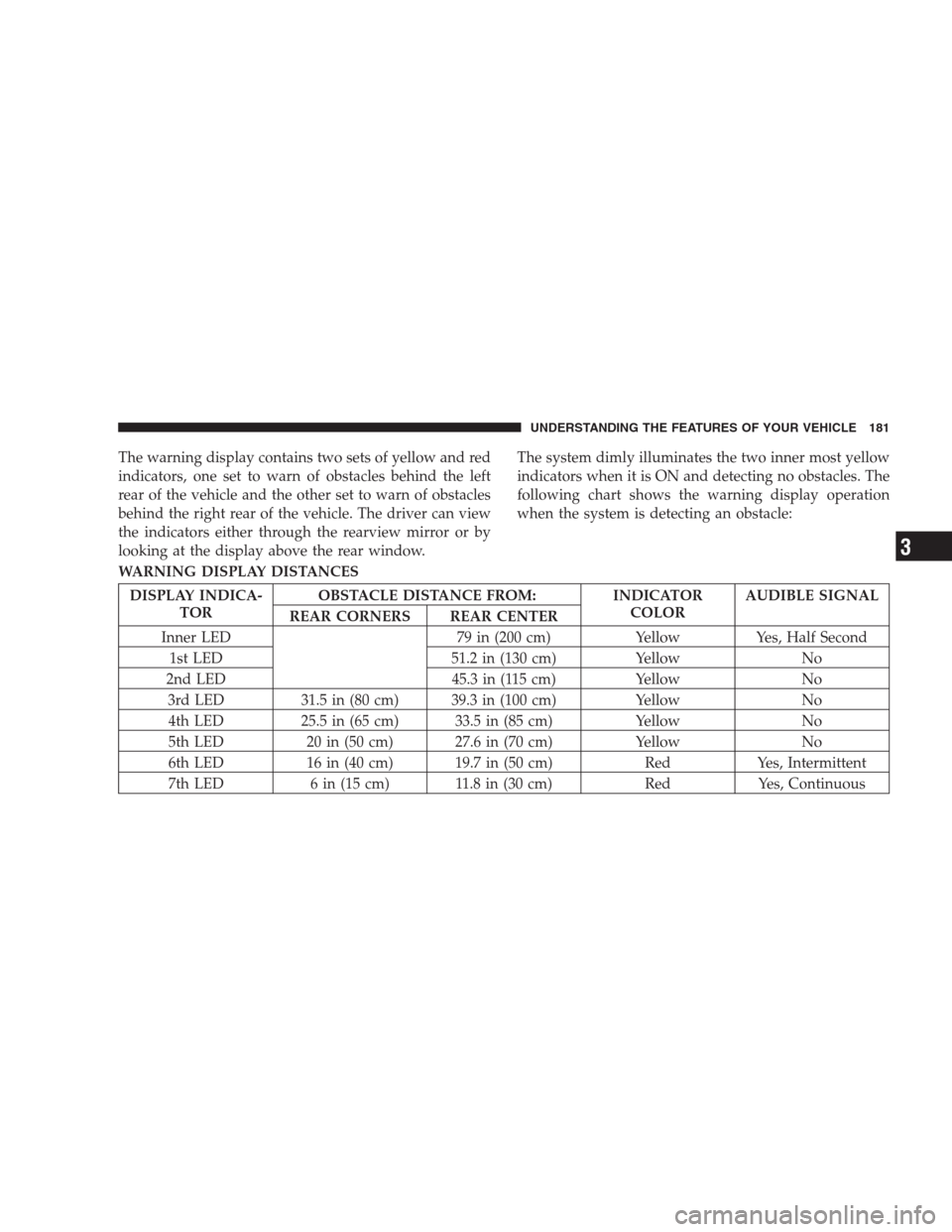
The warning display contains two sets of yellow and red
indicators, one set to warn of obstacles behind the left
rear of the vehicle and the other set to warn of obstacles
behind the right rear of the vehicle. The driver can view
the indicators either through the rearview mirror or by
looking at the display above the rear window.The system dimly illuminates the two inner most yellow
indicators when it is ON and detecting no obstacles. The
following chart shows the warning display operation
when the system is detecting an obstacle:
WARNING DISPLAY DISTANCES
DISPLAY INDICA-
TOROBSTACLE DISTANCE FROM: INDICATOR
COLORAUDIBLE SIGNAL
REAR CORNERS REAR CENTER
Inner LED 79 in (200 cm) Yellow Yes, Half Second
1st LED 51.2 in (130 cm) Yellow No
2nd LED 45.3 in (115 cm) Yellow No
3rd LED 31.5 in (80 cm) 39.3 in (100 cm) Yellow No
4th LED 25.5 in (65 cm) 33.5 in (85 cm) Yellow No
5th LED 20 in (50 cm) 27.6 in (70 cm) Yellow No
6th LED 16 in (40 cm) 19.7 in (50 cm) Red Yes, Intermittent
7th LED 6 in (15 cm) 11.8 in (30 cm) Red Yes, Continuous
UNDERSTANDING THE FEATURES OF YOUR VEHICLE 181
3
Page 203 of 537
WARNING! (Continued)
•To help protect against personal injury, passengers
should not be seated in the rear cargo area. The
rear cargo space is intended for load carrying
purposes only, not for passengers, who should sit
in seats and use seat belts.
CARGO AREA FEATURES
Trunk Mat — If Equipped
A reversible trunk mat covers the bottom of the cargo
area. The rubber side of the mat is used to protect the
interior of the trunk from mud, snow, and debris. It
provides a nonskid surface to keep cargo from sliding.
REAR WINDOW FEATURES
Electric Rear Window Defroster
The Electric Rear Window Defroster button is
located on the climate control. Press this button to
turn on the rear window defroster and the heated outside
rearview mirrors (if equipped). An indicator in the button
will illuminate when the rear window defroster is on. The
rear window defroster automatically turns off after ap-
proximately 10 minutes. For an additional five minutes of
operation, press the button a second time.
UNDERSTANDING THE FEATURES OF YOUR VEHICLE 201
3
Page 239 of 537
“Remote Key Unlock”
WhenDriver Door 1st Pressis selected, only the driver’s
door will unlock on the first press of the Remote Keyless
Entry (RKE) transmitter UNLOCK button. When Driver
Door 1st Press is selected, you must press the RKE
transmitter UNLOCK button twice to unlock the passen-
ger’s doors. WhenAll Doors 1st Pressis selected, all of
the doors will unlock on the first press of the RKE
transmitter UNLOCK button. To make your selection,
press and release the FUNCTION SELECT button until
“Driver Door 1st Press” or “All Doors 1st Press” appears.
NOTE:If the vehicle is equipped with Passive Entry
and the EVIC is programmed to Unlock All Doors 1st
Press, all doors will unlock no matter which handle is
grasped. If Driver Door 1st Press is programmed, only
the driver ’s door will unlock when the driver ’s door is
grasped. With Passive Entry, if Driver Door 1st Press is
programmed touching the handle more than once will
only result in the driver ’s door opening. You have totouch a passenger handle to unlock all doors passively
when Driver ’s Door Only is programmed in the EVIC.
“Recall Memory with Remote Key Unlock” — If
Equipped
When ON is selected, you can use your RKE transmitter
to recall one of two pre-programmed memory profiles.
Each memory profile contains desired position settings
for the driver seat, side mirror, adjustable pedals (if
equipped), power tilt and telescopic steering column (if
equipped), and a set of desired radio station presets.
When OFF is selected, only the MEMORY switch on the
driver’s door trim panel will recall memory profiles. To
make your selection, press and release the FUNCTION
SELECT button until “ON” or “OFF” appears. Refer to
“Driver Memory Seat” in Section 3.
UNDERSTANDING YOUR INSTRUMENT PANEL 237
4
Page 241 of 537
“Headlights On with Wipers” (Available with Auto
Headlights Only)
When ON is selected, and the HEADLIGHT switch is in
the AUTO position, the headlights will turn on approxi-
mately 10 seconds after the wipers are turned on. The
headlights will also turn off when the wipers are turned
off if they were turned on by this feature. To make your
selection, press and release the FUNCTION SELECT
button until “ON” or “OFF” appears.
NOTE:Turning the headlights on during the daytime
causes the instrument panel lights to dim. To increase the
brightness, refer to “Lights” in Section 3.
“Delay Turning Headlights Off”
When this feature is selected, the driver can choose to
have the headlights remain on for 0, 30, 60, or 90 seconds
when exiting the vehicle. To make your selection, press
and release the FUNCTION SELECT button until “0,”
“30,” “60,” or “90” appears.
“Tilt Mirrors Down in Reverse” — If Equipped
When ON is selected, the outside rearview mirrors will
tilt downward when the ignition switch is in the ON
position and the transmission is in the REVERSE posi-
tion. The mirrors will move back to their previous
position when the transmission is shifted out of RE-
VERSE. To make your selection, press and release the
FUNCTION SELECT button until “ON” or “OFF”
appears.
“Turn Headlights On with Remote Key Unlock”
When this feature is selected, the headlights will activate
and remain on for up to 90 seconds when the doors are
unlocked with the RKE transmitter. To make your selec-
tion, press and release the FUNCTION SELECT button
until “OFF,” “30 sec.,” “60 sec.,” or “90 sec.” appears.
UNDERSTANDING YOUR INSTRUMENT PANEL 239
4
Page 315 of 537
STARTING PROCEDURES
Before starting your vehicle, adjust your seat, adjust the
inside and outside mirrors, fasten your seat belt, and if
present, instruct all other occupants to buckle their seat
belts.
WARNING!
•Never leave children alone in a vehicle. Leaving
unattended children in a vehicle is dangerous for a
number of reasons. A child or others could be
seriously or fatally injured. Do not leave the key in
the ignition. A child could operate power win-
dows, other controls, or move the vehicle.
•Do not leave animals or children inside parked
vehicles in hot weather; interior heat buildup may
cause serious injury or death.
(Continued)
WARNING! (Continued)
•Be sure to turn OFF the engine and remove the key
from the ignition switch if you want to rest or
sleep in your car. Accidents can be caused by
inadvertently moving the shift lever. Accidents
can also be caused by pressing the accelerator
pedal. This may cause excessive heat in the ex-
haust system, resulting in overheating and vehicle
fire, which may cause serious or fatal injuries.
Automatic Transmission
The shift lever must be in the NEUTRAL or PARK
position before you can start the engine. Apply the brakes
before shifting into any driving gear.
STARTING AND OPERATING 313
5