battery CHRYSLER 300 LX 2005 User Guide
[x] Cancel search | Manufacturer: CHRYSLER, Model Year: 2005, Model line: 300 LX, Model: CHRYSLER 300 LX 2005Pages: 374, PDF Size: 7.09 MB
Page 128 of 374
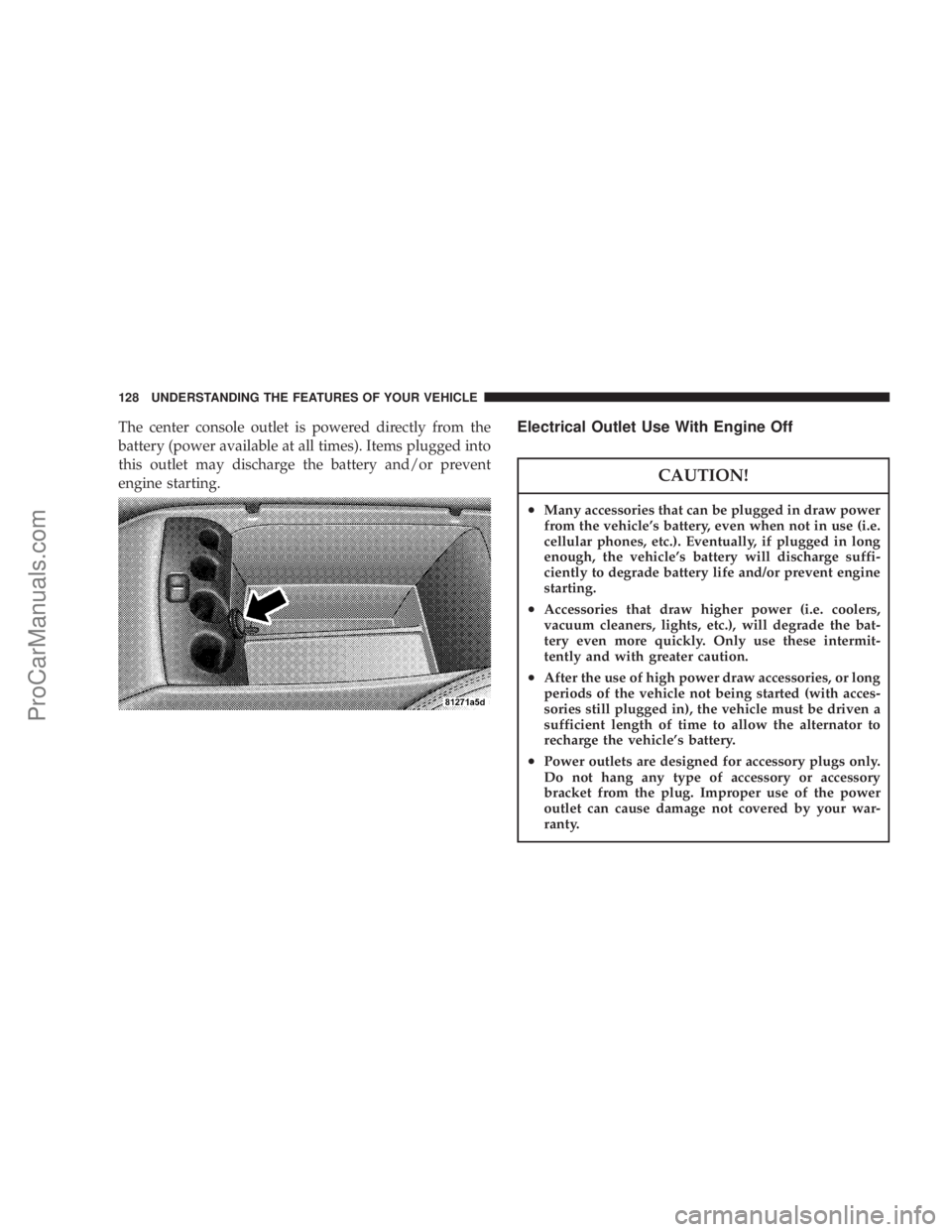
The center console outlet is powered directly from the
battery (power available at all times). Items plugged into
this outlet may discharge the battery and/or prevent
engine starting.Electrical Outlet Use With Engine Off
CAUTION!
²Many accessories that can be plugged in draw power
from the vehicle's battery, even when not in use (i.e.
cellular phones, etc.). Eventually, if plugged in long
enough, the vehicle's battery will discharge suffi-
ciently to degrade battery life and/or prevent engine
starting.
²Accessories that draw higher power (i.e. coolers,
vacuum cleaners, lights, etc.), will degrade the bat-
tery even more quickly. Only use these intermit-
tently and with greater caution.
²After the use of high power draw accessories, or long
periods of the vehicle not being started (with acces-
sories still plugged in), the vehicle must be driven a
sufficient length of time to allow the alternator to
recharge the vehicle's battery.
²Power outlets are designed for accessory plugs only.
Do not hang any type of accessory or accessory
bracket from the plug. Improper use of the power
outlet can cause damage not covered by your war-
ranty.
128 UNDERSTANDING THE FEATURES OF YOUR VEHICLE
ProCarManuals.com
Page 148 of 374

Pressing the FUNCTION SELECT button ac-
cepts a selected choice. The Function Select
button also advances the radio preset when the
EVIC is in the Compass/Temp/Audio screen.
Use the SCROLL buttons to scroll through Trip
Functions, Navigation (If Equipped), System
Status Messages, and Personal Settings (Cus-
tomer Programmable Features). The SCROLL
buttons also seek up and down (radio station or CD track
number).
The AUDIO MODE SELECT button is used to
select the Compass/Temp/Audio screen. If
Compass/Temp/Audio is already being dis-
played when the AUDIO MODE SELECT but-
ton is pressed, the radio mode will change from AM to
FM to Tape to CD, or to Satellite (SAT) depending on
which radio is in the vehicle. This button can also be used
to return to a previous navigation menu selection.
When the appropriate conditions exist, the Electronic
Vehicle Information Center (EVIC) displays the following
messages.²Turn Signal On (with a continuous warning chime)
²Left Front Turn Signal Lamp Out (with a single chime)
²Left Rear Turn Signal Lamp Out (with a single chime)
²Right Front Turn Signal Lamp Out (with a single
chime)
²Right Rear Turn Signal Lamp Out (with a single
chime)
²RKE Battery Low (with a single chime)
²Memory #1/#2 Profile Set
²Memory #1/#2 Profile Recall
²Memory System Disabled ± Vehicle Not In Park (with
a single chime)
²Memory System Disabled ± Seat Belt Buckled (with a
single chime)
²Personal Settings Not Available ± Vehicle Not in Park
²Left/Right Front Door Ajar (one or more, with a single
chime if speed is above 1 mph)
148 UNDERSTANDING YOUR INSTRUMENT PANEL
ProCarManuals.com
Page 152 of 374
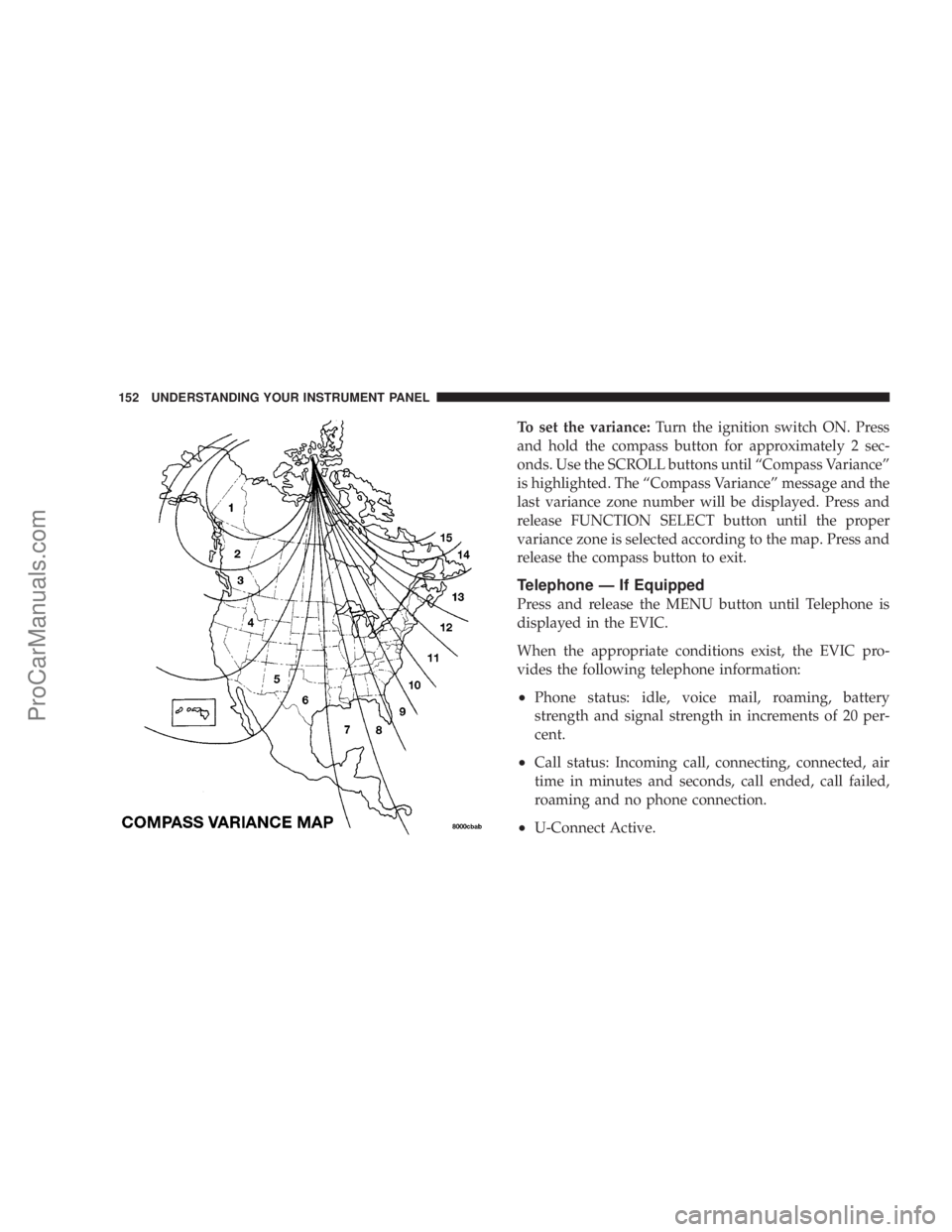
To set the variance:Turn the ignition switch ON. Press
and hold the compass button for approximately 2 sec-
onds. Use the SCROLL buttons until ªCompass Varianceº
is highlighted. The ªCompass Varianceº message and the
last variance zone number will be displayed. Press and
release FUNCTION SELECT button until the proper
variance zone is selected according to the map. Press and
release the compass button to exit.
Telephone Ð If Equipped
Press and release the MENU button until Telephone is
displayed in the EVIC.
When the appropriate conditions exist, the EVIC pro-
vides the following telephone information:
²Phone status: idle, voice mail, roaming, battery
strength and signal strength in increments of 20 per-
cent.
²Call status: Incoming call, connecting, connected, air
time in minutes and seconds, call ended, call failed,
roaming and no phone connection.
²U-Connect Active.
152 UNDERSTANDING YOUR INSTRUMENT PANEL
ProCarManuals.com
Page 153 of 374
²Caller ID phone number display.
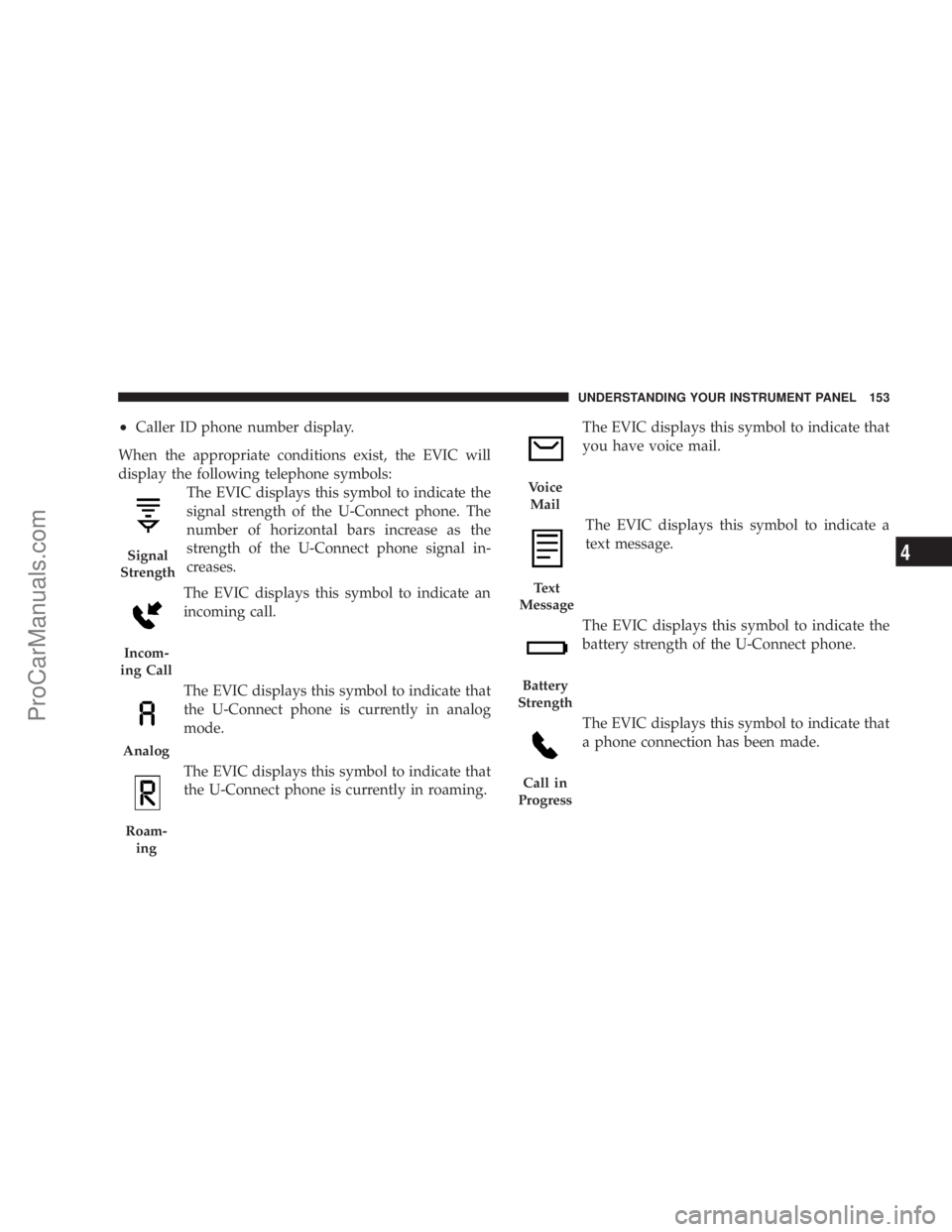
When the appropriate conditions exist, the EVIC will
display the following telephone symbols:
The EVIC displays this symbol to indicate the
signal strength of the U-Connect phone. The
number of horizontal bars increase as the
strength of the U-Connect phone signal in-
creases.
The EVIC displays this symbol to indicate an
incoming call.
The EVIC displays this symbol to indicate that
the U-Connect phone is currently in analog
mode.
The EVIC displays this symbol to indicate that
the U-Connect phone is currently in roaming.The EVIC displays this symbol to indicate that
you have voice mail.
The EVIC displays this symbol to indicate a
text message.
The EVIC displays this symbol to indicate the
battery strength of the U-Connect phone.
The EVIC displays this symbol to indicate that
a phone connection has been made.
Signal
Strength
Incom-
ing Call
Analog
Roam-
ing
Voice
Mail
Text
Message
Battery
Strength
Call in
Progress
UNDERSTANDING YOUR INSTRUMENT PANEL 153
4
ProCarManuals.com
Page 208 of 374

WARNING!
²Do not attempt to push or tow your vehicle to get
it started. Vehicles equipped with an automatic
transmission cannot be started this way. Un-
burned fuel could enter the catalytic converter and
once the engine has started, ignite and damage the
converter and vehicle. If the vehicle has a dis-
charged battery, booster cables may be used to
obtain a start from a booster battery or the battery
in another vehicle. This type of start can be
dangerous if done improperly. See section 6 of
this manual for the proper jump starting proce-
dures and follow them carefully.
²Never pour fuel or other flammable liquid into
the throttle body air inlet opening in an attempt to
start the vehicle. This could result in flash fire
causing serious personal injury.
If Engine Fails to Start
If the engine fails to start after you have followed the
ªNORMAL STARTINGº procedure, it may be flooded.Push the accelerator pedal all the way to the floor and
hold it there while cranking the engine. This should clear
any excess fuel in case the engine is flooded.
CAUTION!
To prevent damage to the starter, do not crank the
engine for more than 15 seconds at a time. Wait 10 to
15 seconds before trying again.
If the engine has been flooded, it may start to run, but not
have enough power to continue running when the key is
released. If this occurs, continue cranking up to 15
seconds with the accelerator pedal pushed all the way to
the floor. Release the accelerator pedal and the key once
the engine is running smoothly. Do not overspeed en-
gine.
If the engine shows no sign of starting after two 15
second periods of cranking with the accelerator pedal
held to the floor, the ªNORMAL STARTINGº procedure
should be repeated.
208 STARTING AND OPERATING
ProCarManuals.com
Page 263 of 374

WHAT TO DO IN EMERGENCIES
CONTENTS
mHazard Warning Flasher.................264
mIf Your Engine Overheats................264
mJacking And Tire Changing...............265
NPreparations For Jacking................266
NJack Location........................267
NSpare Tire Stowage....................268
NJacking And Changing a Tire.............269
NCompact Spare Tire....................272
NWheel Cover Installation (If Required)......273
mJump-Starting Procedures If Battery Is Low...273
mDriving On Slippery Surfaces.............276NAcceleration.........................276
NTraction............................276
mFreeing A Stuck Vehicle.................277
mTowing A Disabled Vehicle...............278
NWith Ignition Key.....................278
NWithout The Ignition Key...............279
NTowing This Vehicle Behind Another Vehicle
(Flat Towing With All Four Wheels On The
Ground)............................279
NTowing This Vehicle Behind Another Vehicle
With A Tow Dolley....................2796
ProCarManuals.com
Page 264 of 374
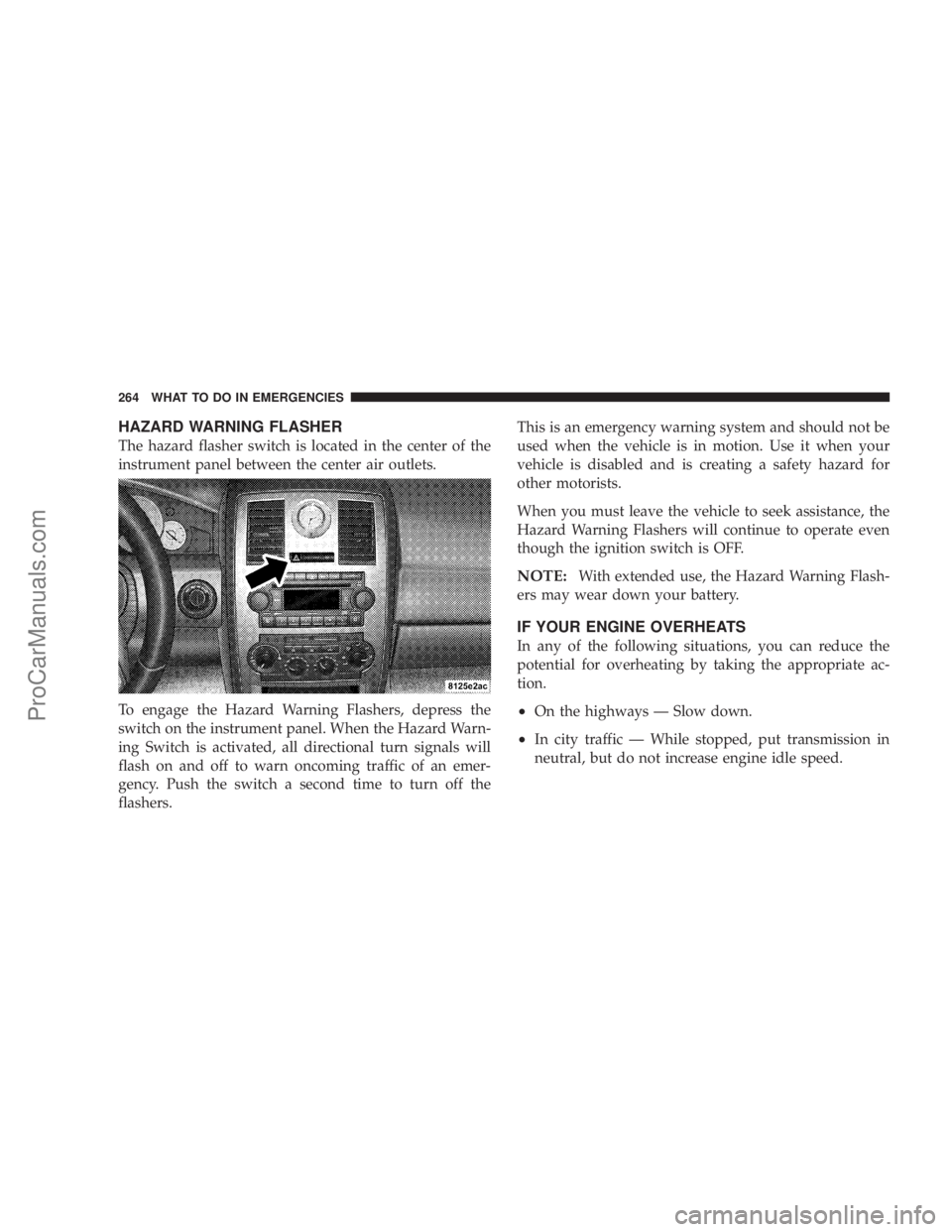
HAZARD WARNING FLASHER
The hazard flasher switch is located in the center of the
instrument panel between the center air outlets.
To engage the Hazard Warning Flashers, depress the
switch on the instrument panel. When the Hazard Warn-
ing Switch is activated, all directional turn signals will
flash on and off to warn oncoming traffic of an emer-
gency. Push the switch a second time to turn off the
flashers.This is an emergency warning system and should not be
used when the vehicle is in motion. Use it when your
vehicle is disabled and is creating a safety hazard for
other motorists.
When you must leave the vehicle to seek assistance, the
Hazard Warning Flashers will continue to operate even
though the ignition switch is OFF.
NOTE:With extended use, the Hazard Warning Flash-
ers may wear down your battery.
IF YOUR ENGINE OVERHEATS
In any of the following situations, you can reduce the
potential for overheating by taking the appropriate ac-
tion.
²On the highways Ð Slow down.
²In city traffic Ð While stopped, put transmission in
neutral, but do not increase engine idle speed.
264 WHAT TO DO IN EMERGENCIES
ProCarManuals.com
Page 273 of 374

Wheel Cover Installation (If Required)
1. Tighten the two lug nuts on the mounting studs on
each side of the stud which is in alignment with the valve
stem.
2. Align the valve notch in the wheel cover with the
valve stem on the wheel.3. Install the cover by hand, snapping the cover over the
two lug nuts. Do not use a hammer or excessive force to
install the cover.
4. Return to Changing a Tire Section, Item #9 above.
JUMP-STARTING PROCEDURES IF BATTERY IS
LOW
WARNING!
Take care to avoid the radiator cooling fan whenever
the hood is raised. It can start anytime the ignition
switch is on. You can be hurt by the fan.
WHAT TO DO IN EMERGENCIES 273
6
ProCarManuals.com
Page 274 of 374

WARNING!
²Do not attempt to push or tow your vehicle to get it
started. Vehicles equipped with an automatic trans-
mission cannot be started this way. Unburned fuel
could enter the catalytic converter and once the
engine has started, ignite and damage the converter
and vehicle. If the vehicle has a discharged battery,
booster cables may be used to obtain a start from
another vehicle. This type of start can be dangerous
if done improperly, so follow this procedure care-
fully.
²Battery fluid is a corrosive acid solution; do not
allow battery fluid to contact eyes, skin or clothing.
Don't lean over battery when attaching clamps or
allow the clamps to touch each other. If acid splashes
in eyes or on skin, flush contaminated area immedi-
ately with large quantities of water.
²A battery generates hydrogen gas which is flam-
mable and explosive. Keep flame or spark away from
the vent holes. Do not use a booster battery or any
other booster source with an output that exceeds 12
volts.
NOTE:The battery is stored under an access cover in
the trunk. Remote battery terminals are located in the
engine compartment for jump starting.
NOTE:The battery in this vehicle has a vent hose that
should not be disconnected and should only be replaced
with a battery of the same type (vented).
1. Wear eye protection and remove any metal jewelry
such as watch bands or bracelets that might make an
inadvertent electrical contact.
2. When boost is provided by a battery in another
vehicle, park that vehicle within booster cable reach and
without letting the vehicles touch. Set the parking brake,
place the automatic transmission in PARK and turn the
ignition switch to the OFF (or LOCK) position for both
vehicles.
3. Turn off the heater, radio and all unnecessary electrical
loads.
274 WHAT TO DO IN EMERGENCIES
ProCarManuals.com
Page 275 of 374

4. Connect one end of the jumper cable to the remote
jump start positive battery post (A) in the engine com-
partment. Connect the other end of the same cable to the
positive terminal of the booster battery. Refer to the
following illustration for jump starting connections.
5. Connect the other cable, first to the negative terminal
of the booster battery andthen to the engine ground (B)
of the vehicle with the discharged battery.Make sure
you have a good contact on the engine ground. Refer to
the following illustration for jump starting connections.
6. Start the engine in the vehicle which has the booster
battery, let the engine idle a few minutes, then start the
engine in the vehicle with the discharged battery.
7. When removing the jumper cables, reverse the above
sequence exactly. Be careful of the moving belts and fan.
Jump Starting
WHAT TO DO IN EMERGENCIES 275
6
ProCarManuals.com