radio CHRYSLER 300 LX 2005 User Guide
[x] Cancel search | Manufacturer: CHRYSLER, Model Year: 2005, Model line: 300 LX, Model: CHRYSLER 300 LX 2005Pages: 374, PDF Size: 7.09 MB
Page 93 of 374

When high-temperature heating is selected, the heaters
provide a boosted heat level during the first four minutes
of operation after heating is activated. The heat output
then drops to the normal high-temperature level. If
high-level heating is selected, the system will automati-
cally switch to the low level after two hours of continu-
ous operation. At that time, the number of illuminated
LEDs changes from two to one, indicating the change.
Operation on the low setting also turns off automatically
after two hours.
NOTE:Once a heat setting is selected, heat will be felt
within two to five minutes.
Memory FeatureÐIf Equipped
This feature allows the driver to store up to two memory
profiles. Each memory profile will include the seat, side
mirror, adjustable pedal (if equipped), power tilt and
telescopic steering column (if equipped) settings as well
as radio station presets.The memory feature switch is located on the driver's
door panel. The memory switch allows the driver to
recall one of two pre-programmed memory profiles.
To Set The Memory Feature:
1. Adjust all memory profile settings to desired prefer-
ences. i.e. seat, side mirror, adjustable pedal (if
equipped), power tilt and telescopic steering column (if
equipped) settings as well as the radio presets.
Memory Switch
UNDERSTANDING THE FEATURES OF YOUR VEHICLE 93
3
ProCarManuals.com
Page 94 of 374
2. Press and release the Set (S) button on the memory
seat switch, then press button 1 within 5 seconds. The
radio display will show which memory position is being
set.
3. A second memory profile can also be stored in the
vehicle memory. Begin by pressing 2 on the memory
switch for driver 2. Adjust settings to desired positions,
press Set (S) button, then press button 2 within 5 seconds.
Each time the Set and a numbered button are pressed, the
old memory is erased, and a new one is stored.
NOTE:Memory positions can be set without the ve-
hicle in Park, but the vehicle must be in Park to recall a
memory position. The Recall Memory with Remote Key
Unlock feature must be turned on using the Electronic
Vehicle Information Center (EVIC). Refer to Electronic
Vehicle Information Center in this manual for details.
Programming the Remote Keyless Transmitter for
the Memory Feature
Your remote transmitter can be programmed to return to
a memory profile when the Unlock button is pressed and
released.To program your transmitters, perform the following:
1. Insert the key into the ignition and turn the key to the
Run position.
2. Select desired memory profile 1 or 2.
3. Press and release the Set (S) button on the memory
seat switch, then press and release button 1 or 2.
9Memory Profile Setº (1or 2) will be displayed in the
instrument cluster on vehicles equipped with the Elec-
tronic Vehicle Information Center.
4. Press and release the Lock button on the transmitter
within 10 seconds.
NOTE:Your transmitters may be unlinked to your
memory settings by pressing the Unlock button on the
transmitter in step 4 above. On vehicles equipped with an
Electronic Vehicle Information Center (Optional), these
functions can be selected at the EVIC using the Personal
Settings (Customer Programmable Features). Refer to
Electronic Vehicle Information Center Ð ªPersonal Set-
tingsº for details. When newly purchased (or replace-
ment) transmitters are programmed into the vehicle, the
first transmitter trained will be associated with memory
94 UNDERSTANDING THE FEATURES OF YOUR VEHICLE
ProCarManuals.com
Page 102 of 374
Dome Light Position
Rotate the dimmer control completely upward to the
second detent to turn on the interior lights. The interior
lights will remain on when the dimmer control is in this
position.
Interior light Defeat (OFF)
Rotate the dimmer control to the extreme bottom ªOFFº
position. The interior lights will remain off when the
doors are open.
Parade Mode (Daytime Brightness Feature)
Rotate the dimmer control upward to the first detent.
This feature brightens all text displays such as the
odometer, Electronic Vehicle Information Center Ð if
equipped, and radio when the parking lights or head-
lights are on.
Headlight Switch
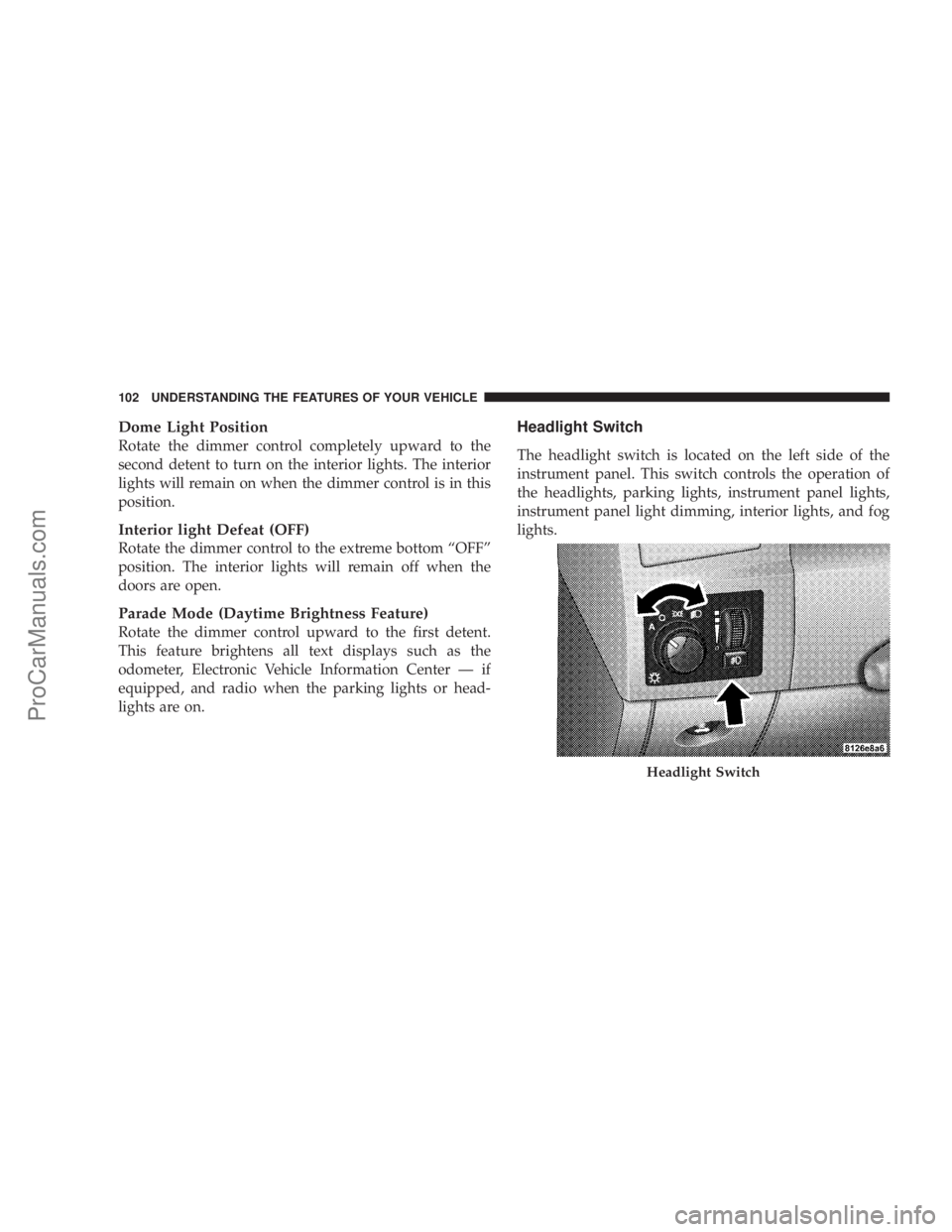
The headlight switch is located on the left side of the
instrument panel. This switch controls the operation of
the headlights, parking lights, instrument panel lights,
instrument panel light dimming, interior lights, and fog
lights.
Headlight Switch
102 UNDERSTANDING THE FEATURES OF YOUR VEHICLE
ProCarManuals.com
Page 119 of 374
GARAGE DOOR OPENER Ð IF EQUIPPED
The HomeLinktUniversal Transceiver replaces up to
three remote controls (hand held transmitters) that oper-
ate devices such as garage door openers, motorized
gates, or home lighting. It triggers these devices at the
push of a button. The Universal Transceiver operates off
your vehicle's battery and charging system; no batteries
are needed.
NOTE:The HomeLinktUniversal Transceiver is dis-
abled when the Vehicle Theft Alarm is active.
For additional information on HomeLinkt, call 1±800±
355±3515, or on the internet at www.homelink.com.
WARNING!
A moving garage door can cause injury to people and
pets in the path of the door. People or pets could be
seriously or fatally injured. Only use this transceiver
with a garage door opener that has a ªstop and
reverseº feature as required by federal safety stan-
dards. This includes most garage door opener mod-
els manufactured after 1982. Do not use a garage
door opener without these safety features it could
cause injury or death. Call toll-free 1±800±355±3515
or, on the Internet at www.homelink.com for safety
information or assistance.
Programming HomeLink
NOTE:
When programming a garage door opener, it is
advised to park outside the garage. It is also recom-
mended that a new battery be placed in the hand-held
transmitter of the device being programmed to
HomeLink for quicker training and accurate transmis-
sion of the radio-frequency signal.
UNDERSTANDING THE FEATURES OF YOUR VEHICLE 119
3
ProCarManuals.com
Page 122 of 374
complete the programming of a rolling code equipped
device (most common garage door openers require this
step.
6. At the garage door opener receiver (motor-head unit)
in the garage, locate the9learn9or9smart9button. This
can usually be found where the hanging antenna wire is
attached to the motor-head unit.
7. Firmly press and release the9learn9or9smart9button.
(The name and color of the button may vary by manu-
facturer.)
NOTE:There are 30 seconds in which to initiate step
eight.
8. Return to the vehicle and firmlypress, hold for two
seconds and releasethe programmed HomeLink button.
Repeat the(press/hold/release(sequence a second time,
and, depending on the brand of the garage door opener
(or other rolling code equipped device), repeat this
sequence a third time to complete the programming.
HomeLink should now activate your rolling code
equipped device.
NOTE:To program the remaining two HomeLink but-
tons, begin with9Programming9step two. Do not repeat
step one. For questions or comments, please contact
HomeLink atwww.homelink.com or 1-800-355-3515.
Canadian Programming/Gate Programming
Canadian radio-frequency laws require transmitter sig-
nals to9time-out9(or quit) after several seconds of
transmission which may not be long enough for
HomeLink to pick up the signal during programming.
Similar to this Canadian law, some U.S. gate operators are
designed to9time-out9in the same manner.
If you live in Canada or you are having difficulties
programming a gate operator by using the9Program-
ming9procedures (regardless of where you live),replace
(Programming HomeLink(step 3with the following:
NOTE:If programming a garage door opener or gate
operator, it is advised to unplug the device during the
9cycling9process to prevent possible overheating.
122 UNDERSTANDING THE FEATURES OF YOUR VEHICLE
ProCarManuals.com
Page 130 of 374

Rear Seat Cupholders
The rear seat cupholders are located in the center armrest
between the rear seats. The cup holders are positioned
forward in the armrest and side-by-side to provide
convenient access to beverage cans or bottles while
maintaining a resting place for the rear occupants' el-
bows.
STORAGE
Console Features
The center console includes a large internal storage bin.
The storage bin has a rubber mat for noise control. The
bin is also large enough to hold a portable AC/DC
converter to power lap tops, games, or other electrical
equipment. Two slots at the top right side of the bin
provide clearance for power cords to pass conveniently
out of the bin with the lid closed. This feature is ideal for
games, laptops, cell phones or other electrical equipment.
A four-slot coin holder can hold US dollar coins or
Canadian one and two-dollar coins, as well as quarters,
dimes and nickels. The bin has a Front-opening lid for
easy access inside by either the driver or front passenger.
There are also two shift bezel cubby bins with rubber
mats for holding small items. For vehicles not equipped
with the navigation radio, an extra storage bin is pro-
vided below the climate controls that holds up to four CD
jewel cases. The inside portion of the arm rest lid contains
a pen holder, a tissue holder, and a tire gauge holder.
130 UNDERSTANDING THE FEATURES OF YOUR VEHICLE
ProCarManuals.com
Page 133 of 374

UNDERSTANDING YOUR INSTRUMENT PANEL
CONTENTS
mInstruments And Controls................137
mStandard Instrument Cluster..............138
mPremium Instrument Cluster..............139
mInstrument Cluster Descriptions...........140
mElectronic Vehicle Information Center (EVIC)±
If Equipped
..........................147
NTrip Functions.......................149
NCompass Display.....................150
NTelephone Ð If Equipped...............152
NNavigation Ð If Equipped...............154NPersonal Settings (Customer Programmable
Features)...........................154
mSetting The Analog Clock................158
mSales Code REF Ð AM/FM/CD (Single Disc)
Radio With Optional Satellite Radio And
Hands Free Phone Capability
.............159
NOperating Instructions - Radio Mode.......159
NOperation Instructions - CD Mode.........162
NOperating Instructions - Hands Free Phone Ð
If Equipped.........................164
NOperating Instructions - Satellite Radio Ð
If Equipped.........................164
4
ProCarManuals.com
Page 134 of 374
mSales Code RAQ ± AM/FM/CD (6-Disc) Radio
With Optional Satellite Radio, Hands Free Phone,
And Vehicle Entertainment Systems (Ves)
Capabilities
..........................164
NOperating Instructions - Radio Mode.......164
NOperation Instructions -
(CD Mode For CD Audio Play)...........169
NLoad/Eject Button
(CD Mode For CD Audio Play)...........170
NNotes On Playing MP3 Files.............171
NOperation Instructions -
(CD Mode For MP3 Audio Play)..........173
NLoad/Eject Button (CD Mode For MP3 Play) . . 174
mSales Code RAK ± AM/FM/Cassette/CD (6-Disc)
Radio With Optional Satellite Radio, Hands Free
Phone, Video, MP3, And WMA Capabilities
. . 175
NOperating Instructions - Radio Mode.......176NOperating Instructions Ð Tape Player.......179
NSeek Button.........................179
NFast Forward (FF).....................179
NRewind (RW)........................179
NTape Eject...........................180
NScan Button.........................180
NChanging Tape Direction................180
NMetal Tape Selection...................180
NPinch Roller Release...................180
NNoise Reduction......................180
NOperation Instructions -
(CD Mode For CD Audio Play)...........180
NLoad/Eject Button
(CD Mode For CD Audio Play)...........181
NNotes On Playing MP3 Files.............183
134 UNDERSTANDING YOUR INSTRUMENT PANEL
ProCarManuals.com
Page 135 of 374
NOperation Instructions -
(CD Mode For MP3 And WMA Audio Play) . . 185
NLoad/Eject Button
(CD Mode For MP3 And WMA Play).......185
mSatellite Radio Ð If Equipped.............187
NSystem Activation.....................187
NElectronic Serial Number/Sirius Identification
Number (ENS/SID)....................187
NSelecting Satellite Mode In REF, RAQ, And RAK
Radios.............................188
NSelecting a Channel....................188
NStoring And Selecting Pre-Set Channels......188
NUsing The PTY (Program Type) Button
(If Equipped)........................189
NPTY Button9Scan9.....................189
NPTY Button9Seek9.....................189NSatellite Antenna......................189
NReception Quality.....................189
mRemote Sound System Controls...........190
NRadio Operation......................191
NTape Player.........................191
NCD Player..........................191
NSatellite............................191
mRadio General Information...............191
NRadio Broadcast Signals.................191
NTwo Types Of Signals..................192
NElectrical Disturbances..................192
NAM Reception.......................192
NFM Reception........................192
mCassette Tape And Player Maintenance......192
UNDERSTANDING YOUR INSTRUMENT PANEL 135
4
ProCarManuals.com
Page 136 of 374

mCD/DVD Disc Maintenance..............193
mRadio Operation And Cellular Phones.......194
mClimate Controls......................194
NClimate Controls Ð Manual..............194
NAutomatic Temperature Control Ð
If Equipped.........................197
NSummer Operation....................202NWinter Operation.....................203
NVacation Storage......................203
NWindow Fogging.....................203
NOutside Air Intake....................203
NA/C Air Filter Ð If Equipped............203
NOperating Tips.......................204
136 UNDERSTANDING YOUR INSTRUMENT PANEL
ProCarManuals.com