light CHRYSLER 300 LX 2005 Owner's Manual
[x] Cancel search | Manufacturer: CHRYSLER, Model Year: 2005, Model line: 300 LX, Model: CHRYSLER 300 LX 2005Pages: 374, PDF Size: 7.09 MB
Page 58 of 374
A new engine may consume some oil during its first few
thousand miles (kilometers) of operation. This should be
considered as a normal part of the break-in and not
interpreted as an indication of difficulty.
SAFETY TIPS
Exhaust Gas
WARNING!
Exhaust gases can injure or kill. They contain carbon
monoxide (CO) which is colorless and odorless.
Breathing it can make you unconscious and can
eventually poison you. To avoid breathing (CO)
follow the safety tips below.
Do not run the engine in a closed garage or in confined
areas any longer than needed to move your vehicle in or
out of the area.
If it is necessary to sit in a parked vehicle with the engine
running, adjust your heating or cooling controls to force
outside air into the vehicle. Set the blower at high speed.
WARNING!
If you are required to drive with the trunk open,
make sure that all windows are closed, and the
climate control blower switch is set at high speed.
DO NOT use the recirculation mode.
Safety Checks You Should Make Inside The
Vehicle
Seat Belts
Inspect the belt system periodically, checking for cuts,
frays and loose parts. Damaged parts must be replaced
immediately. Do not disassemble or modify the system.
Front seat belt assemblies must be replaced after a
collision. Rear seat belt assemblies must be replaced after
a collision if they have been damaged (bent retractor, torn
webbing, etc. If there is any question regarding belt or
retractor condition, replace the belt.
Airbag Light
The light should come on and remain on for 6 to 8
seconds as a bulb check when the ignition switch is first
58 THINGS TO KNOW BEFORE STARTING YOUR VEHICLE
ProCarManuals.com
Page 59 of 374
turned ON. If the LED is not lit during starting, have it
checked. If the light stays on or comes on while driving,
have the system checked by an authorized dealer.
Defroster
Check operation by selecting the defrost mode and place
the blower control on high speed. You should be able to
feel the air directed against the windshield.
Periodic Safety Checks You Should Make Outside
The Vehicle
Tires
Examine tires for excessive tread wear or uneven wear
patterns. Check for stones, nails, glass, or other objects
lodged in the tread. Inspect tread and sidewall for cuts or
cracks. Check wheel nuts for tightness, and tires (includ-
ing spare) for proper pressure.
Lights
Have someone observe the operation of exterior lights
while you work the controls. Check turn signal and high
beam indicator lights on the instrument panel.
Fluid Leaks
Check area under vehicle after overnight parking for fuel,
engine coolant, oil or other fluid leaks. Also, if gasoline
fumes are detected or fuel, power steering fluid or brake
fluid leaks are suspected, the cause should be located and
corrected immediately.
THINGS TO KNOW BEFORE STARTING YOUR VEHICLE 59
2
ProCarManuals.com
Page 62 of 374
mSeats................................89
NPower Seats..........................89
NPower Reclining Seats...................90
NLumbar Support.......................91
NHeated SeatsÐIf Equipped...............92
NMemory FeatureÐIf Equipped.............93
NProgramming The Remote Keyless Transmitter
For The Memory Feature.................94
NDriver's Seat Glide ±To ± Exit Feature Ð
If Equipped..........................95
NHead Restraints.......................96
NFolding Rear Seat......................97
mAdjustable Pedals Ð If Equipped...........98
mTo Open And Close The Hood.............99
mLights..............................101
NOverhead Console Map/Reading Lights.....101NInterior Lights.......................101
NHeadlight Switch.....................102
NMulti-Function Lever...................103
NHeadlights, Parking Lights, Instrument Panel
Lights.............................103
NAutomatic Headlights±If Equipped.........104
NHeadlamps On With Wipers
(Available With Auto Headlights Only)......104
NDaytime Running Lights (Canada Only).....104
NLights-On Reminder...................104
NHeadlight Time Delay..................104
NFog Lights Ð If Equipped...............105
NTurn Signals.........................105
NHighbeam/Lowbeam Select Switch.........106
NFlash To Pass........................106
62 UNDERSTANDING THE FEATURES OF YOUR VEHICLE
ProCarManuals.com
Page 63 of 374
mWindshield Wipers And Washers..........106
NWindshield Washers...................106
NRain Sensing WipersÐIf Equipped.........107
NMist Feature.........................107
NHeadlamps On With Wipers
(Available With Auto Headlights Only)......107
NWindshield Wiper Operation.............108
NIntermittent Wiper System...............108
NAdding Washer Fluid..................108
mTilt/Telescoping Steering Column..........109
mPower Tilt/Telescoping Steering Column Ð
If Equipped
..........................109
mTraction Control System (Tcs) Ð If Equipped..110
mBrake Assist System (BAS)Ð If Equipped....112
mElectronic Stability Program (ESP)Ð
If Equipped
..........................113
NSynchronizing ESP....................115
mElectronic Speed Control.................115
NTo Activate..........................116
NTo Set At A Desired Speed...............116
NTo Deactivate........................116
NTo Resume Speed.....................116
NTo Vary The Speed Setting...............116
NTo Accelerate For Passing...............117
mOverhead Console Ð If Equipped..........118
NCourtesy/Reading Lights................118
NSunglasses Storage....................118
mGarage Door Opener Ð If Equipped........119
NProgramming Homelink................119
NCanadian Programming/Gate Programming . . 122
NUsing Homelink......................123
NErasing Homelink Buttons...............123
NReprogramming a Single Homelink Button . . . 123
UNDERSTANDING THE FEATURES OF YOUR VEHICLE 63
3
ProCarManuals.com
Page 65 of 374
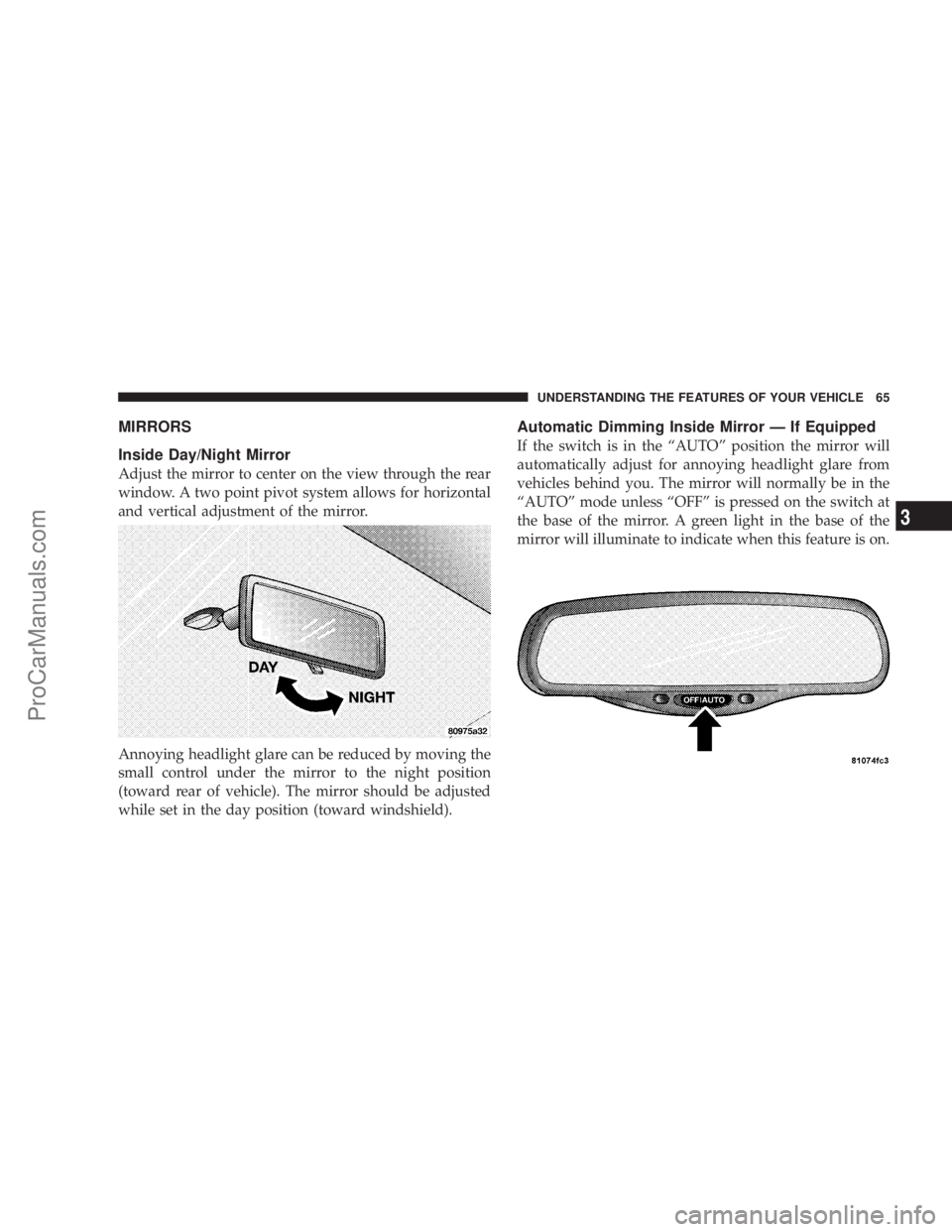
MIRRORS
Inside Day/Night Mirror
Adjust the mirror to center on the view through the rear
window. A two point pivot system allows for horizontal
and vertical adjustment of the mirror.
Annoying headlight glare can be reduced by moving the
small control under the mirror to the night position
(toward rear of vehicle). The mirror should be adjusted
while set in the day position (toward windshield).
Automatic Dimming Inside Mirror Ð If Equipped
If the switch is in the ªAUTOº position the mirror will
automatically adjust for annoying headlight glare from
vehicles behind you. The mirror will normally be in the
ªAUTOº mode unless ªOFFº is pressed on the switch at
the base of the mirror. A green light in the base of the
mirror will illuminate to indicate when this feature is on.
UNDERSTANDING THE FEATURES OF YOUR VEHICLE 65
3
ProCarManuals.com
Page 66 of 374
CAUTION!
To avoid damage to the mirror during cleaning,
never spray any cleaning solution directly onto the
mirror. Apply the solution onto a clean cloth and
wipe the mirror clean.
Driver's Side Outside Mirror Auto Dimmer Ð If
Equipped
The driver's side outside mirror automatically adjusts for
annoying headlight glare from vehicles behind you. This
feature can be turned on or off by pressing the button at
the base of the Inside Rearview Mirror.
Tilt in Reverse FeatureÐ If Equipped
The9Tilt in Reverse9feature tilts the outside rearview
mirrors down when the vehicle is shifted into REVERSE
with the ignition switch in the RUN position. This feature
provides the customer with a better view of the ground
and vehicle in the area of the rear tires when backing up.
The mirrors move back to their previous position when
the vehicle is shifted out of REVERSE. This feature is
disabled from the factory, but can be enabled by theelectronic vehicle information center (EVIC). Refer to
Electronic Vehicle Information Center (EVIC) in this
manual for details.
Exterior Mirrors Folding Feature Ð If Equipped
Some models have exterior mirrors that are hinged and
may move either forward or rearward to resist damage.
The hinges have three detent positions; full forward, full
rearward, and normal.
Outside Mirror Ð Driver's Side
Adjust the outside mirror to center on the adjacent lane of
traffic, with a slight overlap of the view obtained on the
inside mirror.
Outside Mirror Ð Passenger's Side
Adjust the convex outside mirror so you can just see the
side of your vehicle in the portion of the mirror closest to
the vehicle. This type of mirror will give a much wider
view to the rear, and especially of the lane next to your
vehicle.
66 UNDERSTANDING THE FEATURES OF YOUR VEHICLE
ProCarManuals.com
Page 68 of 374
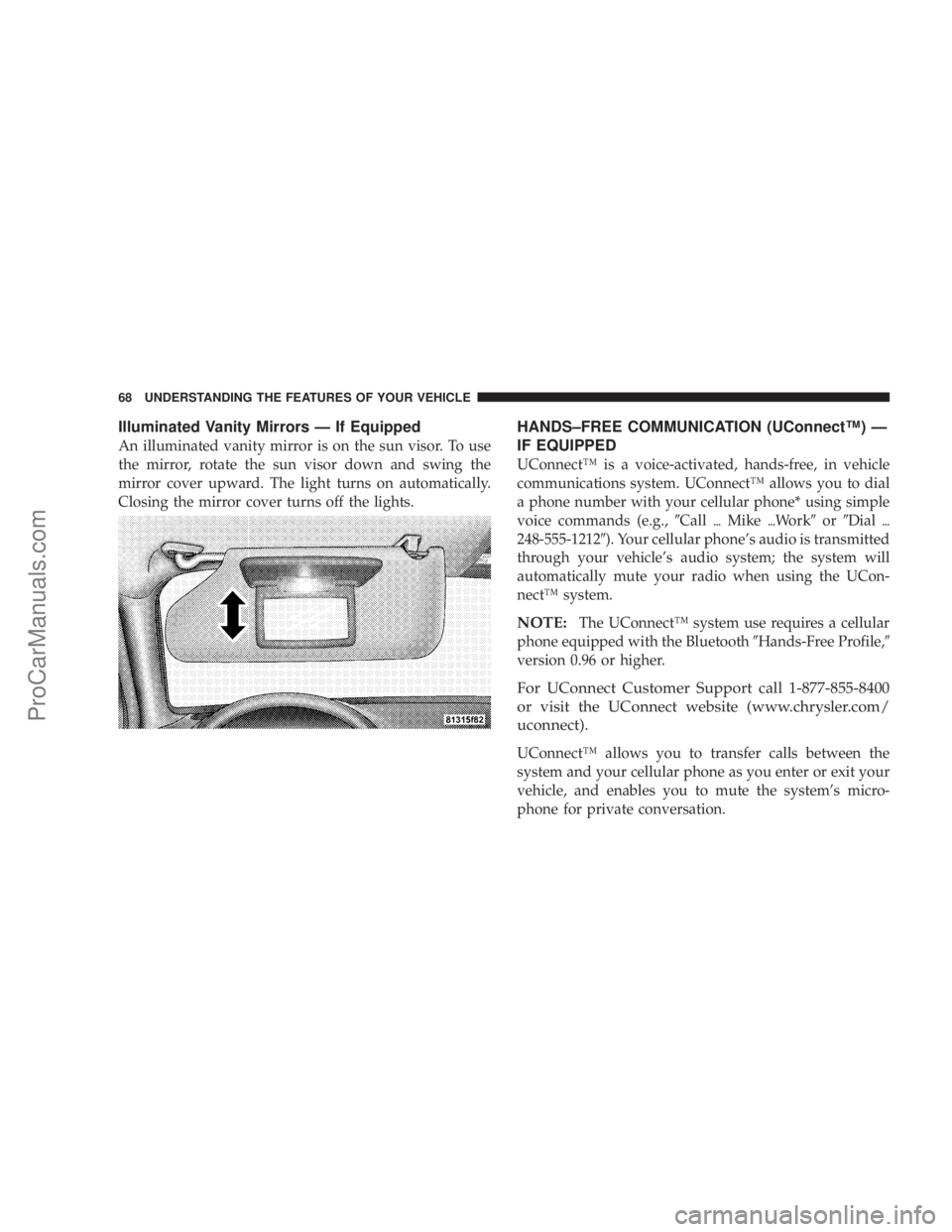
Illuminated Vanity Mirrors Ð If Equipped
An illuminated vanity mirror is on the sun visor. To use
the mirror, rotate the sun visor down and swing the
mirror cover upward. The light turns on automatically.
Closing the mirror cover turns off the lights.
HANDS±FREE COMMUNICATION (UConnectŸ) Ð
IF EQUIPPED
UConnectŸ is a voice-activated, hands-free, in vehicle
communications system. UConnectŸ allows you to dial
a phone number with your cellular phone* using simple
voice commands (e.g.,9Call{Mike{Work9or9Dial{
248-555-12129). Your cellular phone's audio is transmitted
through your vehicle's audio system; the system will
automatically mute your radio when using the UCon-
nectŸ system.
NOTE:The UConnectŸ system use requires a cellular
phone equipped with the Bluetooth9Hands-Free Profile,9
version 0.96 or higher.
For UConnect Customer Support call 1-877-855-8400
or visit the UConnect website (www.chrysler.com/
uconnect).
UConnectŸ allows you to transfer calls between the
system and your cellular phone as you enter or exit your
vehicle, and enables you to mute the system's micro-
phone for private conversation.
68 UNDERSTANDING THE FEATURES OF YOUR VEHICLE
ProCarManuals.com
Page 78 of 374
NOTE:After every UConnectŸ language change op-
eration, you need to re-enter names to the phonebook
and re-pair (re-link) phone(s).
Emergency Assistance
If you are in an emergency and the mobile phone is
reachable:
²Pick up the phone and manually dial the emergency
number for your area.
If the phone is not reachable and the UConnectŸ system
is operational, you may reach the emergency number as
follows:
²Press the 'Phone' button to begin.
²After the9Ready9prompt and the following beep, say
9Emergency9and the UConnectŸ system will instruct
the paired cellular phone to call the emergency num-
ber. This feature is only supported in the USA.
NOTE:The UConnectŸ system does slightly lower
your chances of successfully making a phone call as to
that for the cell phone directly.
Your phone must be turned on and paired to the
UConnectŸ system to allow use of this vehicle feature
in emergency situations when the cell phone has
network coverage and stays paired to the UConnectŸ
system.
Towing Assistance
If you need towing assistance,
²Press the 'Phone' button to begin.
²After the9Ready9prompt and the following beep, say
9Towing Assistance.9
Please refer to the 24-Hour Towing Assistance coverage
details in the DaimlerChrysler Corporation 24-Hour
Towing Assistance Program Guide.
Paging
To learn how to page, refer to section9Working with
Automated Systems.9Paging works properly except for
pagers of certain companies which timeout a little too
soon to work properly with the UConnectŸ system.
78 UNDERSTANDING THE FEATURES OF YOUR VEHICLE
ProCarManuals.com
Page 89 of 374
NOTE:The Rear Park Assist System displays the outer
most yellow LED's at a slightly dimmer level to indicate
that the system is ON.
NOTE:When an audio tone is indicated by the Rear
Park Assist display the system will MUTE the radio if it
is turned on.
The system can be turned on or off through the Electronic
Vehicle Information Center (EVIC) when the vehicle is in
PARK. Refer to ªPersonal Settingsº in the Electronic
Vehicle Information Center section of this manual for
details.
NOTE:
²
Ensure that the rear bumper is free of dirt and debris
to keep the system operating properly.
²Jackhammers, large trucks, and other vibrations could
affect the performance of the system.
If ªService Park Assist Systemº appears in the EVIC after
making sure the rear bumper is clean please see your
authorized dealer.
SEATS
Power Seats
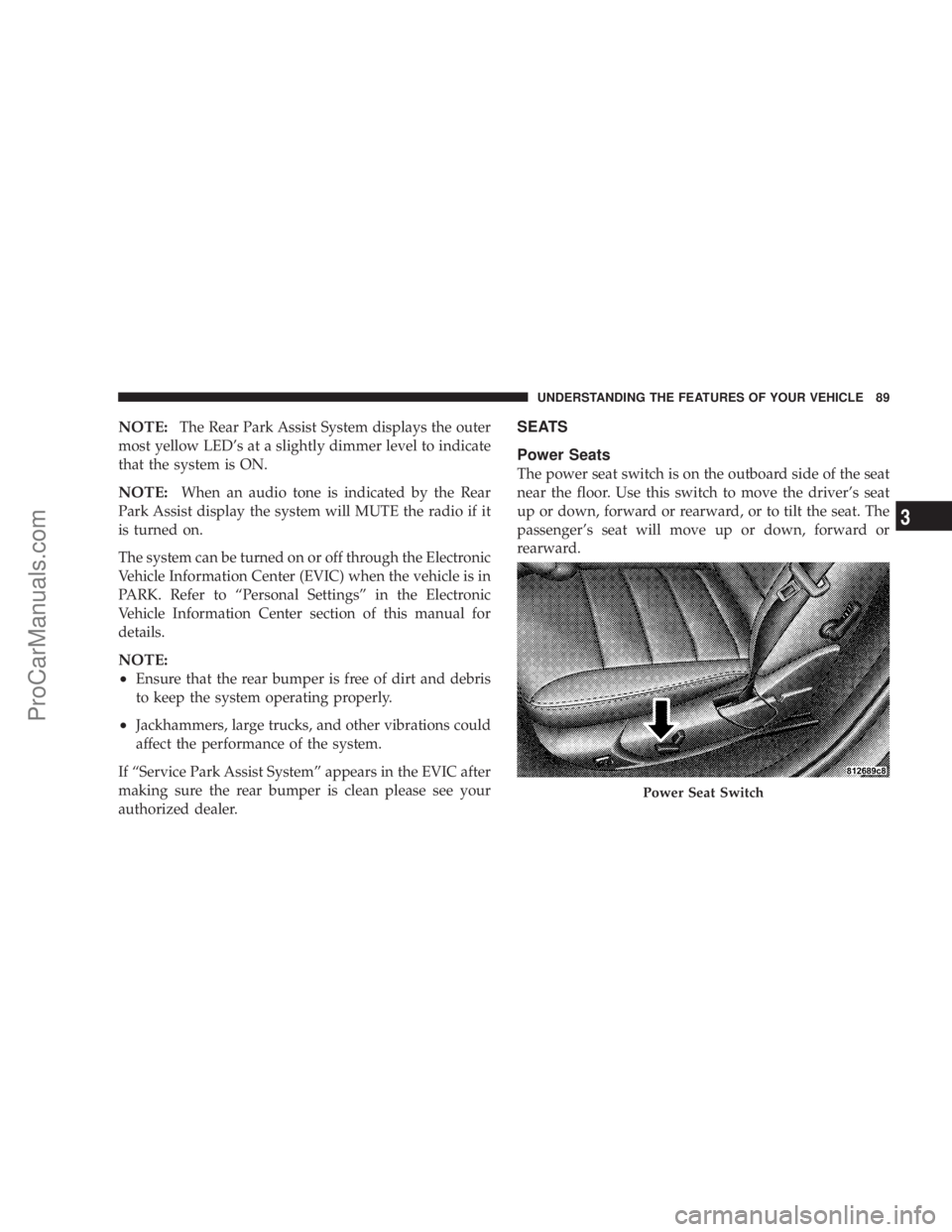
The power seat switch is on the outboard side of the seat
near the floor. Use this switch to move the driver's seat
up or down, forward or rearward, or to tilt the seat. The
passenger's seat will move up or down, forward or
rearward.
Power Seat Switch
UNDERSTANDING THE FEATURES OF YOUR VEHICLE 89
3
ProCarManuals.com
Page 101 of 374
LIGHTS
Overhead Console Map/Reading Lights
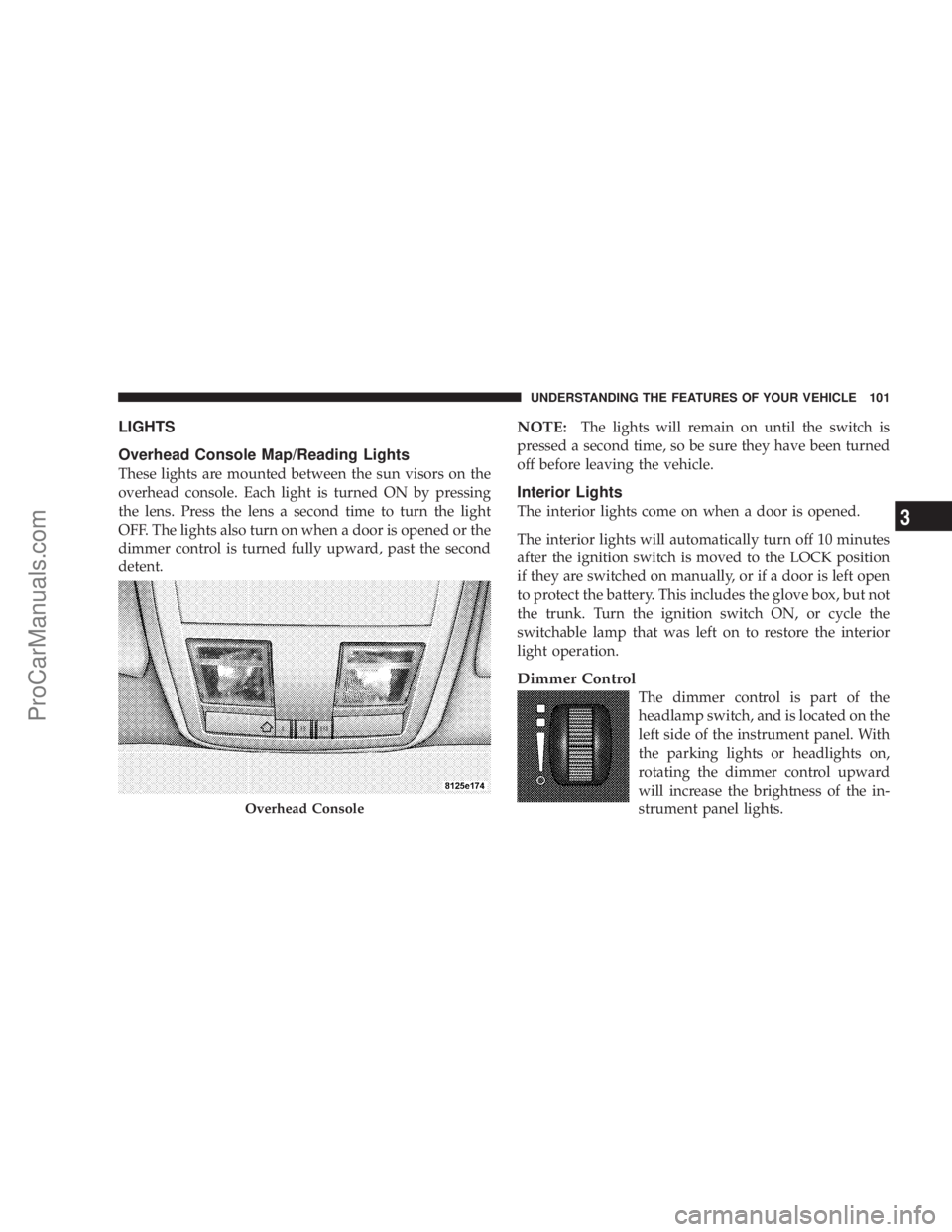
These lights are mounted between the sun visors on the
overhead console. Each light is turned ON by pressing
the lens. Press the lens a second time to turn the light
OFF. The lights also turn on when a door is opened or the
dimmer control is turned fully upward, past the second
detent.
NOTE:The lights will remain on until the switch is
pressed a second time, so be sure they have been turned
off before leaving the vehicle.
Interior Lights
The interior lights come on when a door is opened.
The interior lights will automatically turn off 10 minutes
after the ignition switch is moved to the LOCK position
if they are switched on manually, or if a door is left open
to protect the battery. This includes the glove box, but not
the trunk. Turn the ignition switch ON, or cycle the
switchable lamp that was left on to restore the interior
light operation.
Dimmer Control
The dimmer control is part of the
headlamp switch, and is located on the
left side of the instrument panel. With
the parking lights or headlights on,
rotating the dimmer control upward
will increase the brightness of the in-
strument panel lights.
Overhead Console
UNDERSTANDING THE FEATURES OF YOUR VEHICLE 101
3
ProCarManuals.com