wheel CHRYSLER 300 M 2004 1.G Owners Manual
[x] Cancel search | Manufacturer: CHRYSLER, Model Year: 2004, Model line: 300 M, Model: CHRYSLER 300 M 2004 1.GPages: 277, PDF Size: 5.69 MB
Page 33 of 277
WARNING!
Using a seat belt extender when not needed can
increase the risk of injury in a collision. Only use the
extender when the lap belt is not long enough when
it is worn low and snug, and in the recommended
seating positions. Remove and store the extender
when not needed.
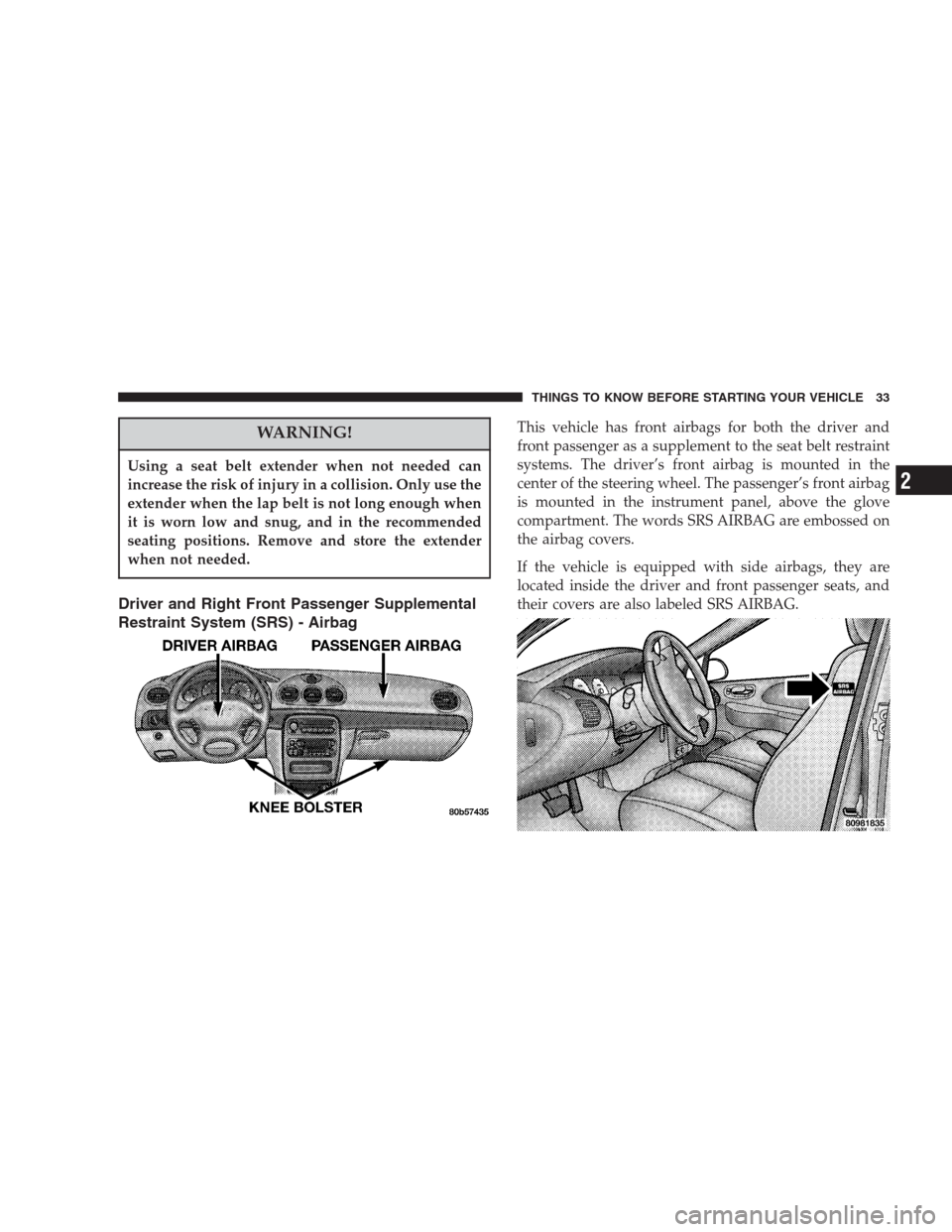
Driver and Right Front Passenger Supplemental
Restraint System (SRS) - Airbag
This vehicle has front airbags for both the driver and
front passenger as a supplement to the seat belt restraint
systems. The driver’s front airbag is mounted in the
center of the steering wheel. The passenger’s front airbag
is mounted in the instrument panel, above the glove
compartment. The words SRS AIRBAG are embossed on
the airbag covers.
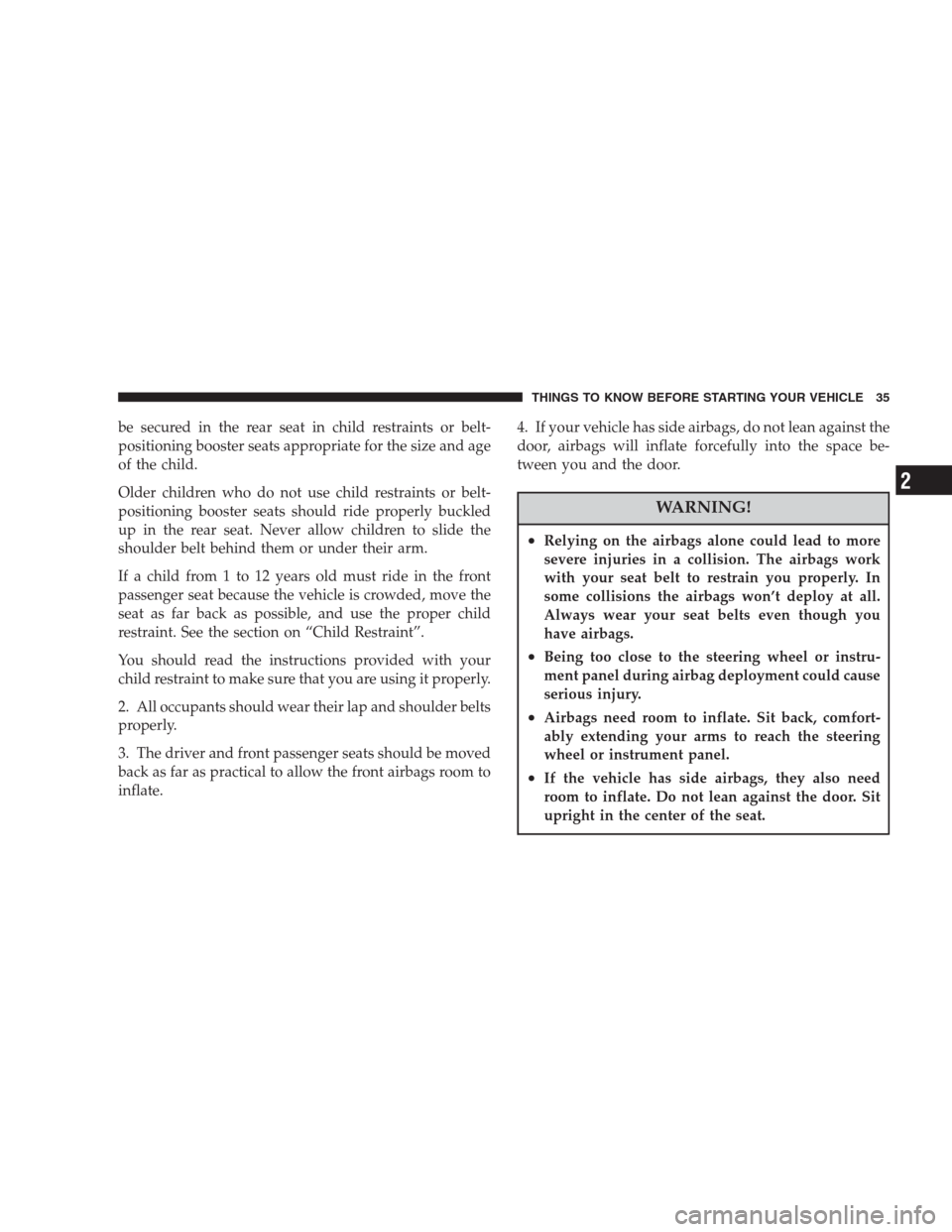
If the vehicle is equipped with side airbags, they are
located inside the driver and front passenger seats, and
their covers are also labeled SRS AIRBAG.
THINGS TO KNOW BEFORE STARTING YOUR VEHICLE 33
2
Page 35 of 277
be secured in the rear seat in child restraints or belt-
positioning booster seats appropriate for the size and age
of the child.
Older children who do not use child restraints or belt-
positioning booster seats should ride properly buckled
up in the rear seat. Never allow children to slide the
shoulder belt behind them or under their arm.
If a child from 1 to 12 years old must ride in the front
passenger seat because the vehicle is crowded, move the
seat as far back as possible, and use the proper child
restraint. See the section on “Child Restraint”.
You should read the instructions provided with your
child restraint to make sure that you are using it properly.
2. All occupants should wear their lap and shoulder belts
properly.
3. The driver and front passenger seats should be moved
back as far as practical to allow the front airbags room to
inflate.4. If your vehicle has side airbags, do not lean against the
door, airbags will inflate forcefully into the space be-
tween you and the door.
WARNING!
•Relying on the airbags alone could lead to more
severe injuries in a collision. The airbags work
with your seat belt to restrain you properly. In
some collisions the airbags won’t deploy at all.
Always wear your seat belts even though you
have airbags.
•Being too close to the steering wheel or instru-
ment panel during airbag deployment could cause
serious injury.
•Airbags need room to inflate. Sit back, comfort-
ably extending your arms to reach the steering
wheel or instrument panel.
•If the vehicle has side airbags, they also need
room to inflate. Do not lean against the door. Sit
upright in the center of the seat.
THINGS TO KNOW BEFORE STARTING YOUR VEHICLE 35
2
Page 36 of 277
Airbag System Components
The airbag system consists of the following:
•ACM (Airbag Control Module)
•AIRBAG Readiness Light
•Driver and Passenger Front Airbags
•Optional Driver and Passenger Side Airbags.
•Steering Wheel and Column
•Instrument Panel
•Interconnecting Wiring
•Crash Sensors
•Knee Impact Bolsters
The side airbag system, on vehicles so equipped, consists
of the following:
•AIRBAG Readiness Light
•Side Airbag in the Driver’s Seat
•Side Airbag in the Passenger’s Seat
•ACM (Airbag Control Module)
•SIACM (Side Impact Airbag Control Module)
•Interconnecting Wiring
How the Frontal Airbag System Works
•
The front airbag control module determines if a frontal
collision is severe enough to require the airbags to
inflate.
•The airbag control module will not detect side, roll
over, or rear collisions.
•The airbag control module also monitors the readiness
of the electronic parts of the system whenever the
ignition switch is in the START or RUN positions.
These include all of the items listed above except the
knee bolsters, the instrument panel, and the steering
wheel and column. If the key is in the OFF position, in
the ACC position, or not in the ignition, the airbags are
not on and will not inflate.
•The airbag control module also turns on the
AIRBAG light in the instrument panel for 6 to
8 seconds when the ignition is first turned on,
36 THINGS TO KNOW BEFORE STARTING YOUR VEHICLE
Page 48 of 277
must remain open, close all windows. Adjust the
heating or cooling system to force outside air into the
vehicle. Set the blower at high speed.
Safety Checks You Should Make Inside the
Vehicle
Seat Belts
Inspect the belt system periodically, checking for cuts,
frays and loose parts. Damaged parts must be replaced
immediately. Do not disassemble or modify the system.
Safety belt assemblies must be replaced after an accident
if they have been damaged (bent retractor, torn webbing,
etc.). If there is any question regarding belt or retractor
condition, replace the belt.
Airbag Light
The light should come on and remain on for 6 to
8 seconds as a bulb check when the ignition
switch is first turned ON. If the bulb is not lit
during starting, have it replaced. If the light stays on or
comes on while driving, have the system checked by an
authorized dealer.
Defrosters
Check operation by selecting the defrost mode and place
the blower control on high speed. You should be able to
feel the air directed against the windshield.
Periodic Safety Checks You Should Make Outside
the Vehicle
Tires
Examine tires for excessive tread wear or uneven wear
patterns. Check for stones, nails, glass, or other objects
lodged in the tread. Inspect for tread cuts or sidewall
cracks. Check wheel nuts for tightness and tires (includ-
ing spare) for proper pressure.
Lights
Have someone observe the operation of exterior lights
while you work the controls. Check turn signal and high
beam indicator lights on the instrument panel.
Fluid Leaks
Check area under vehicle after overnight parking for
brake fluid, fuel, water, oil, or other fluid leaks. Also, if
gasoline fumes are present, the cause should be corrected
immediately.
48 THINGS TO KNOW BEFORE STARTING YOUR VEHICLE
Page 56 of 277
NOTE:Place the mirror switch in the neutral (center)
position to prevent accidental changing of the mirror
setting.
Supplemental Indicators — 300M Special Only
The 300M Special is equipped with Supplemental Indi-
cators on each of the side mirrors. When using the
Multifunction Control lever to signal, small lights in the
side outside mirrors will flash designating the direction
of the turn.
Mirror Adjustment
Outside Mirror — Driver’s Side
Adjust the outside mirror to center on the adjacent lane of
traffic, with a slight overlap of the view obtained on the
inside mirror.
Right Side Mirror
Adjust the convex outside mirror so you can just see the
side of your vehicle. This type of mirror will give a much
wider view to the rear, and especially of the lane next to
your vehicle.
WARNING!
Vehicles and other objects seen in the right side
convex mirror will look smaller and farther away
than they really are. Relying too much on your right
side mirror could cause you to collide with another
vehicle or other object. Use your inside mirror when
judging the size or distance of a vehicle seen in this
convex mirror.
Mirror Tilt in Reverse
This feature will tilt the driver’s exterior mirror down-
ward to improve visibility of the rear wheel area when
the vehicle is placed in reverse. Once reverse is disen-
gaged, the driver’s exterior mirror will return to it’s
original position.
This feature can be turned on or off by performing the
following procedure:
1. Press and hold the Set button.
2. Move the horizontal seat switch forward.
3. Release the Set button and the horizontal seat switch.
56 UNDERSTANDING THE FEATURES OF YOUR VEHICLE
Page 68 of 277
Daytime Running Lights (Canada Only)
The headlights are on at a dimmer level whenever the
vehicle is started and the parking brake is released. The
lights remain on until the ignition switch is turned OFF.
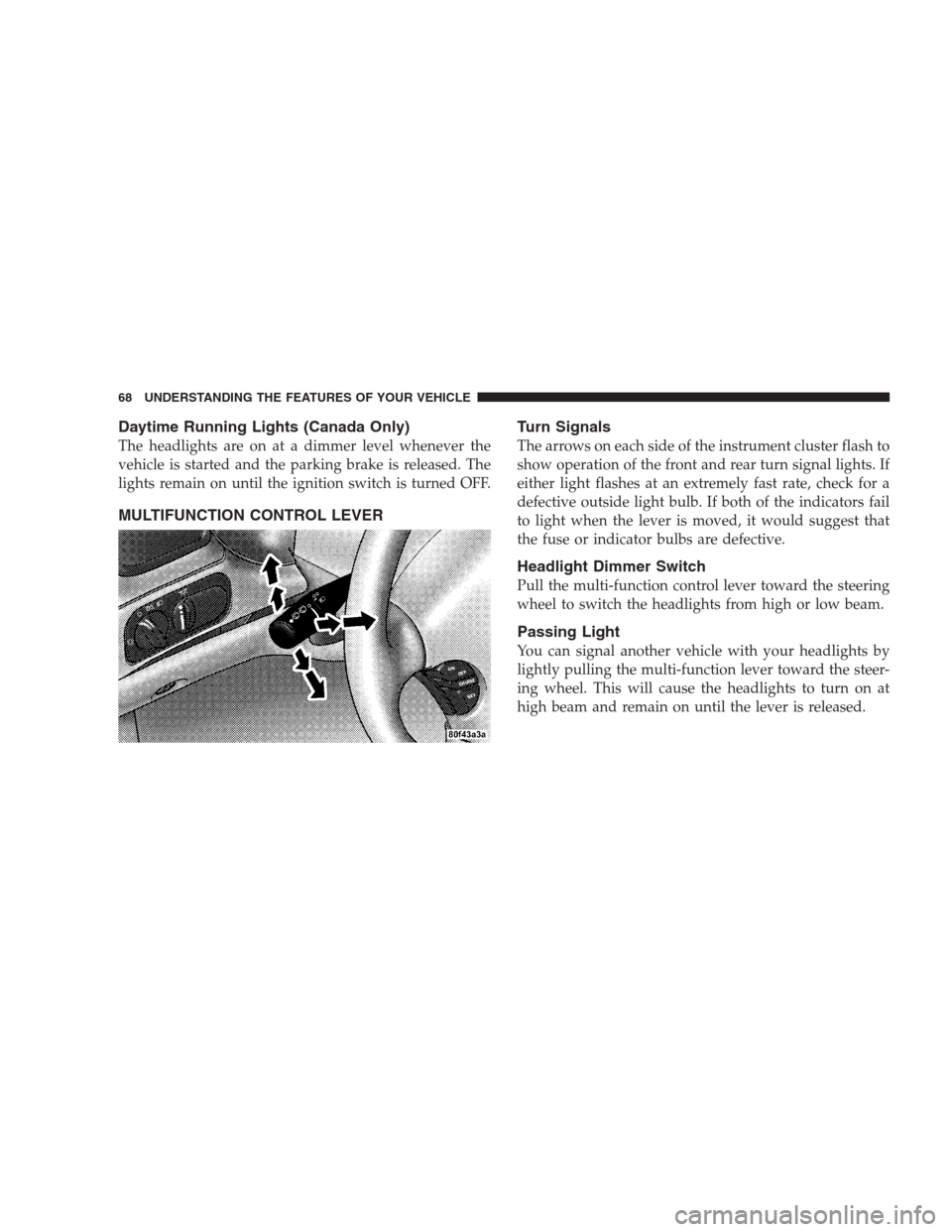
MULTIFUNCTION CONTROL LEVERTurn Signals
The arrows on each side of the instrument cluster flash to
show operation of the front and rear turn signal lights. If
either light flashes at an extremely fast rate, check for a
defective outside light bulb. If both of the indicators fail
to light when the lever is moved, it would suggest that
the fuse or indicator bulbs are defective.
Headlight Dimmer Switch
Pull the multi-function control lever toward the steering
wheel to switch the headlights from high or low beam.
Passing Light
You can signal another vehicle with your headlights by
lightly pulling the multi-function lever toward the steer-
ing wheel. This will cause the headlights to turn on at
high beam and remain on until the lever is released.
68 UNDERSTANDING THE FEATURES OF YOUR VEHICLE
Page 70 of 277
NOTE:Vehicle speed is monitored to calculate wiper
delay intervals. The delay between cycles is shortened
when the vehicle is moving above 10 m.p.h. (16 km/h)
and lengthened below 10 m.p.h. (16 km/h).
TILT STEERING COLUMN
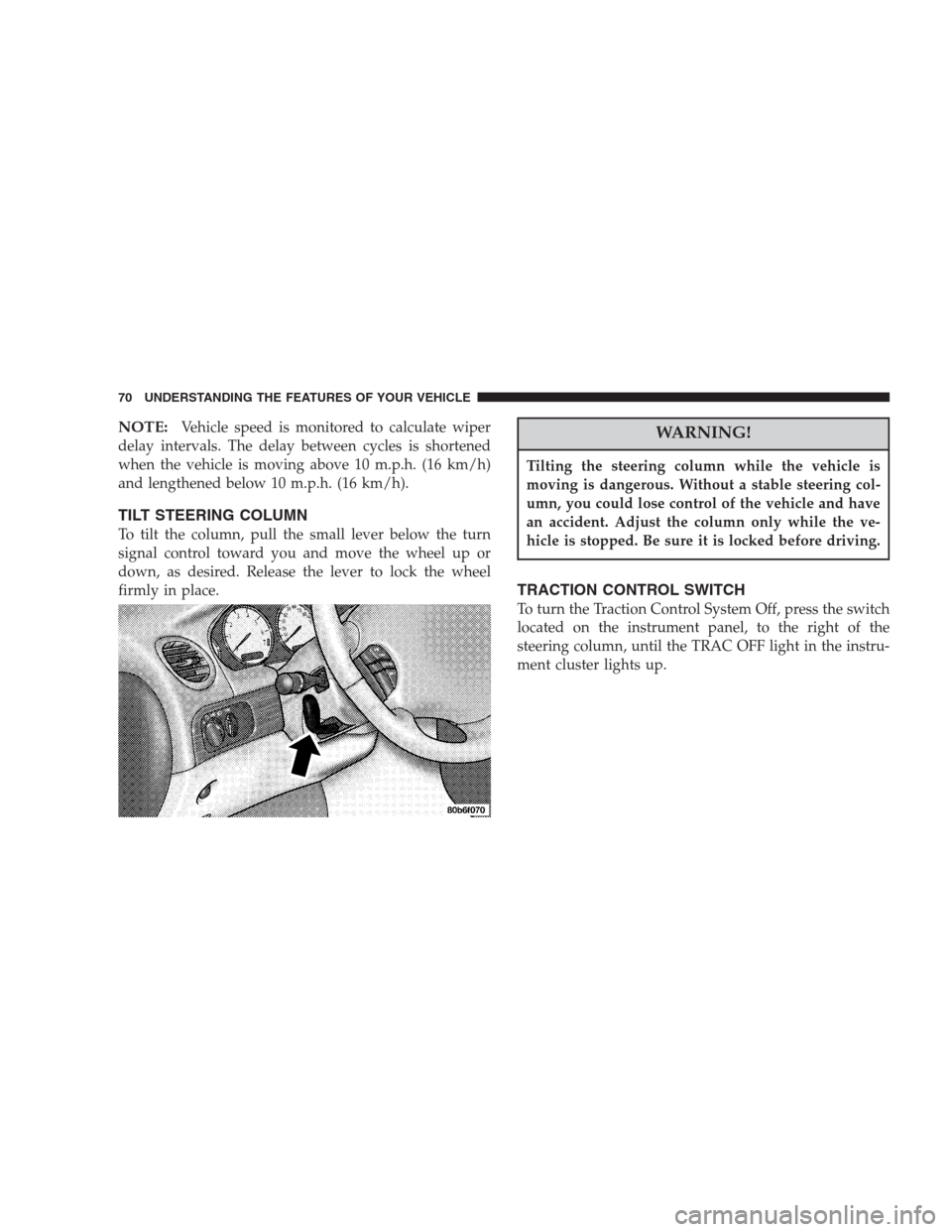
To tilt the column, pull the small lever below the turn
signal control toward you and move the wheel up or
down, as desired. Release the lever to lock the wheel
firmly in place.
WARNING!
Tilting the steering column while the vehicle is
moving is dangerous. Without a stable steering col-
umn, you could lose control of the vehicle and have
an accident. Adjust the column only while the ve-
hicle is stopped. Be sure it is locked before driving.
TRACTION CONTROL SWITCH
To turn the Traction Control System Off, press the switch
located on the instrument panel, to the right of the
steering column, until the TRAC OFF light in the instru-
ment cluster lights up.
70 UNDERSTANDING THE FEATURES OF YOUR VEHICLE
Page 71 of 277
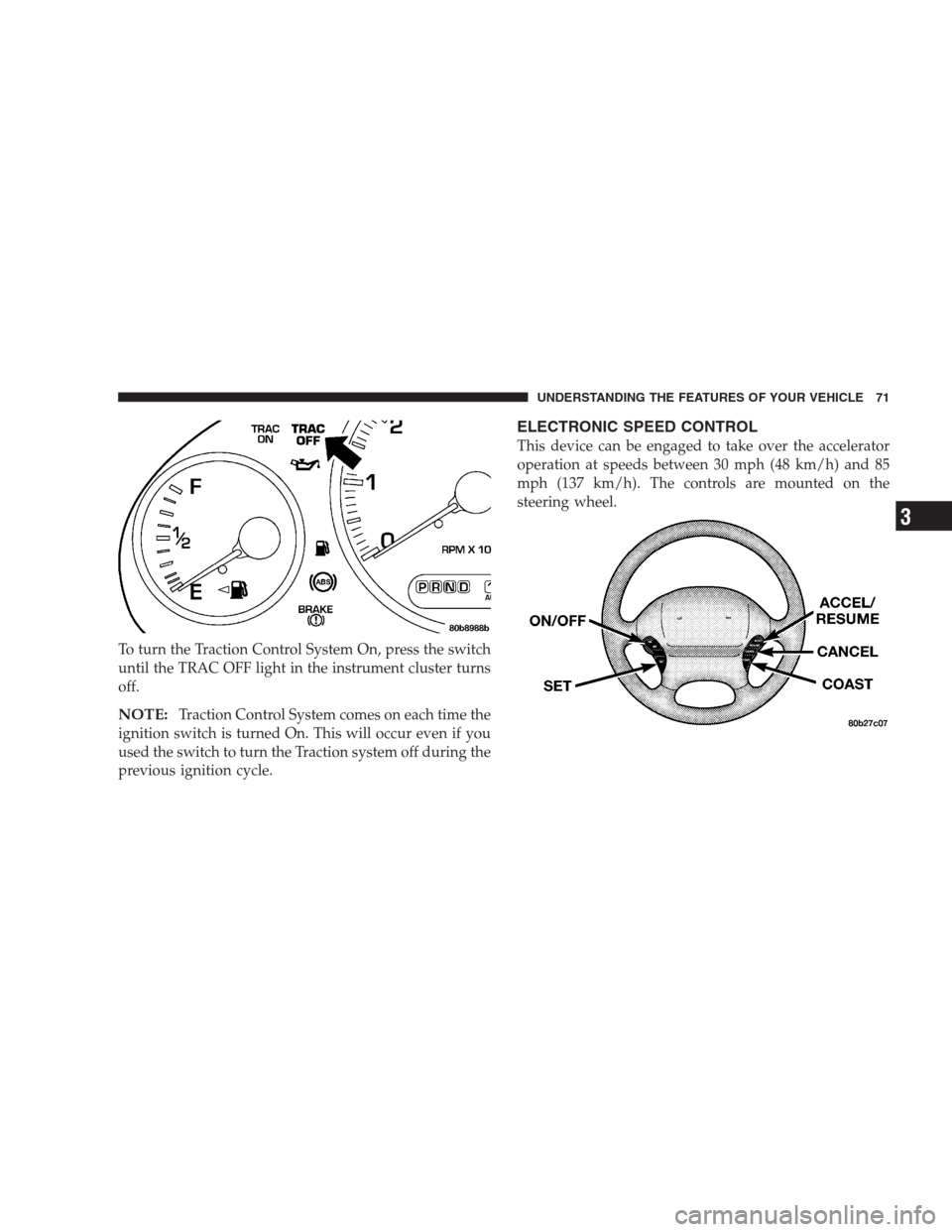
To turn the Traction Control System On, press the switch
until the TRAC OFF light in the instrument cluster turns
off.
NOTE:Traction Control System comes on each time the
ignition switch is turned On. This will occur even if you
used the switch to turn the Traction system off during the
previous ignition cycle.
ELECTRONIC SPEED CONTROL
This device can be engaged to take over the accelerator
operation at speeds between 30 mph (48 km/h) and 85
mph (137 km/h). The controls are mounted on the
steering wheel.
UNDERSTANDING THE FEATURES OF YOUR VEHICLE 71
3
Page 89 of 277
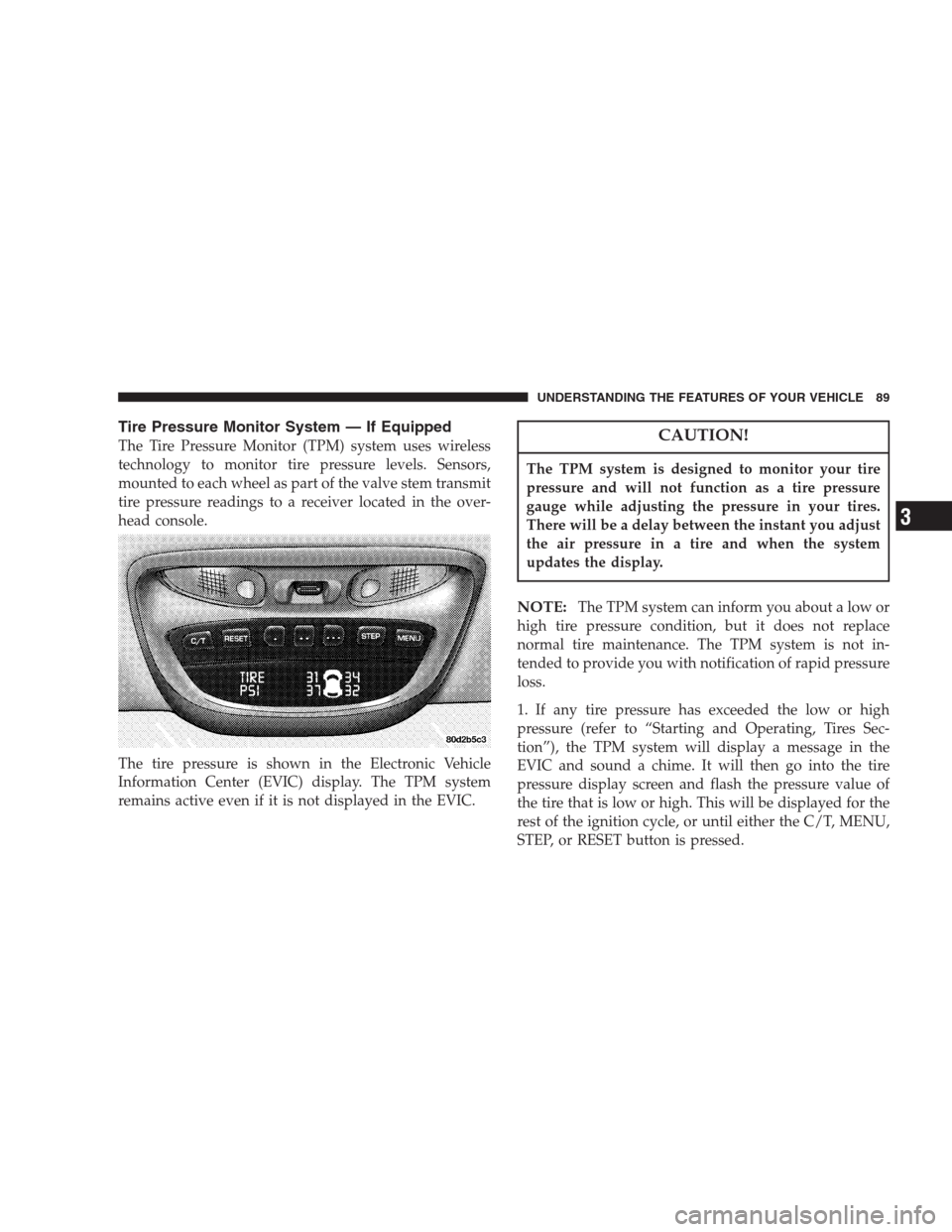
Tire Pressure Monitor System — If Equipped
The Tire Pressure Monitor (TPM) system uses wireless
technology to monitor tire pressure levels. Sensors,
mounted to each wheel as part of the valve stem transmit
tire pressure readings to a receiver located in the over-
head console.
The tire pressure is shown in the Electronic Vehicle
Information Center (EVIC) display. The TPM system
remains active even if it is not displayed in the EVIC.CAUTION!
The TPM system is designed to monitor your tire
pressure and will not function as a tire pressure
gauge while adjusting the pressure in your tires.
There will be a delay between the instant you adjust
the air pressure in a tire and when the system
updates the display.
NOTE:The TPM system can inform you about a low or
high tire pressure condition, but it does not replace
normal tire maintenance. The TPM system is not in-
tended to provide you with notification of rapid pressure
loss.
1. If any tire pressure has exceeded the low or high
pressure (refer to “Starting and Operating, Tires Sec-
tion”), the TPM system will display a message in the
EVIC and sound a chime. It will then go into the tire
pressure display screen and flash the pressure value of
the tire that is low or high. This will be displayed for the
rest of the ignition cycle, or until either the C/T, MENU,
STEP, or RESET button is pressed.
UNDERSTANDING THE FEATURES OF YOUR VEHICLE 89
3
Page 95 of 277
Tilt Mirrors Down
When this feature is selected, and the vehicle is placed in
reverse, the driver’s exterior mirror will tilt downward to
improve visibility of rear wheel area. Once reverse is
disengaged, the driver’s exterior mirror will return to it’s
original position. Pressing the STEP button when in this
display will select “YES” or “NO”.
Train Remote
NOTE:
As a safety feature, successful training of at least
one transmitter will erase all previously trained transmit-
ters.
When this feature is selected the driver can choose to
train up to four remote keyless entry transmitters. Press-
ing the STEP button when in this display will select
“YES” or “NO”. When “YES” is selected and the MENU
button is pressed; the EVIC will display “PRESS RE-
MOTE LOCK & UNLOCK THEN PRESS UNLOCK”,
followed by a chime to indicate the training sequence can
commence. You have approximately 30 seconds to train
up to four transmitters; after each transmitter is trained a
chime will sound indicating that the training was suc-
cessful. If remote link to memory is “YES,” the firsttransmitter trained will be associated with memory set-
ting 1 and the second transmitter trained will be associ-
ated with memory setting 2. Additional transmitters will
not be associated with a memory setting. When you have
finished training the transmitters, press the MENU but-
ton again and the EVIC will display “TRAIN DONE, x
TRAINED”. (Where x = 1,2,3, or 4) If no transmitters are
trained within approximately 30 seconds the EVIC will
display “TRAIN TIMEOUT”.Retrain Tire Sensors? (Available with TPM System
Only)
WARNING!
Death or serious injury can occur if magnetically
sensitive devices are exposed to this magnet. Mag-
nets can affect pacemakers.
NOTE:If a wheel rotation is not followed by the retrain
procedure, the system will not properly inform you of the
correct vehicle location for a low or high pressure tire.
UNDERSTANDING THE FEATURES OF YOUR VEHICLE 95
3