engine CHRYSLER 300 S 2012 User Guide
[x] Cancel search | Manufacturer: CHRYSLER, Model Year: 2012, Model line: 300 S, Model: CHRYSLER 300 S 2012Pages: 116, PDF Size: 3.21 MB
Page 32 of 116
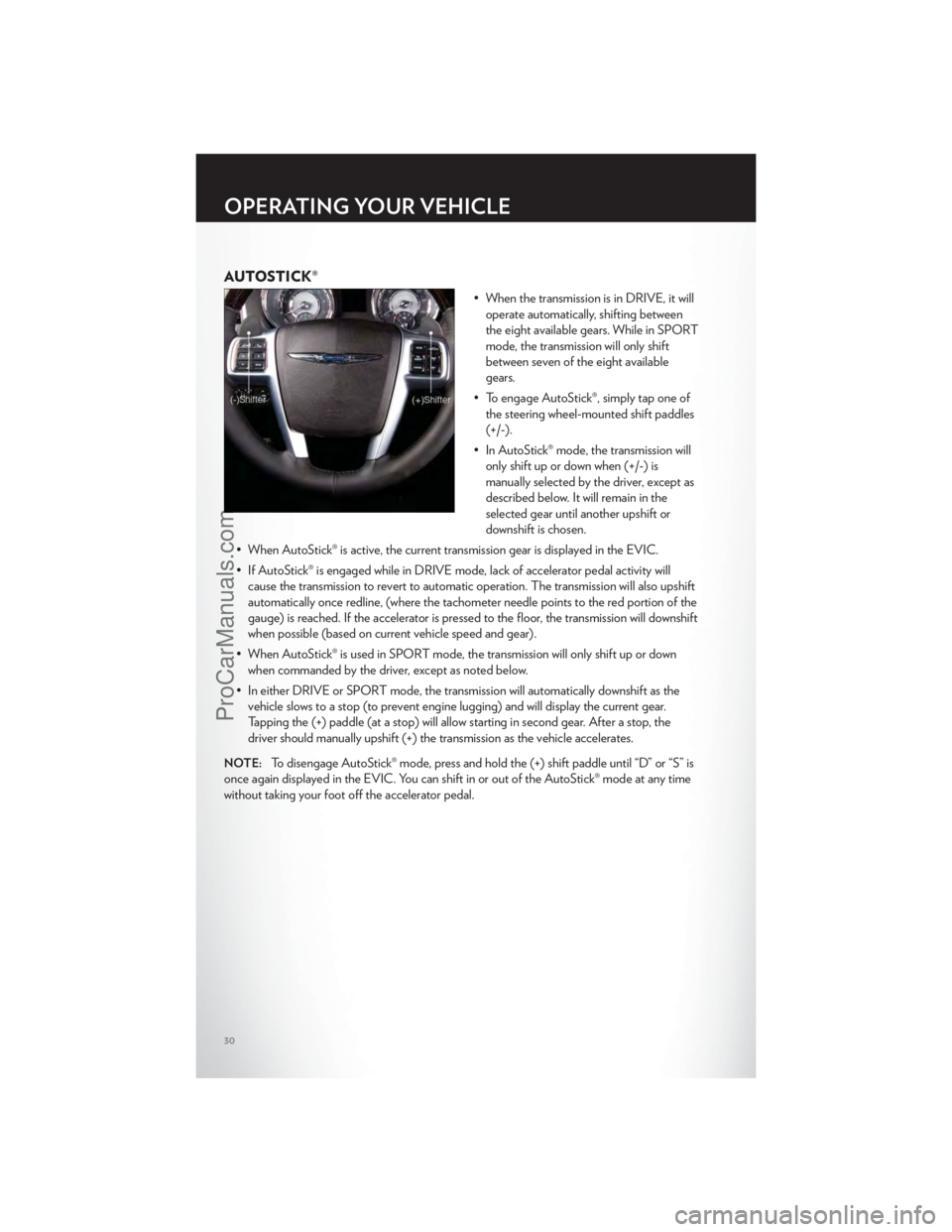
AUTOSTICK®
• When the transmission is in DRIVE, it willoperate automatically, shifting between
the eight available gears. While in SPORT
mode, the transmission will only shift
between seven of the eight available
gears.
• To engage AutoStick®, simply tap one of the steering wheel-mounted shift paddles
(+/-).
• In AutoStick® mode, the transmission will only shift up or down when (+/-) is
manually selected by the driver, except as
described below. It will remain in the
selected gear until another upshift or
downshift is chosen.
• When AutoStick® is active, the current transmission gear is displayed in the EVIC.
• If AutoStick® is engaged while in DRIVE mode, lack of accelerator pedal activity will cause the transmission to revert to automatic operation. The transmission will also upshift
automatically once redline, (where the tachometer needle points to the red portion of the
gauge) is reached. If the accelerator is pressed to the floor, the transmission will downshift
when possible (based on current vehicle speed and gear).
• When AutoStick® is used in SPORT mode, the transmission will only shift up or down when commanded by the driver, except as noted below.
• In either DRIVE or SPORT mode, the transmission will automatically downshift as the vehicle slows to a stop (to prevent engine lugging) and will display the current gear.
Tapping the (+) paddle (at a stop) will allow starting in second gear. After a stop, the
driver should manually upshift (+) the transmission as the vehicle accelerates.
NOTE:To disengage AutoStick® mode, press and hold the (+) shift paddle until “D” or “S” is
once again displayed in the EVIC. You can shift in or out of the AutoStick® mode at any time
without taking your foot off the accelerator pedal.
OPERATING YOUR VEHICLE
30
ProCarManuals.com
Page 56 of 116
PROGRAMMABLE FEATURES
Electronic Vehicle Information Center (EVIC)
• The EVIC can be used to view or change the following settings. Press the UPor
DOWN
button until System Setup displays, then press the SELECTbutton.
Scroll through the settings using the UP or DOWN buttons. Press the SELECT
button to change the setting. Press the BACK button to scroll back to a previous menu or
sub menu.
• Fuel Economy • Vehicle Info (Customer Information
Features)
• Vehicle Speed • Messages
• Trip Info • Turn Menu Off
• Units
Uconnect Touch™ Customer Programmable Features
• The Uconnect Touch™ 8.4 system allows you to access Customer Programmable feature settings such as Display, Clock, Safety/Assistance, Lights, Doors & Locks, Heated Seats,
Engine Off Operation, Compass Settings, Audio, Phone/ Bluetooth and SIRIUS Setup
through soft-keys.
• Touch the More soft-key to on the bottom of the screen, then touch the Settings soft-key to access the Settings screen. When making a selection, scroll up or down until the
preferred setting is highlighted, then press and release the preferred setting until a
check-mark appears next to the setting, showing that setting has been selected. The
following feature settings are available:
• Display • Clock
• Safety / Assistance • Doors & Locks
• Auto-On Comfort & Remote Start • Engine Off Options
• Compass Settings • Audio
• Phone / Bluetooth • SIRIUS Setup
UNIVERSAL GARAGE DOOR OPENER (HomeLink®)
• HomeLink® replaces up to three hand-held transmitters that operate devices such as
garage door openers, motorized gates, lighting or home security systems. The
HomeLink® unit is powered by your vehicles 12 Volt battery.
• The HomeLink® buttons that are located in the overhead console or sunvisor designate the three different HomeLink® channels.
• The HomeLink® indicator is located above the center button.
ELECTRONICS
54
ProCarManuals.com
Page 59 of 116
POWER OUTLETS
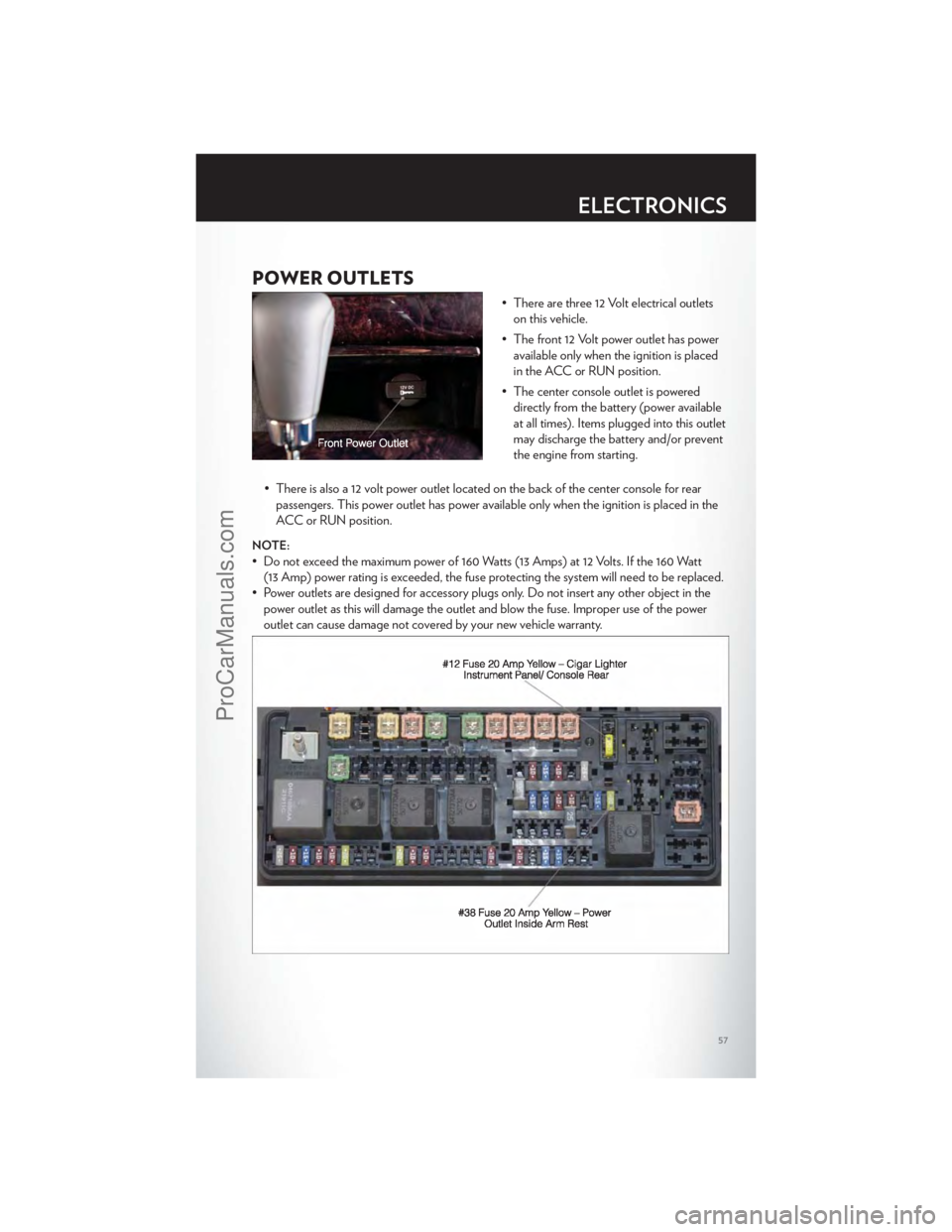
• There are three 12 Volt electrical outletson this vehicle.
• The front 12 Volt power outlet has power available only when the ignition is placed
in the ACC or RUN position.
• The center console outlet is powered directly from the battery (power available
at all times). Items plugged into this outlet
may discharge the battery and/or prevent
the engine from starting.
• There is also a 12 volt power outlet located on the back of the center console for rear passengers. This power outlet has power available only when the ignition is placed in the
ACC or RUN position.
NOTE:
• Do not exceed the maximum power of 160 Watts (13 Amps) at 12 Volts. If the 160 Watt(13 Amp) power rating is exceeded, the fuse protecting the system will need to be replaced.
• Power outlets are designed for accessory plugs only. Do not insert any other object in the power outlet as this will damage the outlet and blow the fuse. Improper use of the power
outlet can cause damage not covered by your new vehicle warranty.
ELECTRONICS
57
ProCarManuals.com
Page 60 of 116
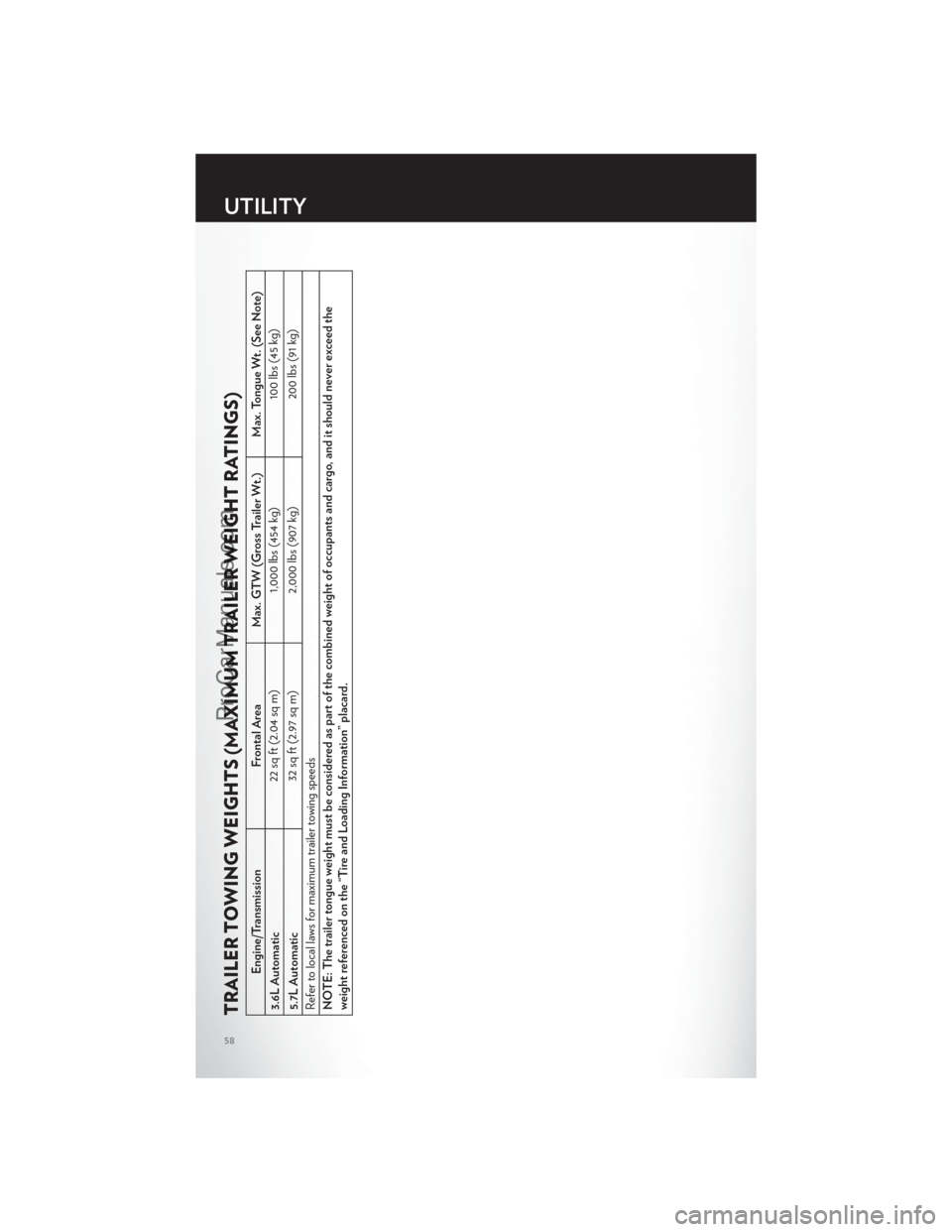
TRAILER TOWING WEIGHTS (MAXIMUM TRAILER WEIGHT RATINGS)
Engine/TransmissionFrontal AreaMax. GTW (Gross Trailer Wt.) Max. Tongue Wt. (See Note)
3.6L Automatic 22 sq ft (2.04 sq m)
1,000 lbs (454 kg) 100 lbs (45 kg)
5.7L Automatic 32 sq ft (2.97 sq m)
2,000 lbs (907 kg) 200 lbs (91 kg)
Refer to local laws for maximum trailer towing speeds
NOTE: The trailer tongue weight must be considered as part of the combined weight of occupants and cargo, and it should never exceed the
weight referenced on the “Tire and Loading Information” placard.
UTILITY
58
ProCarManuals.com
Page 62 of 116
AUTOSTICK®
Steering Wheel Mounted Paddle Shifters Or Console Mounted Shifter
• AutoStick® is a driver-interactive transmission feature that offers manual gear shifting toprovide you with more control of the vehicle. AutoStick® allows you to maximize engine
braking, and improve overall vehicle performance.
• This system can also provide you with more control during passing, city driving, cold slippery conditions, mountain driving, trailer towing, and many other situations.
Operation
• When the shift lever is in the DRIVE position, the transmission will operate automatically,shifting between the five available gears. To engage AutoStick®, simply move the shift
lever to the right or left (+/-) while in the DRIVE position, or press one of the steering
wheel mounted shift paddles (+/-). When AutoStick® is active, the current transmission
gear is displayed in the Electronic Vehicle Information Center (EVIC) portion of the
instrument cluster. In AutoStick® mode, the transmission will shift when manually selected
by the driver (using the shift lever, or the shift paddles), unless an engine lugging or
overspeed condition would result. It will remain in the selected gear until another upshift
or downshift is chosen, except as described below:
• The transmission will automatically downshift as the vehicle slows (to prevent engine lugging) and will display the current gear.
• The transmission will automatically downshift to first gear when coming to a stop.
• You can start out in first or second gear. Tapping (+) (at a stop) will allow starting in second gear. Starting out in second gear is helpful in snowy or icy conditions.
• The system will ignore attempts to upshift at too low of a vehicle speed.
• Transmission shifting will be more noticeable when AutoStick® is engaged. To disengage AutoStick® mode, hold the shift lever to the right or press and hold the (+) shift paddle
until “D” is once again displayed in the instrument cluster. You can shift in or out of the
AutoStick® mode at any time without taking your foot off the accelerator pedal.
• An “UPSHIFT” message will appear in the Electronic Vehicle Information Center (EVIC) portion of the instrument cluster when using AutoStick®, to alert the driver to
upshift to the next gear. The “UPSHIFT” message will appear when approaching the
maximum engine speed.
Auto
• This is the default position when vehicle ignition is first turned on. This mode will give asporty, but comfortable ride. Within this mode, the suspension will adapt to the vehicle
inputs, including vehicle speed, steering inputs, braking and acceleration.
• If AutoStick® is engaged while in “Auto” mode, the transmission will automatically shift up if maximum engine speed is reached.
• Heavily pressing the accelerator pedal may generate an automatic downshift for improved acceleration.
• This mode should be used for most driving situations.
SRT8
60
ProCarManuals.com
Page 63 of 116
Sport
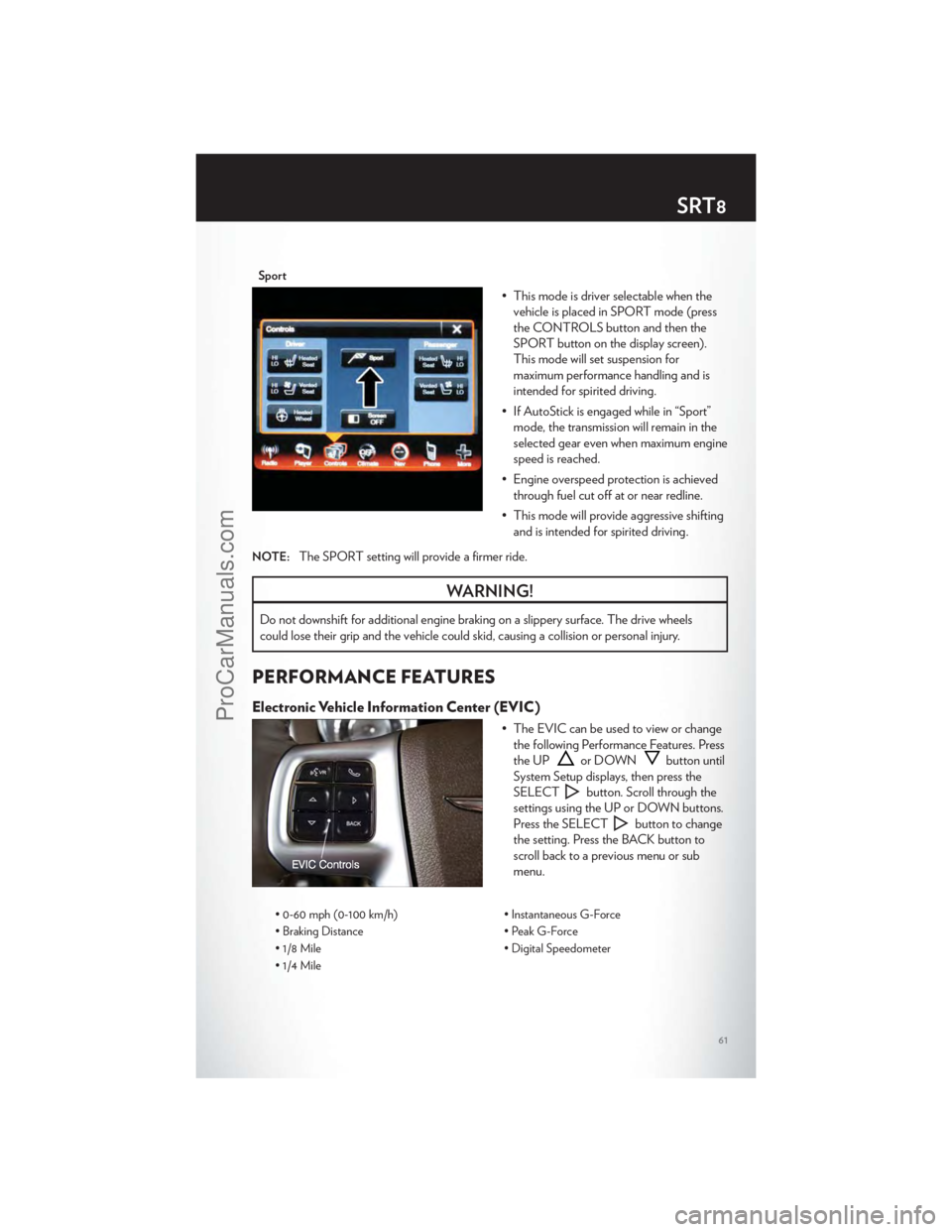
• This mode is driver selectable when thevehicle is placed in SPORT mode (press
the CONTROLS button and then the
SPORT button on the display screen).
This mode will set suspension for
maximum performance handling and is
intended for spirited driving.
• If AutoStick is engaged while in “Sport” mode, the transmission will remain in the
selected gear even when maximum engine
speed is reached.
• Engine overspeed protection is achieved through fuel cut off at or near redline.
• This mode will provide aggressive shifting and is intended for spirited driving.
NOTE:The SPORT setting will provide a firmer ride.
WARNING!
Do not downshift for additional engine braking on a slippery surface. The drive wheels
could lose their grip and the vehicle could skid, causing a collision or personal injury.
PERFORMANCE FEATURES
Electronic Vehicle Information Center (EVIC)
• The EVIC can be used to view or changethe following Performance Features. Press
the UP
or DOWNbutton until
System Setup displays, then press the
SELECT
button. Scroll through the
settings using the UP or DOWN buttons.
Press the SELECT
button to change
the setting. Press the BACK button to
scroll back to a previous menu or sub
menu.
• 0-60 mph (0-100 km/h) • Instantaneous G-Force
• Braking Distance • Peak G-Force
• 1/8 Mile • Digital Speedometer
• 1/4 Mile
SRT8
61
ProCarManuals.com
Page 64 of 116
0-60 mph (0-100 km/h)
• When selected, this screen displays the time it takes for the vehicle to go from 0 to60 mph (0 to 100 km/h) within 10 seconds.
Braking Distance
• When selected, this screen displays the vehicle's braking distance and the speed at whichthe brake pedal was depressed.
1/8 Mile, 1/4 Mile
• When selected, this screen displays the time it takes the vehicle to travel 1/8 mile(1/4 mile) within 30 seconds and the vehicle's speed when it reaches 1/8 mile (1/4 mile).
Instantaneous G-Force
• When selected, this screen displays the current G-Force (lateral and longitudinal) alongwith a friction circle that displays the directions of the forces.
Peak G-Force
• When selected, this screen displays all four G-Force values (two lateral and twolongitudinal).
Uconnect Touch SRT8 Performance Features
• To access the SRT8 Performance Features, touch the “More” soft-key then touch the“SRT” soft-key. Press the UP or DOWN soft-key to cycle through the features. Press the
feature soft-key to select that feature.
• The Performance Page include the following:
• Timers • 1/8 Mile
• Engine Values • 1/4 Mile
• Digital Gauge Displays • Instantaneous G-Force
• 0-60 mph (0-100 km/h) • Peak G-Force
• Braking Distance • Digital Speedometer
Timers
0-60 mph (0-100 km/h), 1/8 Mile, 1/4 Mile • When selected, this screen displays the time it takes for the vehicle to go from 0 to60 mph (0 to 100 km/h), 1/8 mile or 1/4 mile.
Braking Distance • When selected, this screen displays the vehicle's braking distance and the speed at whichthe brake pedal was depressed.
G-Force
• When selected, this screen displays all four G-Force values (two lateral and twolongitudinal) as well as steering angle.
SRT8
62
ProCarManuals.com
Page 65 of 116
Gauges 1
• Oil Temperature
• Oil Pressure
• Battery Voltage
Gauges 2
• Coolant Temperature
• Oil Temperature
• Transmission Temperature
• Intake Air Temperature
• Oil Pressure
• Battery Voltage
Engine
• When selected, this screen displays miles per hour (mph), horsepower (hp), torque(ft/lb), oil pressure (psi) and gear selector values.
Handling
• When selected, this screen displays peak g-force, instantaneous g-force, steering and yawangles.
Options
• When selected, this screen allows you to choose a standard or customize display for yourSRT home page.
SPORTSport Mode
• To access the Sport Mode, touch the “Controls” soft-key then touch the “Sport” soft-key.When SPORT mode is enabled, a flag will light up in the instrument cluster.
• This mode provides performance based tuning with improved handling through an electronic controlled dampening system. This system reduces body roll and pitch in many
driving situations including cornering, acceleration and braking.
WARNING!
Measurement of vehicle statistics with the Performance Features is intended for
off-highway or off-road use only and should not be done on any public roadways. It is
recommended that these features be used in a controlled environment and within the limits
of the law. The capabilities of the vehicle as measured by the performance pages must
never be exploited in a reckless or dangerous manner, which can jeopardize the user’s safety
or the safety of others. Only a safe, attentive, and skillful driver can prevent accidents.
SRT8
63
ProCarManuals.com
Page 66 of 116
24-HOUR TOWING ASSISTANCE
• Dial toll-free 1-800-521-2779 or 1-800-363-4869 for Canadian residents.
• Provide your name, vehicle identification number and license plate number.
• Provide your location, including telephone number, from which you are calling.
• Briefly describe the nature of the problem and answer a few simple questions.
• You will be given the name of the service provider and an estimated time of arrival. If youfeel you are in an “unsafe situation”, please let us know. With your consent, we will contact
local police or safety authorities.
INSTRUMENT CLUSTER WARNING LIGHTS
- Electronic Stability Control (ESC) Activation/Malfunction Indicator
Light
• The “ESC Activation/Malfunction Indicator Light” in the instrument cluster will come on when the ignition switch is turned to the ON/RUN position. It should go out with the
engine running. If the “ESC Activation/Malfunction Indicator Light” comes on
continuously with the engine running, a malfunction has been detected in the ESC
system.
• If this light remains on after several ignition cy cles, and the vehicle has been driven several
miles (kilometers) at speeds greater than 30 mph (48 km/h), we recommend you drive to
the nearest service center and have the vehicle serviced immediately.
- Tire Pressure Monitoring System (TPMS) Light
• Each tire, including the spare (if provided), should be checked monthly, when cold and inflated to the inflation pressure recommended by the vehicle manufacturer on the
vehicle placard or tire inflation pressure label. (If your vehicle has tires of a different size
than the size indicated on the vehicle placard or tire inflation pressure label, you should
determine the proper tire inflation pressure for those tires.)
• As an added safety feature, your vehicle has been equipped with a Tire Pressure Monitoring System (TPMS) that illuminates a low tire pressure telltale when one or more
of your tires is significantly under-inflated. Accordingly, when the low tire pressure telltale
illuminates, you should stop and check your tires as soon as possible, and inflate them to
the proper pressure. Driving on a significantly under-inflated tire causes the tire to
overheat and can lead to tire failure. Under-inflation also reduces fuel efficiency and tire
tread life, and may affect the vehicle’s handling and stopping ability.
• IF THE LIGHT STARTS FLASHING INDICATING A LOW TIRE PRESSURE,
ADJUST THE AIR PRESSURE IN THE LOW TIRE TO THE AIR PRESSURE
SHOWN ON THE VEHICLE PLACARD OR TIRE INFLATION PRESSURE
LABEL LOCATED ON THE DRIVER'S DOOR. NOTE: AFTER INFLATION,
THE VEHICLE MAY NEED TO BE DRIVEN FOR 20 MINUTES BEFORE THE
FLASHING LIGHT WILL TURN OFF.
WHAT TO DO IN EMERGENCIES
64
ProCarManuals.com
Page 67 of 116
• Please note that the TPMS is not a substitute for proper tire maintenance, and it is thedriver’s responsibility to maintain correct tire pressure, even if under-inflation has not
reached the level to trigger illumination of the TPMS low tire pressure telltale.
• Your vehicle has also been equipped with a TPMS malfunction indicator to indicate when the system is not operating properly. The TPMS malfunction indicator is combined with
the low tire pressure telltale. When the system detects a malfunction, the telltale will flash
for approximately one minute and then remain continuously illuminated. This sequence
will continue each time the vehicle is restarted as long as the malfunction exists.
• When the malfunction indicator is illuminated, the system may not be able to detect or signal low tire pressure as intended. TPMS malfunctions may occur for a variety of
reasons, including the installation of replacement or alternate tires or wheels on the
vehicle that prevent the TPMS from functioning properly. Always check the TPMS
malfunction telltale after replacing one or more tires or wheels on your vehicle, to ensure
that the replacement or alternate tires and wheels allow the TPMS to continue to function
properly.
NOTE:Tire pressures change by approximately 1 psi (7 kPa) per 12° F (7° C) of air
temperature change. Keep this in mind when checking tire pressure inside a garage, especially
in the Winter. Example: If garage temperature is 68°F (20°C) and the outside temperature is
32°F (0°C), then the cold tire inflation pressure should be increased by 3 psi (21 kPa), which
equals 1 psi (7 kPa) for every 12°F (7°C) for this outside temperature condition.
CAUTION!
The TPMS has been optimized for the original equipment tires and wheels. TPMS
pressures and warning have been established for the tire size equipped on your vehicle.
Undesirable system operation or sensor damage may result when using replacement
equipment that is not of the same size, type, and/or style. Aftermarket wheels can cause
sensor damage. Do not use tire sealant from a can, or balance beads if your vehicle is
equipped with a TPMS, as damage to the sensors may result.
- Engine Temperature Warning Light
• This light warns of an overheated engine condition.
• If the light turns on or flashes continuously while driving, safely pull over and stop the vehicle. If the A/C system is on, turn it off. Also, shift the transmission into NEUTRAL
and idle the vehicle. If the temperature reading does not return to normal, turn the engine
off immediately.
• We recommend that you do not operate the vehicle or engine damage will occur. Have the vehicle serviced immediately.
WARNING!
A hot engine cooling system is dangerous. You or others could be badly burned by steam
or boiling coolant. You may want to call an authorized service center for service if your
vehicle overheats.
WHAT TO DO IN EMERGENCIES
65
ProCarManuals.com