key CHRYSLER 300 S 2012 User Guide
[x] Cancel search | Manufacturer: CHRYSLER, Model Year: 2012, Model line: 300 S, Model: CHRYSLER 300 S 2012Pages: 116, PDF Size: 3.21 MB
Page 18 of 116
FRONT SEATS
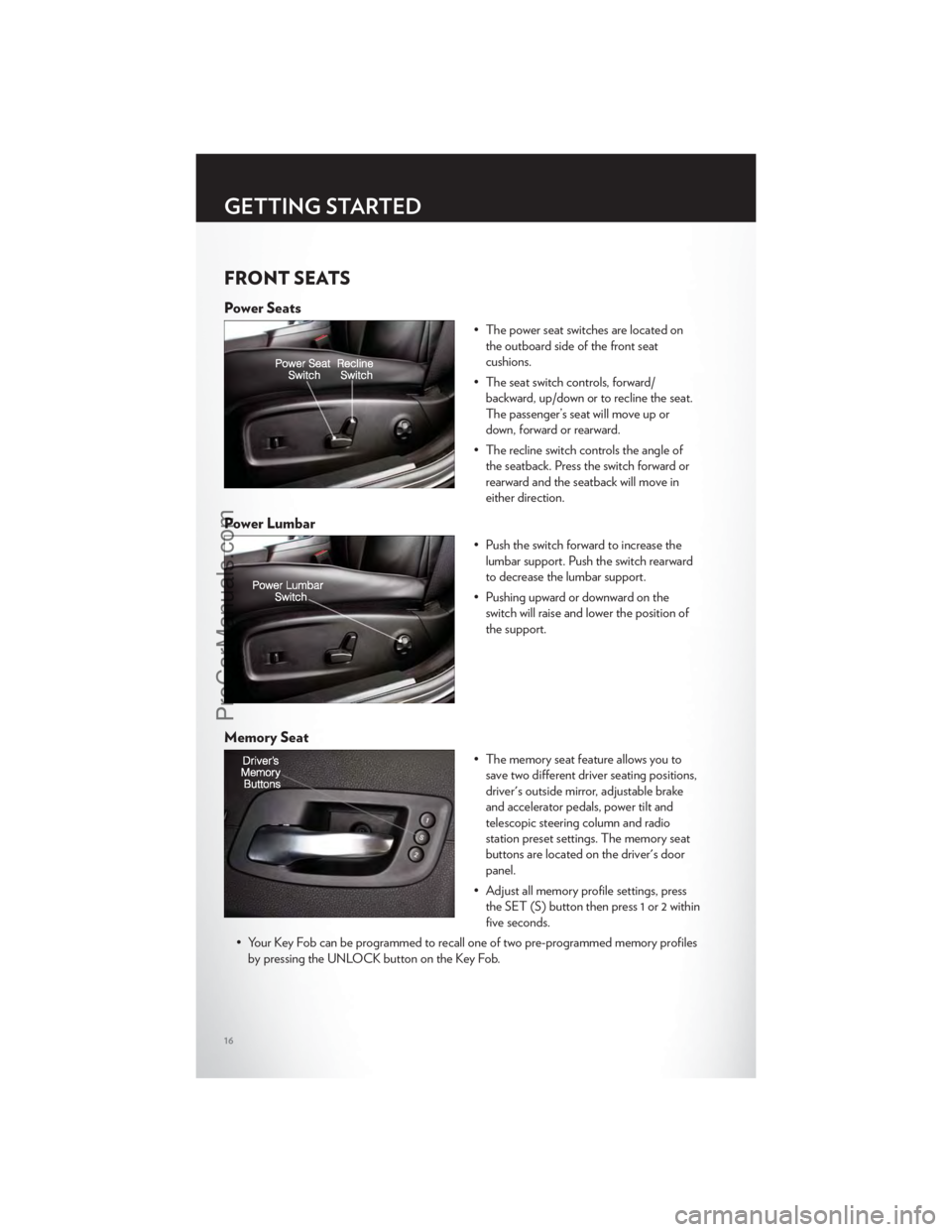
Power Seats
• The power seat switches are located onthe outboard side of the front seat
cushions.
• The seat switch controls, forward/ backward, up/down or to recline the seat.
The passenger’s seat will move up or
down, forward or rearward.
• The recline switch controls the angle of the seatback. Press the switch forward or
rearward and the seatback will move in
either direction.
Power Lumbar
• Push the switch forward to increase thelumbar support. Push the switch rearward
to decrease the lumbar support.
• Pushing upward or downward on the switch will raise and lower the position of
the support.
Memory Seat
• The memory seat feature allows you tosave two different driver seating positions,
driver's outside mirror, adjustable brake
and accelerator pedals, power tilt and
telescopic steering column and radio
station preset settings. The memory seat
buttons are located on the driver's door
panel.
• Adjust all memory profile settings, press the SET (S) button then press 1 or 2 within
five seconds.
• Your Key Fob can be programmed to recall one of two pre-programmed memory profiles by pressing the UNLOCK button on the Key Fob.
GETTING STARTED
16
ProCarManuals.com
Page 19 of 116
• To program your Key Fobs, perform the following:• Change the ignition to OFF.
• Select desired memory profile 1 or 2.
• Once the profile has been recalled, press and release the SET (S) button on the memory switch, then press and release the side of the rocker switch labeled 1 or 2
accordingly.
• (1 or 2) will display in the instrument cluster if the vehicle is equipped with the EVIC.
• Press and release the LOCK button on the Key Fob within 10 seconds.
NOTE:Your Key Fob can be unlinked to your memory settings by pressing the SET (S)
button followed by the UNLOCK button on the Key Fob in the fourth step.
• Press 1 or 2 to recall the saved positions, or press UNLOCK on the programmed Key Fob.
• Refer to the Owner's Manual on the DVD for further details.
Manual Seat Adjustment
Forward/Rearward
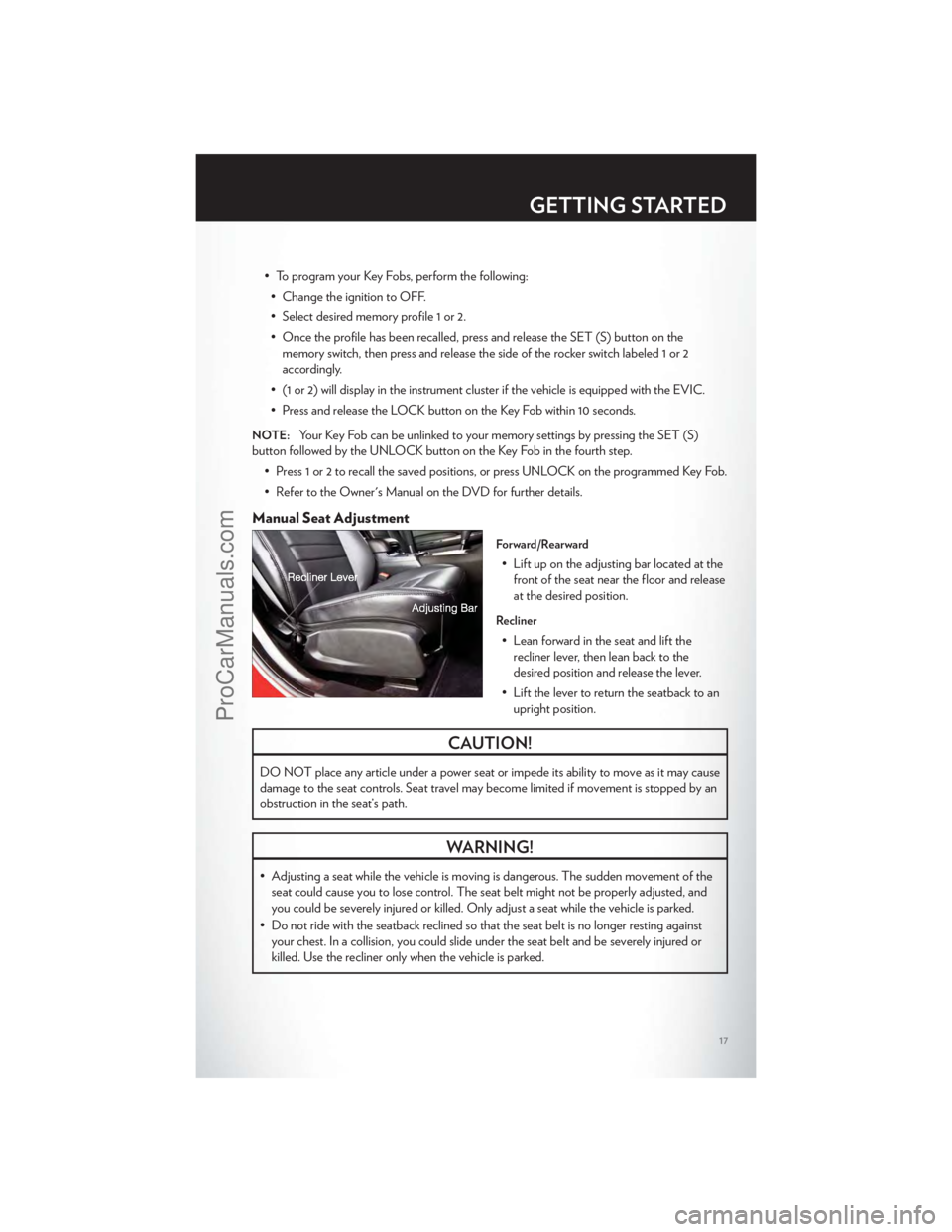
• Lift up on the adjusting bar located at thefront of the seat near the floor and release
at the desired position.
Recliner
• Lean forward in the seat and lift therecliner lever, then lean back to the
desired position and release the lever.
• Lift the lever to return the seatback to an upright position.
CAUTION!
DO NOT place any article under a power seat or impede its ability to move as it may cause
damage to the seat controls. Seat travel may become limited if movement is stopped by an
obstruction in the seat’s path.
WARNING!
• Adjusting a seat while the vehicle is moving is dangerous. The sudden movement of theseat could cause you to lose control. The seat belt might not be properly adjusted, and
you could be severely injured or killed. Only adjust a seat while the vehicle is parked.
• Do not ride with the seatback reclined so that the seat belt is no longer resting against your chest. In a collision, you could slide under the seat belt and be severely injured or
killed. Use the recliner only when the vehicle is parked.
GETTING STARTED
17
ProCarManuals.com
Page 20 of 116
REAR SEAT
Folding Rear Seatback
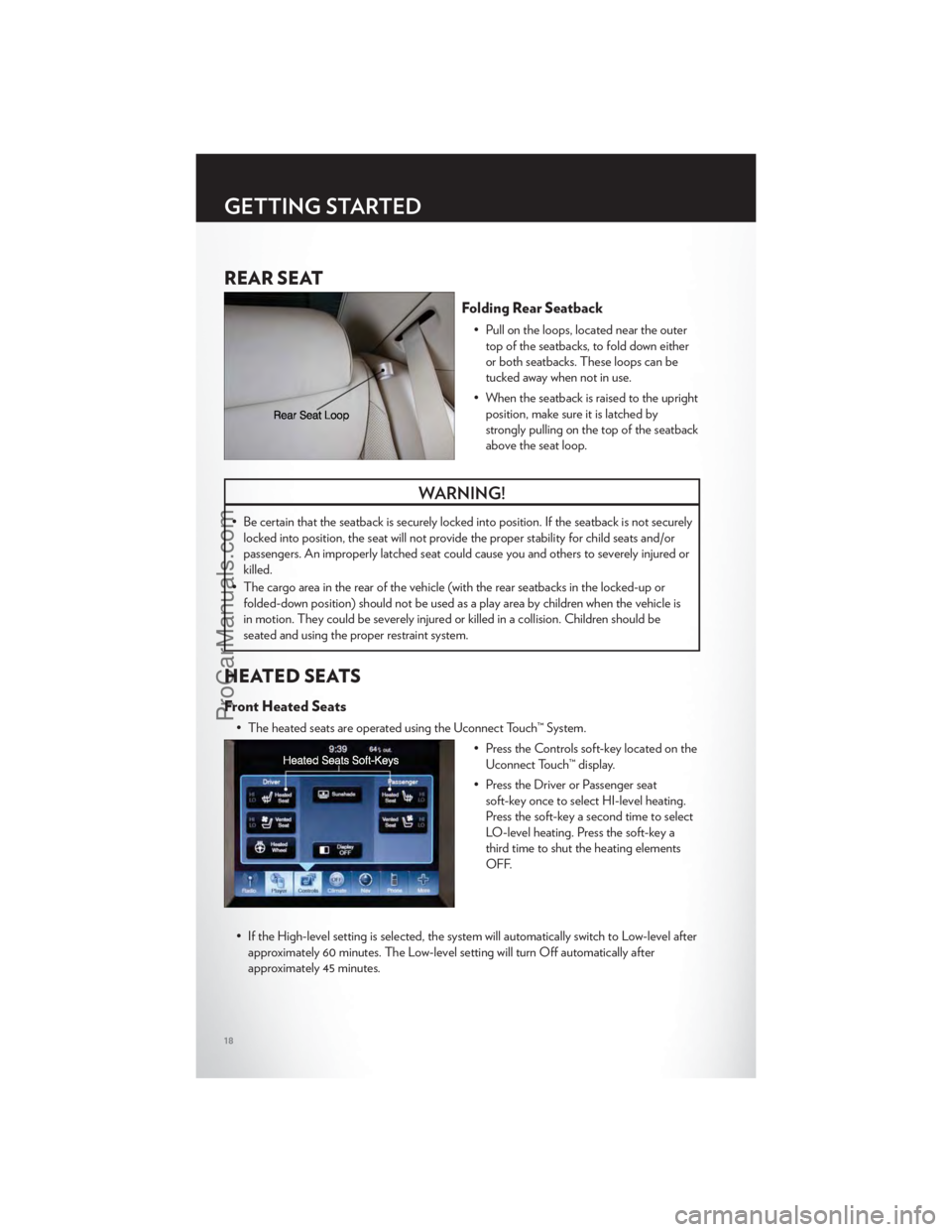
• Pull on the loops, located near the outertop of the seatbacks, to fold down either
or both seatbacks. These loops can be
tucked away when not in use.
• When the seatback is raised to the upright position, make sure it is latched by
strongly pulling on the top of the seatback
above the seat loop.
WARNING!
• Be certain that the seatback is securely locked into position. If the seatback is not securelylocked into position, the seat will not provide the proper stability for child seats and/or
passengers. An improperly latched seat could cause you and others to severely injured or
killed.
• The cargo area in the rear of the vehicle (with the rear seatbacks in the locked-up or folded-down position) should not be used as a play area by children when the vehicle is
in motion. They could be severely injured or killed in a collision. Children should be
seated and using the proper restraint system.
HEATED SEATS
Front Heated Seats
• The heated seats are operated using the Uconnect Touch™ System.
• Press the Controls soft-key located on theUconnect Touch™ display.
• Press the Driver or Passenger seat soft-key once to select HI-level heating.
Press the soft-key a second time to select
LO-level heating. Press the soft-key a
third time to shut the heating elements
OFF.
• If the High-level setting is selected, the system will automatically switch to Low-level after approximately 60 minutes. The Low-level setting will turn Off automatically after
approximately 45 minutes.
GETTING STARTED
18
ProCarManuals.com
Page 33 of 116
CLIMATE CONTROLS
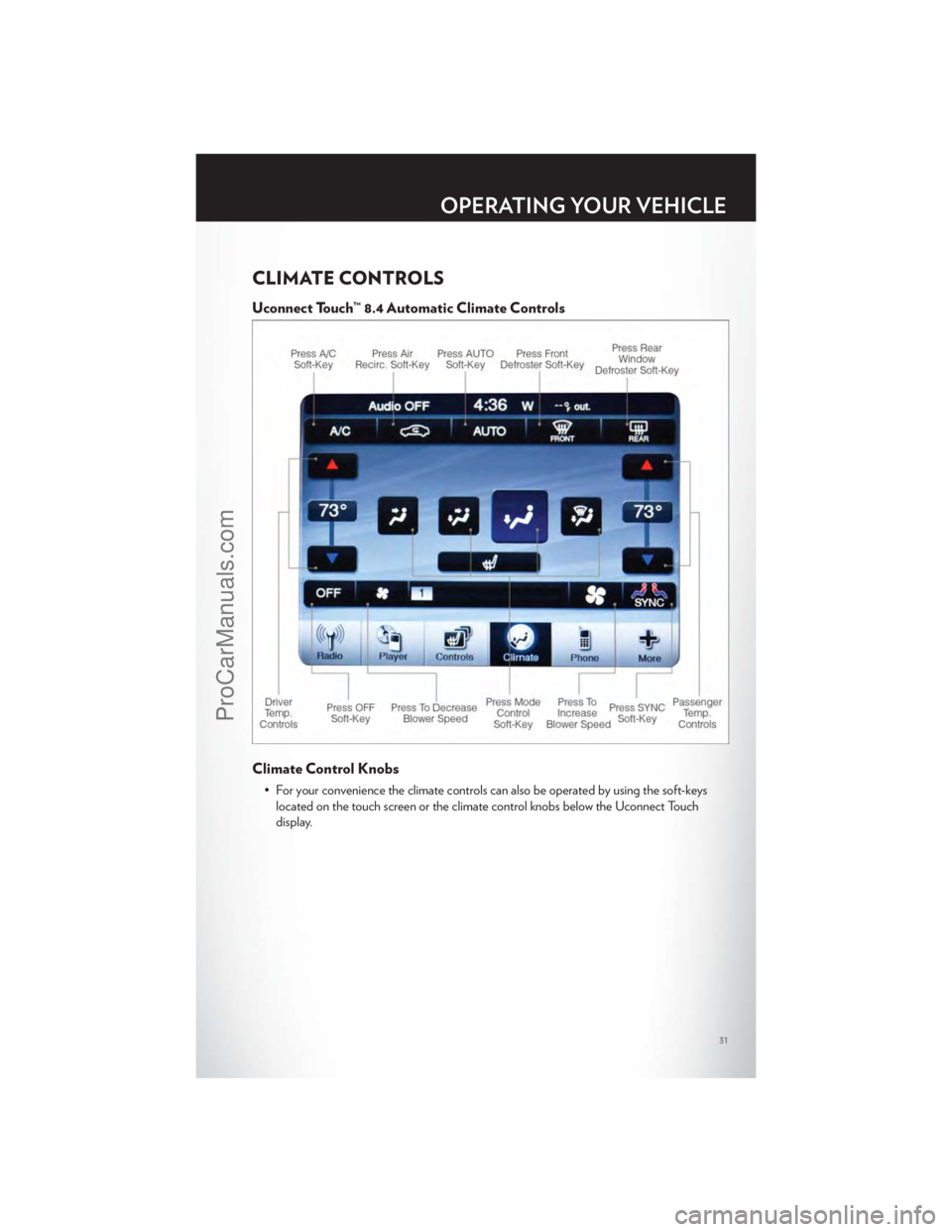
Uconnect Touch™ 8.4 Automatic Climate Controls
Climate Control Knobs
• For your convenience the climate controls can also be operated by using the soft-keyslocated on the touch screen or the climate control knobs below the Uconnect Touch
display.
OPERATING YOUR VEHICLE
31
ProCarManuals.com
Page 35 of 116
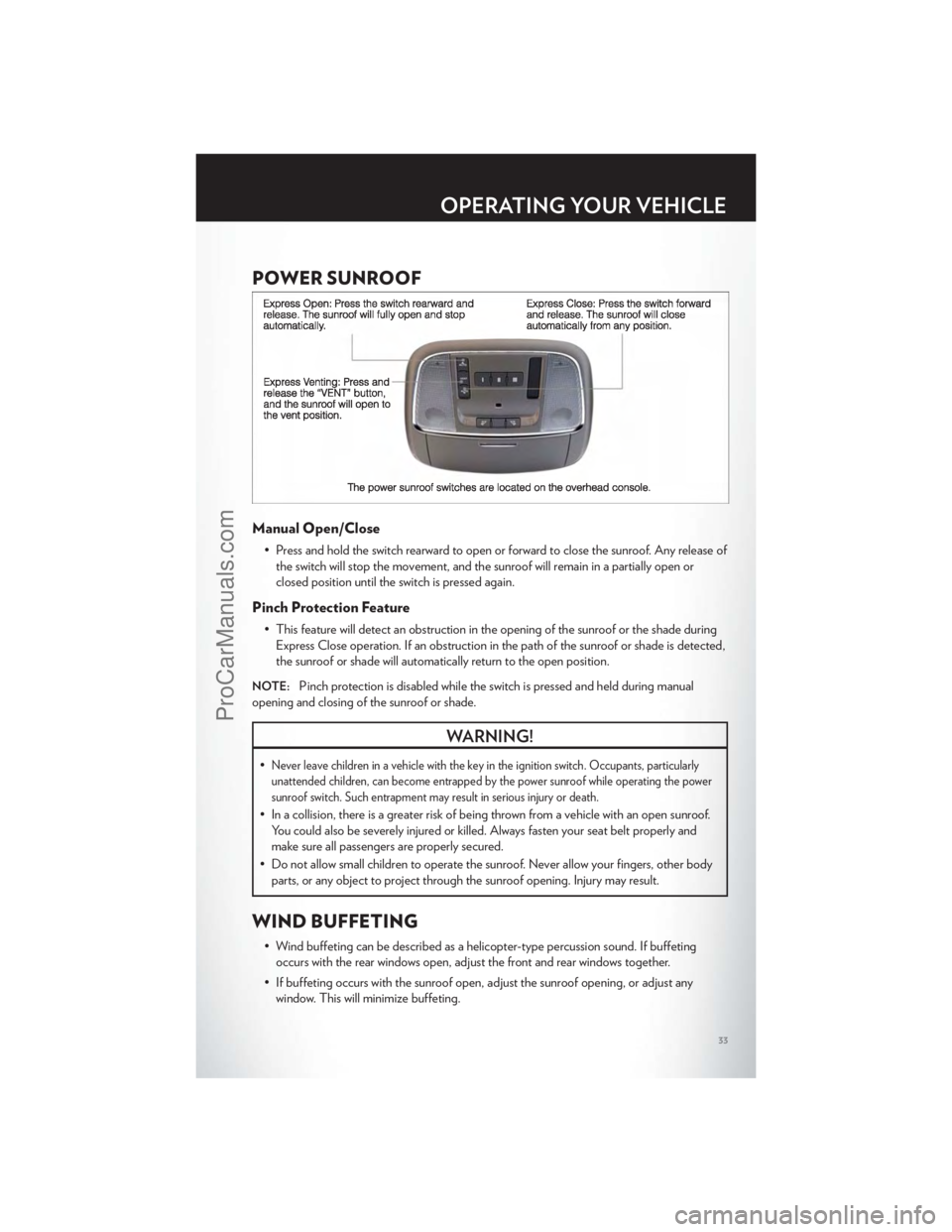
POWER SUNROOF
Manual Open/Close
• Press and hold the switch rearward to open or forward to close the sunroof. Any release ofthe switch will stop the movement, and the sunroof will remain in a partially open or
closed position until the switch is pressed again.
Pinch Protection Feature
• This feature will detect an obstruction in the opening of the sunroof or the shade duringExpress Close operation. If an obstruction in the path of the sunroof or shade is detected,
the sunroof or shade will automatically return to the open position.
NOTE:Pinch protection is disabled while the switch is pressed and held during manual
opening and closing of the sunroof or shade.
WARNING!
•Never leave children in a vehicle with the key in the ignition switch. Occupants, particularly
unattended children, can become entrapped by the power sunroof while operating the power
sunroof switch. Such entrapment may result in serious injury or death.
• In a collision, there is a greater risk of being thrown from a vehicle with an open sunroof. You could also be severely injured or killed. Always fasten your seat belt properly and
make sure all passengers are properly secured.
• Do not allow small children to operate the sunroof. Never allow your fingers, other body parts, or any object to project through the sunroof opening. Injury may result.
WIND BUFFETING
• Wind buffeting can be described as a helicopter-type percussion sound. If buffetingoccurs with the rear windows open, adjust the front and rear windows together.
• If buffeting occurs with the sunroof open, adjust the sunroof opening, or adjust any window. This will minimize buffeting.
OPERATING YOUR VEHICLE
33
ProCarManuals.com
Page 38 of 116
IDENTIFYING YOUR RADIO
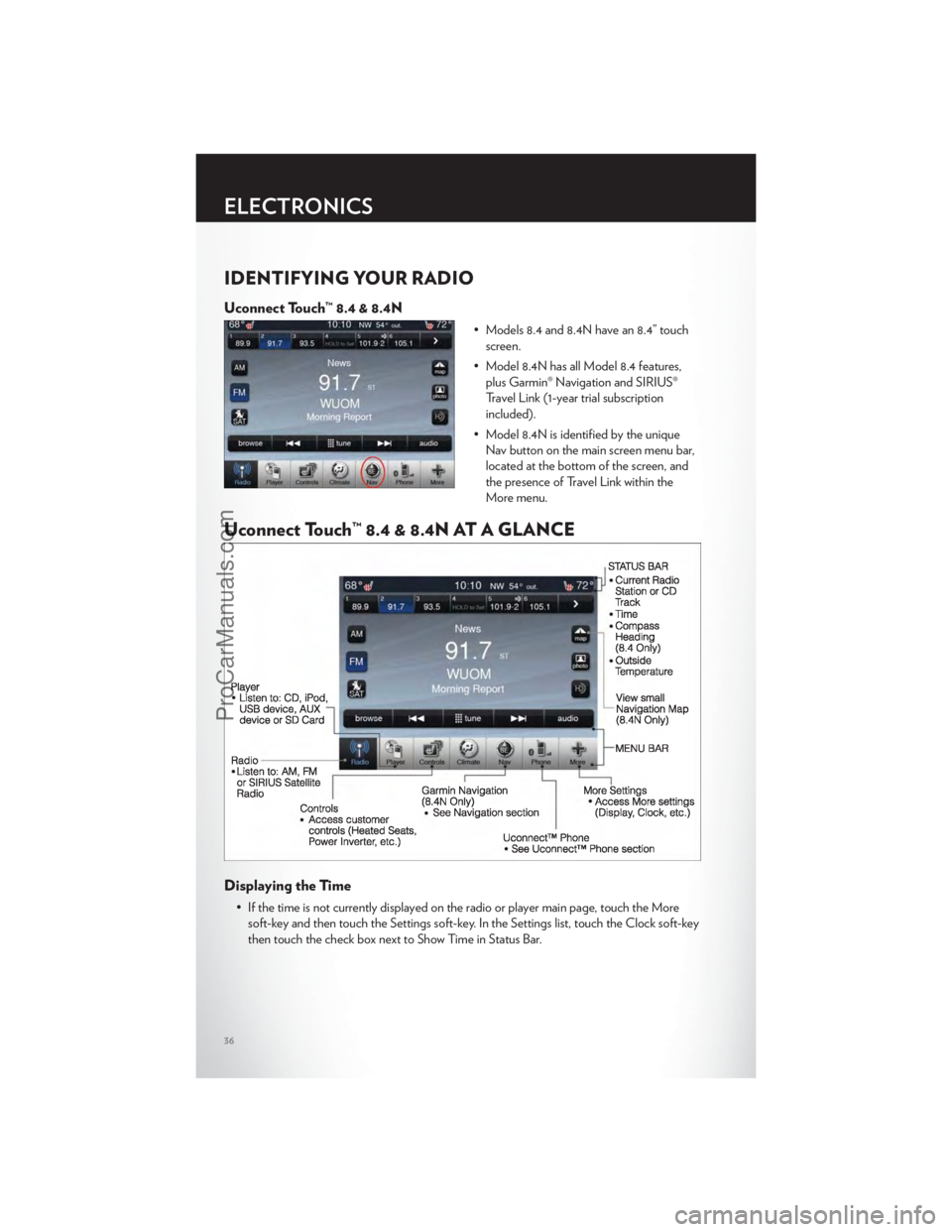
Uconnect Touch™ 8.4 & 8.4N
• Models 8.4 and 8.4N have an 8.4” touchscreen.
• Model 8.4N has all Model 8.4 features, plus Garmin® Navigation and SIRIUS®
Travel Link (1-year trial subscription
included).
• Model 8.4N is identified by the unique Nav button on the main screen menu bar,
located at the bottom of the screen, and
the presence of Travel Link within the
More menu.
Uconnect Touch™ 8.4 & 8.4N AT A GLANCE
Displaying the Time
• If the time is not currently displayed on the radio or player main page, touch the Moresoft-key and then touch the Settings soft-key. In the Settings list, touch the Clock soft-key
then touch the check box next to Show Time in Status Bar.
ELECTRONICS
36
ProCarManuals.com
Page 39 of 116
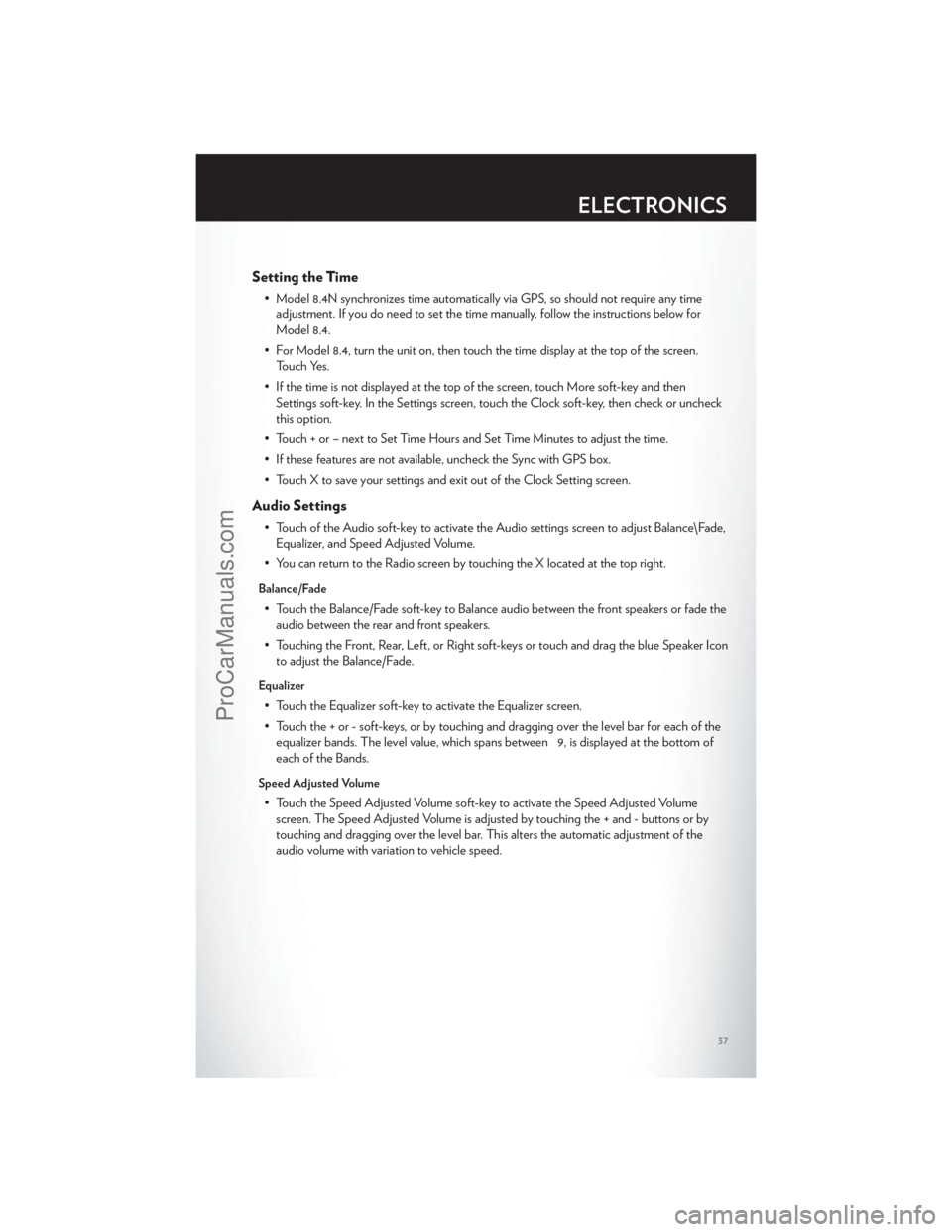
Setting the Time
• Model 8.4N synchronizes time automatically via GPS, so should not require any timeadjustment. If you do need to set the time manually, follow the instructions below for
Model 8.4.
• For Model 8.4, turn the unit on, then touch the time display at the top of the screen. Touch Yes.
• If the time is not displayed at the top of the screen, touch More soft-key and then Settings soft-key. In the Settings screen, touch the Clock soft-key, then check or uncheck
this option.
• Touch + or – next to Set Time Hours and Set Time Minutes to adjust the time.
• If these features are not available, uncheck the Sync with GPS box.
• Touch X to save your settings and exit out of the Clock Setting screen.
Audio Settings
• Touch of the Audio soft-key to activate the Audio settings screen to adjust Balance\Fade, Equalizer, and Speed Adjusted Volume.
• You can return to the Radio screen by touching the X located at the top right.
Balance/Fade
• Touch the Balance/Fade soft-key to Balance audio between the front speakers or fade the audio between the rear and front speakers.
• Touching the Front, Rear, Left, or Right soft-keys or touch and drag the blue Speaker Icon to adjust the Balance/Fade.
Equalizer
• Touch the Equalizer soft-key to activate the Equalizer screen.
• Touch the + or - soft-keys, or by touching and dragging over the level bar for each of theequalizer bands. The level value, which spans between 9, is displayed at the bottom of
each of the Bands.
Speed Adjusted Volume
• Touch the Speed Adjusted Volume soft-key to activate the Speed Adjusted Volumescreen. The Speed Adjusted Volume is adjusted by touching the + and - buttons or by
touching and dragging over the level bar. This alters the automatic adjustment of the
audio volume with variation to vehicle speed.
ELECTRONICS
37
ProCarManuals.com
Page 40 of 116
RADIO
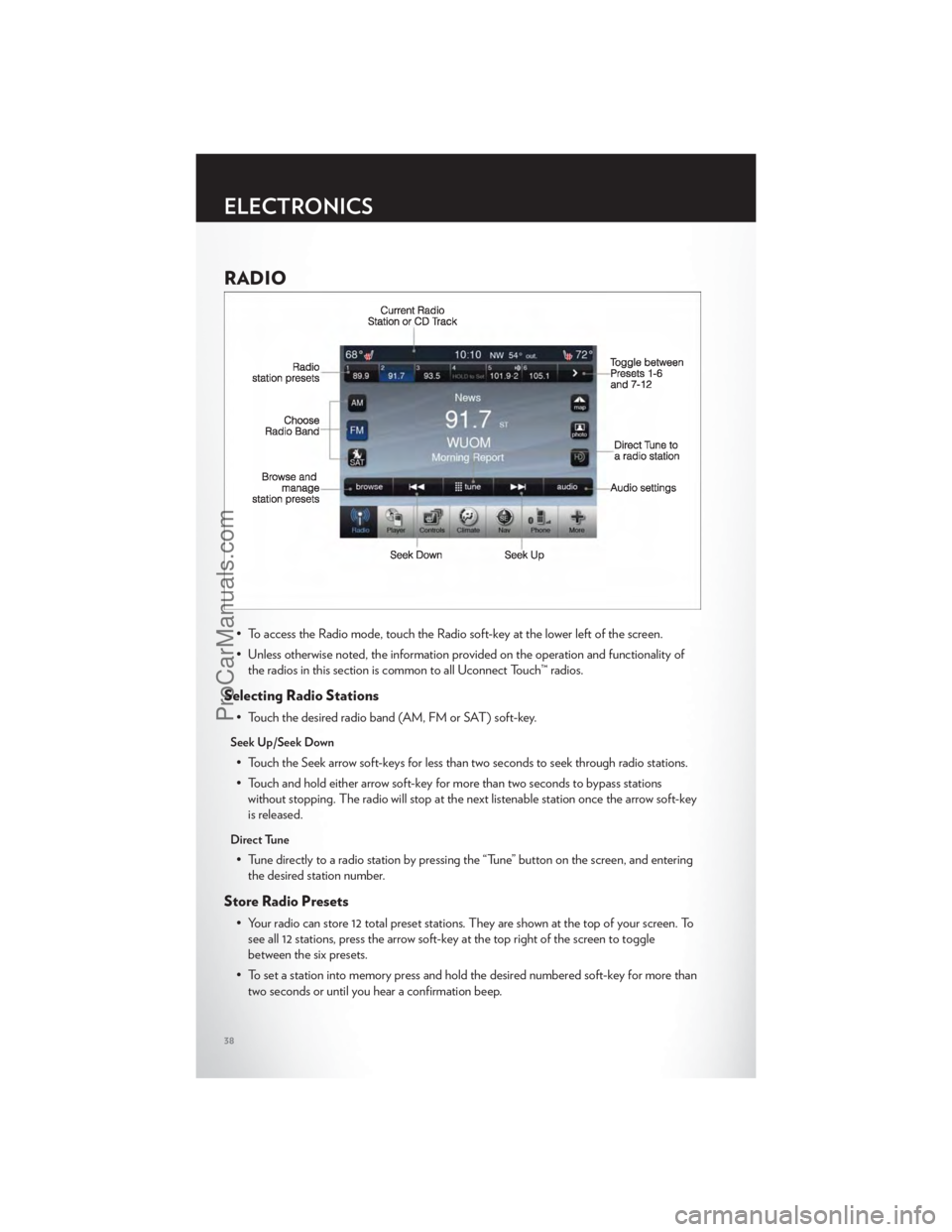
• To access the Radio mode, touch the Radio soft-key at the lower left of the screen.
• Unless otherwise noted, the information provided on the operation and functionality ofthe radios in this section is common to all Uconnect Touch™ radios.
Selecting Radio Stations
• Touch the desired radio band (AM, FM or SAT) soft-key.
Seek Up/Seek Down
• Touch the Seek arrow soft-keys for less than two seconds to seek through radio stations.
• Touch and hold either arrow soft-key for more than two seconds to bypass stationswithout stopping. The radio will stop at the next listenable station once the arrow soft-key
is released.
Direct Tune
• Tune directly to a radio station by pressing the “Tune” button on the screen, and enteringthe desired station number.
Store Radio Presets
• Your radio can store 12 total preset stations. They are shown at the top of your screen. Tosee all 12 stations, press the arrow soft-key at the top right of the screen to toggle
between the six presets.
• To set a station into memory press and hold the desired numbered soft-key for more than two seconds or until you hear a confirmation beep.
ELECTRONICS
38
ProCarManuals.com
Page 41 of 116
SIRIUS SATELLITE RADIO
• SIRIUS® Satellite Radio gives you over 130 channels, including 100% commercial-freemusic from nearly every genre, plus all your favorite sports, news, talk and entertainment
channels –all with crystal clear, coast-to-coast coverage, all in one place and all at your
fingertips.
• To access SIRIUS Satellite Radio, touch the SAT soft-key on the main Radio screen.
• The following describes features that are available when in SIRIUS Satellite Radio mode.
Selecting SIRIUS Satellite Channels
Seek Up/Seek Down
• Touch the Seek arrow soft-keys for less than two seconds to seek through channels in SAT mode.
• Touch and hold either arrow soft-key for more than two seconds to bypass channels without stopping. The radio will stop at the next listenable channel once the arrow
soft-key is released.
Direct Tune
• Tune directly to a SAT channel by pressing the “Tune” button on the screen, and enteringthe desired station number.
Jump
• Automatically tells you when Traffic & Weather for a favorite city is available, and givesyou the option to switch to that channel. Touch Jump to activate the feature. After
listening to Traffic and Weather, touch Jump again to return to the previous channel.
Fav
• Activates the favorites menu. You can add up to 50 favorite artists or songs. Just touchAdd Fav Artist or Add Fav Song while the song is playing. You will then be alerted any
time one of these songs, or works by these artists, is playing on other SIRIUS channels.
SIRIUS Parental Controls
• You can skip or hide certain channels from view if you do not want access to them. Touchthe More soft-key, then the Settings soft-key, next touch the SIRIUS Setup soft-key, then
select Channel Skip. Touch the box, check-mark, next to the channel you want skipped.
They will not show up in normal usage.
• SIRIUS also offers the option to permanently block selected channels. Call 1-888-539-7474 and request the Family Package.
ELECTRONICS
39
ProCarManuals.com
Page 43 of 116
iPod®/CD/AUX CONTROLS
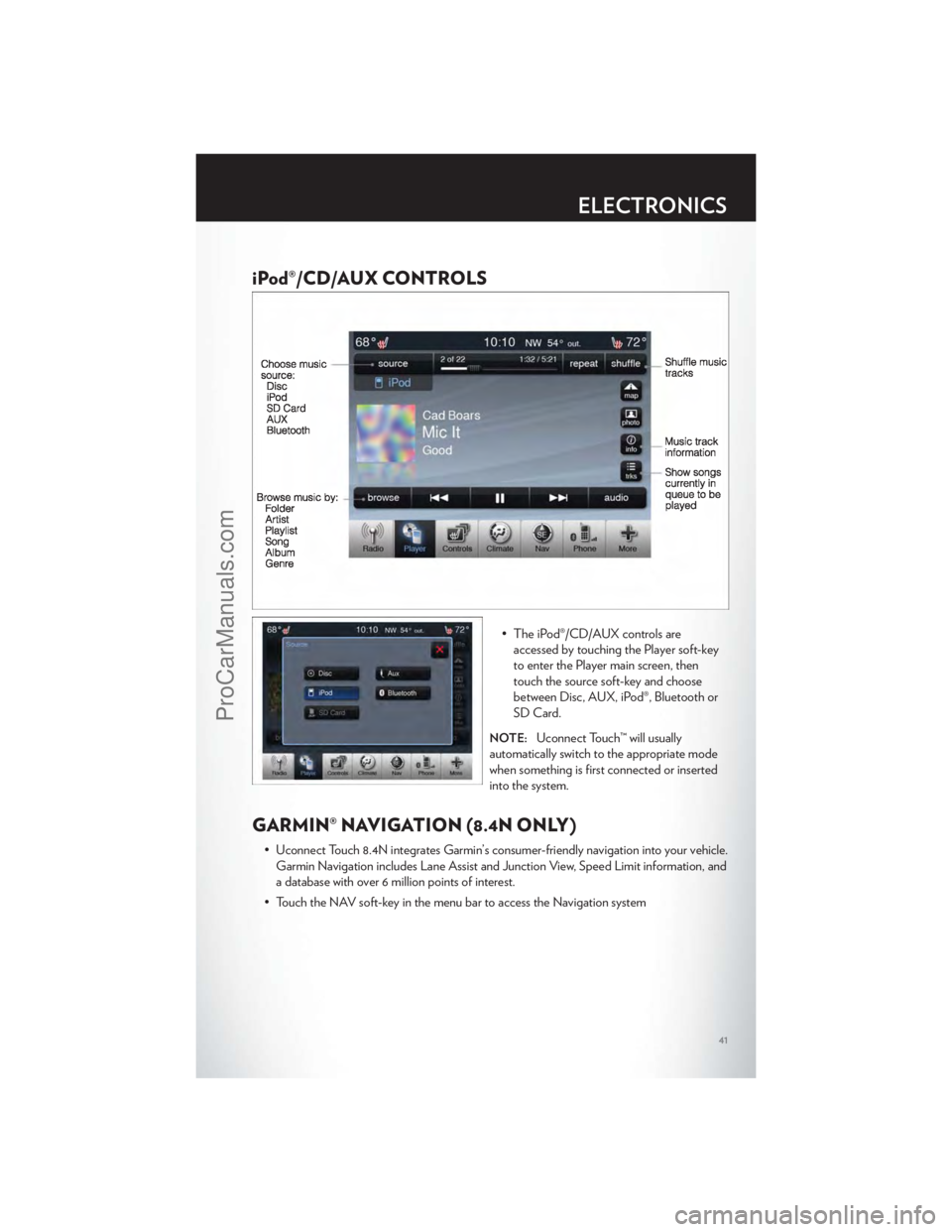
• The iPod®/CD/AUX controls areaccessed by touching the Player soft-key
to enter the Player main screen, then
touch the source soft-key and choose
between Disc, AUX, iPod®, Bluetooth or
SD Card.
NOTE:Uconnect Touch™ will usually
automatically switch to the appropriate mode
when something is first connected or inserted
into the system.
GARMIN® NAVIGATION (8.4N ONLY)
• Uconnect Touch 8.4N integrates Garmin’s consumer-friendly navigation into your vehicle. Garmin Navigation includes Lane Assist and Junction View, Speed Limit information, and
a database with over 6 million points of interest.
• Touch the NAV soft-key in the menu bar to access the Navigation system
ELECTRONICS
41
ProCarManuals.com