park assist CHRYSLER 300 S 2012 Owners Manual
[x] Cancel search | Manufacturer: CHRYSLER, Model Year: 2012, Model line: 300 S, Model: CHRYSLER 300 S 2012Pages: 116, PDF Size: 3.21 MB
Page 57 of 116
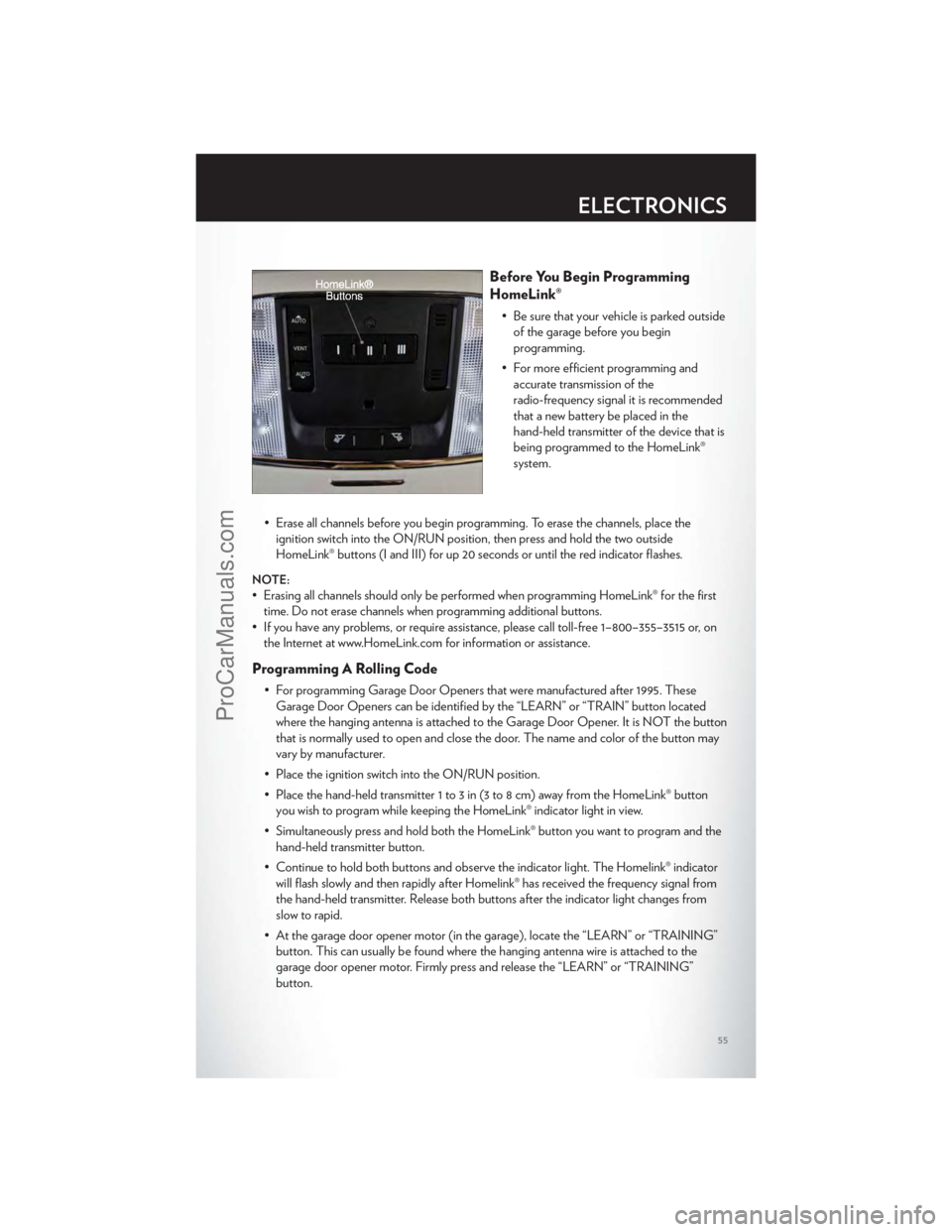
Before You Begin Programming
HomeLink®
• Be sure that your vehicle is parked outsideof the garage before you begin
programming.
• For more efficient programming and accurate transmission of the
radio-frequency signal it is recommended
that a new battery be placed in the
hand-held transmitter of the device that is
being programmed to the HomeLink®
system.
• Erase all channels before you begin programming. To erase the channels, place the ignition switch into the ON/RUN position, then press and hold the two outside
HomeLink® buttons (I and III) for up 20 seconds or until the red indicator flashes.
NOTE:
• Erasing all channels should only be performed when programming HomeLink® for the firsttime. Do not erase channels when programming additional buttons.
• If you have any problems, or require assistance, please call toll-free 1–800–355–3515 or, on the Internet at www.HomeLink.com for information or assistance.
Programming A Rolling Code
• For programming Garage Door Openers that were manufactured after 1995. TheseGarage Door Openers can be identified by the “LEARN” or “TRAIN” button located
where the hanging antenna is attached to the Garage Door Opener. It is NOT the button
that is normally used to open and close the door. The name and color of the button may
vary by manufacturer.
• Place the ignition switch into the ON/RUN position.
• Place the hand-held transmitter 1 to 3 in (3 to 8 cm) away from the HomeLink® button you wish to program while keeping the HomeLink® indicator light in view.
• Simultaneously press and hold both the HomeLink® button you want to program and the hand-held transmitter button.
• Continue to hold both buttons and observe the indicator light. The Homelink® indicator will flash slowly and then rapidly after Homelink® has received the frequency signal from
the hand-held transmitter. Release both buttons after the indicator light changes from
slow to rapid.
• At the garage door opener motor (in the garage), locate the “LEARN” or “TRAINING” button. This can usually be found where the hanging antenna wire is attached to the
garage door opener motor. Firmly press and release the “LEARN” or “TRAINING”
button.
ELECTRONICS
55
ProCarManuals.com
Page 100 of 116
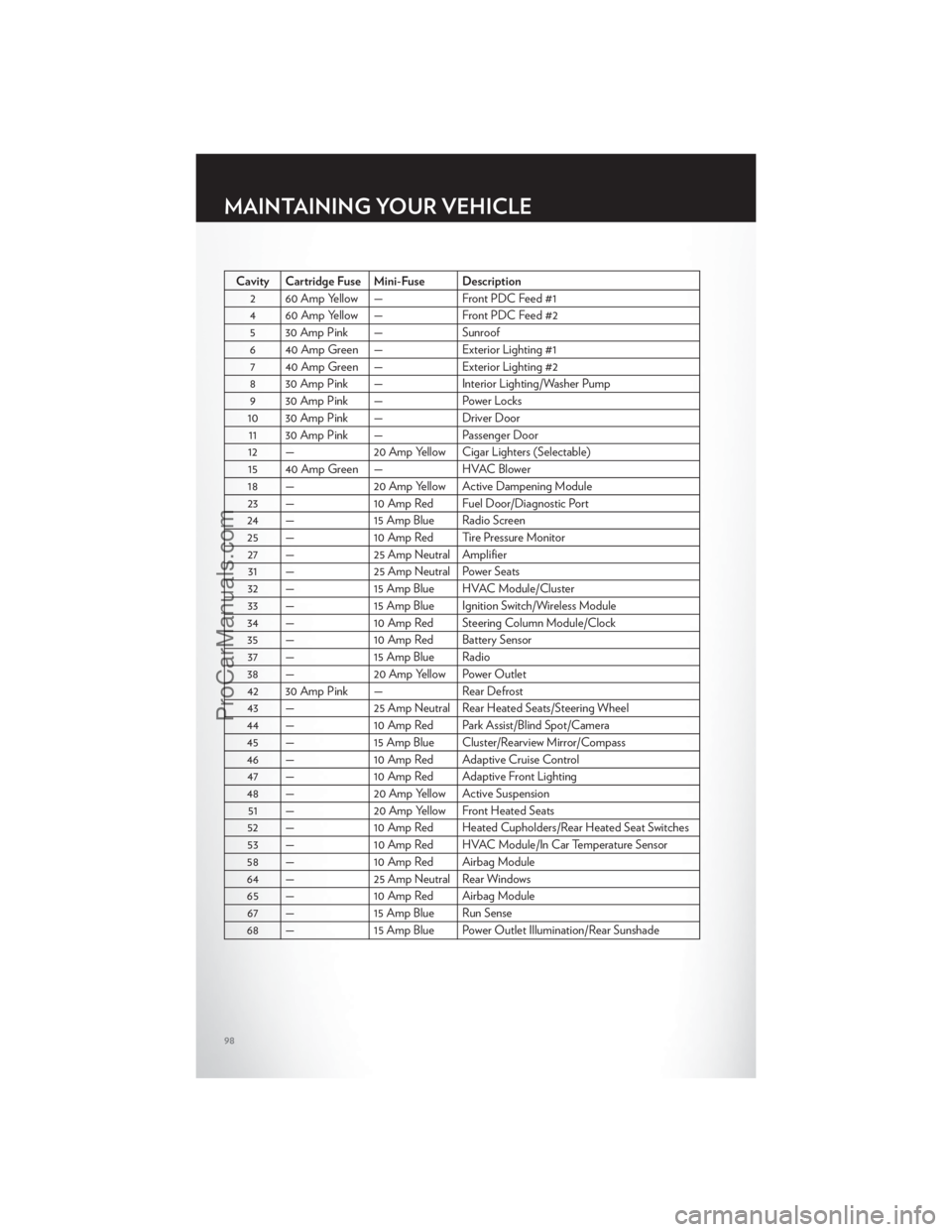
Cavity Cartridge Fuse Mini-Fuse Description2 60 Amp Yellow — Front PDC Feed #1
4 60 Amp Yellow — Front PDC Feed #2 5 30 Amp Pink — Sunroof
6 40 Amp Green — Exterior Lighting #1 7 40 Amp Green — Exterior Lighting #2
8 30 Amp Pink — Interior Lighting/Washer Pump 9 30 Amp Pink — Power Locks
10 30 Amp Pink — Driver Door 11 30 Amp Pink — Passenger Door
12 — 20 Amp Yellow Cigar Lighters (Selectable)
15 40 Amp Green — HVAC Blower
18 — 20 Amp Yellow Active Dampening Module
23 — 10 Amp Red Fuel Door/Diagnostic Port
24 — 15 Amp Blue Radio Screen 25 — 10 Amp Red Tire Pressure Monitor 27 — 25 Amp Neutral Amplifier 31 — 25 Amp Neutral Power Seats
32 — 15 Amp Blue HVAC Module/Cluster 33 — 15 Amp Blue Ignition Switch/Wireless Module
34 — 10 Amp Red Steering Column Module/Clock 35 — 10 Amp Red Battery Sensor 37 — 15 Amp Blue Radio
38 — 20 Amp Yellow Power Outlet
42 30 Amp Pink — Rear Defrost 43 — 25 Amp Neutral Rear Heated Seats/Steering Wheel
44 — 10 Amp Red Park Assist/Blind Spot/Camera 45 — 15 Amp Blue Cluster/Rearview Mirror/Compass
46 — 10 Amp Red Adaptive Cruise Control 47 — 10 Amp Red Adaptive Front Lighting
48 — 20 Amp Yellow Active Suspension 51 — 20 Amp Yellow Front Heated Seats
52 — 10 Amp Red Heated Cupholders/Rear Heated Seat Switches 53 — 10 Amp Red HVAC Module/In Car Temperature Sensor
58 — 10 Amp Red Airbag Module
64 — 25 Amp Neutral Rear Windows 65 — 10 Amp Red Airbag Module 67 — 15 Amp Blue Run Sense
68 — 15 Amp Blue Power Outlet Illumination/Rear Sunshade
MAINTAINING YOUR VEHICLE
98
ProCarManuals.com
Page 105 of 116
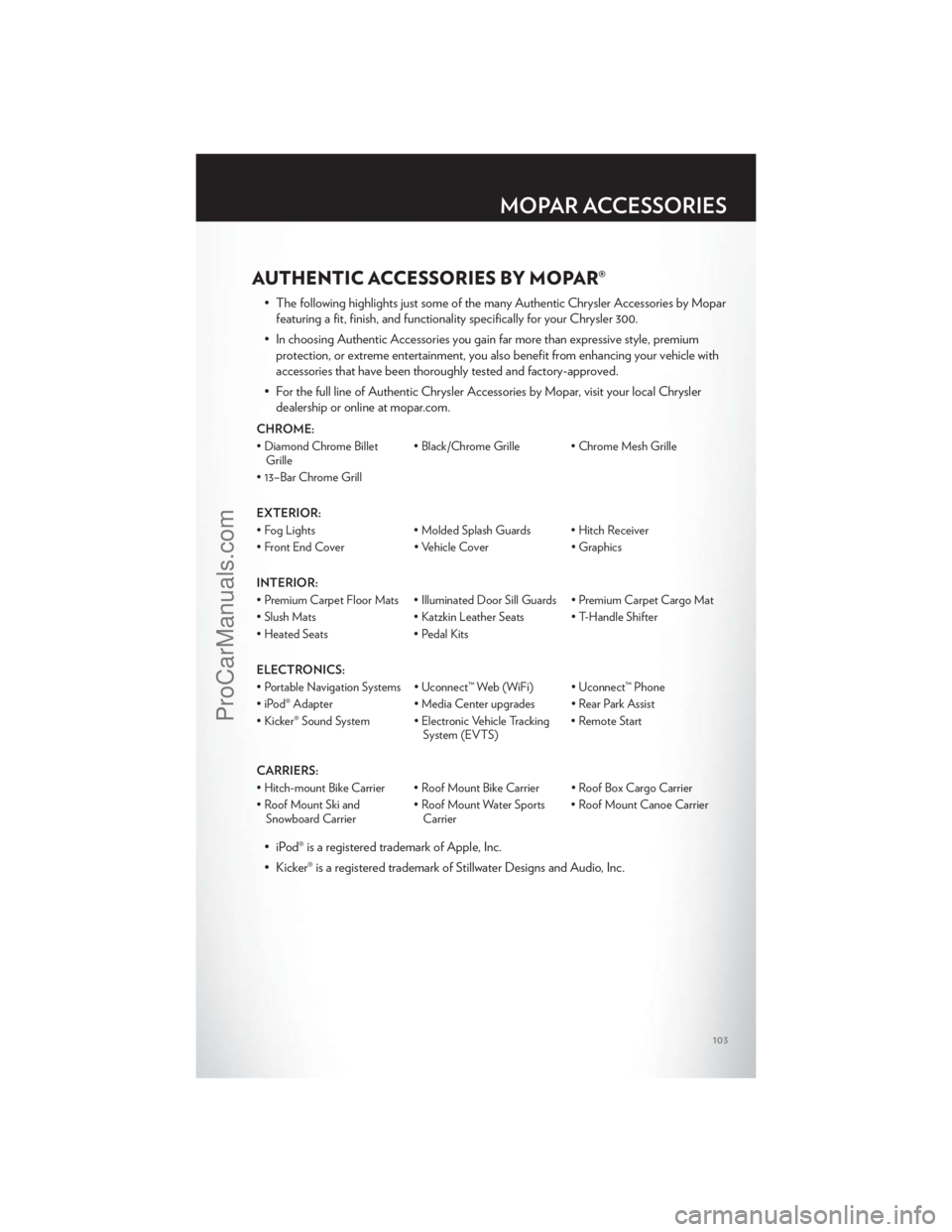
AUTHENTIC ACCESSORIES BY MOPAR®
• The following highlights just some of the many Authentic Chrysler Accessories by Moparfeaturing a fit, finish, and functionality specifically for your Chrysler 300.
• In choosing Authentic Accessories you gain far more than expressive style, premium protection, or extreme entertainment, you also benefit from enhancing your vehicle with
accessories that have been thoroughly tested and factory-approved.
• For the full line of Authentic Chrysler Accessories by Mopar, visit your local Chrysler dealership or online at mopar.com.
CHROME:
• Diamond Chrome BilletGrille • Black/Chrome Grille • Chrome Mesh Grille
• 13–Bar Chrome Grill
EXTERIOR:
• Fog Lights • Molded Splash Guards • Hitch Receiver
• Front End Cover • Vehicle Cover • Graphics
INTERIOR:
• Premium Carpet Floor Mats • Illuminated Door Sill Guards • Premium Carpet Cargo Mat
• Slush Mats • Katzkin Leather Seats • T-Handle Shifter
• Heated Seats • Pedal Kits
ELECTRONICS:
• Portable Navigation Systems • Uconnect™ Web (WiFi) • Uconnect™ Phone
• iPod® Adapter • Media Center upgrades • Rear Park Assist
• Kicker® Sound System • Electronic Vehicle Tracking System (EVTS)• Remote Start
CARRIERS:
• Hitch-mount Bike Carrier • Roof Mount Bike Carrier • Roof Box Cargo Carrier
• Roof Mount Ski and Snowboard Carrier • Roof Mount Water Sports
Carrier • Roof Mount Canoe Carrier
• iPod® is a registered trademark of Apple, Inc.
• Kicker® is a registered trademark of Stillwater Designs and Audio, Inc.
MOPAR ACCESSORIES
103
ProCarManuals.com
Page 107 of 116
Indicators.................7
Instrument Cluster Warning Lights ....6,64
Intermittent Wipers (Delay Wipers) ....23
Introduction .................2
iPod®/USB/MP3 Control .........46
Bluetooth Streaming Audio .......47
Jack Location ...............69
Jack Operation ..............71
Jacking Instructions ............71
Jump Starting ...............74
KeyFob...................8
Keyless Enter-N-Go ............9
Lock/Unlock ...............9
Starting/Stopping ............10
Lane Change Assist ............23
LATCH (Lower Anchors and Tether for
CHildren) .................14
Lights TurnSignal ...............23
Warning (Instrument Cluster
Description) ...............6
Maintenance Record ..........92,94
Maintenance Schedule .........90,93
Memory Seat ...............16
Mirrors Heated .................32
MOPAR® Accessories ..........103
Navigation .................41
Navigation Voice Commands .......52
New Vehicle Break-In Period ........22
Oil Change Indicator ...........67
Oil, Engine Capacity ................87
Outlet Power ..................57
Overheating, Engine ...........68
Panic Alarm .................8
Pedals, Adjustable .............20 Phone (Pairing)
..............48
Phone (Uconnect) .............47
Placard, Tire and Loading Information . . . 99
Power Glass Sunroof ..............33
Outlet (Auxiliary Electrical Outlet) . . . 57
Seats ..................16
Steering .................87
Tilt/Telescoping Steering Column ....21
Preparation for Jacking ..........70
Programmable Electronic Features . . . 54,61
Radio Operation ..............38
Rain Sensitive Wiper System ........23
Rear Heated Seats .............19
Rear Seat, Folding .............18
Recreational Towing ............59
Remote Starting System ..........8
Replacement Bulbs ............100
Reporting Safety Defects .........102
Restraints, Child ..............14
Seat Belts .................12
Seats ....................16
Ad
justment ...............17
Heated .................18
Lumbar Support .............16
Memory.................16
Power ..................16
Rear Folding ..............18
Setting the Clock .............37
Shift Lever Override ............76
Signals, Turn ................23
SIRIUSTravelLink .............45
SmartBeams ................24
SpareTire .................69
Spark Plugs ................87
Speed Control (Cruise Control) ......25
Starting Remote .................8
Steering Tilt Column ...............20
Store Radio Presets ............38
SunRoof..................33
Supplemental Restraint System - Airbag . . 13
Temperature Gauge, Engine Coolant . . . 68
INDEX
105
ProCarManuals.com