mirror CHRYSLER ASPEN 2007 2.G User Guide
[x] Cancel search | Manufacturer: CHRYSLER, Model Year: 2007, Model line: ASPEN, Model: CHRYSLER ASPEN 2007 2.GPages: 472, PDF Size: 7.51 MB
Page 146 of 472
WARNING!
Speed Control can be dangerous where the system
can’t maintain a constant speed. Your vehicle could
go too fast for the conditions, and you could lose
control. An accident could be the result. Don’t use
Speed Control in heavy traffic or on roads that are
winding, icy, snow-covered, or slippery.
REAR PARK ASSIST SYSTEM — IF EQUIPPED
NOTE:The manufacturer suggest disabling the Rear
Park Assist System when towing a trailer. Refer to
Overhead Console with Electronic Vehicle Information
(EVIC) – If Equipped, Personal Settings (Customer Pro-
grammable Features) in section 3 of this Owner Manual.This system is used to help drivers determine if an
obstacle is in the way of the vehicle while it is backing up
in addition to the use of inside rearview and outside
mirrors.
When the driver selects Reverse the system scans for
objects behind the vehicle using four sensors located in
the rear bumper. Objects can be detected from up to 59
inches (150 cm). A warning display above the rear
window provides both visible and audible warnings
indicating the range of the object.
146 UNDERSTANDING THE FEATURES OF YOUR VEHICLE
Page 147 of 472
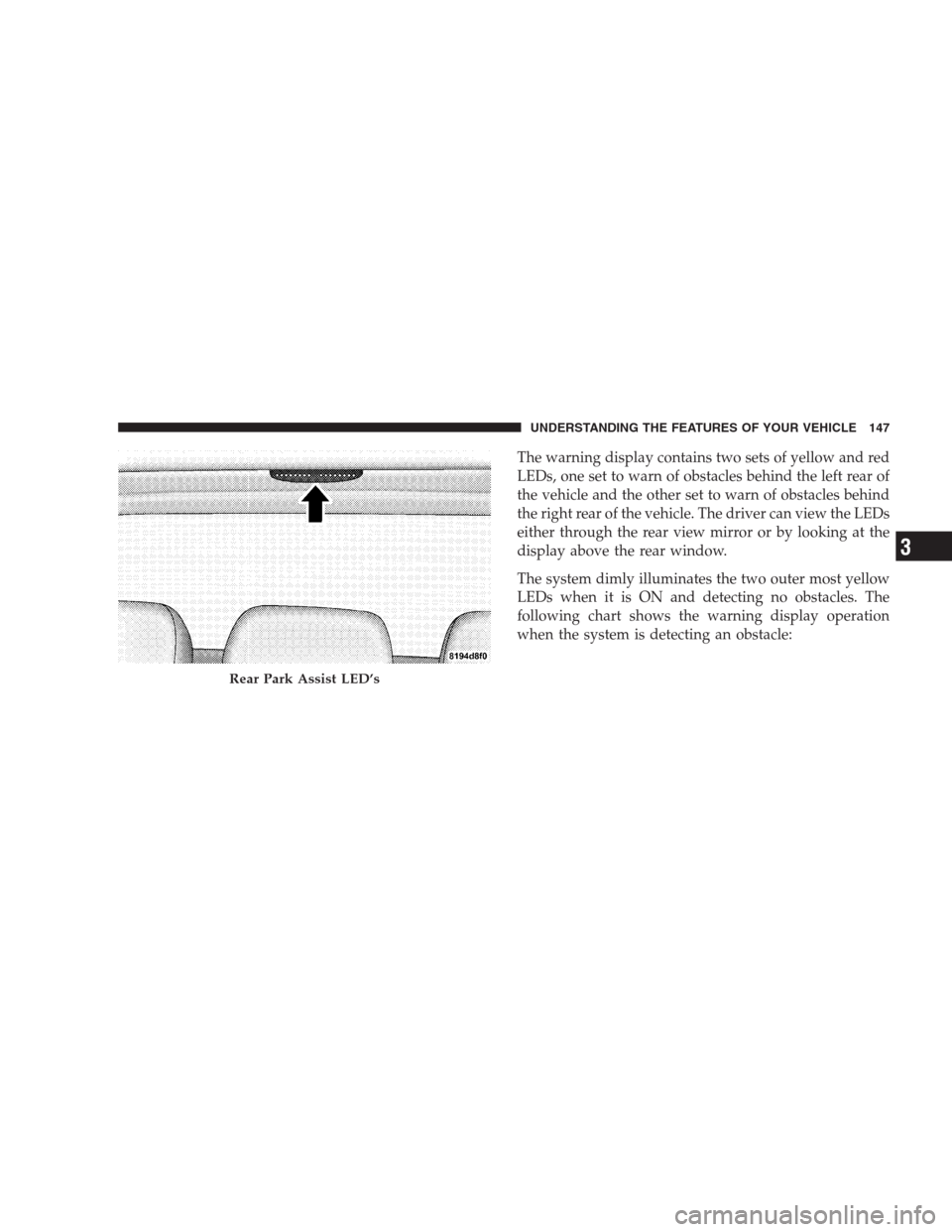
The warning display contains two sets of yellow and red
LEDs, one set to warn of obstacles behind the left rear of
the vehicle and the other set to warn of obstacles behind
the right rear of the vehicle. The driver can view the LEDs
either through the rear view mirror or by looking at the
display above the rear window.
The system dimly illuminates the two outer most yellow
LEDs when it is ON and detecting no obstacles. The
following chart shows the warning display operation
when the system is detecting an obstacle:
Rear Park Assist LED’s
UNDERSTANDING THE FEATURES OF YOUR VEHICLE 147
3
Page 156 of 472

remote keyless entry unlock button twice to unlock the
passenger’s doors. To make your selection, press and
release the RESET button until “DRV DR 1st ” appears.
•“RKE UNLOCK ALL DR 1ST” – When AllALL DR
1STis selected, all of the doors will unlock on the first
press of the remote keyless entry unlock button. To
make your selection, press and release the RESET
button until “All DR 1st” appears.
•MEM. RECALL WITH RKE > YES – When ON is
selected, pressing the unlock button on the RKE will
recall the memory settings for the seat, mirror and
radio.
•“SOUND HORN W/LOCK > YES” – When ON is
selected, a short horn sound will occur when the
remote keyless entry “Lock” button is pressed. This
feature may be selected with or without the flash lightson lock/unlock feature. To make your selection, press
and release the RESET button until “ON” or “OFF”
appears.
•“FLASH LAMPS w/LOCK >YES” – When ON is
selected, the front and rear turn signals will flash when
the doors are locked or unlocked with the remote
keyless entry transmitter. This feature may be selected
with or without the sound horn on lock feature
selected. To make your selection, press and release the
RESET button until “ON” or “OFF” appears.
•“HEAD LAMP OFF DELAY > 0 SEC” – When this
feature is selected, the driver can choose to have the
head lamps remain on for 0, 30, 60, or 90 seconds when
exiting the vehicle. To make your selection, press and
release the RESET button until “0,” “30,” “60,” or “90”
appears.
NOTE:The head lamp switch must be in the “A” auto
mode before this feature will work.
156 UNDERSTANDING THE FEATURES OF YOUR VEHICLE
Page 157 of 472
•HEADLAMPS W /WIPERS > YES – When ON is
selected, the headlamps will automatically turn on
when the wiper switch is activated.
•EASY EXIT SEAT > YES – When ON is selected, and
the key is removed from the ignition, the driver’s seat
will automatically move rearward to allow easy exit.
•TILT MIRRORS IN “R” > YES – When On is selected,
and the transmission is put in reverse, the outside
mirrors will tilt downward.
•“KEY OFF POWER DELAY > OFF” – When this
feature is selected, the power window switches, radio,
hands–free system (if equipped), and power outlets
will remain active for up to 60 minutes after the
ignition switch is turned off. Opening a vehicle door
will cancel this feature. To make your selection, press
and release the RESET button until “Off,” “45 sec.,” “5
min.,” “10 min.” appears.
•“ILLUMINATED APRCH > OFF” – When this feature
is selected, the headlights will activate and remain on
for up to 90 seconds when the doors are unlocked with
the remote keyless entry transmitter. To make your
selection, press and release the RESET button until
“OFF,” “30 sec.,” “60 sec.,” or “90 sec.” appears.
•PARK ASST. SYSTEM > YES – When YES is selected,
the Park Assist System is activated when the vehicle is
in Reverse. When No is selected, the Rear Park System
is turned off.
•“UNIT IN > US/METRIC” – The EVIC, odometer can
be changed between English and Metric units of
measure. To make your selection, press and release the
RESET button until “US” or “METRIC” appears.
•“COMPASS VARIANCE > 1” – Press the RESET
button to change the compass variance setting. Set this
to your current location. If you change location,
UNDERSTANDING THE FEATURES OF YOUR VEHICLE 157
3
Page 250 of 472

If the rear wiper is operating when the ignition is turned
off, the wiper will automatically return to the “Park”
position. When the vehicle is restarted, the wiper will
resume operation.
Rear Window Defrosting
A push-button type switch is located in the climate
control panel. Press the switch and the rear win-
dow defroster and electric remote control heated mirrors
(if equipped) will turn On. An amber indicator on the
push-button will light when the defroster is turned On.
An symbol will be displayed when the defroster is turned
on with an ATC control. Push again to turn Off prior to
time-out. The defroster will automatically turn Off after
fifteen minutes. For ten more minutes of operation, push
the button again. To prevent excessive battery drain, use
the defroster only when the engine is operating.
CAUTION!
Use care when washing the inside of the rear win-
dow to prevent damage to heating elements. Use a
soft cloth and a mild washing solution, wiping
parallel to the heating elements. Also, keep all
objects a safe distance from the window to prevent
damaging the heating elements.
250 INSTRUMENT PANEL AND CONTROLS
Page 255 of 472
STARTING PROCEDURES
Before starting your vehicle, adjust your seat, adjust both
inside and outside mirrors, and fasten your seat belts.
WARNING!
Be sure to turn off the engine if you want to rest or
sleep in your car. Accidents can be caused by inad-
vertently moving the gear selection lever or by
pressing the accelerator pedal. This may cause exces-
sive heat in the exhaust system, resulting in over-
heating and vehicle fire which may cause serious or
fatal injuries.
WARNING!
Do not leave children or animals inside parked
vehicles in hot weather. Interior heat build up may
cause serious injury or death.
Automatic Transmission
Start the engine with the selector lever in NEUTRAL or
PARK position. Apply the brake before shifting to any
driving range.
Normal Starting
Normal Starting of either a warm or cold engine is
obtained without pumping or depressing the accelerator
pedal.
Tip Start Feature
Your vehicle has a “Tip Start” starting system. With “Tip
Start” the driver does not need to hold the key in the
STARTING AND OPERATING 255
5
Page 397 of 472
Glass Surfaces
All glass surfaces should be cleaned on a regular basis
with any commercial household-type glass cleaner.
Never use an abrasive type cleaner. Use caution when
cleaning inside rear windows equipped with electric
defrosters or windshields equipped with a windshield
wiper de-icer. Do not use scrapers or other sharp instru-
ments which may scratch the elements.
When cleaning the rear view mirror, spray cleaner on the
towel or rag that you are using. Do not spray cleaner
directly on the mirror.
Cleaning Plastic Instrument Cluster Lenses
The lenses in front of the instruments in this vehicle are
molded in clear plastic. When cleaning the lenses, care
must be taken to avoid scratching the plastic.1. Clean with a wet soft rag. A mild soap solution may be
used, but do not use high alcohol content or abrasive
cleaners. If soap is used, wipe clean with a clean damp
rag.
2. Dry with a soft tissue.
Seat Belt Maintenance
Do not bleach, dye or clean the belts with chemical
solvents or abrasive cleaners. This will weaken the fabric.
Sun damage will also weaken the fabric.
If the belts need cleaning, use a mild soap solution or
lukewarm water. Do not remove the belts from the car to
wash them.
Replace the belts if they appear frayed or worn or if the
buckles do not work properly.
MAINTAINING YOUR VEHICLE 397
7
Page 399 of 472
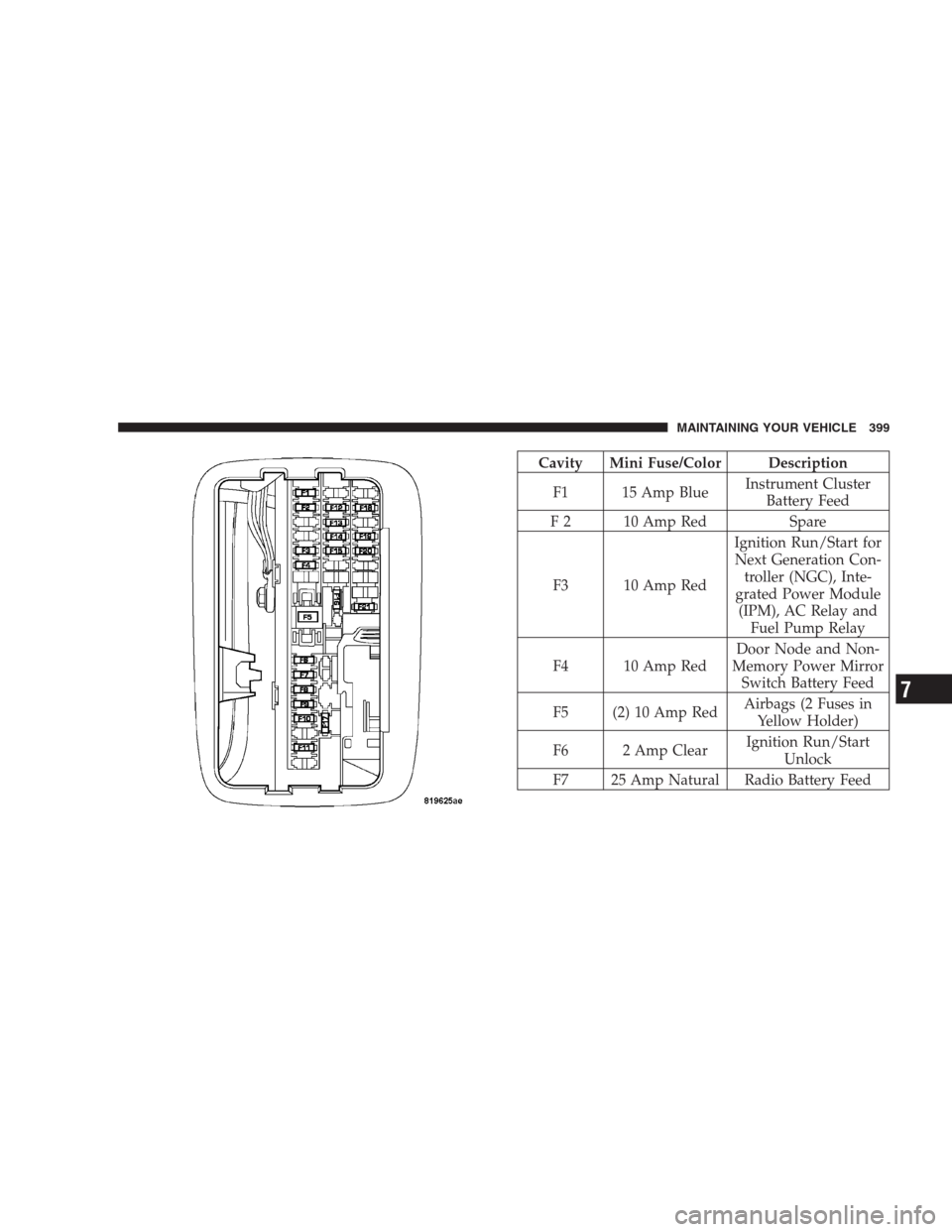
Cavity Mini Fuse/Color Description
F1 15 Amp BlueInstrument Cluster
Battery Feed
F 2 10 Amp Red Spare
F3 10 Amp RedIgnition Run/Start for
Next Generation Con-
troller (NGC), Inte-
grated Power Module
(IPM), AC Relay and
Fuel Pump Relay
F4 10 Amp RedDoor Node and Non-
Memory Power Mirror
Switch Battery Feed
F5 (2) 10 Amp RedAirbags (2 Fuses in
Yellow Holder)
F6 2 Amp ClearIgnition Run/Start
Unlock
F7 25 Amp Natural Radio Battery Feed
MAINTAINING YOUR VEHICLE 399
7
Page 400 of 472

F8 10 Amp RedIgnition Run/Start for
Cluster/Transfer
Case/Seat Sw. Back
lighting
F9 10 Amp RedSatellite Digital Audio
Receiver (SDAR)/
Digital Video Disc
(DVD) Battery Feed
F10 10 Amp Red Spare
F11 10 Amp Red Heated Mirrors
F12 20 Amp Yellow Cluster Battery Feed
F13 10 Amp RedIgnition Run HVAC
Module/Heated Rear
Glass (EBL) Relay
F14 10 Amp RedABS Module Ignition
RunF15 15 Amp BlueBattery Feed Blue
Tooth, Compass/Trip
Computer (CMTC),
Sentry Key Diagnos-
tics
F16 20 Amp YellowReconfigurable Power
Outlets
F17 20 Amp YellowIgnition Run / Rear
Park Assist / Second
Row Heated Seats
F18 20 Amp Yellow Cigar Lighter Ignition
F19 10 Amp Red Spare Fuse
F20 15 Amp BlueHeating & Air Condi-
tioning w/ATC Only
Battery Feed
F21 25 Amp Natural Amplifier Battery Feed
400 MAINTAINING YOUR VEHICLE
Page 450 of 472
ABS (Anti-Lock Brake System)............190,275
Adding Fuel........................... 316
Air Cleaner, Engine (Engine Air Cleaner Filter) . . . 373
Air Conditioner Maintenance............233,376
Air Conditioning........................ 233
Air Conditioning, Operating Tips............ 246
Air Conditioning, Rear Zone................ 237
Air Conditioning Refrigerant.............376,377
Air Conditioning System................233,376
Air Filter........................362,363,373
Air Pressure, Tires....................298,306
Airbag.............................51,196
Airbag Light..........................59,73
Alarm, Panic............................ 22
Alarm (Security Alarm).................17,190
Alignment and Balance................... 305
Alterations/Modifications, Vehicle............. 8
Antenna, Satellite Radio................... 229
Antifreeze (Engine Coolant)...........382,383,414Disposal............................ 384
Anti-Lock Brake System (ABS)............275,279
Anti-Lock Warning Light.................. 190
Anti-Theft System.....................17,190
Appearance Care........................ 393
Arming Theft System (Security Alarm)......... 18
Automatic Dimming Mirror...............80,83
Automatic Door Locks..................... 28
Automatic Headlights.................... 133
Automatic Transaxle....................12,258
Automatic Transmission.............255,258,389
Adding Fluid......................... 389
Fluid and Filter Changes................. 390
Fluid Level Check...................... 389
Fluid Type........................390,416
Gear Ranges.......................... 258
Special Additives...................... 391
Torque Converter...................... 262
Axle Fluid............................. 416
450 INDEX