battery CHRYSLER ASPEN 2008 2.G User Guide
[x] Cancel search | Manufacturer: CHRYSLER, Model Year: 2008, Model line: ASPEN, Model: CHRYSLER ASPEN 2008 2.GPages: 479, PDF Size: 4.3 MB
Page 177 of 479
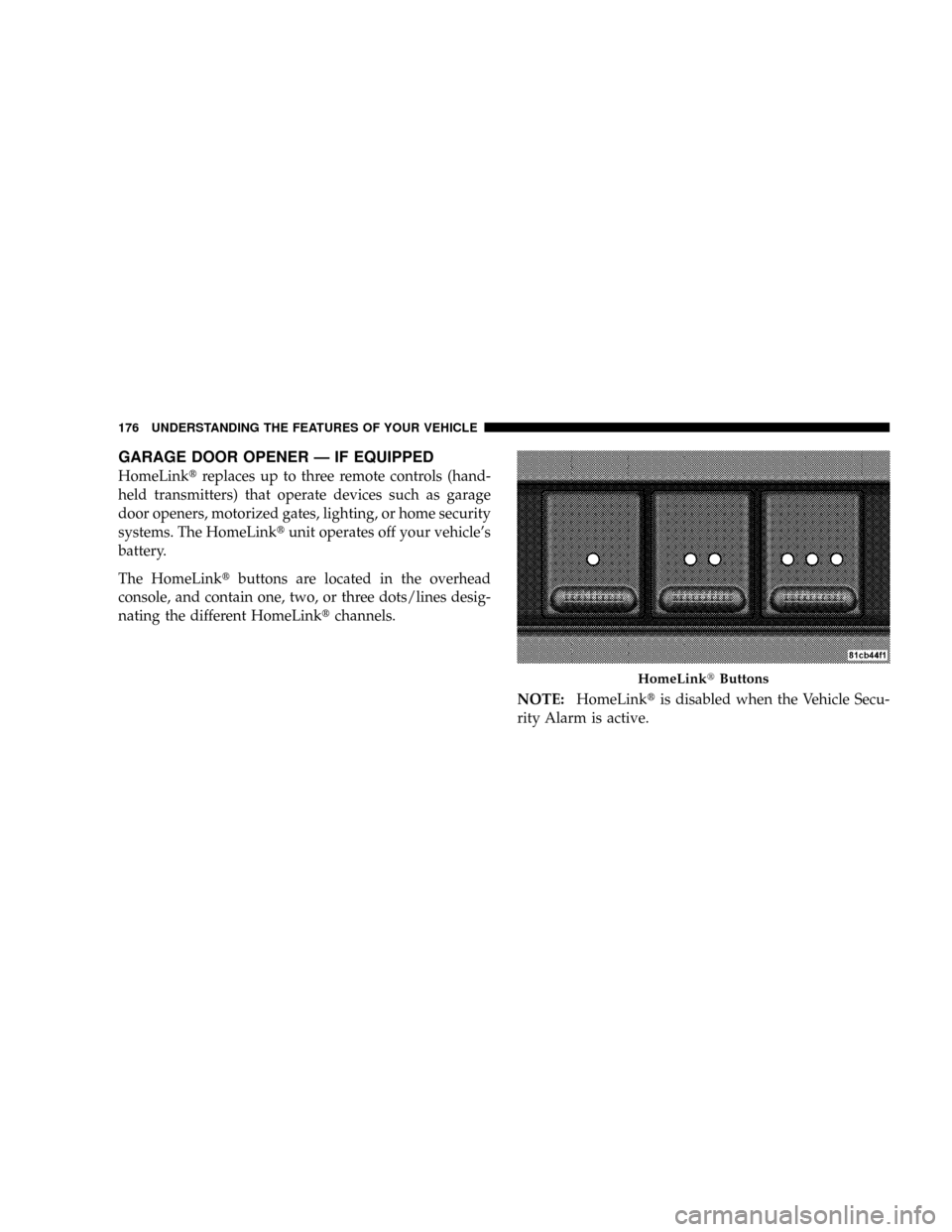
GARAGE DOOR OPENER Ð IF EQUIPPED
HomeLinktreplaces up to three remote controls (hand-
held transmitters) that operate devices such as garage
door openers, motorized gates, lighting, or home security
systems. The HomeLinktunit operates off your vehicle's
battery.
The HomeLinktbuttons are located in the overhead
console, and contain one, two, or three dots/lines desig-
nating the different HomeLinktchannels.
NOTE:HomeLinktis disabled when the Vehicle Secu-
rity Alarm is active.
HomeLinktButtons
176 UNDERSTANDING THE FEATURES OF YOUR VEHICLE
Page 179 of 479
It is recommended that a new battery be placed in the
hand-held transmitter of the device being programmed
to HomeLinktfor more efficient training and accurate
transmission of the radio-frequency signal.
Your vehicle should be parked outside of the garage
while training.
1. Turn the ignition switch to the ON/RUN position.
2. Place the hand-held transmitter 1 to 3 in (3 to 8 cm)
from the HomeLinktbuttons while keeping the EVIC
display in view.
For optimal training, point the battery end of the hand-
held transmitter away from the HomeLinkt.
3. Simultaneously, press and hold both the chosen
HomeLinktbutton and the hand-held transmitter button
until the EVIC display changes from ªCHANNEL #
TRAININGº to ªCHANNEL # TRAINED.ºThen release both the HomeLinktand hand-held trans-
mitter buttons.
If the EVIC display states ªDID NOT TRAINº repeat Step
3. If the signal is too weak, replace the battery in the
original hand-held transmitter.
It may take up to 30 seconds, or longer, in rare cases. The
garage door may open and close while you train.
NOTE:Some gate operators and garage door openers
may require you to replace Step 3 with procedures noted
in the ªGate Operator/Canadian Programmingº section.
4. Press and hold the just-trained HomeLinktbutton. If
the channel has been trained, the EVIC display will now
state ªCHANNEL # TRANSMIT.º
If the EVIC display still states ªCHANNEL # TRAIN-
INGº repeat Step 3.
178 UNDERSTANDING THE FEATURES OF YOUR VEHICLE
Page 182 of 479

Using HomeLinkT
To operate, simply press and release the programmed
HomeLinktbutton. Activation will now occur for the
trained device (i.e., garage door opener, gate operator,
security system, entry door lock, home/office lighting,
etc.) The hand-held transmitter of the device may also be
used at any time.
Reprogramming A Single HomeLinkTButton
To reprogram a channel that has been previously trained,
follow these steps:
1. Turn the ignition switch to the ON/RUN position.
2. Press and hold the desired HomeLinktbutton for 20
seconds until the EVIC display states ªCHANNEL #
TRAINING.ºDo not release the button.
3.Without releasing the button,proceed with Program-
ming HomeLinktStep 2 and follow all remaining steps.
Security
It is advised to erase all channels before you sell or turn
in your vehicle.
To do this, press and hold the two outside buttons for 20
seconds until the EVIC message states ªCHANNELS
CLEARED.º Note that all channels will be erased. Indi-
vidual channels cannot be erased.
The HomeLinktUniversal Transceiver is disabled when
the Vehicle Security Alarm is active.
Troubleshooting Tips
If you are having trouble programming HomeLinkt, here
are some of the most common solutions:
²Replace the battery in the original transmitter.
²Press the learn button on the garage door opener to
complete the training for rolling code.
UNDERSTANDING THE FEATURES OF YOUR VEHICLE 181
3
Page 186 of 479
ELECTRICAL POWER OUTLETS
This vehicle has three auxiliary power outlets that can
provide up to 20 Amps of current for accessories de-
signed for use with the standard power outlet adapters.
The outlet located in the lower portion of the instrument
panel has a snap on plastic cap so that it can be covered
when not in use. As a safety precaution, the outlet in the
instrument panel only operates with the ignition switch
ON. When the optional Cigar Lighter heating element is
used, it heats when pushed in and pops out automati-
cally when ready for use.To preserve the heating
element, do not hold the lighter in the heating position.
There are two additional 12 V/(20 total Amps for both
outlets) power outlets, one located in the storage bin of
the center console and another located in the right rear
cargo area. These outlets can be reconfigured by the
customer to operate only when the ignition is ON(switched battery fed) or with the ignition ON or OFF
(battery fed) to allow for cellular telephone charging and
or operation while the ignition is off.
NOTE:All accessories connected to these outlets should
be removed or turned OFF when the vehicle is not in use
to protect the battery against discharge (unless the cus-
tomer has reconfigured the fuse block to switched battery
feed). (See page 187 for more information.)
115V Inverter Outlet ± If Equipped
This vehicle may also be equipped with a 115 Volt (150
Watts Maximum) outlet on the rear of the front center
console. These outlets can power cell phones, electronics
and other low power devices. This plug is controlled by
a switch located in left lower instrument panel.
Press the switch to turn the power on to the outlet. Press
the switch a second to turn the power off.
UNDERSTANDING THE FEATURES OF YOUR VEHICLE 185
3
Page 188 of 479

Electrical Outlet Use With Engine OFF (Battery
Fed Configuration)
CAUTION!
²Many accessories that can be plugged in draw
power from the vehicle's battery, even when not
in use (i.e., cellular phones, etc.). Eventually, if
plugged in long enough, the vehicle's battery will
discharge sufficiently to degrade battery life
and/or prevent engine starting.
²Accessories that draw higher power (i.e., coolers,
vacuum cleaners, lights, etc.), will discharge the
battery even more quickly. Only use these inter-
mittently and with greater caution.
²After the use of high power draw accessories, or
long periods of the vehicle not being started (with
accessories still plugged in), the vehicle must be
driven a sufficient length of time to allow the
generator to recharge the vehicle's battery.
115V Inverter Plug
UNDERSTANDING THE FEATURES OF YOUR VEHICLE 187
3
Page 242 of 479

Operating Instructions - Hands-Free Phone (If
Equipped)
Refer to ªHands-Free Communication (UConnectt)º in
Section 3.
Operating Instructions - Video Entertainment
System (VESŸ) (If Equipped)
Refer to separate ªVideo Entertainment System (VESŸ)
Guide.º
UNIVERSAL CONSUMER INTERFACE (UCI) Ð IF
EQUIPPED
NOTE:This section is for sales code RES and REQ
radios only with UConnectt. For sales code REN touch
screen radio, refer to the separate User's Manual.This feature allows you to plug an iPodtmobile digital
device into the vehicle's sound system through a connec-
tor (UCI connector) using an optional connection cable
(available through MOPARt). See your authorized dealer
for details.
Using this feature,
²the iPodtaudio can be played on the vehicle's sound
system, providing metadata (Track Title, Artist, Al-
bum, etc.) information display on radio.
²the iPodtcan be controlled using the radio buttons to
Play, Browse and List the iPodtcontents.
²the iPodtbattery charges when plugged into the UCI
connector.
INSTRUMENT PANEL AND CONTROLS 241
4
Page 247 of 479
VIDEO ENTERTAINMENT SYSTEM (SALES CODE
XRV) Ð IF EQUIPPED
The optional Video Entertainment SystemŸ (VESŸ)
consists of a DVD player and LCD (liquid crystal display)
screen, a battery-powered remote control, and two head-
sets. The system is located in the headliner behind the
front row seat. Refer to your VESŸ User's Manual for
detailed operating instructions.
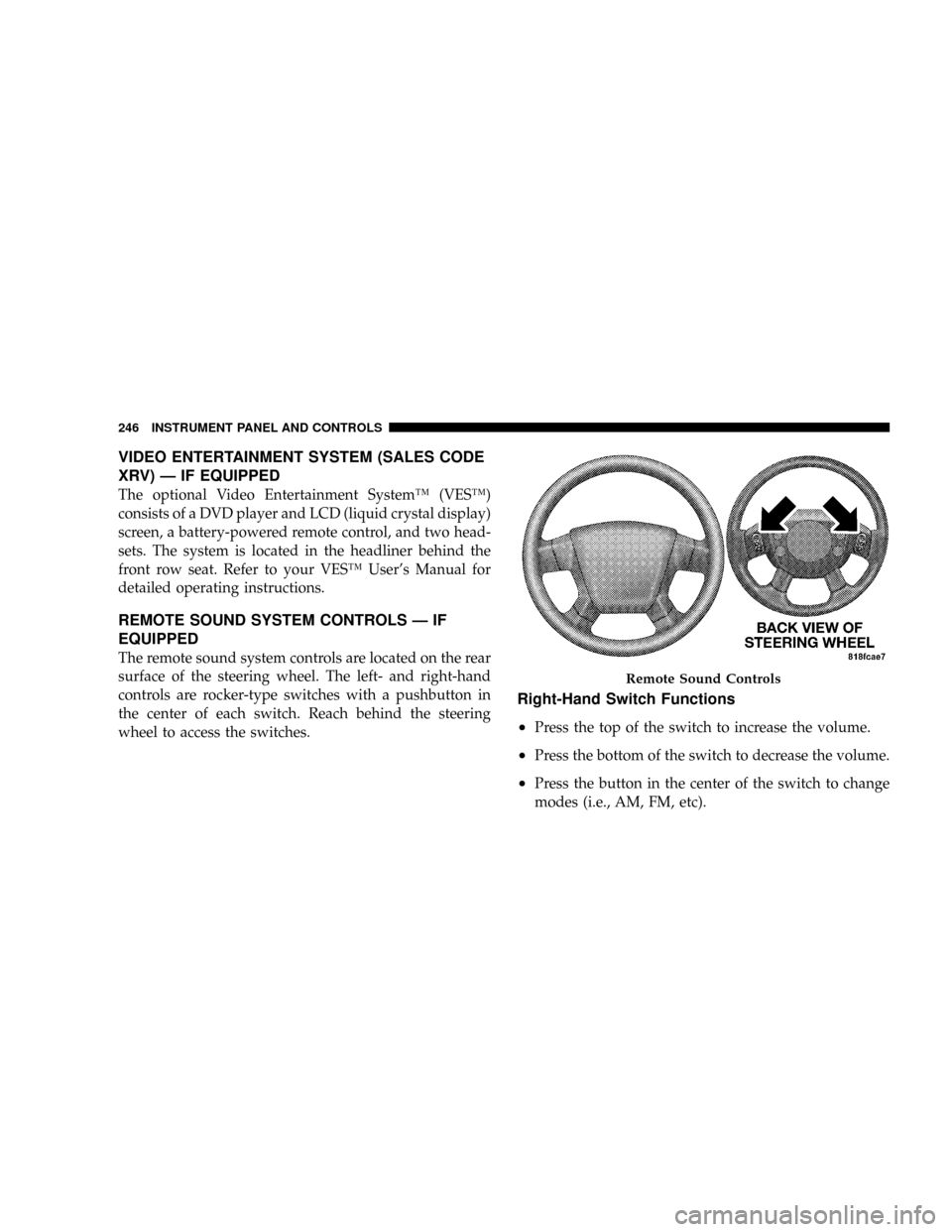
REMOTE SOUND SYSTEM CONTROLS Ð IF
EQUIPPED
The remote sound system controls are located on the rear
surface of the steering wheel. The left- and right-hand
controls are rocker-type switches with a pushbutton in
the center of each switch. Reach behind the steering
wheel to access the switches.
Right-Hand Switch Functions
²
Press the top of the switch to increase the volume.
²Press the bottom of the switch to decrease the volume.
²Press the button in the center of the switch to change
modes (i.e., AM, FM, etc).
Remote Sound Controls
246 INSTRUMENT PANEL AND CONTROLS
Page 266 of 479
If the rear wiper is operating when the ignition is turned
OFF, the wiper will automatically return to the Park
position. When the vehicle is restarted, the wiper will
resume operation.
Rear Window Defrosting
A pushbutton type switch is located in the climate
control panel. Press the switch and the rear win-
dow defroster and electric remote control heated mirrors
(if equipped) will turn on. An amber indicator on the
pushbutton will light when the defroster is turned on. A
symbol will be displayed when the defroster is turned on
with an ATC control. Push again to turn off prior to
time-out. The defroster will automatically turn off after
15 minutes. For 10 more minutes of operation, push the
button again. To prevent excessive battery drain, use the
defroster only when the engine is operating.
CAUTION!
Use care when washing the inside of the rear window
to prevent damage to heating elements. Use a soft
cloth and a mild washing solution, wiping parallel to
the heating elements. Also, keep all objects a safe
distance from the window to prevent damaging the
heating elements.
INSTRUMENT PANEL AND CONTROLS 265
4
Page 274 of 479
WARNING!
Do not attempt to push or tow your vehicle to get it
started. Vehicles equipped with an automatic trans-
mission cannot be started this way. Unburned fuel
could enter the catalytic converter and once the
engine has started, ignite and damage the converter
and vehicle. If the vehicle has a discharged battery,
booster cables may be used to obtain a start from a
booster battery or the battery in another vehicle. This
type of start can be dangerous if done improperly.
Refer to ªJump Startingº in Section 6 for the proper
jump-starting procedures and follow them carefully.If the engine has been flooded it may start to run, but not
have enough power to continue running when the key is
released. If this occurs, continue cranking with the accel-
erator pedal pushed all the way to the floor. Release the
accelerator pedal and the key once the engine is running
smoothly.
If the engine shows no sign of starting after two 15
second periods of cranking with the accelerator pedal
held to the floor, the normal starting procedure should be
repeated.
After Starting
The idle speed is automatically controlled on fuel injected
engines and will decrease as the engine warms up.
STARTING AND OPERATING 273
5
Page 304 of 479
stop the sway. The system will reduce engine power and
apply individual brakes that will counter act the sway of
the trailer. TSC will become active automatically once the
swaying trailer is recognized. No driver action is re-
quired. TSC cannot stop all trailers from swaying. Al-
ways use caution when towing a trailer and follow the
tongue weight recommendations. For additional infor-
mation on towing a trailer with your vehicle, refer to
9Trailer Towing9in Section 5.
MULTI-DISPLACEMENT SYSTEM (MDS) Ð 5.7L
ENGINE ONLY
This feature offers improved fuel economy by shutting
off four of the engine's eight cylinders during light load
and cruise conditions. The system is automatic with no
driver inputs or additional driving skills required.
NOTE:The MDS system may take some time to return
to full functionality after a battery disconnect.
TIRE SAFETY INFORMATION
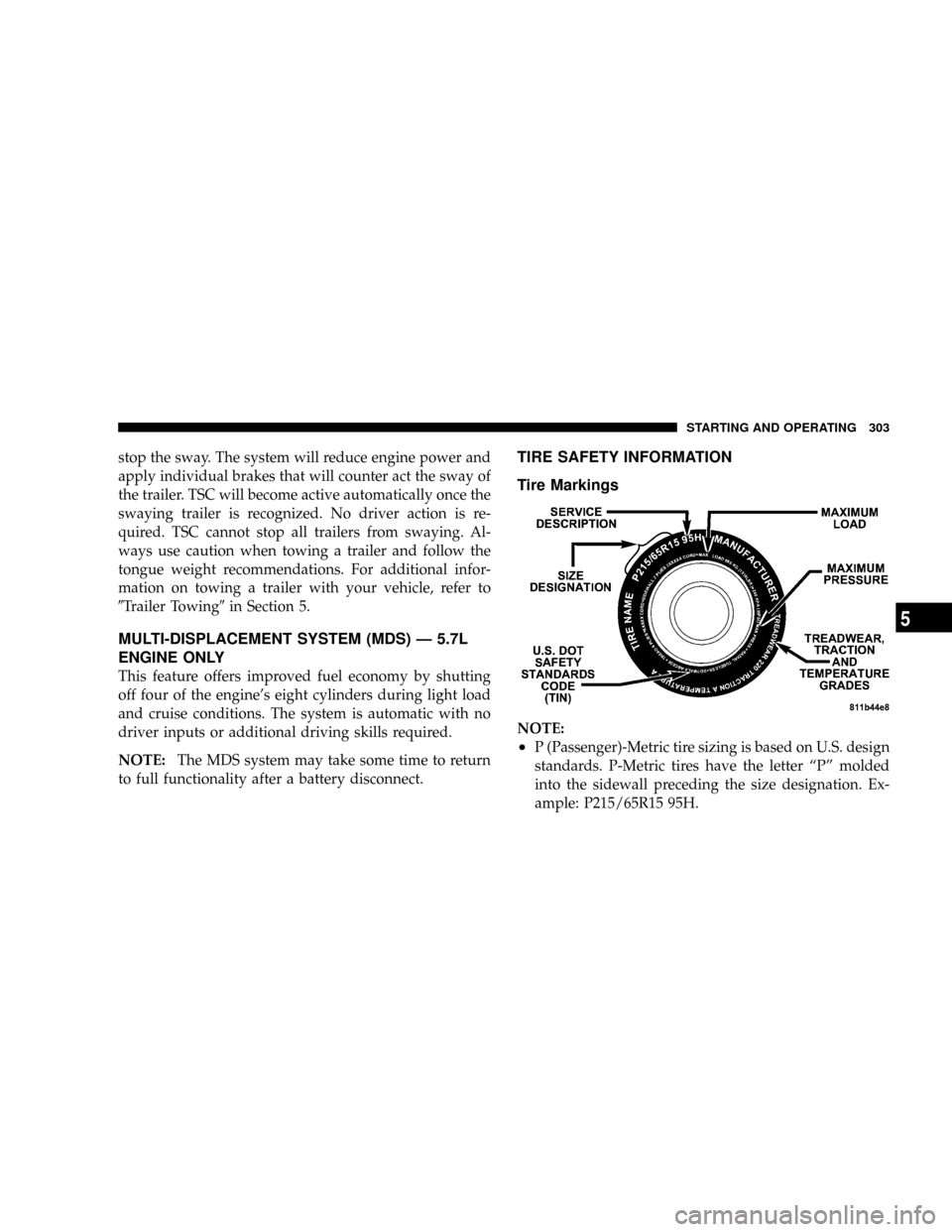
Tire Markings
NOTE:
²P (Passenger)-Metric tire sizing is based on U.S. design
standards. P-Metric tires have the letter ªPº molded
into the sidewall preceding the size designation. Ex-
ample: P215/65R15 95H.
STARTING AND OPERATING 303
5