ECO mode CHRYSLER ASPEN 2008 2.G Owner's Guide
[x] Cancel search | Manufacturer: CHRYSLER, Model Year: 2008, Model line: ASPEN, Model: CHRYSLER ASPEN 2008 2.GPages: 479, PDF Size: 4.3 MB
Page 232 of 479

CAUTION!
²This CD player will accept 4±3/4 in (12 cm) discs
only. The use of other sized discs may damage the
CD player mechanism.
²Do not use adhesive labels. These labels can peel
away and jam the player mechanism.
²RES is a single CD player. Do not attempt to insert
a second CD if one is already loaded.
²Dual-media disc types (one side is a DVD, the
other side is a CD) should not be used, and they
can cause damage to the player.
EJECT Button - Ejecting a CD
Press the EJECT button to eject the CD.If you have ejected a disc and have not removed it within
10 seconds, it will be reloaded. If the CD is not removed,
the radio will reinsert the CD but will not play it.
A disc can be ejected with the radio and ignition OFF.
NOTE:Ejecting with ignition OFF is not allowed on
convertible or soft-top models (if equipped).
SEEK Button
Press the right SEEK button for the next selection on the
CD. Press the left SEEK button to return to the beginning
of the current selection, or return to the beginning of the
previous selection if the CD is within the first second of
the current selection. Pressing and holding the SEEK
button will allow faster scrolling through the tracks in
CD, MP3 modes.
SCAN Button
Press the SCAN button to scan through each track on the
CD currently playing.
INSTRUMENT PANEL AND CONTROLS 231
4
Page 233 of 479

TIME Button
Press this button to change the display from a large CD
playing time display to a small CD playing time display.
RW/FF
Press the RW button to stop the CD at the beginning of
the current CD track/title.
Press and hold FF (Fast Forward) and the CD player will
begin to fast forward until FF is released or RW or
another CD button is pressed. The RW (Reverse) button
works in a similar manner.
AM or FM Button
Switches the AM or FM radio to the opposite radio mode.
RND Button (Random Play Button)
Press this button while the CD is playing to activate
Random Play. This feature plays the selections on the
compact disc in random order to provide an interesting
change of pace.Press the right SEEK button to move to the next ran-
domly selected track.
Press the RND button a second time to stop Random
Play.
Notes On Playing MP3 Files
The radio can play MP3 files; however, acceptable MP3
file recording media and formats are limited. When
writing MP3 files, pay attention to the following restric-
tions.
Supported Media (Disc Types)
The MP3 file recording media supported by the radio are
CDDA, CD-R, CD-RW, MP3, and CDDA+MP3.
Supported Medium Formats (File Systems)
The medium formats supported by the radio are ISO 9660
Level 1 and Level 2 and includes the Joliet extension.
When reading discs recorded using formats other than
ISO 9660 Level 1 and Level 2, the radio may fail to read
232 INSTRUMENT PANEL AND CONTROLS
Page 236 of 479
LIST Button (CD Mode for MP3 Play)
Pressing the LIST button will bring up a list of all folders
on the disc. Scrolling up or down the list is done by
turning the TUNE/SCROLL control knob. Selecting a
folder by pressing the TUNE/SCROLL control knob will
begin playing the files contained in that folder (or the
next folder in sequence if the selection does not contain
playable files).
The folder list will time out after five seconds.
INFO Button (CD Mode for MP3 Play)
Pressing the INFO button repeatedly will scroll through
the following TAG information: Song Title, Artist, File
Name, and Folder Name (if available).
Press the INFO button once more to return to9elapsed
time9priority mode.
Press and hold the INFO button for three seconds or
more and the radio will display song titles for each file.Press and hold the INFO button again for three seconds
to return to9elapsed time9display.
Operation Instructions - Auxiliary Mode
The auxiliary (AUX) jack is an audio input jack, which
allows the user to plug in a portable device such as an
MP3 player, or cassette player, and utilize the vehicle's
audio system to amplify the source and play through the
vehicle speakers.
Pressing the AUX button will change the mode to auxil-
iary device if the AUX jack is connected.
NOTE:The AUX device must be turned on and the
device's volume set to proper level. If the AUX audio is
not loud enough, turn the device's volume up. If the AUX
audio sounds distorted, turn the device's volume down.
INSTRUMENT PANEL AND CONTROLS 235
4
Page 237 of 479
TIME Button (Auxiliary Mode)
Press this button to change the display to time of day. The
time of day will display for five seconds (when ignition is
OFF).
Operating Instructions - Hands-Free Phone
(UConnectt) (If Equipped)
Refer to ªHands-Free Communication (UConnectt)º in
Section 3.
Operating Instructions - Satellite Radio Mode (If
Equipped)
Refer to ªSatellite Radioº in this section.
Operating Instructions - Video Entertainment
SystemŸ (VESŸ) (If Equipped)
Refer to separate ªVideo Entertainment SystemŸ
(VESŸ) Guide.º
SATELLITE RADIO (RSC) Ð IF EQUIPPED
(RER/REQ/REN RADIOS ONLY)
Satellite radio uses direct satellite-to-receiver broadcast-
ing technology to provide clear digital sound, coast to
coast. The subscription service provider is Sirius Satellite
Radio. This service offers over 130 channels of music,
sports, news, entertainment, and programming for chil-
dren, directly from its satellites and broadcasting studios.
NOTE:Sirius service is not available in Hawaii and has
limited coverage in Alaska.
System Activation
Sirius Satellite Radio service is pre-activated, and you
may begin listening immediately to the one year of audio
service that is included with the factory-installed satellite
radio system in your vehicle. Sirius will contact you to
supply a welcome kit and to confirm subscription infor-
mation, including the setup of your on-line listening
account at no additional charge. For further information,
236 INSTRUMENT PANEL AND CONTROLS
Page 240 of 479

SCAN Button
Pressing the SCAN button causes the tuner to search for
the next channel, pausing for eight seconds before con-
tinuing to the next. To stop the search, press the SCAN
button a second time.
INFO Button
Pressing the INFO button will cycle between Artist, Song
Title, and Composer (if available) information. Also,
pressing and holding the INFO button for an additional
three seconds will make the radio display the Song Title
all of the time (press and hold again to return to normal
display).
RW/FF
Pressing the RW (Rewind) or FF (Fast Forward) buttons
causes the tuner to search for the next channel in the
direction of the arrows.
TUNE Control (Rotary)
Turn the rotary TUNE/SCROLL control knob clockwise
to increase or counterclockwise to decrease the channel.
MUSIC TYPE Button
Pressing this button once will turn on the Music Type
mode for five seconds. Pressing the MUSIC TYPE button
or turning the TUNE/SCROLL control knob within five
seconds will allow the program format type to be se-
lected.
Toggle the MUSIC TYPE button again to select the music
type.
By pressing the SEEK button when the Music Type
function is active, the radio will be tuned to the next
channel with the same selected Music Type name.
If a preset button is activated while in the Music Type
(Program Type) mode, the Music Type mode will be
exited and the radio will tune to the preset channel.
INSTRUMENT PANEL AND CONTROLS 239
4
Page 243 of 479
Connecting The iPodTDevice
Use the optional connection cable to connect an iPodtto
the vehicle's UCI connector (which is located in the glove
box on some vehicles. This location may vary with
vehicle). Once the iPodtis connected and synchronized
to the vehicle system (this may take a few seconds to
connect), the vehicle brand logo appears on the iPodt
display, and it starts charging and is ready for use by
pressing radio switches as described below.
Controlling The iPodTUsing Radio Buttons
To get into the UCI (iPodt) mode and access a connected
iPodt, press the AUX button on the radio faceplate. Once
in the UCI (iPodt) mode, the iPodtaudio track (if
available from iPodt) will start playing over the vehicle
audio system.
Play Mode
When switched to UCI mode the iPodtwill be in Play
mode. In Play mode, you may use the following buttons
on the radio faceplate to control the iPodtand display
data:
TUNE/SCROLL Knob
Use the TUNE/SCROLL knob to go to the next or
previous track.
The TUNE/SCROLL knob functions similar to the scroll
wheel on the iPodtmobile digital device.
Turning it clockwise (forward) by one click while playing
a track skips to the next track.
Turning it counterclockwise (backward) by one click
during the first two seconds of the track will jump to the
previous track in the list and turning this button at any
other time in the track will jump to the beginning of the
current track.
242 INSTRUMENT PANEL AND CONTROLS
Page 244 of 479
RW (Rewind) Button
Press and hold the RW button to move backward in the
current track. Holding the RW button long enough will
take you back to the beginning of the current track.
Pressing and releasing the RW button will go back five
seconds of the current track.
FF (Fast Forward) Button
Press and hold the FF button to move forward in the
current track.
Pressing and releasing the FF button will go forward five
seconds of the current track.
SEEK Buttons
Use the SEEK buttons to move to the previous or the next
track.If the left (down) button is pressed during the first two
seconds of the current track, it will go back to the
previous track in the list; if you press this button at any
other time in the current track it will go back to the
beginning of the track.
If the right (up) button is pressed during Play mode, it
will go to the next track in the list.
INFO Button
Press the INFO button while a track is playing to see the
information (Track Title, Artist, Album, etc.) for that
track. Each press of the INFO button will take you to the
next screen of data for that track. Once you have seen all
of the screens, the last press of the INFO button will take
you back to the Play mode screen on the radio.
REPEAT Button
Press the REPEAT button to repeat the current playing
track.
INSTRUMENT PANEL AND CONTROLS 243
4
Page 245 of 479

SCAN Button
Pressing the SCAN button will play the first five seconds
of each track in the current list and then forward to the
next song. To stop the SCAN mode and start playing the
desired track, press the SCAN button again.
During the SCAN mode, you can also press the SEEK
button to the left or right to go to the previous or next
tracks.
RND (Random) Button (RES Radios Only)
Pressing the RND button will switch between the shuffle
on and shuffle off modes of the iPodt. If the RND icon is
showing on the radio display then the shuffle mode is on.
List or Browse Mode
During Play mode, pressing any of the following buttons
will take you to List mode. List mode enables you to
scroll through the list of menus and tracks on the iPodt
device.TUNE/SCROLL Knob
In the List mode, the TUNE/SCROLL knob functions in
a similar manner as the scroll wheel on the iPodt.
Turning the TUNE/SCROLL knob clockwise (forward)
and counterclockwise (backward) scrolls through lists,
displaying the track detail on the radio display. Once you
have the track to be played highlighted on the radio
display, press the TUNE/SCROLL knob to select and
start playing the track. By turning the TUNE/SCROLL
knob fast, you can jump through the list faster. During
fast scroll, you may notice a slight delay in updating the
information on the radio display.
During all List modes, the iPodtwill display all lists in
ªwrap-aroundº mode. So if the track you wish to select is
at the bottom of the list, you just turn the TUNE/
SCROLL knob backward (counterclockwise) to get to the
track faster.
244 INSTRUMENT PANEL AND CONTROLS
Page 246 of 479
Radio Preset Buttons
In the List mode, the radio preset buttons are used as
shortcuts to the following lists on the iPodtdevice.
²1 ± Playlists
²2 ± Artists
²3 ± Albums
²4 ± Genres
²5 - Audiobooks
²6 ± Podcasts
After pressing a preset button, you will see the list you
are in on the top line and the first item in that list on the
second line.
To exit the List mode without selecting a track, press the
same preset button again to go back to Play mode.LIST Button
Pressing the LIST button will take to the top level menu
of the iPodt. This takes you to the same top level menu
as on your iPodt. Turn the TUNE/SCROLL knob to list
the top menu item you wish to select and then press the
TUNE/SCROLL knob. This will take you to the next sub
menu list item of the iPodtand you can follow the same
steps to go to the desired track in that list. Not all iPodt
sub menu levels are available on this system.
MUSIC TYPE Button
The MUSIC TYPE button is another shortcut button to
the genre listing on your iPodt.
INSTRUMENT PANEL AND CONTROLS 245
4
Page 250 of 479
CLIMATE CONTROLS
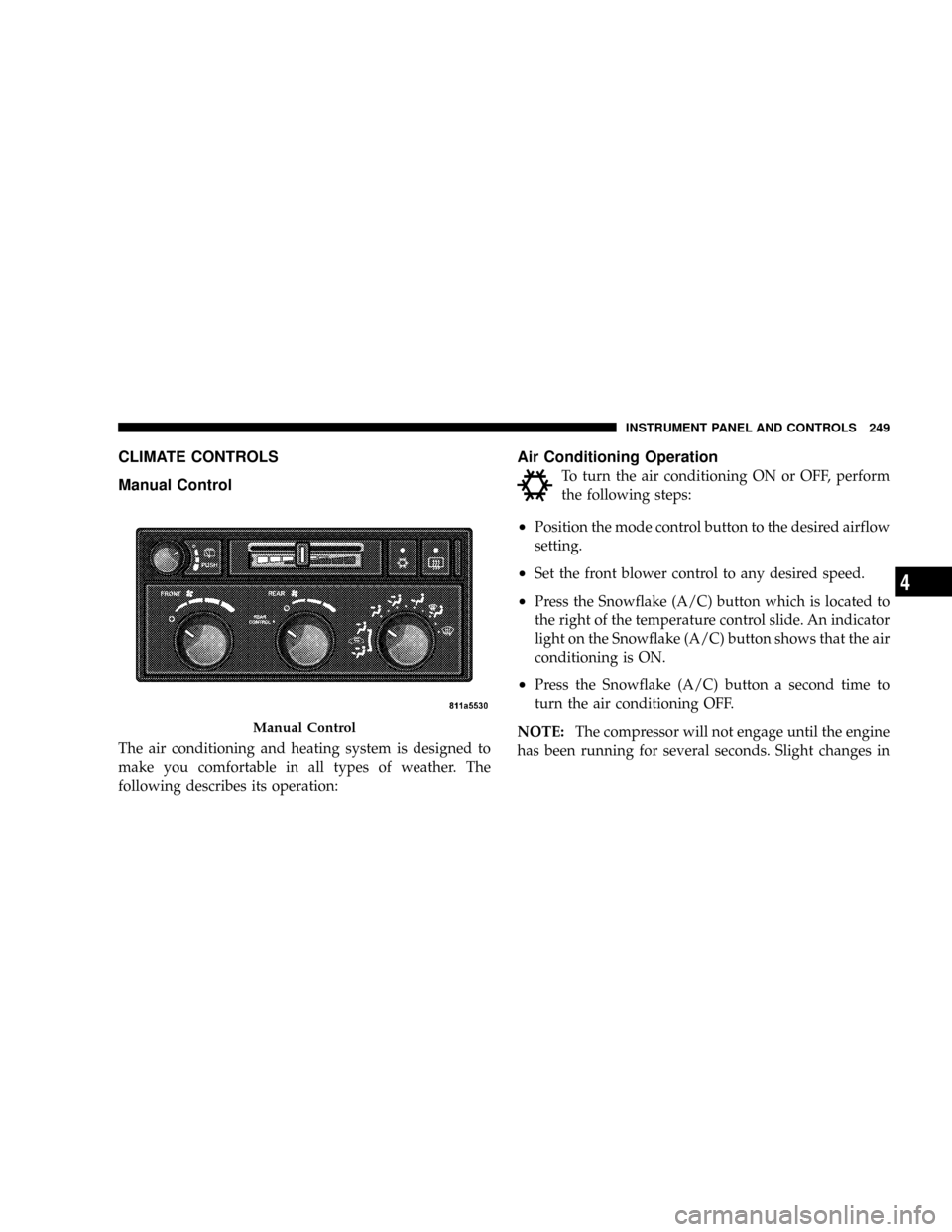
Manual Control
The air conditioning and heating system is designed to
make you comfortable in all types of weather. The
following describes its operation:
Air Conditioning Operation
To turn the air conditioning ON or OFF, perform
the following steps:
²Position the mode control button to the desired airflow
setting.
²Set the front blower control to any desired speed.
²Press the Snowflake (A/C) button which is located to
the right of the temperature control slide. An indicator
light on the Snowflake (A/C) button shows that the air
conditioning is ON.
²Press the Snowflake (A/C) button a second time to
turn the air conditioning OFF.
NOTE:The compressor will not engage until the engine
has been running for several seconds. Slight changes in
Manual Control
INSTRUMENT PANEL AND CONTROLS 249
4