audio CHRYSLER ASPEN 2008 2.G Owners Manual
[x] Cancel search | Manufacturer: CHRYSLER, Model Year: 2008, Model line: ASPEN, Model: CHRYSLER ASPEN 2008 2.GPages: 479, PDF Size: 4.3 MB
Page 89 of 479
that the heating elements are ON. Turning OFF the rear
window defroster or the ignition will deactivate the
heated mirrors.
Automatic Dimming Driver's Exterior Mirror Ð If
Equipped
This mirror will automatically adjust for annoying light
glare from vehicles behind you. This feature is controlled
by the inside mirror and can be turned off by pressing the
button at the base of the inside mirror.
HANDS-FREE COMMUNICATION (UConnectT)Ð
IF EQUIPPED
NOTE: The sales code RER radio contains an inte-
grated Hands-Free Communication (UConnectt) sys-
tem. Refer to your ªNavigation User's Manualº for
UConnecttsystem operating instructions for this radio.
UConnecttis a voice-activated, hands-free, in-vehicle
communications system. UConnecttallows you to dial aphone number with your cellular phone using simple
voice commands (e.g.,9Callº{ªMikeº{ºWork9or9Dialº
{ª248-555-12129). Your cellular phone's audio is trans-
mitted through your vehicle's audio system; the system
will automatically mute your radio when using the
UConnecttsystem.
NOTE:The UConnecttsystem requires a cellular phone
equipped with the Bluetootht9Hands-Free Profile,9Ve r -
sion 0.96 or higher. See the UConnecttwebsite for
supported phones.
NOTE:For UConnecttcustomer support, visit the
following websites:²www.chrysler.com/uconnect
²www.dodge.com/uconnect
²www.jeep.com/uconnect
²or call 1±877±855±8400
88 UNDERSTANDING THE FEATURES OF YOUR VEHICLE
Page 91 of 479
Profile) you may not be able to use any UConnectt
features. Refer to your cellular service provider or the
phone manufacturer for details.
The UConnecttsystem is fully integrated with the vehi-
cle's audio system. The volume of the UConnecttsystem
can be adjusted either from the radio volume control
knob or from the steering wheel radio control (right
switch), if so equipped.
The radio display will be used for visual prompts from
the UConnecttsystem such as9CELL9or caller ID on
certain radios.
Operation
Voice commands can be used to operate the UConnectt
system and to navigate through the UConnecttmenu
structure. Voice commands are required after most
UConnecttsystem prompts. You will be prompted for a
specific command and then guided through the available
options.
²Prior to giving a voice command, one must wait for
the beep, which follows the9Ready9prompt or another
prompt.
²For certain operations, compound commands can be
used. For example, instead of saying9Setup9and then
9Phone Pairing,9the following compound command
can be said:9Setup Phone Pairing.9
²For each feature explanation in this section, only the
combined form of the voice command is given. You
can also break the commands into parts and say each
part of the command when you are asked for it. For
example, you can use the combined form voice com-
mand9Phonebook New Entry,9or you can break the
combined form command into two voice commands:
9Phonebook9and9New Entry.9Please remember, the
UConnecttsystem works best when you talk in a
normal conversational tone, as if speaking to someone
sitting a few feet/meters away from you.
90 UNDERSTANDING THE FEATURES OF YOUR VEHICLE
Page 98 of 479
²The UConnecttsystem will play the names of all the
phonebook entries.
²To call one of the names in the list, press the ªVoice
Recognitionº button during the playing of the desired
name, and say9Call.9
NOTE:The user can also exercise9Edit9or9Delete9
operations at this point.
²The UConnecttsystem will then prompt you as to the
number designation you wish to call.
²The selected number will be dialed.
Phone Call Features
The following features can be accessed through the
UConnecttsystem if the feature(s) are available on your
cellular service plan. For example, if your cellular service
plan provides three-way calling, this feature can beaccessed through the UConnecttsystem. Check with
your cellular service provider for the features that you
have.
Answer or Reject an Incoming Call - No Call
Currently in Progress
When you receive a call on your cellular phone, the
UConnecttsystem will interrupt the vehicle audio sys-
tem, if on, and will ask if you would like to answer the
call. Press the PHONE button to accept the call. To reject
the call, press and hold the PHONE button until you hear
a single beep, indicating that the incoming call was
rejected.
Answer or Reject an Incoming Call - Call
Currently in Progress
If a call is currently in progress and you have another
incoming call, you will hear the same network tones for
UNDERSTANDING THE FEATURES OF YOUR VEHICLE 97
3
Page 105 of 479
dialing a number with your paired Bluetoothtcellular
phone, the audio will be played through your vehicle's
audio system. The UConnecttsystem will work the same
as if you dial the number using voice recognition.
NOTE:Certain brands of mobile phones do not send the
dial ring to the UConnecttsystem to play it on the
vehicle audio system, so you will not hear it. Under this
situation, after successfully dialing a number the user
may feel that the call did not go through even though the
call is in progress. Once your call is answered, you will
hear the audio.
Mute/Un-Mute (Mute Off)
When you mute the UConnecttsystem, you will still be
able to hear the conversation coming from the other
party, but the other party will not be able to hear you. In
order to mute the UConnecttsystem:
²Press the ªVoice Recognitionº button.
²Following the beep, say9Mute.9In order to un-mute the UConnecttsystem:
²Press the ªVoice Recognitionº button.
²Following the beep, say9Mute off.9
Advanced Phone Connectivity
Transfer Call to and from Cellular Phone
The UConnecttsystem allows ongoing calls to be trans-
ferred from your cellular phone to the UConnecttsystem
without terminating the call. To transfer an ongoing call
from your UConnecttpaired cellular phone to the
UConnecttsystem or vice versa, press the ªVoice Recog-
nitionº button and say9Transfer Call.9
Connect or Disconnect Link Between the
UConnecttSystem and Cellular Phone
Your cellular phone can be paired with many different
electronic devices, but can only be actively9connected9
with one electronic device at a time.
104 UNDERSTANDING THE FEATURES OF YOUR VEHICLE
Page 109 of 479
²It is not recommended to store similar sounding
names in the UConnecttphonebook.
²The UConnecttphonebook nametag recognition rate
is optimized for the person who stored the name in the
phonebook.
²You can say9O9(letter9O9) for909(zero).98009must be
spoken9eight-zero-zero.9
²Even though international dialing for most number
combinations is supported, some shortcut dialing
number combinations may not be supported.
²In a convertible vehicle, system performance may be
compromised with the convertible top down.
Far End Audio Performance
²
Audio quality is maximized under:
²low-to-medium blower setting,
²low-to-medium vehicle speed,
²low road noise,
²smooth road surface,
²fully closed windows,
²dry weather conditions, and
²operation from the drivers seat.
²Performance, such as audio clarity, echo, and loudness
to a large degree rely on the phone and network, and
not the UConnecttsystem.
²Echo at the far end can sometimes be reduced by
lowering the in-vehicle audio volume.
²In a convertible vehicle, system performance may be
compromised with the convertible top down.
108 UNDERSTANDING THE FEATURES OF YOUR VEHICLE
Page 118 of 479

3. Use the ON/OFF VOLUME rotary knob to adjust the
volume to a comfortable level while the voice recognition
system is speaking. Please note the volume setting for VR
is different then the audio system.
Main Menu
Start a dialogue by pressing the VR hard-key. You may
say MAIN MENU to switch to the main menu.
In this mode, you can say the following commands:
²RADIO (to switch to the radio mode)
²DISC (to switch to the disc mode)
²MEMO (to switch to the memo recorder)
Radio AM (or Radio Long Wave or Radio Medium
Wave - if equipped)
To switch to the AM band say AM or RADIO AM. In this
mode, you may say the following commands:
²FREQUENCY (to change the frequency)
²NEXT STATION (to select the next station)
²PREVIOUS STATION (to select the previous station)
²RADIO MENU (to switch to the radio menu)
²MAIN MENU (to switch to the main menu)
Radio FM
To switch to the FM band say FM or RADIO FM. In this
mode, you may say the following commands:
²FREQUENCY (to change the frequency)
²NEXT STATION (to select the next station)
²PREVIOUS STATION (to select the previous station)
²RADIO MENU (to switch to the radio menu)
²MAIN MENU (to switch to the main menu)
UNDERSTANDING THE FEATURES OF YOUR VEHICLE 117
3
Page 162 of 479
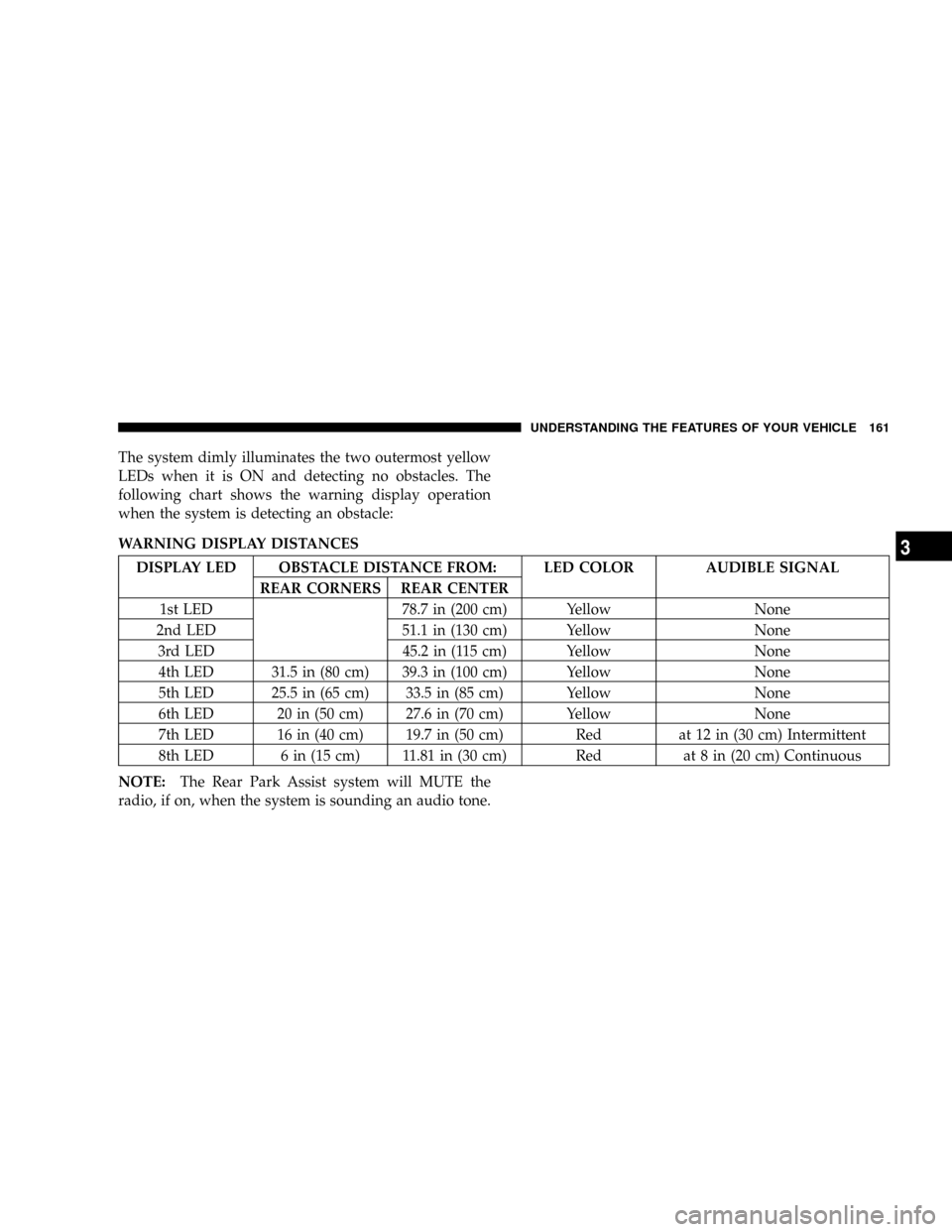
The system dimly illuminates the two outermost yellow
LEDs when it is ON and detecting no obstacles. The
following chart shows the warning display operation
when the system is detecting an obstacle:
WARNING DISPLAY DISTANCES
DISPLAY LED OBSTACLE DISTANCE FROM: LED COLOR AUDIBLE SIGNAL
REAR CORNERS REAR CENTER
1st LED 78.7 in (200 cm) Yellow None
2nd LED 51.1 in (130 cm) Yellow None
3rd LED 45.2 in (115 cm) Yellow None
4th LED 31.5 in (80 cm) 39.3 in (100 cm) Yellow None
5th LED 25.5 in (65 cm) 33.5 in (85 cm) Yellow None
6th LED 20 in (50 cm) 27.6 in (70 cm) Yellow None
7th LED 16 in (40 cm) 19.7 in (50 cm) Red at 12 in (30 cm) Intermittent
8th LED 6 in (15 cm) 11.81 in (30 cm) Red at 8 in (20 cm) Continuous
NOTE:The Rear Park Assist system will MUTE the
radio, if on, when the system is sounding an audio tone.
UNDERSTANDING THE FEATURES OF YOUR VEHICLE 161
3
Page 199 of 479
NOperating Instructions Ð Hands-Free
Communication (UConnectt) (If Equipped) . . . 218
NClock Setting Procedure.................218
mSales Code RER Ð Multimedia System Ð If
Equipped............................220
NOperating Instructions Ð Satellite Radio.....221
NOperating Instructions Ð Hands-Free
Communication (UConnectt) (If Equipped) . . . 221
NClock Setting Procedure.................221
mSales Code RES Ð AM/FM Stereo Radio With
CD Player (MP3 AUX Jack)................224
NOperating Instructions - Radio Mode.......224
NOperation Instructions - CD Mode For CD And
MP3 Audio Play......................230
NNotes On Playing MP3 Files.............232NList Button (CD Mode For MP3 Play).......235
NInfo Button (CD Mode For MP3 Play).......235
mSatellite Radio (RSC) Ð If Equipped
(RER/REQ/REN Radios Only).............236
NSystem Activation.....................236
NElectronic Serial Number/Sirius Identification
Number (ENS/SID)....................237
NSelecting Satellite Mode.................237
NSatellite Antenna......................238
NReception Quality.....................238
NOperating Instructions - Satellite Mode......238
NOperating Instructions - Hands-Free Phone (If
Equipped)..........................241
198 INSTRUMENT PANEL AND CONTROLS
Page 216 of 479
Clock Setting Procedure
1. Press and hold the TIME button until the hours blink.
2. Adjust the hours by turning the right side TUNE/
AUDIO control knob.
3. After the hours are adjusted, push the right side
TUNE/AUDIO control knob to set the minutes.
4. Adjust the minutes by turning the right side TUNE/
AUDIO control knob.
5. To exit, press any button/knob, or wait approximately
five seconds.
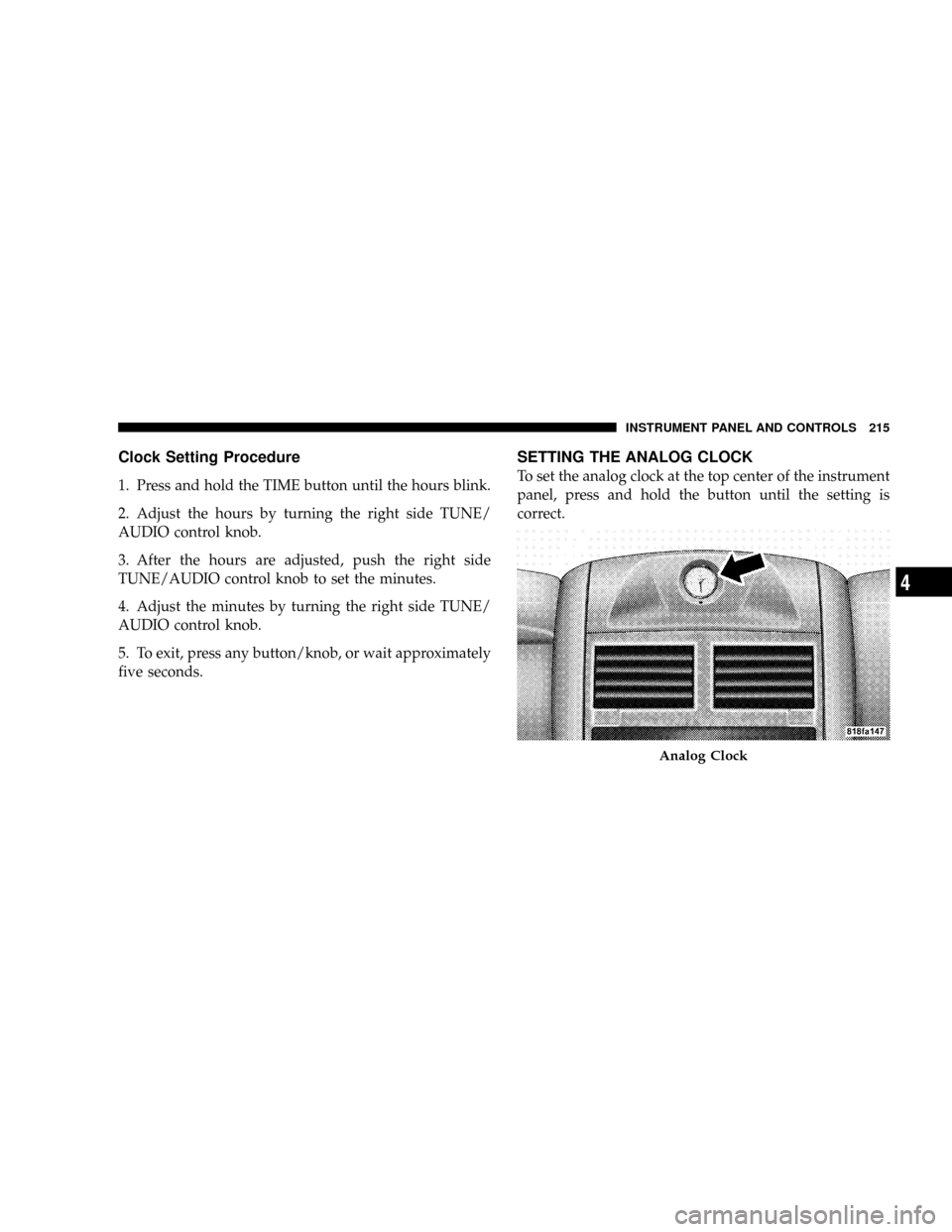
SETTING THE ANALOG CLOCK
To set the analog clock at the top center of the instrument
panel, press and hold the button until the setting is
correct.
Analog Clock
INSTRUMENT PANEL AND CONTROLS 215
4
Page 218 of 479
NOTE:The radio, steering wheel radio controls (if
equipped), and 6±Disc CD/DVD changer (if equipped)
will remain active for up to 10 minutes after the ignition
switch has been turned OFF. Opening a vehicle front
door will cancel this feature.
SALES CODE REN Ð MULTIMEDIA SYSTEM Ð IF
EQUIPPED
NOTE:The sales code is located on the lower right side
of the unit's faceplate.
The REN Multimedia system contains a radio, CD/DVD
player, USB port, a 20-gigabyte hard drive (HDD), and a
ªJukeBoxº (virtual CD changer). Sirius Satellite Radio is
optional. The 6.5-in (16.5 cm) touch screen allows for easy
menu selection.
A 20-gigabyte HDD allows uploads of music and photos
from CDs or through the USB port. The Gracenote
database finds the artist, track, and title for the music.An auxiliary input jack permits passengers to listen to a
portable MP3 player through the vehicle's speakers. For
vehicles equipped with the Vehicle Entertainment System
(VES)t, separate audio outputs allow passengers to listen
to the vehicle speakers while different audio tracks play
through the system's wireless headphones. This means
rear-seat passengers can watch a DVD on the optional
rear seat entertainment system, while the driver and
front-seat passenger listen to the radio.
Other special features include direct tune, music type
selections, easy store presets, backup camera display for
vehicles equipped with a backup camera, and on some
models, a dual display screen operation. Refer to your
Radio-specific user's manual for detailed operating in-
structions.
INSTRUMENT PANEL AND CONTROLS 217
4