ECU CHRYSLER ASPEN 2009 2.G Owner's Manual
[x] Cancel search | Manufacturer: CHRYSLER, Model Year: 2009, Model line: ASPEN, Model: CHRYSLER ASPEN 2009 2.GPages: 481, PDF Size: 9.28 MB
Page 199 of 481
push the button a second time. To prevent excessive
battery drain, use the defroster only when the engine is
operating.
CAUTION!
Use care when washing the inside of the rear window
to prevent damage to heating elements. Use a soft
cloth and a mild washing solution, wiping parallel to
the heating elements. Also, keep all objects a safe
distance from the window to prevent damaging the
heating elements.
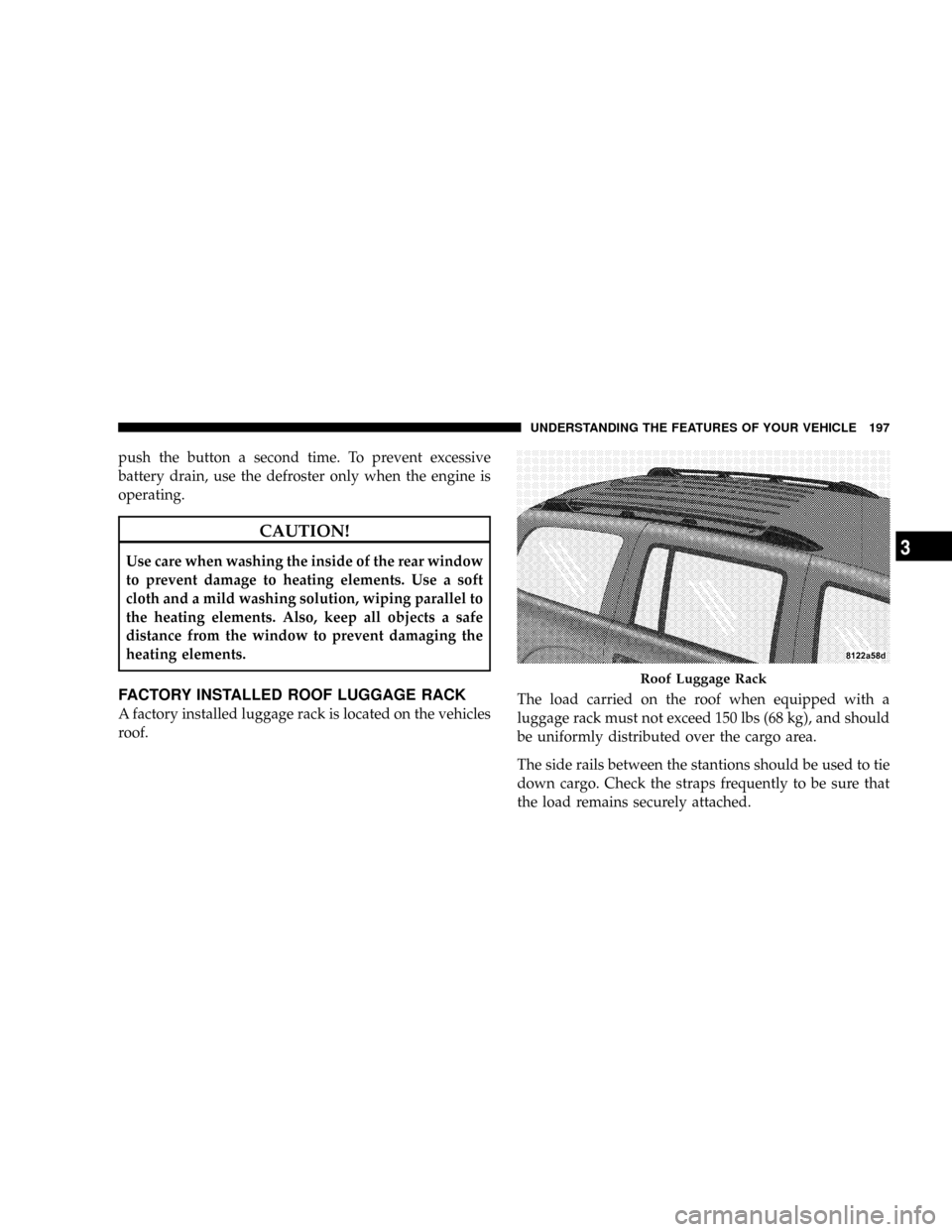
FACTORY INSTALLED ROOF LUGGAGE RACK
A factory installed luggage rack is located on the vehicles
roof.The load carried on the roof when equipped with a
luggage rack must not exceed 150 lbs (68 kg), and should
be uniformly distributed over the cargo area.
The side rails between the stantions should be used to tie
down cargo. Check the straps frequently to be sure that
the load remains securely attached.
Roof Luggage Rack
UNDERSTANDING THE FEATURES OF YOUR VEHICLE 197
3
Page 200 of 481
NOTE:Crossbars are offered by Mopartaccessories.
External racks do not increase the total load carrying
capacity of the vehicle. Be sure that the total occupant
and luggage load inside the vehicle, plus the load on the
luggage rack, do not exceed the maximum vehicle load
capacity.
CAUTION!
To avoid damage to the roof rack and vehicle, do not
exceed the maximum roof rack load capacity. Always
distribute heavy loads as evenly as possible and
secure the load appropriately.
Long loads which extend over the windshield, such
as wood panels or surfboards, should be secured to
both the front and rear of the vehicle.
Place a blanket or other protection between the
surface of the roof and the load.
(Continued)
CAUTION! (Continued)
Travel at reduced speeds and turn corners carefully
when carrying large or heavy loads on the roof rack.
Wind forces, due to natural causes or nearby truck
traffic, can add sudden upward loads. This is espe-
cially true on large flat loads and may result in
damage to the cargo or your vehicle.
WARNING!
Cargo must be securely tied down before driving
your vehicle. Improperly secured loads can fly off the
vehicle, particularly at high speeds, resulting in per-
sonal injury or property damage. Follow the roof rack
cautions when carrying cargo on your roof rack.
198 UNDERSTANDING THE FEATURES OF YOUR VEHICLE
Page 208 of 481
8. Speedometer
The speedometer shows the speed of the vehicle.
9. Charging System Light
This light shows the status of the electrical charg-
ing system. The light should come on when the
ignition switch is first turned ON and remain on briefly
as a bulb check. If the light stays on or comes on while
driving, turn off some of the vehicle's non-essential
electrical devices or increase engine speed (if at idle). If
the charging system light remains on, it means that the
vehicle is experiencing a problem with the charging
system. Obtain SERVICE IMMEDIATELY. See an autho-
rized dealer.
10. Vehicle Security Light
This light will flash rapidly for approximately 15 seconds
when the vehicle security alarm is arming. The light will
flash at a slower speed continuously after the alarm is set.The security light will also come on for about three
seconds when the ignition is first turned on.
11. Anti-Lock Brake System (ABS) Light
This light monitors the Anti-Lock Brake System
(ABS) which is described elsewhere in this
manual. This light will come on when the
ignition key is turned to the ON position and
may stay on for approximately three seconds. If this light
remains on or comes on during driving, it indicates that
the Anti-Lock portion of the brake system is not func-
tioning and that service is required. See an authorized
dealer immediately. With the ABS malfunctioning, the
Brake Assist System (BAS) and Electronic Stability Pro-
gram (ESP) are also switched off. Both malfunction
indicator lights illuminate with the engine running. If the
charging voltage falls below 10 volts, the malfunction
indicator light illuminates and the ABS is switched off.
206 UNDERSTANDING YOUR INSTRUMENT PANEL
Page 263 of 481
Level Of Automatic Control
72ÉF (22ÉC) is the recommended setting for maximum
comfort for the average person, however, this may vary.
NOTE:The temperature setting can be adjusted at any
time without affecting automatic control operation. It is
not necessary to move the temperature setting for cold or
hot vehicles. The system automatically adjusts the tem-
perature, mode and fan speed to provide comfort as
quickly as possible.
NOTE:In cold weather, the fan will not turn on in Auto
mode until the engine coolant has warmed up suffi-
ciently. This is indicated by the ªWARM UP DELAYº
message on the display.
NOTE:The temperature can be displayed in U.S. or
Metric by selecting the U.S./METRIC Customer-
Programmable feature. Refer to9Overhead ConsoleCustomer-Programmable Features9in Section 3. The
mode will also be shown in the display and will change
as required during automatic operation.
NOTE:The system can be put into recirculate mode
without affecting ATC operation. This will prevent out-
side air from entering the vehicle. Use this mode to
temporarily block out any outside odors, smoke, or dust.
Manual Control (ATC)
You may also choose to customize your comfort by
selecting the fan speed and mode manually. Turning the
fan speed knob or any mode button places the system
into manual operation.
While in manual operation there are six fan speeds
available and the choice of any mode. The airflow
temperature is adjusted automatically to maintain the
desired comfort level. You can adjust the temperature by
pressing the + or - Temp rocker switches.
UNDERSTANDING YOUR INSTRUMENT PANEL 261
4
Page 287 of 481
NV 244 Generation II Transfer Case Operating
Information/Precautions ± If Equipped
The NV 244 Generation II is an electric-shift transfer case
and is operated by the 4WD Control Switch, which is
located on the instrument panel.
The NV 244 Generation II transfer case provides four
mode positions - Normal four-wheel drive (4WD) high
range, four-wheel drive lock (4WD LOCK) range, four-
wheel drive low (4WD LOW) range, and NEUTRAL.
This transfer case is equipped with an inter-axle differ-
ential that allows driving the vehicle in the normal
all-wheel drive position (4WD) at all times on any given
road surface, including dry, hard-surfaced roads. The
4WD mode allows the front and rear wheels to rotate at
different speeds. This eliminates driveline binding and
component wear normally associated with driving the
vehicle in the 4WD LOCK position on dry, hard-surfacedroads. This feature provides the safety, security, and
convenience of operating in all-wheel drive at all times
regardless of road conditions.
When additional traction is required, the 4WD LOCK
and 4WD LOW positions can be used to lock the front
and rear driveshafts together, through the transfer case
inter-axle differential, and force the front and rear wheels
to rotate at the same speed. This is accomplished by
rotating the 4WD Control Switch to these positions. The
4WD LOCK and 4WD LOW positions are intended for
loose, slippery road surfaces only. Driving in the 4WD
LOCK and 4WD LOW positions on dry, hard-surfaced
roads may cause increased tire wear and damage to the
driveline components.
The transfer case NEUTRAL position is selected by
depressing the recessed button located on the lower left
hand corner of the 4WD Control Switch.
STARTING AND OPERATING 285
5
Page 350 of 481
Inflation Pressure (Cold)
This is the cold tire inflation pressure for your vehicle for
all loading conditions up to full GAWR.
Curb Weight
The curb weight of a vehicle is defined as the total weight
of the vehicle with all fluids, including vehicle fuel, at full
capacity conditions, and with no occupants or cargo
loaded into the vehicle. The front and rear curb weight
values are determined by weighing your vehicle on a
commercial scale before any occupants or cargo are
added.
Loading
The actual total weight and the weight of the front and
rear of your vehicle at the ground can best be determined
by weighing it when it is loaded and ready for operation.The entire vehicle should first be weighed on a commer-
cial scale to ensure that the GVWR has not been ex-
ceeded. The weight on the front and rear of the vehicle
should then be determined separately to be sure that the
load is properly distributed over front and rear axle.
Weighing the vehicle may show that the GAWR of either
the front or rear axles has been exceeded but the total
load is within the specified GVWR. If so, weight must be
shifted from front to rear or rear to front as appropriate
until the specified weight limitations are met.
Store heavier items down low and be sure that the weight
is distributed equally. Stow all loose items securely before
driving.
Improper weight distribution can have an adverse effect
on the way your vehicle steers and handles and the way
the brakes operate.
348 STARTING AND OPERATING
Page 358 of 481
Perform the maintenance listed in the Maintenance
Schedule. Refer to Section 8 of this manual. When towing
a trailer, never exceed the GAWR or GCWR ratings.
WARNING!
Improper towing can lead to an injury accident.
Follow these guidelines to make your trailer towing
as safe as possible:
Make certain that the load is secured in the trailer
and will not shift during travel. When trailering
cargo that is not fully secured, dynamic load shifts
can occur that may be difficult for the driver to
control. You could lose control of your vehicle and
have an accident.
²When hauling cargo or towing a trailer, do not over-
load your vehicle or trailer. Overloading can cause a
loss of control, poor performance or damage to brakes,
axle, engine, transmission, steering, suspension, chas-
sis structure or tires.
²Safety chains must always be used between your
vehicle and trailer. Always connect the chains to the
frame or hook retainers of the vehicle hitch. Cross the
chains under the trailer tongue and allow enough
slack for turning corners.
²Vehicles with trailers should not be parked on a grade.
When parking, apply the parking brake on the tow
vehicle. Put the tow vehicle automatic transmission in
PARK. For four-wheel drive vehicles, make sure the
transfer case is not in NEUTRAL. Always, block or
9chock9the trailer wheels.
356 STARTING AND OPERATING
Page 371 of 481
JACKING INSTRUCTIONS
WARNING!
²Being under a jacked-up vehicle is dangerous. The
vehicle could slip off the jack and fall on you. You
could be crushed. Never put any part of your body
under a vehicle that is on a jack. Never start or run
the engine while the vehicle is on a jack. If you
need to get under a raised vehicle, take it to a
service center where it can be raised on a lift.
²The jack is designed to use as a tool for changing
tires only. The jack should not be used to lift the
vehicle for service purposes. The vehicle should
be jacked on a firm level surface only. Avoid ice or
slippery areas.
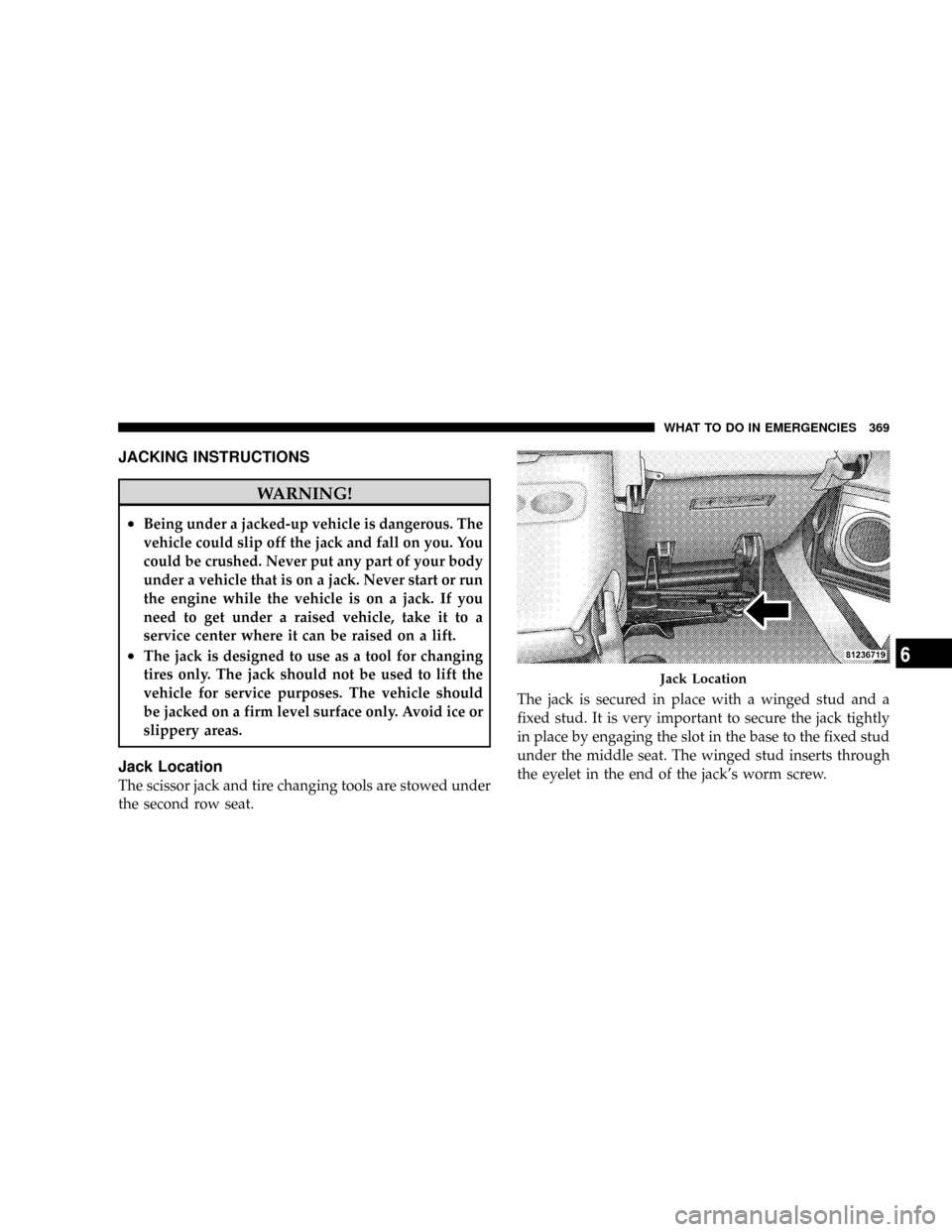
Jack Location
The scissor jack and tire changing tools are stowed under
the second row seat.The jack is secured in place with a winged stud and a
fixed stud. It is very important to secure the jack tightly
in place by engaging the slot in the base to the fixed stud
under the middle seat. The winged stud inserts through
the eyelet in the end of the jack's worm screw.
Jack Location
WHAT TO DO IN EMERGENCIES 369
6
Page 375 of 481
WARNING!
Carefully follow these tire changing warnings to
help prevent personal injury or damage to your
vehicle:
²Always park on a firm, level surface as far from
the edge of the roadway as possible before raising
the vehicle.
²Block the wheel diagonally opposite the wheel to
be raised.
²Set the parking brake firmly and set an automatic
transmission in PARK; a manual transmission in
REVERSE.
²Never start or run the engine with the vehicle on a
jack.
²Do not let anyone sit in the vehicle when it is on a
jack.
²Do not get under the vehicle when it is on a jack.
(Continued)
WARNING! (Continued)
²Only use the jack in the positions indicated and
for lifting this vehicle during a tire change.
²If working on or near a roadway, be extremely
careful of motor traffic.
²To assure that spare tires, flat or inflated are
securely stowed, spares must be stowed with the
valve stem facing the ground.
²Turn on the Hazard warning flasher.
1. Remove the spare wheel, jack, and tools from storage.
2. Using the wheel wrench, loosen, but do not remove,
the wheel nuts by turning them counterclockwise one
turn while the wheel is still on the ground.
WHAT TO DO IN EMERGENCIES 373
6
Page 379 of 481
WARNING! (Continued)
²If working on or near a roadway, be extremely
careful of motor traffic.
²To assure that spare tires, flat or inflated, are
securely stowed, spares must be stowed with the
valve stem facing the ground.
To Stow The Flat Or Spare
Turn the wheel so that the valve stem is downward. Slide
the wheel retainer through the center of the wheel and
position it properly across the wheel opening.
For convenience in checking the spare tire inflation, stow
with the valve stem toward the rear of the vehicle.
Rotate the winch mechanism until the wheel is drawn
into place against the underside of the vehicle. Continue
to rotate until you feel the winch mechanism slip or click
two times. It cannot be overtightened. Push against the
tire several times to be sure it is firmly in place.
JUMP±STARTING PROCEDURES
WARNING!
²Battery fluid is a corrosive acid solution; do not
allow battery fluid to contact eyes, skin or cloth-
ing. Don't lean over battery when attaching
clamps or allow the clamps to touch each other. If
acid splashes in eyes or on skin, flush the contami-
nated area immediately with large quantities of
water.
²A battery generates hydrogen gas which is flam-
mable and explosive. Keep flame or spark away
from the vent holes. Do not use a booster battery
or any other booster source with an output that
exceeds 12 volts.
Check the Battery Test Indicator (if equipped). If a light or
bright colored dot is visible in the indicator, DO NOT
jump-start the battery.
WHAT TO DO IN EMERGENCIES 377
6