audio CHRYSLER ASPEN 2009 2.G Owner's Manual
[x] Cancel search | Manufacturer: CHRYSLER, Model Year: 2009, Model line: ASPEN, Model: CHRYSLER ASPEN 2009 2.GPages: 481, PDF Size: 9.28 MB
Page 244 of 481
NOTE:
²If the radio has a USB port, connecting an iPodtto this
port does not play the media. For playing an iPodt,
use the separate 16±pin connector port (in the glove
compartment on some vehicles).
²Connecting an iPodtto the AUX port located in the
radio faceplate, plays media, but does not use the UCI
feature to control the connected device.
Connecting The iPodT
Use the optional connection cable to connect an iPodtto
the vehicle's 16±pin connector port (which is located in
the glove compartment on some vehicles). Once the
iPodtis connected and synchronized to the vehicle's UCI
system (iPodtmay take a few seconds to connect), the
iPodtstarts charging and is ready for use by pressing
radio switches, as described below.NOTE:
²You may have to remove the connector pin protection
cap from the 16±pin connector port, prior to connect-
ing the cable.
²If the iPodtbattery is completely discharged, it may
not communicate with the UCI system until a mini-
mum charge is attained. Leaving the iPodtconnected
to the UCI system may charge it to the required level.
Using This Feature
By using the optional connection cable to connect an
iPodtto the vehicle's UCI 16±pin connector port:
²The iPodtaudio can be played on the vehicle's sound
system, providing metadata (Artist, track title, album,
etc.) information on the radio display.
²The iPodtcan be controlled using the radio buttons to
Play, Browse, and List the iPodtcontents.
²The iPodtbattery charges when plugged into the UCI
connector.
242 UNDERSTANDING YOUR INSTRUMENT PANEL
Page 245 of 481
Controlling The iPodTUsing Radio Buttons
To get into the UCI (iPodt) mode and access a connected
iPodt, press the `AUX' button on the radio faceplate. Once
in the UCI (iPodt) mode, iPodtaudio tracks (if available
from iPodt) start playing over the vehicle's audio system.
Play Mode
When switched to UCI mode, the iPodtautomatically
starts Play mode. In Play mode, you may use the
following buttons on the radio faceplate to control the
iPodtand display data:
²Use the TUNE control knob to select the next or
previous track.
²Turning it clockwise (forward) by one click, while
playing a track, skips to the next track.
²Turning it counterclockwise (backward) by one
click, during the first two seconds of the track, willjump to the previous track in the list. Turning this
button at any other time in the track, will jump to
the beginning of the current track.
²Jump backward in the current track by pressing and
holding the <
of the current track.
²Jump forward in the current track by pressing and
holding theFF>> button.
²A single press backward <
jump backward or forward respectively, for five
seconds.
²Use the <
previous or next track. If the <
jump to the previous track in the list, if you press this
button at any other time in the track it will jump to the
UNDERSTANDING YOUR INSTRUMENT PANEL 243
4
Page 247 of 481
the track to be played highlighted on the radio
display, press theTUNEcontrol knob to select and
start playing the track. Turning theTUNEcontrol
knob fast will scroll through the list faster. During
fast scroll, you may notice a slight delay in updating
the information on the radio display.
²During all List modes, the iPodtdisplays all lists in
ªwrap-aroundº mode. So if the track is at the
bottom of the list just turn the wheel backwards
(counter-clockwise) to get to the track faster.
²In List mode, the radioPRESETButtons are used as
shortcuts to the following lists on the iPodt.
²Preset 1 ± Playlists
²Preset 2 ± Artists
²Preset 3 ± Albums
²Preset 4 ± Genres
²Preset 5 - Audiobooks
²Preset 6 ± Podcasts
²Pressing a PRESET button, will display the current
list on the top line and the first item in that list on
the second line.
²To Exit List mode without selecting a track, press the
samePRESETbutton again to go back toPlay
mode.
²LISTbutton: TheLISTbutton will display the top
level menu of the iPodt. Turn theTUNEcontrol knob
to list the top-menu item you wish to select and press
theTUNEcontrol knob. This will display the next
sub-menu list item on the iPodtthen you can follow
the same steps to go to the desired track in that list.
Not all iPodtsub-menu levels are available on this
system.
UNDERSTANDING YOUR INSTRUMENT PANEL 245
4
Page 248 of 481
²MUSIC TYPEbutton: TheMUSIC TYPEbutton is
another shortcut button to the genre listing on your
iPodt.
CAUTION!
²Leaving the iPodt(or any supported device) any-
where in the vehicle in extreme heat or cold can
alter the operation, or damage the device. Follow
the device manufacturer 's guidelines.
²Placing items on the iPodt, or connections to the
iPodtin the vehicle, can cause damage to the
device and/or to the connectors.
WARNING!
Do not plug in or remove the iPodtwhile driving.
Failure to following this warning could result in an
accident.
SATELLITE RADIO Ð IF EQUIPPED
(REN/REQ/RER/RES/REU RADIOS ONLY)
Satellite radio uses direct satellite-to-receiver broadcast-
ing technology to provide clear digital sound, coast to
coast. The subscription service provider is Sirius Satellite
Radio. This service offers over 130 channels of music,
sports, news, entertainment, and programming for chil-
dren, directly from its satellites and broadcasting studios.
NOTE:Sirius service is not available in Hawaii and has
limited coverage in Alaska.
System Activation
Sirius Satellite Radio service is pre-activated, and you
may begin listening immediately to the one year of audio
service that is included with the factory-installed satellite
radio system in your vehicle. Sirius will supply a wel-
come kit that contains general information, including
how to setup your on-line listening account at no addi-
tional charge. For further information, call the toll-free
246 UNDERSTANDING YOUR INSTRUMENT PANEL
Page 250 of 481
Selecting Satellite Mode
Press the SAT button until9SAT9appears in the display. A
CD may remain in the radio while in the Satellite radio
mode.
Satellite Antenna
To ensure optimum reception, do not place items on the
roof around the rooftop antenna location or strap items to
the trunk lid around the trunk lid antenna (if equipped).
Metal objects placed within the line of sight of the
antenna will cause decreased performance. Larger lug-
gage items such as bikes should be placed as far rearward
as possible, within the loading design of the rack. Do not
place items directly on or above the antenna.
Reception Quality
Satellite reception may be interrupted due to one of the
following reasons:
²The vehicle is parked in an underground parking
structure or under a physical obstacle.
²Dense tree coverage may interrupt reception in the
form of short audio mutes.
²Driving under wide bridges or along tall buildings can
cause intermittent reception.
²Placing objects over or too close to the antenna can
cause signal blockage.
Operating Instructions - Satellite Mode
NOTE:The ignition switch must be in the ON or ACC
position to operate the radio.
SEEK Buttons
Press and release the SEEK buttons to search for the next
channel in Satellite mode. Press the right switch to seek
up and the left switch to seek down. The radio will
remain tuned to the new channel until you make another
selection. Holding either button will bypass channels
without stopping until you release it.
248 UNDERSTANDING YOUR INSTRUMENT PANEL
Page 252 of 481
By pressing the SEEK button when the Music Type
function is active, the radio will be tuned to the next
channel with the same selected Music Type name.
If a preset button is activated while in the Music Type
(Program Type) mode, the Music Type mode will be
exited and the radio will tune to the preset channel.
MUSIC TYPE Button Ð REU Radio
Pressing this button provides a MUSIC TYPES list from
which you can make a selection. Once a selection is
made, you can seek up, or down, or scan the channels
and the radio will tune to the next station matching the
selected format. There is no time-out for this screen.
Pressing the MUSIC TYPE button again will close the
MUSIC TYPE screen. Once closed, seek up, seek down,
and scan will no longer be based on your selection.
SETUP Button
Pressing the SETUP button allows you to select the
following items:
²Display Sirius ID number Ð Press the AUDIO/
SELECT button to display the Sirius ID number. This
number is used to activate, deactivate, or change the
Sirius subscription.
SET Button ± To Set the Pushbutton Memory
When you are receiving a channel that you wish to
commit to pushbutton memory, press the SET button.
The symbol SET 1 will now show in the display window.
Select the button (1-6) you wish to lock onto this channel
and press and release that button. If a button is not
selected within five seconds after pressing the SET but-
ton, the channel will continue to play but will not be
stored into pushbutton memory.
250 UNDERSTANDING YOUR INSTRUMENT PANEL
Page 418 of 481
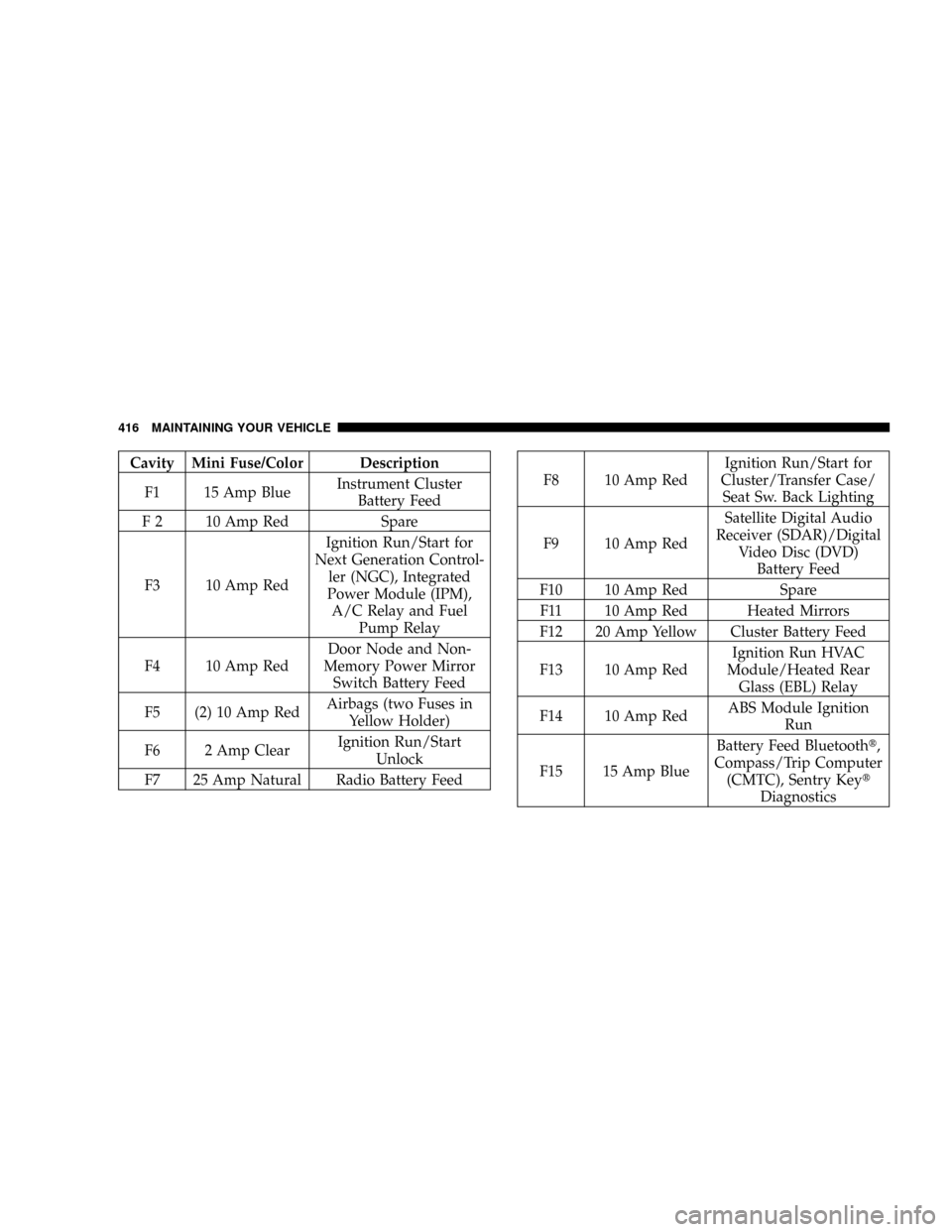
Cavity Mini Fuse/Color Description
F1 15 Amp BlueInstrument Cluster
Battery Feed
F 2 10 Amp Red Spare
F3 10 Amp RedIgnition Run/Start for
Next Generation Control-
ler (NGC), Integrated
Power Module (IPM),
A/C Relay and Fuel
Pump Relay
F4 10 Amp RedDoor Node and Non-
Memory Power Mirror
Switch Battery Feed
F5 (2) 10 Amp RedAirbags (two Fuses in
Yellow Holder)
F6 2 Amp ClearIgnition Run/Start
Unlock
F7 25 Amp Natural Radio Battery Feed
F8 10 Amp RedIgnition Run/Start for
Cluster/Transfer Case/
Seat Sw. Back Lighting
F9 10 Amp RedSatellite Digital Audio
Receiver (SDAR)/Digital
Video Disc (DVD)
Battery Feed
F10 10 Amp Red Spare
F11 10 Amp Red Heated Mirrors
F12 20 Amp Yellow Cluster Battery Feed
F13 10 Amp RedIgnition Run HVAC
Module/Heated Rear
Glass (EBL) Relay
F14 10 Amp RedABS Module Ignition
Run
F15 15 Amp BlueBattery Feed Bluetootht,
Compass/Trip Computer
(CMTC), Sentry Keyt
Diagnostics
416 MAINTAINING YOUR VEHICLE