turn signal CHRYSLER ASPEN 2009 2.G Owners Manual
[x] Cancel search | Manufacturer: CHRYSLER, Model Year: 2009, Model line: ASPEN, Model: CHRYSLER ASPEN 2009 2.GPages: 481, PDF Size: 9.28 MB
Page 40 of 481
The liftgate will not manually open if the vehicle is in
gear or the vehicle speed is above 0 mph (0 km/h).
NOTE:If the liftgate is locked and is not equipped with
a powered liftgate, pressing the button on the RKE
Transmitter will result in the liftgate becoming unlocked
for 30 seconds allowing you to manually access the
liftgate area. The liftgate will re-lock automatically within
10 seconds once the liftgate is closed.
Power Liftgate Ð If Equipped
The power liftgate may be opened manually or by using
the button on the RKE Transmitter. Press the power
liftgate button on the RKE Transmitter twice within five
seconds, to open the power liftgate. Once the liftgate is
fully open, pressing the power liftgate button twice
within five seconds a second time will close the liftgate.When the RKE Transmitter power liftgate button is
pressed two times and the ªLamp Flashº feature is
enabled, the turn signals will flash twice to signal that the
liftgate is opening or closing.
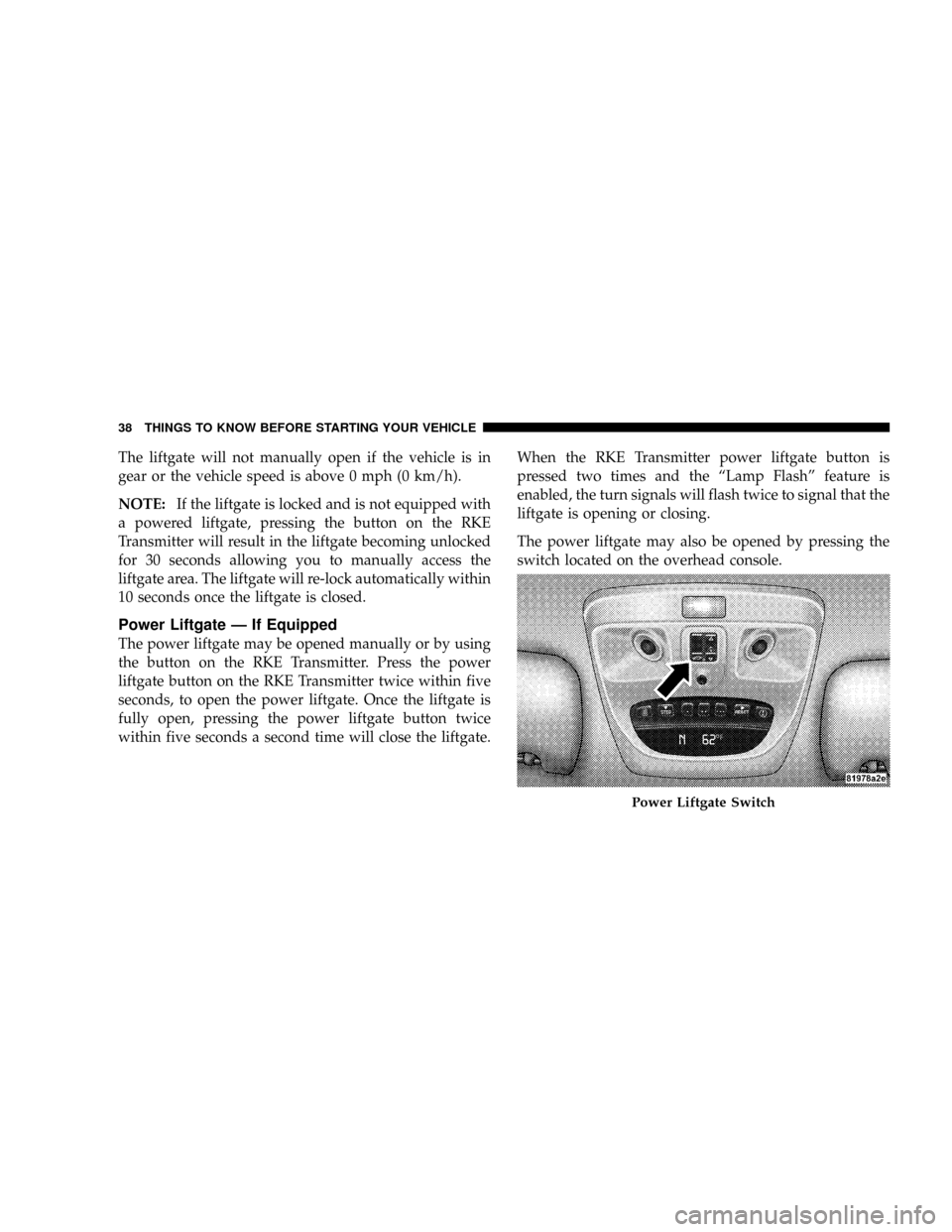
The power liftgate may also be opened by pressing the
switch located on the overhead console.
Power Liftgate Switch
38 THINGS TO KNOW BEFORE STARTING YOUR VEHICLE
Page 79 of 481
Safety Checks You Should Make Outside The
Vehicle
Tires
Examine tires for tread wear or uneven wear patterns.
Check for stones, nails, glass or other objects lodged in
the tread.
Inspect for tread cuts or sidewall cracks. Check wheel
nuts for tightness and tires for proper pressure.
Lights
Check the operation of all exterior lights. Check turn
signal and high beam indicator lights on the instrument
panel.
Door Latches
Check for positive closing, latching and locking.
Fluid Leaks
Check area under vehicle after overnight parking for fuel,
water, oil, or other fluid leaks. Also, if fuel fumes are
detected, the cause should be located and corrected.
THINGS TO KNOW BEFORE STARTING YOUR VEHICLE 77
2
Page 150 of 481
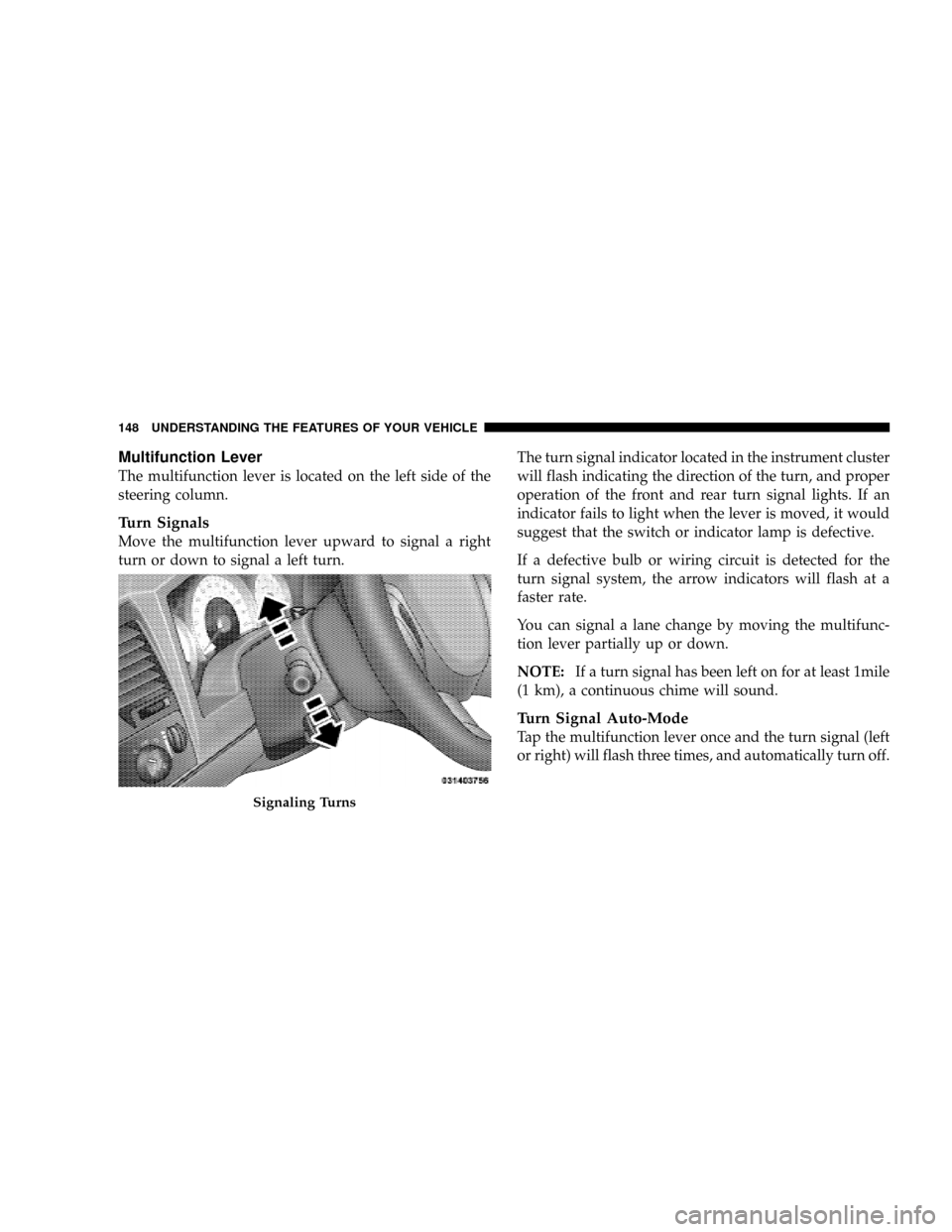
Multifunction Lever
The multifunction lever is located on the left side of the
steering column.
Turn Signals
Move the multifunction lever upward to signal a right
turn or down to signal a left turn.The turn signal indicator located in the instrument cluster
will flash indicating the direction of the turn, and proper
operation of the front and rear turn signal lights. If an
indicator fails to light when the lever is moved, it would
suggest that the switch or indicator lamp is defective.
If a defective bulb or wiring circuit is detected for the
turn signal system, the arrow indicators will flash at a
faster rate.
You can signal a lane change by moving the multifunc-
tion lever partially up or down.
NOTE:If a turn signal has been left on for at least 1mile
(1 km), a continuous chime will sound.
Turn Signal Auto-Mode
Tap the multifunction lever once and the turn signal (left
or right) will flash three times, and automatically turn off.
Signaling Turns
148 UNDERSTANDING THE FEATURES OF YOUR VEHICLE
Page 151 of 481
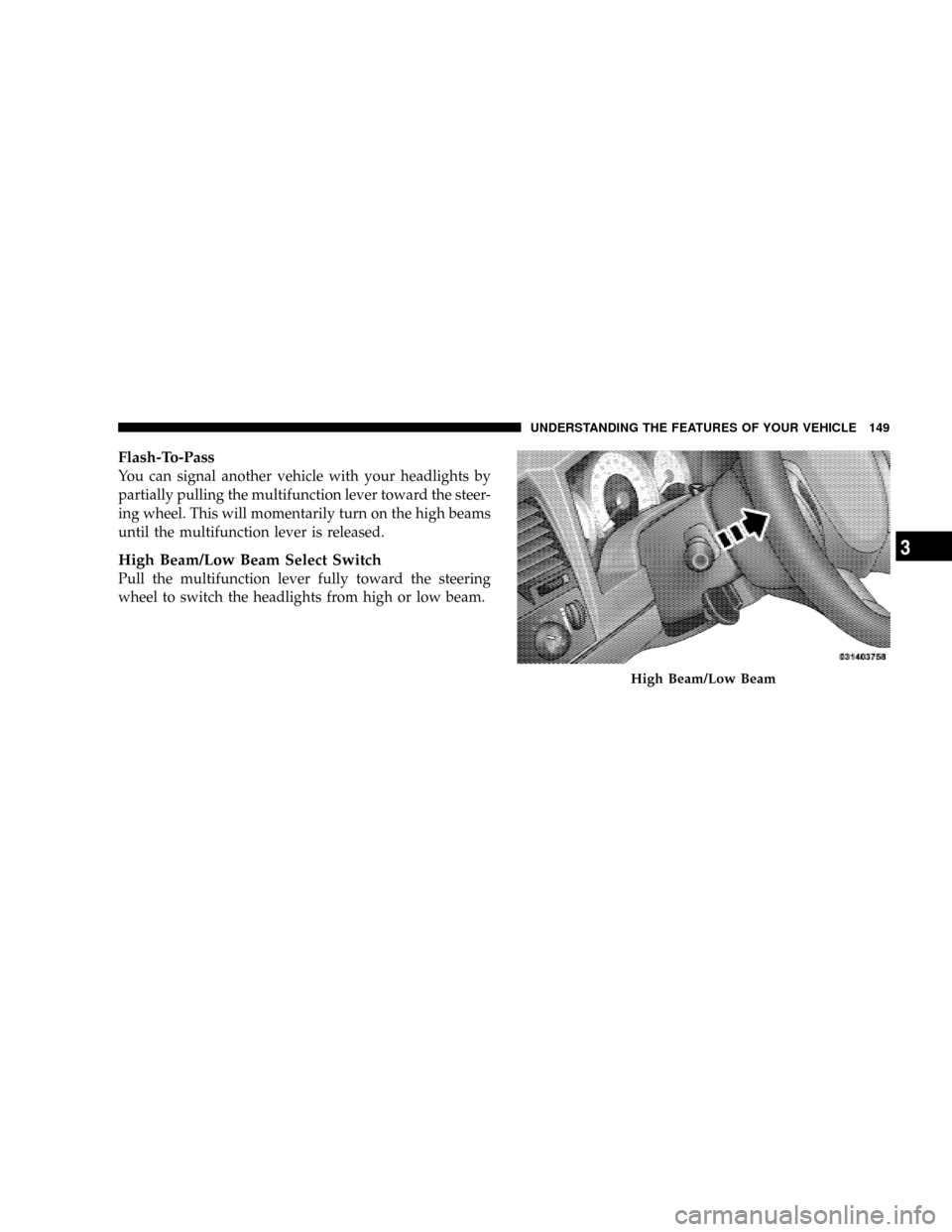
Flash-To-Pass
You can signal another vehicle with your headlights by
partially pulling the multifunction lever toward the steer-
ing wheel. This will momentarily turn on the high beams
until the multifunction lever is released.
High Beam/Low Beam Select Switch
Pull the multifunction lever fully toward the steering
wheel to switch the headlights from high or low beam.
High Beam/Low Beam
UNDERSTANDING THE FEATURES OF YOUR VEHICLE 149
3
Page 154 of 481
NOTE:To prevent freeze-up of your windshield washer
system in cold weather, select a solution or mixture that
meets or exceeds the temperature range of your climate.
This rating information can be found on most washer
fluid containers.
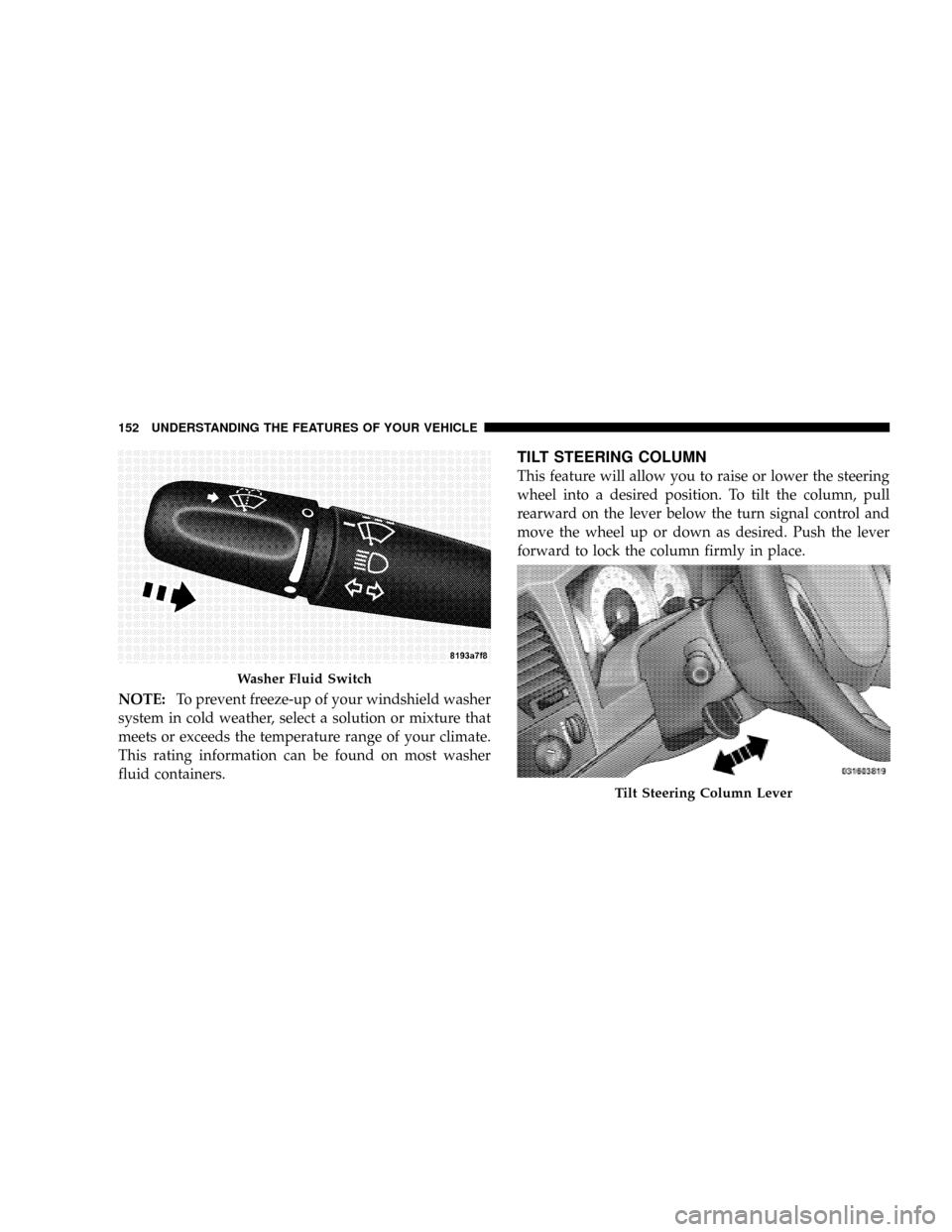
TILT STEERING COLUMN
This feature will allow you to raise or lower the steering
wheel into a desired position. To tilt the column, pull
rearward on the lever below the turn signal control and
move the wheel up or down as desired. Push the lever
forward to lock the column firmly in place.
Washer Fluid Switch
Tilt Steering Column Lever
152 UNDERSTANDING THE FEATURES OF YOUR VEHICLE
Page 171 of 481
System Status (EVIC Displays)
When the appropriate conditions exist, the EVIC displays
the following messages:
²TURN SIGNALS ON (with a continuous warning
chime)
²PERSONAL SETTINGS NOT AVAILABLE ± Vehicle
not in PARK
²LEFT/RIGHT FRONT DOOR AJAR (one or more,
with a single chime if speed is above 1 mph/1 km/h)
²LEFT/RIGHT REAR DOOR AJAR (one or more, with
a single chime if speed is above 1 mph/1 km/h)
²DOOR(S) AJAR (with a single chime if vehicle is in
motion)
²LOW WASHER FLUID (with a single chime)
²OIL CHANGE REQUIRED (with a single chime)
²SERVICE PARK ASSIST SYSTEM (with a single chime)
²SERVICE PARK ASSIST SYSTEM
²COOLANT LOW
²LIFTGATE OPEN
²CHECK TPM SYSTEM (with single chime) (Premium
TPM System Only)
OIL CHANGE REQUIRED Ð If Equipped
Your vehicle is equipped with an engine oil change
indicator system. The ªOil Change Requiredº message
will flash in the EVIC display for approximately 10
seconds after a single chime has sounded to indicate the
next scheduled oil change interval. The engine oil change
indicator system is duty cycle based, which means the
engine oil change interval may fluctuate dependent upon
your personal driving style.
UNDERSTANDING THE FEATURES OF YOUR VEHICLE 169
3
Page 174 of 481
²ªFLASH LAMPS W/LOCK >ONº ± When ON is
selected, the front and rear turn signals will flash when
the doors are locked or unlocked with the RKE Trans-
mitter. This feature may be selected with or without
the sound horn on lock feature selected. To make your
selection, press and release the RESET button until
ªONº or ªOFFº appears.
²ªHEADLAMP OFF DELAY > 0 SECº ± When this
feature is selected, the driver can choose to have the
headlamps remain on for 0, 30, 60, or 90 seconds when
exiting the vehicle. To make your selection, press and
release the RESET button until ª0,º ª30,º ª60,º or ª90º
appears.
NOTE:The headlamp switch must be in the ªAº auto
mode before this feature will work.
²HEADLAMPS W/WIPERS > ON ± When ON is
selected, the headlamps will automatically turn on
when the wiper switch is activated.
²EASY EXIT SEAT > ON ± When ON is selected, and
the key is removed from the ignition, the driver's seat
will automatically move rearward to allow easy exit.
²TILT MIRRORS IN ªRº > ON ± When ON is selected,
and the transmission is put in REVERSE, the outside
mirrors will tilt downward.
²ªKEY OFF POWER DELAY> OFFº ± When this feature
is selected, the power window switches, radio, hands±
free system (if equipped), and power outlets will
remain active for up to 10 minutes after the ignition
switch is turned off. Opening a vehicle door will
cancel this feature. To make your selection, press and
release the RESET button until ªOff,º ª45 sec.,º ª5
min.,º ª10 min.º appears.
²ªILLUMINATED APRCH > OFFº ± When this feature
is selected, the headlights will activate and remain on
for up to 90 seconds when the doors are unlocked with
172 UNDERSTANDING THE FEATURES OF YOUR VEHICLE
Page 180 of 481
It is recommended that a new battery be placed in the
hand-held transmitter of the device being programmed
to HomeLinktfor more efficient training and accurate
transmission of the radio-frequency signal.
Your vehicle should be parked outside of the garage
while training.
1. Turn the ignition switch to the ON/RUN position.
2. Place the hand-held transmitter 1 to 3 in (3 to 8 cm)
from the HomeLinktbuttons while keeping the EVIC
display in view.
For optimal training, point the battery end of the hand-
held transmitter away from the HomeLinkt.
3. Simultaneously, press and hold both the chosen
HomeLinktbutton and the hand-held transmitter button
until the EVIC display changes from ªCHANNEL #
TRAININGº to ªCHANNEL # TRAINED.ºThen release both the HomeLinktand hand-held trans-
mitter buttons.
If the EVIC display states ªDID NOT TRAINº repeat Step
3. If the signal is too weak, replace the battery in the
original hand-held transmitter.
It may take up to 30 seconds, or longer, in rare cases. The
garage door may open and close while you train.
NOTE:Some gate operators and garage door openers
may require you to replace Step 3 with procedures noted
in the ªGate Operator/Canadian Programmingº section.
4. Press and hold the just-trained HomeLinktbutton. If
the channel has been trained, the EVIC display will now
state ªCHANNEL # TRANSMIT.º
If the EVIC display still states ªCHANNEL # TRAIN-
INGº repeat Step 3.
178 UNDERSTANDING THE FEATURES OF YOUR VEHICLE
Page 182 of 481
NOTE:There are 30 seconds in which to initiate the next
step after the ªLearnº button has been pressed.
7. Return to the vehicle and press the programmed
HomeLinktbutton twice (holding the button for two
seconds each time). If the device is plugged in and
activates, programming is complete.
If the device does not activate, press the button a third
time (for two seconds) to complete the training.
If you have any problems, or require assistance, please
call toll-free 1±800±355±3515 or, on the Internet at
www.HomeLink.com for information or assistance.
To program the remaining two HomeLinktbuttons,
repeat each step for each remaining button. DO NOT
erase the channels.Gate Operator/Canadian Programming
Canadian radio-frequency laws require transmitter sig-
nals to ªtime-outº (or quit) after several seconds of
transmission ± which may not be long enough for
HomeLinktto pick up the signal during programming.
Similar to this Canadian law, some U.S. gate operators are
designed to ªtime-outº in the same manner.
It may be helpful to unplug the device during the cycling
process to prevent possible overheating of the garage
door or gate motor.
If you are having difficulties programming a garage door
opener or a gate operator, replace ªProgramming
HomeLinkº Step 3 with the following:
180 UNDERSTANDING THE FEATURES OF YOUR VEHICLE
Page 183 of 481
3. Continue to press and hold the HomeLinktbutton
while you press and release - every two seconds
(ªcycleº) your hand-held transmitter until HomeLinkt
has successfully accepted the frequency signal. The
EVIC display will change from ªCHANNEL # TRAIN-
INGº to ªCHANNEL # TRAINED.º
If you unplugged the device for training, plug it back in
at this time.
Then proceed with Step 4 under ªProgramming
HomeLinktº earlier in this section.
Using HomeLinkT
To operate, simply press and release the programmed
HomeLinktbutton. Activation will now occur for the
trained device (i.e., garage door opener, gate operator,
security system, entry door lock, home/office lighting,
etc.) The hand-held transmitter of the device may also be
used at any time.
Reprogramming A Single HomeLinkTButton
To reprogram a channel that has been previously trained,
follow these steps:
1. Turn the ignition switch to the ON/RUN position.
2. Press and hold the desired HomeLinktbutton for 20
seconds until the EVIC display states ªCHANNEL #
TRAINING.ºDo not release the button.
3.Without releasing the button,proceed with Program-
ming HomeLinktStep 2 and follow all remaining steps.
Security
It is advised to erase all channels before you sell or turn
in your vehicle.
To do this, press and hold the two outside buttons for 20
seconds until the EVIC message states ªCHANNELS
CLEARED.º Note that all channels will be erased. Indi-
vidual channels cannot be erased.
UNDERSTANDING THE FEATURES OF YOUR VEHICLE 181
3