ECO mode CHRYSLER CONCORDE 2004 2.G Owner's Manual
[x] Cancel search | Manufacturer: CHRYSLER, Model Year: 2004, Model line: CONCORDE, Model: CHRYSLER CONCORDE 2004 2.GPages: 273, PDF Size: 6 MB
Page 134 of 273
Pressing the center button will make the radio switch
between the various modes available (AM/FM/TAPE/
CD, Etc.).
The left hand control is a rocker type switch with a
push-button in the center. The function of the left hand
control is different depending on which mode you are in.
The following describes the left hand control operation in
each mode.
Radio Operation
Pressing the top of the switch will “Seek” up for the next
listenable station and pressing the bottom of the switch
will “Seek” down for the next listenable station.
The button located in the center of the left hand control
will tune to the next preset station that you have pro-
grammed in the radio preset push-button.
Tape Player
Pressing the top of the switch once will go to the next
selection on the cassette. Pressing the bottom of the
switch once will go to the beginning of the current
selection or to the beginning of the previous selection if it
is within the first 5 seconds of the current selection.If you press the switch up or down twice it plays the
second selection, three times, it will play the third, etc.
The button in the center of the left hand switch has no
function in this mode.
CD Player — Single Disc in Radio
Pressing the top of the switch once will go to the next
track on the CD. Pressing the bottom of the switch once
will go to the beginning of the current track or to the
beginning of the previous track if it is within one second
after the current track begins to play.
If you press the switch up or down twice it plays the
second track, three times, it will play the third, etc.
The button in the center of the left hand switch has no
function in this mode.
CD Player — 6 Disc CD Changer
Pressing the top of the switch once will go to the next
track on the CD. Pressing the bottom of the switch once
will go to the beginning of the current track or to the
beginning of the previous track if it is within one second
after the current track begins to play.
134 UNDERSTANDING YOUR INSTRUMENT PANEL
Page 138 of 273
Panel Recirculation
Directs all air through the panel outlets.
Bi-Level Recirculation
Directs air through the panel and floor outlets.
NOTE:Continuous use of the Recirculate modes may
make the inside air stuffy. Use of these modes for longer
than fifteen minutes is not recommended.
The A/C compressor turns on automatically when this
mode is selected. This is to help reduce moisture build up
on the windshield.
Panel
Air is directed through the outlets in the instru-
ment panel. These outlets can be adjusted to direct
air flow.
Bi-Level
Air is directed through the instrument panel and
floor outlets. A small amount of air is also
directed through the defrost outlets.
NOTE:
There is a varying temperature differential
between the upper and lower outlets for added comfort.The warmer air goes to the floor outlets. This feature
provides improved comfort during sunny but cool con-
ditions.
Floor
Air is directed through the floor outlets with a
lesser amount through the defrost and side win-
dow demist outlets.
Mix
Air is directed through the floor, defrost, and
side window demist outlets. This setting works
best in cold or snowy conditions that require
extra heat at the windshield. This setting is good for
maintaining comfort while reducing moisture on the
windshield.
Windshield Defrost
Air is directed through the windshield and side
window demist outlets. Use this mode with
maximum fan and temperature settings for best wind-
shield and side window defrosting.
138 UNDERSTANDING YOUR INSTRUMENT PANEL
Page 139 of 273
NOTE:The air conditioning compressor operates in
this mode. This dehumidifies the air to help dry the
windshield. To improve fuel economy, leave in the De-
frost mode only when necessary.
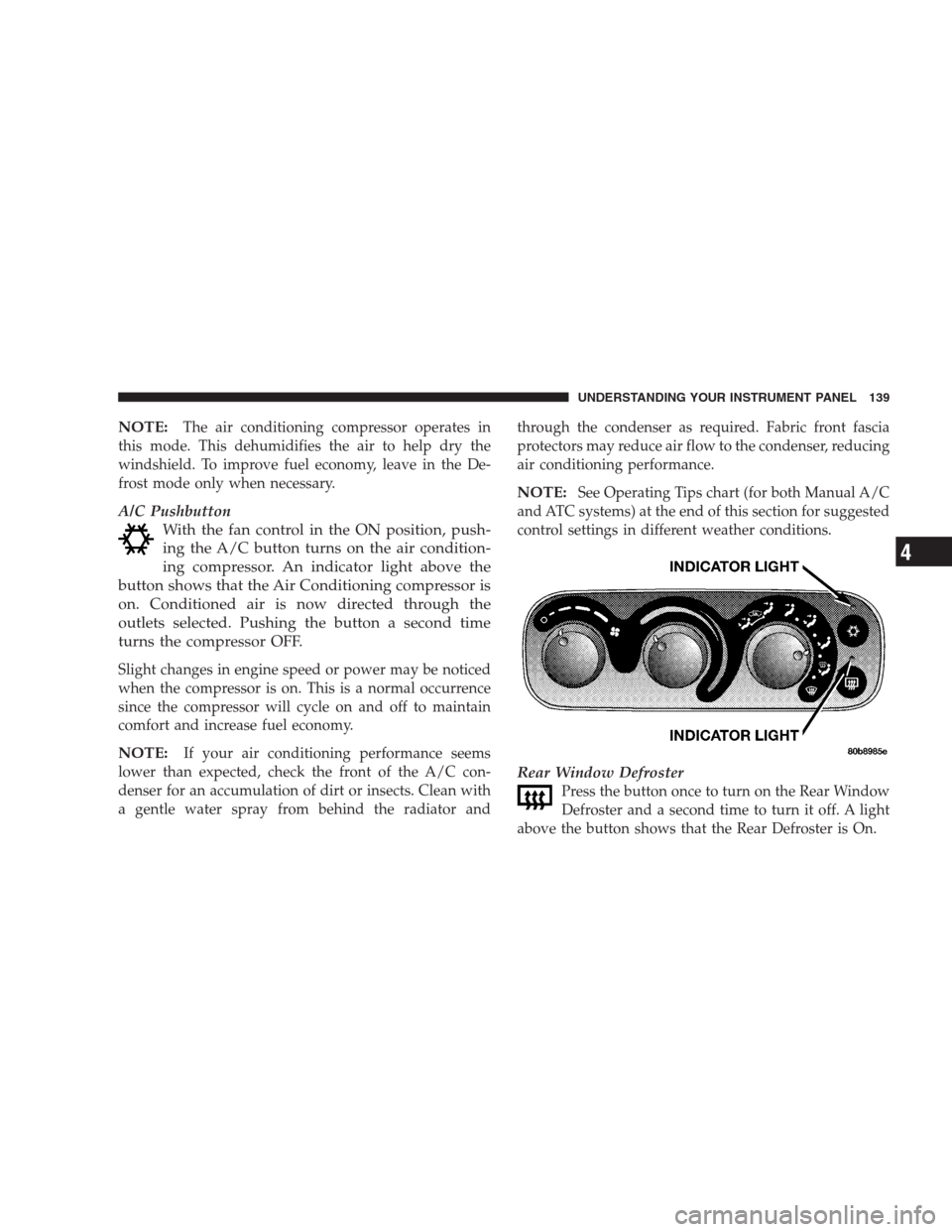
A/C Pushbutton
With the fan control in the ON position, push-
ing the A/C button turns on the air condition-
ing compressor. An indicator light above the
button shows that the Air Conditioning compressor is
on. Conditioned air is now directed through the
outlets selected. Pushing the button a second time
turns the compressor OFF.
Slight changes in engine speed or power may be noticed
when the compressor is on. This is a normal occurrence
since the compressor will cycle on and off to maintain
comfort and increase fuel economy.
NOTE:If your air conditioning performance seems
lower than expected, check the front of the A/C con-
denser for an accumulation of dirt or insects. Clean with
a gentle water spray from behind the radiator andthrough the condenser as required. Fabric front fascia
protectors may reduce air flow to the condenser, reducing
air conditioning performance.
NOTE:See Operating Tips chart (for both Manual A/C
and ATC systems) at the end of this section for suggested
control settings in different weather conditions.
Rear Window Defroster
Press the button once to turn on the Rear Window
Defroster and a second time to turn it off. A light
above the button shows that the Rear Defroster is On.
UNDERSTANDING YOUR INSTRUMENT PANEL 139
4
Page 141 of 273
near the windshield glass. The In-Car Temperature Sen-
sor is mounted behind the ATC control panel. These
sensors transmit data on sun strength and vehicle interior
temperatures to enhance system performance.
CAUTION!
Do not cover either sensor with any foreign material
as improper operation of the system will result.
Level Of Automatic Control
72°F (22°C) is the recommended setting for maximum
comfort for the average person, however, this may vary.
NOTE:The temperature setting can be adjusted at any
time without affecting automatic control operation.
The control also will show what Mode the system is in by
the figure shown in the display.
NOTE:The Mode can change when the system is in the
Auto Mode. This will be indicated in changes in the
display window. This shows automatic changes in air
direction.
Fan Control
Use this control to regulate the amount of air forced
through the system in any mode you select. Turn the
control clockwise to increase fan speed.
In ambient temperatures below 70°F (21°C), fan opera-
tion is delayed when the engine is first started. The fan
will automatically start when the engine coolant is warm
enough to heat the air. This feature can be defeated by
turning the fan control.
AUTO Control
Press the top of the button to turn the ATC system On.
Press the lower portion of the button to turn the entire
system Off.
Comfort Control
Use this control to regulate the comfort inside the pas-
senger compartment. Press the top of the switch to raise
the temperature selection and the bottom of the switch to
lower it. The comfort setting range is from Lo, 60, 61,....to
89,90, Hi, for automatic temperature control. You can
select a very hot or cold comfort setting by holding the
comfort control until it reaches its highest or lowest
levels.
UNDERSTANDING YOUR INSTRUMENT PANEL 141
4
Page 142 of 273
The system adjusts to bring the interior temperature to
the desired comfort level. All comfort settings are auto-
matic; even Hi and Low.
NOTE:You can change the display from U.S. to metric
units by pressing the Mix and Panel mode buttons
simultaneously or by pressing the English/Metric button
on the overhead console.
Air Conditioning Button
Press this button to turn on the air conditioning
compressor. A snow flake symbol in the display
shows that the compressor is on. Compressor
operation is automatic when you press the Auto button.
The compressor can operate at any temperature above
32°F (0°C).
With the compressor off and the temperature set at Lo, air
entering the vehicle will be slightly warmer than the air
outside the vehicle.
NOTE:The compressor will not engage until the engine
has been running for several seconds. Slight changes inengine speed or power may be noticed when the com-
pressor is on. This is a normal occurrence since the
compressor will cycle on and off to maintain comfort and
improve fuel economy.
Recirculate Button
Press this button to recirculate the air inside the
vehicle. Outside air is prevented from entering the
vehicle. Recirculation is automatically controlled when
the system is in Auto Mode. Use this mode to temporarily
block out any outside odors, smoke, or dust.
Manual control of Recirculation is possible only in Panel,
Floor, and Bi-Level modes. It will not operate in Mix, or
Defrost modes.
NOTE:The Recirc button light will blink if you try to
use it in the Mix or Defrost modes.
Air Direction Buttons (Mode)
These buttons allow you to select from five air distribu-
tion patterns. These buttons should be used only when
you can not achieve comfort or visibility in Auto opera-
tion. A symbol in the display window will show which
mode is operating.
142 UNDERSTANDING YOUR INSTRUMENT PANEL
Page 143 of 273
Panel
Air is directed through the outlets in the instru-
ment panel. These outlets can be adjusted to direct
air flow. This mode is not recommended when heat is
required.
Floor
Air is directed through the floor outlets with a
lesser amount through the Defrost and side
window demist outlets. This mode is recommended
when heat is desired.
Mix
Air is directed through the floor, defrost, and
side window demist outlets. Use this setting in
cold or snowy conditions that require extra heat
at the windshield. This setting is good for maintaining
comfort while reducing moisture on the windshield.
The compressor is on in this mode.
Bi-Level
Air is directed through both the panel and floor
outlets. This mode is not recommended when
heat is required in very cold temperatures.NOTE:There is a varying difference in temperature
between the upper and lower outlets for added comfort.
The warmer air goes to the floor outlets. This feature
provides improved comfort during sunny but cool con-
ditions.
Windshield Defrost
Air is directed through the defrost outlets and
side window demist outlets. A small amount of
air also is directed through the floor outlets. Use this
mode with maximum fan and comfort level settings
for best windshield and side window defrosting. The
defrost symbol will glow in amber to show that the
defroster is on.
NOTE:
The air conditioning compressor is on in this
mode. This dehumidifies the air to help dry the wind-
shield. To improve fuel economy, leave in the defrost
mode only when necessary.
Rear Window Defroster
Press the button once to turn on the Rear Window
Defroster and a second time to turn it off. An
indicator light in the control shows that the defroster is
on.
UNDERSTANDING YOUR INSTRUMENT PANEL 143
4
Page 144 of 273
NOTE:The defroster turns off automatically after 15
minutes of operation. Each later activation will allow 7
1/2 minutes of operation.
CAUTION!
To avoid damaging the electrical conductors, do not
use scrapers, sharp instruments, or abrasive window
cleaners on the interior surface of the rear window.
Labels can be peeled off by soaking with warm
water.
Window Fogging
In mild but rainy or humid weather, your windows may
fog up on the inside. You can remove this fog by pressing
the Defrost button. The Mix mode can be used to
maintain a clear windshield and provide sufficient heat-
ing. If side window fogging becomes a problem, increase
blower speed. The compressor will remain on during
these conditions.
Hot Weather Automatic Recirculation
The system will automatically recirculate the air inside
the vehicle when the interior is very warm. This will
provide maximum cooling. The system will also occa-
sionally return to REC on hot, humid days to maintain
occupant comfort. See Operating Tips chart (for both
Manual A/C and ATC systems) at the end of this section
for suggested control settings in different weather condi-
tions.
Side Window Demisters
Side window demisters are located on the instrument
panel. These non adjustable outlets direct air toward the
side windows in any mode except Panel or Panel Recir-
culation. The air is directed toward the area of the side
windows through which you view the outside rearview
mirrors.
144 UNDERSTANDING YOUR INSTRUMENT PANEL
Page 154 of 273
Transaxle Reset Mode
The transaxle is monitored for abnormal conditions. If a
condition is detected that could cause damage, the trans-
axle automatically shifts into second gear. The transaxle
remains in second gear despite the forward gear selected.
Park (P), Reverse (R), and Neutral (N) will continue to
operate. This Reset feature allows the vehicle to be driven
to a dealer for service without damaging the transaxle.
If the problem has been momentary, the transaxle can be
reset to regain all forward gears.
•Stop the vehicle and shift into PARK (P).
•Turn the key to OFF then start the engine.
•Shift into “D” and resume driving.
NOTE:Even if the transaxle can be reset, we recom-
mend that you visit a dealer at your earliest possible
convenience. Your dealer has diagnostic equipment to
determine if the problem could recur.
If the transaxle cannot be reset, dealer service is required.
Gear Ranges
“P” Park
NOTE:
If the key is in the RUN position, you must
press the brake pedal to shift out of the “P” Park position.
Supplements the parking brake by locking the transaxle.
Engine can be started in this range. Never attempt to use
PARK while vehicle is in motion.
Apply parking brake when leaving vehicle in this range.
WARNING!
Your vehicle could move and injure you and others if
it is not completely in Park (P). Check by trying to
move the gearshift lever back and forth without
depressing the shift button after you have set it in P.
Make sure it is in Park before leaving the vehicle.
154 STARTING AND OPERATING
Page 159 of 273
TRACTION CONTROL— IF EQUIPPED
The Traction Control System reduces wheel slip and
maintains traction at the driving (front) wheels. The
system reduces wheel slip by engaging the brake on the
wheel that is losing traction while spinning. The traction
system operates at speeds below 35 mph (56 km/h).
The system is always in the “stand by” mode unless:
•The Traction Control switch has been used to turn the
system off;
•There is a Anti-Lock Brake System malfunction;
•There is a Traction Control System malfunction;
•The system has been deactivated to prevent damage to
the brake system due to overheated brake tempera-
tures.
NOTE:Extended heavy use of Traction Control may
cause the system to deactivate and turn on the Traction
Control OFF Light, indicated byTRAC OFF, located in
the instrument cluster.This is to prevent overheating of the brake system and is
a normal condition. After cooling, the system will auto-
matically reactivate and turn off theTRAC OFFlight.
If your vehicle becomes stuck in mud, ice, or snow, turn
the Traction Control System Off before attempting to
“rock” the vehicle free.
TIRES
Proper tire inflation pressure is essential to the safe and
satisfactory operation of your vehicle. Three primary
areas are affected by improper tire pressure:
STARTING AND OPERATING 159
5
Page 176 of 273
HAZARD WARNING FLASHER
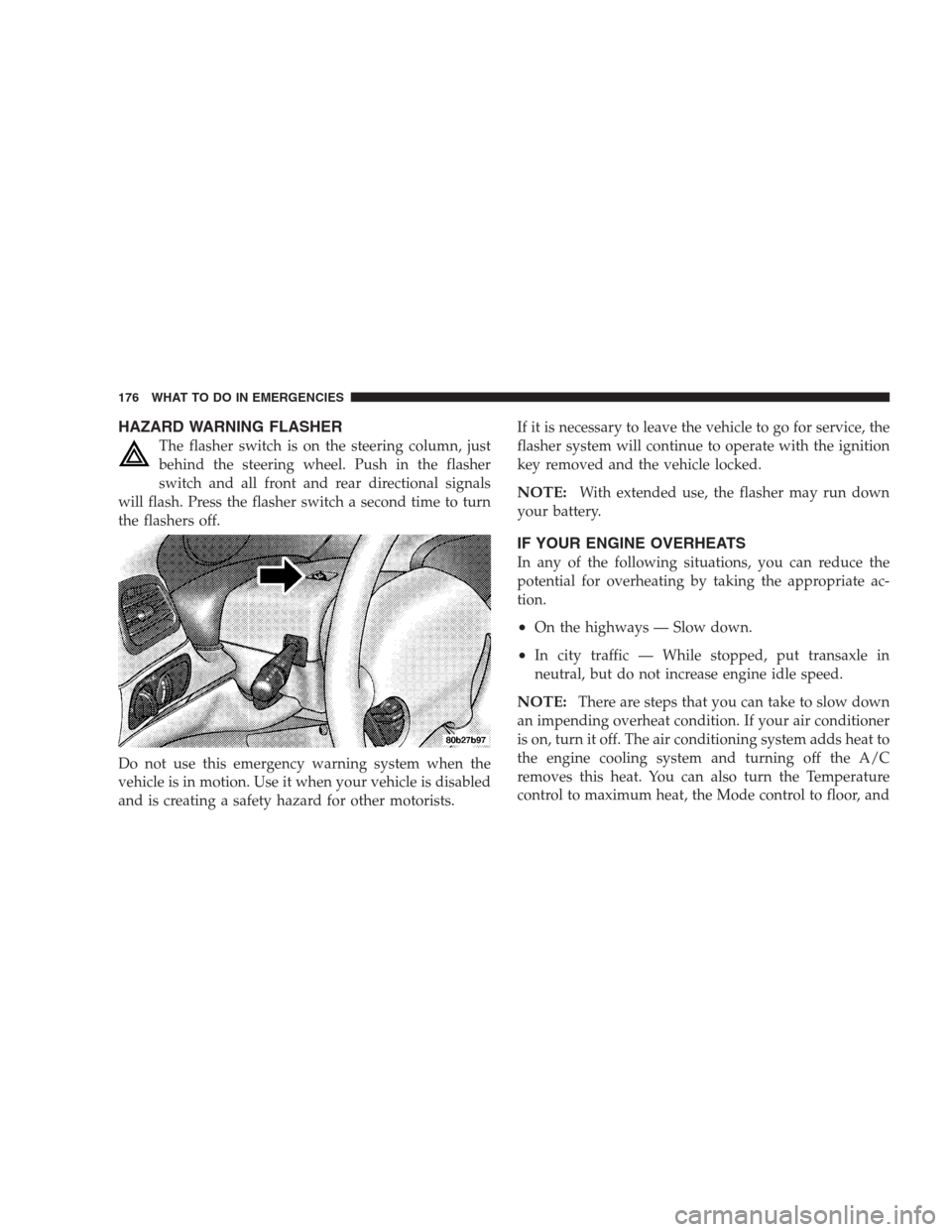
The flasher switch is on the steering column, just
behind the steering wheel. Push in the flasher
switch and all front and rear directional signals
will flash. Press the flasher switch a second time to turn
the flashers off.
Do not use this emergency warning system when the
vehicle is in motion. Use it when your vehicle is disabled
and is creating a safety hazard for other motorists.If it is necessary to leave the vehicle to go for service, the
flasher system will continue to operate with the ignition
key removed and the vehicle locked.
NOTE:With extended use, the flasher may run down
your battery.
IF YOUR ENGINE OVERHEATS
In any of the following situations, you can reduce the
potential for overheating by taking the appropriate ac-
tion.
•On the highways — Slow down.
•In city traffic — While stopped, put transaxle in
neutral, but do not increase engine idle speed.
NOTE:There are steps that you can take to slow down
an impending overheat condition. If your air conditioner
is on, turn it off. The air conditioning system adds heat to
the engine cooling system and turning off the A/C
removes this heat. You can also turn the Temperature
control to maximum heat, the Mode control to floor, and
176 WHAT TO DO IN EMERGENCIES