key CHRYSLER CONCORDE 2004 2.G Owner's Manual
[x] Cancel search | Manufacturer: CHRYSLER, Model Year: 2004, Model line: CONCORDE, Model: CHRYSLER CONCORDE 2004 2.GPages: 273, PDF Size: 6 MB
Page 91 of 273
feature selected. Pressing the STEP button when in this
display will select “Yes” or “No.”
Headlamp Delay
When this feature is selected the driver can choose, when
exiting the vehicle, to have the headlamps remain on for
30, 60, or 90 seconds, or not remain on. Pressing the STEP
button when in this display will select 30, 60, 90, or OFF.
Headlamp On With Wipers (Available with Auto
Headlights Only)
When this feature is selected and the headlight switch
has at least once been moved to the AUTO position, the
headlights will turn on when the wipers are turned on.
The headlights will also turn off when the wipers are
turned off if they were turned on in this way. Pressing the
STEP button when in this display will select “Yes” or
“No.”
NOTE:Turning the headlights on during the daytime
causes the instrument panel lights to dim. To increase the
brightness, refer to “Lights” in this section.
Service Interval
When this feature is selected a service interval between
2,000 (3 200 km) and 6,000 miles (9 600 km) in 500 mile
(800 km) increments may be selected. Pressing the STEP
button when in this display will select distances between
2,000 (3 200 km) and 6,000 miles (9 600 km) in 500 mile
(800 km) increments.
Reset Service Distance (Displays Only if Service
Interval was Changed)
When this feature is selected the current accumulated
service distance can be reset to the newly selected service
interval. Pressing the STEP button when in this display
will select “Yes” or “No.”
Easy Exit Seat
When this feature is selected the driver’s seat moves
rearward two inches (55 mm) or to the farthest rearward
position if this distance is less than two inches (55 mm)
when the key is removed from the ignition switch so that
the driver can more easily exit the vehicle. The seat will
return to the memorized seat location (if REMOTE LINK
TO MEMORY is set to YES) when the remote keyless
entry transmitter is used to unlock the door. Pressing the
UNDERSTANDING THE FEATURES OF YOUR VEHICLE 91
3
Page 92 of 273
STEP button when in this display will select “Yes” or
“No.”
Tilt Mirrors Down
When this feature is selected, and the vehicle is placed in
reverse, the driver’s exterior mirror will tilt downward to
improve visibility of rear wheel area. Once reverse is
disengaged, the driver’s exterior mirror will return to it’s
original position. Pressing the STEP button when inthis
display will select “YES” or “NO”.
Train Remote
NOTE:
As a safety feature, successful training of at least
one transmitter will erase all previously trained transmit-
ters.
When this feature is selected the driver can choose to
train up to four remote keyless entry transmitters. Press-
ing the STEP button when in this display will select“YES” or “NO”. When “YES” is selected and the MENU
button is pressed; the EVIC will display “PRESS RE-
MOTE LOCK & UNLOCK THEN PRESS UNLOCK”,
followed by a chime to indicate the training sequence can
commence. You have approximately 30 seconds to train
up to four transmitters; after each transmitter is trained a
chime will sound indicating that the training was suc-
cessful. If remote link to memory is “YES,” the first
transmitter trained will be associated with memory set-
ting 1 and the second transmitter trained will be associ-
ated with memory setting 2. Additional transmitters will
not be associated with a memory setting. When you have
finished training the transmitters, press the MENU but-
ton again and the EVIC will display “TRAIN DONE, x
TRAINED”. (Where x = 1,2,3, or 4) If no transmitters are
trained within approximately 30 seconds the EVIC will
display “TRAIN TIMEOUT”.
92 UNDERSTANDING THE FEATURES OF YOUR VEHICLE
Page 111 of 273
If the pointer rises to the “H” mark, stop the vehicle and
turn off the engine until the problem is corrected.
There are steps that you can take to slow down an
impending overheat condition. If your air conditioning is
on, turn it off. The air conditioning system adds heat to
the engine cooling system and turning off the A/C
removes this heat. You can also turn the Temperature
control to maximum heat, the Mode control to Floor and
the Fan control to High. This allows the heater core to act
as a supplement to the radiator and aids in removing heat
from the engine cooling system.
16. Malfunction Indicator Light
This light is part of an onboard diagnostic
system called OBD that monitors engine and
automatic transmission control systems. The
light will illuminate when the key is in the ON
position before engine start. If the bulb does not come
on when turning the key from OFF to ON, have the
condition checked promptly.
Certain conditions such as a loose or missing gas cap or
poor fuel quality may illuminate the light after engine
start. The vehicle should be serviced if the light stays onthrough several of your typical driving cycles. In most
situations the vehicle will drive normally and will not
require towing.
The Malfunction Indicator Light flashes to alert to serious
conditions that could lead to immediate loss of power or
severe catalytic converter damage. The vehicle should be
serviced as soon as possible if this occurs.
17. Trip Odometer Reset Knob
To reset the trip odometer, push the reset knob for about
two seconds.
18. Airbag Light
The light will come on and remain on for 6 to 8
seconds as a bulb check when the ignition switch
is first turned ON. If the bulb is not lit during starting,
have it replaced. If the light stays on, or comes on
while driving, have the system checked by an autho-
rized dealer.
19. Odometer/Trip Odometer
Shows the total distance the vehicle has been driven.
U.S. Federal regulations require that upon transfer of
vehicle ownership, the seller certify to the purchaser the
UNDERSTANDING YOUR INSTRUMENT PANEL 111
4
Page 112 of 273
correct mileage that the vehicle has been driven. There-
fore, if the odometer reading is changed during repair or
replacement, be sure to keep a record of the reading
before and after the service so that the correct mileage can
be determined.
The Trip Odometer shows individual trip mileage and is
accessed by pressing the reset button.
20. Charging System Light
This light shows the status of the electrical
charging system. The light should come on
briefly when the ignition is first turned on and remain
on briefly as a bulb check. If the light stays on or
comes on while driving, turn off some of the vehicle’s
electrical devices, such as the Fog Lights or Rear
Defroster. If the Charging System Light remains on, it
means that the vehicle is experiencing a problem with
the charging system and should be serviced immedi-
ately. See your local authorized dealer.
21. Transmission Range Indicator
This indicator illuminates to show the automatic trans-
mission gear selection.
22. ABS Light
This light monitors the Anti-Lock Brake system
described elsewhere in this manual. The yellow
ABS light will come on when the ignition key is turned
to the ON position and may stay on for several
seconds. If the ABS light does not come on have the
system checked by an authorized dealer.
If the ABS light remains on or comes on while driving, it
indicates that the Anti-Lock portion of the brake system
is not functioning and that service is required, however,
the conventional brake system will continue to operate
normally if the red BRAKE warning light is not on. A
warning chime will sound when the light comes on.
If the ABS light is on, the brake system should be serviced
as soon as possible to restore the benefits of Anti-Lock
brakes.
23. Brake System Warning Light
The dual brake system provides a reserve
braking capability if a failure occurs in a
portion of the hydraulic system.
112 UNDERSTANDING YOUR INSTRUMENT PANEL
Page 151 of 273
STARTING PROCEDURES
WARNING!
Do not leave children or animals inside parked
vehicles in hot weather. Interior heat build up may
cause serious injury or death.
The gear selector must be in the NEUTRAL or PARK
position before you can start the engine. Apply the brakes
before shifting to any driving gear.
Normal Starting
Normal Starting of either a cold or a warm engine does
not require pumping or depressing the accelerator pedal.
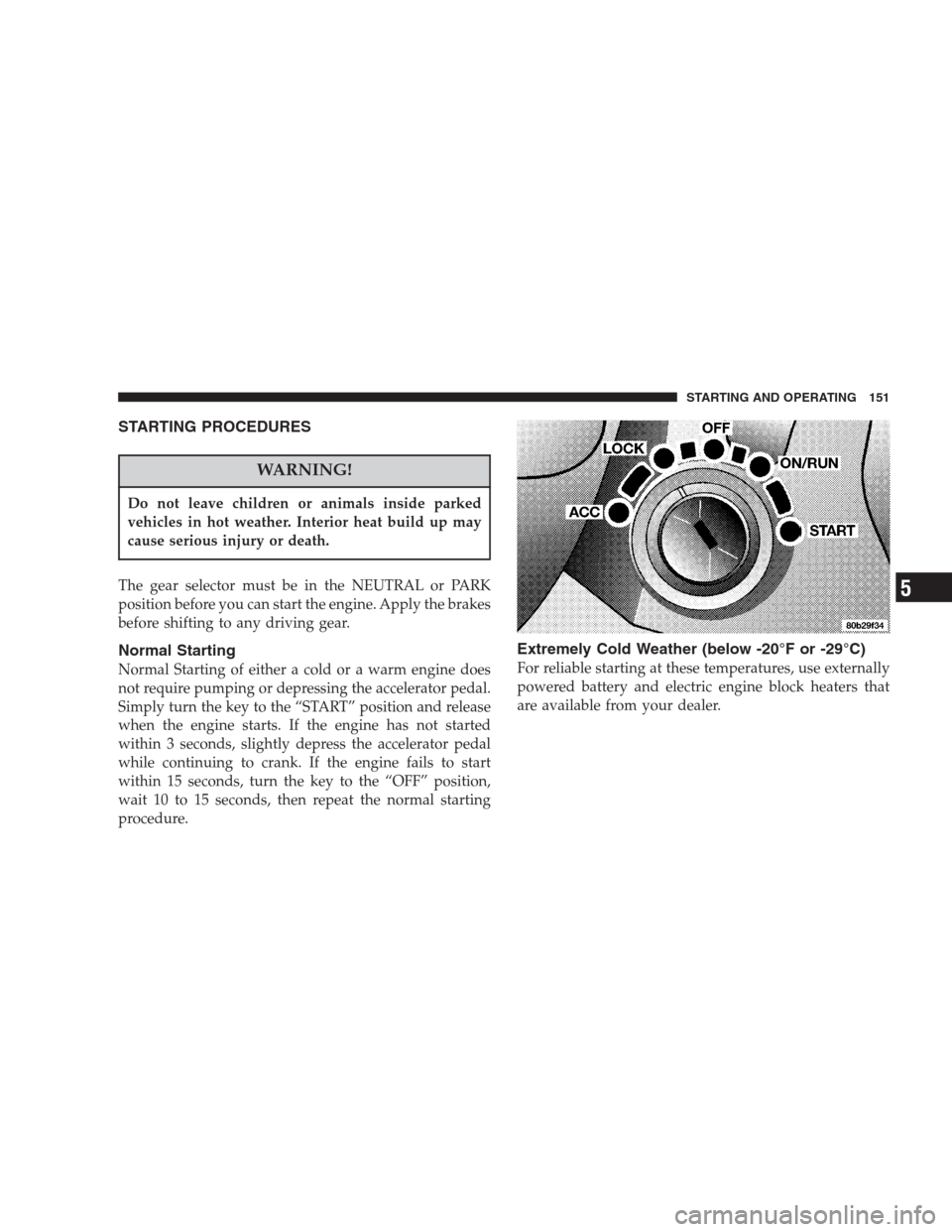
Simply turn the key to the “START” position and release
when the engine starts. If the engine has not started
within 3 seconds, slightly depress the accelerator pedal
while continuing to crank. If the engine fails to start
within 15 seconds, turn the key to the “OFF” position,
wait 10 to 15 seconds, then repeat the normal starting
procedure.
Extremely Cold Weather (below -20°F or -29°C)
For reliable starting at these temperatures, use externally
powered battery and electric engine block heaters that
are available from your dealer.
STARTING AND OPERATING 151
5
Page 152 of 273
If Engine Fails To Start
CAUTION!
Do not try to push or tow your vehicle to get it
started. Your vehicle cannot be started this way.
Pushing with another vehicle may damage the trans-
axle or the rear of your vehicle. See Section 6 of this
manual for the proper jump starting procedures.
WARNING!
Never pour fuel or other flammable liquid into the
throttle body air inlet opening in an attempt to start
the vehicle. This could result in flash fire causing
serious personal injury.
If the engine fails to start after following the Normal
Starting procedure, it may be flooded. Push the accelera-
tor pedal all the way to the floor and hold it there while
cranking the engine. This should clear any excess fuel in
case the engine is flooded.
CAUTION!
To prevent damage to the starter, do not crank the
engine for more than 15 seconds at a time. Wait 10 to
15 seconds before trying again.
If the engine has been flooded, it may start to run, but not
have enough power to continue running when the key is
released. If this occurs, continue cranking with the accel-
erator pedal pushed all the way to the floor. Release the
accelerator pedal and the key once the engine is running
smoothly.
If the engine shows no sign of starting after two 15
second periods of cranking with the accelerator pedal
held to the floor, the Normal Starting procedure should
be repeated.
152 STARTING AND OPERATING
Page 153 of 273
After Starting
The idle speed will automatically decrease as the engine
warms up.
ENGINE BLOCK HEATER — Optional U.S. and
Standard Canada
These heaters use a common power cord which is stored
under the hood, behind the Air Cleaner housing. Plug the
cord into any 110 volt AC outlet and both heaters will be
energized. Use the heaters when temperatures below 0°F
(-18°C) are expected to last for several days.
AUTOMATIC TRANSAXLE
Brake/Transmission Interlock
This interlock system prevents you from moving the gear
selector out of the Park position unless the brake pedal is
pressed. This system is active only while the key is in the
RUN position.
CAUTION!
Damage to the transaxle may occur if the following
precautions are not observed:
•Shift into PARK only after the vehicle has come to a
complete stop.
•Shift into or out of REVERSE only after the vehicle has
come to a complete stop and the engine is at idle
speed.
•Do not shift from REVERSE, PARK or NEUTRAL into
any forward gear when the engine is above idle speed.
•Before shifting into any gear, make sure your foot is
firmly on the brake pedal.
The electronically controlled transaxle provides a precise
shift schedule. The transaxle electronics are self-
calibrating. Therefore, the first few shifts on a new
vehicle may be somewhat abrupt. This is a normal
condition, and precision shifts will develop within a few
shift cycles.
STARTING AND OPERATING 153
5
Page 154 of 273
Transaxle Reset Mode
The transaxle is monitored for abnormal conditions. If a
condition is detected that could cause damage, the trans-
axle automatically shifts into second gear. The transaxle
remains in second gear despite the forward gear selected.
Park (P), Reverse (R), and Neutral (N) will continue to
operate. This Reset feature allows the vehicle to be driven
to a dealer for service without damaging the transaxle.
If the problem has been momentary, the transaxle can be
reset to regain all forward gears.
•Stop the vehicle and shift into PARK (P).
•Turn the key to OFF then start the engine.
•Shift into “D” and resume driving.
NOTE:Even if the transaxle can be reset, we recom-
mend that you visit a dealer at your earliest possible
convenience. Your dealer has diagnostic equipment to
determine if the problem could recur.
If the transaxle cannot be reset, dealer service is required.
Gear Ranges
“P” Park
NOTE:
If the key is in the RUN position, you must
press the brake pedal to shift out of the “P” Park position.
Supplements the parking brake by locking the transaxle.
Engine can be started in this range. Never attempt to use
PARK while vehicle is in motion.
Apply parking brake when leaving vehicle in this range.
WARNING!
Your vehicle could move and injure you and others if
it is not completely in Park (P). Check by trying to
move the gearshift lever back and forth without
depressing the shift button after you have set it in P.
Make sure it is in Park before leaving the vehicle.
154 STARTING AND OPERATING
Page 157 of 273
precaution, turn the front wheels toward the curb on a
downhill grade and away from the curb on an uphill
grade.
The parking brake should always be applied when the
driver is not in the vehicle.
WARNING!
•Leaving children in a vehicle unattended is dan-
gerous for several reasons. A child or others could
be injured. Children should be warned not to
touch the parking brake or the gear selector. Don’t
leave the keys in the ignition. A child could
operate power windows, other controls, or move
the vehicle.
•Be sure the parking brake is fully disengaged
before driving; failure to do so can lead to brake
failure and an accident.
BRAKE SYSTEM
Your vehicle is equipped with power brakes as standard
equipment. In the event you lose power assist for any
reason (for example, repeated brake applications with the
engine off), the brakes will still function. The effort
required to brake the vehicle will be substantially in-
creased over that required with the power system oper-
ating.
If either of the two hydraulic systems lose normal capa-
bility, the remaining system will still function with some
loss of overall braking effectiveness. This will be evident
by increased pedal travel during application, greater
pedal force required to slow or stop, and activation of the
Brake Warning Lamp during brake use.
Anti-Lock Brake System (ABS) — If Equipped
The ABS gives increased vehicle stability and brake
performance under most braking conditions. The system
automatically “pumps” the brakes during severe braking
conditions to prevent wheel lock-up.
All vehicle wheels and tires must be the same size and
tires must be properly inflated to produce accurate
STARTING AND OPERATING 157
5
Page 176 of 273
HAZARD WARNING FLASHER
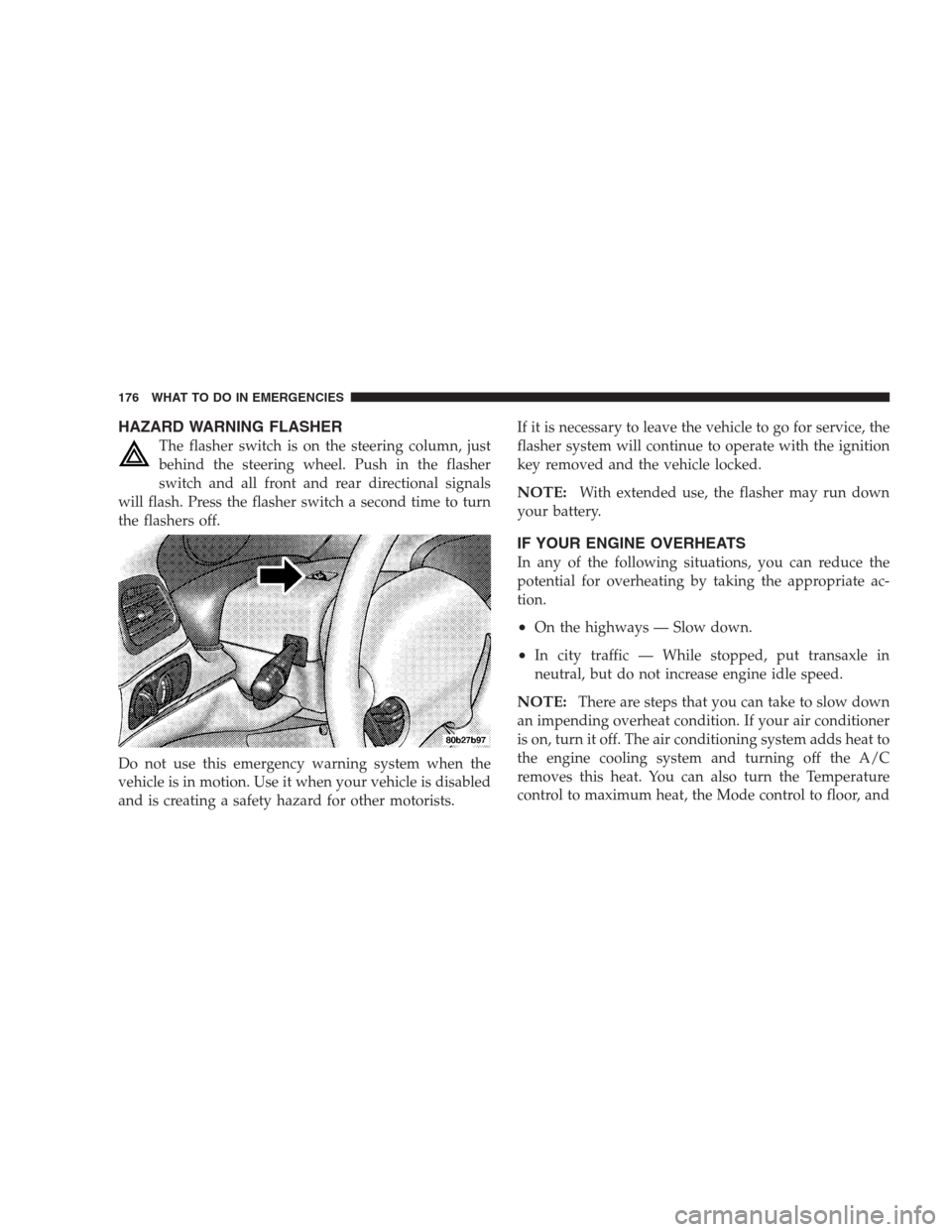
The flasher switch is on the steering column, just
behind the steering wheel. Push in the flasher
switch and all front and rear directional signals
will flash. Press the flasher switch a second time to turn
the flashers off.
Do not use this emergency warning system when the
vehicle is in motion. Use it when your vehicle is disabled
and is creating a safety hazard for other motorists.If it is necessary to leave the vehicle to go for service, the
flasher system will continue to operate with the ignition
key removed and the vehicle locked.
NOTE:With extended use, the flasher may run down
your battery.
IF YOUR ENGINE OVERHEATS
In any of the following situations, you can reduce the
potential for overheating by taking the appropriate ac-
tion.
•On the highways — Slow down.
•In city traffic — While stopped, put transaxle in
neutral, but do not increase engine idle speed.
NOTE:There are steps that you can take to slow down
an impending overheat condition. If your air conditioner
is on, turn it off. The air conditioning system adds heat to
the engine cooling system and turning off the A/C
removes this heat. You can also turn the Temperature
control to maximum heat, the Mode control to floor, and
176 WHAT TO DO IN EMERGENCIES