radio CHRYSLER CROSSFIRE 2008 1.G Owners Manual
[x] Cancel search | Manufacturer: CHRYSLER, Model Year: 2008, Model line: CROSSFIRE, Model: CHRYSLER CROSSFIRE 2008 1.GPages: 358, PDF Size: 4.7 MB
Page 94 of 358
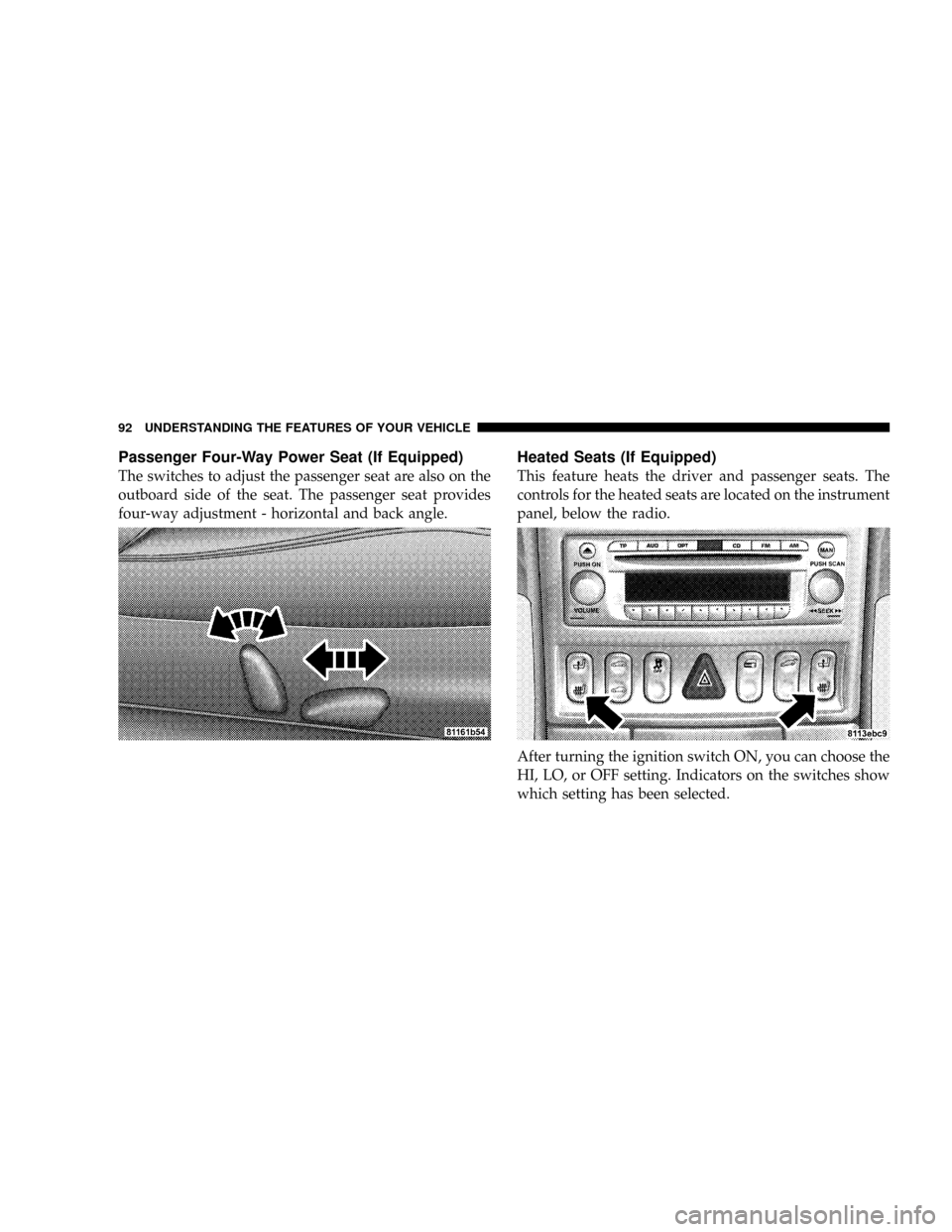
Passenger Four-Way Power Seat (If Equipped)
The switches to adjust the passenger seat are also on the
outboard side of the seat. The passenger seat provides
four-way adjustment - horizontal and back angle.
Heated Seats (If Equipped)
This feature heats the driver and passenger seats. The
controls for the heated seats are located on the instrument
panel, below the radio.
After turning the ignition switch ON, you can choose the
HI, LO, or OFF setting. Indicators on the switches show
which setting has been selected.
92 UNDERSTANDING THE FEATURES OF YOUR VEHICLE
Page 123 of 358
door opener (or other rolling code equipped device),
repeat this sequence a third time to complete the pro-
gramming.
The universal transceiver should now activate your roll-
ing code equipped device.
If you do not successfully program the universal trans-
ceiver to learn the signal of your hand-held transmitter,
call toll free for customer assistance at 1-800-355-3515, or
on the internet at www.homelink.com.
Gate Operator/Canadian Programming
Canadian radio-frequency laws require transmitter sig-
nals to ªtime-outº (or quit) after several seconds of
transmission. This may not be long enough for the
universal transceiver to pick up the signal during pro-
gramming. Similar to this Canadian law, some U.S. gate
operators are designed to ªtime-outº in the same manner.If you live in Canada or you are having difficulties
programming a gate operator by using the programming
procedures (regardless of where you live), replace Pro-
gramming Step 5 with the following:
NOTE:If programming a garage door opener or gate
operator, it is advised to unplug the device during the
ªcyclingº process to prevent possible overheating.
5. Continue to press and hold the universal transceiver
button while you press and release every two seconds
(ªcycleº) your hand-held transmitter until the frequency
signal has successfully been accepted by the universal
transmitter. (The indicator light will flash slowly and
then rapidly.) Proceed with Programming Step 6 to
complete.
UNDERSTANDING THE FEATURES OF YOUR VEHICLE 121
3
Page 127 of 358
UNDERSTANDING YOUR INSTRUMENT PANEL
CONTENTS
mInstruments And Controls.................127
mInstrument Cluster......................128
mInstrument Cluster Description.............129
mªInfinity Modulusº AM/FM Stereo Radio With
Single-Disc CD Player And GPS Navigation....143
mAM/FM Stereo Radio With Single-Disc CD
Player...............................144
NInfinity Modulus Entertainment Systems.....144
NCD Player Operation...................149
NUser Menu..........................151NUser Memory (User ± 1, 2, 3).............152
NMono/Stereo........................152
NDriver ± L/R........................153
NTelephone Mute Characteristics...........153
mCompact Disc Maintenance................154
mRadio Antenna........................154
mRadio Operation And Cellular Phones........155
mClimate Controls.......................155
NTemperature Control...................1564
Page 145 of 358
position, press the knob to the left of the speedometer
once and wait seven seconds. An ISO oil level icon
appears in the trip odometer window and a ªclockº icon
in the cumulative odometer display. Pressing the knob to
the left of the speedometer twice within one second
displays one of the following messages:
²OK
²-1.0 Q (-1.0L)
²-1.5 Q (-1.5L)
²-2.0 Q (-2.0L)
²HI
The indicated amount of oil must be added to the engine
if the message -2.0 Q (-2.0L) blinks and a signal sounds.
The HI message indicates that the excess oil must be
removed from the pan to avoid possible engine or
catalytic converter damage. If the ISO oil level icon andªclockº icon remain on when attempting to check oil
level and no message follows, or if the low engine oil
level warning lamp comes on, a malfunction in the
engine oil level system is indicated. A conveniently
located dipstick allows manual checking of the oil level.
If no leaks are noted, continue to drive to the nearest
service station where the engine oil should be topped to
the ªfullº mark on the dipstick with an approved oil.
29. Low Fuel Warning Light
When the fuel level drops to about 2 gal (7.5 L), this
symbol will light and remains lit until fuel is added.
ªINFINITY MODULUSº AM/FM STEREO RADIO
WITH SINGLE-DISC CD PLAYER AND GPS
NAVIGATION
(OPTIONAL - See separate User's Manual)
UNDERSTANDING YOUR INSTRUMENT PANEL 143
4
Page 146 of 358
AM/FM STEREO RADIO WITH SINGLE-DISC CD
PLAYER
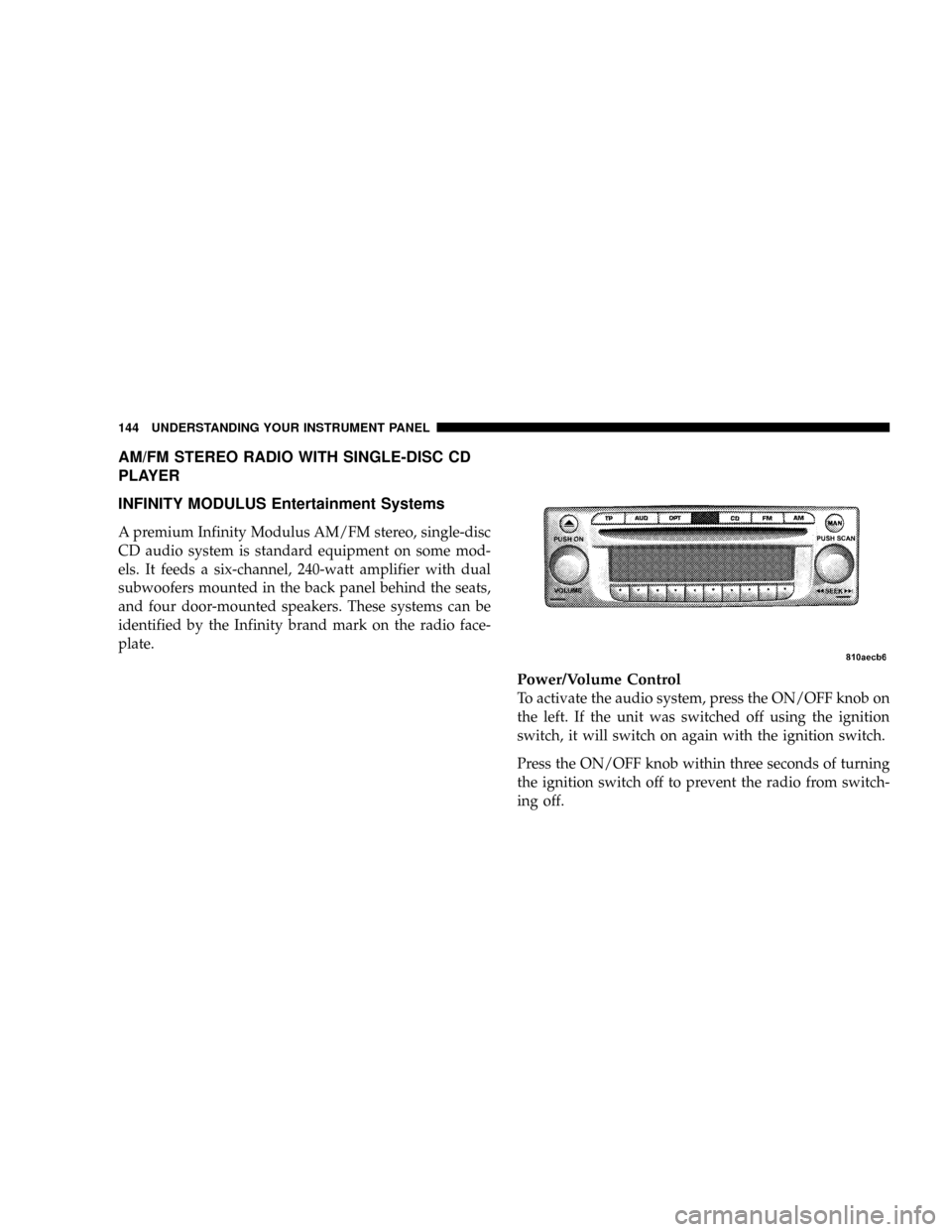
INFINITY MODULUS Entertainment Systems
A premium Infinity Modulus AM/FM stereo, single-disc
CD audio system is standard equipment on some mod-
els. It feeds a six-channel, 240-watt amplifier with dual
subwoofers mounted in the back panel behind the seats,
and four door-mounted speakers. These systems can be
identified by the Infinity brand mark on the radio face-
plate.
Power/Volume Control
To activate the audio system, press the ON/OFF knob on
the left. If the unit was switched off using the ignition
switch, it will switch on again with the ignition switch.
Press the ON/OFF knob within three seconds of turning
the ignition switch off to prevent the radio from switch-
ing off.
144 UNDERSTANDING YOUR INSTRUMENT PANEL
Page 147 of 358
The unit can also be operated without the ignition switch
turned on by pressing the ON/OFF knob, but it will
switch off automatically after one hour.
The volume is controlled by rotating the ON/OFF knob
to the left or right.
Audio (AUD) Settings
²
Bass (BASS)
Press the AUD button repeatedly until BASS appears.
Rotate the right rotary control for the desired level
(from -9 to +9).
²Treble (TREB)
Press the AUD button repeatedly until TREB appears.
Rotate the right rotary control for the desired level
(from -9 to +9).
²Balance (BAL)Press the AUD button repeatedly until BAL appears.
Rotate the right rotary control for the desired level
(from -9 to +9).
²Linear adjustment (LINEAR)
The tone values for the set signal source (e.g., radio/
FM) are set to ª0º (mean value). Press and hold the
AUD button for more than four seconds until FM
LINEAR appears (which affects FM only). Press and
hold the AUD button for more than eight seconds until
ALL LINEAR appears (which affects both radio and
CD).
²Mute function (MUTE)
To activate the mute function in all modes and wave-
bands, press the TP button. The mute function is
cancelled by either pressing the TP button again, or by
turning the volume control.
UNDERSTANDING YOUR INSTRUMENT PANEL 145
4
Page 149 of 358
Storing FM stations ± 10 frequencies can be stored on FM
1 and on FM 2 by pressing a multifunction button for
three seconds; a tone will confirm that the selection was
set.
Scan Search FM (SC) ± To activate, press the right rotary
control/push button until SC is displayed.
Beginning with the currently set frequency, the next
station scanned will be heard for eight seconds. Press the
right rotary control/push button if you wish to keep the
current station. Once the scan begins, it will continue
until either a station or program is retained or until
another mode is selected.
Radio Data System (RDS) Stations
PTY (Program Type)
The program type of the selected station can be displayed
for 10 seconds, or scanned in order of ascending fre-
quency for eight seconds each.To activate, press the OPT button in FM mode, then press
the multifunction PT button. You can pre-select one of the
currently available PTY by turning the right rotary
control/push button and the program type scan search
begins.
Press the button again to keep the received program. If
the selected station does not transmit a PTY identifica-
tion, the display will show NO PTY. If all criteria for
evaluating RDS are not met, the unit will only display the
frequency.
The following are examples of program types displayed:
²NEWS ± News Service
²SOFT ± Soft Music
²INFORM ± Information Programs
²NOSTALGA ± Nostalgia
²SPORTS ± Sports Reports
UNDERSTANDING YOUR INSTRUMENT PANEL 147
4
Page 150 of 358
²JAZZ ± Jazz Music
²TALK ± Talk Programs
²CLASSICL ± Classical
²ROCK ± Rock Music
²RB±R&B
²CLS ROCK ± Classic Rock
²SOFTRB±Soft R&B
²ADLT HIT ± Adult Hits
²LANGUAGE ± Language Program
²SOFT RCK ± Soft Rock
²REL MUSC ± Religious Music
²TOP 40 ± Top 40
²REL TALK ± Religious Talk
²COUNTRY ± Country Music
²PERSNLTY ± Personality
²OLDIES ± Oldies Format
²PUBLIC ± Public Radio
²WEATHER ± Weather Forecast
²PTY 24-28 ± Not Specified
²NO PTY ± No Program Type
AM-AM AS
The system has two AM modes available. Press the AM
button repeatedly until the band or operation mode is
selected. To search in this mode, press the right rotary
control/push button and the abbreviation SC is dis-
played. Receivable stations can be heard for eight sec-
onds. Press the control again to keep the received station.
148 UNDERSTANDING YOUR INSTRUMENT PANEL
Page 151 of 358
Once the scan search begins, it will continue until either
a station is retained or until another mode is selected.
Tuning AM stations ± Rotating the right rotary control to
the right or left will change the AM frequency to the next
higher or lower station with a strong signal. To manually
step through each frequency or tune in a station with a
weaker signal, press the MAN button first, and then
rotate the rotary control right or left.
Storing AM stations ± 10 frequencies can be stored on AM
by pressing a multifunction button for three seconds; a
tone will confirm that the selection was set.
AM AS ± An autostore feature will store the 9 current
stations with the strongest signal on station buttons 1-9 in
the order of their signal quality. Press the AM button
repeatedly until AM AS is displayed to perform an
autostore scan. Press the multifunction button labeled AS
repeatedly until AS-SEEK is displayed. To select the
stored stations, press the 1-9 buttons.General Information
This radio complies with Part 15 of FCC rules and with
RSS-210 of Industry Canada. Operation is subject to the
following conditions:
1. This device may not cause harmful interference,
2. This device must accept any interference received,
including interference that may cause undesired opera-
tion.
NOTE:Changes or modifications not expressly ap-
proved by the party responsible for compliance could
void the user's authority to operate the equipment.
CD Player Operation
To activate the CD function, press the CD button; CDS is
shown in the display. If no CD disc is present, the display
briefly shows NO CDS and the radio mode remains
active.
UNDERSTANDING YOUR INSTRUMENT PANEL 149
4
Page 155 of 358
You can also call up the Setting DRIVER mode by
pressing the right rotary/push button at this time.
Driver ± L/R
If a telephone with hands-free operation is installed, the
call is routed through the speaker system. The setting
DRIVER is used to set the appropriate speaker side (left
or right).
To activate, call up the user menu, then press the right
rotary control/push button repeatedly until DRIVER L or
DRIVER R is displayed (depending on the currently
selected setting, you may need to turn the knob also for
your selection). You can also call up the Telephone mute
characteristics mode by pressing the right rotary/push
button at this time.
Telephone mute characteristics
If a telephone with hands-free operation is installed, the
call may be routed through the speaker system. This
eliminates the need for an additional speaker (if the
signal lines are connected to the unit). The following
settings are available:
²PH MUTE ± Switching radio to mute.
²AUDIO PH ± Telephone call via the car radio.
Call up the user menu, then press the right rotary
control/push button repeatedly until AUDIO PH or PH
MUTE is displayed (depending on the currently selected
setting, you may need to turn the knob also for your
selection).
UNDERSTANDING YOUR INSTRUMENT PANEL 153
4