tow CHRYSLER PACIFICA 2004 1.G User Guide
[x] Cancel search | Manufacturer: CHRYSLER, Model Year: 2004, Model line: PACIFICA, Model: CHRYSLER PACIFICA 2004 1.GPages: 361, PDF Size: 5.21 MB
Page 110 of 361
TILT STEERING COLUMN
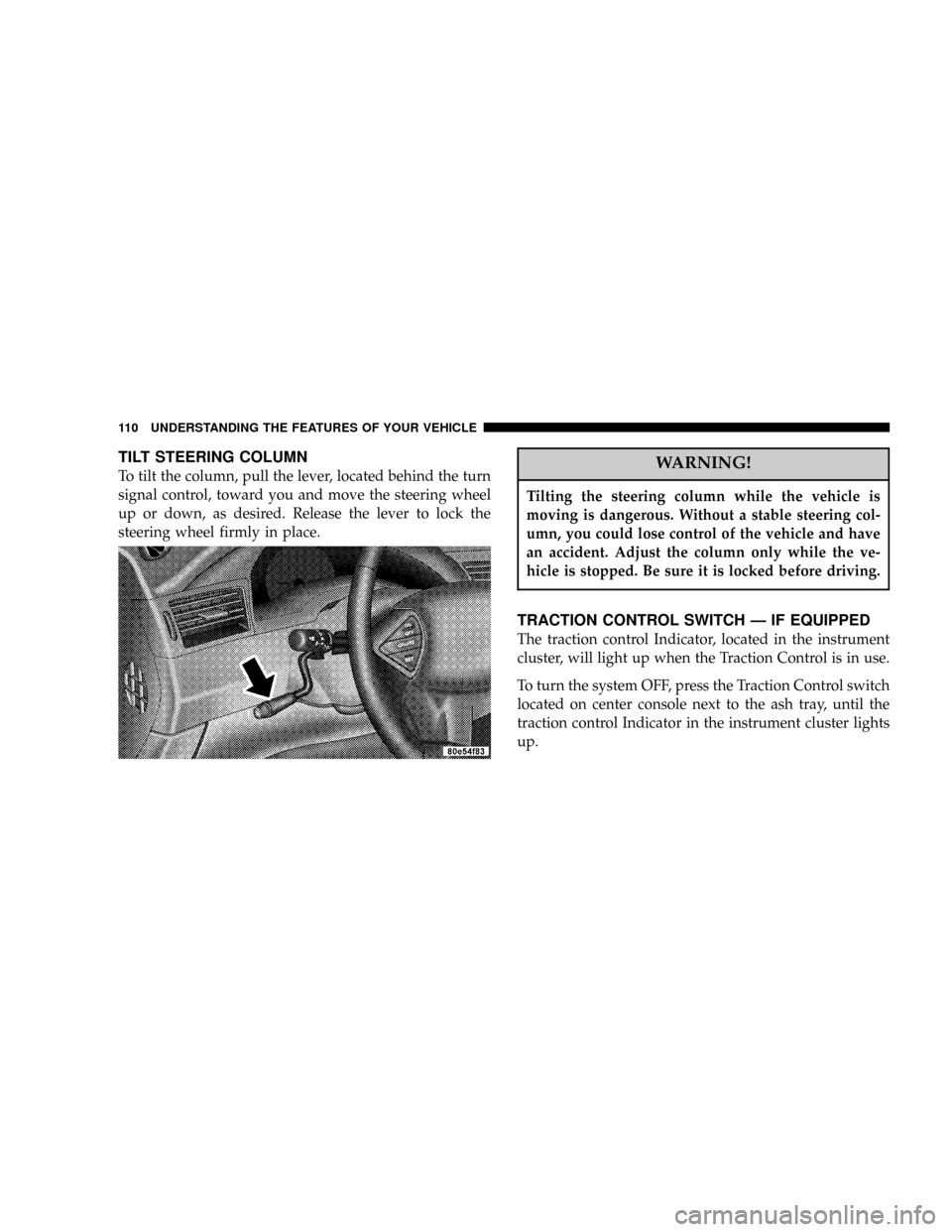
To tilt the column, pull the lever, located behind the turn
signal control, toward you and move the steering wheel
up or down, as desired. Release the lever to lock the
steering wheel firmly in place.WARNING!
Tilting the steering column while the vehicle is
moving is dangerous. Without a stable steering col-
umn, you could lose control of the vehicle and have
an accident. Adjust the column only while the ve-
hicle is stopped. Be sure it is locked before driving.
TRACTION CONTROL SWITCH Ð IF EQUIPPED
The traction control Indicator, located in the instrument
cluster, will light up when the Traction Control is in use.
To turn the system OFF, press the Traction Control switch
located on center console next to the ash tray, until the
traction control Indicator in the instrument cluster lights
up.
110 UNDERSTANDING THE FEATURES OF YOUR VEHICLE
Page 128 of 361
WARNING!
In an accident a cargo cover loose in the vehicle
could cause injury. It could fly around in a sudden
stop and strike someone in the vehicle. Do not store
the cargo cover on the cargo floor or in the passenger
compartment. Remove the cover from the vehicle
when taken from its mounting. Do not store in the
vehicle.
Stowed Position
1. Fold down the third row seatbacks.
2. Fold the cargo cover extensions to their stowed posi-
tion and lock into place.3. Insert the pins on the ends of the cover into the slots
located on the trim panel behind the third row seatbacks.
4. Grasp the center portion of the cover flap. Pull it over
the cargo area.
5. Insert the pins on the ends of the cover flap into the
slots on the rear trim panel.
6. The liftgate may be opened or closed with the cargo
cover in place.
Cargo Tie-Down Hooks
The tie-downs located on cargo area floor and on the rear
trim panels should be used to safely secure loads when
vehicle is moving.
128 UNDERSTANDING THE FEATURES OF YOUR VEHICLE
Page 130 of 361

ROOF LUGGAGE RACK Ð IF EQUIPPED
The crossbars and siderails are designed to carry the
weight on vehicles equipped with a luggage rack. The
load must not exceed 150 lbs (68 kg), and should be
uniformly distributed over the luggage rack crossbars.Distribute cargo weight evenly on the roof rack crossbars.
The roof rack does not increase the total load carrying
capacity of the vehicle. Be sure the total load of cargo
inside the vehicle plus that on the external rack does not
exceed the maximum vehicle load capacity.
To move the cross bars, press the upper edge of each
cross bar button, then move the cross bar to the desired
position. This is can be done with one person standing on
each side of the vehicle, moving the cross bar at the same
time. Once the cross bar is in place, press the lower edge
of the cross bar button to lock it into position.
Attempt to move the crossbar again to ensure that it has
properly locked into position.
NOTE:To reduce the amount of wind noise when the
cross bars are not in use, move both cross bars next to
each other towards the rear of the vehicle in the rear most
position.
130 UNDERSTANDING THE FEATURES OF YOUR VEHICLE
Page 138 of 361

INSTRUMENT CLUSTER DESCRIPTIONS
1. Voltage Light
This light monitors the electrical system voltage.
The light should turn on momentarily as the
engine is started. If the light stays on or turns on while
driving, it indicates a problem with the charging system.
Immediate service should be obtained.
2. Temperature Gauge
The temperature gauge shows engine coolant tempera-
ture. Any reading within the normal range indicates that
the engine cooling system is operating satisfactorily.
The gauge pointer will likely indicate a higher tempera-
ture when driving in hot weather, up mountain grades,
or when towing a trailer. It should not be allowed to
exceed the upper limits of the normal operating range.
CAUTION!
Driving with a hot engine cooling system could
damage your vehicle. If temperature gauge reads (H),
pull over and stop the vehicle. Idle the vehicle with
the air conditioner turned off until the pointer drops
back into the normal range. If the pointer remains on
the ªHº, and you hear continuous chimes, turn the
engine off immediately, and call for service.
138 UNDERSTANDING YOUR INSTRUMENT PANEL
Page 143 of 361

release the Trip Odometer button. To reset a trip odom-
eter, display the desired trip odometer to be reset then
push and hold the button until the display resets (ap-
proximately 2 seconds).
14. Cruise Indicator
This display indicator shows that the Speed Control
System is ON.
15. Malfunction Indicator Light
This light is part of an onboard diagnostic system
called OBD that monitors engine and automatic
transmission control systems. The light will illu-
minate when the key is in the ON position before engine
start. If the bulb does not come on when turning the key
from OFF to ON, have the condition checked promptly.
Certain conditions such as a loose or missing gas cap,
poor fuel quality, etc. may illuminate the light after
engine start. The vehicle should be serviced if the lightstays on through several of your typical driving cycles. In
most situations the vehicle will drive normally and will
not require towing.
The Malfunction Indicator Light flashes to alert you to
serious conditions that could lead to immediate loss of
power or severe catalytic converter damage. The vehicle
should be serviced as soon as possible if this occurs.
16. High Beam Light
This light shows that the headlights are on high
beam. Pull the Multi-Function lever towards the
steering wheel to switch the headlights from high or low
beam.
17. Navigation Screen Ð If Equipped
Displays the current navigation screen.
18. Front Fog Light Indicator Ð If Equipped
This light shows the front fog lights are ON.
UNDERSTANDING YOUR INSTRUMENT PANEL 143
4
Page 164 of 361

To set the clock, use a ballpoint pen or similar object to
press the hour (H) or minute (M) buttons on the radio,
The time setting will increase each time you press the
button. Press any other button to exit from the clock
setting mode.
General Information
This radio complies with Part 15 of FCC rules and with
RSS-210 of Industry Canada. Operation is subject to the
following conditions:
1. This device may not cause harmful interference,
2. This device must accept any interference received,
including interference that may cause undesired opera-
tion.
NOTE:Changes or modifications not expressively ap-
proved by the party responsible for compliance could
void the user's authority to operate the equipment.
Tape Player Operation
Insert the cassette with the exposed tape side toward the
right and the mechanical action of the player will gently
pull the cassette into the play position.
NOTE:When subjected to extremely cold temperatures,
the tape mechanism may require a few minutes to warm
up for proper operation. Sometimes poor playback may
be experienced due to a defective cassette tape. Clean and
demagnetize the tape heads at least twice a year.
Tape Side йD/PTY
Pressing the¹Dbutton during tape mode will cause the
other side of the tape to be played. The display will
confirm the selected tape play direction. The time is
always displayed.
Tape
Press the TAPE button to select the Tape mode.
164 UNDERSTANDING YOUR INSTRUMENT PANEL
Page 177 of 361

General Information
This device complies with part 15 of the FCC rules and
RSS 210 of Industry Canada. Operation is subject to the
following two conditions: (1) This device may not cause
harmful interference and (2) This device must accept any
interference received, including interference that may
cause undesired operation.
If you experience static or the headphones will not hold
a channel, check for these two conditions:
1. A weak battery in the headphones.
2. Closeness to a radio transmitter such as a radio station
tower, airport transmitter, and some mobile or CB radios.
Operating Instructions Ð MP3 Player
An MP3 player can be connected to the audio system.
Connect the cables to the RCA jacks located on the front
of the CD/DVD changer.NOTE:Follow the manufactures instructions for the
correct colors when connecting the RCA cables.
Operating Instructions Ð Video
Games/Camcorders
A video game unit or camcorder can be connected to the
rear audio/video system. Connect the cables to the RCA
jacks located on the front of the CD/DVD changer.
NOTE:To operate a video game unit a DC to AC
adapter may be required, plug the adapter into any
power outlet.
Follow the manufactures instructions for the correct
colors when connecting the RCA cables.
NOTE:MP3 player's, video game systems, camcorders
connected to the RCA jacks and CD's or DVD's inserted
into the CD/DVD changer can be heard through the
headphones.
UNDERSTANDING YOUR INSTRUMENT PANEL 177
4
Page 197 of 361

NGasoline/Oxygenate Blends..............236
NMMT In Gasoline.....................237
NSulfur In Gasoline.....................237
NMaterials Added To Fuel................238
NFuel System Cautions..................238
NCarbon Monoxide Warnings..............239
mAdding Fuel..........................240
NFuel Filler Cap (Gas Cap)...............240mVehicle Loading........................241
NVehicle Certification Label...............241
NGross Vehicle Weight Rating (GVWR).......242
NGross Axle Weight Rating (GAWR).........242
NOverloading.........................242
NLoading............................243
mTrailer Towing.........................244
NWarranty Requirements.................245
STARTING AND OPERATING 197
5
Page 199 of 361
WARNING!
²Do not attempt to push or tow your vehicle to get
it started. Vehicles equipped with an automatic
transmission cannot be started this way. Un-
burned fuel could enter the catalytic converter and
once the engine has started, ignite and damage the
converter and vehicle. If the vehicle has a dis-
charged battery, booster cables may be used to
obtain a start from a booster battery or the battery
in another vehicle. This type of start can be
dangerous if done improperly. See section 6 of
this manual for the proper jump starting proce-
dures and follow them carefully.
²Never pour fuel or other flammable liquid into
the throttle body air inlet opening in an attempt to
start the vehicle. This could result in flash fire
causing serious personal injury.
If Engine Fails to Start
If the engine fails to start after you have followed the
ªNORMAL STARTINGº procedure, it may be flooded.
Push the accelerator pedal all the way to the floor and
hold it there while cranking the engine. This should clear
any excess fuel in case the engine is flooded.
CAUTION!
To prevent damage to the starter, do not crank the
engine for more than 15 seconds at a time. Wait 10 to
15 seconds before trying again.
STARTING AND OPERATING 199
5
Page 203 of 361

NOTE:Even if the transmission can be reset, it is
recommended that you visit a dealer at your earliest
possible convenience. Your dealer has diagnostic equip-
ment to determine if the problem could recur.
If the transmission cannot be reset, dealer service is
required.
Gear Ranges
DO NOT race the engine when shifting from PARK or
NEUTRAL positions into another gear range.
ªPº Park
Supplements the parking brake by locking the transmis-
sion. The engine can be started in this range. Never
attempt to use PARK while vehicle is in motion.
Apply parking brake when leaving vehicle in this range.
ªRº Reverse
Shift into this range only after the vehicle has come to a
complete stop.ªNº Neutral
Engine may be started in this range.
ªDº Overdrive
To be used for most city and highway driving, it provides
smoothest upshifts and downshifts and best fuel
economy. When frequent transmission shifting occurs
while using the ªDº Overdrive position, such as when
operating the vehicle under heavy loading conditions,
(i.e. in hilly terrain, traveling into strong head winds or
while towing heavy trailers), use the AutoStick mode and
select the ª3º range.
NOTE:Using the ª3º range in the AutoStick mode
while operating the vehicle under heavy operating con-
ditions will improve performance and extend transmis-
sion life by reducing excessive shifting and heat build up.
STARTING AND OPERATING 203
5