transmission CHRYSLER PACIFICA 2004 1.G User Guide
[x] Cancel search | Manufacturer: CHRYSLER, Model Year: 2004, Model line: PACIFICA, Model: CHRYSLER PACIFICA 2004 1.GPages: 361, PDF Size: 5.21 MB
Page 195 of 361

STARTING AND OPERATING
CONTENTS
mStarting Procedures.....................198
NNormal Starting......................198
mEngine Block Heater Ð If Equipped.........200
mAutomatic Transmission..................201
NBrake/Transmission Interlock System.......201
NAutomatic Transmission Ignition Interlock
System.............................202
NFour Speed Automatic Transmission........202
mAutoStick............................204NAutoStick Operation...................204
NAutoStick General Information............204
mAll Wheel Drive Ð If Equipped............205
mParking Brake.........................206
mBrake System..........................208
NAnti-Lock Brake System................208
mPower Steering........................211
mTraction Control Ð If Equipped............212
5
Page 199 of 361
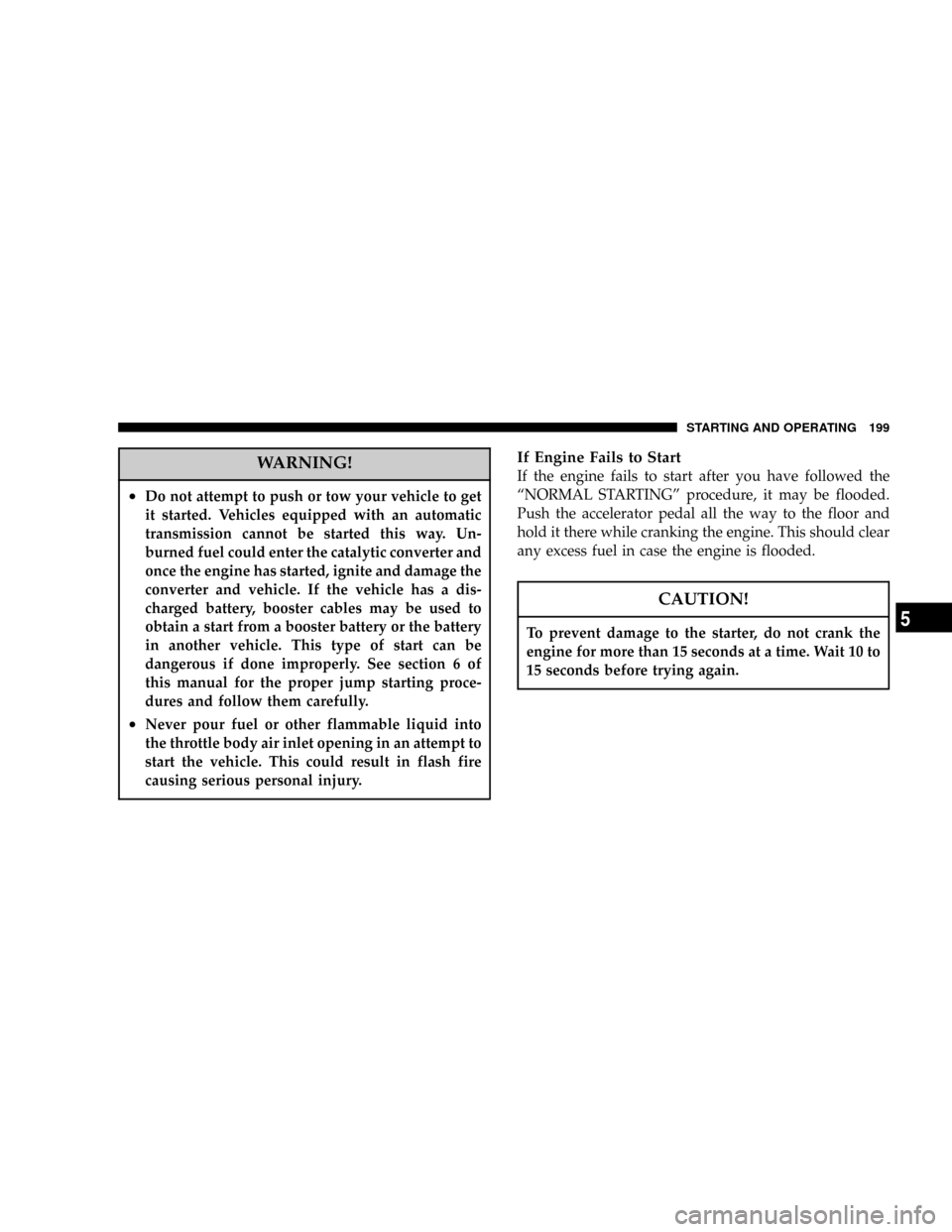
WARNING!
²Do not attempt to push or tow your vehicle to get
it started. Vehicles equipped with an automatic
transmission cannot be started this way. Un-
burned fuel could enter the catalytic converter and
once the engine has started, ignite and damage the
converter and vehicle. If the vehicle has a dis-
charged battery, booster cables may be used to
obtain a start from a booster battery or the battery
in another vehicle. This type of start can be
dangerous if done improperly. See section 6 of
this manual for the proper jump starting proce-
dures and follow them carefully.
²Never pour fuel or other flammable liquid into
the throttle body air inlet opening in an attempt to
start the vehicle. This could result in flash fire
causing serious personal injury.
If Engine Fails to Start
If the engine fails to start after you have followed the
ªNORMAL STARTINGº procedure, it may be flooded.
Push the accelerator pedal all the way to the floor and
hold it there while cranking the engine. This should clear
any excess fuel in case the engine is flooded.
CAUTION!
To prevent damage to the starter, do not crank the
engine for more than 15 seconds at a time. Wait 10 to
15 seconds before trying again.
STARTING AND OPERATING 199
5
Page 201 of 361
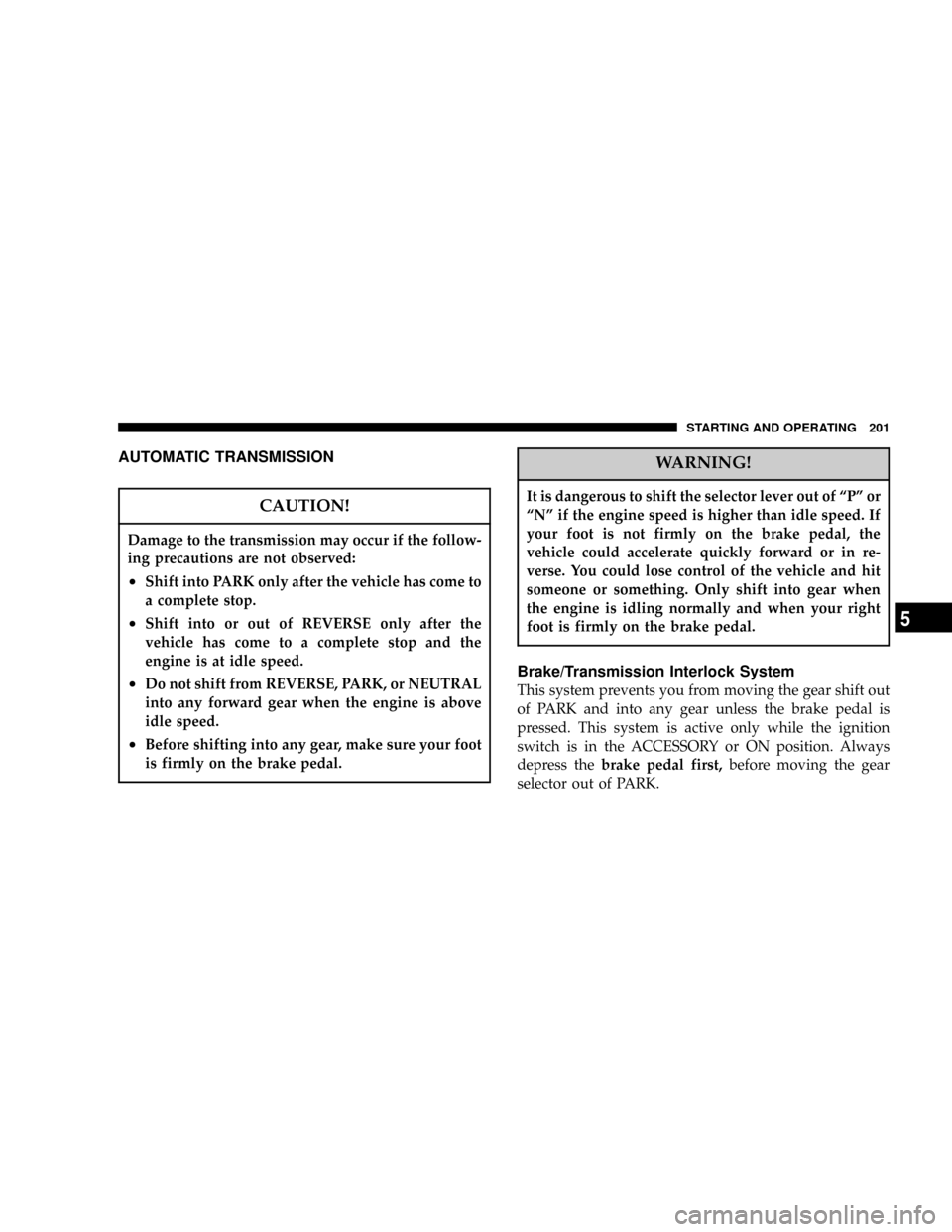
AUTOMATIC TRANSMISSION
CAUTION!
Damage to the transmission may occur if the follow-
ing precautions are not observed:
²Shift into PARK only after the vehicle has come to
a complete stop.
²Shift into or out of REVERSE only after the
vehicle has come to a complete stop and the
engine is at idle speed.
²Do not shift from REVERSE, PARK, or NEUTRAL
into any forward gear when the engine is above
idle speed.
²Before shifting into any gear, make sure your foot
is firmly on the brake pedal.
WARNING!
It is dangerous to shift the selector lever out of ªPº or
ªNº if the engine speed is higher than idle speed. If
your foot is not firmly on the brake pedal, the
vehicle could accelerate quickly forward or in re-
verse. You could lose control of the vehicle and hit
someone or something. Only shift into gear when
the engine is idling normally and when your right
foot is firmly on the brake pedal.
Brake/Transmission Interlock System
This system prevents you from moving the gear shift out
of PARK and into any gear unless the brake pedal is
pressed. This system is active only while the ignition
switch is in the ACCESSORY or ON position. Always
depress thebrake pedal first,before moving the gear
selector out of PARK.
STARTING AND OPERATING 201
5
Page 202 of 361

Automatic Transmission Ignition Interlock System
This system prevents the key from being removed unless
the shift lever is in PARK. It also prevents shifting out of
PARK unless the key is in the ACCESSORY or ON
position.
NOTE:If a malfunction occurs, the system will trap the
key in the ignition cylinder to warn you that this safety
feature is inoperable. The engine can be started and
stopped but the key cannot be removed until you obtain
service.
Four Speed Automatic Transmission
The electronically controlled transmission provides a
precise shift schedule. The transmission electronics are
self-calibrating; therefore, the first few shifts on a new
vehicle, may be somewhat abrupt. This is a normal
condition, and precision shifts will develop within a few
hundred miles.
Reset Mode - Electronic Transmission
The transmission is monitored electronically for abnor-
mal conditions. If a condition is detected that could cause
damage, the transmission automatically shifts into sec-
ond gear. The transmission remains in second gear
despite the forward gear selected. Park (P), Reverse (R),
and Neutral (N) will continue to operate. This Reset
feature allows the vehicle to be driven to a dealer for
service without damaging the transmission.
In the event that the problem has been momentary, the
transmission can be reset to regain all forward gears.
²Stop the vehicle and shift into Park (P).
²Turn the key to OFF then restart the engine.
²Shift into the desired range and resume driving.
202 STARTING AND OPERATING
Page 203 of 361

NOTE:Even if the transmission can be reset, it is
recommended that you visit a dealer at your earliest
possible convenience. Your dealer has diagnostic equip-
ment to determine if the problem could recur.
If the transmission cannot be reset, dealer service is
required.
Gear Ranges
DO NOT race the engine when shifting from PARK or
NEUTRAL positions into another gear range.
ªPº Park
Supplements the parking brake by locking the transmis-
sion. The engine can be started in this range. Never
attempt to use PARK while vehicle is in motion.
Apply parking brake when leaving vehicle in this range.
ªRº Reverse
Shift into this range only after the vehicle has come to a
complete stop.ªNº Neutral
Engine may be started in this range.
ªDº Overdrive
To be used for most city and highway driving, it provides
smoothest upshifts and downshifts and best fuel
economy. When frequent transmission shifting occurs
while using the ªDº Overdrive position, such as when
operating the vehicle under heavy loading conditions,
(i.e. in hilly terrain, traveling into strong head winds or
while towing heavy trailers), use the AutoStick mode and
select the ª3º range.
NOTE:Using the ª3º range in the AutoStick mode
while operating the vehicle under heavy operating con-
ditions will improve performance and extend transmis-
sion life by reducing excessive shifting and heat build up.
STARTING AND OPERATING 203
5
Page 204 of 361

AUTOSTICK
Autostick is a driver-interactive transmission that offers
manual gear shifting capability to provide you with more
control. Autostick allows you to maximize engine brak-
ing, eliminate undesirable upshifts and downshifts, and
improve overall vehicle performance. This system can
also provide you with more control during passing, city
driving, cold slippery conditions, mountain driving,
trailer towing, and many other situations.
Autostick Operation
The Autostick position is just below the Overdrive posi-
tion and is identified by the word ªAUTOSTICKº. When
you place the shift lever in the Autostick position, it can
be moved from side to side. Moving the lever to the left
(-) triggers a downshift and to the right (+) an upshift.
The gear position will be shown in the transmission gear
display, located in the instrument cluster.You can shift in or out of the autostick mode at any time
without taking your foot off the accelerator pedal. If you
choose the Overdrive mode, the transmission will oper-
ate automatically; shifting between the four available
gears. When you wish to engage autostick, simply move
the shift lever to the AUTOSTICK position. The transmis-
sion will remain in the current gear until an upshift or
downshift is chosen.
Move the lever back to the Overdrive position to shift out
of the Autostick mode.Autostick General Information
²
The transmission will automatically upshift from first
to second gear and from second to third gear when
engine speed reaches about 6300 RPM.
²Downshifts from third to second gear above 74 mph
(119 km/h) and from second to first gear above 41
mph (66 km/h) will be ignored.
204 STARTING AND OPERATING
Page 205 of 361

²You can start out in first, second, or third gear. Shifting
into fourth gear can occur only after vehicle speed
reaches 15 mph (24 km/h).
²The transmission will automatically downshift to first
gear when coming to a stop.
²Starting out in third gear is helpful in snowy or icy
conditions.
²While in the Autostick mode, Speed Control will only
function in third or fourth gear.
Downshifting out of third gear will turn off the speed
control.
²If the system detects powertrain overheating, the
transmission will revert to the automatic shift mode
and remain in that mode until the powertrain cools off.
²If the system detects a problem it will disable the
Autostick mode and the transmission will return to the
automatic mode until the problem is corrected.
ALL WHEEL DRIVE Ð IF EQUIPPED
This feature provides full time, on-demand, All Wheel
Drive (AWD). The system is automatic with no driver
inputs or additional driving skills required. Under nor-
mal driving conditions, the front wheels provide most of
the traction. If the front wheels begin to lose traction,
power is shifted automatically to the rear wheels. The
greater the front wheel traction loss, the greater the
power transfer to the rear wheels.
STARTING AND OPERATING 205
5
Page 207 of 361

When parking on a hill, it is important to set the parking
brake before placing the gear selector in Park, otherwise
the load on the transmission locking mechanism may
make it difficult to move the selector out of park. As an
added precaution, turn the front wheels toward the curb
on a downhill grade and away from the curb on a uphill
grade.
The parking brake should always be applied when the
driver is not in the vehicle.WARNING!
²Leaving children in a vehicle unattended is dan-
gerous for a number of reasons. A child or others
could be injured. Children should be warned not
to touch the parking brake, brake pedal or the
gear selector lever. Don't leave the keys in the
ignition. A child could operate power windows,
other controls, or move the vehicle.
²Be sure the parking brake is fully disengaged
before driving: failure to do so can lead to brake
failure, and an accident.
STARTING AND OPERATING 207
5
Page 245 of 361

Warranty Requirements
The Manufacturer's Passenger Vehicle Warranty will
apply to vehicles used to tow trailers for non-commercial
use. However the following conditions must be met:
²The maximum frontal area of the trailer cannot exceed
20 square feet (1.86 square meters).
²The trailer tongue load must be considered as part of
the combined weight of occupants and cargo, and
should never exceed the weight referenced on the Tire
and Loading Information placard. Refer to the Tire±
Safety Information Section in this manual.
²The ªDº range can be selected when towing. However,
if frequent shifting occurs while in this range, the ª3º
range must be selected.NOTE:Using the ª3º range while operating the vehicle
under heavy operating conditions will improve perfor-
mance and extend transmission life by reducing exces-
sive shifting and heat build up.
WARNING!
Connecting trailer brakes to your vehicle's hydraulic
brake lines can overload your brake system and
cause it to fail. You might not have brakes when you
need them and could have an accident.
²Do not attempt to tow a trailer while using a compact
spare tire.
²Whenever you pull a trailer, regardless of the trailer
size, stop lights and turn signals on the trailer are
recommended for motoring safety.
STARTING AND OPERATING 245
5
Page 246 of 361

²The automatic transmission fluid and filter should be
changed if you REGULARLY tow a trailer for more
than 45 minutes of continuous operation. See Schedule
ªBº in section 8 of this manual for transmission fluid
change intervals.
NOTE:
²Check the automatic transmission fluid level before
towing. Fluid discoloration, or a burnt odor, shows the
need for a transmission fluid and filter change.
²For vehicles equipped with Autostick. By using the
Autostick modes, and selecting a specific gear range,
frequent shifting can be avoided. The highest gear
range should be selected that allows for adequate
performance. For example, choose ª4º if the desired
speed can be maintained. Choose ª3º or ª2º if needed
to maintain the desired speed.
²Extended driving at high RPM should be avoided to
prevent excess heat generation. A reduction in vehiclespeed may be required to avoid extended driving at
high RPM. Return to a higher gear range or vehicle
speed when road conditions and RPM level allows.
TRAVEL CONDITION MAXIMUM TRAILER
WEIGHT(TRAILER
FRONTAL AREA NOT
TO EXCEED 32 SQ. FT.)
3.5L ENGINES
MAX. COMBINED
WEIGHT OF VEHICLE
AND TRAILER NOT TO
EXCEED 8,600 lbs (3900
kg)
UP TO 2 PERSONS &
LUGGAGE3,500 lbs (1600 kg)
3 TO 4 PERSONS &
LUGGAGE3,000 lbs (1360 kg)
5 TO 6 PERSONS &
LUGGAGE1,000 lbs (454 kg)
246 STARTING AND OPERATING