CD changer CHRYSLER PACIFICA 2004 1.G Owners Manual
[x] Cancel search | Manufacturer: CHRYSLER, Model Year: 2004, Model line: PACIFICA, Model: CHRYSLER PACIFICA 2004 1.GPages: 361, PDF Size: 5.21 MB
Page 133 of 361
UNDERSTANDING YOUR INSTRUMENT PANEL
CONTENTS
mInstruments And Controls.................136
mInstrument Cluster......................137
mInstrument Cluster Descriptions............138
mElectronic Vehicle Information Center (EVIC) . . . 145
NCustomer Programmable Features
Ð If Equipped.......................148
NCompass Display Ð If Equipped..........151
NMini-Trip Functions Ð If Equipped........153
mSetting The Analog Clock.................154mElectronic Digital Clock..................154
NClock Setting Procedure.................154
mSales Code RAHÐAM & FM Stereo Radio With CD
Player And CD/DVD Changer Controls.......155
NRadio Operation......................155
NCD Player Operation...................157
NCD/DVD Changer Operation.............159
mSales Code RBPÐAM & FM Stereo Radio With
Cassette Tape Player, CD Player, And Optional
CD/DVD Changer Controls...............1604
Page 134 of 361

NRadio Operation......................160
NTape Player Operation..................164
NCD Player Operation...................166
NCD/DVD Changer Operation Ð If Equipped . 168
m6 Disc CD/Digital Video Disc (DVD) Changer . . 170
NOperating Instructions Ð CD/DVD Changer . . 170
NEject (EJT) Button.....................171
NOperating Instructions Ð Remote Control....172
NOperating Instructions Ð Video Screen......174
NOperating Instructions Ð Headphones......175
NOperating Instructions Ð MP3 Player.......177
NOperating Instructions Ð Video
Games/Camcorders...................177mRemote Sound System Controls.............178
NRadio Operation......................178
NTape Player.........................178
NCD Player..........................179
mRadio General Information................179
NRadio Broadcast Signals.................179
NTwo Types Of Signals..................179
NElectrical Disturbances..................179
NAM Reception.......................180
NFM Reception........................180
mCassette Tape And Player Maintenance.......180
mCD/DVD Disc Maintenance...............181
mRadio Operation And Cellular Phones........182
134 UNDERSTANDING YOUR INSTRUMENT PANEL
Page 155 of 361
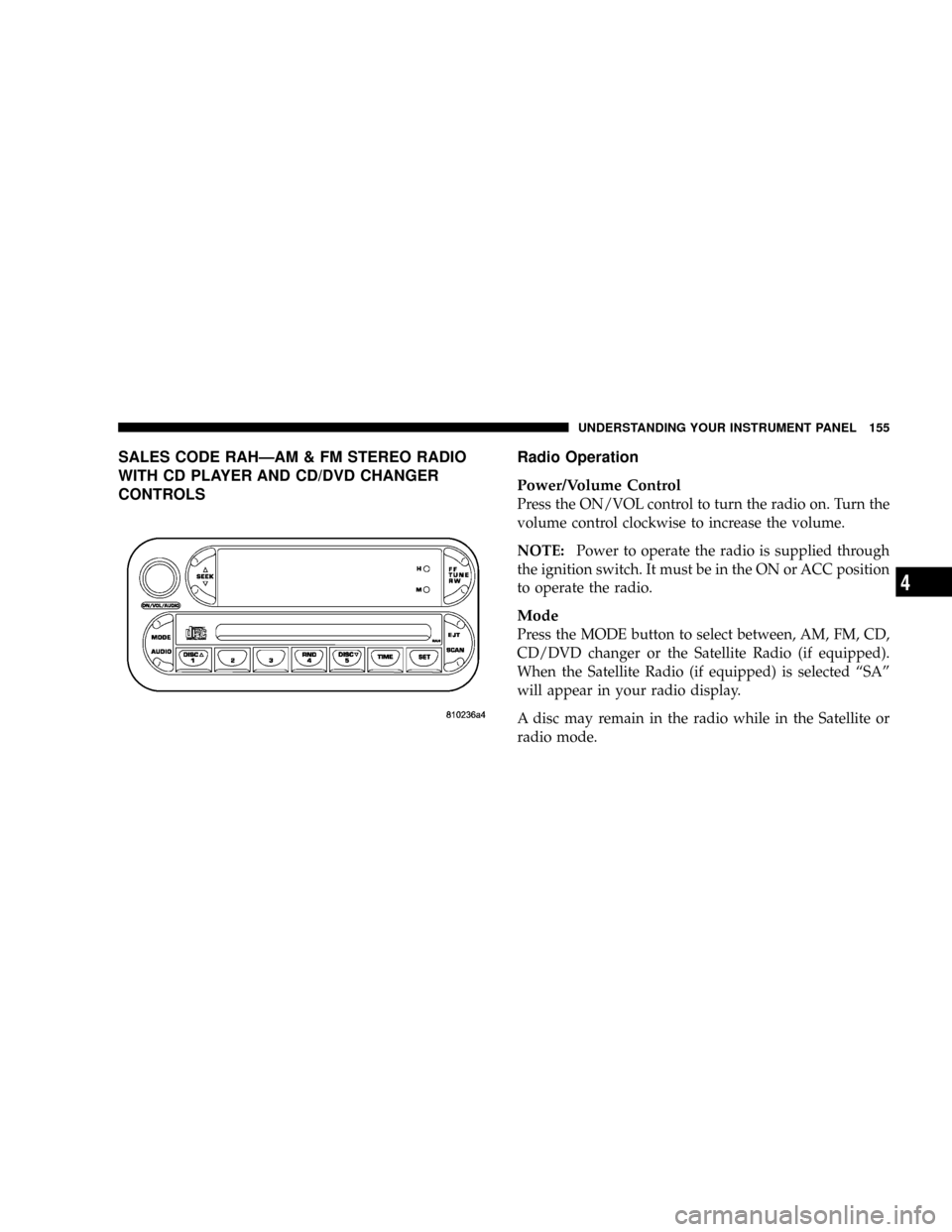
SALES CODE RAHÐAM & FM STEREO RADIO
WITH CD PLAYER AND CD/DVD CHANGER
CONTROLSRadio Operation
Power/Volume Control
Press the ON/VOL control to turn the radio on. Turn the
volume control clockwise to increase the volume.
NOTE:Power to operate the radio is supplied through
the ignition switch. It must be in the ON or ACC position
to operate the radio.
Mode
Press the MODE button to select between, AM, FM, CD,
CD/DVD changer or the Satellite Radio (if equipped).
When the Satellite Radio (if equipped) is selected ªSAº
will appear in your radio display.
A disc may remain in the radio while in the Satellite or
radio mode.
UNDERSTANDING YOUR INSTRUMENT PANEL 155
4
Page 159 of 361
RND Ð Random Play
Press the RND button while the CD is playing to activate
Random Play. This feature plays the selections on the
compact disc in random order to provide an interesting
change of pace.
Press the SEEK button to move to the next randomly
selected track.
Press TUNE FF to fast forward through the tracks. Press
the FF button a second time to stop the fast forward
feature. If TUNE RW is pressed, the current track will
reverse to the beginning of the track and begin playing.
Press the RND button a second time to stop Random
Play.
CD/DVD Changer Operation
Press the MODE button to select between the CD player
and the optional remote CD/DVD changer.
Time
Press the TIME button to change the display from
elapsed CD or DVD playing time to time of day.
UNDERSTANDING YOUR INSTRUMENT PANEL 159
4
Page 160 of 361

SALES CODE RBPÐAM & FM STEREO RADIO
WITH CASSETTE TAPE PLAYER, CD PLAYER,
AND OPTIONAL CD/DVD CHANGER CONTROLSRadio Operation
Power/Volume Control
Press the ON/VOL control to turn the radio on. Turn the
volume control to the right to increase the volume.
NOTE:Power to operate the radio is supplied through
the ignition switch. It must be in the ON or ACC position
to operate the radio.
PTY (Program Type) Button
Pressing this button once will turn on the PTY mode for
5 seconds. If no action is taken during the 5 second time
out the PTY icon will turn off. Pressing the PTY button
within 5 seconds will allow the program format type to
be selected. Many radio stations do not currently broad-
cast PTY information.
160 UNDERSTANDING YOUR INSTRUMENT PANEL
Page 167 of 361
Seek
Press the top of the SEEK button for the next selection on
the CD. Press the bottom of the button to return to the
beginning of the current selection, or return to the
beginning of the previous selection if the CD is within the
first second of the current selection.
Scan
Press the SCAN button to play 10 seconds of each
selection. Press the SCAN button a second time to cancel
this feature.
EJT CD
Press the EJT CD button and the disc will unload and
move to the entrance for easy removal. The unit will
switch to the radio mode.
If you do not remove the disc within 15 seconds, it will be
reloaded. The unit will continue in radio mode.
The disc can be ejected with the radio and ignition off.
FF/TUNE/RW
Press FF (Fast Forward) and the CD player will begin to
fast forward until FF is released. The RW (Reverse)
button works in a similar manner.
Random Play Ð RND/Program Button 4
Press the RND (button 4) button while the CD is playing
to activate Random Play. This feature plays the selections
on the compact disc in random order to provide an
interesting change of pace.
Press the top of the SEEK button to move to the next
randomly selected track.
Press the RND (button 4) button a second time to stop
Random Play.
MODE
Press the MODE button to select between the CD player,
remote CD/DVD changer (if equipped), or satellite radio
(if equipped).
UNDERSTANDING YOUR INSTRUMENT PANEL 167
4
Page 168 of 361

To select Satellite Radio (if equipped), press the MODE
button until the word SIRIUSŸ appears. The following
will be displayed in this order: After three seconds, the
current channel name and number will be displayed for
five seconds. The current program type and channel
number will then be displayed for five seconds. The
current channel name and number will then be displayed
until an action occurs. A CD or tape may remain in the
player while in the Satellite Radio mode.
Time
Press the TIME button to change the display from
elapsed CD playing time to time of day.
CD/DVD Changer Operation Ð If Equipped
MODE
Press the MODE button to select between the CD player,
and the CD/DVD changer (if equipped).
Disc Up/Program Button 1
Press the DISC (button 1) button to play the next avail-
able disc.
Random Play Ð RND/Program Button 4
Press the RND (button 4) button while the CD is playing
to activate Random Play. This feature plays the selections
on the currently playing compact disc in random order to
provide an interesting change of pace.
Press the top of the SEEK button to move to the next
randomly selected track.
Press the RND (button 4) button a second time to stop
Random Play.
168 UNDERSTANDING YOUR INSTRUMENT PANEL
Page 170 of 361

6 DISC CD/DIGITAL VIDEO DISC (DVD) CHANGER
The Rear Seat Audio/Video System allows passengers to
listen to a CD or DVD from the 6 disc CD/DVD changer
through the headphones, while the front seat passengers
listen to either AM/FM, Cassette or CDs from the radio.
A remote control is provided for functions such as
changing tracks or DVD functions, as well as selecting
discs loaded in the 6 disc CD/DVD changer while
listening to the Rear Audio/Video System.
Operating Instructions Ð CD/DVD Changer
Loading The CD/DVD Changer
The CD/DVD changer is a multi-disc changer,
and will accept up to six discs. Gently insert
one disc into the CD/DVD changer with the
label facing up. The disc will automatically be
pulled into the CD/DVD changer.
To insert additional discs into the changer, follow the
instructions shown:
1. Select and press any numbered button without an
illuminated light above it.
2. Insert the disc while the light above the chosen button
is flashing and the light below the loading slot is illumi-
nated.
3. Upon insertion, the disc will begin to play, and both
the button light and the light below the loading slot will
illuminate.
170 UNDERSTANDING YOUR INSTRUMENT PANEL
Page 171 of 361
4. Repeat the process for loading any additional CD/
DVDs. The CD/DVD changer will stop while additional
CD/DVDs are loaded.
If the volume control is ON, the unit will switch from
radio to CD/DVD mode and begin to play. The radio
display will show the chapter number and index time in
hours and minutes of the DVD, and the track number,
minutes and second of the CD. Play will begin automati-
cally in approximately 20 seconds. If the DVD does not
play automatically, press the ªENTERº button on the
remote control or on the side of the video screen to select
play from the menu options.
NOTE:
²You may eject a disc with the radio OFF. The ignition
switch must be in the ON or ACC position to insert a
disc with the radio OFF.
²If you insert a disc with the ignition ON and the radio
OFF, the DVD will automatically be pulled into the
DVD changer and the display will show the time of
day.
EJECT (EJT) Button
If there is a single disc in the changer, press the EJT
button and the disc will eject. The unit will switch to the
radio mode. If you do not remove the disc within 10
seconds, it will be reloaded and the display will show
PAUSE. The radio mode will continue to operate.
To eject additional discs from the changer, first select the
numbered button where the disc is located and then press
the EJT button.
The disc can be ejected with the radio OFF.
UNDERSTANDING YOUR INSTRUMENT PANEL 171
4
Page 173 of 361
MODE Button
No Function
SEEK Button
²
CD/DVD changer
Press the right side of the ªSEEKº button for the next
chapter or track on the disc. Press the left side to return to
the beginning of the current chapter or track. Press the
left side of the ªSEEKº button twice within 2 seconds to
return to the previous chapter or track. Each press of the
ªSEEKº button up or down will toggle through the
chapters or tracks.
FF/RW Button
²
CD/DVD changer
Press and hold ªFFº (Fast Forward) once and the CD/
DVD changer will begin to fast forward until the FF
button is released. The RW (Reverse) button works in a
similar manner.
Program Button (PROG)
No Function
Channel Button
Press this button to select between channel ªAº or
channel ªBº, or if interference is heard through the
headphones.
Remote Control Battery Service
²
To replace the batteries for the remote control slide the
cover rearward.
The replacement batteries for the remote control are two
AAA batteries.
UNDERSTANDING YOUR INSTRUMENT PANEL 173
4