radio CHRYSLER PACIFICA 2005 1.G Owner's Guide
[x] Cancel search | Manufacturer: CHRYSLER, Model Year: 2005, Model line: PACIFICA, Model: CHRYSLER PACIFICA 2005 1.GPages: 420, PDF Size: 5.83 MB
Page 195 of 420
Program Type Radio Display
Rock Rock
Soft Soft
Soft Rock Soft Rck
Soft Rhythm and Blues Soft R&B
Sports Sports
Talk Talk
Top 40 Top 40
Weather Weather
By pressing the SEEK button when the PTY icon is
displayed, the radio will be tuned to the next frequency
station with the same selected PTY name. The PTY
function only operates when in the FM and Satellite (if
equipped) modes.
The radio display will flash“SEEK”and the selected PTY
program type when searching for the next PTY station. If
no station is found with the selected PTY program type,
the radio will return to the last preset station.If a preset button is activated while in the PTY (Program
Type) mode, the PTY mode will be exited and the radio
will tune to the preset station.
Pressing PTY, then SCAN will scan the FM Band and stop
at all RDS stations that broadcast the station type. Each
RDS station will be played for a 5 second scan once
around the FM Band and stop at the last station. The PTY
icon will then turn off.
Seek
Press and release the SEEK button to search for the next
station in either the AM or FM mode. Press the top of the
button to seek up and the bottom to seek down. The
radio will remain tuned to the new station until you
make another selection. Holding the button in will by-
pass stations without stopping until you release it.
UNDERSTANDING YOUR INSTRUMENT PANEL 195
4
Page 196 of 420

Scan
Press and release the SCAN button to search for the next
station in either the AM or FM mode. The radio will
pause for 5 seconds at each listenable station before
continuing to the next. To stop the search, press the
SCAN button a second time.
Tune
Press the TUNE control up or down to increase or
decrease the frequency. If you press and hold the button,
the radio will continue to tune until you release the
button. The frequency will be displayed and continu-
ously updated while the button is pressed.
Balance—BAL
The Balance control adjusts the left-to-right speaker bal-
ance. Press the BAL button in and it will pop out. Adjust
the balance and push the button back in.
Fade
The Fade control provides for balance between the front
and rear speakers. Press the FADE button in and it will
pop out. Adjust the balance and push the button back in.
Tone Control
The tone controls affect the BASS and TREBLE frequency
bands. Each is controlled by a slider control with a detent
at the mid position. Moving a control up or down
increases or decreases amplification of the band. The mid
position provides a balanced output.
AM/FM Selection
Press the AM/FM button to toggle between AM and FM
mode. The operating mode will be displayed next to the
station frequency. The display will show“ST”when a
stereo station is received (FM only).
To Set The Radio Push-Button Memory
When you are receiving a station that you wish to
commit to push-button memory, press the SET button.
196 UNDERSTANDING YOUR INSTRUMENT PANEL
Page 197 of 420
SET 1 will now show in the display window. Select the
“1–5”button you wish to lock onto this station and press
and release that button. If a button is not selected within
5 seconds after pressing the SET button, the station will
continue to play but will not be locked into push-button
memory.
You may add a second station to each push-button by
repeating the above procedure with this exception: Press
the SET button twice and SET 2 will show in the display
window. Each button can be set for SET 1 and SET 2 in
both AM and FM. This allows a total of 10 AM and 10 FM
stations to be locked into push-button memory. The
stations stored in SET 2 memory can be selected by
pressing the push-button twice.
Time
Press the TIME button to change the display between
radio frequency and time.To set the clock, use a ballpoint pen or similar object to
press the hour (H) or minute (M) buttons on the radio,
The time setting will increase each time you press the
button. Press any other button to exit from the clock
setting mode.
General Information
This radio complies with Part 15 of FCC rules and with
RSS-210 of Industry Canada. Operation is subject to the
following conditions:
1. This device may not cause harmful interference,
2. This device must accept any interference received,
including interference that may cause undesired opera-
tion.
NOTE:Changes or modifications not expressively ap-
proved by the party responsible for compliance could
void the user’s authority to operate the equipment.
UNDERSTANDING YOUR INSTRUMENT PANEL 197
4
Page 199 of 420
Rewind—RW
Press the RW button down momentarily to reverse the
tape direction. The tape will rewind until the button is
pressed again or until the beginning of the tape is
reached. At the beginning of the tape, the tape will play
in the opposite direction.
EJT Tape
Press the EJT TAPE button and the cassette will disen-
gage and eject from the radio.
Metal Tape Selection (70µs)
If a standard 70 µ (metal) tape is inserted into the player,
the player will automatically select the correct equaliza-
tion.
Pinch Roller Release
If ignition power or the radio ON/OFF switch are turned
off, the pinch roller will automatically retract to protectthe tape from any damage. When power is restored to the
tape player, the pinch roller will automatically reengage
and the tape will resume play.
Dolby Noise Reduction
The Dolby Noise Reduction System* is on when-
ever the tape player is on, but may be switched
on/off.
To turn the Dolby Noise Reduction System on/off: Press
the Dolby NR button (button 2) after you insert the tape.
The NR light in the display will go off when the Dolby
System is off.
*”Dolby”noise reduction manufactured under license
from Dolby Laboratories Licensing Corporation. Dolby
and the double-D symbol are trademarks of Dolby Labo-
ratories Licensing Corporation.
UNDERSTANDING YOUR INSTRUMENT PANEL 199
4
Page 200 of 420

CD Player Operation
NOTE:The ignition switch must be in the ON or ACC
position and the volume control ON before the CD player
will operate.
Inserting The Compact Disc
You may either insert or eject a disc with the radio OFF.
If you insert a disc with the ignition ON and the radio off,
the display will show CD and the time of day will be
displayed.
If the power is on, the unit will switch from radio to CD
mode and begin to play when you insert the disc. The
display will show the track number and index time in
minutes and seconds. Play will begin at the start of track
one.
Seek
Press the top of the SEEK button for the next selection on
the CD. Press the bottom of the button to return to the
beginning of the current selection, or return to the
beginning of the previous selection if the CD is within the
first second of the current selection.
Scan
Press the SCAN button to play 10 seconds of each
selection. Press the SCAN button a second time to cancel
this feature.
EJT CD
Press the EJT CD button and the disc will unload and
move to the entrance for easy removal. The unit will
switch to the radio mode.
If you do not remove the disc within 15 seconds, it will be
reloaded. The unit will continue in radio mode.
The disc can be ejected with the radio and ignition off.
200 UNDERSTANDING YOUR INSTRUMENT PANEL
Page 201 of 420
FF/TUNE/RW
Press FF (Fast Forward) and the CD player will begin to
fast forward until FF is released. The RW (Reverse)
button works in a similar manner.
Random Play—RND/Program Button 4
Press the RND (button 4) button while the CD is playing
to activate Random Play. This feature plays the selections
on the compact disc in random order to provide an
interesting change of pace.
Press the top of the SEEK button to move to the next
randomly selected track.
Press the RND (button 4) button a second time to stop
Random Play.
MODE
Press the MODE button to select between the CD player,
remote CD/DVD changer (if equipped), or satellite radio
(if equipped).To select Satellite Radio (if equipped), press the MODE
button until the word SIRIUS™appears. The following
will be displayed in this order: After three seconds, the
current channel name and number will be displayed for
five seconds. The current program type and channel
number will then be displayed for five seconds. The
current channel name and number will then be displayed
until an action occurs. A CD or tape may remain in the
player while in the Satellite Radio mode.
Time
Press the TIME button to change the display from
elapsed CD playing time to time of day.
CD/DVD Changer Operation—If Equipped
MODE
Press the MODE button to select between the CD player,
and the CD/DVD changer (if equipped).
UNDERSTANDING YOUR INSTRUMENT PANEL 201
4
Page 203 of 420
6 DISC CD/DVD CHANGER (RDV)—IF EQUIPPED
The Rear Seat Audio/Video System allows passengers to
listen to a CD or DVD from the 6 disc CD/DVD changer
through wireless headphones, while the front seat pas-
sengers listen to either AM/FM, Cassette or CDs from the
radio speakers. A remote control is provided for func-
tions such as changing tracks or DVD functions, as well
as selecting discs loaded in the 6 disc CD/DVD changer
while listening to the Rear Audio/Video System.
The Rear Seat Audio/Video System may be available in a
base and premium version. The premium version in-
cludes a six disc changer, remote control and two sets of
wireless headphones. The base version includes a single
disc changer and remote control.
The CD/DVD Changer will play CD-R, CD-RW, CD-
Audio and DVD Video disc formats.
NOTE:The ignition switch must be in the ON or ACC
position before the CD/DVD changer will operate.
Operating Instructions—CD/DVD Changer
Loading The CD/DVD Changer
The premium version has a multi-disc changer,
and will accept up to six discs. The base
version is a single-disc changer, and will only
accept one disc.
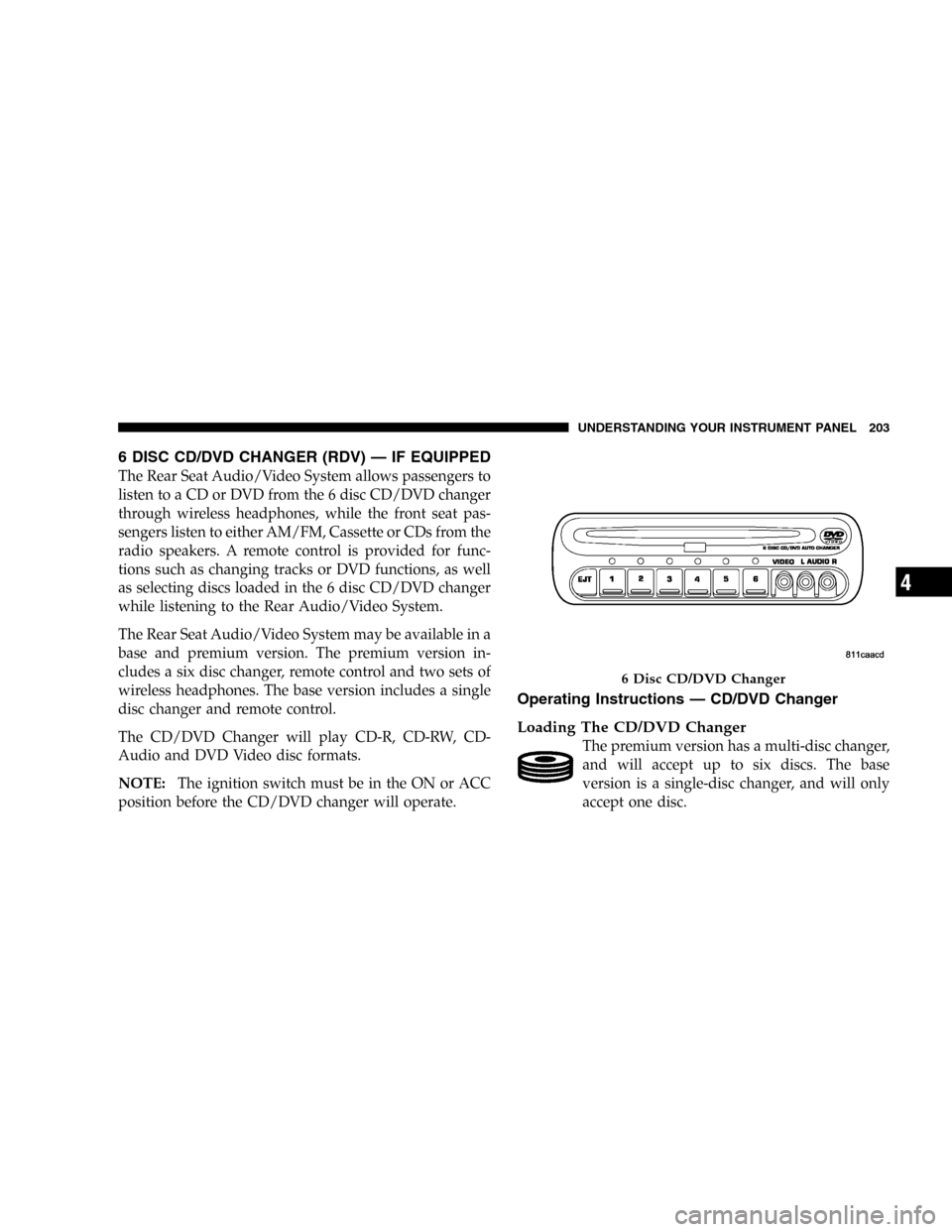
6 Disc CD/DVD Changer
UNDERSTANDING YOUR INSTRUMENT PANEL 203
4
Page 204 of 420

To insert disc(s) into the changer, follow the instructions
shown:
1. On vehicles equipped with the premium version,
select and press any numbered button without an illumi-
nated light above it.
2. Gently insert the disc with the label facing up while
the light below the loading slot is illuminated. On
vehicles equipped with the premium version the light
above the chosen button will also be flashing, indicating
which numbered position the disc will be loaded into.
The disc will automatically be pulled into the CD/DVD
changer.
3. Upon insertion, the disc will begin to play, and the
light below the loading slot will turn off. On vehicles
equipped with the premium version the light above the
chosen button will remain illuminated.4. Repeat the process for loading any additional CD/
DVDs into the premium version multi-disc changer. The
CD/DVD changer will stop while additional CD/DVDs
are loaded.
If the radio volume control is ON, the unit will switch
from radio to CD/DVD mode. If the DVD supports the
autoplay feature, play will begin automatically in ap-
proximately 10 seconds, after the DVD disc menu is
displayed. If the DVD does not play automatically, press
the ENTER button on the remote control or on the side of
the video screen to select play from the menu options.
The radio display will show the chapter number and
index time in hours and minutes of the DVD, or the track
number, minutes and second of the CD.
NOTE:
•You may eject a disc with the radio OFF.
204 UNDERSTANDING YOUR INSTRUMENT PANEL
Page 205 of 420
•If you insert a disc with the ignition ON and the radio
OFF, the DVD will automatically be pulled into the
DVD changer and the display will show the time of
day.
•It is recommended to label home made burned discs
with a permanent marker instead of adhesive labels.
These types of labels may become loose and cause the
disc to be stuck in the DVD player. This may cause
permanent damage to the DVD mechanism.
EJECT (EJT) Button
If there is a disc in the changer, press the EJT button and
the disc will eject. If you do not remove the disc within 10
seconds, it will be reloaded and the display will show
PAUSE. The radio mode will continue to operate.To eject additional discs from the premium version
multi-disc changer, first select the numbered button
where the disc is located and then press the EJT button.
The disc can be ejected with the radio OFF.
Operating Instructions—Remote Control
NOTE:Aim the remote control at the DVD changer
located on the center of the instrument panel and press
the desired button. Direct sunlight or objects blocking the
line of sight may affect the function of the remote control.
UNDERSTANDING YOUR INSTRUMENT PANEL 205
4
Page 207 of 420
Remote Control Buttons
17. Enter
18. Light
Headphone Transmitter Button (1)
After a disc is inserted into the DVD changer, both the
headphone transmitter button (1) on the remote control
and the power button on the headphones must be turned
ON before sound can be heard from the headphones. On
some radios the headphone symbol will flash for ap-
proximately 5 seconds in the radio display, indicating the
headphones are in use.
ARROW Buttons (2, 3, 15, 16)
These buttons only function in DVD video mode. Use the
arrow buttons to toggle through the DVD disc menu
screen options.
RTN Button (4)
This button only functions in DVD video mode. Press this
button to return to the previous menu when in the DVD
disc menu mode.
SETUP Button (5)
This button only functions in DVD video mode. Press the
button after pressing the STOP button to access the DVD
changer set up menu. Use the right and left arrows to
move between tabs for language, rating, mark, audio and
aspect. Use the up and down arrows to move between
options within each tab.
To change an item highlighted in blue, press ENTER. This
should cause the highlight to turn yellow. Again, using
the up and down arrows will cause the arrow to move up
or down. Once the arrow is on the desired selection, press
ENTER. When finished, press setup or play to return to
playing the DVD or Menu to return to the DVD disc
menu.
UNDERSTANDING YOUR INSTRUMENT PANEL 207
4