lock CHRYSLER PACIFICA 2007 1.G Owner's Guide
[x] Cancel search | Manufacturer: CHRYSLER, Model Year: 2007, Model line: PACIFICA, Model: CHRYSLER PACIFICA 2007 1.GPages: 464, PDF Size: 5.92 MB
Page 52 of 464
WARNING!
•Do not put anything on or around the airbag covers
or attempt to manually open them. You may damage
the airbags and you could be injured because the
airbags are not there to protect you. These protec-
tive covers for the airbag cushions are designed to
open only when the airbags are inflating.
•If your vehicle is equipped with left and right
window bags, do not stack luggage or other cargo up
high enough to block the location of the side curtain
airbag. The area where the side curtain airbag is
located should remain free from any obstructions.
•If your vehicle is equipped with left and right
window bags, do not have any accessory items
installed which will alter the roof, including adding
a sunroof to your vehicle. Do not add roof racks that
require permanent attachments (bolts or screws) for
installation on the vehicle roof. Do not drill into the
roof of the vehicle for any reason.
NOTE:Do not use a clothing bar mounted to the coat
hooks in this vehicle. A clothing bar will impede the
proper performance of the window bags.
Front airbags, along with seat belts, and front seat belt
buckle pretensioners, work with the instrument panel
knee blockers to provide improved protection for the
driver and front passenger. Left and right window bags
also work with seat belts to improve occupant protection.
The seat belts are designed to protect you in many types
of collisions. The front airbags deploy in moderate to
severe frontal collisions.
NOTE:The passenger front airbag may not deploy even
when the driver front airbag has if the Occupant Classi-
fication System (refer to “Occupant Classification Sys-
tem” in this section) has determined the seat is empty or
is occupied by a child.
52 THINGS TO KNOW BEFORE STARTING YOUR VEHICLE
Page 55 of 464
Airbag System Components
The airbag system consists of the following:
•Occupant Restraint Controller (ORC)
•AIRBAG Light
•Driver Airbag
•Front Passenger Airbag
•Supplemental Side Curtain Airbags (If Equipped)
•Front Impact Sensors
•Side Impact Sensors (If Equipped)
•Steering Wheel and Column
•Instrument Panel
•Interconnecting Wiring
•Seat Belt Reminder Light
•Knee Impact Bolster
•Driver Inflatable Knee Blocker
•Front Passenger Seat Occupant Classification System
(OCS) — If Equipped
Occupant Classification Module
Passenger Airbag Disabled (PAD) Indicator Light
Interconnecting Wiring
Bladder Assembly
Belt Tension Sensor
•Front Seat Belt Buckle Pretensioners
THINGS TO KNOW BEFORE STARTING YOUR VEHICLE 55
2
Page 58 of 464
about 30 milliseconds (about one quarter of the time it
takes to blink your eyes) with enough force to injure
you if you are not belted and seated properly, or if
items are positioned in the area where the window bag
inflates. This especially applies to children. The win-
dow bag is only about 3
12inches (9 cm) thick when it
is inflated.
•When the ORC and the impact sensors detect a
collision requiring theDriver Inflatable Knee
Blocker,it signals the inflator unit. A quantity of
nontoxic gas is generated to inflate the Driver Inflat-
able Knee Blocker. The Driver Inflatable Knee Blocker
inflates rearward towards the driver’s knees to help
protect the knees and position you for the best inter-
action with the front airbag. The Driver Inflatable
Knee Blocker fully inflates in about 50 milliseconds,
this is only about half of the time it takes you to blink
your eyes. It then quickly deflates while helping to
protect the driver’s knees.
•TheKnee Impact Bolstershelp protect the knees, and
position everyone for the best interaction with the
front airbag.
•If your vehicle contains a Passenger Airbag Disable
indicator light, it will be equipped with theOccupant
Classification System (OCS).The OCS system will
classify an occupant into a size category based on
sensor readings from within the seat cushion. Occu-
pants should try to remain in a normally seated
position. If the occupant’s weight is transferred to
another object in the vehicle (i.e. feet on the dash-
board), the OCS may not be able to properly approxi-
mate occupant size. Furthermore, the occupant size
may appear to increase or decrease due to objects
hanging on the seat, other passengers pushing on the
seat, or objects lodged underneath the seat.
58 THINGS TO KNOW BEFORE STARTING YOUR VEHICLE
Page 64 of 464
WARNING!
Deployed airbags, front seat belt buckle pretension-
ers and driver inflatable knee blocker cannot protect
you in another collision. Have the airbags, front seat
belt buckle pretensioners and driver inflatable knee
blocker replaced by an authorized dealer as soon as
possible. Also, have the Occupant Classification
System serviced as well.
Enhanced Accident Response
If the airbags and seat belt pretensioners deploy after an
impact and the electrical system remains functional,
vehicles equipped with power door locks will unlock
automatically. In addition, approximately 10 seconds
after the vehicle has stopped moving, the interior lights
will illuminate until the ignition switch is turned off.
Maintaining Your Airbag System
WARNING!
•Modifications to any part of the airbag system could cause
it to fail when you need it. You could be injured because
the airbags are not there to protect you. Do not modify the
components or wiring, including adding any kind of
badges or stickers to the steering wheel hub trim cover or
the upper right side of the instrument panel. Do not
modify the front bumper, vehicle body structure, or frame.
•Do not attempt to modify any part of your advanced airbag
system. The airbag may inflate accidentally or may not
function properly if modifications are made. Take your
vehicle to an authorized dealer for any advanced airbag
system service. If your seat including your trim cover and
cushion needs to be serviced in any way (including re-
moval or loosening/tightening of seat attachment bolts),
take the vehicle to your authorized dealer. Only manufac-
turer approved seat accessories may be used. If it is
necessary to modify an advanced airbag system for per-
sons with disabilities, contact your authorized dealer.
64 THINGS TO KNOW BEFORE STARTING YOUR VEHICLE
Page 65 of 464
WARNING!
•You need proper knee impact protection in a
collision. Do not mount or locate any aftermarket
equipment on or behind the knee bolsters.
•It is dangerous to try to repair any part of the
airbag system yourself. Be sure to tell anyone who
works on your vehicle that it has airbags.
Airbag Light
You will want to have the airbags ready to
inflate for your protection in a collision. While
the airbag system is designed to be mainte-
nance free, if any of the following occurs, have
an authorized dealer service the system immediately.
•The AIRBAG light does not come on or flickers during
the 6 to 8 seconds when the ignition switch is first
turned on.
•The light remains on or flickers after the 6 to 8 second
interval.
•The light flickers or comes on and remains on while
driving.
NOTE:If the speedometer, tachometer or any engine
related gauges are not working, the airbag control mod-
ule may also be disabled. The airbags may not be ready
to inflate for your protection. Promptly check fuse block
for blown fuses. Refer to the label located on the inside of
the fuse block cover for the proper airbag fuses. See your
dealer if the fuse is good.
Event Data Recorder (EDR)
In the event of an airbag deployment, your vehicle is
designed to record up to 2-seconds of specific vehicle
data parameters (see list below) in an event data recorder
prior to the moment of airbag deployment. Please note
that such data are ONLY recorded if an airbag deploys,
and are otherwise unavailable. In conjunction with other
THINGS TO KNOW BEFORE STARTING YOUR VEHICLE 65
2
Page 70 of 464
and use the lap belt. Never allow a child to put the
shoulder belt under an arm or behind their back.
NOTE:For additional information, refer to
www.seatcheck.org or call 1-866-SEATCHECK.
WARNING!
•Improper installation can lead to failure of an
infant or child restraint. It could come loose in a
collision. The child could be badly injured or
killed. Follow the manufacturer’s directions ex-
actly when installing an infant or child restraint.
•A rearward facing child restraint should only be
used in a rear seat. A rearward facing child re-
straint in the front seat may be struck by a
deploying passenger airbag which may cause se-
vere or fatal injury to the infant.
Here are some tips on getting the most out of your child
restraint:
•Before buying any restraint system, make sure that it
has a label certifying that it meets all applicable Safety
Standards. We also recommend that you make sure
that you can install the child restraint in the vehicle
where you will use it, before you buy it.
•The restraint must be appropriate for your child’s
weight and height. Check the label on the restraint for
weight and height limits.
•Carefully follow the instructions that come with the
restraint. If you install the restraint improperly, it may
not work when you need it.
The passenger seat belts are equipped with cinching
latch plates, which are designed to keep the lap
portion tight around the child restraint so that it is not
necessary to use a locking clip. Pulling up on the
70 THINGS TO KNOW BEFORE STARTING YOUR VEHICLE
Page 76 of 464
WARNING!
An incorrectly anchored tether strap could lead to
increased head motion and possible injury to the
child. Use only the anchor positions directly behind
the child seat to secure a child restraint top tether
strap.
Automatic-Locking Retractor (ALR)
The center seating position on vehicles equipped with a
second row bench seat is equipped with an Automatic-
Locking Retractor (ALR). Pull the belt from the retractor
until there is enough to allow you to pass through the
child restraint and slide the latch plate into the buckle.
Then pull on the belt until it is all removed from the
retractor. Allow the belt to return into the retractor,
pulling on the excess webbing to tighten the lap portion
about the child restraint. Follow the instructions of the
child restraint manufacturer.NOTE:To reset this feature you must let all of the belt
webbing return into the retractor. You will not be able to
pull out more webbing until all of the webbing has been
returned back into the retractor.
Installing A Child Restraint
We urge that you carefully follow the directions of the
manufacturer when installing your child restraint. Many,
but not all, restraint systems will be equipped with
separate straps on each side, with each having a hook or
connector and a means for adjusting the tension in the
strap. Forward-facing toddler restraints and some
rearward-facing infant restraints will also be equipped
with a tether strap, a hook and means for adjusting the
tension in the strap.
In general, you will first loosen the adjusters on the lower
straps and tether straps so that you can more easily attach
the hook or connector to the lower anchorages and tether
76 THINGS TO KNOW BEFORE STARTING YOUR VEHICLE
Page 119 of 464
WARNING!
Do not ride with the seatback reclined so that the
shoulder belt is no longer resting against your chest.
In a collision you could slide under the seat belt and
be seriously or fatally injured. Use the recliner only
when the vehicle is parked.
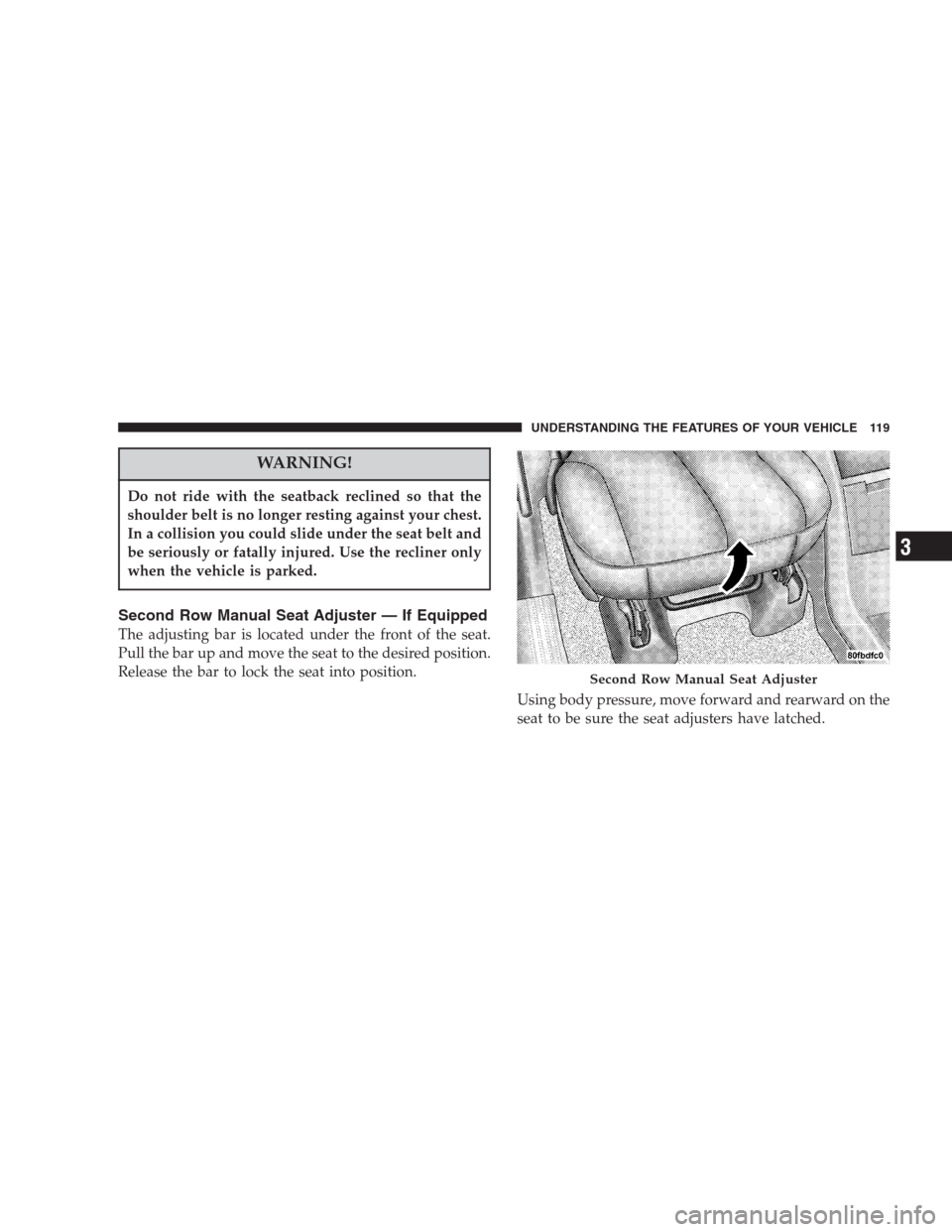
Second Row Manual Seat Adjuster — If Equipped
The adjusting bar is located under the front of the seat.
Pull the bar up and move the seat to the desired position.
Release the bar to lock the seat into position.
Using body pressure, move forward and rearward on the
seat to be sure the seat adjusters have latched.
Second Row Manual Seat Adjuster
UNDERSTANDING THE FEATURES OF YOUR VEHICLE 119
3
Page 127 of 464
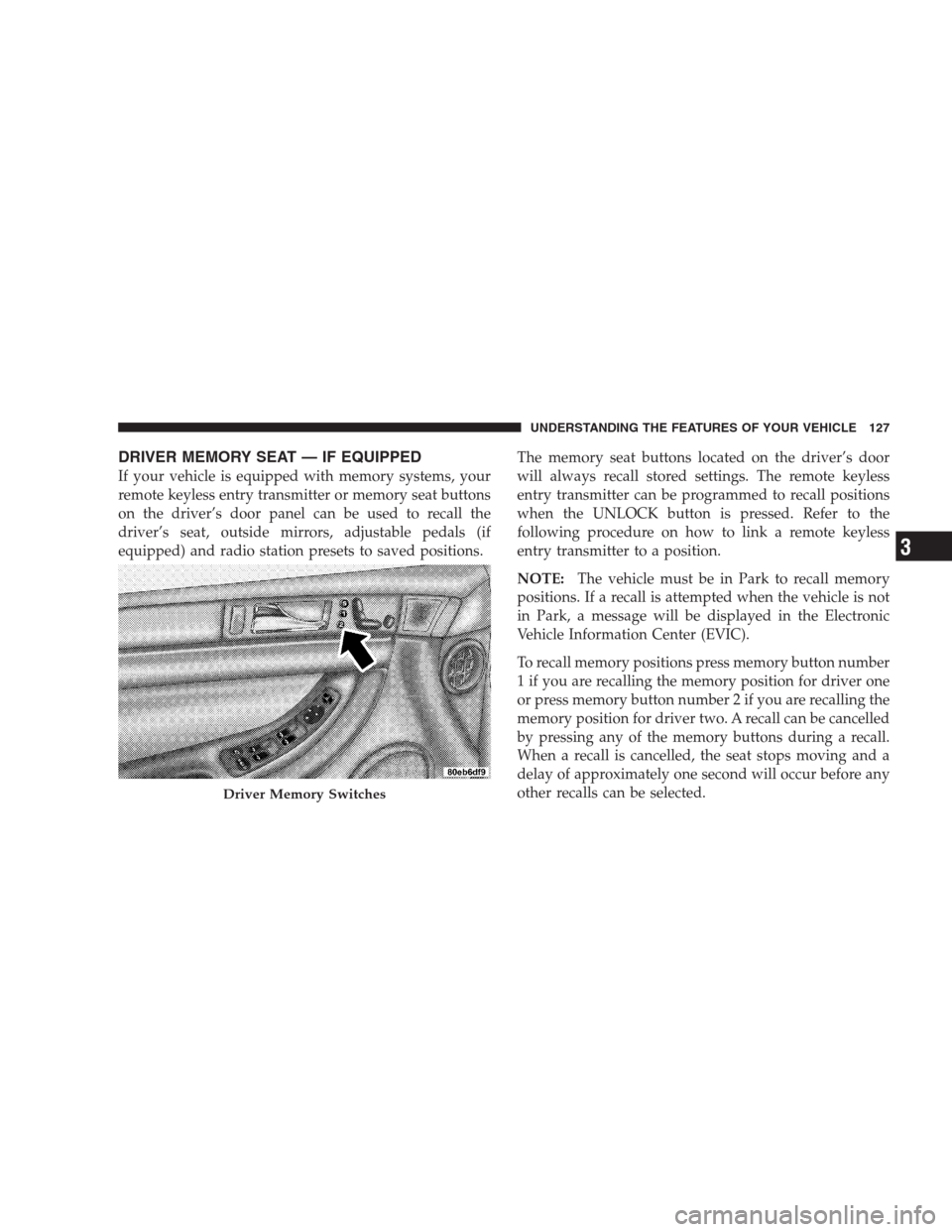
DRIVER MEMORY SEAT — IF EQUIPPED
If your vehicle is equipped with memory systems, your
remote keyless entry transmitter or memory seat buttons
on the driver’s door panel can be used to recall the
driver’s seat, outside mirrors, adjustable pedals (if
equipped) and radio station presets to saved positions.The memory seat buttons located on the driver’s door
will always recall stored settings. The remote keyless
entry transmitter can be programmed to recall positions
when the UNLOCK button is pressed. Refer to the
following procedure on how to link a remote keyless
entry transmitter to a position.
NOTE:The vehicle must be in Park to recall memory
positions. If a recall is attempted when the vehicle is not
in Park, a message will be displayed in the Electronic
Vehicle Information Center (EVIC).
To recall memory positions press memory button number
1 if you are recalling the memory position for driver one
or press memory button number 2 if you are recalling the
memory position for driver two. A recall can be cancelled
by pressing any of the memory buttons during a recall.
When a recall is cancelled, the seat stops moving and a
delay of approximately one second will occur before any
other recalls can be selected.
Driver Memory Switches
UNDERSTANDING THE FEATURES OF YOUR VEHICLE 127
3
Page 128 of 464
Your vehicle has been delivered with two remote keyless
entry transmitters. One or both transmitters can be linked
to either memory position. Up to eight remote keyless
entry transmitters can be used with your vehicle. The
memory seat system can also accommodate up to eight
transmitters linked to either of the two stored seat
positions or any combination of the two positions.
To Program Memory Seat Buttons & RKE
Transmitters, Follow These Steps:
1. Turn the ignition switch to the ON position.
2. Select Remote Linked to Memory from the EVIC and
enter “Yes”.
3. Use the seat, mirror and adjustable pedal switches to
adjust the seat, recliner, side view mirrors and adjustable
pedals to the desired positions.
4. Set the radio station presets.5. Turn the ignition switch to the OFF position and
remove the key.
6. Press and release the SET (S) button located on the
driver’s door. A light in the button will flash telling you
that you are in the set memory mode. You have five
seconds to complete the next step.
7. Within 5 seconds, press and release button 1 or 2 on
the driver’s door. A chime will sound signaling you that
the driver memory has been set. A message will also be
displayed in the Electronic Vehicle Information Center
(EVIC), indicating a position has been set.
8. Within 5 seconds, press and release the LOCK button
on one of the Remote Keyless Entry Transmitters. A
chime will sound signaling you that the transmitter has
been successfully linked. A message will also be dis-
played in the Electronic Vehicle Information Center
(EVIC), indicating the transmitter has been linked.
128 UNDERSTANDING THE FEATURES OF YOUR VEHICLE