audio CHRYSLER PACIFICA 2008 1.G User Guide
[x] Cancel search | Manufacturer: CHRYSLER, Model Year: 2008, Model line: PACIFICA, Model: CHRYSLER PACIFICA 2008 1.GPages: 457, PDF Size: 6.7 MB
Page 224 of 457

no station is found with the selected PTY program type,
the radio will return to the last preset station.
If a preset button is activated while in the PTY (Program
Type) mode, the PTY mode will be exited and the radio
will tune to the preset station.
Mode
Press the MODE button to select between, AM, FM, CD,
CD/DVD changer or the Satellite Radio (if equipped).
When the Satellite Radio (if equipped) is selected ªSAº
will appear in your radio display.
A disc may remain in the radio while in the Satellite or
radio mode.
Seek
Press and release the SEEK button to search for the next
station in either the AM, FM or Satellite mode. Press the
top of the button to seek up and the bottom to seek down.
The radio will remain tuned to the new station until youmake another selection. Holding the button in will by-
pass stations without stopping until you release it.
Tuning
Press the TUNE control up or down to increase or
decrease the frequency. If you press and hold the button,
the radio will continue to tune until you release the
button. The frequency will be displayed and continu-
ously updated while the button is pressed.
Balance
The Balance control adjusts the left-to-right speaker bal-
ance. Press the AUDIO button, select BALANCE, then
press SEEK + or SEEK2to adjust the balance.
Fade
The Fade control provides for balance between the front
and rear speakers. Press the AUDIO button, select FADE,
then press SEEK + or SEEK2to adjust the fade balance.
224 UNDERSTANDING YOUR INSTRUMENT PANEL
Page 225 of 457

Tone Control
The Bass and/or Treble controls sound for the desired
tone. Press the AUDIO button, select Bass or TREBLE,
then press SEEK + or SEEK2to increase or decrease
amplification of the band.
To Set The Radio Push-Button Memory
When you are receiving a station that you wish to
commit to push-button memory, press the SET button.
SET 1 will show in the display window. Select the
push-button you wish to lock onto this station and press
and release that button. If a station is not selected within
5 seconds after pressing the SET button, the station will
continue to play but will not be locked into push-button
memory.
You may add a second station to each push-button by
repeating the above procedure with this exception: Press
the SET button twice and SET 2 will show in the display
window. Each button can be set for SET 1 and SET 2 inboth AM and FM. This allows a total of 10 AM and 10 FM
stations to be locked into memory. You can recall the
stations stored in SET 2 memory by pressing the push-
button twice.
To Change From Clock To Radio Mode
Press the TIME button to change the display between
radio frequency and time.
General Information
This radio complies with Part 15 of FCC rules and with
RSS-210 of Industry Canada. Operation is subject to the
following conditions:
1. This device may not cause harmful interference,
2. This device must accept any interference received,
including interference that may cause undesired opera-
tion.
UNDERSTANDING YOUR INSTRUMENT PANEL 225
4
Page 229 of 457
CD audio tracks and computer files (including MP3 files).
Discs created with an option such as9keep disc open after
writing9are most likely multi-session discs. The use of
multi-session for CD audio or MP3 playback may result
in longer disc loading times.
Supported MP3 file formats
The radio will recognize only files with the *.mp3 exten-
sion as MP3 files. Non-MP3 files named with the *.mp3
extension may cause playback problems. The radio is
designed to recognize the file as an invalid MP3 and will
not play the file.
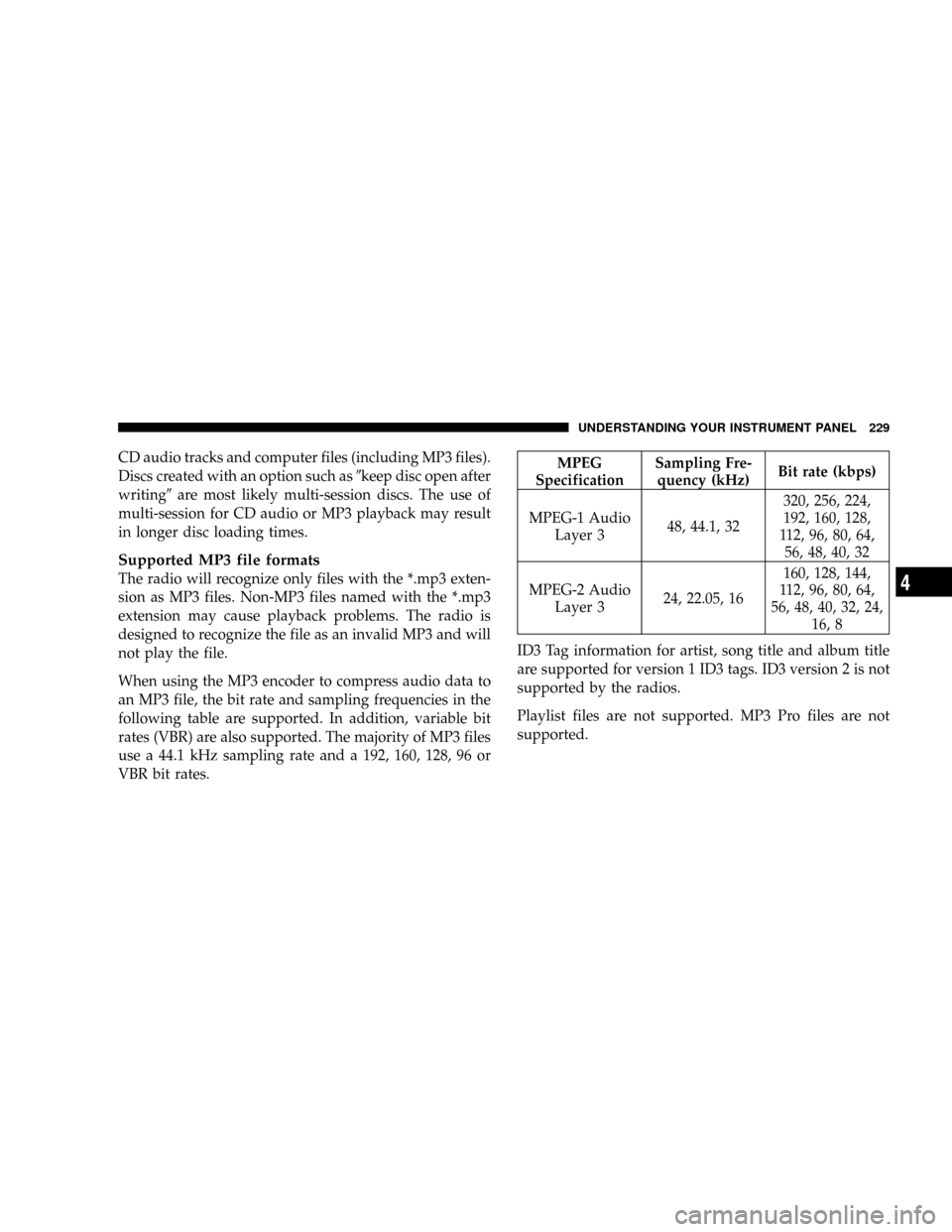
When using the MP3 encoder to compress audio data to
an MP3 file, the bit rate and sampling frequencies in the
following table are supported. In addition, variable bit
rates (VBR) are also supported. The majority of MP3 files
use a 44.1 kHz sampling rate and a 192, 160, 128, 96 or
VBR bit rates.
MPEG
SpecificationSampling Fre-
quency (kHz)Bit rate (kbps)
MPEG-1 Audio
Layer 348, 44.1, 32320, 256, 224,
192, 160, 128,
112, 96, 80, 64,
56, 48, 40, 32
MPEG-2 Audio
Layer 324, 22.05, 16160, 128, 144,
112, 96, 80, 64,
56, 48, 40, 32, 24,
16, 8
ID3 Tag information for artist, song title and album title
are supported for version 1 ID3 tags. ID3 version 2 is not
supported by the radios.
Playlist files are not supported. MP3 Pro files are not
supported.
UNDERSTANDING YOUR INSTRUMENT PANEL 229
4
Page 230 of 457

Playback of MP3 files
When a medium containing MP3 data is loaded, the
radio checks all files on the medium. If the medium
contains a lot of folders or files, the radio will take more
time to start playing the MP3 files.
Loading times for playback of MP3 files may be affected
by the following:
²Media - CD-RW media may take longer to load than
CD-R media
²Medium formats - Multi-session discs may take longer
to load than not multi-session discs
²Number of files and folders - Loading times will
increase with more files and folders
To increase the speed of disc loading, it is recommended
to use CD-R media and single-session discs. To create a
single-session disc, enable the Disc at Once option before
writing to the disc.
Operation Instructions - (CD Mode For MP3 Audio
Play)
SEEK Button (CD Mode For MP3 Play)
Pressing the SEEK + button plays the next MP3 File.
Pressing the SEEK2button plays the beginning of the
MP3 file. Pressing the button within the first ten seconds
plays the previous file.
INFO Button (CD Mode For MP3 Play)
Press and INFO button while playing MP3 disc. The
radio scrolls through the following TAG information:
Song Title, Artist, File Name, and Folder Name (if avail-
able).
Press the INFO button once more to return to9elapsed
time9priority mode.
230 UNDERSTANDING YOUR INSTRUMENT PANEL
Page 231 of 457

RW/FF (CD Mode For MP3 Play)
Press the FF side of the button to move forward through
the MP3 selection. Press the RW side of the button to
move back through the MP3 selection.
AM/FM Button (CD Mode For MP3 Play)
Switches back to Radio mode.
RND Button (CD Mode For MP3 Play)
Pressing this button plays files randomly.
DIR Button (CD Mode For MP3 Play)
Press the DIR Button to display folders, when playing an
MP3 discs that have a file/folder structure. Press DISC
up (button 1) or DISC down (button 5) to move through
the folders. Press the SET button to select a folder.
Operating Instructions - Hands Free Phone (If
Equipped)
Refer to Hands Free Phone section of the Owner's
Manual.
Operating Instructions - Satellite Radio Mode (If
Equipped)
Refer to the Satellite Radio section of the Owner's
Manual.
Operating Instructions Ð MP3 Player, Portable
Walkman
An MP3 player can be connected to the audio system.
Connect the cables to the RCA jacks located on the front
of the CD/DVD changer.
NOTE:Follow the manufactures instructions for the
correct colors when connecting the RCA cables. (Refer to
the illustration below).
Operating Instructions Ð Video
Games/Camcorders
A video game unit or camcorder can be connected to the
rear audio/video system. Connect the cables to the RCA
jacks located on the front of the CD/DVD changer.
UNDERSTANDING YOUR INSTRUMENT PANEL 231
4
Page 232 of 457

NOTE:To operate a video game unit a DC to AC
adapter may be required, plug the adapter into any
power outlet.
Listed below is the standard RCA
Jack/Cable connection. You may also
want to refer to the manufacture's
instructions for the correct colors
when connecting the RCA cables.
1. Video in (yellow)
2. Left audio in (white)
3. Right audio in (red)
NOTE:MP3 player's, video game systems, camcorders
connected to the RCA jacks and CD's or DVD's inserted
into the radio, can be heard through the headphones or
the cabin when AUX Mode is selected.6 DISC CD/DVD CHANGER (RDV) Ð IF EQUIPPED
The Rear Seat Audio/Video System allows passengers to
listen to a CD or DVD from the 6 disc CD/DVD changer
through wireless headphones, while the front seat pas-
sengers listen to either AM/FM, Cassette or CDs from the
radio speakers. A remote control is provided for func-
tions such as changing tracks or DVD functions, as well
as selecting discs loaded in the 6 disc CD/DVD changer
while listening to the Rear Audio/Video System.
The Rear Seat Audio/Video System may be available in a
base and premium version. The premium version in-
cludes a six disc changer, remote control and two sets of
wireless headphones. The base version includes a single
disc player and remote control.
The CD/DVD Changer will play CD-R, CD-RW, CD-
Audio and DVD Video disc formats. The video screen
will turn on automatically once a DVD is inserted into the
changer.
232 UNDERSTANDING YOUR INSTRUMENT PANEL
Page 237 of 457

RTN Button (4)
This button only functions in CD/DVD mode. Press this
button to return to the previous menu when in the disc
menu mode.
SETUP Button (5)
This button only functions in CD/DVD mode. Press the
button after pressing the STOP button to access the set up
menu. Use the right and left arrows to move between
tabs for language, rating, mark, audio and aspect. Use the
up and down arrows to move between options within
each tab.
To change an item highlighted in blue, press ENTER. This
should cause the highlight to turn yellow. Again, using
the up and down arrows will cause the arrow to move up
or down. Once the arrow is on the desired selection, press
ENTER. When finished, press setup or play to return to
playing the CD/DVD or Menu to return to the disc
menu.
PAUSE/PLAY Button (6)
This button only functions in DVD video mode. Press this
button once to pause the video, press a second time to
play the video.
MUTE Button (7)
This button mutes audio playing through the DVD
player.
DISP Button (8)
This button only functions in DVD video mode. When a
DVD video is playing, press this button to display the
play menu options.
MODE Button (9)
²
With DVD Radio (REV) and DVD changer, this button
changes between radio DVD, Radio AUX Jacks and
DVD changer input.
²All other radios: No Function.
UNDERSTANDING YOUR INSTRUMENT PANEL 237
4
Page 241 of 457

Operating Instructions Ð Headphones
1. Power Button
2. Volume Control
3. Power Indicator
Power Button
Pressing the power button will turn the headphones
ON/OFF. An indicator light will illuminate on the head-
phone earpiece to indicate the headphones are ON.
NOTE:
²The headphones will turn OFF automatically in ap-
proximately 3 minutes if they lose the signal form the
system or when the radio or rear audio/video system
is turned OFF.
Volume Control
Rotate the volume control to adjust the volume to the
desired listening level.
Rear Headphones
UNDERSTANDING YOUR INSTRUMENT PANEL 241
4
Page 242 of 457

Headphone Battery Service
²
Press the button at the bottom of each headphone
earpiece and lift the cover upward.
²Replace the battery in each earpiece and reinstall the
cover. The headphones require two AAA batteries.
General Information
This device complies with part 15 of the FCC rules and
RSS 210 of Industry Canada. Operation is subject to the
following two conditions: (1) This device may not cause
harmful interference and (2) This device must accept any
interference received, including interference that may
cause undesired operation.
If you do not hear sound coming from the headphones,
check for the following conditions:
1. Rear Seat Audio/Video System and headphones are
on. Press the headphone transmitter button (1) on the
remote control and the power button on the headphones.
An indicator light will illuminate on the headphone
earpiece to indicate the headphones are ON.
2. Weak batteries in the headphones.
3. Direct sunlight or objects blocking the line of sight
between the headphone transmitter on the video screen
and the headphones.
Headphone Battery Service
242 UNDERSTANDING YOUR INSTRUMENT PANEL
Page 243 of 457

Operating Instructions Ð Auxiliary Input
²
Connect your auxiliary device (video game system,
video camera, or MP3 player) cables to the color coded
auxiliary jacks on the front of the DVD changer. (Refer
to the illustration below).
²Turn your auxiliary device on and adjust its volume to
mid or high position.
NOTE:Audio can now be heard through the vehicle's
speaker system or through the headphones (if Rear Seat
Audio is turned ON).
²Video will be displayed on the screen if connected to a
video device.
²Your auxiliary device must be disconnected or turned
off to return to DVD changer mode.NOTE:To operate a video game unit a DC to AC
adapter may be required, plug the adapter into any
power outlet.
Listed below is the standard RCA
Jack/Cable connection. You may also
want to refer to the manufacture's
instructions for the correct colors
when connecting the RCA cables.
1. Video in (yellow)
2. Left audio in (white)
3. Right audio in (red)
UNDERSTANDING YOUR INSTRUMENT PANEL 243
4