buttons CHRYSLER PACIFICA 2008 1.G User Guide
[x] Cancel search | Manufacturer: CHRYSLER, Model Year: 2008, Model line: PACIFICA, Model: CHRYSLER PACIFICA 2008 1.GPages: 457, PDF Size: 6.7 MB
Page 144 of 457
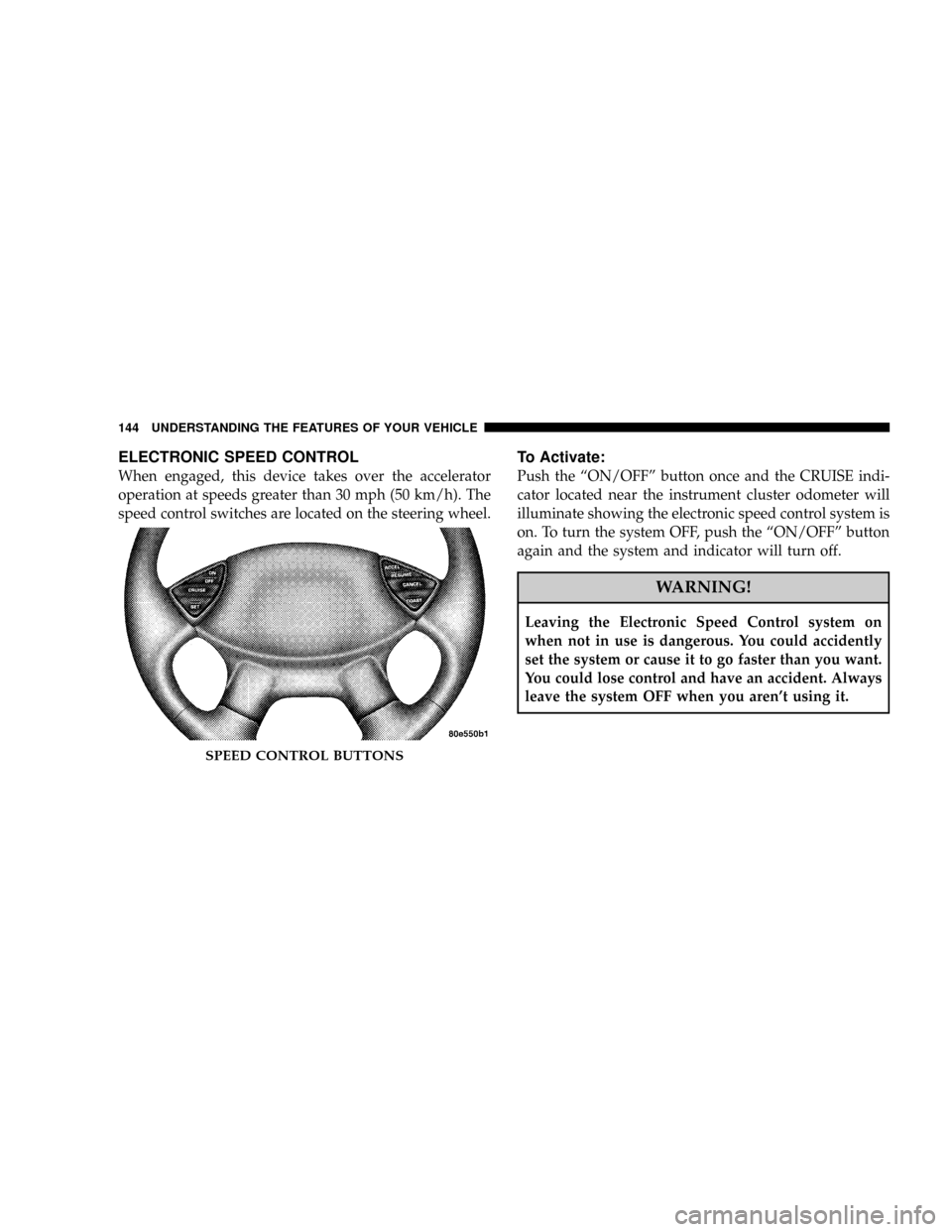
ELECTRONIC SPEED CONTROL
When engaged, this device takes over the accelerator
operation at speeds greater than 30 mph (50 km/h). The
speed control switches are located on the steering wheel.
To Activate:
Push the ªON/OFFº button once and the CRUISE indi-
cator located near the instrument cluster odometer will
illuminate showing the electronic speed control system is
on. To turn the system OFF, push the ªON/OFFº button
again and the system and indicator will turn off.
WARNING!
Leaving the Electronic Speed Control system on
when not in use is dangerous. You could accidently
set the system or cause it to go faster than you want.
You could lose control and have an accident. Always
leave the system OFF when you aren't using it.
SPEED CONTROL BUTTONS
144 UNDERSTANDING THE FEATURES OF YOUR VEHICLE
Page 147 of 457
WARNING!
Your motorized door or gate will open and close
while you are training the Universal Transceiver. Do
not train the transceiver if people or pets are in the
path of the door or gate. Only use this transceiver
with a garage door opener that has a ªstop and
reverseº feature as required by federal safety stan-
dards. This includes most garage door opener models
manufactured after 1982. Do not use a garage door
opener without these safety features. Call toll-free
1±800±355±3515 or, on the Internet at
www.HomeLink.com for safety information or
assistance.
WARNING!
Vehicle exhaust contains carbon monoxide, a danger-
ous gas. Do not run your vehicle in the garage while
training the transceiver. Exhaust gas can cause seri-
ous injury or death.
Programming HomeLinkT
Before You Begin
If you have not trained any of the HomeLinktbuttons,
erase all channels before you begin training.
To do this, press and hold the two outside buttons for 20
seconds until the red HomeLinktindicator begins to
flash, or the EVIC message changes fromªCLEARING
CHANNELSºtoªCHANNELS CLEARED.º
It is recommended that a new battery be placed in the
hand-held transmitter of the device being programmed
UNDERSTANDING THE FEATURES OF YOUR VEHICLE 147
3
Page 148 of 457

to HomeLinktfor more efficient training and accurate
transmission of the radio-frequency signal.
Your vehicle should be parked outside of the garage
while training.
1. Turn the ignition switch to the ON/RUN position.
2. Place the hand-held transmitter 1±3 inches (3±8 cm)
from the HomeLinktbuttons while keeping the indicator
in view.
For optimal training, point the battery end of the hand-
held transmitter away from the HomeLinkt.
3. Simultaneously press and hold both the chosen
HomeLinktbutton and the hand-held transmitter button
until the until the red HomeLinktindicator changes from
a slow to a rapid flash rate or the EVIC display changes
fromªCHANNEL # TRAININGºtoªCHANNEL #
TRAINED.ºThen release both the HomeLinktand hand-held trans-
mitter buttons.
If the EVIC display statesªDID NOT TRAINºrepeat
Step 3. If the signal is too weak, replace the battery in the
original hand-held transmitter.
It may take up to 30 seconds, or longer in rare cases. The
garage door may open & close while you train.
NOTE:Some gate operators and garage door openers
may require you to replace Step #3 with procedures
noted in the ªGate Operator/Canadian Programmingº
section.
4. Press and hold the newly-trained HomeLinktbutton.
If the channel has been trained, the EVIC display will
now stateªCHANNEL # TRANSMIT.º
If the EVIC display still statesªCHANNEL # TRAIN-
INGºrepeat Step 3.
148 UNDERSTANDING THE FEATURES OF YOUR VEHICLE
Page 150 of 457

7. Return to the vehicle and press the programmed
HomeLinktbutton twice (holding the button for 2 sec-
onds each time). If the device is plugged in and activates,
programming is complete.
If the device does not activate, press the button a third
time (for 2 seconds) to complete the training.
NOTE:If you are have any problems, or require assis-
tance, please call toll-free 1±800±355±3515 or, on the
Internet at www.HomeLink.com for information or assis-
tance.
To program the remaining two HomeLinktbuttons,
repeat each step for each remaining button.DO NOT
ERASE THE CHANNELS.Canadian Programming/Gate Programming
Canadian radio-frequency laws require transmitter sig-
nals to9time-out9(or quit) after several seconds of
transmission which may not be long enough for
HomeLinktto pick up the signal during programming.
Similar to this Canadian law, some U.S. gate operators are
designed to9time-out9in the same manner.
It may be helpful to unplug the device during the cycling
process to prevent possible overheating of the garage
door or gate motor.
If you are having difficulties programming a garage door
opener or a gate operator, replace ªProgramming
HomeLinkº Step 3 with the following:
3. Continue to press and hold the HomeLinktbutton
while you press and release - every two seconds
(ªcycleº) your hand-held transmitter until HomeLinkt
has successfully accepted the frequency signal. The red
HomeLinktindicator will change from a slow to rapid
150 UNDERSTANDING THE FEATURES OF YOUR VEHICLE
Page 151 of 457

flash, and the EVIC display in the cluster will change
from ªCHANNEL # TRAININGº to ªCHANNEL #
TRAINED.º
If you unplugged the device for training, plug it back in
at this time.
Then proceed with the remaining steps.
Using HomeLinkT
To operate, simply press and release the programmed
HomeLinktbutton. Activation will now occur for the
trained device (i.e. garage door opener, gate operator,
security system, entry door lock, home/office lighting,
etc.). The hand-held transmitter of the device may also be
used at any time.
Reprogramming a Single HomeLinkTButtons
To re-program a channel that has been previously
trained, follow these steps:
1. Turn the ignition switch to the ON/RUN position.
2. Press and hold the desired HomeLinktbutton for 20
seconds until the red indicator starts to flash, or the EVIC
display statesªCHANNEL # TRAINING.ºDO NOT
RELEASE THE BUTTON.
3.WITHOUT RELEASING THE BUTTON,proceed
withPROGRAMMING HOMELINK Step #2and fol-
low all remaining steps.
Security
It is advised to erase all channels before you sell or turn
in your vehicle.
UNDERSTANDING THE FEATURES OF YOUR VEHICLE 151
3
Page 152 of 457

To do this, press and hold the two outside buttons for 20
seconds until the EVIC message statesªCHANNELS
CLEARED.ºNote that all channels will be erased. Indi-
vidual channels cannot be erased.
The HomeLinktUniversal Transceiver is disabled when
the Vehicle Theft Alarm is active.
Troubleshooting Tips
If you are having trouble programming HomeLinkt, here
are some of the most common solutions:
²Replace the battery in the original transmitter.
²Press the Learn Button on the Garage Door Opener to
complete the training for Rolling Code.
²Did you unplug the device for training, and remember
to plug it back in?If you are have any problems, or require assistance,
please call toll-free 1±800±355±3515 or, on the Internet at
www.HomeLink.com for information or assistance.
General Information
This device complies with FCC rules part 15 and Industry
Canada RSS-210. Operation is subject to the following
two conditions:
1. This device may not cause harmful interference
2. This device must accept any interference that may be
received including interference that may cause undesired
operation
NOTE:The transmitter has been tested and it complies
with FCC and IC rules. Changes or modifications not
expressly approved by the party responsible for compli-
ance could void the user 's authority to operate the
device.
152 UNDERSTANDING THE FEATURES OF YOUR VEHICLE
Page 160 of 457

²The pedals can be adjusted while driving.
²The pedalscannotbe adjusted when the vehicle is in R
(Reverse) or when the Speed Control is ON. A message
will be displayed in the Electronic Vehicle Information
Center (EVIC) if the pedals are attempted to be ad-
justed when the system is locked out (ªAdjustable
Pedal Disabled Ð Cruise Control Engagedº or ªAd-
justable Pedal Disabled Ð Vehicle In Reverseº).
NOTE:If your vehicle is equipped with memory seat
feature, your remote keyless entry transmitter or memory
seat buttons on the driver's door panel can be used to
recall the adjustable pedals to saved positions.
CAUTION!
Do not place any article under the adjustable pedals
or impede its ability to move as it may cause damage
to the pedal controls. Pedal travel may become lim-
ited if movement is stopped by an obstruction in the
adjustable pedal's path.
REAR PARK SENSE SYSTEM Ð IF EQUIPPED
The Rear Park Assist System provides visual and audible
indications of the distance between the rear fascia and the
detected obstacle when backing up. When backing up the
driver should also use the inside rearview and outside
mirrors.
The Rear Park Assist System will remember the last
system state (enabled or disabled) from the last ignition
cycle when the ignition is changed to the RUN/ON
position.
160 UNDERSTANDING THE FEATURES OF YOUR VEHICLE
Page 169 of 457

POWER SUNROOF Ð IF EQUIPPED
The power sunroof buttons are located between the sun
visors on the overhead console.Press and hold the ªOPENº button rearward to fully
open the sunroof. The sunroof can be stopped at any
position between closed and full open. Momentarily
pressing the ªOPENº button rearward will activate the
Express Open Feature, causing the sunroof to open
automatically.
Press and hold the ªVENTº button to open the vent. The
sunroof can be stopped at any position between closed
and full vent. To close the sunroof from the vent position,
press and hold the ªCLOSEº button forward. Releasing
the button will stop the movement of the sunroof and the
sunroof will remain in the partial vent position until the
button is pushed forward again.
NOTE:The power sunroof buttons remain active for up
to 45 seconds after the ignition button has been turned
off. Opening either front door will cancel this feature.
Power Sunroof buttons
UNDERSTANDING THE FEATURES OF YOUR VEHICLE 169
3
Page 210 of 457

On vehicles equipped with an Analog Clock the radio
time display will function as follows:
²Radio On Ð Radio clock will display for approxi-
mately 5 seconds after button is pressed, then default
back to radio frequency.
²Radio Off Ð Radio clock will display for approxi-
mately 5 seconds after button is pressed, then default
back to blank screen.
The following radio time options can be changed by your
dealer service department:
²Radio On Ð Radio clock will continue to be displayed
after button is pressed.
²Radio Off Ð Radio clock will displayed continuously.
Clock Setting Procedure
1. Turn the ignition switch to the ON or ACC position
and press the time button. Using the tip of a ballpoint pen
or similar object, press either the hour (H) or minute (M)
buttons on the radio.
2. Press the H button to set hours or the M button to set
minutes. The time setting will increase each time you
press a button.
RADIO GENERAL INFORMATION
Radio Broadcast Signals
Your new radio will provide excellent reception under
most operating conditions. Like any system, however, car
radios have performance limitations, due to mobile op-
eration and natural phenomena, which might lead you to
believe your sound system is malfunctioning. To help
210 UNDERSTANDING YOUR INSTRUMENT PANEL
Page 236 of 457

Remote Control Buttons
1. Headphone Transmitter
2. Menu Up/Next Track/Chapter
3. Menu Left/Fast Rewind
4. Return
5. Setup
6. Pause/Play
7. Mute
8. Display
9. Mode
10. Program Down - Previous Disc
11. Program Up - Next Disc
12. Slow
13. Stop
14. Menu
15. Menu Down/Previous Track/Chapter
16. Menu Right/Fast ForwardRemote Control Buttons
17. Enter
18. Light
Headphone Transmitter Button (1)
The headphone transmitter button on the remote control
and the power button on the headphones must be turned
ON before sound can be heard from the headphones. On
some radios the headphone symbol will flash for ap-
proximately 5 seconds in the radio display, indicating the
headphones are in use.
ARROW Buttons (2, 3, 15, 16)
These arrow buttons only function in CD/ DVD mode.
Use the arrow buttons to toggle through the disc menu
screen options.
236 UNDERSTANDING YOUR INSTRUMENT PANEL