display CHRYSLER PACIFICA 2008 1.G User Guide
[x] Cancel search | Manufacturer: CHRYSLER, Model Year: 2008, Model line: PACIFICA, Model: CHRYSLER PACIFICA 2008 1.GPages: 457, PDF Size: 6.7 MB
Page 160 of 457

²The pedals can be adjusted while driving.
²The pedalscannotbe adjusted when the vehicle is in R
(Reverse) or when the Speed Control is ON. A message
will be displayed in the Electronic Vehicle Information
Center (EVIC) if the pedals are attempted to be ad-
justed when the system is locked out (ªAdjustable
Pedal Disabled Ð Cruise Control Engagedº or ªAd-
justable Pedal Disabled Ð Vehicle In Reverseº).
NOTE:If your vehicle is equipped with memory seat
feature, your remote keyless entry transmitter or memory
seat buttons on the driver's door panel can be used to
recall the adjustable pedals to saved positions.
CAUTION!
Do not place any article under the adjustable pedals
or impede its ability to move as it may cause damage
to the pedal controls. Pedal travel may become lim-
ited if movement is stopped by an obstruction in the
adjustable pedal's path.
REAR PARK SENSE SYSTEM Ð IF EQUIPPED
The Rear Park Assist System provides visual and audible
indications of the distance between the rear fascia and the
detected obstacle when backing up. When backing up the
driver should also use the inside rearview and outside
mirrors.
The Rear Park Assist System will remember the last
system state (enabled or disabled) from the last ignition
cycle when the ignition is changed to the RUN/ON
position.
160 UNDERSTANDING THE FEATURES OF YOUR VEHICLE
Page 162 of 457

Rear Park Assist Warning Display
The Rear Park Assist Warning Display, located in the
headliner near the liftgate glass, provides both visual and
audible warnings to indicate the distance between the
rear fascia and the detected obstacle.
When the ignition is changed to the RUN/ON position,
the warning display will turn ON all of its LEDs for
about 1 second. Each side of the warning display has 6
yellow and 2 red LEDs. The vehicle is close to the obstacle
when the red LED is ON.The driver can view the LEDs either through the rear
view mirror or by looking at the display above the rear
window.
The system dimly illuminates the two outer most yellow
LEDs when it is ON and detecting no obstacles. The
following chart shows the warning display operation
when the system is detecting an obstacle:
162 UNDERSTANDING THE FEATURES OF YOUR VEHICLE
Page 163 of 457
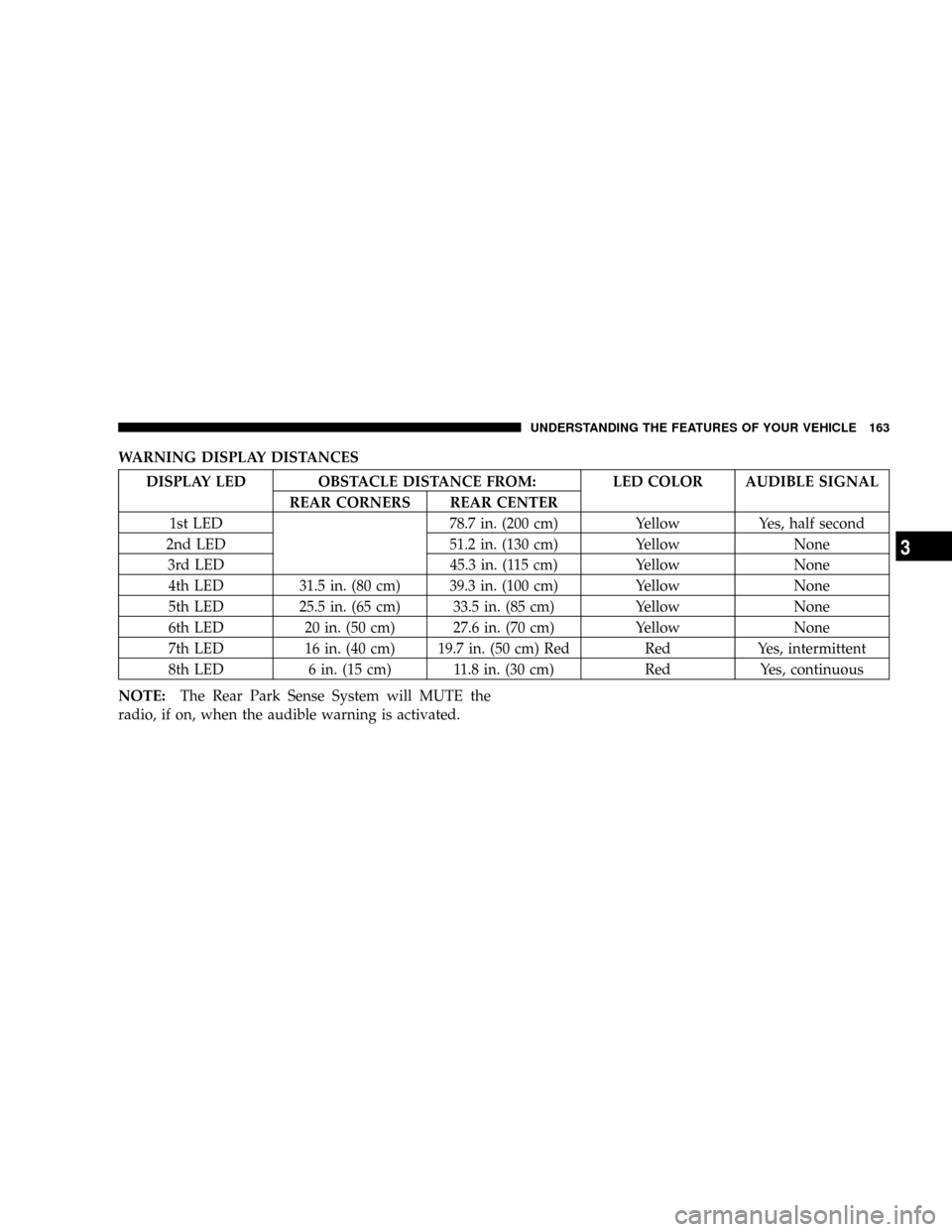
WARNING DISPLAY DISTANCES
DISPLAY LED OBSTACLE DISTANCE FROM: LED COLOR AUDIBLE SIGNAL
REAR CORNERS REAR CENTER
1st LED 78.7 in. (200 cm) Yellow Yes, half second
2nd LED 51.2 in. (130 cm) Yellow None
3rd LED 45.3 in. (115 cm) Yellow None
4th LED 31.5 in. (80 cm) 39.3 in. (100 cm) Yellow None
5th LED 25.5 in. (65 cm) 33.5 in. (85 cm) Yellow None
6th LED 20 in. (50 cm) 27.6 in. (70 cm) Yellow None
7th LED 16 in. (40 cm) 19.7 in. (50 cm) Red Red Yes, intermittent
8th LED 6 in. (15 cm) 11.8 in. (30 cm) Red Yes, continuous
NOTE:The Rear Park Sense System will MUTE the
radio, if on, when the audible warning is activated.
UNDERSTANDING THE FEATURES OF YOUR VEHICLE 163
3
Page 164 of 457

WARNING!
²Drivers must be careful when backing up even when
using the Rear Park Sense System. Always check
carefully behind your vehicle, and be sure to check
for pedestrians, animals, other vehicles, obstructions,
or blind spots before backing up. You are respon-
sible for the safety of your surroundings and must
continue to pay attention while backing up. Failure
to do so can result in serious injury or death.
²Before using the Rear Park Sense System, it is
strongly recommended that the ball mount and hitch
ball assembly be disconnected from the vehicle
when the vehicle is not used for towing. Failure to do
so can result in injury or damage to vehicles or
obstacles because the hitch ball will be much closer
to the obstacle than the rear fascia when the warning
display turns the red LEDs ON. Also, the sensors
could detect the ball mount and hitch ball assembly,
depending on its size and shape, giving a false
indication that an obstacle is behind the vehicle.
CAUTION!
²To avoid vehicle damage the Rear Park Sense
System should only be used as a parking aid and
is unable to recognize every obstacle, including
small objects. Parking curbs might be temporarily
detected or not detected at all. Obstacles located
above or below the sensors will not be detected
when they are in close proximity to the rear of the
vehicle.
²To avoid vehicle damage the vehicle must be
driven slowly when using the Rear Park Sense
System to be able to stop in time when an obstacle
is detected. It is recommended that the driver look
over his/her shoulder when using the Rear Park
Sense System.
164 UNDERSTANDING THE FEATURES OF YOUR VEHICLE
Page 165 of 457

NOTE:
²Ensure that the rear bumper is free of dirt and debris
to keep the system operating properly.
²Jackhammers, large trucks, and other vibrations could
affect the performance of the system.
If ªService Park Sense Systemº appears in the Electronic
Vehicle Information Center (EVIC) after making sure the
rear bumper is clean please see your authorized dealer.
Enable/Disable the Rear Park Assist System Ð If
Equipped
The Rear Park Assist System can be enabled and disabled
with a switch located on the switch bank of the instru-
ment panel. When the switch is pressed to disable the
system, the instrument cluster will display the9PARK
ASSIST DISABLED9message. Refer to ªElectronic Vehicle
Information Center (EVIC)º in Section 4 of this manual.
When the shift lever is changed to R (Reverse) and thesystem is disabled, the instrument cluster will actuate a
single chime, once per ignition cycle, and it will display
the message.
The Rear Park Assist Switch LED will be ON when the
Rear Park Assist System is disabled or defective. The
Rear Park Assist Switch LED will be OFF when the
system is enabled.
The system can be turned on or off through the Electronic
Vehicle Information Center (EVIC), if equipped. For
details, refer to ªPersonal Settings (Customer Program-
mable Features)º under ªElectronic Vehicle Information
enter (EVIC)º in Section 4 of this manual.
Service the Rear Park Assist System
When the Rear Park Assist System is defective, the
instrument cluster will actuate a single chime, once per
ignition cycle, and it will display the(SERVICE PARK
ASSIST SYSTEM(message. Refer to ªElectronic Vehicle
Information Center (EVIC)º in Section 4 of this manual.
UNDERSTANDING THE FEATURES OF YOUR VEHICLE 165
3
Page 166 of 457

If(SERVICE PARK ASSIST SYSTEM(appears in the
Electronic Vehicle Information Center (EVIC) after mak-
ing sure the rear bumper is clean please see your autho-
rized dealer.
Cleaning the Rear Park Assist System
Clean the Rear Park Assist Sensors with water, car wash
soap and a soft cloth. Do not use rough or hard cloths. Do
not scratch or poke the sensors, otherwise, you could
damage the sensors.
REAR CAMERA Ð IF EQUIPPED
Your vehicle may be equipped with a Rear Camera
system that allows you to see an on-screen image (located
in the center of the instrument cluster) of the rear of your
vehicle whenever it is put into R (Reverse). The camera is
located in the light bar over the rear license plate.NOTE:Refer to ªSetting Display Propertiesº under
ªSystem Settingsº in the Navigation User's Manual for
instructions regarding navigation screen brightness ad-
justments.
Use the following steps to access the Rear Backup Cam-
era feature:
1. Start the engine.
2. Place shift lever in R (Reverse).
3. Wait one to two seconds, and the camera view will
display on the instrument cluster.
NOTE:The camera view will display only while the
vehicle is in R (Reverse).
4. Perform a visual check of the rear area.
NOTE:CHECK ENTIRE SURROUNDINGS before
backing up.
166 UNDERSTANDING THE FEATURES OF YOUR VEHICLE
Page 181 of 457

UNDERSTANDING YOUR INSTRUMENT PANEL
CONTENTS
mInstrument Panel And Controls.............184
mBase Instrument Cluster..................185
mPremium Instrument Cluster...............186
mInstrument Cluster Descriptions............187
mElectronic Vehicle Information Center (EVIC) Ð
If Equipped...........................199
NOil Change Required...................202
NCustomer Programmable Features Ð
If Equipped.........................203
NCompass Display Ð If Equipped..........207NMini-Trip Functions Ð If Equipped........208
mSetting The Analog Clock.................209
mElectronic Digital Clock..................209
NClock Setting Procedure.................210
mRadio General Information................210
NRadio Broadcast Signals.................210
NTwo Types Of Signals..................211
NElectrical Disturbances..................211
NAM Reception.......................2114
Page 191 of 457

9. Tachometer
The red segments indicate the maximum permissible
engine revolutions-per-minute (rpm. x 1000) for each
gear range. Before reaching the red area, ease up on the
accelerator.
10. Trip Odometer Button
Press this button to change the display from odometer to
either of the two trip odometer settings. The word TRIP
and either ªAº or ªBº will appear when in the trip
odometer mode. Push in and hold the button for two
seconds to reset the trip odometer to 0 miles or kilome-
ters. The odometer must be in trip mode to reset.
11. Transmission Range Indicator
This display indicator shows the automatic transmission
gear selection.
12. AutoStick Light
This display indicator illuminates when the gearshift
lever is moved to the AutoStick position.13. Odometer/Trip Odometer
The odometer shows the total distance the vehicle has
been driven. U.S. federal regulations require that upon
transfer of vehicle ownership, the seller certify to the
purchaser the correct mileage that the vehicle has been
driven. Therefore, if the odometer reading is changed
during repair or replacement, be sure to keep a record of
the reading before and after the service so that the correct
mileage can be determined.
The two trip odometers show individual trip mileage. To
switch from odometer to trip odometers, press and
release the Trip Odometer button. To reset a trip odom-
eter, display the desired trip odometer to be reset then
push and hold the button until the display resets (ap-
proximately 2 seconds).
Vehicle Warning Messages
When the appropriate conditions exist, vehicle warning
messages will display in the odometer.
UNDERSTANDING YOUR INSTRUMENT PANEL 191
4
Page 192 of 457

NOTE:If the instrument cluster is equipped with the
optional Electronic Vehicle Information Center (EVIC),
then all warnings will only display in the EVIC. (Refer to
ªElectronic Vehicle Information Center (EVIC)º in this
section for specific messages).
gASCAP
If the vehicle diagnostic system detects a leak or change
in the evaporative system, or the fuel filler cap is loose,
improperly installed, or damaged, the words ªgASCAPº
will display in the odometer. If this occurs, tighten the
fuel filler cap properly and press the odometer reset
button to turn off the ªgASCAPº message. (Refer to
ªOnboard Diagnostic System Ð OBDIIº in Section 7 of
this manual for more information). If the problem con-
tinues, the message will appear the next time the vehicle
is started. See your authorized dealer service center as
soon as possible.Change Oil
Your vehicle is equipped with an engine oil change
indicator system. The ªChange Oilº message will flash in
the instrument cluster odometer for approximately 12
seconds after a single chime has sounded to indicate the
next scheduled oil change interval. The engine oil change
indicator system is duty cycle based, which means the
engine oil change interval may fluctuate dependent upon
your personal driving style.
Unless reset, this message will continue to display each
time you turn the ignition switch to the ªONº position.
To turn off the message temporarily, press and release the
Trip Odometer button on the instrument cluster. To reset
the oil change indicator system (after performing the
scheduled maintenance) perform the following proce-
dure:
1. Turn the ignition switch to the ªONº position (Do
not start the engine).
192 UNDERSTANDING YOUR INSTRUMENT PANEL
Page 194 of 457

17. Navigation Screen/Rear View Camera Ð If
Equipped
The navigation system provides maps, turn identifica-
tion, selection menus and instructions for selecting a
variety of destinations and routes. Refer to your ªNavi-
gation User's Manualº for detailed operating instruc-
tions.
The Rear View Camera system uses the Navigator Screen
to display the area behind the vehicle. Camera view will
display only while the vehicle is in R (Reverse).
18. Front Fog Light Indicator Ð If Equipped
This light shows the front fog lights are ON.
19. Oil Pressure Warning Light
This light shows low engine oil pressure. The light
should turn on momentarily when the engine is
started. If the light turns on while driving, stop thevehicle and shut off the engine as soon as possible. A
continuous chime will sound when this light turns on.
Do not operate the vehicle until the cause is corrected.
This light does not show how much oil is in the engine.
The engine oil level must be checked under the hood.
20. Seat Belt Reminder Light
When the ignition switch is first turned ON, this
light will turn on for 5 to 8 seconds as a bulb check.
During the bulb check, if the driver's seat belt is
unbuckled, a chime will sound. After the bulb check or
when driving, if the driver seat belt remains unbuckled,
the Seat Belt Warning Light will flash or remain on
continuously. Refer to9Enhanced Driver Seat Belt Re-
minder System (BeltAlertŸ)9in the Occupant Restraints
section for more information.
194 UNDERSTANDING YOUR INSTRUMENT PANEL