ESP CHRYSLER PACIFICA 2008 1.G Owner's Manual
[x] Cancel search | Manufacturer: CHRYSLER, Model Year: 2008, Model line: PACIFICA, Model: CHRYSLER PACIFICA 2008 1.GPages: 457, PDF Size: 6.7 MB
Page 195 of 457

21. Tire Pressure Monitoring Telltale Lamp
Each tire, including the spare (if provided),
should be checked monthly when cold and
inflated to the inflation pressure recommended
by the vehicle manufacturer on the vehicle
placard or tire inflation pressure label. (If your vehicle
has tires of a different size than the size indicated on the
vehicle placard or tire inflation pressure label, you should
determine the proper tire inflation pressure for those
tires.)
As an added safety feature, your vehicle has been
equipped with a tire pressure monitoring system (TPMS)
that illuminates a low tire pressure telltale when one or
more of your tires are significantly under-inflated. Ac-
cordingly, when the low tire pressure telltale illuminates,
you should stop and check your tires as soon as possible,
and inflate them to the proper pressure. Driving on a
significantly under-inflated tire causes the tire to over-
heat and can lead to tire failure. Under-inflation alsoreduces fuel efficiency and tire tread life, and may affect
the vehicle's handling and stopping ability.
NOTE:Please note that the TPMS is not a substitute for
proper tire maintenance, and it is the driver 's responsi-
bility to maintain correct tire pressure, even if underin-
flation has not reached the level to trigger illumination of
the TPMS low tire pressure telltale.
Your vehicle has also been equipped with a TPMS
malfunction indicator to indicate when the system is
combined with the low tire pressure telltale. When the
system detects a malfunction, the telltale will flash for
approximately one minute and then remain continuously
illuminated. This sequence will continue upon subse-
quent vehicle start-ups as long as the malfunction exists.
When the malfunction indicator is illuminated, the sys-
tem may not be able to detect or signal low tire pressure
as intended. TPMS malfunctions may occur for a variety
of reasons, including the installation of replacement or
UNDERSTANDING YOUR INSTRUMENT PANEL 195
4
Page 198 of 457

28. Electronic Stability Program (ESP) Warning
Light/Brake Assist System (BAS) Warning Light Ð If
Equipped
The malfunction lamp for the ESP is combined
with BAS. The yellow ªESP/BAS Warning
Lampº comes on when the ignition switch is
turned to the ªONº position. They should go
out with the engine running. If the ªESP/BAS Warning
Lampº comes on continuously with the engine running,
a malfunction has been detected in either the ESP or the
BAS system. If this light remains on after several ignition
cycles, and the vehicle has been driven several miles at
speeds greater than 30 mph (48 km/h), see your autho-
rized dealer as soon as possible.
29. Electronic Throttle Control (ETC.) Light
This light informs you of a problem with the
Electronic Throttle Control system. If a prob-
lem is detected the light will come on while the
engine is running. Cycle the ignition key whenthe vehicle has completely stopped and the gear selector
is placed in the PARK position. The light should turn off.
If the light remains lit with the engine running your
vehicle will usually be drivable, however, see your dealer
for service as soon as possible. If the light is flashing
when the engine is running, immediate service is re-
quired and you may experience reduced performance, an
elevated/rough idle or engine stall and your vehicle may
require towing. The light will come on when the ignition
is first turned on and remain on briefly as a bulb check.
If the light does not come on during starting, have the
system checked by an authorized dealer.
30. All-Wheel-Drive Failure Indicator Light Ð If AWD
equipped
This light monitors the All-Wheel-Drive
(AWD) system. The light will come on, for a
bulb check, when the ignition key is turned to
the ON position and may stay on for as long as
3 seconds.
198 UNDERSTANDING YOUR INSTRUMENT PANEL
Page 203 of 457

Customer Programmable Features Ð If Equipped
Press the MENU button until one of the following
display choices appears:
Language?
When in this display you may select one of three lan-
guages for all display nomenclature, including the trip
computer functions and navigation system. Press the
STEP button while in this display selects English,
Francais, or Espanol. As you continue the displayed
information will be shown in the selected language.
Park Assist System? ON/OFF
When this feature is selected the system scans for objects
behind the vehicle using four sensors located in the rear
bumper. Objects can be detected from up to 59 inches
(150 cm). Pressing the ªSTEPº button while in this
display will disable/enable the Rear Park Assist System.
The EVIC will display the following message: PARKASSIST DISABLED after the feature has been disabled
and SERVICE PARK ASSIST SYSTEM if there is a prob-
lem with the system.
Service Interval
When this feature is selected a service interval between
2,000 miles (3 200 km) and 6, 000 miles (10 000 km) in 500
mile (800 km) increments may be selected. Pressing the
STEP button when in this display will select distances
between 2,000 miles (3 200 km) and 6, 000 miles (10 000
km) in 500 mile (800 km) increments.
Reset Service Distance (Displays Only if Service
Interval was Changed)
When this feature is selected the current accumulated
service distance can be reset to the newly selected service
interval. Pressing the STEP button when in this display
will select ªYesº or ªNo.º
UNDERSTANDING YOUR INSTRUMENT PANEL 203
4
Page 216 of 457

NOTE:Changes or modifications not expressively ap-
proved by the party responsible for compliance could
void the user's authority to operate the equipment.
CD Player Operation
NOTE:
²The ignition switch must be in the ON or ACC
position and the volume control ON before the CD
player will operate.
²This Radio is capable of playing compact discs (CD),
recordable compact discs (CD-R), rewritable compact
discs (CD-RW) compact discs with MP3 tracks and
multisession compact discs with CD and MP3 tracks.
Inserting The Compact Disc
CAUTION!
This CD player will accept only 4±3/4 inch (12 cm)
discs only. The use of other sized discs may damage
the CD player mechanism.
You may either insert or eject a disc with the radio OFF.
If you insert a disc with the ignition ON and the radio
OFF, the display will show the time of day. If you insert
a disc with the ignition OFF, the display will show the
time of day for about 5 seconds, then go out.
If the power is ON, the unit will switch from radio to CD
mode and begin to play when you insert the disc. The
display will show the track number and index time in
minutes and seconds. Play will begin at the start of track
one.
216 UNDERSTANDING YOUR INSTRUMENT PANEL
Page 226 of 457

NOTE:Changes or modifications not expressively ap-
proved by the party responsible for compliance could
void the user's authority to operate the equipment.
CD Player Operation
NOTE:
²The ignition switch must be in the ON or ACC
position and the volume control ON before the CD
player will operate.
²This Radio is capable of playing compact discs (CD),
recordable compact discs (CD-R), rewritable compact
discs (CD-RW) compact discs with MP3 tracks and
multi-session compact discs with CD and MP3 tracks.
Inserting The Compact Disc
CAUTION!
This CD player will accept only 4±3/4 inch (12 cm)
discs only. The use of other sized discs may damage
the CD player mechanism.
You may either insert or eject a disc with the radio OFF.
If you insert a disc with the ignition ON and the radio
OFF, the display will show the time of day. If you insert
a disc with the ignition OFF, the display will show the
time of day for about 5 seconds, then go out.
If the power is ON, the unit will switch from radio to CD
mode and begin to play when you insert the disc. The
display will show the track number and index time in
minutes and seconds. Play will begin at the start of track
one.
226 UNDERSTANDING YOUR INSTRUMENT PANEL
Page 258 of 457

²If the recirculation button is pressed while in the Mix
or Defrost mode, the indicator light in the recirculation
button will flash 3 times indicating that recirculation is
not allowed.
A/C Recirculation Programming
The recirculation control is programmed to cancel the
recirculation mode when the ignition key is turned OFF
and will reset to outside air mode when the ignition key
is turned ON. The frequent use of outside air will help
keep odors from building up within the air conditioner-
heater housing. It is recommended that the recirculation
mode be used as little as possible, especially in humid
climates.
For hot and dry climates, or people who are allergic to
pollen and find frequent use of the recirculation mode
necessary, the recirculation mode can be programmed to
not automatically reset to the outside mode by using the
following procedures:
²Turn the ignition switch to the OFF position.
²Set the mode control to ªPANELº.
²Depress and hold in the ªPOWERº button.
²Start the engine, and continue to hold in the ªPOWERº
button until the indicator light starts flashing repeat-
edly.
²Press the recirculation button until the indicator light
remains lit.
²The selection will be stored when the ignition switch is
turned OFF or if the ªPOWERº button is pressed.
If the recirculation indicator light is lit, the recirculation
mode will not reset when the engine is started. If the
recirculation indicator light is not lit, the recirculation
mode will reset to the outside air mode when the engine
is started. The programmed status can be changed back
and forth by following the above mentioned procedure.
258 UNDERSTANDING YOUR INSTRUMENT PANEL
Page 266 of 457

windshield or side glass starts to impair visibility, press
the front blower button and increase the fan speed to
maximum.
Recirculation Control
When the outside air contains smoke, odors,
high humidity, or if rapid cooling is desired
you may wish to recirculate interior air by
pressing the recirculation button. The recircu-
lation mode should only be used temporarily. The recir-
culate symbol will illuminate in the display when this
button is selected. Push the button a second time to allow
outside air into the vehicle.
NOTE:In cold weather, use of the recirculation mode
may lead to excessive window fogging. The recirculation
mode is not allowed in the Mix and Defrost modes to
improve window clearing operation. Recirculation will
be disabled automatically if these modes are selected.
A/C Recirculation Programming
The recirculation control is programmed to cancel the
recirculation mode when the ignition key is turned OFF
and will reset to the outside air mode when the ignition
key is turned ªONº. The frequent use of outside air will
help keep odors from building up within the air
conditioner-heater housing. It is recommended that the
recirculation mode be used as little as possible, especially
in humid climates.
For hot and dry climates, or people who are allergic to
pollen and find frequent use of the recirculation mode
necessary, the recirculation mode can be programmed to
not automatically reset to the outside mode by using the
following procedures:
²Turn the ignition switch to the OFF position.
²Press and hold the recirculation button.
266 UNDERSTANDING YOUR INSTRUMENT PANEL
Page 290 of 457

²and a slight drop or fall away of the brake pedal at the
end of the stop.
These are all normal characteristics of ABS.
WARNING!
The Anti-Lock Brake System contains sophisticated
electronic equipment that may be susceptible to
interference caused by improperly installed or high
output radio transmitting equipment. This interfer-
ence can cause possible loss of anti-lock braking
capability. Installation of such equipment should be
performed by qualified professionals.
All vehicle wheels and tires must be the same size and
type and tires must be properly inflated to produce
accurate signals for the computer.
POWER STEERING
The standard power steering system will give you good
vehicle response and increased ease of maneuverability
in tight spaces. The system will provide mechanical
steering capability if power assist is lost.
If for some reason the power assist is interrupted, it will
still be possible to steer your vehicle. Under these condi-
tions, you will observe a substantial increase in steering
effort, especially at very low vehicle speeds and during
parking maneuvers.
NOTE:Increased noise levels at the end of the steering
wheel travel are considered normal and do not indicate
that there is a problem with the power steering system.
Upon initial start-up in cold weather, the power steering
pump may make noise for a short amount of time. This is
due to the cold, thick fluid in the steering system. This
noise should be considered normal, and it does not in any
way damage the steering system.
290 STARTING AND OPERATING
Page 297 of 457
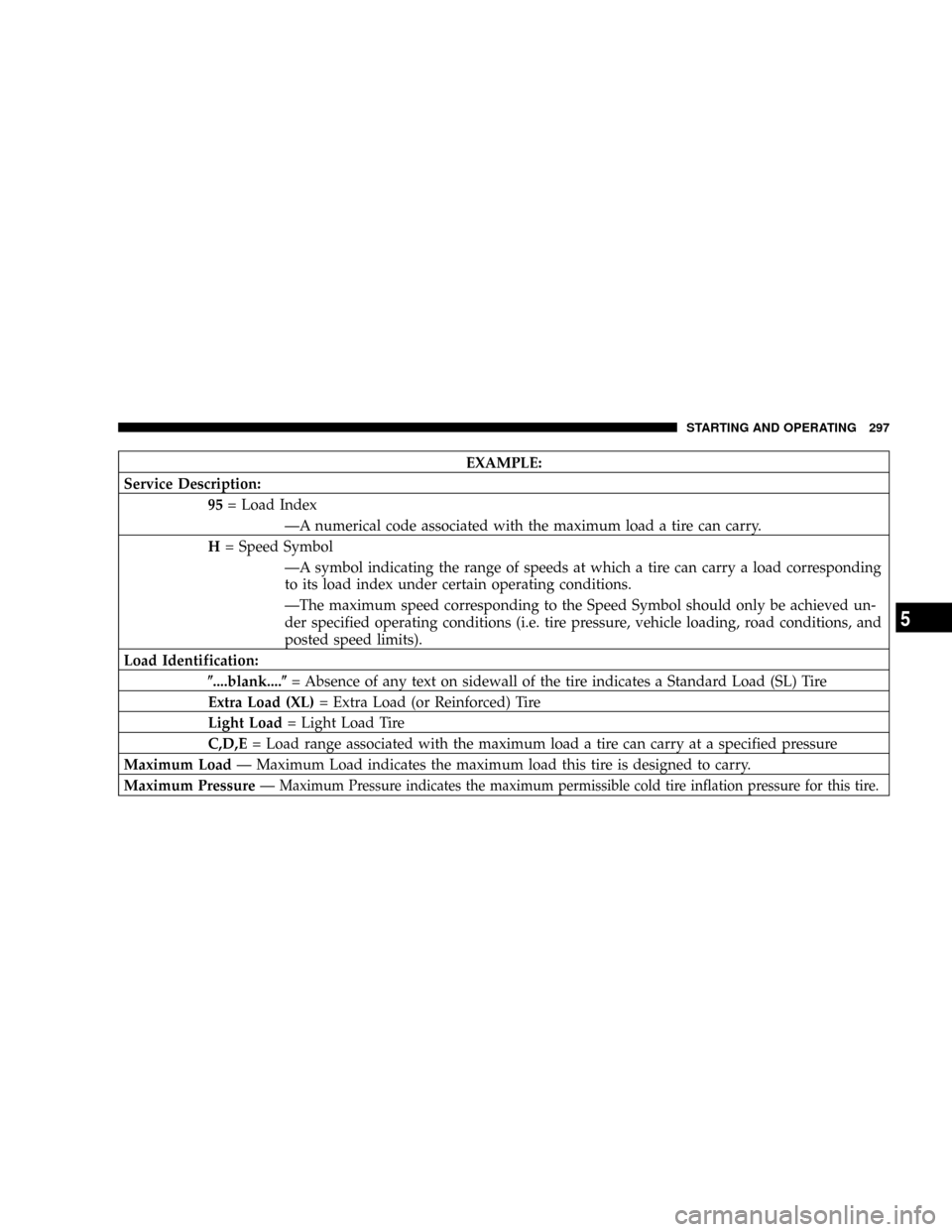
EXAMPLE:
Service Description:
95= Load Index
ÐA numerical code associated with the maximum load a tire can carry.
H= Speed Symbol
ÐA symbol indicating the range of speeds at which a tire can carry a load corresponding
to its load index under certain operating conditions.
ÐThe maximum speed corresponding to the Speed Symbol should only be achieved un-
der specified operating conditions (i.e. tire pressure, vehicle loading, road conditions, and
posted speed limits).
Load Identification:
(....blank....(= Absence of any text on sidewall of the tire indicates a Standard Load (SL) Tire
Extra Load (XL)= Extra Load (or Reinforced) Tire
Light Load= Light Load Tire
C,D,E= Load range associated with the maximum load a tire can carry at a specified pressure
Maximum LoadÐ Maximum Load indicates the maximum load this tire is designed to carry.
Maximum PressureÐ
Maximum Pressure indicates the maximum permissible cold tire inflation pressure for this tire.
STARTING AND OPERATING 297
5
Page 305 of 457
check tire pressure. Do not make a visual judgement
when determining proper inflation. Radial tires may look
properly inflated even when they are under inflated.
CAUTION!
After inspecting or adjusting the tire pressure, al-
ways reinstall the valve stem cap (if equipped). This
will prevent moisture and dirt from entering the
valve stem, which could damage the valve stem.
Inflation pressures specified on the placard are always
ªcold tire inflation pressure.º Cold tire inflation pressure
is defined as the tire pressure after the vehicle has not
been driven for at least 3 hours, or driven less than 1 mile
(1 km) after a 3 hour period. The cold tire inflation
pressure must not exceed the maximum inflation pres-
sure molded into the tire sidewall.Check tire pressures more often if subject to a wide range
of outdoor temperatures, as tire pressures vary with
temperature changes.
Tire pressures change by approximately 1 psi (7 kPa) per
12 ÉF (7 ÉC) of air temperature change. Keep this in mind
when checking tire pressure inside a garage, especially in
the winter.
Example: If garage temperature = 68 ÉF (20 ÉC) and the
outside temperature = 32 ÉF (0 ÉC) then the cold tire
inflation pressure should be increased by 3 psi (21 kPa),
which equals 1 psi (7 kPa) for every 12 ÉF (7 ÉC) for this
outside temperature condition.
Tire pressure may increase from 2 to 6 psi (13 to 40 kPa)
during operation. DO NOT reduce this normal pressure
build up or your tire pressure will be too low.
STARTING AND OPERATING 305
5