ignition CHRYSLER PACIFICA 2017 2.G Owners Manual
[x] Cancel search | Manufacturer: CHRYSLER, Model Year: 2017, Model line: PACIFICA, Model: CHRYSLER PACIFICA 2017 2.GPages: 828, PDF Size: 7.58 MB
Page 492 of 828
NOTE:The LaneSense system will retain the last system
state ON or OFF from the last ignition cycle when the
ignition is changed to the ON/RUN position.
LaneSense Warning Message
The LaneSense system will indicate the current lane drift
condition through the Driver Information Display (DID).
7.0 DID Screen
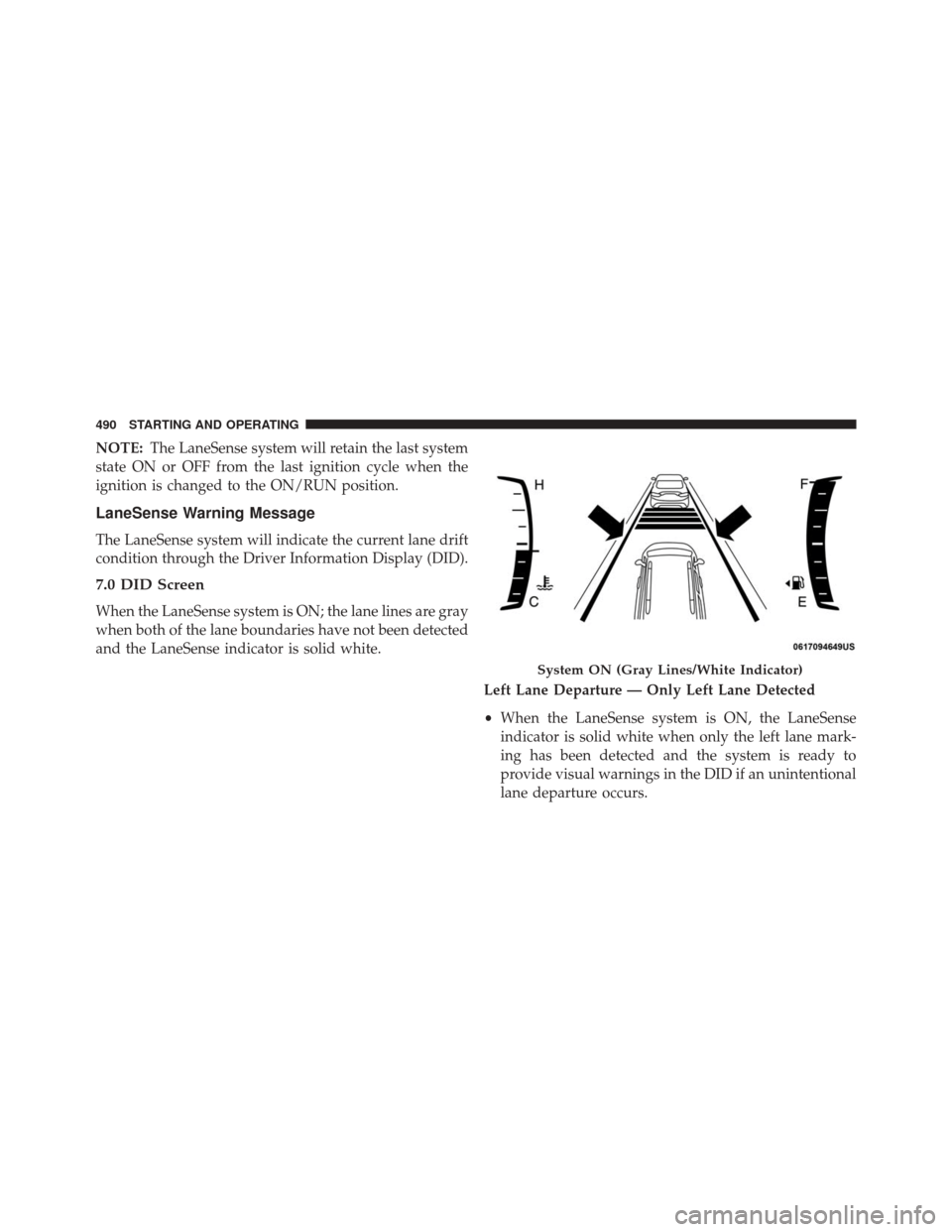
When the LaneSense system is ON; the lane lines are gray
when both of the lane boundaries have not been detected
and the LaneSense indicator is solid white.
Left Lane Departure — Only Left Lane Detected
•When the LaneSense system is ON, the LaneSense
indicator is solid white when only the left lane mark-
ing has been detected and the system is ready to
provide visual warnings in the DID if an unintentional
lane departure occurs.
System ON (Gray Lines/White Indicator)
490 STARTING AND OPERATING
Page 497 of 828
When the vehicle is shifted out of REVERSE (with camera
delay turned OFF), the rear camera mode is exited and
the navigation or audio screen appears again.
When the vehicle is shifted out of REVERSE (with camera
delay turned ON), the camera image will continue to bedisplayed for up to 10 seconds after shifting out of
REVERSE unless the vehicle speed exceeds 8 mph
(13 km/h), the vehicle is shifted into PARK or the ignition
is switched to the OFF position.
A touch screen button to disable display of the camera
image is made available when the vehicle is not in
REVERSE gear. Display of the camera image after shift-
ing out of REVERSE can be disabled via a touch screen
button personalization entry in the camera settings
menu.
When enabled, active guide lines are overlaid on the
image to illustrate the width of the vehicle and its
projected backup path based on the steering wheel
position.
Different colored zones indicate the distance to the rear of
the vehicle.
ParkView Camera Location
6
STARTING AND OPERATING 495
Page 500 of 828
REVERSE unless the vehicle speed exceeds 8 mph
(13 km/h), the vehicle is shifted into PARK or the ignition
is switched to the OFF position.
When the vehicle is shifted out of REVERSE (with camera
delay turned OFF), the surround view camera mode is
exited and the last known screen appears again. There is
a touch screen button (X) to disable the display of the
camera image.When enabled, active guide lines are overlaid on the
image to illustrate the width of the vehicle, including the
side view mirrors and its projected backup path based on
the steering wheel position.
Different colored zones indicate the distance to the rear of
the vehicle.
The following table shows the approximate distances for each zone:
Zone Distance to the rear of the vehicle
Red 0 - 1 ft (0 - 30 cm)
Yellow 1 ft - 6.5 ft (30 cm - 2 m)
Green 6.5 ft or greater (2 m or greater)
498 STARTING AND OPERATING
Page 505 of 828
CAUTION!(Continued)
into the fuel system. Also, a poorly fitting aftermar-
ket cap can cause the “Malfunction Indicator Light
(MIL)” to illuminate, due to fuel vapors escaping
from the system.
• A poorly fitting fuel filler cap may cause the MIL to
turn on.
• To avoid fuel spillage and overfilling, do not “top
off” the fuel tank after filling.
1. Put the vehicle in park and switch the ignition off.
2. Push the center-rear edge of the fuel filler door (3 o’clock position) and release to open. 3. Insert the fuel nozzle fully into the filler pipe, the
nozzle opens and holds the flapper door while refuel-
ing.
4. When the fuel nozzle “clicks” or shuts off, the fuel tank is full.
Fuel Filler Cap Release
6
STARTING AND OPERATING 503
Page 524 of 828
Recreational Towing — All Models
DO NOTflat tow this vehicle. Damage to the drivetrain
will result.
Recreational towing is allowed ONLY if the front wheels
are OFF the ground. This may be accomplished using a
tow dolly (front wheels off the ground) or vehicle trailer
(all four wheels off the ground). If using a tow dolly,
follow this procedure:
1. Properly secure the dolly to the tow vehicle, following the dolly manufacturer’s instructions.
2. Drive the front wheels onto the tow dolly.
3. Apply the parking brake.
4. Place the transmission in PARK.
5. Turn the engine OFF.
6. Properly secure the front wheels to the dolly, following the dolly manufacturer’s instructions. 7. Turn the ignition to the ON/RUN position, but do not
start the engine.
8. Press and hold the brake pedal.
9. Release the parking brake.
10. Turn the ignition OFF.
11. Release the brake pedal.
CAUTION!
• DO NOT flat tow this vehicle. Damage to the
drivetrain will result. If this vehicle requires tow-
ing, make sure the drive wheels are OFF the
ground.
• Ensure that the Electric Park Brake is released, and
remains released, while being towed.
(Continued)
522 STARTING AND OPERATING
Page 531 of 828
HAZARD WARNING FLASHERS
The Hazard Warning flasher switch is located in the
lower center area of the instrument panel.Push the switch to turn on the Hazard Warning
flasher. When the switch is activated, all direc-
tional turn signals will flash on and off to warn oncoming
traffic of an emergency. Push the switch a second time to
turn off the Hazard Warning flashers.
This is an emergency warning system and it should not
be used when the vehicle is in motion. Use it when your
vehicle is disabled and it is creating a safety hazard for
other motorists.
When you must leave the vehicle to seek assistance, the
Hazard Warning flashers will continue to operate even
though the ignition is placed in the OFF position.
NOTE: With extended use, the Hazard Warning flashers
may wear down your battery.
ASSIST AND 9–1–1 REARVIEW MIRROR — IF
EQUIPPED
A single ball joint mirror is provided in the vehicle. It is
a twist on mirror that has a fixed position at the wind-
shield. The mirror installs on the windshield button with
a counterclockwise rotation and requires no tools for
mounting. The mirror head can be adjusted up, down,
left, and right for various drivers. The mirror should be
adjusted to center on the view through the rear window.
NOTE: The Automatic Dimming Mirror feature is dis-
abled when the vehicle is in reverse gear to improve rear
view viewing.
The Automatic Dimming Mirror feature can be turned
On or Off using the Mirror Dimming Button on the
mirror.
7
IN CASE OF EMERGENCY 529
Page 536 of 828
9-1-1 Call System Limitations
Vehicles sold in Canada and MexicoDO NOThave 9-1-1
Call system capabilities.
9-1-1 or other emergency line operators in Canada and
Mexico may not answer or respond to 9-1-1 system calls.
If the 9-1-1 Call system detects a malfunction, any of the
following may occur at the time the malfunction is
detected, and at the beginning of each ignition cycle:
• The Rearview Mirror light located between the ASSIST
and 9-1-1 buttons will continuously be illuminated
red.
• The Device Screen will display the following message
“Vehicle device requires service. Please contact your
dealer.”
• An In-Vehicle Audio message will state “Vehicle de-
vice requires service. Please contact your dealer.”WARNING!
• Ignoring the Rearview Mirror light could mean you
will not have 9-1-1 Call services. If the Rearview
Mirror light is illuminated, have an authorized
dealer service the 9-1-1 Call system immediately.
• The Occupant Restraint Control module turns on
the air bag Warning Light on the instrument panel
if a malfunction in any part of the system is
detected. If the Air Bag Warning Light is illumi-
nated, have an authorized dealer service the Occu-
pant Restraint Control system immediately.
Even if the 9-1-1 Call system is fully functional, factors
beyond FCA US LLC’s control may prevent or stop the
9-1-1 Call system operation. These include, but are not
limited to, the following factors:
• The ignition is in OFF position.
534 IN CASE OF EMERGENCY
Page 548 of 828
6. Reverse process to reinstall the lamp onto vehicle.
Center High-Mounted Stop Lamp (CHMSL)
The center high-mounted stop lamp is an LED assembly.
See your authorized dealer for replacement.
Rear License Lamp
The rear license lamps are LED. See your authorized
dealer for replacement.
FUSES
WARNING!
•When replacing a blown fuse, always use an ap-
propriate replacement fuse with the same amp
rating as the original fuse. Never replace a fuse
with another fuse of higher amp rating. Never
(Continued)
WARNING! (Continued)
replace a blown fuse with metal wires or any other
material. Failure to use proper fuses may result in
serious personal injury, fire and/or property dam-
age.
• Before replacing a fuse, make sure that the ignition
is off and that all the other services are switched off
and/or disengaged.
• If the replaced fuse blows again, contact an autho-
rized dealer.
• If a general protection fuse for safety systems (air
bag system, braking system), power unit systems
(engine system, gearbox system) or steering system
blows, contact an authorized dealer.
546 IN CASE OF EMERGENCY
Page 550 of 828
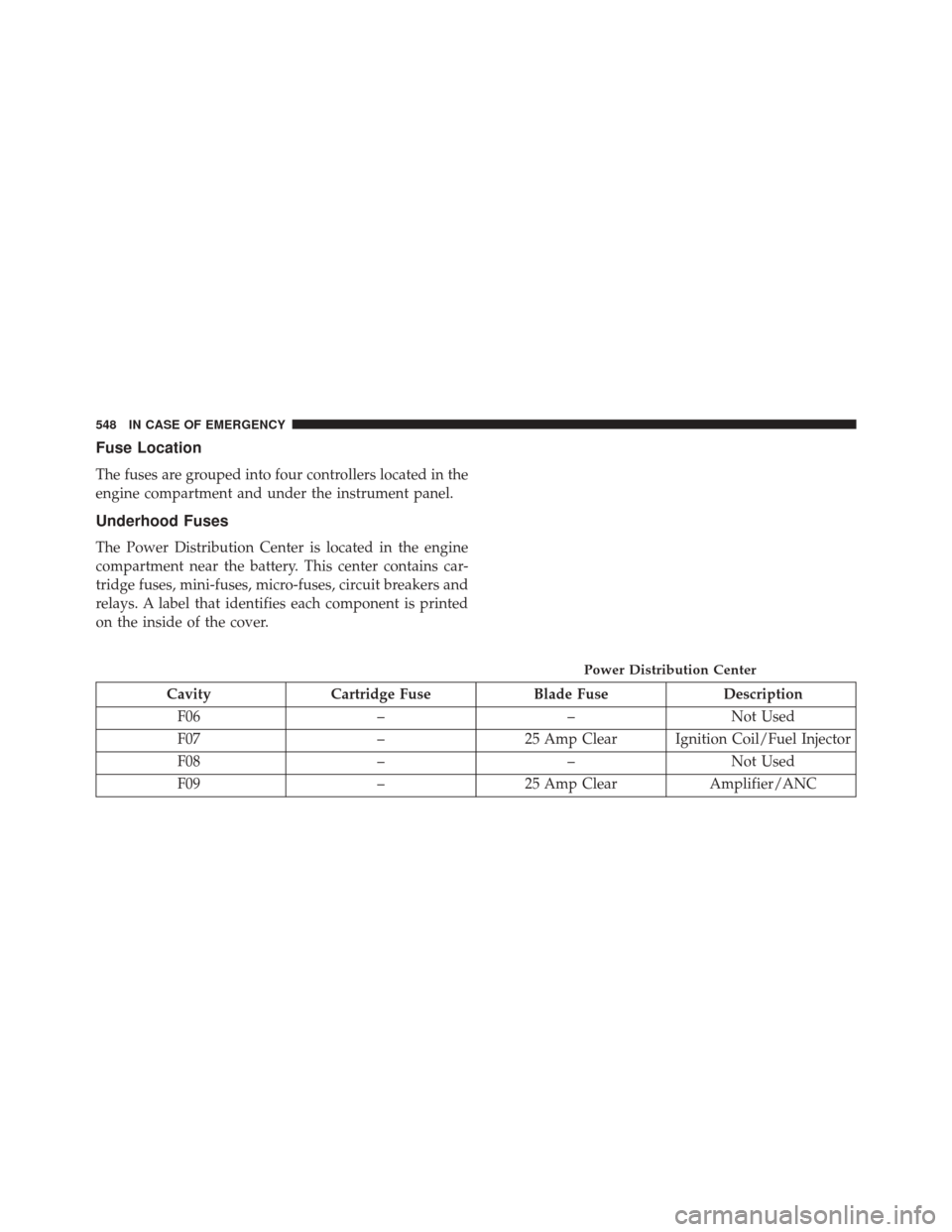
Fuse Location
The fuses are grouped into four controllers located in the
engine compartment and under the instrument panel.
Underhood Fuses
The Power Distribution Center is located in the engine
compartment near the battery. This center contains car-
tridge fuses, mini-fuses, micro-fuses, circuit breakers and
relays. A label that identifies each component is printed
on the inside of the cover.
CavityCartridge Fuse Blade FuseDescription
F06 ––Not Used
F07 –25 Amp Clear Ignition Coil/Fuel Injector
F08 ––Not Used
F09 –25 Amp Clear Amplifier/ANC
Power Distribution Center
548 IN CASE OF EMERGENCY
Page 554 of 828
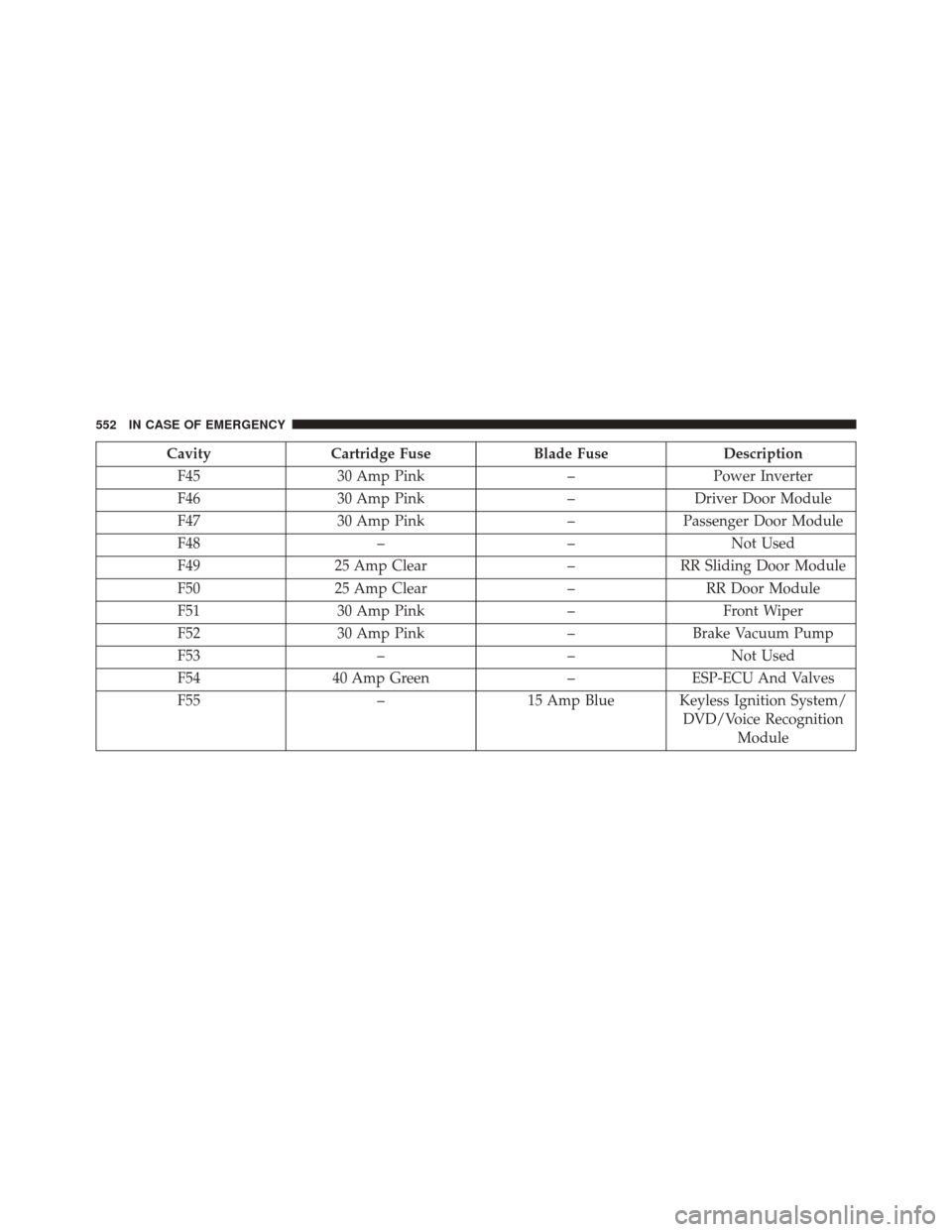
CavityCartridge Fuse Blade FuseDescription
F45 30 Amp Pink –Power Inverter
F46 30 Amp Pink –Driver Door Module
F47 30 Amp Pink –Passenger Door Module
F48 ––Not Used
F49 25 Amp Clear –RR Sliding Door Module
F50 25 Amp Clear –RR Door Module
F51 30 Amp Pink –Front Wiper
F52 30 Amp Pink –Brake Vacuum Pump
F53 ––Not Used
F54 40 Amp Green –ESP-ECU And Valves
F55 –15 Amp Blue Keyless Ignition System/
DVD/Voice RecognitionModule
552 IN CASE OF EMERGENCY