light CHRYSLER PACIFICA 2017 2.G Owners Manual
[x] Cancel search | Manufacturer: CHRYSLER, Model Year: 2017, Model line: PACIFICA, Model: CHRYSLER PACIFICA 2017 2.GPages: 828, PDF Size: 7.58 MB
Page 424 of 828
•The system disengages. (Refer to the information on
ACC Activation).
The maximum braking applied by ACC is limited; how-
ever, the driver can always apply the brakes manually, if
necessary.
NOTE: The brake lights will illuminate whenever the
ACC system applies the brakes.
A Proximity Warning will alert the driver if ACC predicts
that its maximum braking level is not sufficient to
maintain the set distance. If this occurs, a visual alert
“BRAKE” will flash in the EVIC/DID and a chime will
sound while ACC continues to apply its maximum
braking capacity. NOTE:
The “Brake!” Screen in the EVIC/DID is a warn-
ing for the driver to take action and does not necessarily
mean that the Forward Collision Warning system is
applying the brakes autonomously.
Brake Alert
422 STARTING AND OPERATING
Page 435 of 828
WARNING!
In the normal Cruise Control mode, the system will
not react to vehicles ahead. In addition, the proximity
warning does not activate and no alarm will sound
even if you are too close to the vehicle ahead since
neither the presence of the vehicle ahead nor the
vehicle-to vehicle distance is detected. Be sure to
maintain a safe distance between your vehicle and
the vehicle ahead. Always be aware which mode is
selected.
To Set A Desired Speed
Turn the Normal (Fixed Speed) Electronic
Speed Control ON. When the vehicle has
reached the desired speed, push the SET (+) orSET (-) button and release. Release the accelerator and the
vehicle will operate at the selected speed. Once a speed
has been set a message (CRUISE CONTROL SET TO
MPH/KM) will appear indicating what speed was set.
This light will turn on when the system is turned on via
the On/Off control. It turns green when the electronic
speed control is SET.
To Vary The Speed Setting
To Increase Speed
When the Normal (Fixed Speed) Electronic Speed Con-
trol is set, you can increase speed by pushing the SET
+
button.6
STARTING AND OPERATING 433
Page 505 of 828
CAUTION!(Continued)
into the fuel system. Also, a poorly fitting aftermar-
ket cap can cause the “Malfunction Indicator Light
(MIL)” to illuminate, due to fuel vapors escaping
from the system.
• A poorly fitting fuel filler cap may cause the MIL to
turn on.
• To avoid fuel spillage and overfilling, do not “top
off” the fuel tank after filling.
1. Put the vehicle in park and switch the ignition off.
2. Push the center-rear edge of the fuel filler door (3 o’clock position) and release to open. 3. Insert the fuel nozzle fully into the filler pipe, the
nozzle opens and holds the flapper door while refuel-
ing.
4. When the fuel nozzle “clicks” or shuts off, the fuel tank is full.
Fuel Filler Cap Release
6
STARTING AND OPERATING 503
Page 506 of 828
5. After you have stopped pumping fuel, remove the fuelfiller nozzle.
6. To close the fuel filler door, push the center-rear edge (3 o’clock position) of the fuel filler door and then
release. The fuel filler door will latch closed.
NOTE:
• In certain cold conditions, ice may prevent the fuel
filler door from opening. If this occurs, lightly push on
the fuel filler door around the perimeter to break the
ice build up.
VEHICLE LOADING
Certification Label
As required by National Highway Traffic Safety Admin-
istration regulations, your vehicle has a certification label
affixed to the driver’s side door or pillar. This label contains the month and year of manufacture,
Gross Vehicle Weight Rating (GVWR), Gross Axle Weight
Rating (GAWR) front and rear, and Vehicle Identification
Number (VIN). A Month-Day-Hour (MDH) number is
included on this label and indicates the Month, Day and
Hour of manufacture. The bar code that appears on the
bottom of the label is your VIN.
Gross Vehicle Weight Rating (GVWR)
The GVWR is the total permissible weight of your vehicle
including driver, passengers, vehicle, options and cargo.
The label also specifies maximum capacities of front and
rear axle systems (GAWR). Total load must be limited so
GVWR and front and rear GAWR are not exceeded.
Payload
The payload of a vehicle is defined as the allowable load
weight a truck can carry, including the weight of the
driver, all passengers, options and cargo.
504 STARTING AND OPERATING
Page 512 of 828
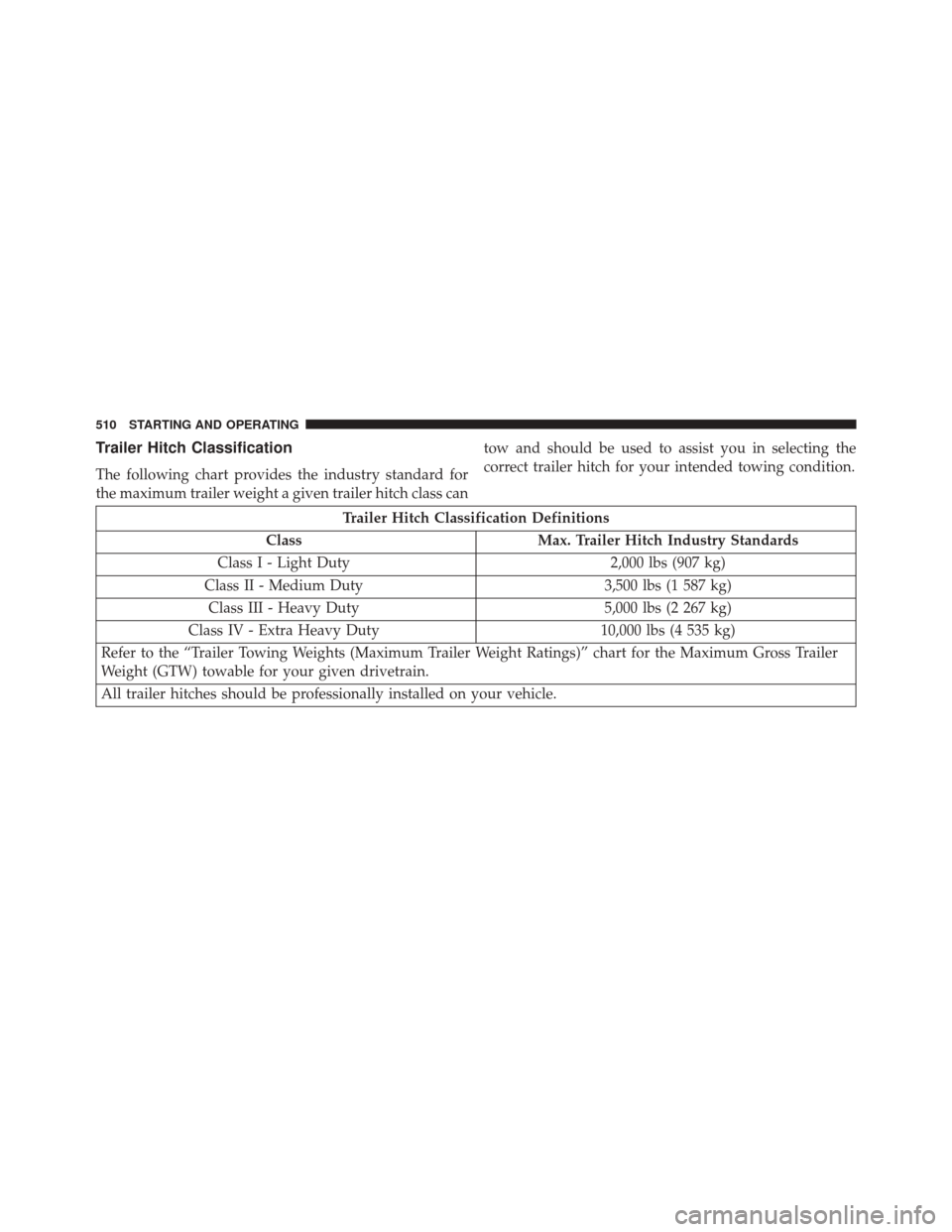
Trailer Hitch Classification
The following chart provides the industry standard for
the maximum trailer weight a given trailer hitch class cantow and should be used to assist you in selecting the
correct trailer hitch for your intended towing condition.
Trailer Hitch Classification Definitions
Class Max. Trailer Hitch Industry Standards
Class I - Light Duty 2,000 lbs (907 kg)
Class II - Medium Duty 3,500 lbs (1 587 kg)
Class III - Heavy Duty 5,000 lbs (2 267 kg)
Class IV - Extra Heavy Duty 10,000 lbs (4 535 kg)
Refer to the “Trailer Towing Weights (Maximum Trailer Weight Ratings)” chart for the Maximum Gross Trailer
Weight (GTW) towable for your given drivetrain.
All trailer hitches should be professionally installed on your vehicle.
510 STARTING AND OPERATING
Page 520 of 828
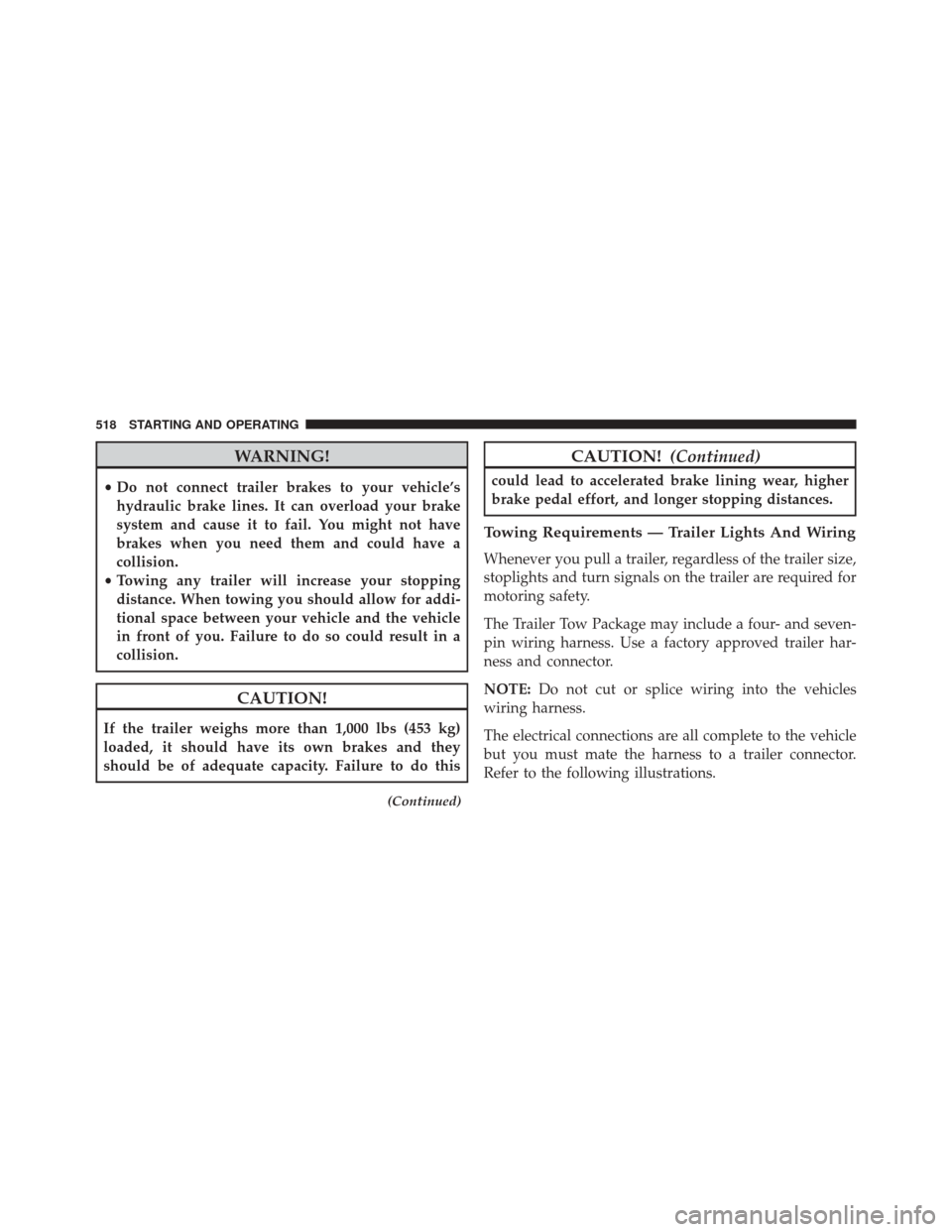
WARNING!
•Do not connect trailer brakes to your vehicle’s
hydraulic brake lines. It can overload your brake
system and cause it to fail. You might not have
brakes when you need them and could have a
collision.
• Towing any trailer will increase your stopping
distance. When towing you should allow for addi-
tional space between your vehicle and the vehicle
in front of you. Failure to do so could result in a
collision.
CAUTION!
If the trailer weighs more than 1,000 lbs (453 kg)
loaded, it should have its own brakes and they
should be of adequate capacity. Failure to do this
(Continued)
CAUTION! (Continued)
could lead to accelerated brake lining wear, higher
brake pedal effort, and longer stopping distances.
Towing Requirements — Trailer Lights And Wiring
Whenever you pull a trailer, regardless of the trailer size,
stoplights and turn signals on the trailer are required for
motoring safety.
The Trailer Tow Package may include a four- and seven-
pin wiring harness. Use a factory approved trailer har-
ness and connector.
NOTE:Do not cut or splice wiring into the vehicles
wiring harness.
The electrical connections are all complete to the vehicle
but you must mate the harness to a trailer connector.
Refer to the following illustrations.
518 STARTING AND OPERATING
Page 522 of 828
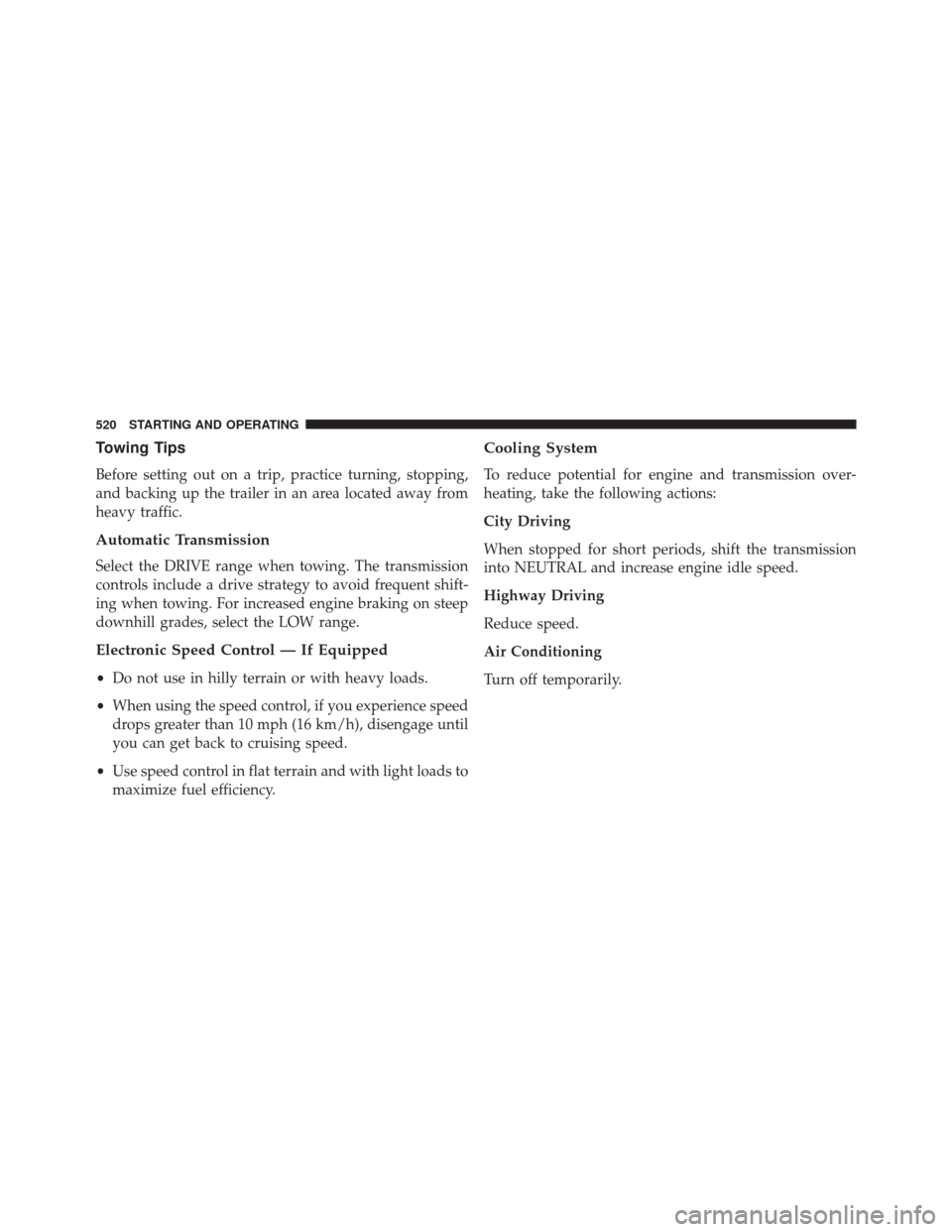
Towing Tips
Before setting out on a trip, practice turning, stopping,
and backing up the trailer in an area located away from
heavy traffic.
Automatic Transmission
Select the DRIVE range when towing. The transmission
controls include a drive strategy to avoid frequent shift-
ing when towing. For increased engine braking on steep
downhill grades, select the LOW range.
Electronic Speed Control — If Equipped
•Do not use in hilly terrain or with heavy loads.
• When using the speed control, if you experience speed
drops greater than 10 mph (16 km/h), disengage until
you can get back to cruising speed.
• Use speed control in flat terrain and with light loads to
maximize fuel efficiency.
Cooling System
To reduce potential for engine and transmission over-
heating, take the following actions:
City Driving
When stopped for short periods, shift the transmission
into NEUTRAL and increase engine idle speed.
Highway Driving
Reduce speed.
Air Conditioning
Turn off temporarily.
520 STARTING AND OPERATING
Page 527 of 828
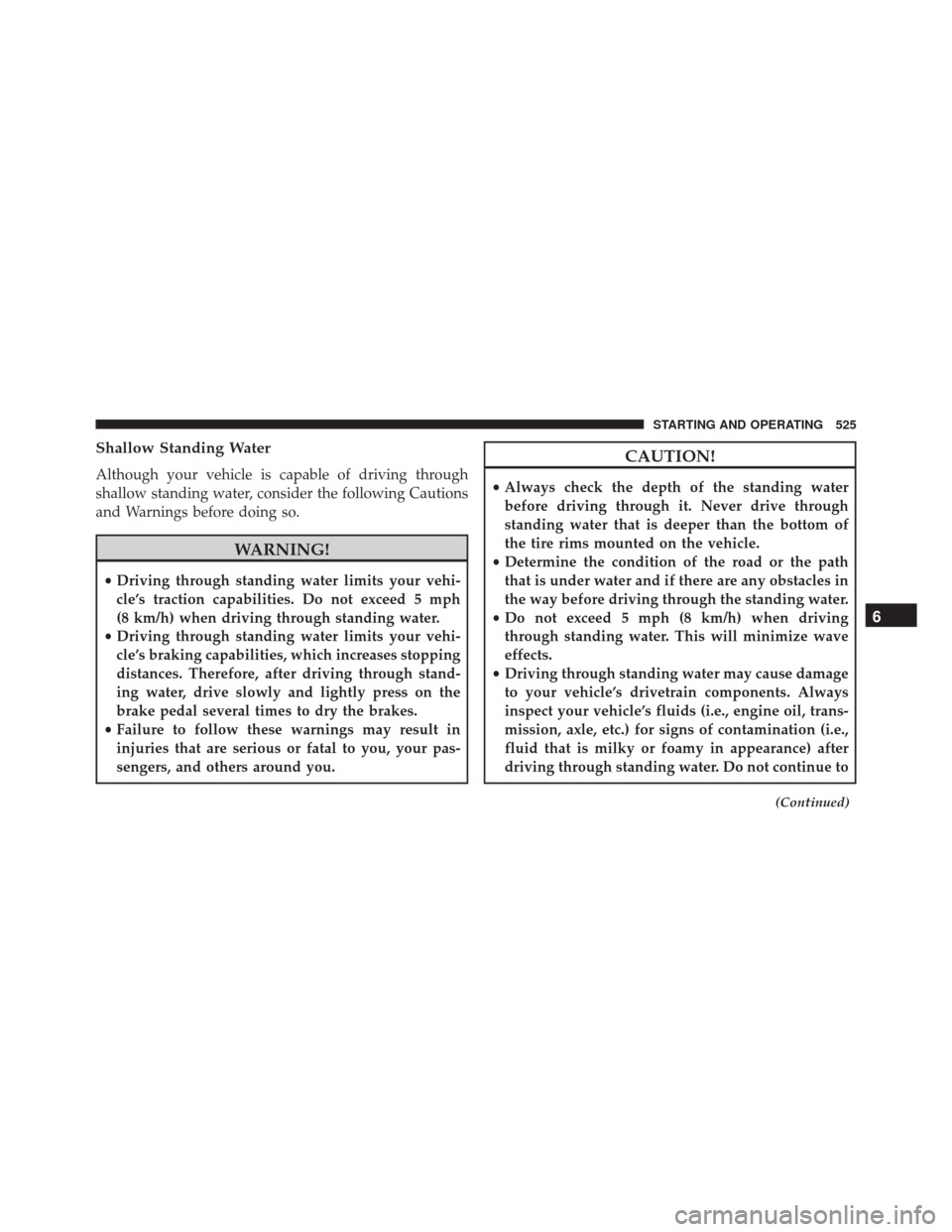
Shallow Standing Water
Although your vehicle is capable of driving through
shallow standing water, consider the following Cautions
and Warnings before doing so.
WARNING!
•Driving through standing water limits your vehi-
cle’s traction capabilities. Do not exceed 5 mph
(8 km/h) when driving through standing water.
• Driving through standing water limits your vehi-
cle’s braking capabilities, which increases stopping
distances. Therefore, after driving through stand-
ing water, drive slowly and lightly press on the
brake pedal several times to dry the brakes.
• Failure to follow these warnings may result in
injuries that are serious or fatal to you, your pas-
sengers, and others around you.
CAUTION!
• Always check the depth of the standing water
before driving through it. Never drive through
standing water that is deeper than the bottom of
the tire rims mounted on the vehicle.
• Determine the condition of the road or the path
that is under water and if there are any obstacles in
the way before driving through the standing water.
• Do not exceed 5 mph (8 km/h) when driving
through standing water. This will minimize wave
effects.
• Driving through standing water may cause damage
to your vehicle’s drivetrain components. Always
inspect your vehicle’s fluids (i.e., engine oil, trans-
mission, axle, etc.) for signs of contamination (i.e.,
fluid that is milky or foamy in appearance) after
driving through standing water. Do not continue to
(Continued)
6
STARTING AND OPERATING 525
Page 533 of 828
ASSIST Call
The ASSIST Button is used to automatically connect you
to any one of the following support centers:
•Roadside Assistance – If you get a flat tire, or need a
tow, just push the ASSIST button and you’ll be con-
nected to someone who can help. Roadside Assistance
will know what vehicle you’re driving and its location.
Additional fees may apply for roadside Assistance.
• Uconnect Access Customer Care – In-vehicle support
for Uconnect Access and Uconnect Access Via Mobile
features.
• Vehicle Customer Care – Total support for all other
vehicle issues. 9-1-1 Call
1. Push the 9-1-1 Call button on the Rearview Mirror.
NOTE:
In case the 9-1-1 Call button is pushed in error,
there will be a 10 second delay before the 9-1-1 Call
system initiates a call to a 9-1-1 operator. To cancel the
9-1-1 Call connection, push the 9-1-1 Call button on the
Rearview Mirror or press the cancellation button on the
Device Screen. Termination of the 9-1-1 Call will turn the
green LED light on the Rearview Mirror off.
2. The LED light located between the Power and 9-1-1 buttons on the Rearview Mirror will turn green once a
connection to a 9-1-1 operator has been made.
7
IN CASE OF EMERGENCY 531
Page 536 of 828
9-1-1 Call System Limitations
Vehicles sold in Canada and MexicoDO NOThave 9-1-1
Call system capabilities.
9-1-1 or other emergency line operators in Canada and
Mexico may not answer or respond to 9-1-1 system calls.
If the 9-1-1 Call system detects a malfunction, any of the
following may occur at the time the malfunction is
detected, and at the beginning of each ignition cycle:
• The Rearview Mirror light located between the ASSIST
and 9-1-1 buttons will continuously be illuminated
red.
• The Device Screen will display the following message
“Vehicle device requires service. Please contact your
dealer.”
• An In-Vehicle Audio message will state “Vehicle de-
vice requires service. Please contact your dealer.”WARNING!
• Ignoring the Rearview Mirror light could mean you
will not have 9-1-1 Call services. If the Rearview
Mirror light is illuminated, have an authorized
dealer service the 9-1-1 Call system immediately.
• The Occupant Restraint Control module turns on
the air bag Warning Light on the instrument panel
if a malfunction in any part of the system is
detected. If the Air Bag Warning Light is illumi-
nated, have an authorized dealer service the Occu-
pant Restraint Control system immediately.
Even if the 9-1-1 Call system is fully functional, factors
beyond FCA US LLC’s control may prevent or stop the
9-1-1 Call system operation. These include, but are not
limited to, the following factors:
• The ignition is in OFF position.
534 IN CASE OF EMERGENCY