reset CHRYSLER PACIFICA 2017 2.G User Guide
[x] Cancel search | Manufacturer: CHRYSLER, Model Year: 2017, Model line: PACIFICA, Model: CHRYSLER PACIFICA 2017 2.GPages: 828, PDF Size: 7.58 MB
Page 222 of 828
Vehicle Info
Push and release theUPorDOWNarrow button
until the Vehicle Info icon is highlighted in the EVIC/
DID. Push the LEFT
orRIGHTarrow button to
scroll through the following information submenus:
Tire Pressure
If tire pressure is OKfor all tires, a vehicle ICON is
displayed with tire pressure values in each corner of the
ICON.
If one or more tires have low pressure, “Inflate Tire To
XX” is displayed with the vehicle ICON, and the tire
pressure values in each corner of the ICON with the
pressure value of the low tire displayed in a different
color than the other tire pressure value.
If the Tire Pressure system requires service, “Service Tire
Pressure System” is displayed. Tire PSI is an information only function and cannot be
reset.
Refer to “Tire Pressure Monitoring System (TPMS)”
under “Safety” for further information.
•
Coolant Temperature
Displays the actual coolant temperature.
• Transmission Temperature – Automatic Transmission
Only
Displays the actual transmission temperature.
• Oil Temperature
Displays the actual oil temperature.
• Oil Pressure
Displays the actual oil pressure.
220 GETTING TO KNOW YOUR INSTRUMENT PANEL
Page 223 of 828
Oil Life (Hold OK Button To Reset)
The “Hold OK to Reset” instruction will be displayed at
all times, but the following conditions will need to be met
in order to reset Oil Life:
The vehicle’s engine must be off
The ignition must be in the ON/RUN position
•If the conditions are met, holding the OK button will
reset the gauge and the numeric display will return to
100%.
• If the conditions are not met, a popup message will
display for 5 seconds, describing the required condi-
tions, and then the Oil Life screen will reappear.
• Battery Voltage
Displays the actual battery voltage.Driver Assist (7” DID)
Push and release the UPorDOWNarrow button
until the Driver Assist display icon is highlighted in
the DID cluster display. Refer to “Adaptive Cruise
Control (ACC) — If Equipped” in “Starting And
Operating” for further information.
Fuel Economy
Push and release the UPorDOWNarrow button
until the Fuel Economy Menu item is highlighted in
the EVIC/DID. The Fuel Economy Menu will display
the following:
• Two sub menu pages that can be toggled between
using the LEFT
andRIGHTarrow buttons;
one with Current value displayed and one without
the Current Value displayed (for DID only):
– Average Fuel Economy (MPG, L/100 km, or km/l)
– Range To Empty (miles or km)
4
GETTING TO KNOW YOUR INSTRUMENT PANEL 221
Page 224 of 828
– Current Fuel Economy (MPG, L/100 km, or km/l)
– The Max and Min values will correspond to theparticular engine requirements
• Hold OKto reset average fuel economy information.
Trip Info
Push and release the UPorDOWNarrow button
until the Trip Menu item is highlighted in the EVIC/
DID. Push the LEFT
orRIGHTarrow button to
scroll through the Trip A and Trip B submenus. The
Trip information will display the following:
• Distance
• Average Fuel Economy
• Elapsed Time
Hold the OKbutton to reset feature information.
Audio
Push and release the UPorDOWNarrow button
until the Audio Menu displays in the EVIC/DID.
Navigation
When this feature is selected, the navigation system
utilizes voice commands, guiding through the drive
route, mile by mile, turn-by-turn until the final destina-
tion is reached.
Stored Messages
Push and release the UPorDOWNarrow button
until the Messages Menu displays in the EVIC/DID.
This feature shows the number of stored warning
messages. Pushing the RIGHT
arrow button will
allow you to see what the stored messages are.
222 GETTING TO KNOW YOUR INSTRUMENT PANEL
Page 231 of 828
•Evaluate the latest driving cycles (distance, driving
time and parking time).
• The vehicle should have service performed if the
message is still present during consecutive trips and
the evaluation of the vehicle and driving pattern did
not help to identify the cause.
TRIP COMPUTER
The Trip Computer is located in the Electronic Vehicle
Information Center (EVIC) or Driver Information Display
(DID). Push and release the UP
orDOWNarrow
button until “Trip Info” is highlighted in the EVIC and
push the RIGHT
arrow button. Push and release
the UP
orDOWNarrow buttons to highlight
one of the following functions if you want to reset it:
Trip A
• Shows the total distance traveled for Trip A since the
last reset. •
Shows the elapsed time traveled for Trip A since the
last reset.
Trip B
• Shows the total distance traveled for Trip B since the
last reset.
• Shows the elapsed time traveled for Trip B since the
last reset.
Elapsed Time
Shows the total elapsed time of travel since the last reset
when the ignition switch is in the ACC position. Elapsed
time will increment when the ignition switch is in the ON
or START position.
To Reset A Trip Function
Reset will only occur while a resettable function is
selected (highlighted). Push and hold the OKbutton to
clear the resettable function being displayed.
4
GETTING TO KNOW YOUR INSTRUMENT PANEL 229
Page 283 of 828
blockage. After removing the blockage, the following
procedure can be used to reset the system:
•Cycle the ignition from on to off and then back on.
• Ensure that the system detects a blind spot target on
each side while driving above 6 mph (10 km/h).
If the blockage message is still present after cycling the
ignition and driving in traffic, check again for a blockage.
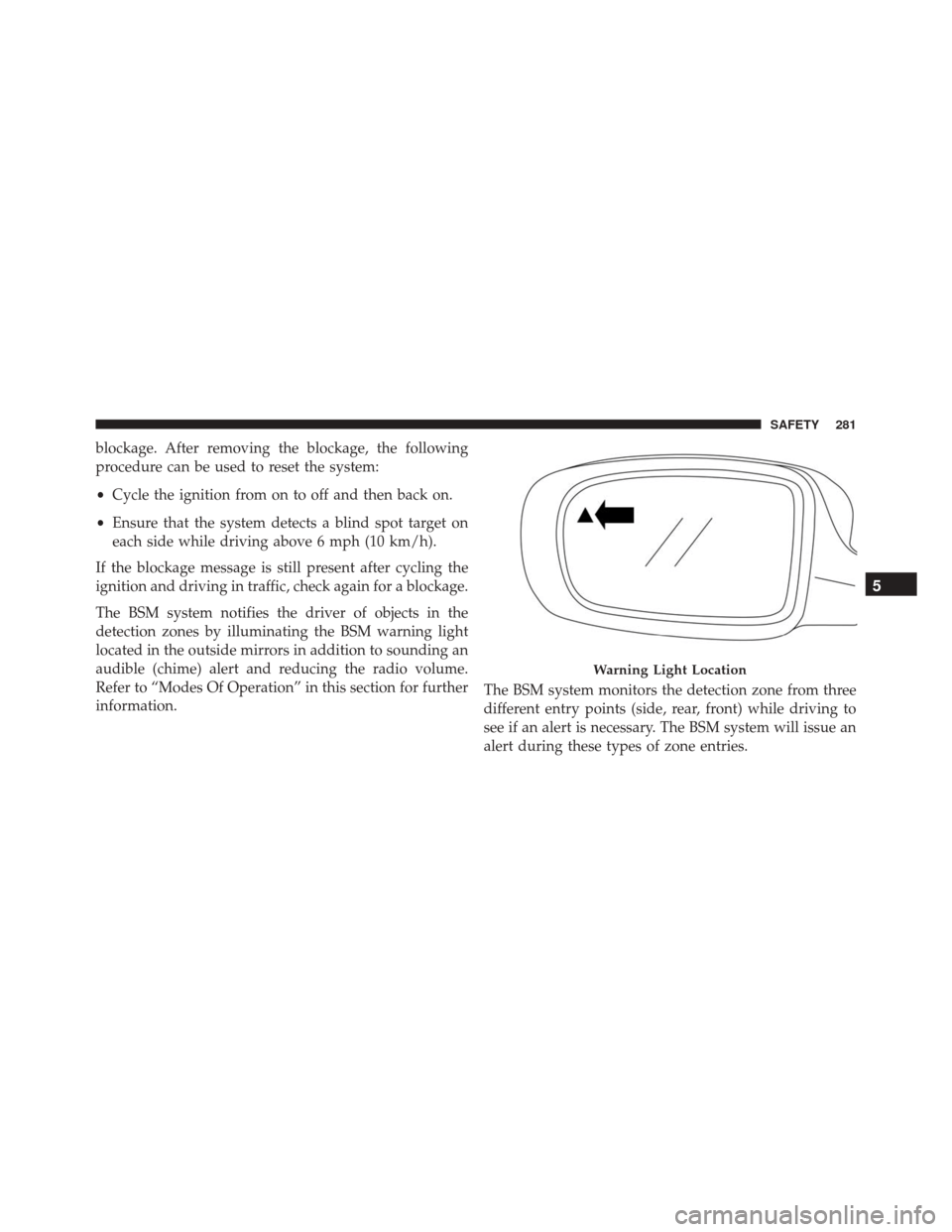
The BSM system notifies the driver of objects in the
detection zones by illuminating the BSM warning light
located in the outside mirrors in addition to sounding an
audible (chime) alert and reducing the radio volume.
Refer to “Modes Of Operation” in this section for further
information. The BSM system monitors the detection zone from three
different entry points (side, rear, front) while driving to
see if an alert is necessary. The BSM system will issue an
alert during these types of zone entries.
Warning Light Location
5
SAFETY 281
Page 343 of 828
WARNING!
Deployed air bags and seat belt pretensioners cannot
protect you in another collision. Have the air bags,
seat belt pretensioners, and the seat belt retractor
assemblies replaced by an authorized dealer imme-
diately. Also, have the Occupant Restraint Controller
System serviced as well.
NOTE:
• Air bag covers may not be obvious in the interior trim,
but they will open during air bag deployment.
• After any collision, the vehicle should be taken to an
authorized dealer immediately.
Enhanced Accident Response System
In the event of an impact, if the communication network
remains intact, and the power remains intact, depending on the nature of the event, the ORC will determine
whether to have the Enhanced Accident Response Sys-
tem perform the following functions:
•
Cut off fuel to the engine.
• Flash hazard lights as long as the battery has power or
until the hazard light button is pressed. The hazard
lights can be deactivated by pressing the hazard light
button.
• Turn on the interior lights, which remain on as long as
the battery has power.
• Unlock the power door locks.
Enhanced Accident Response System Reset
Procedure
In order to reset the Enhanced Accident Response System
functions after an event, the ignition switch must be
changed from ignition START or ON/RUN to ignition
5
SAFETY 341
Page 344 of 828
OFF. Carefully check the vehicle for fuel leaks in the
engine compartment and on the ground near the engine
compartment and fuel tank before resetting the system
and starting the engine.
Air Bag Warning Light
The air bags must be ready to inflate for your
protection in a collision. The Occupant Re-
straint Controller (ORC) monitors the internal
circuits and interconnecting wiring associated
with air bag system electrical components.
The ORC monitors the readiness of the electronic parts of
the air bag system whenever the ignition switch is in the
START or ON/RUN position. If the ignition switch is in
the OFF position or in the ACC position, the air bag
system is not on and the air bags will not inflate. The ORC contains a backup power supply system that
may deploy the air bags even if the battery loses power or
it becomes disconnected prior to deployment.
The ORC turns on the Air Bag Warning Light in the
instrument panel for approximately four to eight seconds
for a self-check when the ignition switch is first turned to
the ON/RUN position. After the self-check, the Air Bag
Warning Light will turn off. If the ORC detects a mal-
function in any part of the system, it turns on the Air Bag
Warning Light, either momentarily or continuously. A
single chime will sound to alert you if the light comes on
again after initial startup.
The ORC also includes diagnostics that will illuminate
the instrument panel Air Bag Warning Light if a malfunc-
tion is detected that could affect the air bag system. The
diagnostics also record the nature of the malfunction.
While the air bag system is designed to be maintenance
342 SAFETY
Page 396 of 828
system will guide you through the steps necessary to
retract the EPB actuator in order to perform rear brake
service.
Brake Service Mode has requirements that must be met in
order to be activated:
•The vehicle must be at a standstill.
• The park brake must be unapplied.
• The transmission must be in PARK or NEUTRAL.
While in service mode, the Electric Park Brake fault lamp
will flash continuously while the ignition switch is ON.
When brake service work is complete, the following steps
must be followed to reset the parking brake system to
normal operation:
• Ensure the vehicle is at a standstill.
• Press the brake pedal with moderate force. •
Apply the Electric Park Brake Switch.
WARNING!
You can be badly injured working on or around a
motor vehicle. Do only that service work for which
you have the knowledge and the right equipment. If
you have any doubt about your ability to perform a
service job, take your vehicle to a competent me-
chanic.
AUTOMATIC TRANSMISSION
CAUTION!
Damage to the transmission may occur if the follow-
ing precautions are not observed:
•Shift into or out of PARK or REVERSE only after
the vehicle has come to a complete stop.
(Continued)
394 STARTING AND OPERATING
Page 405 of 828
In the event of a momentary problem, the transmission
can be reset to regain all forward gears by performing the
following steps:
1. Stop the vehicle.
2. Shift the transmission into PARK, if possible. If not,shift the transmission to NEUTRAL.
3. Push and hold the ignition switch until the engine turns OFF.
4. Wait approximately 30 seconds.
5. Restart the engine.
6. Shift into the desired gear range. If the problem is no longer detected, the transmission will return to normal
operation. NOTE:
Even if the transmission can be reset, we recom-
mend that you visit your authorized dealer at your
earliest possible convenience. Your authorized dealer has
diagnostic equipment to determine if the problem could
recur. If the transmission cannot be reset, authorized
dealer service is required.
Torque Converter Clutch
A feature designed to improve fuel economy has been
included in the automatic transmission on your vehicle.
A clutch within the torque converter engages automati-
cally at calibrated speeds. This may result in a slightly
different feeling or response during normal operation in
the upper gears. When the vehicle speed drops or during
some accelerations, the clutch automatically disengages.
6
STARTING AND OPERATING 403
Page 408 of 828
NOTE:In order to ensure proper operation, the Speed
Control System has been designed to shut down if
multiple Speed Control functions are operated at the
same time. If this occurs, the Speed Control System can
be reactivated by pushing the Speed Control ON/OFF
button and resetting the desired vehicle set speed.
To Activate
Push the ON/OFF button to activate the Speed Control.
The Cruise Indicator Light in the Electronic Vehicle
Information Center (EVIC) or Driver Information Display
(DID) will illuminate. To turn the system off, push the
ON/OFF button a second time. The Cruise Indicator
Light will turn off. The system should be turned off when
not in use.
Speed Control Buttons
1 — ON/OFF 4 — SET-/DECEL
2 — SET+/ACCEL 5 — CANCEL
3 — RESUME 406 STARTING AND OPERATING