brakes CHRYSLER PACIFICA 2017 2.G Owner's Manual
[x] Cancel search | Manufacturer: CHRYSLER, Model Year: 2017, Model line: PACIFICA, Model: CHRYSLER PACIFICA 2017 2.GPages: 828, PDF Size: 7.58 MB
Page 520 of 828
WARNING!
•Do not connect trailer brakes to your vehicle’s
hydraulic brake lines. It can overload your brake
system and cause it to fail. You might not have
brakes when you need them and could have a
collision.
• Towing any trailer will increase your stopping
distance. When towing you should allow for addi-
tional space between your vehicle and the vehicle
in front of you. Failure to do so could result in a
collision.
CAUTION!
If the trailer weighs more than 1,000 lbs (453 kg)
loaded, it should have its own brakes and they
should be of adequate capacity. Failure to do this
(Continued)
CAUTION! (Continued)
could lead to accelerated brake lining wear, higher
brake pedal effort, and longer stopping distances.
Towing Requirements — Trailer Lights And Wiring
Whenever you pull a trailer, regardless of the trailer size,
stoplights and turn signals on the trailer are required for
motoring safety.
The Trailer Tow Package may include a four- and seven-
pin wiring harness. Use a factory approved trailer har-
ness and connector.
NOTE:Do not cut or splice wiring into the vehicles
wiring harness.
The electrical connections are all complete to the vehicle
but you must mate the harness to a trailer connector.
Refer to the following illustrations.
518 STARTING AND OPERATING
Page 521 of 828
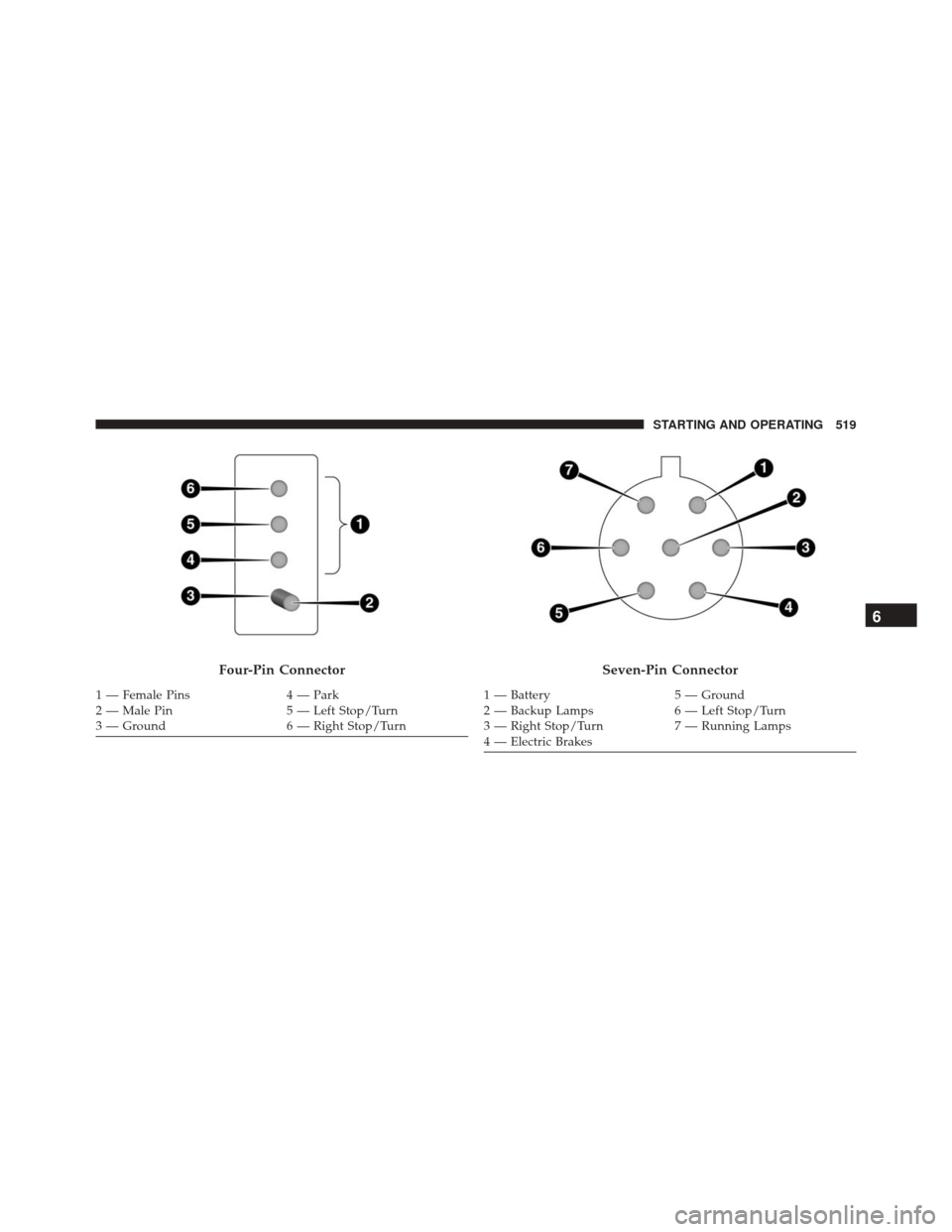
Four-Pin Connector
1 — Female Pins4 — Park
2 — Male Pin 5 — Left Stop/Turn
3 — Ground 6 — Right Stop/Turn
Seven-Pin Connector
1 — Battery5 — Ground
2 — Backup Lamps 6 — Left Stop/Turn
3 — Right Stop/Turn 7 — Running Lamps
4 — Electric Brakes
6
STARTING AND OPERATING 519
Page 527 of 828
Shallow Standing Water
Although your vehicle is capable of driving through
shallow standing water, consider the following Cautions
and Warnings before doing so.
WARNING!
•Driving through standing water limits your vehi-
cle’s traction capabilities. Do not exceed 5 mph
(8 km/h) when driving through standing water.
• Driving through standing water limits your vehi-
cle’s braking capabilities, which increases stopping
distances. Therefore, after driving through stand-
ing water, drive slowly and lightly press on the
brake pedal several times to dry the brakes.
• Failure to follow these warnings may result in
injuries that are serious or fatal to you, your pas-
sengers, and others around you.
CAUTION!
• Always check the depth of the standing water
before driving through it. Never drive through
standing water that is deeper than the bottom of
the tire rims mounted on the vehicle.
• Determine the condition of the road or the path
that is under water and if there are any obstacles in
the way before driving through the standing water.
• Do not exceed 5 mph (8 km/h) when driving
through standing water. This will minimize wave
effects.
• Driving through standing water may cause damage
to your vehicle’s drivetrain components. Always
inspect your vehicle’s fluids (i.e., engine oil, trans-
mission, axle, etc.) for signs of contamination (i.e.,
fluid that is milky or foamy in appearance) after
driving through standing water. Do not continue to
(Continued)
6
STARTING AND OPERATING 525
Page 638 of 828
result in unsatisfactory engine coolant (antifreeze)
performance, poor gas mileage, and increased emis-
sions.
Brake System
In order to assure brake system performance, all brake
system components should be inspected periodically.
Refer to the “Scheduled Servicing” for the proper main-
tenance intervals.
WARNING!
Riding the brakes can lead to brake failure and
possibly a collision. Driving with your foot resting or
riding on the brake pedal can result in abnormally
high brake temperatures, excessive lining wear, and
possible brake damage. You would not have your full
braking capacity in an emergency.
Brake Master Cylinder
The fluid in the master cylinder should be checked when
performing under hood services or immediately if the
“Brake Warning Light” is illuminated.
Be sure to clean the top of the master cylinder area before
removing the cap. If necessary, add fluid to bring the
fluid level up to the requirements described on the brake
fluid reservoir. With disc brakes, fluid level can be
expected to fall as the brake pads wear. Brake fluid level
should be checked when pads are replaced. However,
low fluid level may be caused by a leak and a checkup
may be needed.
Use only manufacturer’s recommended brake fluid. Re-
fer to “Fluids And Lubricants” in “Technical Data” for
further information.
636 MAINTAINING AND CARING FOR YOUR VEHICLE
Page 707 of 828
are much closer to the vehicle in front of you. To change
the FCW+ status, press and release the “Near” “Med” or
“Far” buttons.
•Forward Collision Warning-Plus (FCW+) Active
Braking — If Equipped The FCW+ system includes Advanced Brake Assist
(ABA). When this feature is selected, it will apply the
brakes to slow your vehicle in case of potential
forward collision. The ABA applies additional brake
pressure when the driver requests insufficient brake
pressure to avoid a potential frontal collision. The
ABA system becomes active at 5 mph (8 km/h).
• ParkSense — If Equipped
The ParkSense system will scan for objects behind the
vehicle when the transmission gear selector is in RE-
VERSE and the vehicle speed is less than 7 mph
(11 km/h). It will provide an alert (audible and/or visual) to indicate the proximity to other objects. The
system can be enabled with Sound Only, or Sound and
Display.
•
Rear ParkSense Volume — If Equipped
Rear Park Assist chime volume settings can be se-
lected from the EVIC/DID or Uconnect System (if
equipped). The chime volume settings include
“LOW,” “MEDIUM,” and “HIGH.” The factory de-
fault volume setting is MEDIUM.
• Front ParkSense Volume — If Equipped
Front Park Assist chime volume settings can be
selected from the EVIC/DID or Uconnect System (if
equipped). The chime volume settings include
“LOW,” “MEDIUM,” and “HIGH.” The factory de-
fault volume setting is MEDIUM.
• Rear ParkSense Braking Assist — If Equipped
When this feature is selected, the park assist system
will detect objects located behind the vehicle and
utilize autonomous braking to stop the vehicle.
10
MULTIMEDIA 705
Page 734 of 828
•Hill Start Assist — If Equipped
When this feature is selected, the Hill Start Assist (HSA)
system is active. To make your selection, press the “Hill
Start Assist” button on the touchscreen, until a check-
mark appears next to setting, indicating that the setting
had been selected.
• Brake Service
This feature provides a means for a technician or vehicle
owner to utilize a vehicle integrated, menu driven sys-
tem, to command the electric park brake retraction, to
service the rear foundation brakes (brake pads, calipers,
rotors, etc.).
Lights
After pressing the “Lights” button on the touchscreen the
following settings will be available. •
Headlight Off Delay
When this feature is selected, it allows adjustment of the
amount of time the headlights remain on after the engine
is shut off. To change the Headlights Off Delay setting,
press the “+” or “-” button on the touchscreen to select
your desired time interval, and choose either 0, 30, 60 or
90 seconds.
• Headlight Illumination On Approach
When this feature is selected, the headlights will activate
and remain on for 0, 30, 60 or 90 seconds when the doors
are unlocked with the Remote Keyless Entry (RKE)
transmitter. To change the Illuminated Approach status,
press the “+” or “-” button on the touchscreen to select
your desired time interval.
732 MULTIMEDIA
Page 818 of 828
Lug Nuts.............................. .676
Maintenance Free Battery ....................620
Maintenance Schedule ..................... .613
Malfunction Indicator Light (Check Engine) .......250
Manual, Service ......................... .803
Map/Reading Lights .......................117
Marker Lights, Side ....................... .542
Master Cylinder (Brakes) ....................636
Memory Feature (Memory Seat) ................90
Memory Seat ......................... .90, 107
Methanol .............................. .679
Mini-Trip Computer ...................... .229
Mirrors ............................... .104
Automatic Dimming .....................105
Electric Remote ........................ .106
Exterior Folding ....................... .106
Heated .............................. .107
Memory ..............................90 Outside
............................. .106
Rearview ......................... .104, 529
Vanity ........................... .109, 192
Modifications/Alterations, Vehicle ...............6
Monitor, Tire Pressure System ................293
MOPAR Parts ........................... .802
MTBE/ETBE ........................... .679
Multi-Function Control Lever .................113
New Vehicle Break-In Period .................388
Occupant Restraints ...................... .302
Octane Rating, Gasoline (Fuel) .............677, 687
Oil, Engine ......................... .622, 687
Capacity ............................ .686
Change Interval ....................... .622
Checking ............................ .619
Disposal ............................. .624
Filter ............................ .624, 687
816 INDEX