park assist CHRYSLER PACIFICA 2017 2.G Owner's Manual
[x] Cancel search | Manufacturer: CHRYSLER, Model Year: 2017, Model line: PACIFICA, Model: CHRYSLER PACIFICA 2017 2.GPages: 828, PDF Size: 7.58 MB
Page 468 of 828
The ParkSense Active Park Assist system will turn off
automatically for any of the following conditions:
•The parking maneuver is completed.
• Vehicle speed greater than 18 mph (30 km/h) when
searching for a parking space.
• Vehicle speed greater than 5 mph (7 km/h) during
active steering guidance into the parking space.
• Touching the steering wheel during active steering
guidance into the parking space.
• Pushing the ParkSense Front and Rear Park Assist
switch.
• The Driver ’s door is opened.
• The liftgate is opened.
• Electronic Stability Control/Anti-lock Braking System
intervention. •
The ParkSense Active Park Assist system will allow a
maximum of six shifts between DRIVE and REVERSE.
If the maneuver cannot be completed within six shifts,
the system will cancel and the DID will instruct the
driver to complete the maneuver manually.
The ParkSense Active Park Assist system will only oper-
ate and search for a parking space when the following
conditions are present:
• The gear position is in DRIVE.
• The ignition is in the RUN position.
• The ParkSense Active Park Assist switch is activated.
• The Driver ’s door is closed.
• The liftgate is closed.
• Vehicle speed is less than 15 mph (25 km/h).
466 STARTING AND OPERATING
Page 469 of 828
NOTE:If the vehicle is driven above approximately
15 mph (25 km/h), the DID will instruct the driver to
slow down. If the vehicle is driven above approximately
18 mph (30 km/h), the system will cancel. The driver
must then reactivate the system by pushing the
ParkSense Active Park Assist switch.
• The outer surface and the underside of the front and
rear fascias/bumpers are clean and clear of snow, ice,
mud, dirt or other obstruction.
When pushed, the LED on the ParkSense Active Park
Assist switch will blink momentarily, and then the LED
will turn OFF if any of the above conditions are not
present.Parallel Parking Space Assistance Operation/
Display
When the ParkSense Active Park Assist system is enabled
the “Active ParkSense Searching - Press OK for Perpen-
dicular Park” message will appear in the Driver Informa-
tion Display (DID). You may switch to perpendicular
parking if you desire. Push the OK button on the left side
steering wheel switch to change your parking space
setting.
NOTE:
• When searching for a parking space, use the turn
signal indicator to select which side of the vehicle you
want to perform the parking maneuver. The ParkSense
Active Park Assist system will automatically search for
a parking space on the passenger’s side of the vehicle
if the turn signal is not activated.
6
STARTING AND OPERATING 467
Page 473 of 828
NOTE:
•It is the driver ’s responsibility to use the brake and
accelerator during the semi-automatic parking maneu-
ver. •
When the system instructs the driver to remove their
hands from the steering wheel, the driver should check
their surroundings and begin to back up slowly.
• The ParkSense Active Park Assist system will allow a
maximum of six shifts between DRIVE or REVERSE. If
the maneuver cannot be completed within six shifts,
the system will cancel and the DID will instruct the
driver to complete the maneuver manually.
• The system will cancel the maneuver if the vehicle
speed exceeds 5 mph (7 km/h) during active steering
guidance into the parking space. The system will
provide a warning to the driver at 3 mph (5 km/h) that
tells them to slow down. The driver is then responsible
for completing the maneuver if the system is canceled.
• If the system is canceled during the maneuver for any
reason, the driver must take full control of the vehicle.
Check Surroundings — Move Backward
6
STARTING AND OPERATING 471
Page 479 of 828
Perpendicular Parking Space Assistance
Operation/Display
When the ParkSense Active Park Assist system is en-
abled, the “Active ParkSense Searching - Press OK for
Perpendicular Park” message will show in the DID
display. Push the OK button on the left side steering
wheel switch to change your parking space setting to a
perpendicular maneuver. You may switch back to paral-
lel parking if you desire.
Once the driver pushes OK for a perpendicular parking
maneuver, the “Active ParkSense Searching - Press OK
for Parallel Park” message will appear in the DID display.
Active ParkSense Searching Display
6
STARTING AND OPERATING 477
Page 480 of 828
NOTE:
•When searching for a parking space, use the turn
signal indicator to select which side of the vehicle you
want to perform the parking maneuver. The ParkSense
Active Park Assist system will automatically search for
a parking space on the passenger’s side of the vehicle
if the turn signal is not activated.
• The driver needs to make sure that the selected
parking space for the maneuver remains free and clear
of any obstructions (e.g. pedestrians, bicycles, etc.).
• The driver is responsible to ensure that the selected
parking space is suitable for the maneuver and free/
clear of anything that may be overhanging or protrud-
ing into the parking space (e.g., ladders, tailgates, etc.
from surrounding objects/vehicles). •
When seeking for a parking space, the driver should
drive as parallel or perpendicular (depending on the
type of maneuver) to other vehicles as possible.
• The feature will only indicate the last detected parking
space (example: if passing multiple available parking
spaces, the system will only indicate the last detected
parking space for the maneuver).
When an available parking space has been found, and the
vehicle is not in position, you will be instructed to move
forward to position the vehicle for a perpendicular
parking sequence.
478 STARTING AND OPERATING
Page 483 of 828
NOTE:
•It is the driver ’s responsibility to use the brake and
accelerator during the semi-automatic parking maneu-
ver. •
When the system instructs the driver to remove their
hands from the steering wheel, the driver should check
their surroundings and begin to back up slowly.
• The ParkSense Active Park Assist system will allow a
maximum of six shifts between DRIVE or REVERSE. If
the maneuver cannot be completed within six shifts,
the system will cancel and the DID will instruct the
driver to complete the maneuver manually.
• The system will cancel the maneuver if the vehicle
speed exceeds 5 mph (7 km/h) during active steering
guidance into the parking space. The system will
provide a warning to the driver at 3 mph (5 km/h) that
tells them to slow down. The driver is then responsible
for completing the maneuver if the system is canceled.
• If the system is canceled during the maneuver for any
reason, the driver must take control of the vehicle.
Check Surroundings — Move Backwards
6
STARTING AND OPERATING 481
Page 489 of 828
CAUTION!
•The ParkSense Active Park Assist system is only a
parking aid and it is unable to recognize every
obstacle, including small obstacles. Parking curbs
might be temporarily detected or not detected at
all. Obstacles located above or below the sensors
will not be detected when they are in close prox-
imity.
• The vehicle must be driven slowly when using the
ParkSense Active Park Assist system in order to be
able to stop in time when an obstacle is detected. It
is recommended that the driver looks over his/her
shoulder when using the ParkSense Active Park
Assist system.
WARNING!
Drivers must be careful when performing parallel or
perpendicular parking maneuvers even when using
the ParkSense Active Park Assist system. Always
check carefully behind and in front of your vehicle,
look behind and in front of you, and be sure to check
for pedestrians, animals, other vehicles, obstructions,
and blind spots before backing up and moving
forward. You are responsible for safety and must
continue to pay attention to your surroundings. Fail-
ure to do so can result in serious injury or death.
LANESENSE — IF EQUIPPED
LaneSense Operation
The LaneSense system is operational at speeds above
37 mph (60 km/h) and below 112 mph (180 km/h). It
6
STARTING AND OPERATING 487
Page 556 of 828
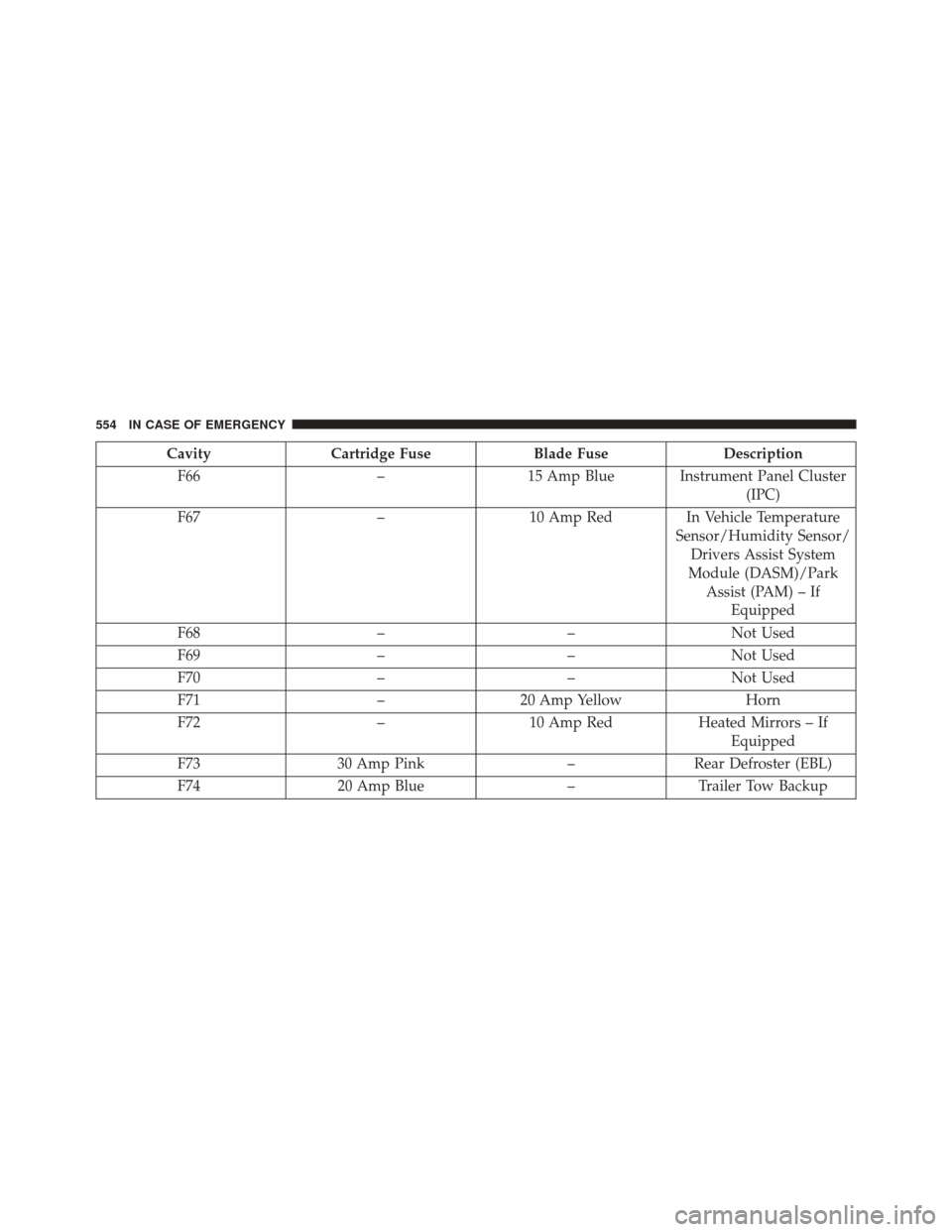
CavityCartridge Fuse Blade FuseDescription
F66 –15 Amp Blue Instrument Panel Cluster
(IPC)
F67 –10 Amp Red In Vehicle Temperature
Sensor/Humidity Sensor/Drivers Assist System
Module (DASM)/Park Assist (PAM) – If Equipped
F68 ––Not Used
F69 ––Not Used
F70 ––Not Used
F71 –20 Amp Yellow Horn
F72 –10 Amp Red Heated Mirrors – If
Equipped
F73 30 Amp Pink –Rear Defroster (EBL)
F74 20 Amp Blue –Trailer Tow Backup
554 IN CASE OF EMERGENCY
Page 682 of 828
CNG or LP are not the responsibility of the manufacturer
and may void or not be covered under the New Vehicle
Limited Warranty.
MMT In Gasoline
Methylcyclopentadienyl Manganese Tricarbonyl (MMT)
is a manganese-containing metallic additive that is
blended into some gasoline to increase octane. Gasoline
blended with MMT provides no performance advantage
beyond gasoline of the same octane number without
MMT. Gasoline blended with MMT reduces spark plug
life and reduces emissions system performance in some
vehicles. The manufacturer recommends that gasoline
without MMT be used in your vehicle. The MMT content
of gasoline may not be indicated on the gasoline pump,
therefore, you should ask your gasoline retailer whether
the gasoline contains MMT. MMT is prohibited in Federal
and California reformulated gasoline.
Fuel System Cautions
CAUTION!
Follow these guidelines to maintain your vehicle’s
performance:
•The use of leaded gasoline is prohibited by Federal
law. Using leaded gasoline can impair engine per-
formance and damage the emissions control sys-
tem.
• An out-of-tune engine or certain fuel or ignition
malfunctions can cause the catalytic converter to
overheat. If you notice a pungent burning odor or
some light smoke, your engine may be out of tune
or malfunctioning and may require immediate ser-
vice. Contact your authorized dealer for service
assistance.
(Continued)
680 TECHNICAL DATA
Page 701 of 828
•Forward Collision Warning Active Braking
The FCW system includes Advanced Brake Assist (ABA).
When this feature is selected, the ABA applies additional
brake pressure when the driver requests insufficient
brake pressure to avoid a potential frontal collision. The
ABA system becomes active at 5 mph (8 km/h). The
system can be enabled or disabled by pressing “Forward
Collision Warning Active Braking” button on the touch-
screen.
• ParkSense — If Equipped
The ParkSense system will scan for objects behind the
vehicle when the transmission gear selector is in RE-
VERSE and the vehicle speed is less than 7 mph
(11 km/h). The system can be enabled with Sound Only,
or Sound and Display. •
Front ParkSense Volume
The chime volume settings include LOW, MEDIUM, and
HIGH. The KeySense default volume setting is ME-
DIUM. To make your selection, press the “Front
ParkSense Vol.” button on the touchscreen, until a check-
mark appears next to setting, indicating that the setting
has been selected. ParkSense will retain its last known
configuration state through ignition cycles.
• Rear ParkSense Volume
The chime volume settings include LOW, MEDIUM, and
HIGH. The KeySense default volume setting is ME-
DIUM. To make your selection, press the “Rear
ParkSense Vol.” button on the touchscreen, until a check-
mark appears next to setting, indicating that the setting
had been selected. ParkSense will retain its last known
configuration state through ignition cycles.
10
MULTIMEDIA 699