window CHRYSLER PACIFICA 2017 2.G Owner's Manual
[x] Cancel search | Manufacturer: CHRYSLER, Model Year: 2017, Model line: PACIFICA, Model: CHRYSLER PACIFICA 2017 2.GPages: 828, PDF Size: 7.58 MB
Page 153 of 828
Auto Up Feature With Anti-Pinch Protection — If
Equipped
The front driver and front passenger controls may be
equipped with an Auto Up feature. Lift the window
control fully upward to the second detent, release, and
the window will go up automatically.
To stop the window from going all the way up during the
Auto Up operation, push down on the control briefly.
To close the window part way, lift the window control to
the first detent and release when you want the window to
stop.
NOTE:
•If the window runs into any obstacle during auto-
closure, it will reverse direction and then go back
down. Remove the obstacle and use the window
control again to close the window. •
Any impact due to rough road conditions may trigger
the auto reverse function unexpectedly during auto-
closure. If this happens, pull the control lightly to the
first detent and hold to close window manually.
NOTE: There is no anti-pinch protection when the win-
dow is almost closed. To avoid personal injury be sure to
clear your arms, hands, fingers and all objects from the
window path before closing.
Auto Up Reset — If Equipped
To reactivate the Auto Up feature, perform the following
steps after vehicle power is restored:
1. Pull the window control up to close the window completely and continue to hold the control up for an
additional two seconds after the window is closed.
3
GETTING TO KNOW YOUR VEHICLE 151
Page 154 of 828

2. Push the window control down firmly to the seconddetent to open the window completely and continue
to hold the control down for an additional two sec-
onds after the window is fully open.
Sliding Side Door Power Window Control — If
Equipped
Second row passengers may open and close the sliding
door window by a single control on the door handle
assembly.
The controls will operate only when the ignition switch is
in the ON/RUN or ACC position and during power
accessory delay.
NOTE: The controls will not operate if the driver has
activated the Power Window Lockout. NOTE:
The sliding door windows do not fully open,
stopping several inches above the window sill.
Wind Buffeting
Wind buffeting can be described as the perception of
pressure on the ears or a helicopter-type sound in the
ears. Your vehicle may exhibit wind buffeting with the
Sliding Door Power Window Control
152 GETTING TO KNOW YOUR VEHICLE
Page 155 of 828
windows down, or the sunroof (if equipped) in certain
open or partially open positions. This is a normal occur-
rence and can be minimized. If the rear windows are
open and buffeting occurs, open the front and rear
windows together to minimize the buffeting. If the
buffeting occurs with the sunroof open, adjust the sun-
roof opening to minimize the buffeting.
TRI-PANE VISTA VIEW SUNROOF — IF
EQUIPPED
The Tri-Pane Vista View Sunroof switch is located to the
left between the sun visors on the overhead console.
The Power Shade switch is located to the right between
the sun visors on the overhead console.
Tri-Pane Vista View Sunroof And Power Shade Switches
1 — Sunroof Switch
2 — Power Shade Switch
3
GETTING TO KNOW YOUR VEHICLE 153
Page 158 of 828
windows down, or the sunroof (if equipped) in certain
open or partially open positions. This is a normal occur-
rence and can be minimized. If the buffeting occurs with
the rear windows open, open the front and rear windows
together to minimize the buffeting. If the buffeting occurs
with the sunroof open, adjust the sunroof opening to
minimize the buffeting or open any window.
Power Sun Shade — If Equipped
Opening Power Shade — Express Mode
Push the shade switch rearward and release it within one
second and the shade will open automatically from any
position. The shade will open and stop automatically at
the half-open position. Push the shade switch rearward
again and release it within one second and the shade will
open automatically to the full-open position. This is
called “Express Open”. During Express Open operation,
any other actuation of the shade switch will stop the
shade.Opening Power Shade — Manual Mode
To open the shade, push and hold the switch rearward.
The shade will open and stop automatically at the
half-open position. Push and hold the shade switch
rearward again and the shade will open automatically to
the full-open position. Any release of the switch will stop
the movement and the shade will remain in a partially
opened condition until the switch is pushed again.
Closing Power Shade — Express Mode
Push the switch forward and release it within one second
and the shade will close automatically from any position.
If the sunroof is completely closed the shade will close
fully and stop automatically. This is called “Express
Close”. During Express Close operation, any other actua-
tion of the switch will stop the shade.
156 GETTING TO KNOW YOUR VEHICLE
Page 165 of 828

WARNING!
•Driving with the liftgate open can allow poisonous
exhaust gases into your vehicle. You and your
passengers could be injured by these fumes. Keep
the liftgate closed when you are operating the
vehicle.
• If you are required to drive with the liftgate open,
make sure that all windows are closed, and the
climate control blower switch is set at high speed.
Do not use the recirculation mode.
Power Liftgate — If Equipped
The power liftgate may be opened or closed in several
ways:
• Overhead console liftgate button •
RKE Key Fob
• Outside handle (opens liftgate only)
• Button just inside the liftgate on the upper left trim
(when liftgate is open)
• Hands-Free Liftgate – If Equipped
Using the above ways:
• when the liftgate is fully closed, the liftgate will open
• when the liftgate is fully open, the liftgate will close
• when the liftgate is moving, the liftgate will reverse
Push the Power Liftgate button on the Overhead Console
to open or close the liftgate.
3
GETTING TO KNOW YOUR VEHICLE 163
Page 169 of 828
•If the power liftgate encounters multiple obstructions
within the same cycle, the system will automatically
stop. If this occurs, the liftgate must be opened or
closed manually.
• The power liftgate will release, but not power open or
close, in temperatures below 12° F (24° C). Be sure to
remove any buildup of snow or ice from the liftgate
before opening the liftgate.
• If the liftgate is left open for an extended period of
time, the liftgate may need to be closed manually to
reset power liftgate functionality.
WARNING!
• Driving with the liftgate open can allow poisonous
exhaust gases into your vehicle. You and your
passengers could be injured by these fumes. Keep
(Continued)
WARNING! (Continued)
the liftgate closed when you are operating the
vehicle.
• If you are required to drive with the liftgate open,
make sure that all windows are closed, and the
climate control blower switch is set at high speed.
Do not use the recirculation mode.
Gas props support the liftgate in the open position.
However, because the gas pressure drops with tempera-
ture, it may be necessary to assist the props when
opening the liftgate in cold weather.
NOTE: Allow the power system to open the liftgate.
Manually pushing or pulling the liftgate may activate the
liftgate obstacle detection feature and stop the power
operation or reverse its direction.
3
GETTING TO KNOW YOUR VEHICLE 167
Page 171 of 828
Stow n’ VAC Integrated Vacuum — If Equipped
Your vehicle may be equipped with an integrated
vacuum system. The system can clean up dry spills and
debris within the vehicle.
1. Make sure the vehicle is in Park (P) and the ignition isset to Run/Accessory mode.
NOTE: •The vacuum system will run for 10 minutes off
battery power. At 10 minutes, the vacuum will shut
down and a low battery indication light will come on
one minute before shutdown.
• When the vehicle engine is running, the vacuum will
be capable of continuous operation.
WARNING!
Carbon monoxide (CO) in exhaust gases is deadly.
Follow the precautions below to prevent carbon
monoxide poisoning:
• Do not inhale exhaust gases. They contain carbon
monoxide, a colorless and odorless gas, which can
kill. Never run the engine in a closed area, such as
a garage, and never sit in a parked vehicle with the
engine running for an extended period. If the
vehicle is stopped in an open area with the engine
running for more than a short period, adjust the
ventilation system to force fresh, outside air into
the vehicle.
• Guard against carbon monoxide with proper main-
tenance. Have the exhaust system inspected every
time the vehicle is raised. Have any abnormal
conditions repaired promptly. Until repaired, drive
with all side windows fully open.
3
GETTING TO KNOW YOUR VEHICLE 169
Page 177 of 828
WARNING!(Continued)
vehicle is stopped in an open area with the engine
running for more than a short period, adjust the
ventilation system to force fresh, outside air into
the vehicle.
• Guard against carbon monoxide with proper main-
tenance. Have the exhaust system inspected every
time the vehicle is raised. Have any abnormal
conditions repaired promptly. Until repaired, drive
with all side windows fully open.
WARNING!
Do not pick up anything that is burning or smoking,
such as cigarettes, matches, or hot ashes. Vehicle
damage, personal injury, or death may result from
vacuuming up burning or smoking material.
GARAGE DOOR OPENER — IF EQUIPPED
HomeLink replaces up to three hand-held transmitters
that operate devices such as garage door openers, motor-
ized gates, lighting or home security systems. The
HomeLink unit is powered by your vehicles 12 Volt
battery.
The HomeLink buttons, located on the driver ’s sunvisor,
designate the three different HomeLink channels. The
HomeLink indicator is located above the center button.
3
GETTING TO KNOW YOUR VEHICLE 175
Page 195 of 828
Sun Screens — If Equipped
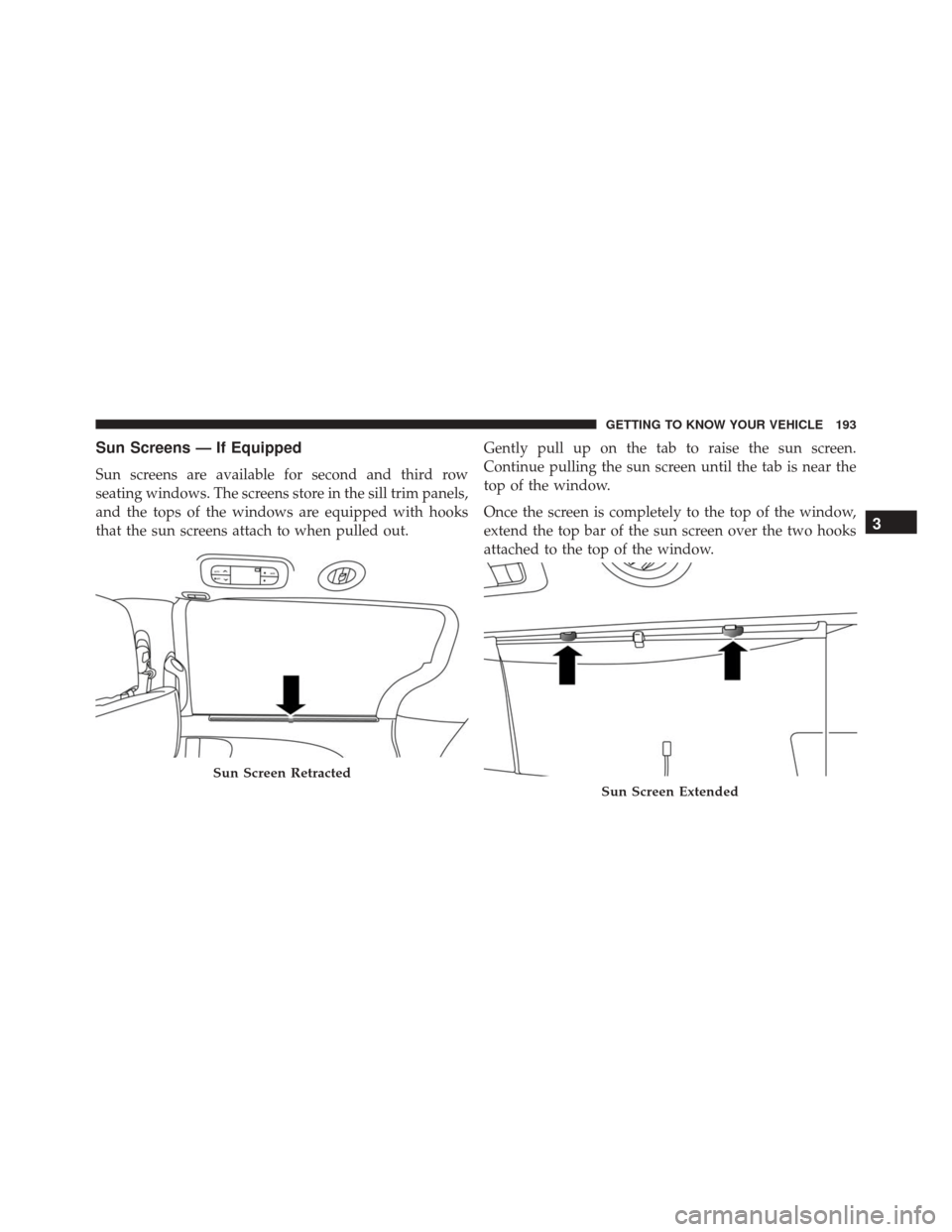
Sun screens are available for second and third row
seating windows. The screens store in the sill trim panels,
and the tops of the windows are equipped with hooks
that the sun screens attach to when pulled out.Gently pull up on the tab to raise the sun screen.
Continue pulling the sun screen until the tab is near the
top of the window.
Once the screen is completely to the top of the window,
extend the top bar of the sun screen over the two hooks
attached to the top of the window.
Sun Screen Retracted
Sun Screen Extended
3
GETTING TO KNOW YOUR VEHICLE 193
Page 299 of 828
system receives the updated tire pressures, the system
will automatically update and the “Tire Pressure Moni-
toring Telltale Light” will turn off.
NOTE:When filling warm tires, the tire pressure may
need to be increased up to an additional 4 psi (28 kPa)
above the recommended cold placard pressure in order
to turn the Tire Pressure Monitoring Telltale Light off.
The vehicle may need to be driven for up to 20 minutes
above 15 mph (24 km/h) in order for the TPMS to receive
this information.
Service TPMS Warning
When a system fault is detected, the “Tire Pressure
Monitoring Telltale Light” will flash on and off for 75
seconds and then remain on solid. The system fault will
also sound a chime. If the ignition is cycled, this sequence
will repeat, providing the system fault still exists. The “Tire Pressure Monitoring Telltale Light” will turn off
when the fault condition no longer exists. A system fault
can occur due to any of the following:
1. Jamming due to electronic devices or driving next to
facilities emitting the same radio frequencies as the
TPMS sensors.
2. Installing some form of aftermarket window tinting that affects radio wave signals.
3. Lots of snow or ice around the wheels or wheel housings.
4. Using tire chains on the vehicle.
5. Using wheels/tires not equipped with TPMS sensors.
Vehicles With Compact Spare
1. The compact spare tire does not have a tire pressure monitoring sensor. Therefore, the TPMS will not moni-
tor the pressure in the compact spare tire.
5
SAFETY 297