lights CHRYSLER PACIFICA 2017 2.G Repair Manual
[x] Cancel search | Manufacturer: CHRYSLER, Model Year: 2017, Model line: PACIFICA, Model: CHRYSLER PACIFICA 2017 2.GPages: 828, PDF Size: 7.58 MB
Page 734 of 828
•Hill Start Assist — If Equipped
When this feature is selected, the Hill Start Assist (HSA)
system is active. To make your selection, press the “Hill
Start Assist” button on the touchscreen, until a check-
mark appears next to setting, indicating that the setting
had been selected.
• Brake Service
This feature provides a means for a technician or vehicle
owner to utilize a vehicle integrated, menu driven sys-
tem, to command the electric park brake retraction, to
service the rear foundation brakes (brake pads, calipers,
rotors, etc.).
Lights
After pressing the “Lights” button on the touchscreen the
following settings will be available. •
Headlight Off Delay
When this feature is selected, it allows adjustment of the
amount of time the headlights remain on after the engine
is shut off. To change the Headlights Off Delay setting,
press the “+” or “-” button on the touchscreen to select
your desired time interval, and choose either 0, 30, 60 or
90 seconds.
• Headlight Illumination On Approach
When this feature is selected, the headlights will activate
and remain on for 0, 30, 60 or 90 seconds when the doors
are unlocked with the Remote Keyless Entry (RKE)
transmitter. To change the Illuminated Approach status,
press the “+” or “-” button on the touchscreen to select
your desired time interval.
732 MULTIMEDIA
Page 735 of 828
•Headlights With Wipers — If Equipped
When this feature is selected, and the headlight switch is
in the AUTO position, the headlights will turn on ap-
proximately 10 seconds after the wipers are turned on.
The headlights will also turn off when the wipers are
turned off if they were turned on by this feature. To make
your selection, press the “Headlights With Wipers” but-
ton on the touchscreen, until a check-mark appears next
to setting, showing that the setting has been selected.
• Auto Dim High Beams — If Equipped
When this feature is selected, the high beam headlights
will activate/deactivate automatically under certain con-
ditions. To make your selection, press the “Auto High
Beams” button on the touchscreen, until a check-mark
appears next to setting, showing that the setting has been
selected. •
Daytime Running Lights — If Equipped
When this feature is selected, the headlights will turn on
whenever the engine is running. To make your selection,
press the “Daytime Running Lights” button on the touch-
screen, until a check-mark appears next to setting, show-
ing that the setting has been selected.
• Flash Lights With Lock
When this feature is selected, the hazard lights will flash
when the doors are locked or unlocked with the Remote
Keyless Entry (RKE) transmitter, or when using the
passive entry feature. This feature may be selected with
or without the “Sound Horn on Lock” feature selected. To
make your selection, press the “Flash Lights with Lock”
button on the touchscreen, until a check-mark appears
next to setting, showing that the setting has been se-
lected.
10
MULTIMEDIA 733
Page 736 of 828
Doors & Locks
After pressing the “Doors & Locks” button on the touch-
screen the following settings will be available:
•Auto Door Locks
When this feature is selected, all doors will lock when the
vehicle is in motion. To make your selection, press the
“Auto Door Locks” button on the touchscreen, until a
check-mark appears next to the setting, showing that the
setting has been selected.
• Auto Unlock On Exit
When this feature is selected, all doors will unlock when
the vehicle is stopped, the transmission is in the PARK or
NEUTRAL position and the driver’s door is opened. To
make your selection, press the “Auto Unlock On Exit”
button on the touchscreen, until a check-mark appears
next to the setting, showing that the setting has been
selected. •
Flash Lights With Lock
When this feature is selected, the exterior lights will flash
when the doors are locked or unlocked with the Remote
Keyless Entry (RKE) Key Fob, or when using the passive
entry feature. This feature may be selected with or
without the “Sound Horn on Lock” feature selected. To
make your selection, press the “Flash Lights with Lock”
button on the touchscreen, until a check-mark appears
next to setting, showing that the setting has been se-
lected.
• Sound Horn With Lock
When this feature is selected, the horn will sound when
the door locks are activated with the RKE. To make your
selection, press either the “Off,” “1st Press,” or “2nd
Press” button on the touchscreen, until a check-mark
appears next to setting, showing that setting has been
selected.
734 MULTIMEDIA
Page 739 of 828
•Sliding Door Alert
When this feature is selected, a chime plays when the
sliding door reverses or an obstacle is sensed. To make
your selection, press the “Sliding Door Alert” button on
the touchscreen, until a check-mark appears next to the
setting, showing that the setting has been selected.
• Flash Lights With Sliding Door
When this feature is selected, the headlights flash when
the sliding door is opening. To make your selection, press
the “Flash Lights With Sliding Door” button on the
touchscreen, until a check-mark appears next to the
setting, showing that the setting has been selected.
• Hands Free Power Sliding Door
When this feature is selected, hands free technology
automatically opens or closes the power sliding door. To make your selection, press the “Hands Free Power Slid-
ing Door” button on the touchscreen, until a check-mark
appears next to the setting, showing that the setting has
been selected.
Auto Comfort Systems — If Equipped
After pressing the “Auto-On Comfort” button on the
touchscreen the following settings will be available:
•
Auto-On Driver Heated/Ventilated Seat & Steering
Wheel With Vehicle Start — If Equipped
When this feature is selected the driver’s heated seat and
heated steering wheel will automatically turn ON when
temperatures are below 40° F (4.4° C). When tempera-
tures are above 80° F (26.7° C) the driver vented seat will
turn ON. To make your selection, press the “Auto-On
Driver Heated/Ventilated Seat & Steering Wheel With
Vehicle Start” button to select from “Off,” “Remote Start”
or “All Starts” until a check-mark appears next to setting,
showing that setting has been selected.
10
MULTIMEDIA 737
Page 740 of 828
Engine Off Options
After pressing the “Engine Off Options” button on the
touchscreen the following settings will be available:
•Easy Exit Seat — If Equipped
When this feature is selected, the Driver ’s seat will
automatically move rearward once the engine is shut off.
To make your selection, press the “Easy Exit Seat” button
on the touchscreen, until a check-mark appears next to
setting, showing that setting has been selected.
• Engine Off Power Delay
When this feature is selected, the power window
switches, radio, Uconnect Phone system (if equipped),
DVD video system (if equipped), power sunroof (if
equipped), and power outlets will remain active for up to
10 minutes after the ignition is cycled to OFF. Opening
either front door will cancel this feature. To change the
Engine Off Power Delay setting, press the “+” or “-” button on the touchscreen to select your desired time
interval, and choose from “0 seconds,” “45 seconds,” “5
minutes” or “10 minutes.”
•
Headlight Off Delay
When this feature is selected, the driver can choose to
have the headlights remain on for 0, 30, 60, or 90 seconds
when exiting the vehicle. To change the Headlight Off
Delay status press the “+” or “–” button on the touch-
screen to select your desired time interval.
Audio
After pressing the “Audio” button on the touchscreen the
following settings will be available.
• Balance/Fade
This feature allows you to adjust the Balance and Fade
settings. Press and drag the speaker icon, use the arrows
to adjust, or tap the ‘C’ icon to readjust to the center.
738 MULTIMEDIA
Page 787 of 828
Uconnect Access
WARNING!
ALWAYS obey traffic laws and pay attention to the
road. Some Uconnect Access services, including 9-1-1
and Assist, will NOT work without an operable 1X
(voice/data) or 3G (data) network connection.
NOTE: Your vehicle may be transmitting data as autho-
rized by the subscriber.
An included trial and/or subscription is required to take
advantage of the Uconnect Access services in the next
section of this guide. To register with Uconnect Access,
press the Apps button on the 8.4-inch touchscreen to get
started. Detailed registration instructions can be found
on the next page.
NOTE: Uconnect Access is available only on equipped
vehicles purchased within the continental United States, Alaska and Hawaii. Services can only be used where
coverage is available; see coverage map for details.
9-1-1 Call
Security Alarm Notification
Remote Door Lock/Unlock
Stolen Vehicle Assistance
Remote Vehicle Start**
Remote Horn and Lights
Yelp Search
Voice Texting
Roadside Assistance Call
WiFi Hotspot***
**If vehicle is equipped.
***Extra charges apply.10
MULTIMEDIA 785
Page 809 of 828
Antifreeze (Engine Coolant)...............631, 686
Disposal ............................. .634
Anti-Lock Brake System (ABS) ................266
Anti-Lock Warning Light ....................243
Ashtray ............................... .199
Assist, Hill Start ......................... .275
Audio Systems (Radio) .....................694
Automatic Dimming Mirror ..................105
Automatic Headlights ......................111
Automatic Temperature Control (ATC) ..........132
Automatic Transaxle ...................... .394
Automatic Transmission .................396, 639
Adding Fluid ...................... .639, 689
Fluid And Filter Changes ..................639
Fluid Change ......................... .639
Fluid Level Check ...................637, 638
Fluid Type ........................ .637, 689
Special Additives ...................... .638
Auxiliary Electrical Outlet (Power Outlet) ........194Auxiliary Power Outlet
.....................194
Axle Lubrication ......................... .689
Battery ............................ .235, 620
Charging System Light ...................235
Jump Starting ......................... .595
Keyless Transmitter Replacement (RKE) ........26
Remote Battery Replacement ................26
Saving Feature (Protection) ................116
Transmitter Battery Replacement .............26
Belts, Seat .............................. .375
Blind Spot Monitoring ..................... .278
Body Mechanism Lubrication .................627
B-Pillar Location ......................... .644
Brake Assist System ...................... .268
Brake Control System, Electronic ..............268
Brake Fluid ............................ .689
Brake System ........................... .636
Fluid
Check ....................... .636, 689
12
INDEX 807
Page 810 of 828
Master Cylinder....................... .636
Parking ............................. .389
Warning Light ........................ .233
Brake/Transmission Interlock .................396
Brightness, Interior Lights ...................118
Bulb Replacement ........................ .543
Bulbs, Light ...................... .377, 537, 543
Camera, Rear ........................ .494, 497
Capacities, Fluid ......................... .686
Caps, Filler Fuel ............................ .502, 599
Radiator (Coolant Pressure) ................633
Carbon Monoxide Warning ...............374, 681
Cargo Compartment Luggage Carrier ....................... .201
Cargo (Vehicle Loading) ....................168
Car Washes ............................ .669
Cellular Phone .......................... .770Center High Mounted Stop Light
..............546
Certification Label ........................ .504
Chains, Tire ............................ .661
Changing A Flat Tire ....................559, 639
Checking Your Vehicle For Safety ..............373
Checks, Safety .......................... .373
Child Restraint .......................... .346
Child Restraints Booster Seats ......................... .351
Center Seat LATCH ..................... .361
Child Restraints ....................... .346
Child Seat Installation .................365, 367
How To Stow An Unused ALR Seat Belt .......363
Infants And Child Restraints ...............349
Installing Child Restraints Using The Vehicle Seat
Belt ................................ .364
Lower Anchors And Tethers For Children ......354
Older Children And Child Restraints .........350
Seating Positions ....................... .353
808 INDEX
Page 811 of 828
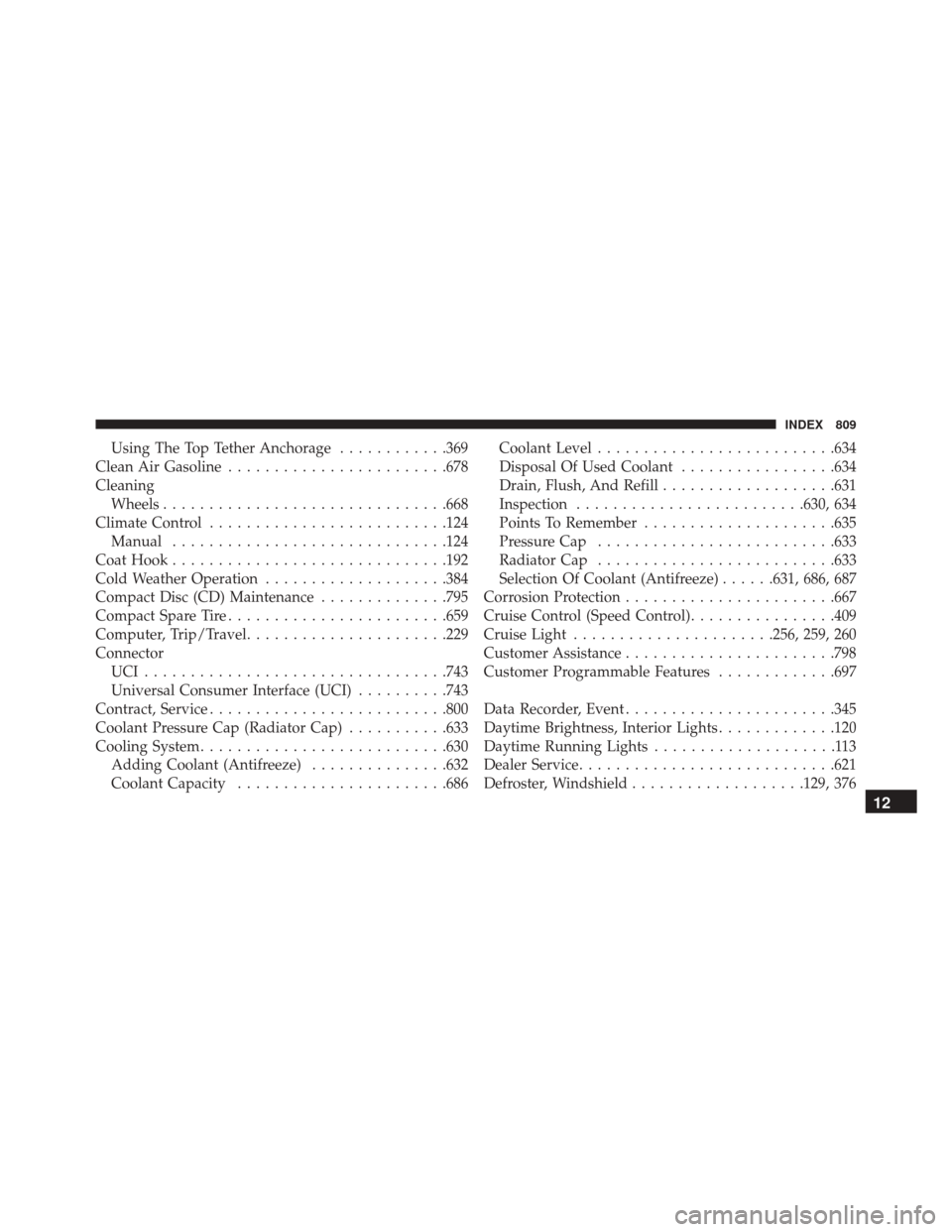
Using The Top Tether Anchorage............369
Clean Air Gasoline ....................... .678
Cleaning Wheels .............................. .668
Climate Control ......................... .124
Manual ............................. .124
Coat Hook ............................. .192
Cold Weather Operation ....................384
Compact Disc (CD) Maintenance ..............795
Compact Spare Tire ....................... .659
Computer, Trip/Travel ..................... .229
Connector UCI................................ .743
Universal Consumer Interface (UCI) ..........743
Contract, Service ......................... .800
Coolant Pressure Cap (Radiator Cap) ...........633
Cooling System .......................... .630
Adding Coolant (Antifreeze) ...............632
Coolant Capacity ...................... .686Coolant Level
......................... .634
Disposal Of Used Coolant .................634
Drain, Flush, And Refill ...................631
Inspection ........................ .630, 634
Points To Remember .....................635
Pressure Cap ......................... .633
Radiator Cap ......................... .633
Selection Of Coolant (Antifreeze) ......631, 686, 687
Corrosion Protection ...................... .667
Cruise Control (Speed Control) ................409
Cruise Light ..................... .256, 259, 260
Customer Assistance ...................... .798
Customer Programmable Features .............697
Data Recorder, Event ...................... .345
Daytime Brightness, Interior Lights .............120
Daytime Running Lights ....................113
Dealer Service ........................... .621
Defr
oster, Windshield ...................129, 376
12
INDEX 809
Page 813 of 828
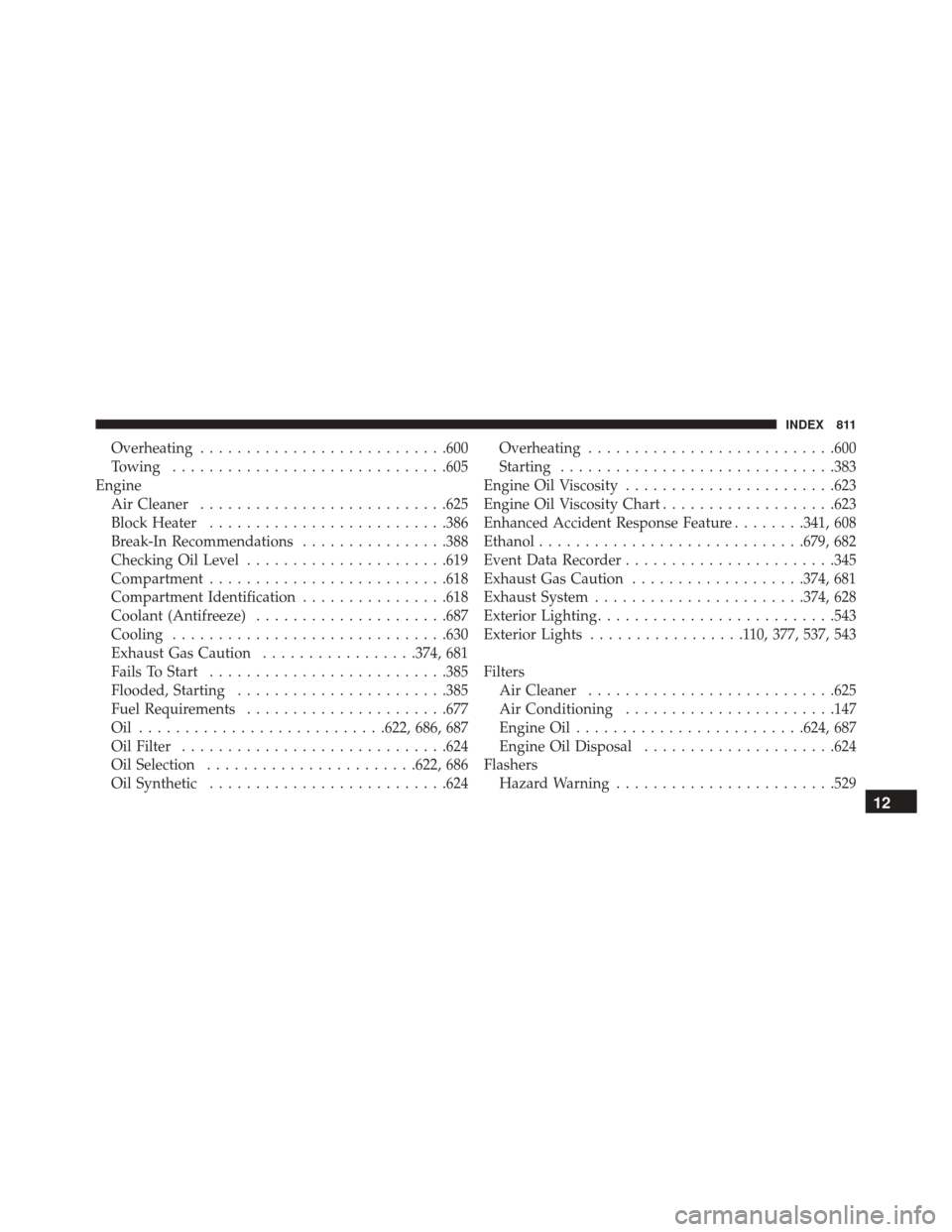
Overheating.......................... .600
Towing ............................. .605
Engine Air Cleaner .......................... .625
Block Heater ......................... .386
Break-In Recommendations ................388
Checking Oil Level ..................... .619
Compartment ......................... .618
Compartment Identification ................618
Coolant (Antifreeze) .....................687
Cooling ............................. .630
Exhaust Gas Caution .................374, 681
Fails To Start ......................... .385
Flooded, Starting ...................... .385
Fuel Requirements ..................... .677
Oil .......................... .622, 686, 687
Oil Filter ............................ .624
Oil Selection ...................... .622, 686
Oil Synthetic ......................... .624Overheating
.......................... .600
Starting ............................. .383
Engine Oil Viscosity ...................... .623
Engine Oil Viscosity Chart ...................623
Enhanced Accident Response Feature ........341, 608
Ethanol ............................ .679, 682
Event Data Recorder ...................... .345
Exhaust Gas Caution ...................374, 681
Exhaust System ...................... .374, 628
Exterior Lighting ......................... .543
Exterior Lights .................110, 377, 537, 543
Filters Air Cleaner .......................... .625
Air Conditioning ...................... .147
Engine Oil ........................ .624, 687
Engine Oil Disposal .....................624
Flashers Hazard Warning ....................... .529
12
INDEX 811