sliding door handle CHRYSLER PACIFICA 2018 User Guide
[x] Cancel search | Manufacturer: CHRYSLER, Model Year: 2018, Model line: PACIFICA, Model: CHRYSLER PACIFICA 2018Pages: 696, PDF Size: 8.48 MB
Page 136 of 696
Auto Up Feature With Anti-Pinch Protection — If
Equipped
The front driver and front passenger controls may be
equipped with an Auto Up feature. Lift the window control
fully upward to the second detent, release, and the window
will go up automatically.
To stop the window from going all the way up during the
Auto Up operation, push down on the control briefly.
To close the window part way, lift the window control to
the first detent and release when you want the window to
stop.
NOTE:
•If the window runs into any obstacle during auto-
closure, it will reverse direction and then go back down.
Remove the obstacle and use the window control again
to close the window.
• Any impact due to rough road conditions may trigger
the auto reverse function unexpectedly during auto-
closure. If this happens, pull the control lightly to the
first detent and hold to close window manually.WARNING!
There is no anti-pinch protection when the window is
almost closed. To avoid personal injury be sure to clear
your arms, hands, fingers and all objects from the
window path before closing.
Auto Up Reset — If Equipped
To reactivate the Auto Up feature, perform the following
steps after vehicle power is restored:
1. Pull the window control up to close the window com- pletely and continue to hold the control up for an
additional two seconds after the window is closed.
2. Push the window control down firmly to the second detent to open the window completely and continue to
hold the control down for an additional two seconds
after the window is fully open.
Sliding Side Door Power Window Control — If Equipped
Second row passengers may open and close the sliding door
window by a single control on the door handle assembly.
The controls will operate only when the ignition switch is
in the ON/RUN or ACC position and during power
accessory delay.
134 GETTING TO KNOW YOUR VEHICLE
Page 145 of 696
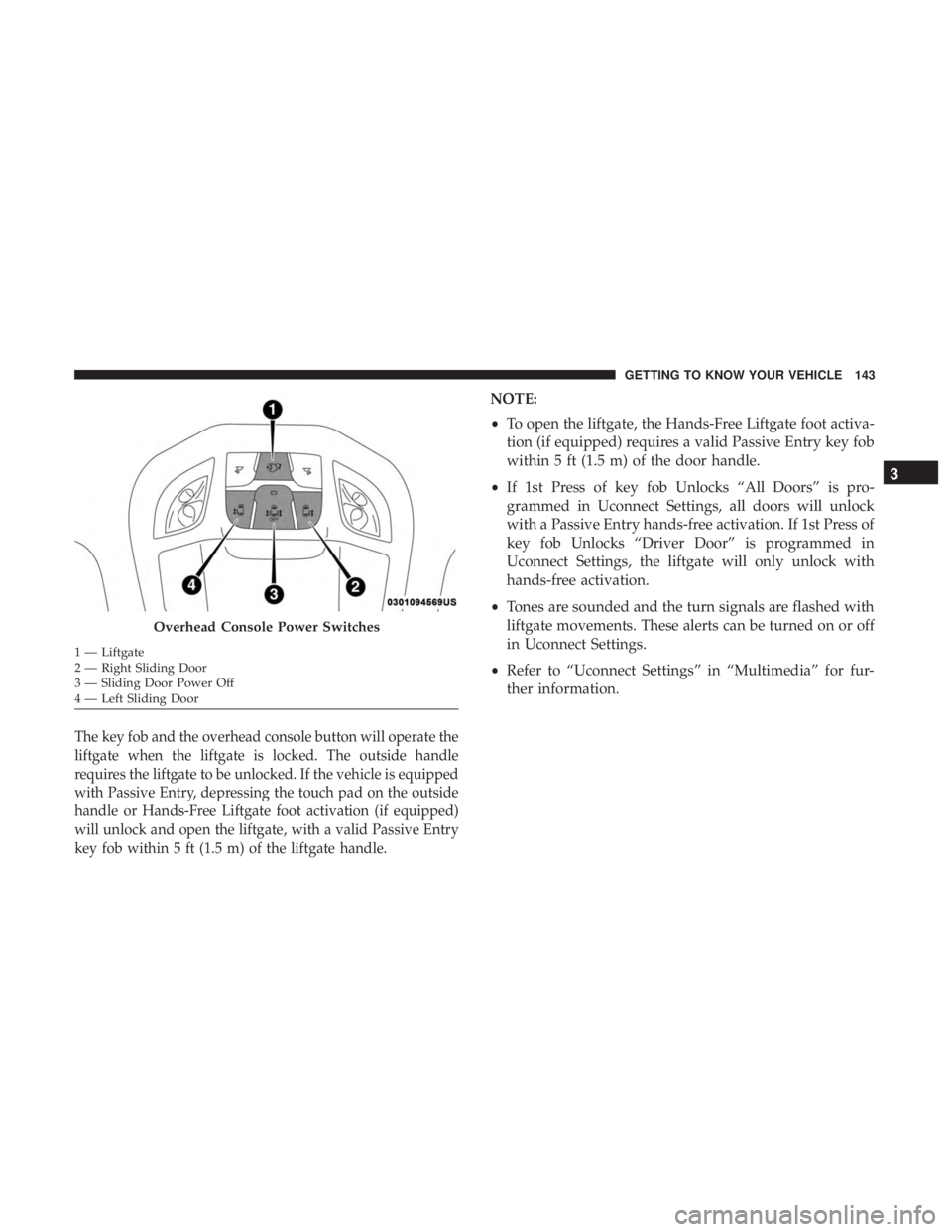
The key fob and the overhead console button will operate the
liftgate when the liftgate is locked. The outside handle
requires the liftgate to be unlocked. If the vehicle is equipped
with Passive Entry, depressing the touch pad on the outside
handle or Hands-Free Liftgate foot activation (if equipped)
will unlock and open the liftgate, with a valid Passive Entry
key fob within 5 ft (1.5 m) of the liftgate handle.
NOTE:
•To open the liftgate, the Hands-Free Liftgate foot activa-
tion (if equipped) requires a valid Passive Entry key fob
within 5 ft (1.5 m) of the door handle.
• If 1st Press of key fob Unlocks “All Doors” is pro-
grammed in Uconnect Settings, all doors will unlock
with a Passive Entry hands-free activation. If 1st Press of
key fob Unlocks “Driver Door” is programmed in
Uconnect Settings, the liftgate will only unlock with
hands-free activation.
• Tones are sounded and the turn signals are flashed with
liftgate movements. These alerts can be turned on or off
in Uconnect Settings.
• Refer to “Uconnect Settings” in “Multimedia” for fur-
ther information.
Overhead Console Power Switches
1 — Liftgate
2 — Right Sliding Door
3 — Sliding Door Power Off
4 — Left Sliding Door
3
GETTING TO KNOW YOUR VEHICLE 143
Page 582 of 696
Setting NameSelectable Options
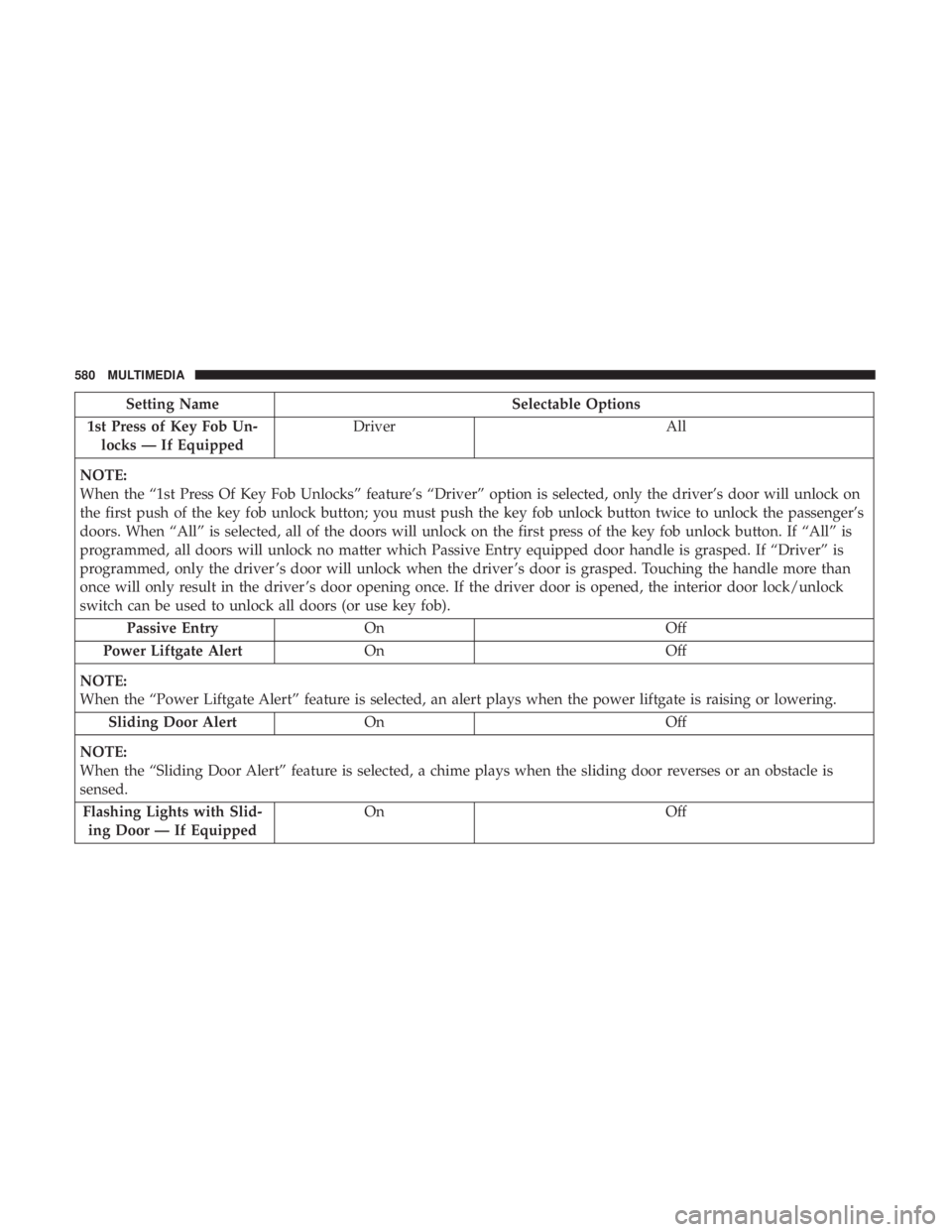
1st Press of Key Fob Un- locks — If Equipped Driver
All
NOTE:
When the “1st Press Of Key Fob Unlocks” feature’s “Driver” option is selected, only the driver’s door will unlock on
the first push of the key fob unlock button; you must push the key fob unlock button twice to unlock the passenger’s
doors. When “All” is selected, all of the doors will unlock on the first press of the key fob unlock button. If “All” is
programmed, all doors will unlock no matter which Passive Entry equipped door handle is grasped. If “Driver” is
programmed, only the driver ’s door will unlock when the driver ’s door is grasped. Touching the handle more than
once will only result in the driver ’s door opening once. If the driver door is opened, the interior door lock/unlock
switch can be used to unlock all doors (or use key fob). Passive Entry On Off
Power Liftgate Alert On Off
NOTE:
When the “Power Liftgate Alert” feature is selected, an alert plays when the power liftgate is raising or lowering. Sliding Door Alert On Off
NOTE:
When the “Sliding Door Alert” feature is selected, a chime plays when the sliding door reverses or an obstacle is
sensed. Flashing Lights with Slid- ing Door — If Equipped On
Off
580 MULTIMEDIA
Page 583 of 696
Setting NameSelectable Options
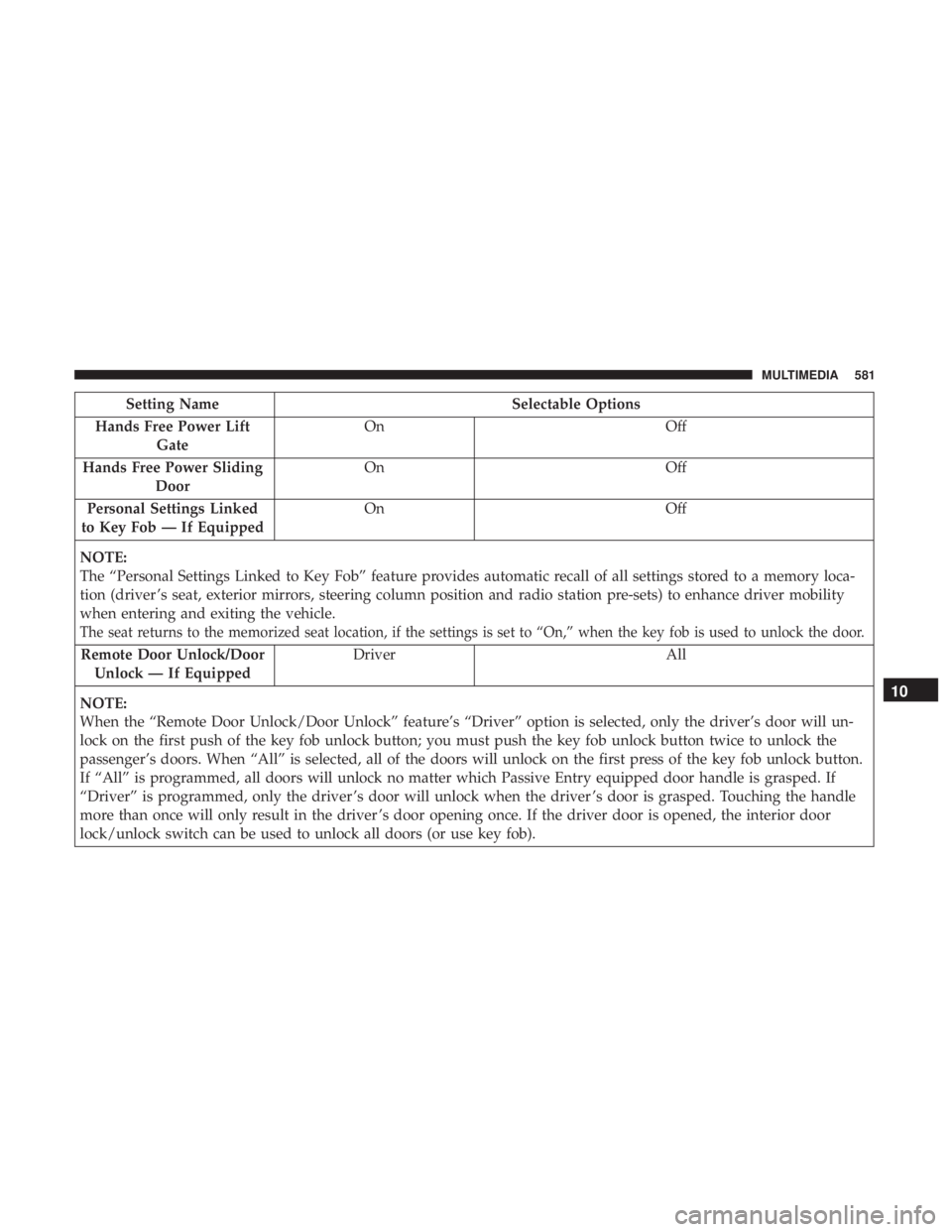
Hands Free Power Lift Gate On
Off
Hands Free Power Sliding Door On
Off
Personal Settings Linked
to Key Fob — If Equipped On
Off
NOTE:
The “Personal Settings Linked to Key Fob” feature provides automatic recall of all settings stored to a memory loca-
tion (driver ’s seat, exterior mirrors, steering column position and radio station pre-sets) to enhance driver mobility
when entering and exiting the vehicle.
The seat returns to the memorized seat location, if the settings is set to “On,” when the key fob is used to unlock the door.
Remote Door Unlock/Door Unlock — If Equipped Driver All
NOTE:
When the “Remote Door Unlock/Door Unlock” feature’s “Driver” option is selected, only the driver’s door will un-
lock on the first push of the key fob unlock button; you must push the key fob unlock button twice to unlock the
passenger’s doors. When “All” is selected, all of the doors will unlock on the first press of the key fob unlock button.
If “All” is programmed, all doors will unlock no matter which Passive Entry equipped door handle is grasped. If
“Driver” is programmed, only the driver ’s door will unlock when the driver ’s door is grasped. Touching the handle
more than once will only result in the driver ’s door opening once. If the driver door is opened, the interior door
lock/unlock switch can be used to unlock all doors (or use key fob).
10
MULTIMEDIA 581
Page 609 of 696
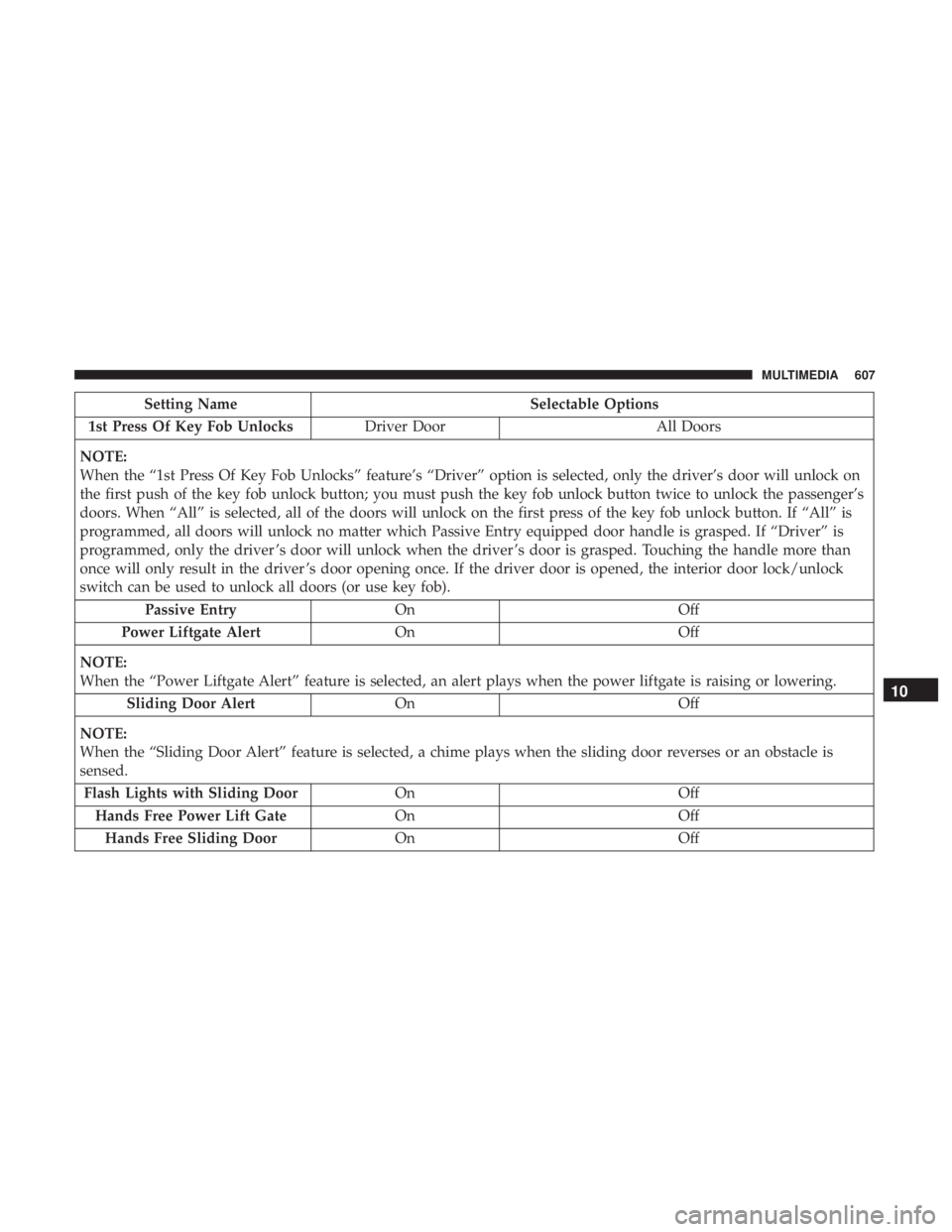
Setting NameSelectable Options
1st Press Of Key Fob Unlocks Driver Door All Doors
NOTE:
When the “1st Press Of Key Fob Unlocks” feature’s “Driver” option is selected, only the driver’s door will unlock on
the first push of the key fob unlock button; you must push the key fob unlock button twice to unlock the passenger’s
doors. When “All” is selected, all of the doors will unlock on the first press of the key fob unlock button. If “All” is
programmed, all doors will unlock no matter which Passive Entry equipped door handle is grasped. If “Driver” is
programmed, only the driver ’s door will unlock when the driver ’s door is grasped. Touching the handle more than
once will only result in the driver ’s door opening once. If the driver door is opened, the interior door lock/unlock
switch can be used to unlock all doors (or use key fob). Passive Entry On Off
Power Liftgate Alert On Off
NOTE:
When the “Power Liftgate Alert” feature is selected, an alert plays when the power liftgate is raising or lowering. Sliding Door Alert On Off
NOTE:
When the “Sliding Door Alert” feature is selected, a chime plays when the sliding door reverses or an obstacle is
sensed. Flash Lights with Sliding Door OnOff
Hands Free Power Lift Gate OnOff
Hands Free Sliding Door OnOff
10
MULTIMEDIA 607