park assist CHRYSLER PACIFICA 2018 Owner's Guide
[x] Cancel search | Manufacturer: CHRYSLER, Model Year: 2018, Model line: PACIFICA, Model: CHRYSLER PACIFICA 2018Pages: 696, PDF Size: 8.48 MB
Page 555 of 696
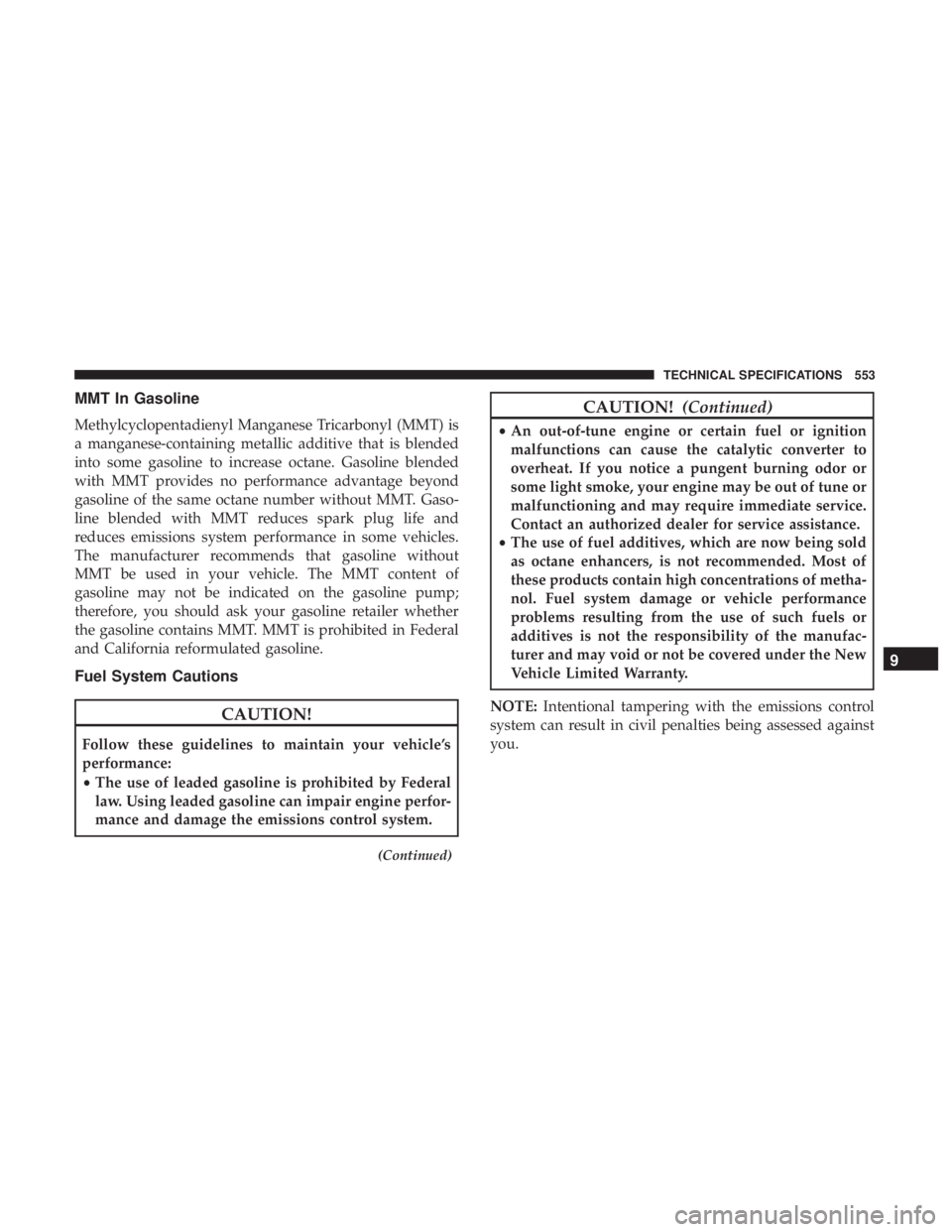
MMT In Gasoline
Methylcyclopentadienyl Manganese Tricarbonyl (MMT) is
a manganese-containing metallic additive that is blended
into some gasoline to increase octane. Gasoline blended
with MMT provides no performance advantage beyond
gasoline of the same octane number without MMT. Gaso-
line blended with MMT reduces spark plug life and
reduces emissions system performance in some vehicles.
The manufacturer recommends that gasoline without
MMT be used in your vehicle. The MMT content of
gasoline may not be indicated on the gasoline pump;
therefore, you should ask your gasoline retailer whether
the gasoline contains MMT. MMT is prohibited in Federal
and California reformulated gasoline.
Fuel System Cautions
CAUTION!
Follow these guidelines to maintain your vehicle’s
performance:
•The use of leaded gasoline is prohibited by Federal
law. Using leaded gasoline can impair engine perfor-
mance and damage the emissions control system.
(Continued)
CAUTION! (Continued)
•An out-of-tune engine or certain fuel or ignition
malfunctions can cause the catalytic converter to
overheat. If you notice a pungent burning odor or
some light smoke, your engine may be out of tune or
malfunctioning and may require immediate service.
Contact an authorized dealer for service assistance.
• The use of fuel additives, which are now being sold
as octane enhancers, is not recommended. Most of
these products contain high concentrations of metha-
nol. Fuel system damage or vehicle performance
problems resulting from the use of such fuels or
additives is not the responsibility of the manufac-
turer and may void or not be covered under the New
Vehicle Limited Warranty.
NOTE: Intentional tampering with the emissions control
system can result in civil penalties being assessed against
you.
9
TECHNICAL SPECIFICATIONS 553
Page 568 of 696
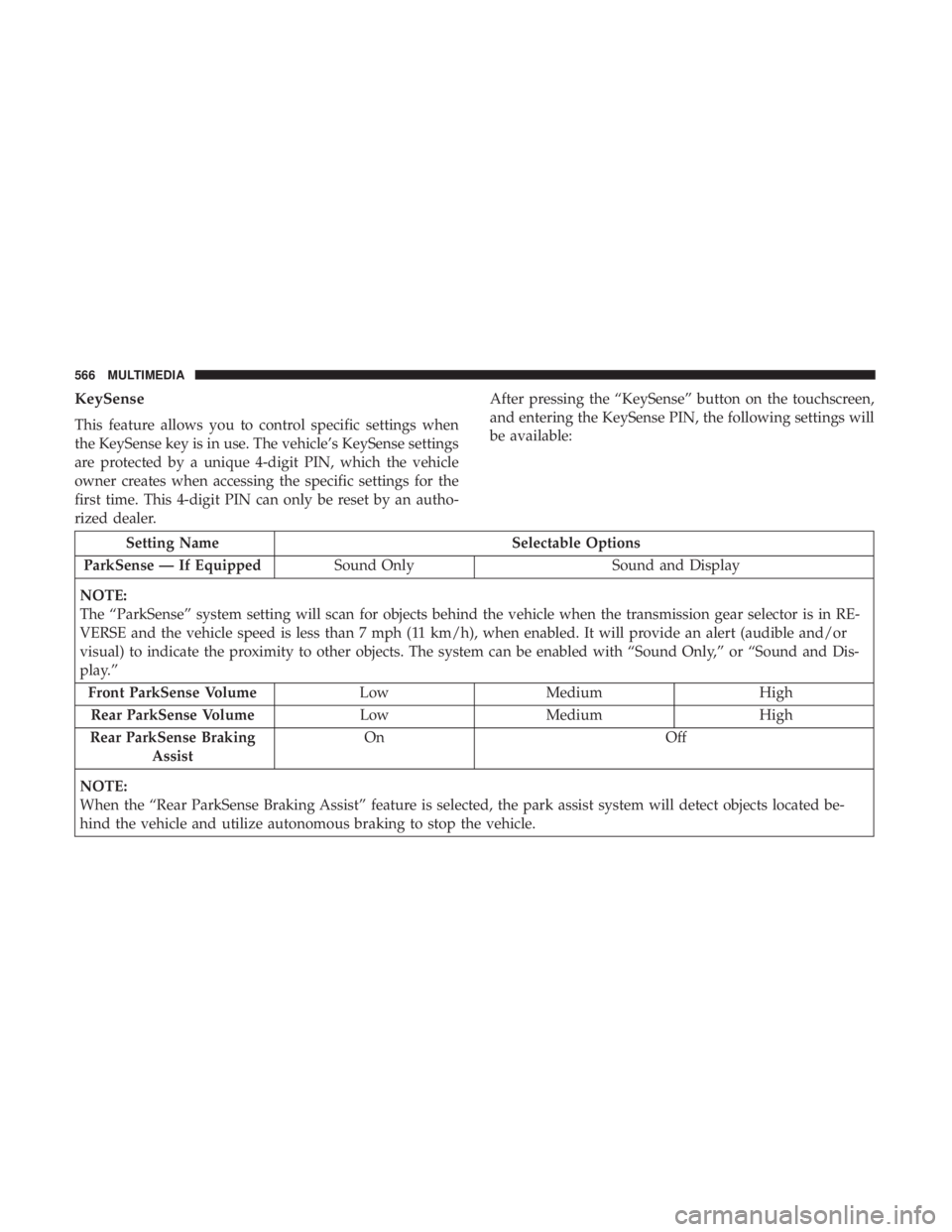
KeySense
This feature allows you to control specific settings when
the KeySense key is in use. The vehicle’s KeySense settings
are protected by a unique 4-digit PIN, which the vehicle
owner creates when accessing the specific settings for the
first time. This 4-digit PIN can only be reset by an autho-
rized dealer.After pressing the “KeySense” button on the touchscreen,
and entering the KeySense PIN, the following settings will
be available:
Setting Name
Selectable Options
ParkSense — If Equipped Sound Only Sound and Display
NOTE:
The “ParkSense” system setting will scan for objects behind the vehicle when the transmission gear selector is in RE-
VERSE and the vehicle speed is less than 7 mph (11 km/h), when enabled. It will provide an alert (audible and/or
visual) to indicate the proximity to other objects. The system can be enabled with “Sound Only,” or “Sound and Dis-
play.” Front ParkSense Volume LowMedium High
Rear ParkSense Volume LowMedium High
Rear ParkSense Braking Assist On
Off
NOTE:
When the “Rear ParkSense Braking Assist” feature is selected, the park assist system will detect objects located be-
hind the vehicle and utilize autonomous braking to stop the vehicle.
566 MULTIMEDIA
Page 576 of 696
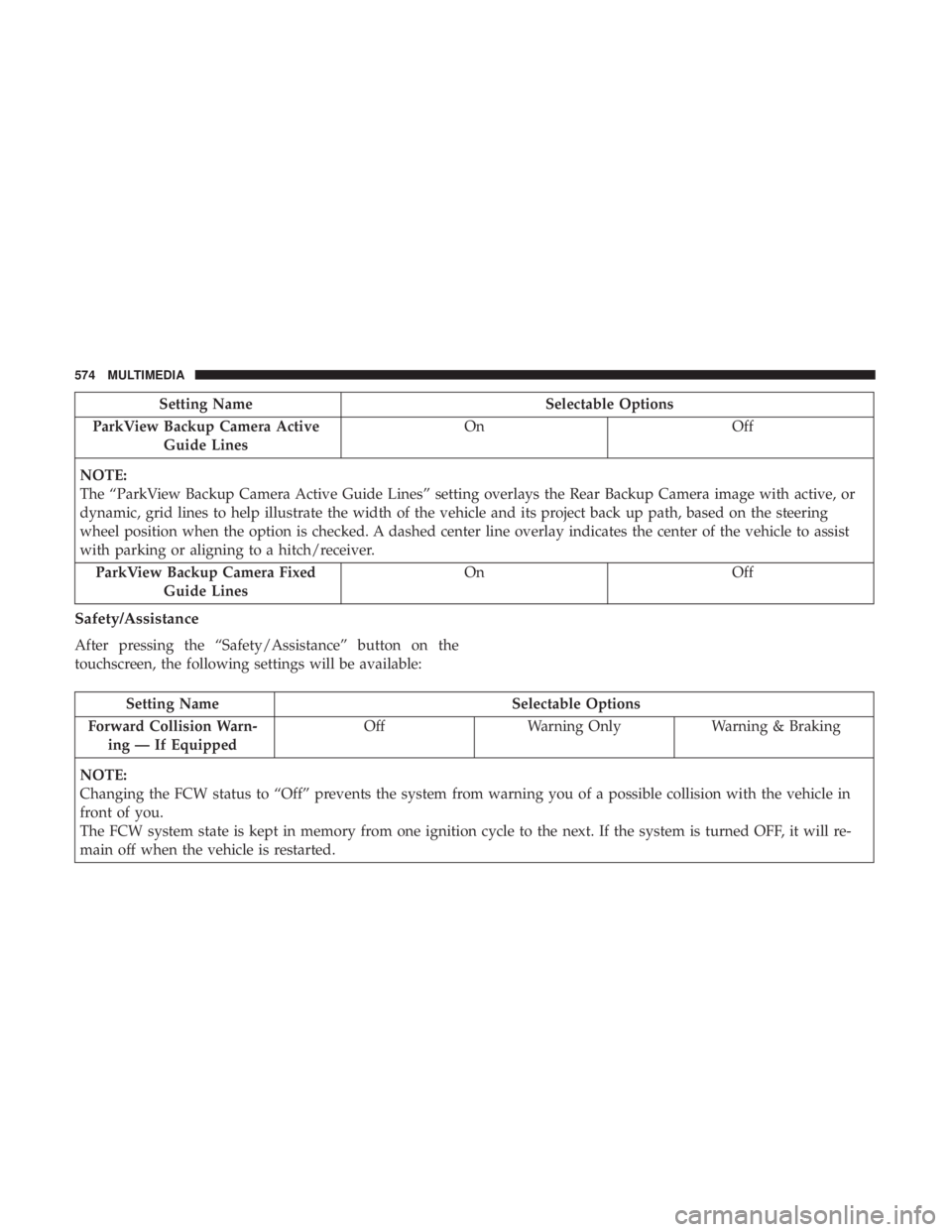
Setting NameSelectable Options
ParkView Backup Camera Active Guide Lines On
Off
NOTE:
The “ParkView Backup Camera Active Guide Lines” setting overlays the Rear Backup Camera image with active, or
dynamic, grid lines to help illustrate the width of the vehicle and its project back up path, based on the steering
wheel position when the option is checked. A dashed center line overlay indicates the center of the vehicle to assist
with parking or aligning to a hitch/receiver. ParkView Backup Camera Fixed Guide Lines On
Off
Safety/Assistance
After pressing the “Safety/Assistance” button on the
touchscreen, the following settings will be available:
Setting Name Selectable Options
Forward Collision Warn- ing — If Equipped Off
Warning Only Warning & Braking
NOTE:
Changing the FCW status to “Off” prevents the system from warning you of a possible collision with the vehicle in
front of you.
The FCW system state is kept in memory from one ignition cycle to the next. If the system is turned OFF, it will re-
main off when the vehicle is restarted.
574 MULTIMEDIA
Page 577 of 696
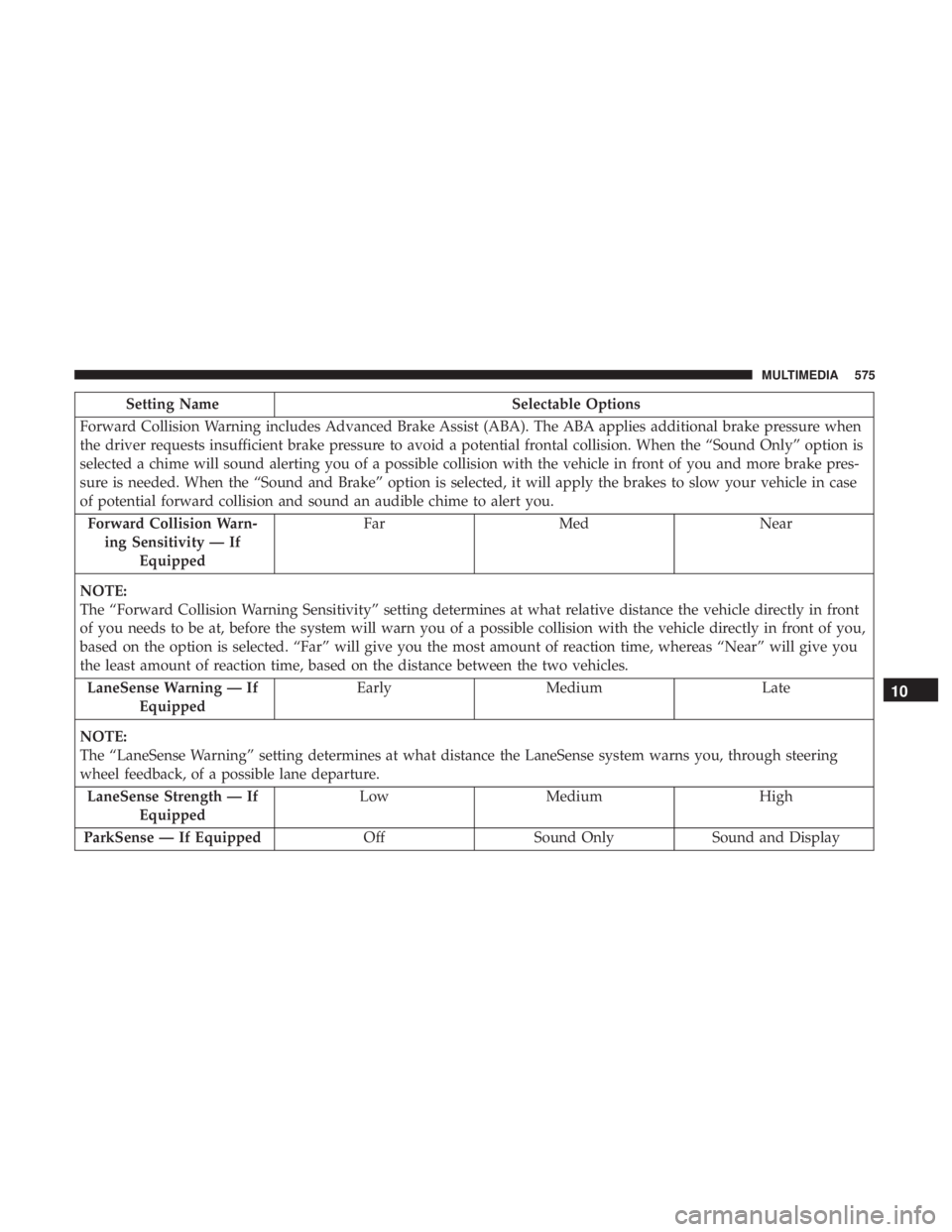
Setting NameSelectable Options
Forward Collision Warning includes Advanced Brake Assist (ABA). The ABA applies additional brake pressure when
the driver requests insufficient brake pressure to avoid a potential frontal collision. When the “Sound Only” option is
selected a chime will sound alerting you of a possible collision with the vehicle in front of you and more brake pres-
sure is needed. When the “Sound and Brake” option is selected, it will apply the brakes to slow your vehicle in case
of potential forward collision and sound an audible chime to alert you. Forward Collision Warn- ing Sensitivity — If Equipped Far
Med Near
NOTE:
The “Forward Collision Warning Sensitivity” setting determines at what relative distance the vehicle directly in front
of you needs to be at, before the system will warn you of a possible collision with the vehicle directly in front of you,
based on the option is selected. “Far” will give you the most amount of reaction time, whereas “Near” will give you
the least amount of reaction time, based on the distance between the two vehicles. LaneSense Warning — If Equipped Early
Medium Late
NOTE:
The “LaneSense Warning” setting determines at what distance the LaneSense system warns you, through steering
wheel feedback, of a possible lane departure. LaneSense Strength — If Equipped Low
Medium High
ParkSense — If Equipped OffSound Only Sound and Display
10
MULTIMEDIA 575
Page 578 of 696
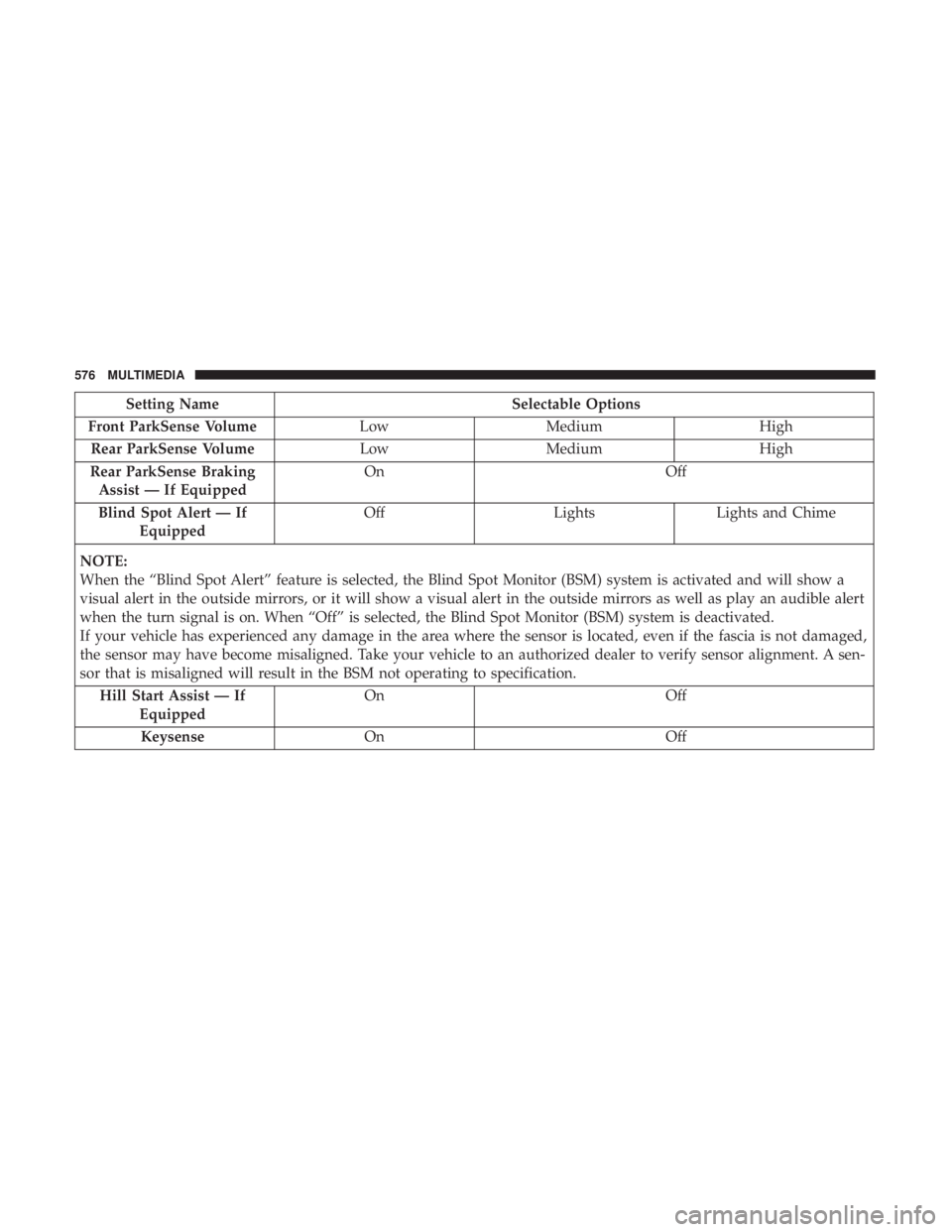
Setting NameSelectable Options
Front ParkSense Volume LowMedium High
Rear ParkSense Volume LowMedium High
Rear ParkSense Braking Assist — If Equipped On
Off
Blind Spot Alert — If Equipped Off
LightsLights and Chime
NOTE:
When the “Blind Spot Alert” feature is selected, the Blind Spot Monitor (BSM) system is activated and will show a
visual alert in the outside mirrors, or it will show a visual alert in the outside mirrors as well as play an audible alert
when the turn signal is on. When “Off” is selected, the Blind Spot Monitor (BSM) system is deactivated.
If your vehicle has experienced any damage in the area where the sensor is located, even if the fascia is not damaged,
the sensor may have become misaligned. Take your vehicle to an authorized dealer to verify sensor alignment. A sen-
sor that is misaligned will result in the BSM not operating to specification. Hill Start Assist — If Equipped On
Off
Keysense On Off
576 MULTIMEDIA
Page 594 of 696
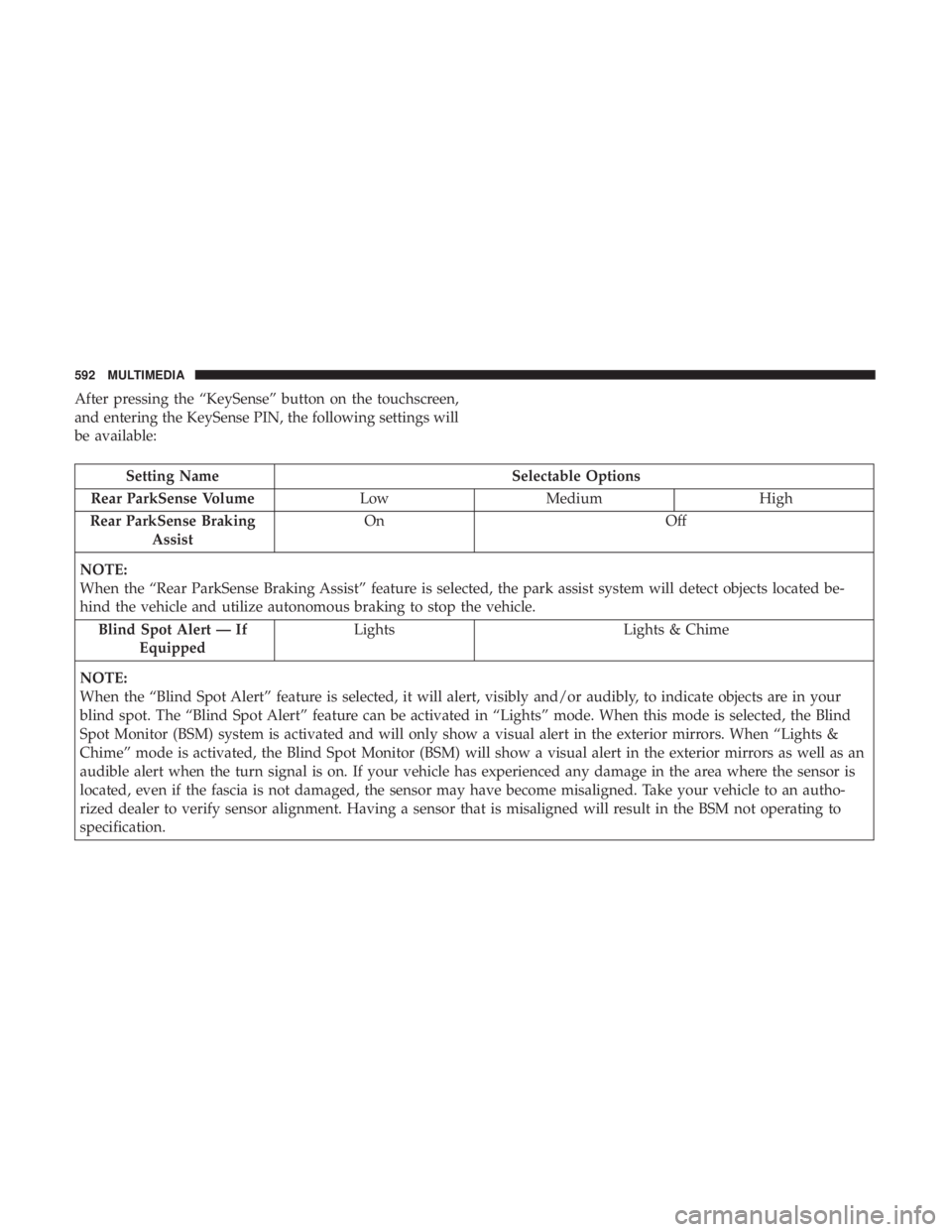
After pressing the “KeySense” button on the touchscreen,
and entering the KeySense PIN, the following settings will
be available:
Setting NameSelectable Options
Rear ParkSense Volume LowMedium High
Rear ParkSense Braking Assist On
Off
NOTE:
When the “Rear ParkSense Braking Assist” feature is selected, the park assist system will detect objects located be-
hind the vehicle and utilize autonomous braking to stop the vehicle. Blind Spot Alert — If Equipped Lights
Lights & Chime
NOTE:
When the “Blind Spot Alert” feature is selected, it will alert, visibly and/or audibly, to indicate objects are in your
blind spot. The “Blind Spot Alert” feature can be activated in “Lights” mode. When this mode is selected, the Blind
Spot Monitor (BSM) system is activated and will only show a visual alert in the exterior mirrors. When “Lights &
Chime” mode is activated, the Blind Spot Monitor (BSM) will show a visual alert in the exterior mirrors as well as an
audible alert when the turn signal is on. If your vehicle has experienced any damage in the area where the sensor is
located, even if the fascia is not damaged, the sensor may have become misaligned. Take your vehicle to an autho-
rized dealer to verify sensor alignment. Having a sensor that is misaligned will result in the BSM not operating to
specification.
592 MULTIMEDIA
Page 601 of 696
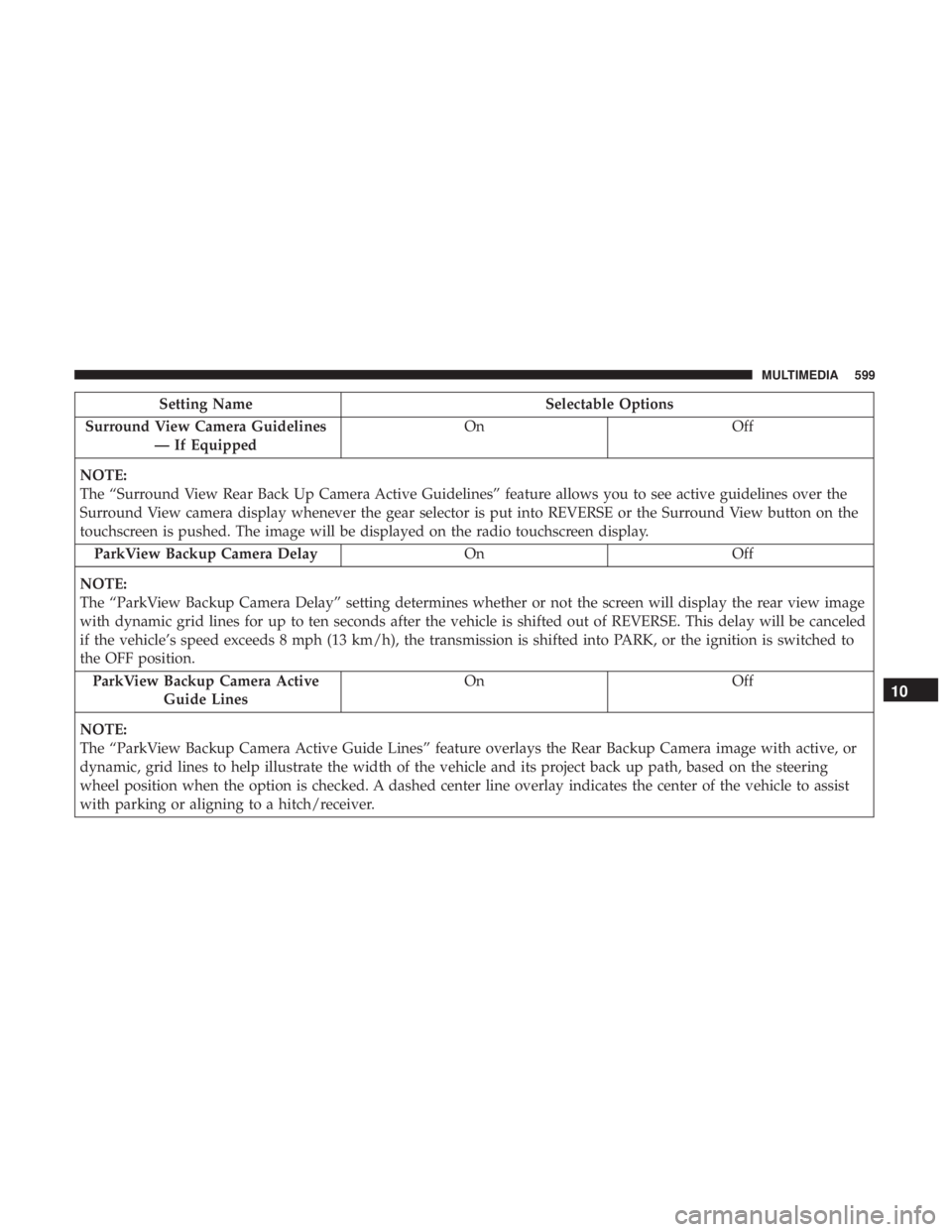
Setting NameSelectable Options
Surround View Camera Guidelines — If Equipped On
Off
NOTE:
The “Surround View Rear Back Up Camera Active Guidelines” feature allows you to see active guidelines over the
Surround View camera display whenever the gear selector is put into REVERSE or the Surround View button on the
touchscreen is pushed. The image will be displayed on the radio touchscreen display. ParkView Backup Camera Delay OnOff
NOTE:
The “ParkView Backup Camera Delay” setting determines whether or not the screen will display the rear view image
with dynamic grid lines for up to ten seconds after the vehicle is shifted out of REVERSE. This delay will be canceled
if the vehicle’s speed exceeds 8 mph (13 km/h), the transmission is shifted into PARK, or the ignition is switched to
the OFF position. ParkView Backup Camera Active Guide Lines On
Off
NOTE:
The “ParkView Backup Camera Active Guide Lines” feature overlays the Rear Backup Camera image with active, or
dynamic, grid lines to help illustrate the width of the vehicle and its project back up path, based on the steering
wheel position when the option is checked. A dashed center line overlay indicates the center of the vehicle to assist
with parking or aligning to a hitch/receiver.
10
MULTIMEDIA 599
Page 681 of 696
Automatic Temperature Control (ATC)...........130
Automatic Transaxle ........................317
Automatic Transmission ..................... .319
Adding Fluid ........................517, 557
Fluid And Filter Change ...................517
Fluid Change .......................... .517
Fluid Level Check ........................516
Fluid Type ..........................516, 557
Special Additives ........................ .516
AuxCord............................... .616
Auxiliary Electrical Outlet (Power Outlet) .........168
Axle Lubrication .......................... .557
Back-Up Camera .......................... .399
Battery ...............................200, 495
Charging System Light ....................200
Jump Starting .......................... .475
Keyless Key Fob Replacement ................22
Battery Saver Feature .........................98
Belts, Seat ............................... .301
Blind Spot Monitoring .......................223
Body Mechanism Lubrication ..................503
B-Pillar Location .......................... .523
Brake Assist System ........................ .216
Brake Control System, Electronic ................215Brake Fluid
...............................557
Brake System ..........................514, 548
Anti-Lock (ABS) ........................ .548
Fluid Check ........................ .515, 557
Master Cylinder ........................ .515
Parking ...............................313
Warning Light .......................... .198
Brake/Transmission Interlock ..................319
Brightness, Interior Lights ....................100
Bulb Replacement .......................431, 435
Bulbs, Light ....................... .303, 431, 435
Camera .................................399
Camera, Rear..........................399,
401
Capacities, Fluid .......................... .555
Caps, Filler Fuel ...............................404, 478
Oil (Engine) ............................493
Radiator (Coolant Pressure) .................513
Carbon Monoxide Warning ................301, 554
Cargo Vehicle Loading ..........................146
Cargo Area Cover ..........................146
Cargo Compartment Luggage Carrier ........................ .173
12
INDEX 679
Page 683 of 696
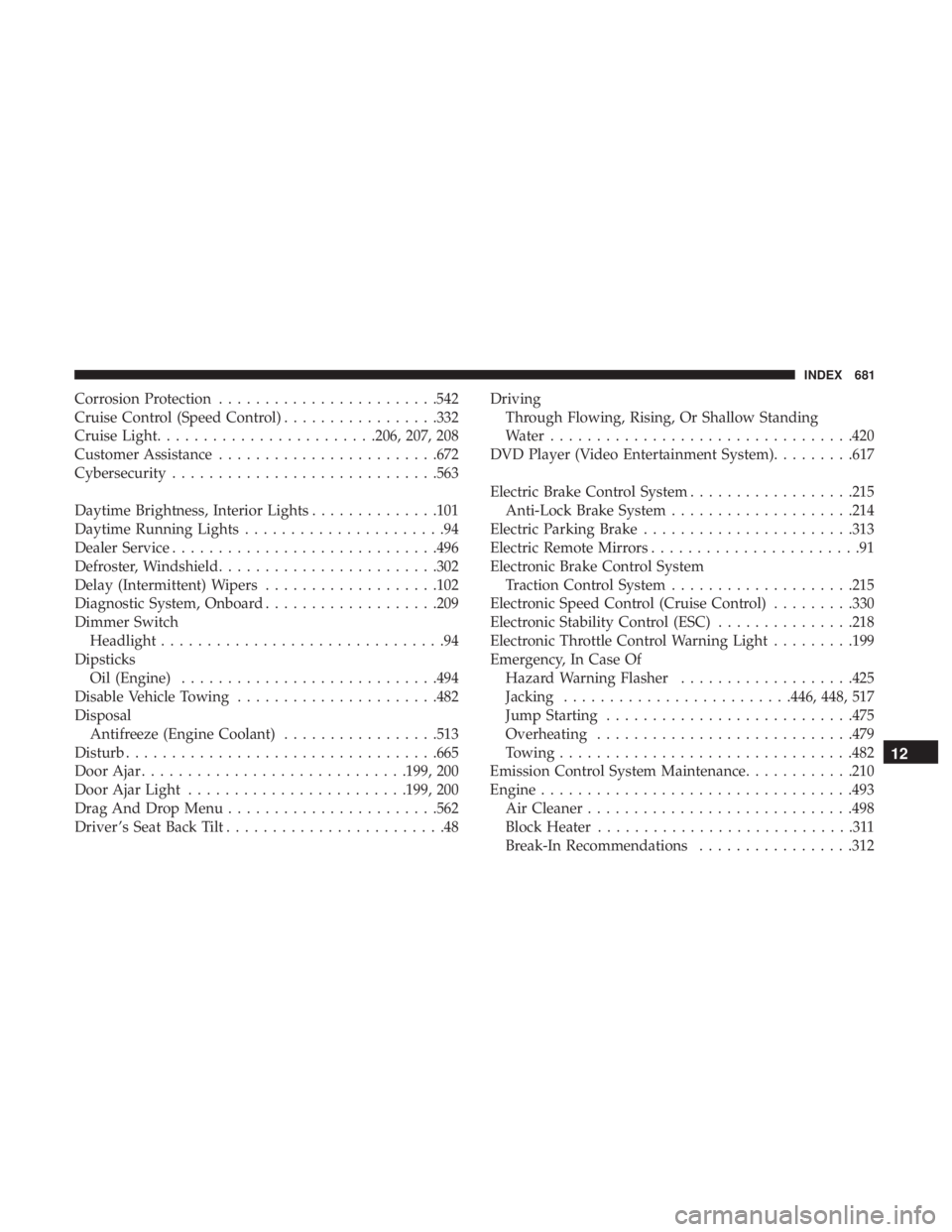
Corrosion Protection........................542
Cruise Control (Speed Control) .................332
Cruise Light ........................206, 207, 208
Customer Assistance ........................672
Cybersecurity ............................ .563
Daytime Brightness, Interior Lights ..............101
Daytime Running Lights ......................94
Dealer Service ............................ .496
Defroster, Windshield ........................302
Delay (Intermittent) Wipers ...................102
Diagnostic System, Onboard ...................209
Dimmer Switch Headlight ...............................94
Dipsticks Oil (Engine) ............................494
Disable Vehicle Towing ..................... .482
Disposal Antifreeze (Engine Coolant) .................513
Disturb ................................. .665
Door Ajar ............................ .199, 200
Door Ajar Light ........................199, 200
Drag And Drop Menu .......................562
Driver ’s Seat Back Tilt ........................48 Driving
Through Flowing, Rising, Or Shallow Standing
Water .................................420
DVD Player (Video Entertainment System) .........617
Electric Brake Control System ..................215
Anti-Lock Brake System ....................214
Electric Parking Brake .......................313
Electric Remote Mirrors .......................91
Electronic Brake Control System Traction Control System ....................215
Electronic Speed Control (Cruise Control) .........330
Electronic Stability Control (ESC) ...............218
Electronic Throttle Control Warning Light .........199
Emergency, In Case Of Hazard Warning Flasher ...................425
Jacking ........................ .446, 448, 517
Jump Starting .......................... .475
Overheating ............................479
T owing ............................... .482
Emission
Control System Maintenance ............210
Engine ................................. .493
Air Cleaner ............................ .498
Block Heater ............................311
Break-In Recommendations .................312
12
INDEX 681
Page 691 of 696
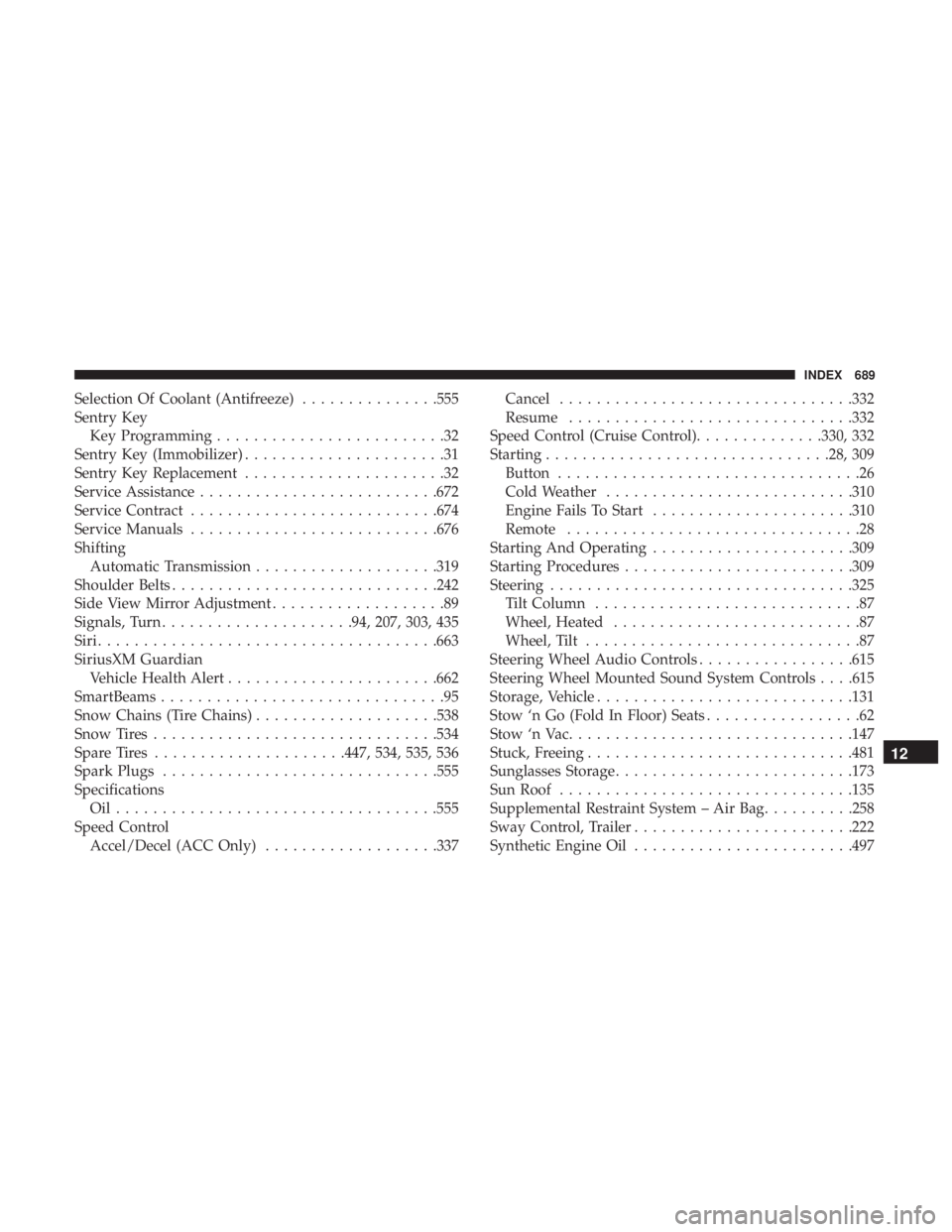
Selection Of Coolant (Antifreeze)...............555
Sentry Key Key Programming .........................32
Sentry Key (Immobilizer) ......................31
Sentry Key Replacement ......................32
Service Assistance ..........................672
Service Contract .......................... .674
Service Manuals .......................... .676
Shifting Automatic Transmission ....................319
Shoulder Belts ............................ .242
Side View Mirror Adjustment ...................89
Signals, Turn .....................94, 207, 303, 435
Siri .................................... .663
SiriusXM Guardian Vehicle Health Alert .......................662
SmartBeams ...............................95
Snow Chains (Tire Chains) ....................538
Snow Tires ...............................534
Spare Tires .....................447, 534, 535, 536
Spark Plugs ............................. .555
Specifications Oil...................................555
Speed Control Accel/Decel (ACC Only) ...................337 Cancel
............................... .332
Resume ...............................332
Speed Control (Cruise Control) ..............330, 332
Starting ...............................28, 309
Button .................................26
Cold Weather .......................... .310
Engine Fails To Start ..................... .310
Remote ................................28
Starting And Operating ..................... .309
Starting Procedures ........................ .309
Steering .................................325
Tilt Column .............................87
Wheel, Heated ...........................87
Wheel, Tilt ..............................87
Steering Wheel Audio Controls .................615
Steering Wheel Mounted Sound System Controls . . . .615
Storage, Vehicle ............................131
Stow ‘n
Go (Fold In Floor) Seats .................62
Stow ‘n Vac ...............................147
Stuck, Freeing ............................ .481
Sunglasses Storage ..........................173
Sun Roof ............................... .135
Supplemental Restraint System – Air Bag ..........258
Sway Control, Trailer ........................222
Synthetic Engine Oil ........................497
12
INDEX 689