tow CHRYSLER PACIFICA 2019 Owners Manual
[x] Cancel search | Manufacturer: CHRYSLER, Model Year: 2019, Model line: PACIFICA, Model: CHRYSLER PACIFICA 2019Pages: 718, PDF Size: 8.6 MB
Page 446 of 718
WARNING!
ALWAYS obey traffic laws and pay attention to the
road. ALWAYS drive safely with your hands on the
steering wheel. You have full responsibility and as-
sume all risks related to the use of the features and
applications in this vehicle. Only use the features and
applications when it is safe to do so. Failure to do so
may result in an accident involving serious injury or
death.
NOTE:
• Your vehicle may be transmitting data as authorized by
the subscriber.
• The SOS and ASSIST buttons will only function if you
are connected to an operable LTE (voice/data) or 4G
(data) network. Other Uconnect services will only be
operable if your SiriusXM Guardian service is active and
you are connected to an operable LTE (voice/data) or 4G
(data) network. ASSIST Call
The ASSIST Button is used to automatically connect you to
any one of the following support centers:
•
Roadside Assistance – If you get a flat tire, or need a tow,
just push the ASSIST button and you will be connected
to a representative for assistance. Roadside Assistance
will know what vehicle you’re driving and its location.
Additional fees may apply for roadside assistance.
• SiriusXM Guardian Customer Care – In-vehicle support
for SiriusXM Guardian.
• Vehicle Customer Care – Total support for all other
vehicle issues.
SOS Call
1. Push the SOS Call button on the Rearview Mirror.
NOTE: In case the SOS Call button is pushed in error, there
will be a ten second delay before the SOS Call system
initiates a call to a SOS operator. To cancel the SOS Call
connection, push the SOS call button on the Rearview
Mirror or press the cancellation button on the Device
Screen. Termination of the SOS Call will turn off the green
LED light on the Rearview Mirror.
444 IN CASE OF EMERGENCY
Page 463 of 718
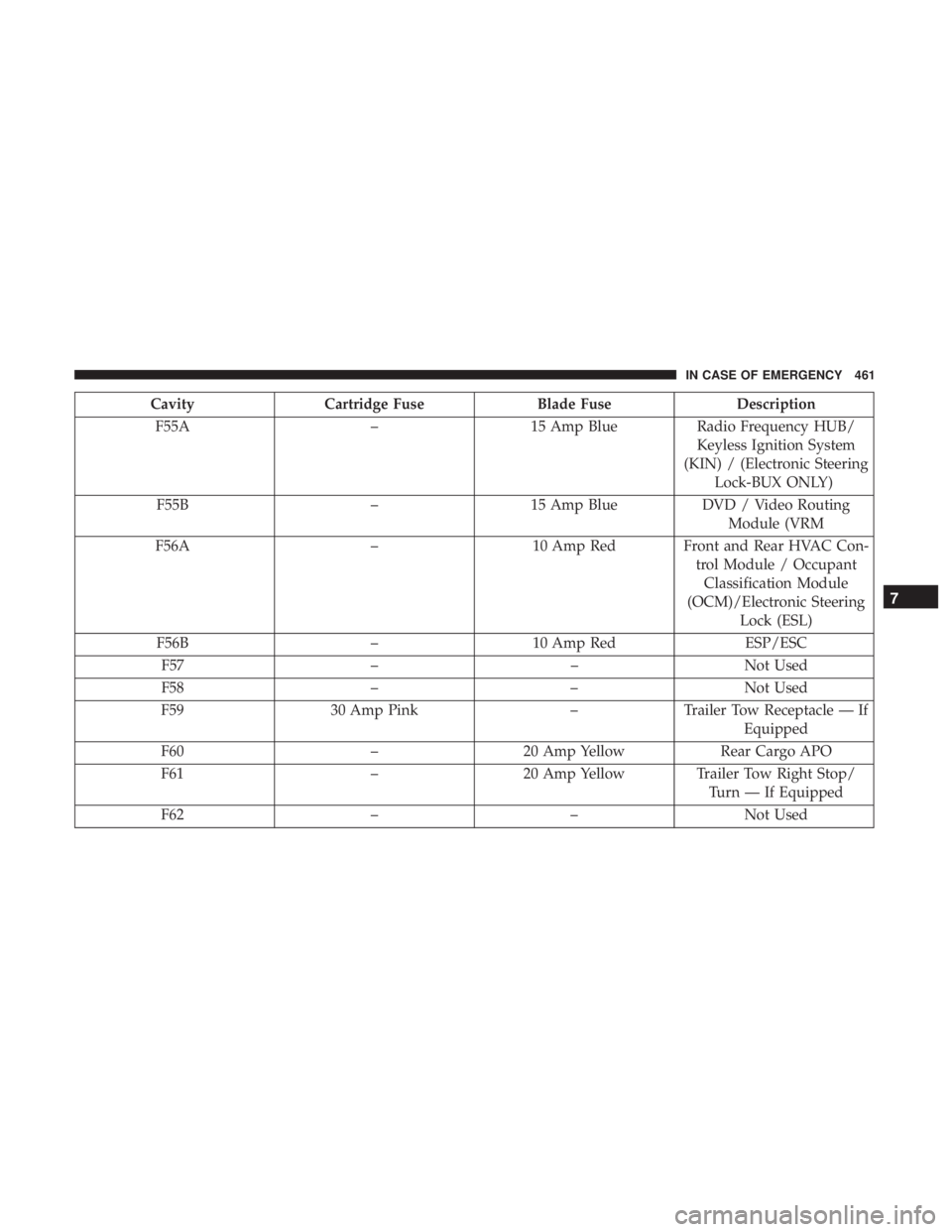
CavityCartridge Fuse Blade FuseDescription
F55A –15 Amp Blue Radio Frequency HUB/
Keyless Ignition System
(KIN) / (Electronic Steering Lock-BUX ONLY)
F55B –15 Amp Blue DVD / Video Routing
Module (VRM
F56A –10 Amp Red Front and Rear HVAC Con-
trol Module / OccupantClassification Module
(OCM)/Electronic Steering Lock (ESL)
F56B –10 Amp Red ESP/ESC
F57 ––Not Used
F58 ––Not Used
F59 30 Amp Pink –Trailer Tow Receptacle — If
Equipped
F60 –20 Amp Yellow Rear Cargo APO
F61 –20 Amp Yellow Trailer Tow Right Stop/
Turn — If Equipped
F62 ––Not Used
7
IN CASE OF EMERGENCY 461
Page 464 of 718
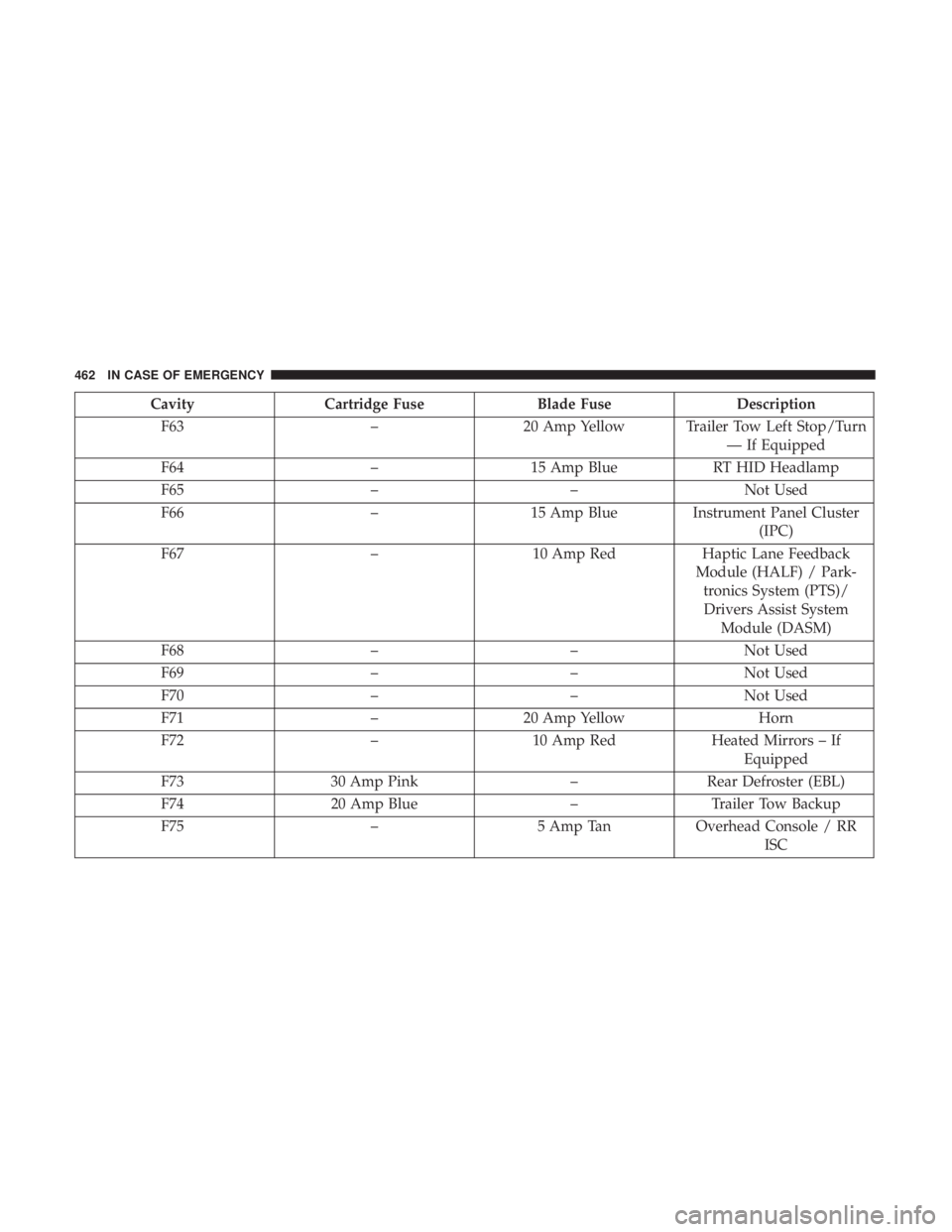
CavityCartridge Fuse Blade FuseDescription
F63 –20 Amp Yellow Trailer Tow Left Stop/Turn
— If Equipped
F64 –15 Amp Blue RT HID Headlamp
F65 ––Not Used
F66 –15 Amp Blue Instrument Panel Cluster
(IPC)
F67 –10 Amp Red Haptic Lane Feedback
Module (HALF) / Park- tronics System (PTS)/Drivers Assist System Module (DASM)
F68 ––Not Used
F69 ––Not Used
F70 ––Not Used
F71 –20 Amp Yellow Horn
F72 –10 Amp Red Heated Mirrors – If
Equipped
F73 30 Amp Pink –Rear Defroster (EBL)
F74 20 Amp Blue –Trailer Tow Backup
F75 –5 Amp TanOverhead Console / RR
ISC
462 IN CASE OF EMERGENCY
Page 465 of 718
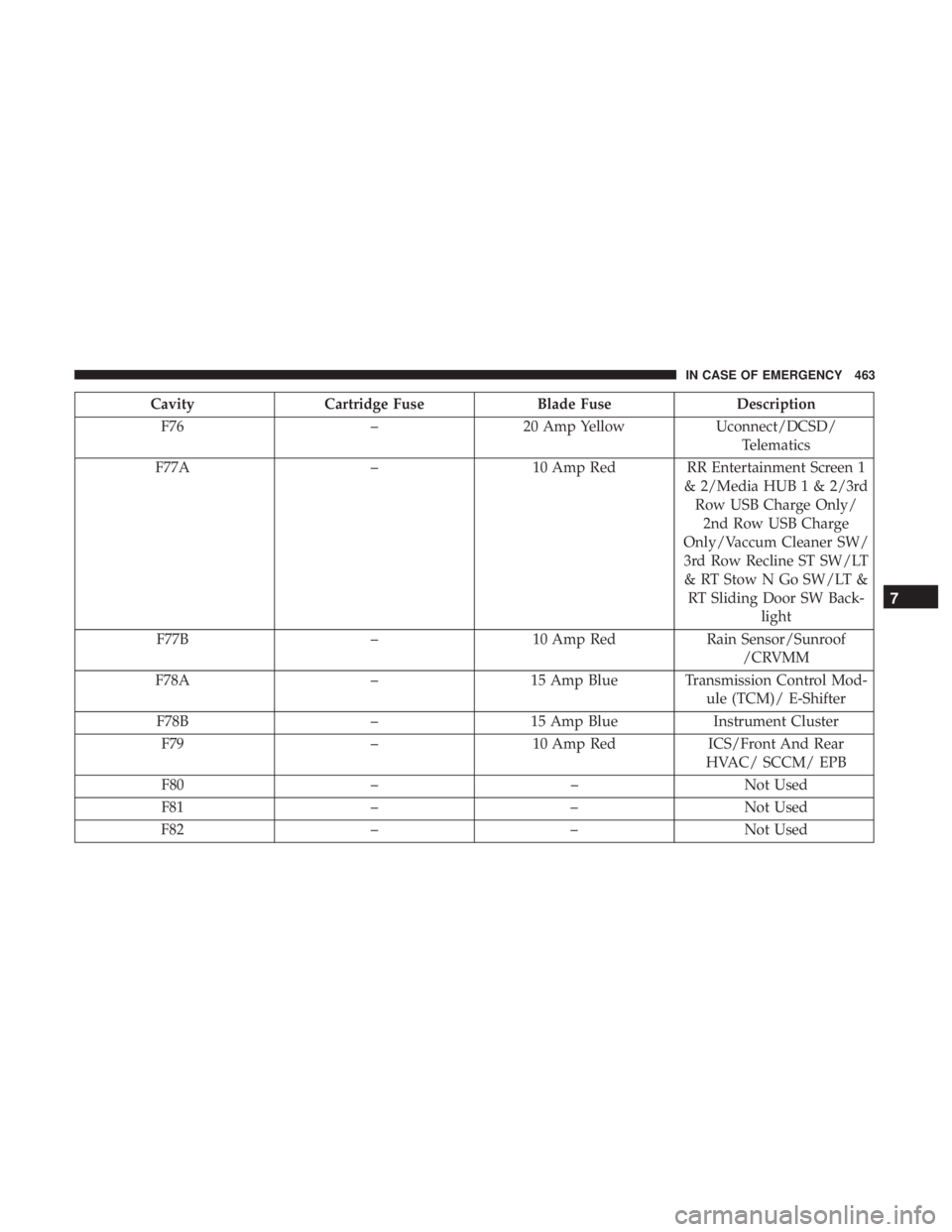
CavityCartridge Fuse Blade FuseDescription
F76 –20 Amp Yellow Uconnect/DCSD/
Telematics
F77A –10 Amp Red RR Entertainment Screen 1
& 2/Media HUB 1 & 2/3rdRow USB Charge Only/2nd Row USB Charge
Only/Vaccum Cleaner SW/ 3rd Row Recline ST SW/LT & RT Stow N Go SW/LT & RT Sliding Door SW Back- light
F77B –10 Amp Red Rain Sensor/Sunroof
/CRVMM
F78A –15 Amp Blue Transmission Control Mod-
ule (TCM)/ E-Shifter
F78B –15 Amp Blue Instrument Cluster
F79 –10 Amp Red ICS/Front And Rear
HVAC/ SCCM/ EPB
F80 ––Not Used
F81 ––Not Used
F82 ––Not Used
7
IN CASE OF EMERGENCY 463
Page 467 of 718
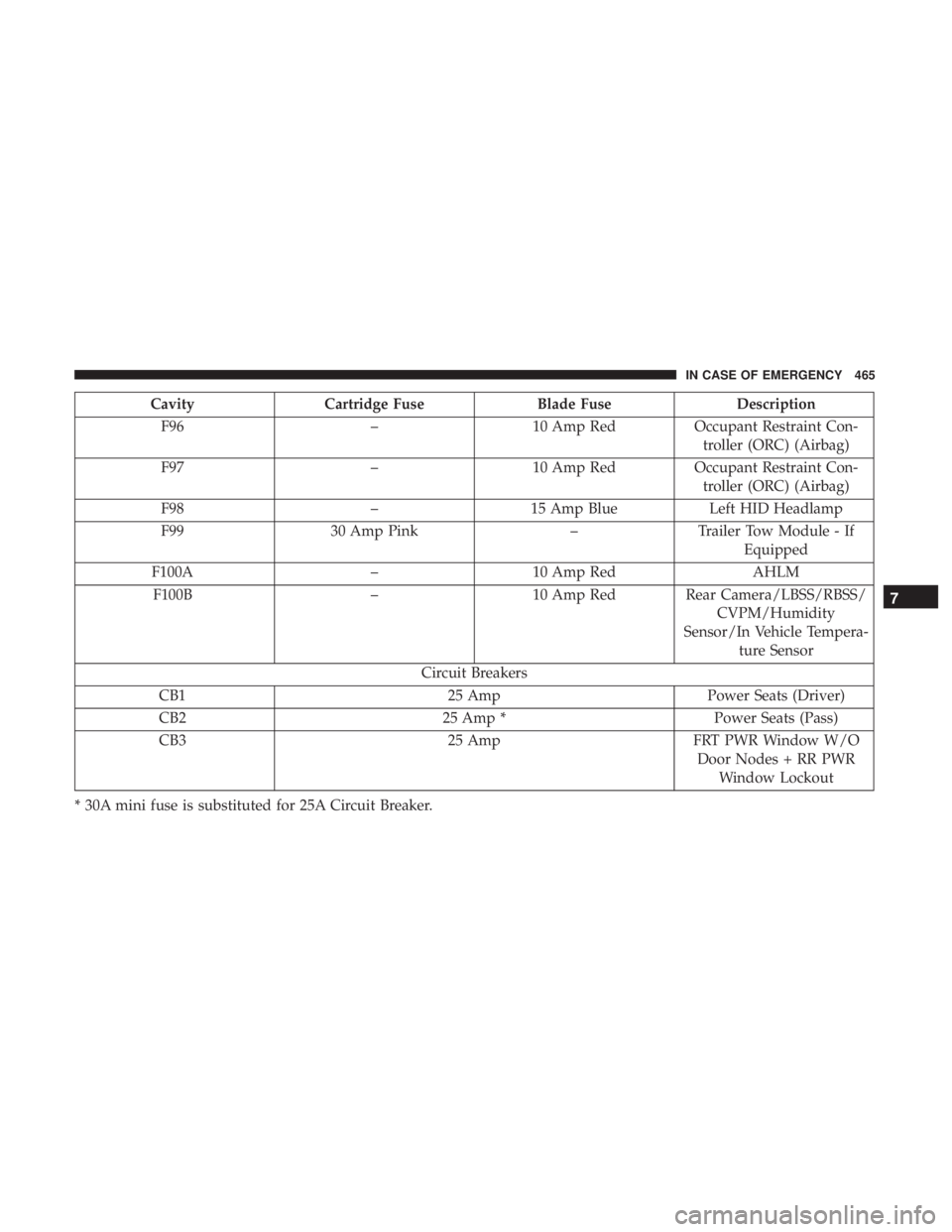
CavityCartridge Fuse Blade FuseDescription
F96 –10 Amp RedOccupant Restraint Con-
troller (ORC) (Airbag)
F97 –10 Amp RedOccupant Restraint Con-
troller (ORC) (Airbag)
F98 –15 Amp Blue Left HID Headlamp
F99 30 Amp Pink –Trailer Tow Module - If
Equipped
F100A –10 Amp Red AHLM
F100B –10 Amp Red Rear Camera/LBSS/RBSS/
CVPM/Humidity
Sensor/In Vehicle Tempera- ture Sensor
Circuit Breakers
CB1 25 AmpPower Seats (Driver)
CB2 25 Amp *Power Seats (Pass)
CB3 25 AmpFRT PWR Window W/O
Door Nodes + RR PWR Window Lockout
* 30A mini fuse is substituted for 25A Circuit Breaker.
7
IN CASE OF EMERGENCY 465
Page 468 of 718
JACKING AND TIRE CHANGING — IF EQUIPPED
WARNING!
•Do not attempt to change a tire on the side of the
vehicle close to moving traffic. Pull far enough off
the road to avoid the danger of being hit when
operating the jack or changing the wheel.
• Being under a jacked-up vehicle is dangerous. The
vehicle could slip off the jack and fall on you. You
could be crushed. Never put any part of your body
under a vehicle that is on a jack. If you need to get
under a raised vehicle, take it to a service center
where it can be raised on a lift.
• The jack is designed to be used as a tool for changing
tires only. The jack should not be used to lift the
vehicle for service purposes. The vehicle should be
jacked on a firm level surface only. Avoid ice or
slippery areas.
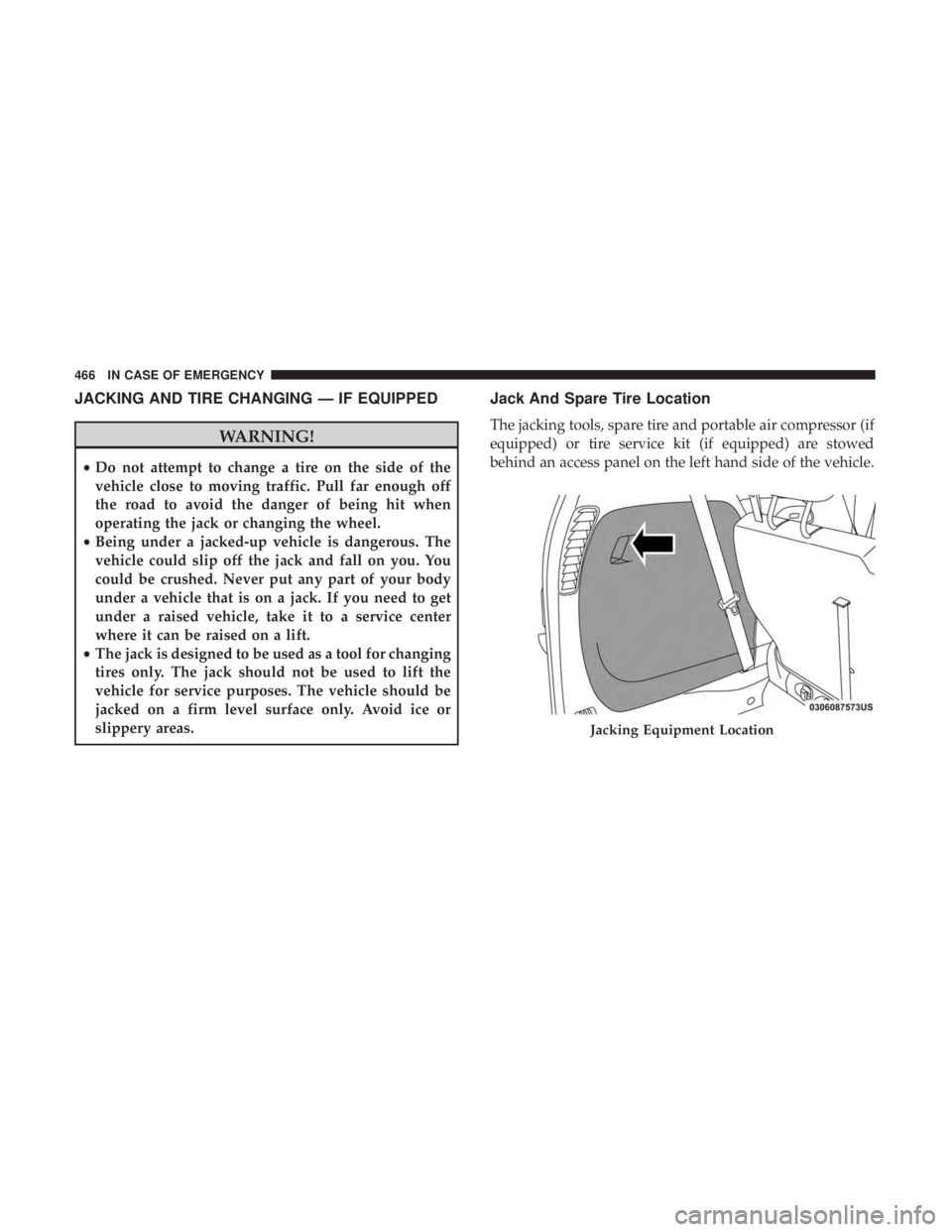
Jack And Spare Tire Location
The jacking tools, spare tire and portable air compressor (if
equipped) or tire service kit (if equipped) are stowed
behind an access panel on the left hand side of the vehicle.
Jacking Equipment Location
466 IN CASE OF EMERGENCY
Page 476 of 718
11. Lower the jack to its fully-closed position.
WARNING!
A loose tire or jack thrown forward in a collision or
hard stop could endanger the occupants of the vehicle.
Always stow the jack parts and the spare tire in the
places provided. Have the deflated (flat) tire repaired
or replaced immediately.
12. Place the deflated (flat) tire and foam tray cover assembly in the rear cargo area. Do not stow the
deflated tire in the inflatable spare tire location. Have
the full-sized tire repaired or replaced, as soon as
possible.
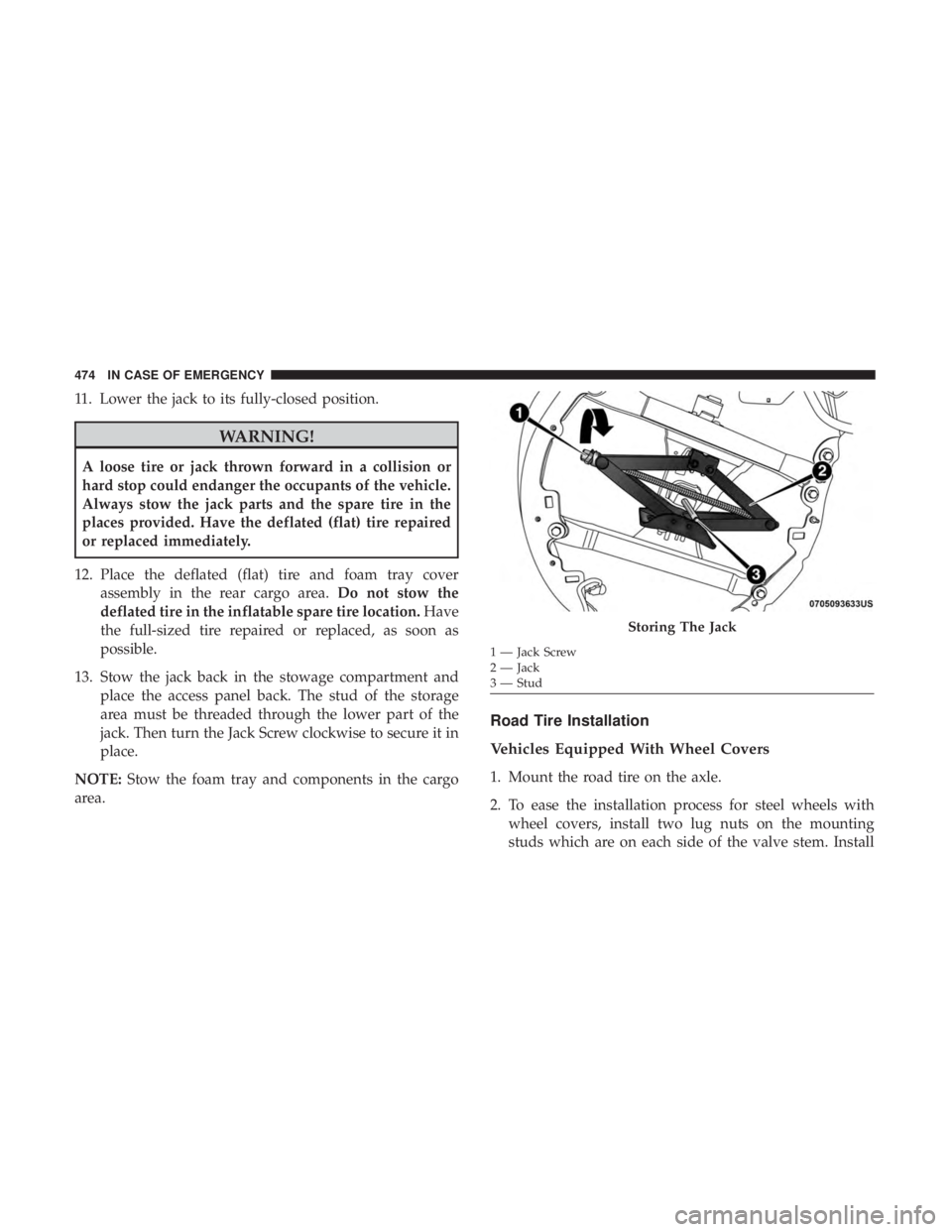
13. Stow the jack back in the stowage compartment and place the access panel back. The stud of the storage
area must be threaded through the lower part of the
jack. Then turn the Jack Screw clockwise to secure it in
place.
NOTE: Stow the foam tray and components in the cargo
area.
Road Tire Installation
Vehicles Equipped With Wheel Covers
1. Mount the road tire on the axle.
2. To ease the installation process for steel wheels with wheel covers, install two lug nuts on the mounting
studs which are on each side of the valve stem. Install
Storing The Jack
1 — Jack Screw
2 — Jack
3 — Stud
474 IN CASE OF EMERGENCY
Page 477 of 718
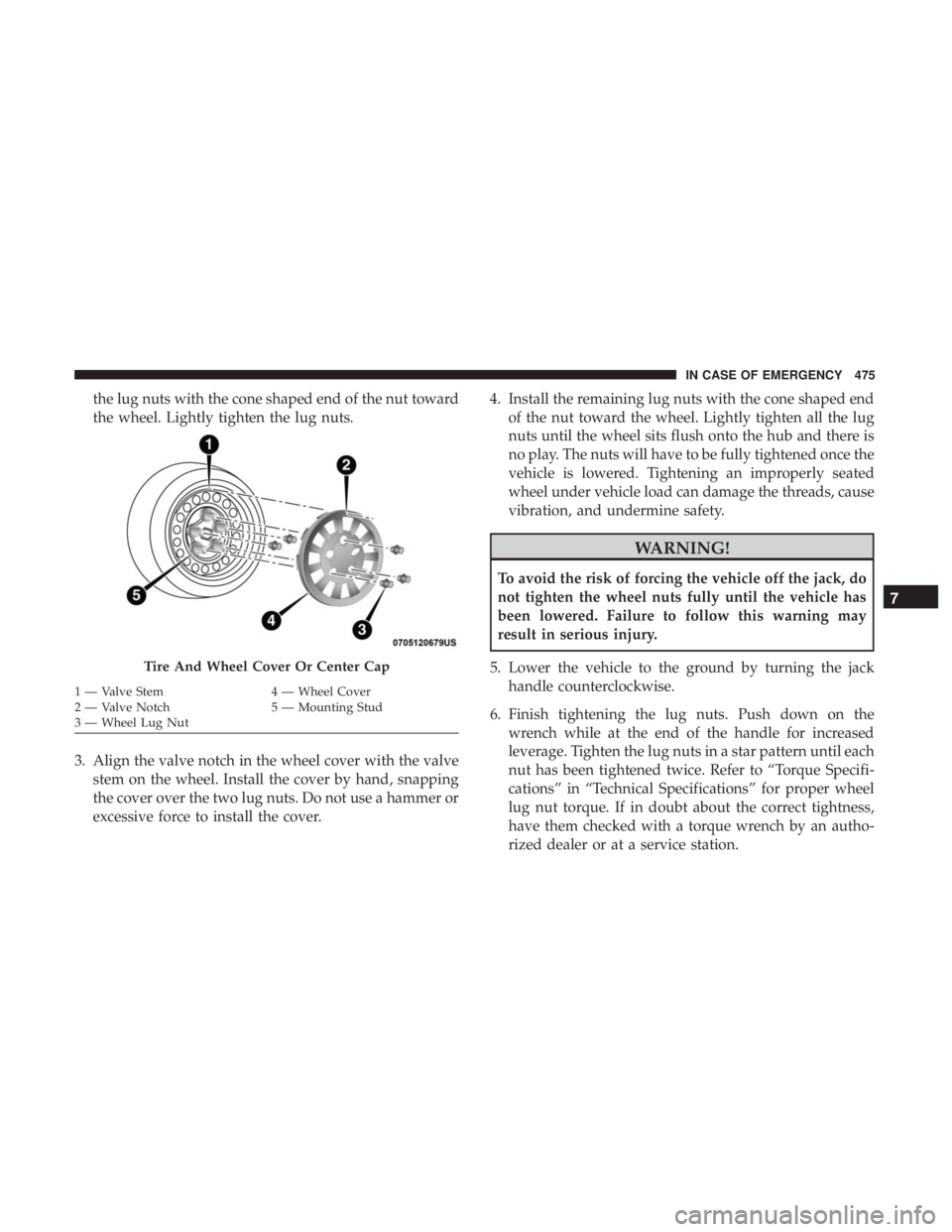
the lug nuts with the cone shaped end of the nut toward
the wheel. Lightly tighten the lug nuts.
3. Align the valve notch in the wheel cover with the valve stem on the wheel. Install the cover by hand, snapping
the cover over the two lug nuts. Do not use a hammer or
excessive force to install the cover. 4. Install the remaining lug nuts with the cone shaped end
of the nut toward the wheel. Lightly tighten all the lug
nuts until the wheel sits flush onto the hub and there is
no play. The nuts will have to be fully tightened once the
vehicle is lowered. Tightening an improperly seated
wheel under vehicle load can damage the threads, cause
vibration, and undermine safety.
WARNING!
To avoid the risk of forcing the vehicle off the jack, do
not tighten the wheel nuts fully until the vehicle has
been lowered. Failure to follow this warning may
result in serious injury.
5. Lower the vehicle to the ground by turning the jack handle counterclockwise.
6. Finish tightening the lug nuts. Push down on the wrench while at the end of the handle for increased
leverage. Tighten the lug nuts in a star pattern until each
nut has been tightened twice. Refer to “Torque Specifi-
cations” in “Technical Specifications” for proper wheel
lug nut torque. If in doubt about the correct tightness,
have them checked with a torque wrench by an autho-
rized dealer or at a service station.
Tire And Wheel Cover Or Center Cap
1 — Valve Stem 4 — Wheel Cover
2 — Valve Notch 5 — Mounting Stud
3 — Wheel Lug Nut
7
IN CASE OF EMERGENCY 475
Page 478 of 718
7. After 25 miles (40 km) check the lug nut torque with atorque wrench to ensure that all lug nuts are properly
seated against the wheel.
Vehicles Without Wheel Covers
1. Mount the road tire on the axle.
2. Install the remaining lug nuts with the cone shaped endof the nut toward the wheel. Lightly tighten all the lug
nuts until the wheel sits flush onto the hub and there is
no play. The nuts will have to be fully tightened once the
vehicle is lowered. Tightening an improperly seated
wheel under vehicle load can damage the threads, cause
vibration, and undermine safety.
WARNING!
To avoid the risk of forcing the vehicle off the jack, do
not tighten the wheel nuts fully until the vehicle has
been lowered. Failure to follow this warning may
result in serious injury.
3. Lower the vehicle to the ground by turning the jack handle counterclockwise. 4. Finish tightening the lug nuts. Push down on the
wrench while at the end of the handle for increased
leverage. Tighten the lug nuts in a star pattern until each
nut has been tightened twice. Refer to “Torque Specifi-
cations” in the “Technical Specifications” section for
proper wheel lug nut torque. If in doubt about the
correct tightness, have them checked with a torque
wrench by your authorized dealer or at a service station.
5. After 25 miles (40 km) check the lug nut torque with a torque wrench to ensure that all lug nuts are properly
seated against the wheel.
Portable Air Compressor — If Equipped
Your vehicle may be equipped with a Portable Air Com-
pressor. Use the Portable Air Compressor located in the
side compartment of the cargo area to inflate the inflatable
tire to 60 psi (4.2 Bar).
476 IN CASE OF EMERGENCY
Page 481 of 718
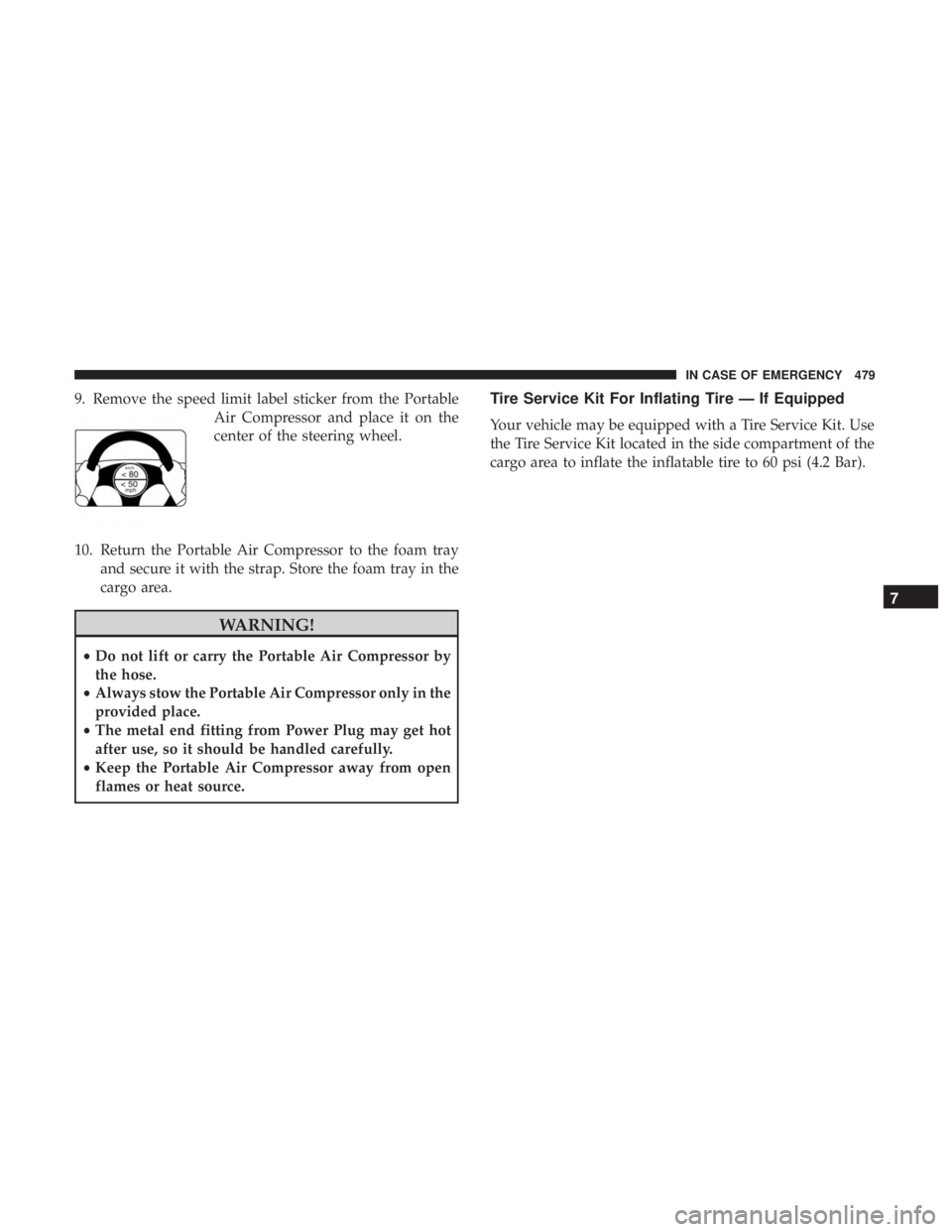
9. Remove the speed limit label sticker from the PortableAir Compressor and place it on the
center of the steering wheel.
10. Return the Portable Air Compressor to the foam tray and secure it with the strap. Store the foam tray in the
cargo area.
WARNING!
•Do not lift or carry the Portable Air Compressor by
the hose.
• Always stow the Portable Air Compressor only in the
provided place.
• The metal end fitting from Power Plug may get hot
after use, so it should be handled carefully.
• Keep the Portable Air Compressor away from open
flames or heat source.
Tire Service Kit For Inflating Tire — If Equipped
Your vehicle may be equipped with a Tire Service Kit. Use
the Tire Service Kit located in the side compartment of the
cargo area to inflate the inflatable tire to 60 psi (4.2 Bar).
7
IN CASE OF EMERGENCY 479