Park CHRYSLER PACIFICA 2019 Owners Manual
[x] Cancel search | Manufacturer: CHRYSLER, Model Year: 2019, Model line: PACIFICA, Model: CHRYSLER PACIFICA 2019Pages: 718, PDF Size: 8.6 MB
Page 603 of 718
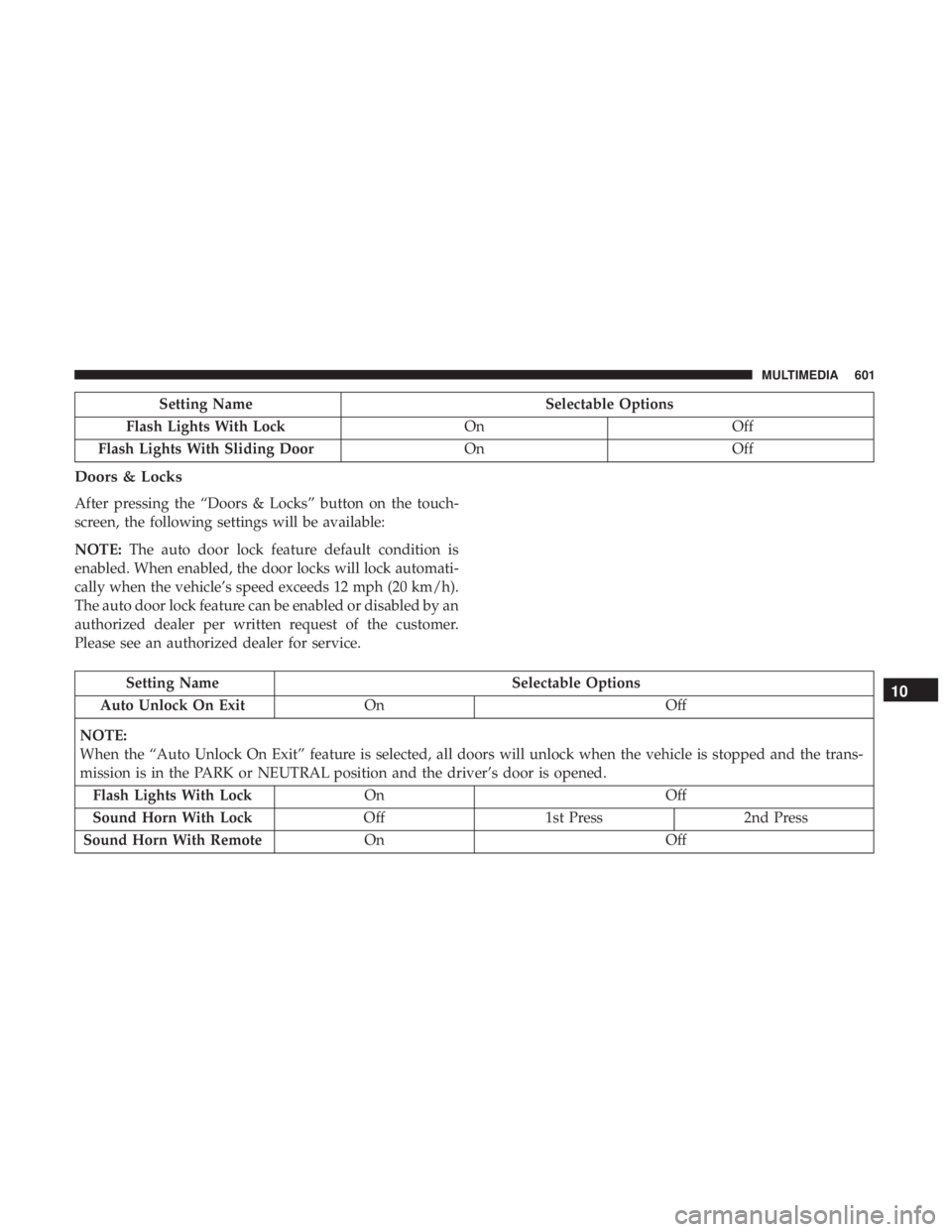
Setting NameSelectable Options
Flash Lights With Lock OnOff
Flash Lights With Sliding Door OnOff
Doors & Locks
After pressing the “Doors & Locks” button on the touch-
screen, the following settings will be available:
NOTE:The auto door lock feature default condition is
enabled. When enabled, the door locks will lock automati-
cally when the vehicle’s speed exceeds 12 mph (20 km/h).
The auto door lock feature can be enabled or disabled by an
authorized dealer per written request of the customer.
Please see an authorized dealer for service.
Setting Name Selectable Options
Auto Unlock On Exit On Off
NOTE:
When the “Auto Unlock On Exit” feature is selected, all doors will unlock when the vehicle is stopped and the trans-
mission is in the PARK or NEUTRAL position and the driver’s door is opened. Flash Lights With Lock On Off
Sound Horn With Lock Off1st Press 2nd Press
Sound Horn With Remote On Off10
MULTIMEDIA 601
Page 617 of 718
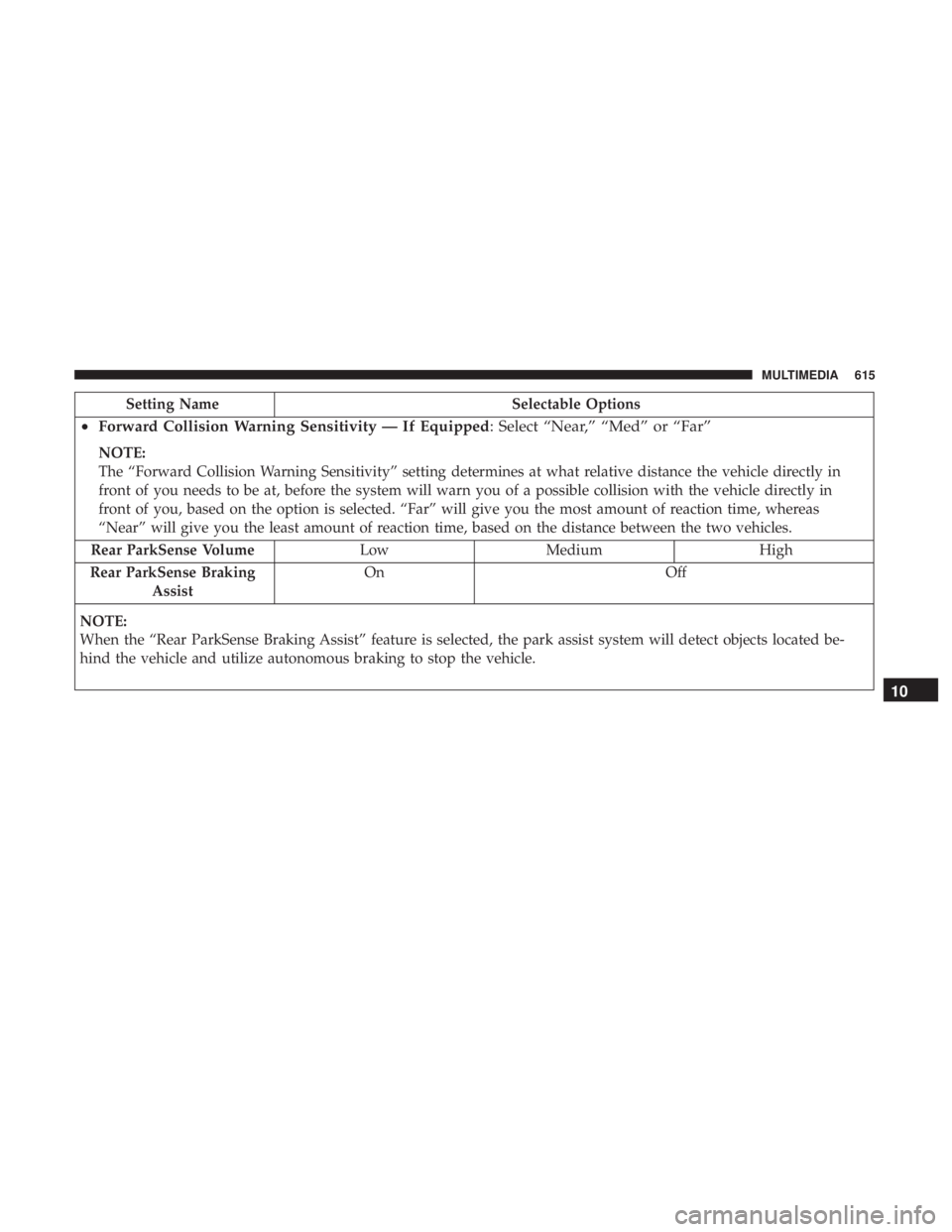
Setting NameSelectable Options
•Forward Collision Warning Sensitivity — If Equipped : Select “Near,” “Med” or “Far”
NOTE:
The “Forward Collision Warning Sensitivity” setting determines at what relative distance the vehicle directly in
front of you needs to be at, before the system will warn you of a possible collision with the vehicle directly in
front of you, based on the option is selected. “Far” will give you the most amount of reaction time, whereas
“Near” will give you the least amount of reaction time, based on the distance between the two vehicles.
Rear ParkSense Volume Low Medium High
Rear ParkSense Braking Assist On Off
NOTE:
When the “Rear ParkSense Braking Assist” feature is selected, the park assist system will detect objects located be-
hind the vehicle and utilize autonomous braking to stop the vehicle.
10
MULTIMEDIA 615
Page 623 of 718
Camera
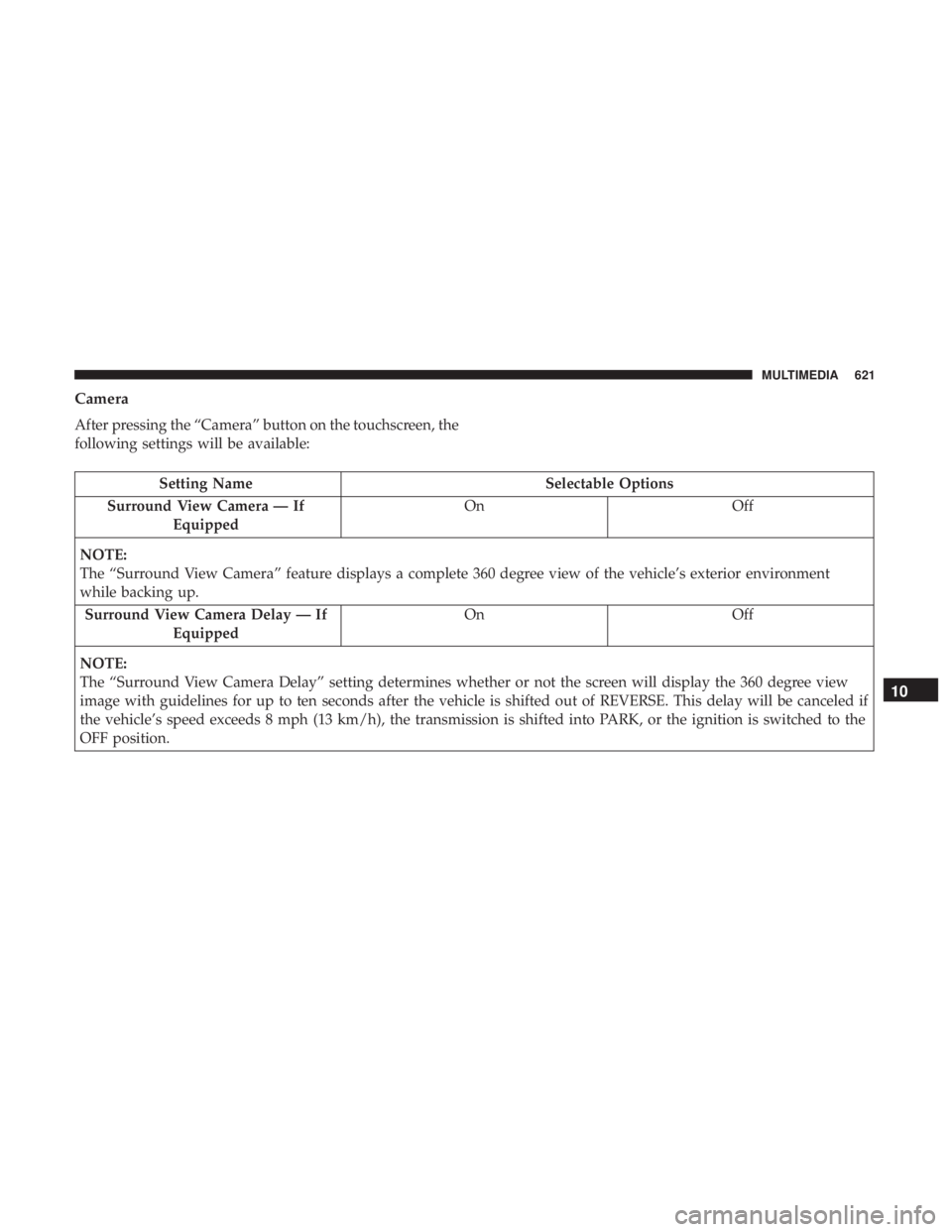
After pressing the “Camera” button on the touchscreen, the
following settings will be available:
Setting NameSelectable Options
Surround View Camera — If Equipped On
Off
NOTE:
The “Surround View Camera” feature displays a complete 360 degree view of the vehicle’s exterior environment
while backing up. Surround View Camera Delay — If Equipped On
Off
NOTE:
The “Surround View Camera Delay” setting determines whether or not the screen will display the 360 degree view
image with guidelines for up to ten seconds after the vehicle is shifted out of REVERSE. This delay will be canceled if
the vehicle’s speed exceeds 8 mph (13 km/h), the transmission is shifted into PARK, or the ignition is switched to the
OFF position.
10
MULTIMEDIA 621
Page 624 of 718
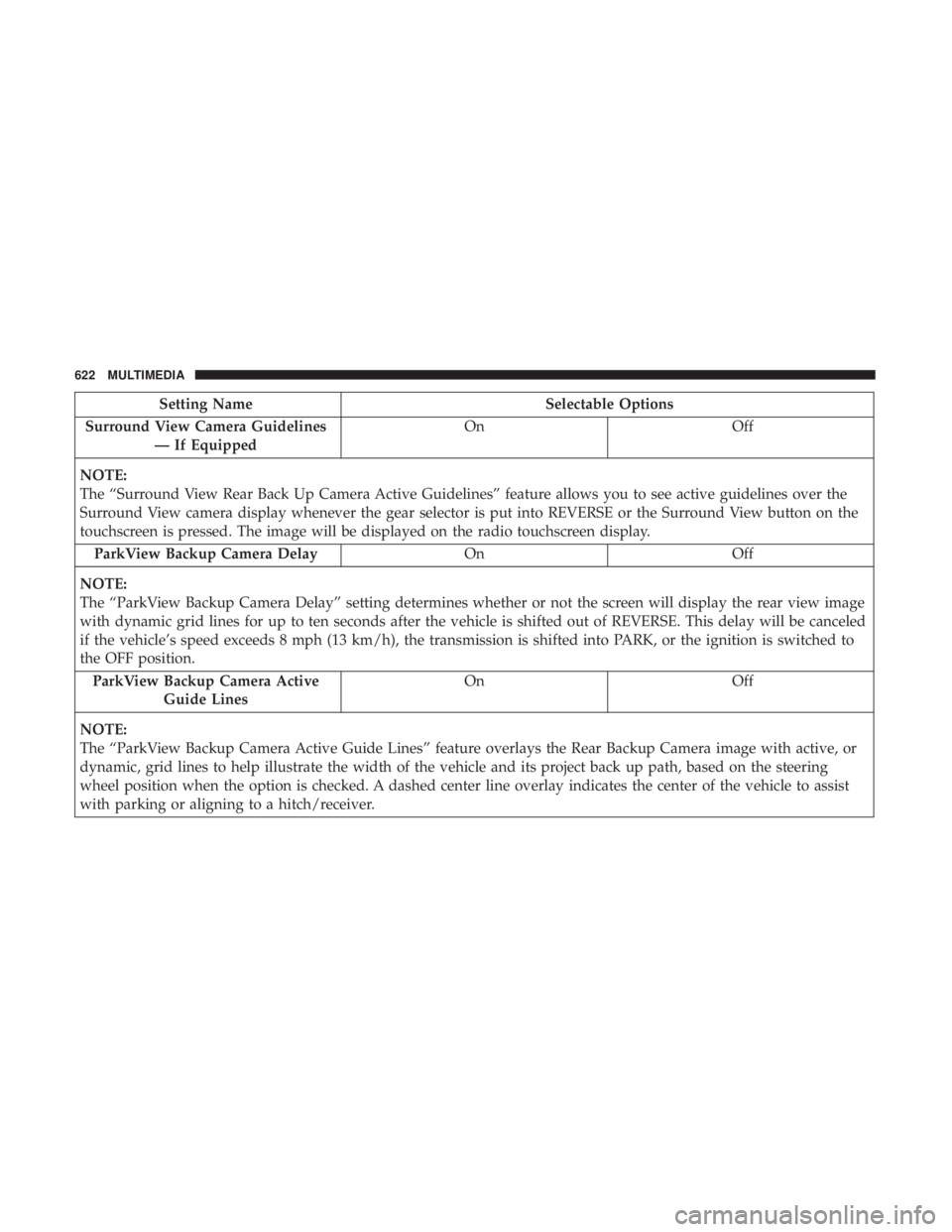
Setting NameSelectable Options
Surround View Camera Guidelines — If Equipped On
Off
NOTE:
The “Surround View Rear Back Up Camera Active Guidelines” feature allows you to see active guidelines over the
Surround View camera display whenever the gear selector is put into REVERSE or the Surround View button on the
touchscreen is pressed. The image will be displayed on the radio touchscreen display. ParkView Backup Camera Delay OnOff
NOTE:
The “ParkView Backup Camera Delay” setting determines whether or not the screen will display the rear view image
with dynamic grid lines for up to ten seconds after the vehicle is shifted out of REVERSE. This delay will be canceled
if the vehicle’s speed exceeds 8 mph (13 km/h), the transmission is shifted into PARK, or the ignition is switched to
the OFF position. ParkView Backup Camera Active Guide Lines On
Off
NOTE:
The “ParkView Backup Camera Active Guide Lines” feature overlays the Rear Backup Camera image with active, or
dynamic, grid lines to help illustrate the width of the vehicle and its project back up path, based on the steering
wheel position when the option is checked. A dashed center line overlay indicates the center of the vehicle to assist
with parking or aligning to a hitch/receiver.
622 MULTIMEDIA
Page 627 of 718
Setting NameSelectable Options
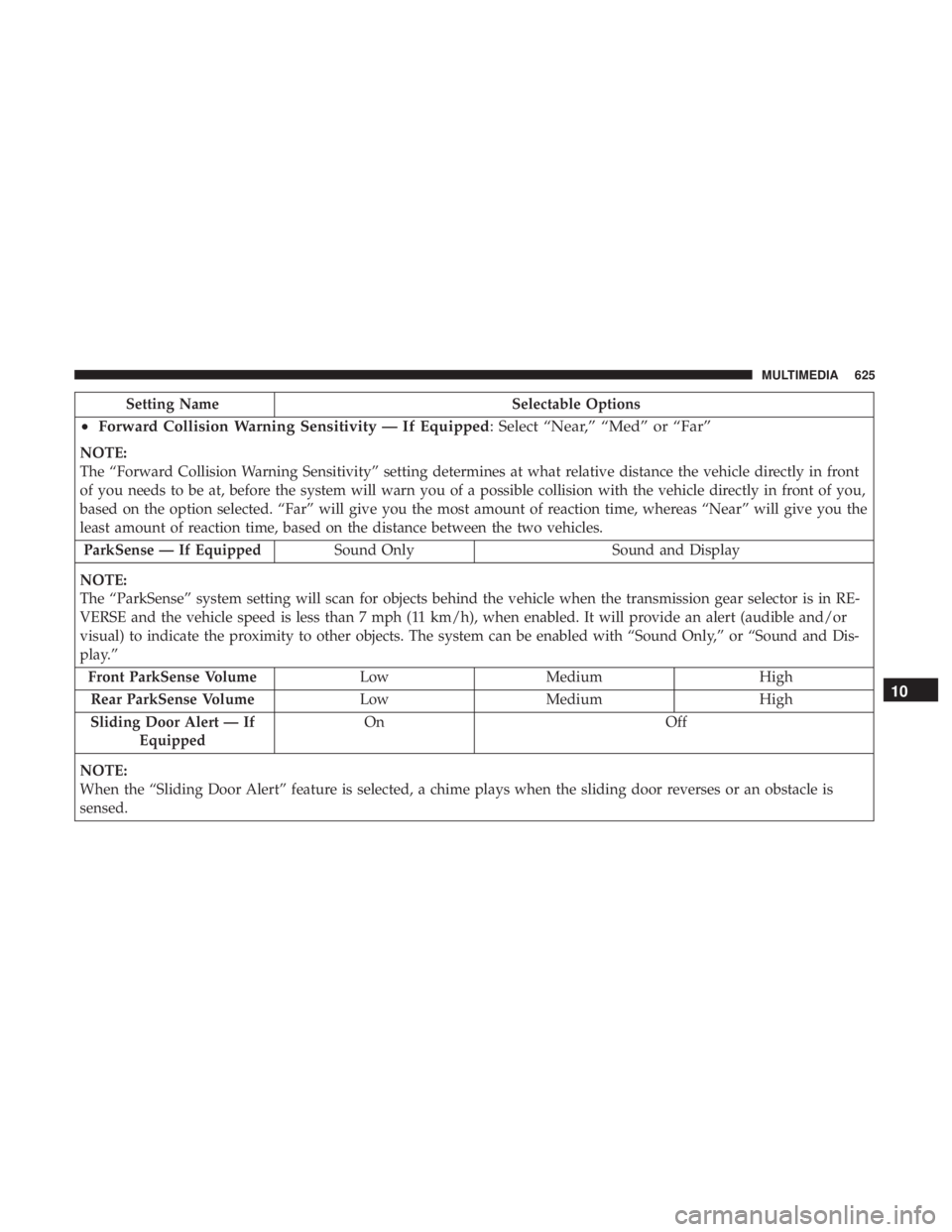
•Forward Collision Warning Sensitivity — If Equipped : Select “Near,” “Med” or “Far”
NOTE:
The “Forward Collision Warning Sensitivity” setting determines at what relative distance the vehicle directly in front
of you needs to be at, before the system will warn you of a possible collision with the vehicle directly in front of you,
based on the option selected. “Far” will give you the most amount of reaction time, whereas “Near” will give you the
least amount of reaction time, based on the distance between the two vehicles.
ParkSense — If Equipped Sound Only Sound and Display
NOTE:
The “ParkSense” system setting will scan for objects behind the vehicle when the transmission gear selector is in RE-
VERSE and the vehicle speed is less than 7 mph (11 km/h), when enabled. It will provide an alert (audible and/or
visual) to indicate the proximity to other objects. The system can be enabled with “Sound Only,” or “Sound and Dis-
play.” Front ParkSense Volume LowMedium High
Rear ParkSense Volume LowMedium High
Sliding Door Alert — If Equipped On
Off
NOTE:
When the “Sliding Door Alert” feature is selected, a chime plays when the sliding door reverses or an obstacle is
sensed.
10
MULTIMEDIA 625
Page 629 of 718
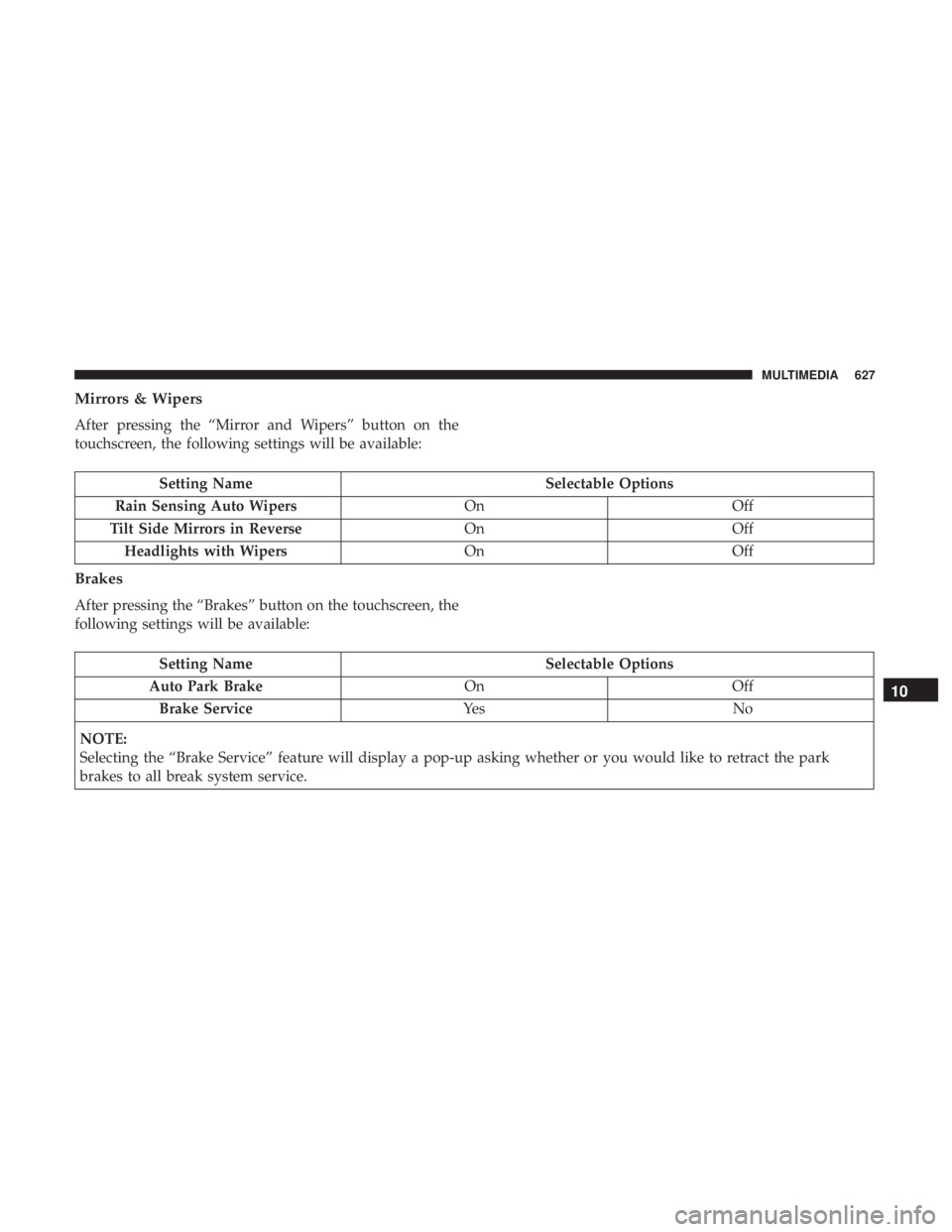
Mirrors & Wipers
After pressing the “Mirror and Wipers” button on the
touchscreen, the following settings will be available:
Setting NameSelectable Options
Rain Sensing Auto Wipers OnOff
Tilt Side Mirrors in Reverse OnOff
Headlights with Wipers OnOff
Brakes
After pressing the “Brakes” button on the touchscreen, the
following settings will be available:
Setting Name Selectable Options
Auto Park Brake OnOff
Brake Service Ye sN o
NOTE:
Selecting the “Brake Service” feature will display a pop-up asking whether or you would like to retract the park
brakes to all break system service.
10
MULTIMEDIA 627
Page 631 of 718
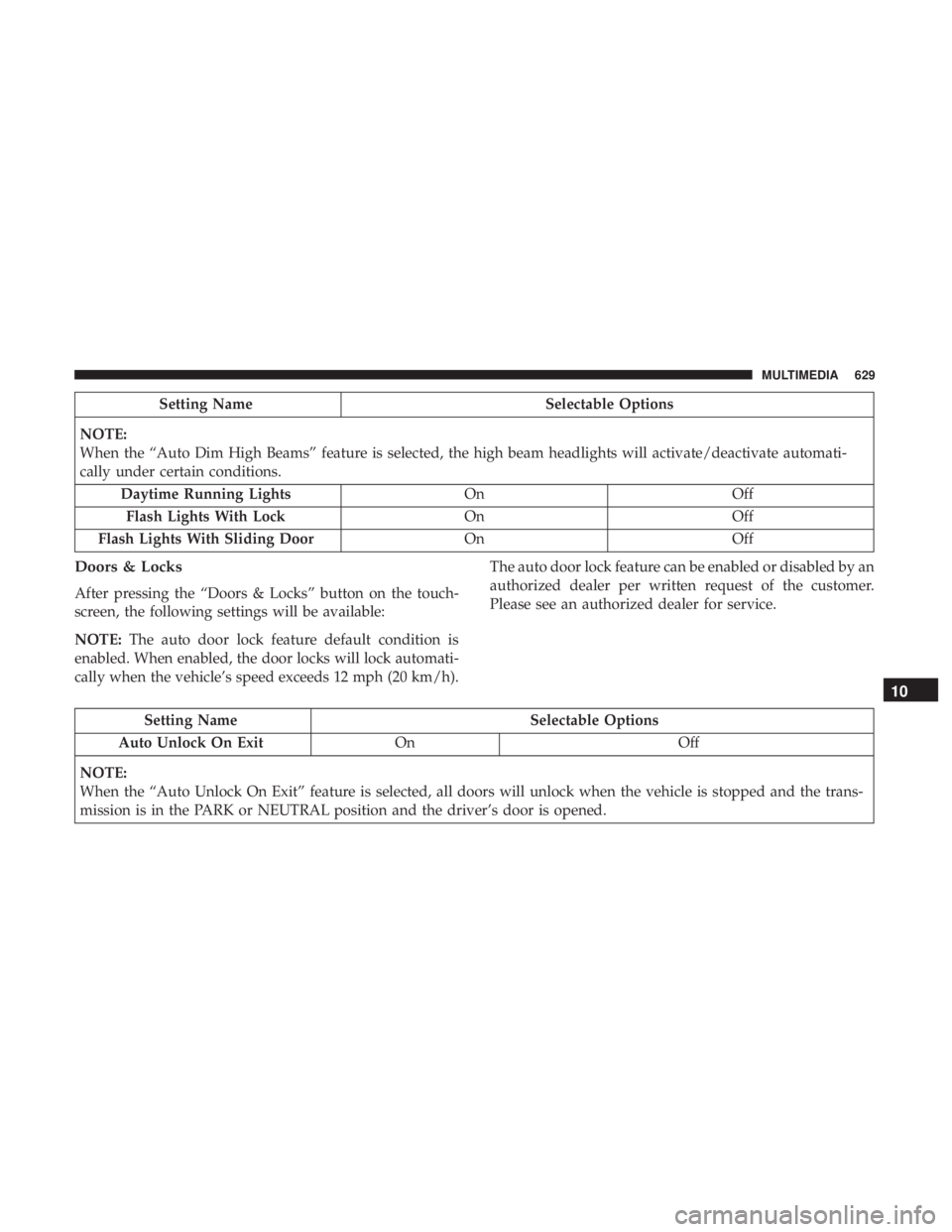
Setting NameSelectable Options
NOTE:
When the “Auto Dim High Beams” feature is selected, the high beam headlights will activate/deactivate automati-
cally under certain conditions. Daytime Running Lights OnOff
Flash Lights With Lock OnOff
Flash Lights With Sliding Door OnOff
Doors & Locks
After pressing the “Doors & Locks” button on the touch-
screen, the following settings will be available:
NOTE:The auto door lock feature default condition is
enabled. When enabled, the door locks will lock automati-
cally when the vehicle’s speed exceeds 12 mph (20 km/h). The auto door lock feature can be enabled or disabled by an
authorized dealer per written request of the customer.
Please see an authorized dealer for service.
Setting Name
Selectable Options
Auto Unlock On Exit On Off
NOTE:
When the “Auto Unlock On Exit” feature is selected, all doors will unlock when the vehicle is stopped and the trans-
mission is in the PARK or NEUTRAL position and the driver’s door is opened.
10
MULTIMEDIA 629
Page 646 of 718
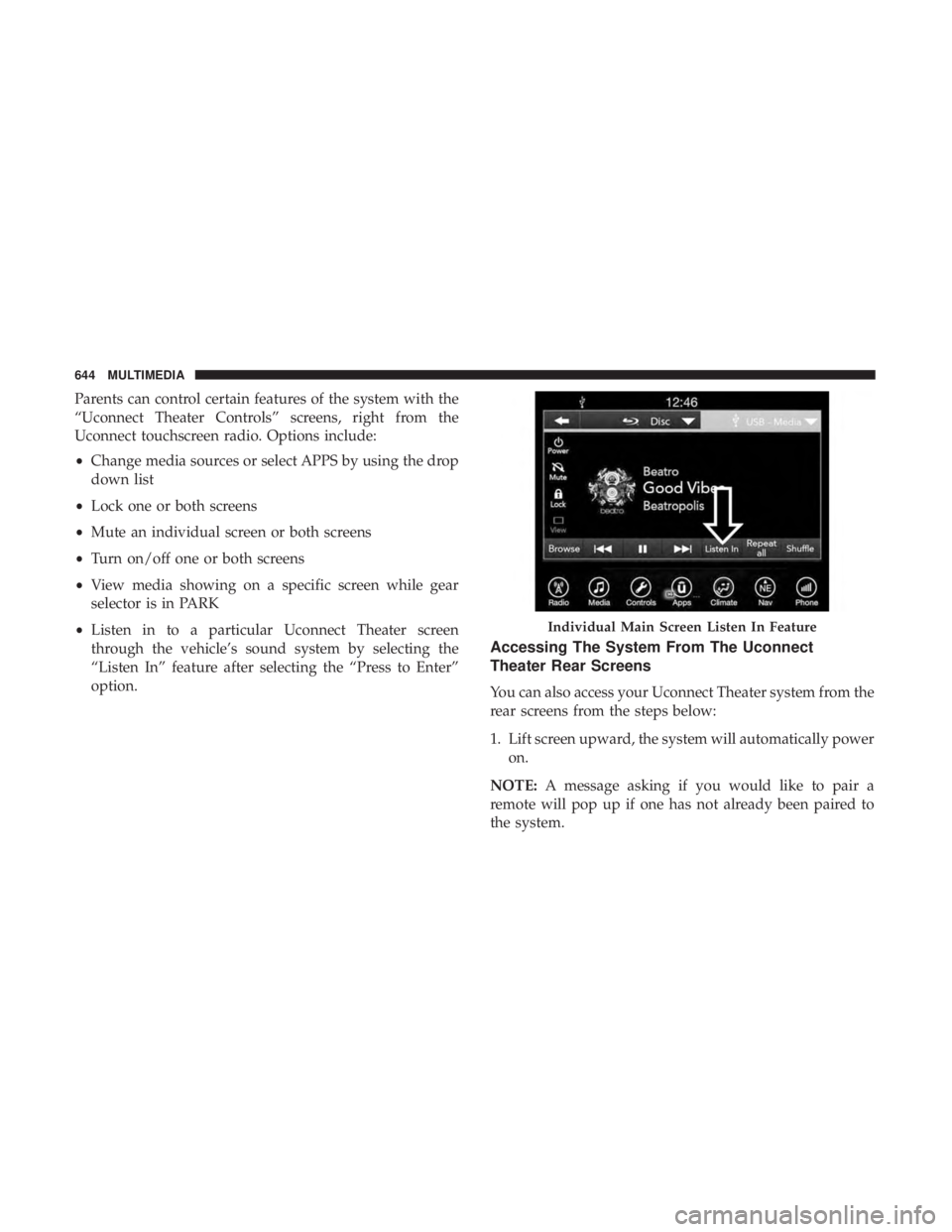
Parents can control certain features of the system with the
“Uconnect Theater Controls” screens, right from the
Uconnect touchscreen radio. Options include:
•Change media sources or select APPS by using the drop
down list
• Lock one or both screens
• Mute an individual screen or both screens
• Turn on/off one or both screens
• View media showing on a specific screen while gear
selector is in PARK
• Listen in to a particular Uconnect Theater screen
through the vehicle’s sound system by selecting the
“Listen In” feature after selecting the “Press to Enter”
option.
Accessing The System From The Uconnect
Theater Rear Screens
You can also access your Uconnect Theater system from the
rear screens from the steps below:
1. Lift screen upward, the system will automatically power on.
NOTE: A message asking if you would like to pair a
remote will pop up if one has not already been paired to
the system.
Individual Main Screen Listen In Feature
644 MULTIMEDIA
Page 703 of 718
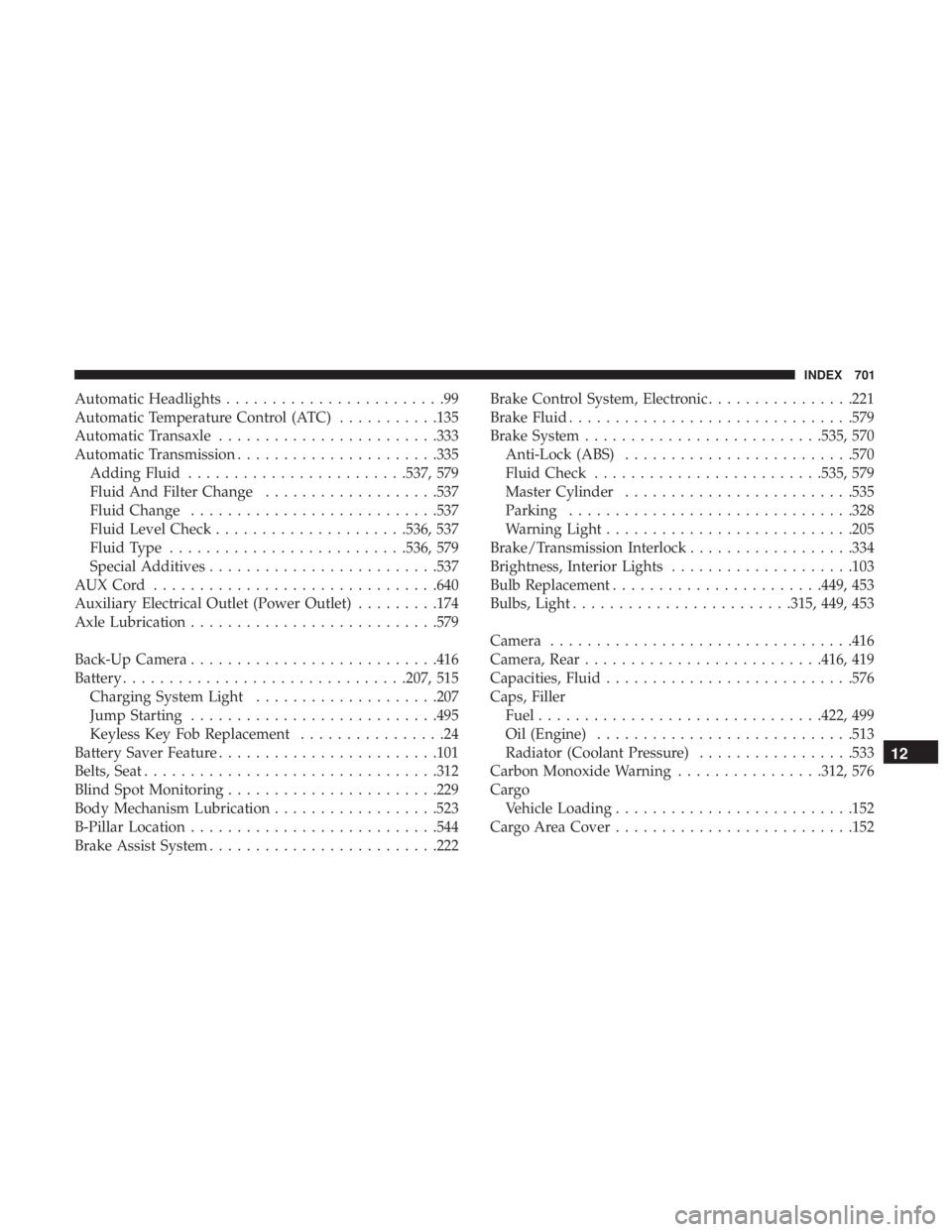
Automatic Headlights........................99
Automatic Temperature Control (ATC) ...........135
Automatic Transaxle ....................... .333
Automatic Transmission ..................... .335
Adding Fluid ....................... .537, 579
Fluid And Filter Change ...................537
Fluid Change .......................... .537
Fluid Level Check .....................536, 537
Fluid Type ......................... .536, 579
Special Additives ........................ .537
AUXCord .............................. .640
Auxiliary Electrical Outlet (Power Outlet) .........174
Axle Lubrication .......................... .579
Back-Up Camera .......................... .416
Battery .............................. .207, 515
Charging System Light ....................207
Jump Starting .......................... .495
Keyless Key Fob Replacement ................24
Battery Saver Feature ....................... .101
Belts, Seat ............................... .312
Blind Spot Monitoring ...................... .229
Body Mechanism Lubrication ..................523
B-Pillar Location .......................... .544
Brake Assist System ........................ .222Brake Control System, Electronic
................221
Brake Fluid .............................. .579
Brake System ......................... .535, 570
Anti-Lock (ABS) ........................ .570
Fluid Check ........................ .535, 579
Master Cylinder ........................ .535
Parking .............................. .328
Warning Light .......................... .205
Brake/Transmission Interlock ..................334
Brightness, Interior Lights ....................103
Bulb Replacement ...................... .449, 453
Bulbs,
Light ....................... .315, 449, 453
Camera ................................ .416
Camera, Rear ......................... .416, 419
Capacities, Fluid .......................... .576
Caps, Filler Fuel .............................. .422, 499
Oil (Engine) ........................... .513
Radiator (Coolant Pressure) .................533
Carbon Monoxide Warning ................312, 576
Cargo Vehicle Loading ......................... .152
Cargo Area Cover ......................... .152
12
INDEX 701
Page 705 of 718
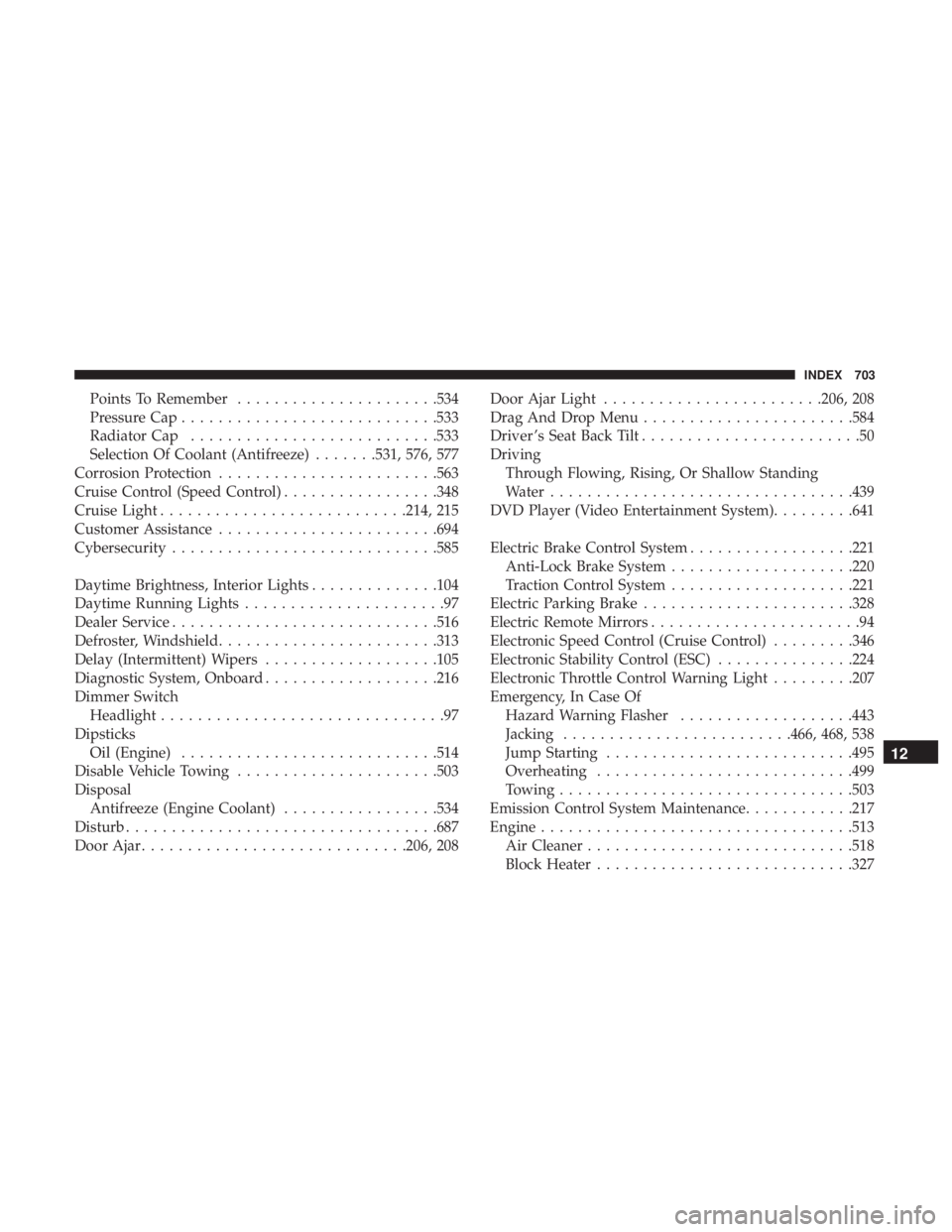
Points To Remember..................... .534
Pressure Cap ........................... .533
Radiator Cap .......................... .533
Selection Of Coolant (Antifreeze) .......531, 576, 577
Corrosion Protection ....................... .563
Cruise Control (Speed Control) .................348
Cruise Light .......................... .214, 215
Customer Assistance ....................... .694
Cybersecurity ............................ .585
Daytime Brightness, Interior Lights ..............104
Daytime Running Lights ......................97
Dealer Service ............................ .516
Defroster, Windshield ....................... .313
Delay (Intermittent) Wipers ...................105
Diagnostic System, Onboard ...................216
Dimmer Switch Headlight ...............................97
Dipsticks Oil (Engine) ........................... .514
Disable Vehicle Towing ..................... .503
Disposal Antifreeze (Engine Coolant) .................534
Disturb ................................. .687
Door Ajar ............................ .206, 208Door Ajar Light
....................... .206, 208
Drag And Drop Menu ...................... .584
Driver ’s Seat Back Tilt ........................50
Driving Through Flowing, Rising, Or Shallow Standing
Water ................................ .439
DVD Player (Video Entertainment System) .........641
Electric Brake Control System ..................221
Anti-Lock Brake System ....................220
Traction Control System ....................221
Electric Parking Brake ...................... .328
Electric Remote Mirrors .......................94
Electronic Speed Control (Cruise Control) .........346
Electronic Stability Control (ESC) ...............224
Electronic Throttle Control Warning Light .........207
Emer
gency, In Case Of
Hazard Warning Flasher ...................443
Jacking ........................ .466, 468, 538
Jump Starting .......................... .495
Overheating ........................... .499
Towing ............................... .503
Emission Control System Maintenance ............217
Engine ................................. .513
Air Cleaner ............................ .518
Block Heater ........................... .327
12
INDEX 703