memory CHRYSLER PACIFICA 2019 User Guide
[x] Cancel search | Manufacturer: CHRYSLER, Model Year: 2019, Model line: PACIFICA, Model: CHRYSLER PACIFICA 2019Pages: 718, PDF Size: 8.6 MB
Page 605 of 718
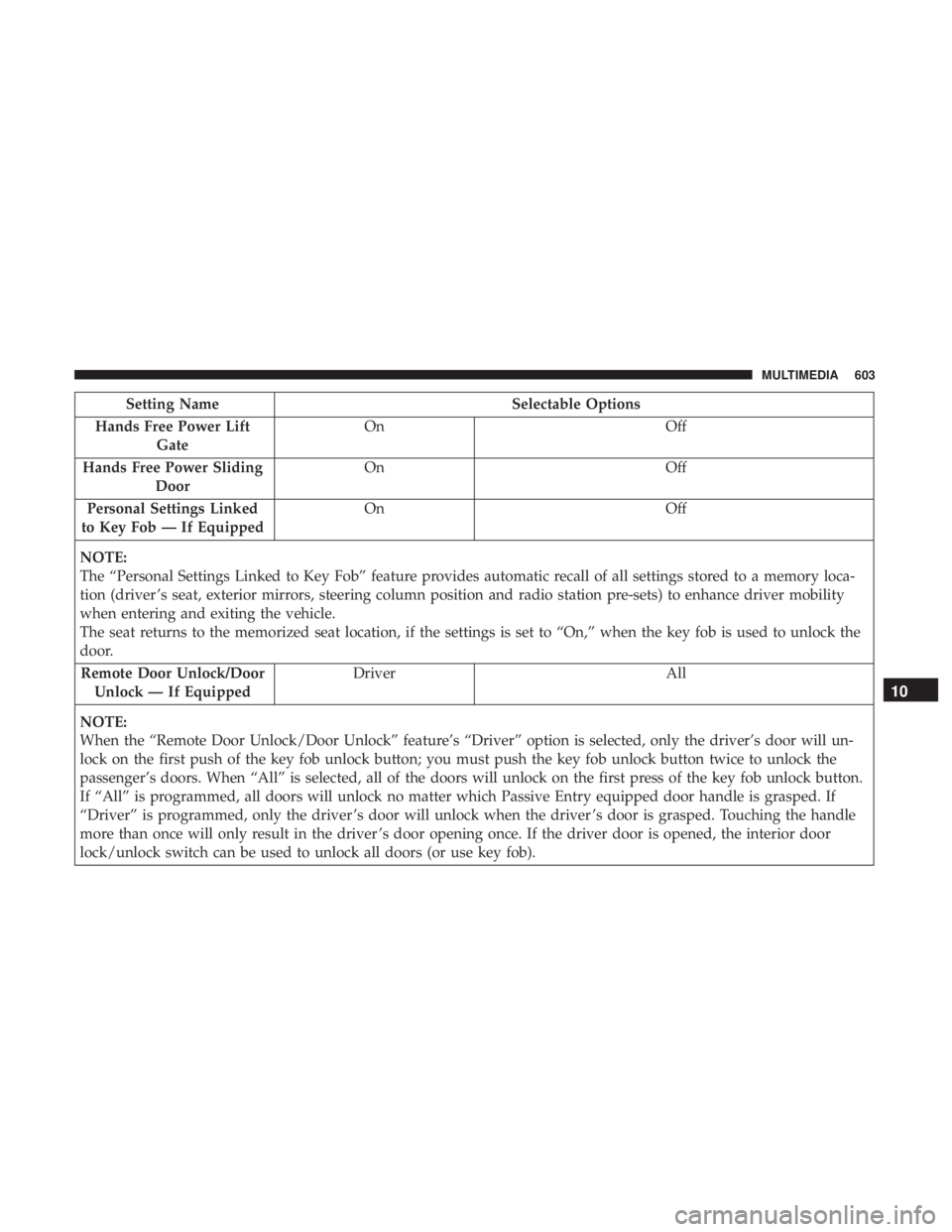
Setting NameSelectable Options
Hands Free Power Lift Gate On
Off
Hands Free Power Sliding Door On
Off
Personal Settings Linked
to Key Fob — If Equipped On
Off
NOTE:
The “Personal Settings Linked to Key Fob” feature provides automatic recall of all settings stored to a memory loca-
tion (driver ’s seat, exterior mirrors, steering column position and radio station pre-sets) to enhance driver mobility
when entering and exiting the vehicle.
The seat returns to the memorized seat location, if the settings is set to “On,” when the key fob is used to unlock the
door. Remote Door Unlock/Door Unlock — If Equipped Driver
All
NOTE:
When the “Remote Door Unlock/Door Unlock” feature’s “Driver” option is selected, only the driver’s door will un-
lock on the first push of the key fob unlock button; you must push the key fob unlock button twice to unlock the
passenger’s doors. When “All” is selected, all of the doors will unlock on the first press of the key fob unlock button.
If “All” is programmed, all doors will unlock no matter which Passive Entry equipped door handle is grasped. If
“Driver” is programmed, only the driver ’s door will unlock when the driver ’s door is grasped. Touching the handle
more than once will only result in the driver ’s door opening once. If the driver door is opened, the interior door
lock/unlock switch can be used to unlock all doors (or use key fob).
10
MULTIMEDIA 603
Page 616 of 718
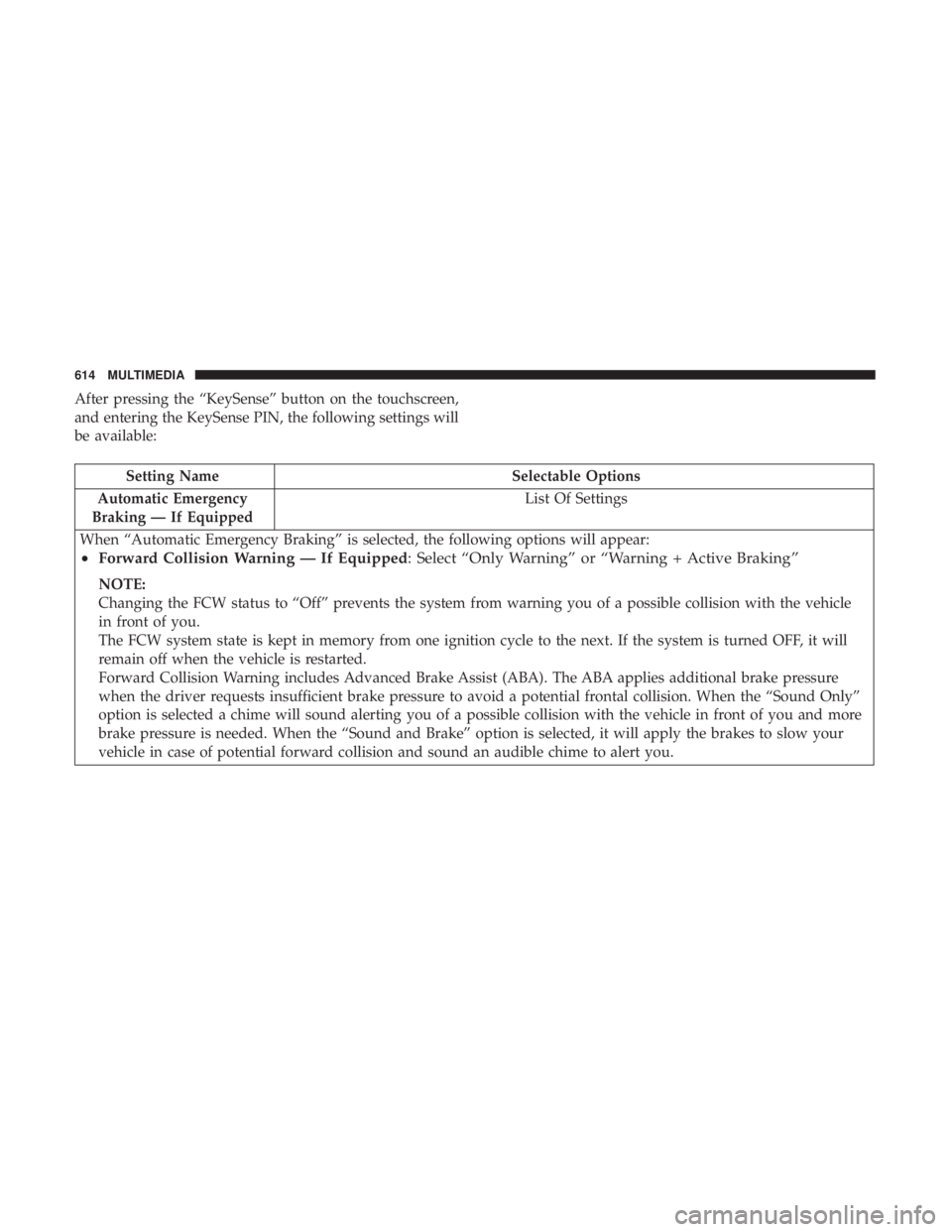
After pressing the “KeySense” button on the touchscreen,
and entering the KeySense PIN, the following settings will
be available:
Setting NameSelectable Options
Automatic Emergency
Braking — If Equipped List Of Settings
When “Automatic Emergency Braking” is selected, the following options will appear:
• Forward Collision Warning — If Equipped : Select “Only Warning” or “Warning + Active Braking”
NOTE:
Changing the FCW status to “Off” prevents the system from warning you of a possible collision with the vehicle
in front of you.
The FCW system state is kept in memory from one ignition cycle to the next. If the system is turned OFF, it will
remain off when the vehicle is restarted.
Forward Collision Warning includes Advanced Brake Assist (ABA). The ABA applies additional brake pressure
when the driver requests insufficient brake pressure to avoid a potential frontal collision. When the “Sound Only”
option is selected a chime will sound alerting you of a possible collision with the vehicle in front of you and more
brake pressure is needed. When the “Sound and Brake” option is selected, it will apply the brakes to slow your
vehicle in case of potential forward collision and sound an audible chime to alert you.
614 MULTIMEDIA
Page 626 of 718
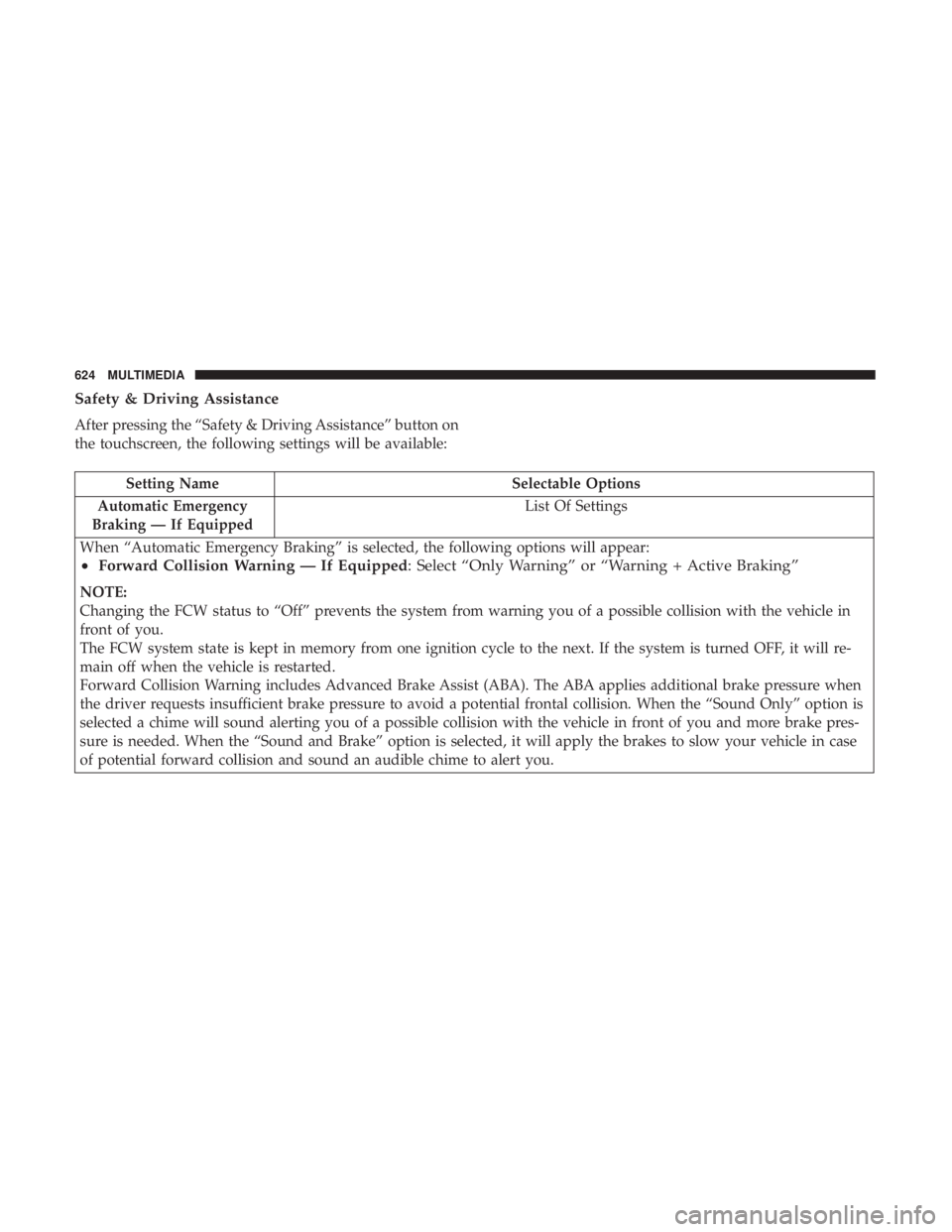
Safety & Driving Assistance
After pressing the “Safety & Driving Assistance” button on
the touchscreen, the following settings will be available:
Setting NameSelectable Options
Automatic Emergency
Braking — If Equipped List Of Settings
When “Automatic Emergency Braking” is selected, the following options will appear:
• Forward Collision Warning — If Equipped : Select “Only Warning” or “Warning + Active Braking”
NOTE:
Changing the FCW status to “Off” prevents the system from warning you of a possible collision with the vehicle in
front of you.
The FCW system state is kept in memory from one ignition cycle to the next. If the system is turned OFF, it will re-
main off when the vehicle is restarted.
Forward Collision Warning includes Advanced Brake Assist (ABA). The ABA applies additional brake pressure when
the driver requests insufficient brake pressure to avoid a potential frontal collision. When the “Sound Only” option is
selected a chime will sound alerting you of a possible collision with the vehicle in front of you and more brake pres-
sure is needed. When the “Sound and Brake” option is selected, it will apply the brakes to slow your vehicle in case
of potential forward collision and sound an audible chime to alert you.
624 MULTIMEDIA
Page 633 of 718
Setting NameSelectable Options
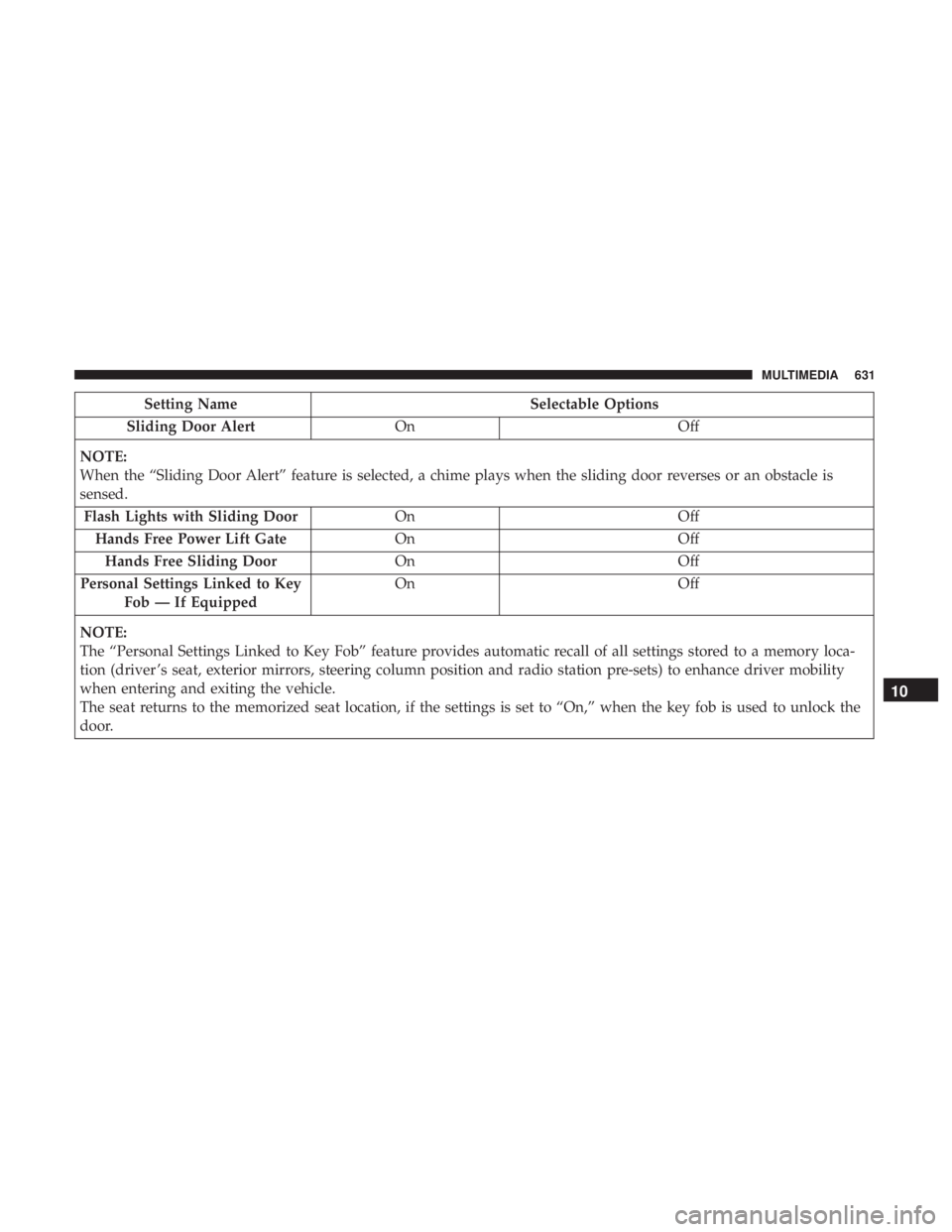
Sliding Door Alert On Off
NOTE:
When the “Sliding Door Alert” feature is selected, a chime plays when the sliding door reverses or an obstacle is
sensed. Flash Lights with Sliding Door OnOff
Hands Free Power Lift Gate OnOff
Hands Free Sliding Door OnOff
Personal Settings Linked to Key Fob — If Equipped On
Off
NOTE:
The “Personal Settings Linked to Key Fob” feature provides automatic recall of all settings stored to a memory loca-
tion (driver ’s seat, exterior mirrors, steering column position and radio station pre-sets) to enhance driver mobility
when entering and exiting the vehicle.
The seat returns to the memorized seat location, if the settings is set to “On,” when the key fob is used to unlock the
door.
10
MULTIMEDIA 631
Page 709 of 718
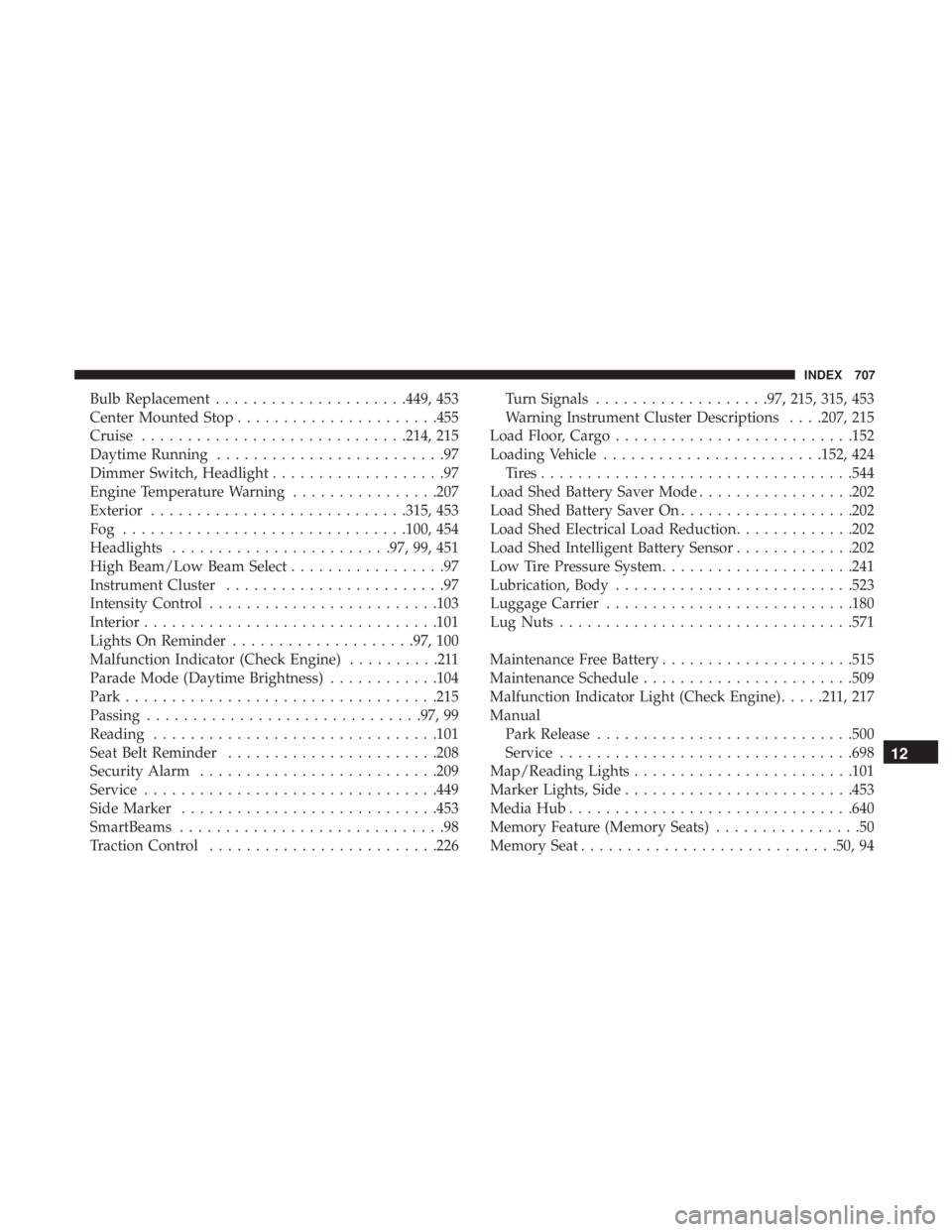
Bulb Replacement.....................449, 453
Center Mounted Stop ..................... .455
Cruise ............................ .214, 215
Daytime Running .........................97
Dimmer Switch, Headlight ...................97
Engine Temperature Warning ................207
Exterior ........................... .315, 453
Fog .............................. .100, 454
Headlights ....................... .97, 99, 451
High Beam/Low Beam Select .................97
Instrument Cluster ........................97
Intensity Control ........................ .103
Interior ............................... .101
Lights On Reminder ....................97, 100
Malfunction Indicator (Check Engine) ..........211
Parade Mode (Daytime Brightness) ............104
Park ................................. .215
Passing ............................. .97, 99
Reading .............................. .101
Seat Belt Reminder ...................... .208
Security Alarm ......................... .209
Service ............................... .449
Side Marker ........................... .453
SmartBeams .............................98
Traction Control ........................ .226Turn Signals
...................97, 215, 315, 453
Warning Instrument Cluster Descriptions . . . .207, 215
Load Floor, Cargo ......................... .152
Loading Vehicle ....................... .152, 424
Tires................................. .544
Load Shed Battery Saver Mode .................202
Load Shed Battery Saver On ...................202
Load Shed Electrical Load Reduction .............202
Load Shed Intelligent Battery Sensor .............202
Low Tire Pressure System .....................241
Lubrication, Body ......................... .523
Luggage Carrier .......................... .180
Lug
Nuts ............................... .571
Maintenance Free Battery .....................515
Maintenance Schedule ...................... .509
Malfunction Indicator Light (Check Engine) .....211,217
Manual Park Release ........................... .500
Service ............................... .698
Map/Reading Lights ....................... .101
Marker Lights, Side ........................ .453
Media Hub .............................. .640
Memory Feature (Memory Seats) ................50
Memory Seat ........................... .50, 94
12
INDEX 707
Page 710 of 718
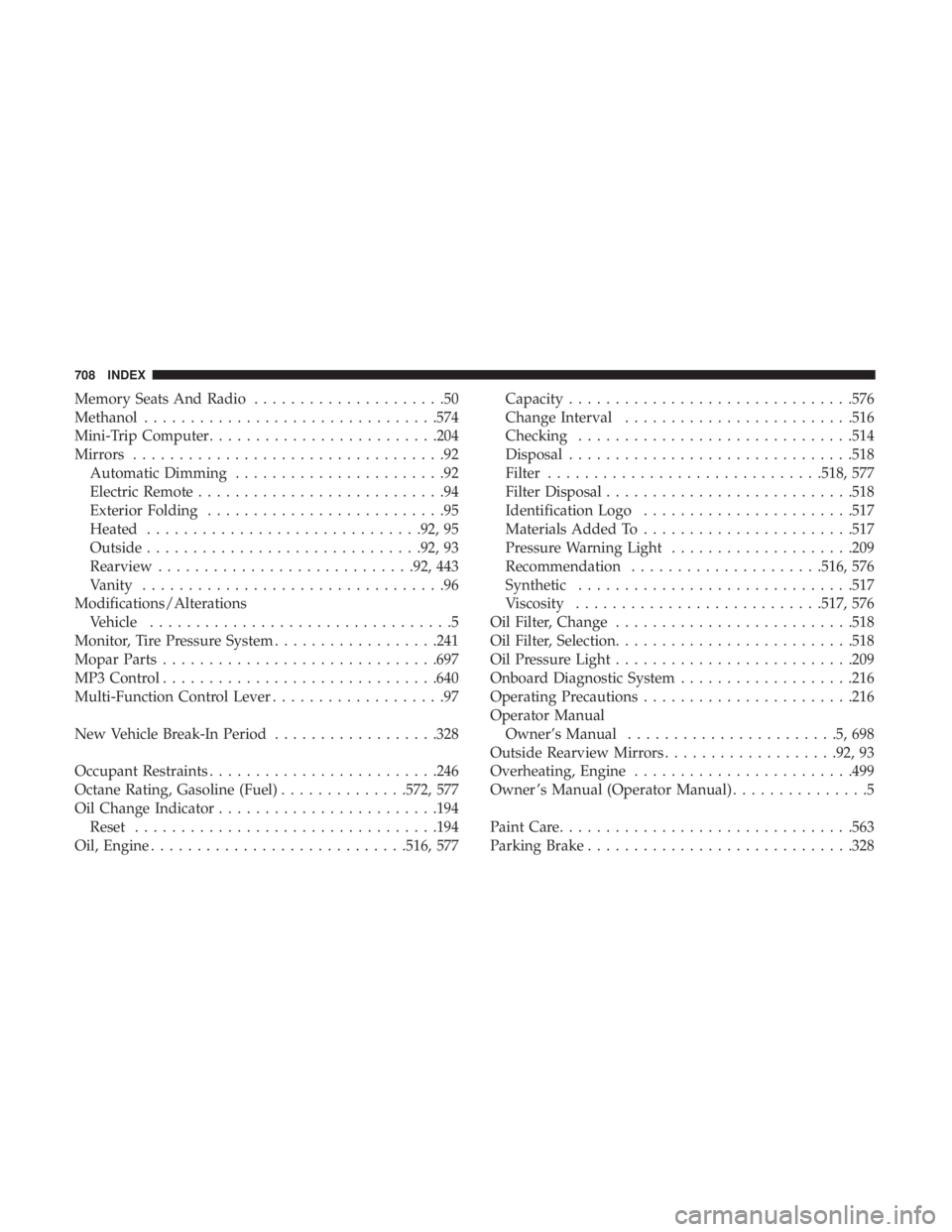
Memory Seats And Radio.....................50
Methanol ............................... .574
Mini-Trip Computer ........................ .204
Mirrors ..................................92
Automatic Dimming .......................92
Electric Remote ...........................94
Exterior Folding ..........................95
Heated ............................. .92, 95
Outside ............................. .92, 93
Rearview ........................... .92, 443
Vanity .................................96
Modifications/Alterations Vehicle .................................5
Monitor, Tire Pressure System ..................241
Mopar Parts ............................. .697
MP3 Control ............................. .640
Multi-Function Control Lever ...................97
New Vehicle Break-In Period ..................328
Occupant Restraints ........................ .246
Octane Rating, Gasoline (Fuel) ..............572, 577
Oil Change Indicator ....................... .194
Reset ................................ .194
Oil, Engine ........................... .516, 577Capacity
.............................. .576
Change Interval ........................ .516
Checking ............................. .514
Disposal .............................. .518
Filter ............................. .518, 577
Filter Disposal .......................... .518
Identification Logo ...................... .517
Materials Added To ...................... .517
Pressure Warning Light ....................209
Recommendation .....................516, 576
Synthetic ............................. .517
Viscosity .......................... .517, 576
Oil Filter, Change ......................... .518
Oil Filter, Selection ......................... .518
Oil Pressure Light ......................... .209
Onboar
d Diagnostic System ...................216
Operating Precautions ...................... .216
Operator Manual Owner’s Manual .......................5,698
Outside Rearview Mirrors ...................92, 93
Overheating, Engine ....................... .499
Owner ’s Manual (Operator Manual) ...............5
Paint Care ............................... .563
Parking Brake ............................ .328
708 INDEX