reset CHRYSLER PACIFICA 2019 User Guide
[x] Cancel search | Manufacturer: CHRYSLER, Model Year: 2019, Model line: PACIFICA, Model: CHRYSLER PACIFICA 2019Pages: 718, PDF Size: 8.6 MB
Page 199 of 718
Instrument Cluster Display Menu Items
NOTE:The instrument cluster display menu items display
in the center of the instrument cluster. Menu items may
vary depending on your vehicle features.
Speedometer
Push and release the upordown arrow button until
Speedometer is highlighted in the instrument cluster dis-
play. Push and release the OKbutton to toggle between
MPH and km/h.
Vehicle Info
Push and release the upordown arrow button until
Vehicle Info is highlighted in the instrument cluster dis-
play. Push the leftorright arrow button to scroll through
the following information submenus:
Tire Pressure
If tire pressure is OKfor all tires, a vehicle ICON is
displayed with tire pressure values in each corner of the
ICON.
If one or more tires have low pressure, “Inflate Tire To XX”
is displayed with the vehicle ICON, and the tire pressure values in each corner of the ICON with the pressure value
of the low tire displayed in a different color than the other
tire pressure value.
If the Tire Pressure system requires service, “Service Tire
Pressure System” is displayed.
Tire PSI is an information only function and cannot be
reset. Refer to “Tire Pressure Monitoring System (TPMS)”
under “Safety” for further information.
Coolant Temperature
Displays the actual coolant temperature.
Transmission Temperature
Displays the actual transmission temperature.
Oil Temperature
Displays the actual oil temperature.
Oil Pressure
Displays the actual oil pressure.
Battery Voltage
Displays the actual battery voltage.
4
GETTING TO KNOW YOUR INSTRUMENT PANEL 197
Page 200 of 718
Engine Hours — If Equipped
Displays the number of hours of engine operation.
Oil Life
To reset the Oil Life, you must hold the OK button. The
“Hold OK to Reset” instruction will be displayed at all
times, but the following conditions will need to be met in
order to reset Oil Life:
•The vehicle must be off
• The ignition must be in the ON/RUN position
If the conditions are met, holding the OKbutton will reset
the gauge and the numeric display will return to 100%.
If the conditions are not met, a popup message will display
for 5 seconds, describing the required conditions, and then
the Oil Life screen will reappear.
Driver Assist
Push and release the upordown arrow button until the
Driver Assist display icon is highlighted in the instrument
cluster display. Refer to “Adaptive Cruise Control (ACC)
— If Equipped” in “Starting And Operating” for further
information.
Fuel Economy
Push and release the upordown arrow button until the
Fuel Economy Menu item is highlighted in the instrument
cluster display. The Fuel Economy Menu will display the
following:
• Two sub menu pages that can be toggled between using
the left and right arrow buttons; one with Current Value
displayed and one without the Current Value displayed:
– Average Fuel Economy (MPG, L/100 km, or km/l)
– Range To Empty (miles or km)
– Current Fuel Economy (MPG, L/100 km, or km/l)
– The Max and Min values will correspond to the particular engine requirements
• Hold OKto reset average fuel economy information.
Trip Info
Push and release the upordown arrow button until the
Trip Menu item is highlighted in the instrument cluster
display. Push the leftorright arrow button to scroll
through the Trip A and Trip B submenus. The Trip infor-
mation will display the following:
• Distance
• Average Fuel Economy
198 GETTING TO KNOW YOUR INSTRUMENT PANEL
Page 201 of 718
•Elapsed Time
Hold the OKbutton to reset feature information.
Stop/Start – If Equipped
Push and release the upordown arrow button until the
Stop/Start menu title is displayed in the instrument cluster
display.
Audio
Push and release the upordown arrow button until the
Audio Menu displays in the instrument cluster display.
Messages
Push and release the upordown arrow button until
Messages is highlighted in the instrument cluster display. This feature shows the number of stored warning mes-
sages. Pushing the
rightarrow button will allow you to see
what the stored messages are.
NOTE: The popup messages indicate the status of the
system and/or the conditions that need to be met. Mes-
sages remain in the stored stack until condition is cleared.
Screen Setup
Push and release the upordown arrow button until the
Screen Setup Menu displays in the instrument cluster
display. Push and release the OKbutton to enter the
submenus. The Screen Setup feature allows you to change
what information is displayed in the instrument cluster as
well as the location that information is displayed.
Premium Instrument Cluster Display Screen Setup Options:
1 — Lower Left
• None
• Compass (Default)
• Outside Temp.
• Time
• Range
• Average/Current (MPG, L/100km, or km/L)
• Trip A Distance
• Trip B Distance 4
GETTING TO KNOW YOUR INSTRUMENT PANEL 199
Page 206 of 718
After a trip:
•Check if any aftermarket equipment was installed (ad-
ditional lights, upfitter electrical accessories, audio sys-
tems, alarms) and review specifications if any (load and
Ignition Off Draw currents).
• Evaluate the latest driving cycles (distance, driving time
and parking time).
• The vehicle should have service performed if the mes-
sage is still present during consecutive trips and the
evaluation of the vehicle and driving pattern did not
help to identify the cause.
TRIP COMPUTER
The Trip Computer is located in the instrument cluster
display. Push and release the up or down arrow button
until “Trip Info” is highlighted in the instrument cluster
display. Push OK to enter the menu. Navigate between Trip
A or Trip B by using the right and left arrows.
For each trip the following information will be displayed:
Trip A
• Shows the total distance traveled for Trip A since the last
reset. •
Shows the Average MPG for Trip A since the last reset.
• Shows the elapsed time traveled for Trip A since the last
reset. Elapsed time will increment when the ignition
switch is in the ON or START position.
Trip B
• Shows the total distance traveled for Trip B since the last
reset.
• Shows the Average MPG for Trip B since the last reset.
• Shows the elapsed time traveled for Trip B since the last
reset. Elapsed time will increment when the ignition
switch is in the ON or START position.
To Reset A Trip Function
Push and hold the OK button to reset the currently
displayed trip.
WARNING LIGHTS AND MESSAGES
The warning/indicator lights will illuminate in the instru-
ment panel together with a dedicated message and/or
acoustic signal when applicable. These indications are
indicative and precautionary and as such must not be
considered as exhaustive and/or alternative to the infor-
mation contained in the Owner ’s Manual, which you are
204 GETTING TO KNOW YOUR INSTRUMENT PANEL
Page 233 of 718
If the system detects degraded performance due to con-
tamination or foreign objects, a message will warn you of a
blocked sensor and the warning indicators in side view
mirrors will be on. The warning indicators will remain
illuminated until blockage clearing conditions are met.
First clear the fascia area around the sensors of the block-
age. After removing the blockage, the following procedure
can be used to reset the system:
•Cycle the ignition from on to off and then back on.
If the blockage message is still present after cycling the
ignition and driving in traffic, check again for a blockage.
The BSM system notifies the driver of objects in the
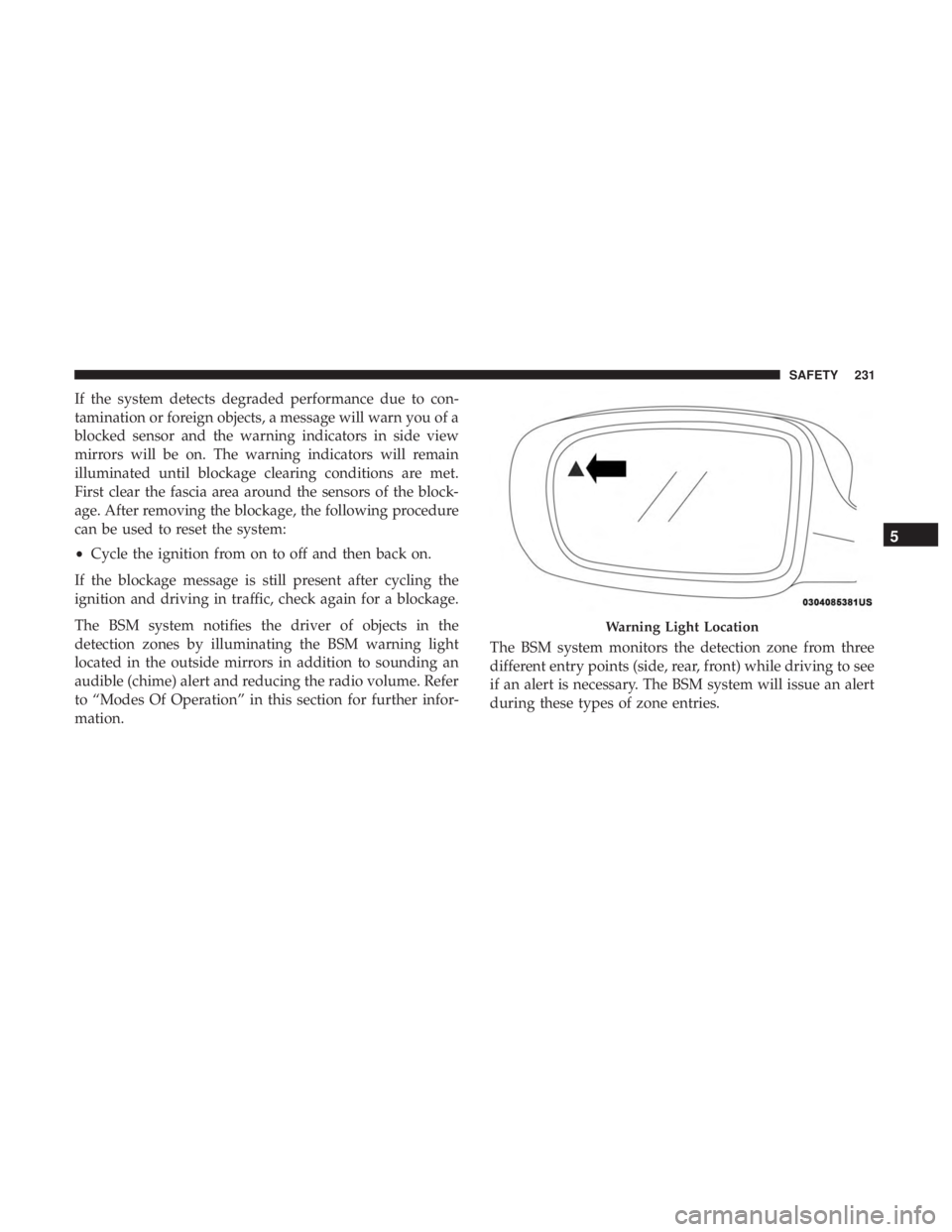
detection zones by illuminating the BSM warning light
located in the outside mirrors in addition to sounding an
audible (chime) alert and reducing the radio volume. Refer
to “Modes Of Operation” in this section for further infor-
mation. The BSM system monitors the detection zone from three
different entry points (side, rear, front) while driving to see
if an alert is necessary. The BSM system will issue an alert
during these types of zone entries.
Warning Light Location
5
SAFETY 231
Page 283 of 718
Your vehicle may also be designed to perform any of these
other functions in response to the Enhanced Accident
Response System:
•Turn off the Fuel Filter Heater, Turn off the HVAC
Blower Motor, Close the HVAC Circulation Door
• Cut off battery power to the:
• Engine
• Electric Motor (if equipped)
• Electric power steering
• Brake booster
• Electric park brake
• Automatic transmission gear selector
• Horn
• Front wiper
• Headlamp washer pump NOTE:
After an accident, remember to cycle the ignition
to the STOP (OFF/LOCK) position and remove the key
from the ignition switch to avoid draining the battery.
Carefully check the vehicle for fuel leaks in the engine
compartment and on the ground near the engine compart-
ment and fuel tank before resetting the system and starting
the engine. If there are no fuel leaks or damage to the
vehicle electrical devices (e.g. headlights) after an accident,
reset the system by following the procedure described
below. If you have any doubt, contact an authorized dealer.
Enhanced Accident Response System Reset
Procedure
In order to reset the Enhanced Accident Response System
functions after an event, the ignition switch must be
changed from ignition START or ON/RUN to ignition OFF.
Carefully check the vehicle for fuel leaks in the engine
compartment and on the ground near the engine compart-
ment and fuel tank before resetting the system and starting
the engine.
5
SAFETY 281
Page 325 of 718
ALWAYS DO A VISUAL CHECKthat your vehicle is in
PARK by looking for the “P” in the Instrument Cluster
Display and on the shifter. As an added precaution, always
apply the parking brake.
If the vehicle is not in PARK and the driver attempts to
turn off the engine, if certain conditions are met, the
vehicle will AutoPark, automatically shifting the vehi-
cle’s transmission to the PARK position. The rotary
shifter will automatically reset itself to the PARK posi-
tion. The vehicle’s ignition will then move to the OFF
position (Engine OFF). When AutoPark is activated the
instrument cluster will display the message “AutoPark
Engaged”
AutoPark will engage when all of these conditions are met:
• Vehicle is equipped with a rotary selector
• Vehicle is not in PARK
• Vehicle Speed is 1.2 MPH (1.9 km/h) or less
• Driver has pushed the ENGINE START/STOP BUTTON
If the vehicle is not in PARK and the driver exits the
vehicle with the engine running, if certain conditions are
met, the vehicle will AutoPark, automatically shifting the
vehicle’s transmission to the PARK position. The Electric Park Brake SAFE HOLD feature will also activate in
some conditions. Please reference SAFE HOLD pages for
additional information regarding this function.
CAUTION!
Engine will remain running.
AutoPark will engage when all of these conditions are met:
• Vehicle is equipped with a rotary selector
• Vehicle is not in PARK
• Vehicle speed is 1.2 MPH (1.9 km/h) or less
• Driver ’s door is ajar
• Driver ’s seat belt is unbuckled
• Brake Pedal is not depressed
The MESSAGE “ AutoPark Engaged”will display in the
instrument cluster.
AutoPark In Stop/Start Autostop Mode
• AutoPark will engage when all of these conditions are
met:
• Vehicle is equipped with a rotary shifter
6
STARTING AND OPERATING 323
Page 334 of 718
to depress the brake pedal or accelerator pedal, the park
brake will automatically engage to prevent the vehicle
from rolling.
SafeHold can be temporarily bypassed by pushing the
Electric Park Brake Switch while the driver door is open
and brake pedal is pressed. Once manually bypassed,
SafeHold will be enabled again once the vehicle reaches
12 mph (20 km/h) or the ignition is cycled to the OFF
position and back to ON again.
Brake Service Mode
We recommend having your brakes serviced by your
authorized dealer. You should only make repairs for which
you have the knowledge and the right equipment. You
should only enter Brake Service Mode during brake ser-
vice.
When servicing your rear brakes, it may be necessary for
you or your technician to push the rear piston into the rear
caliper bore. With the Electric Park Brake system, this can
only be done after retracting the Electric Park Brake
actuator. Fortunately, actuator retraction can be done easily
by entering the “Brake Service” through the “Uconnect
Settings” in your vehicle. This menu based system will
guide you through the steps necessary to retract the EPB
actuator in order to perform rear brake service.Brake Service Mode has requirements that must be met in
order to be activated:
•
The vehicle must be at a standstill.
• The park brake must be unapplied.
• The transmission must be in PARK or NEUTRAL.
While in service mode, the Electric Park Brake fault lamp
will flash continuously while the ignition switch is ON.
When brake service work is complete, the following steps
must be followed to reset the parking brake system to
normal operation:
• Ensure the vehicle is at a standstill.
• Press the brake pedal with moderate force.
• Apply the Electric Park Brake Switch.
WARNING!
You can be badly injured working on or around a
motor vehicle. Do only that service work for which you
have the knowledge and the right equipment. If you
have any doubt about your ability to perform a service
job, take your vehicle to a competent mechanic.
332 STARTING AND OPERATING
Page 342 of 718
Transmission Limp Home Mode
Transmission function is monitored electronically for ab-
normal conditions. If a condition is detected that could
result in transmission damage, Transmission Limp Home
Mode is activated. In this mode, the transmission may
operate only in a fixed gear, or may remain in NEUTRAL.
The Malfunction Indicator Light (MIL) may be illuminated.
Limp Home Mode may allow the vehicle to be driven to an
authorized dealer for service without damaging the trans-
mission.
In the event of a momentary problem, the transmission can
be reset to regain all forward gears by performing the
following steps:
1. Stop the vehicle.
2. Shift the transmission into PARK, if possible. If not, shiftthe transmission to NEUTRAL.
3. Push and hold the ignition switch until the engine turns OFF.
4. Wait approximately 30 seconds.
5. Restart the engine. 6. Shift into the desired gear range. If the problem is no
longer detected, the transmission will return to normal
operation.
NOTE: Even if the transmission can be reset, we recom-
mend that you visit an authorized dealer at your earliest
possible convenience. An authorized dealer has diagnostic
equipment to assess the condition of your transmission. If
the transmission cannot be reset, authorized dealer service
is required.
Torque Converter Clutch
A feature designed to improve fuel economy has been
included in the automatic transmission on your vehicle. A
clutch within the torque converter engages automatically
at calibrated speeds. This may result in a slightly different
feeling or response during normal operation in the upper
gears. When the vehicle speed drops or during some
accelerations, the clutch automatically disengages.
NOTE: The torque converter clutch will not engage until
the engine and/or transmission is warm (usually after 1 to
3 miles [2 to 5 km] of driving). Because the engine speed is
higher when the torque converter clutch is not engaged, it
may seem as if the transmission is not shifting properly
when the vehicle is cold. This is normal. The torque
340 STARTING AND OPERATING
Page 347 of 718
4. The STOP/START system will reset itself back to an ONcondition every time the ignition is turned off and back
on.
Automatic Shutdown
This vehicle is equipped with an automatic shutdown
feature. If the vehicle is left in READY mode (vehicle
running) with the gear selector in PARK for one hour after
the driver exits, this feature will automatically turn the
vehicle off. Notifications have been added into this feature
to raise awareness of the timed event:
• In the interior of the vehicle, the instrument cluster will
display “Ready To Drive”, and will be accompanied by
three audible chimes while exiting. These interior warn-
ings will occur regardless of whether the key fob re-
mains in the vehicle or is removed.
• For the exterior of the vehicle, the horn will sound three
times if the fob is removed from the vehicle and the
vehicle is in the “READY” mode.
Please consider this feature when intentionally running the
vehicle for extended periods of time over one hour. To
restart the vehicle, follow the normal vehicle starting
process. NOTE:
If the vehicle is left in the ACC or RUN (engine not
running) position and the transmission is in PARK, the
system will automatically time out (shut down) after an
initial 30 minutes of inactivity, followed by the additional
amount of time for power accessory delay selected in the
radio settings menu. Once the vehicle times out, it will
switch to the OFF position.
To Manually Turn On The Stop/Start System
After turning off the STOP/START system, push the
STOP/START OFF switch again (located on the instrument
panel). The light on the switch will turn off.
System Malfunction
If there is a malfunction in the STOP/START system, the
system will not shut down the engine. A “SERVICE STOP/
START SYSTEM” message will appear in the instrument
cluster display and the Stop/Start telltale will remain
yellow. Refer to “Instrument Cluster Display” in “Getting
To Know Your Instrument Panel” for further information.
If the “SERVICE STOP/START SYSTEM” message appears
in the instrument cluster display, have the system checked
by your authorized dealer.
6
STARTING AND OPERATING 345